Complete Guide to TikTok Sizes & Dimensions in 2026
Have you ever spent time editing a TikTok, only to upload it and realize your text is hidden behind the action buttons or your video doesn’t fill the screen properly? It happens more often than you’d think.
Unlike many social platforms, TikTok is designed around a full-screen vertical experience, which means even small sizing mistakes can affect how your content looks and performs.
In this guide, you’ll find the latest TikTok sizes and dimensions for 2026, including the recommended specifications for videos, photo carousels, and profile pictures.
We’ll also cover safe zones, file formats, and simple tips that help your content stay sharp, readable, and ready for the For You feed.
Table of Contents
- 1 TikTok Sizes at a Glance (2026)
- 2 Why TikTok Dimensions Matter More Than You Think
- 3 Understanding TikTok’s Safe Zone
- 4 TikTok Video Size and Specifications
- 5 TikTok Carousel Specifications
- 6 TikTok Profile Picture Specifications
- 7 Choosing the Right TikTok Dimensions for Different Content
- 8 TikTok Best Practices
- 9 Common TikTok Size Mistakes to Avoid
- 10 Create, Schedule, and Publish TikTok Content with OnlySocial
- 11 TikTok Size Cheat Sheet
- 12 Final Thoughts
- 13 Frequently Asked Questions
- 13.0.1 What is the recommended TikTok video size?
- 13.0.2 What aspect ratio does TikTok use?
- 13.0.3 What size should TikTok photo carousels be?
- 13.0.4 What size should a TikTok profile picture be?
- 13.0.5 Does TikTok reduce video quality?
- 13.0.6 What is the TikTok safe zone?
- 13.0.7 What file formats does TikTok support?
- 13.0.8 How long can TikTok videos be?
TikTok Sizes at a Glance (2026)
Perhaps you don’t have the patience to read the full guide. The table below shows the recommended dimensions for every major TikTok content type. These are the specifications you should use to achieve the best quality and avoid unnecessary cropping or compression.
| Content Type | Recommended Dimensions | Aspect Ratio | Maximum File Size | Maximum Length |
| Video | 1080 × 1920 px | 9:16 | Up to 4 GB | Up to 10 minutes |
| Photo Carousel | 1080 × 1920 px | 9:16 | Up to 500 MB | Not applicable |
| Profile Picture | 720 × 720 px | 1:1 | Up to 10 MB | Not applicable |
Why TikTok Dimensions Matter More Than You Think
@nairobian_heritage2 Madem huku nje who is ur guy? Valentine is calling❣️❣️❣️❣️🥰🥰🥰 DC: @@1306Cate #fyp #goviral #trending #254 #nairobianheritage2 #GOD #tiktokkenya🇰🇪 #heritage_mwehnde #dancechallenge ♬ Who Is Your Guy? – Spyro
On TikTok, good content can grab attention in seconds. But if your video is cropped, blurry, or covered by the app’s interface, viewers may never see the parts that matter most.
Using the right dimensions helps your content look polished and gives people a better viewing experience from the first frame.
Fill the Entire Screen
TikTok is designed around a 9:16 vertical format. Videos that match this aspect ratio naturally fill the screen, making them more immersive than horizontal or poorly cropped uploads.
Keep Important Content Visible
The app places your username, caption, and music information near the bottom, while the like, comment, and share buttons appear on the right. When important text or visuals sit in these areas, they can easily be hidden from viewers.
Preserve Video Quality
Uploading your content at TikTok’s recommended dimensions gives the platform a high-quality source to work with. While TikTok still compresses videos, starting with the correct resolution helps minimize noticeable quality loss.
Create a More Professional Look
Sharp visuals, consistent framing, and properly positioned text make your videos feel more polished. This is especially important for brands, creators, and businesses looking to build credibility on the platform.
Improve Viewer Retention
First impressions matter on TikTok. A full-screen video with clear visuals and readable text is easier to watch, which can encourage viewers to stay longer and engage with your content.
Understanding TikTok’s Safe Zone
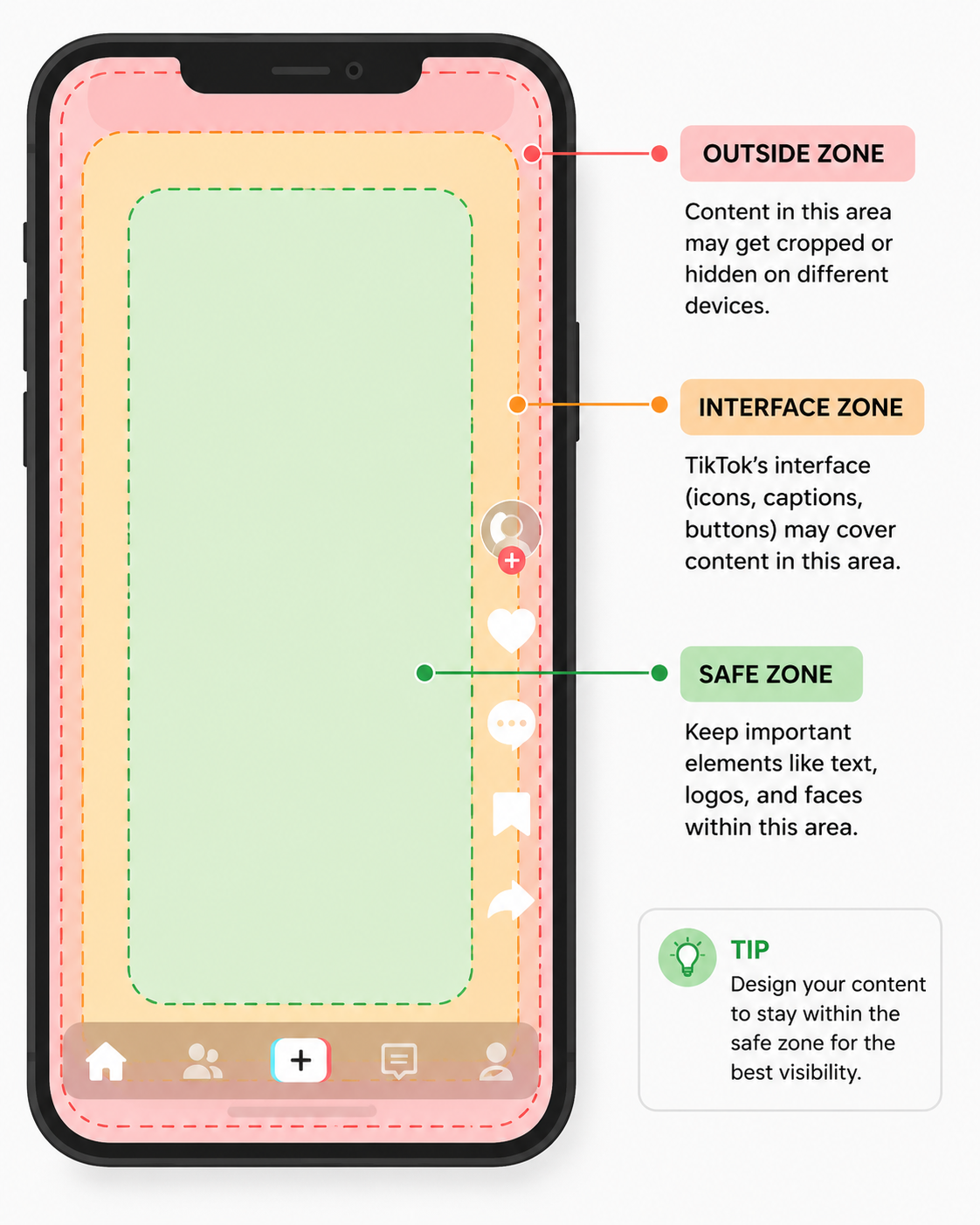
Using the correct video size is only part of the equation. You also need to think about where important elements appear on the screen. TikTok places several interface elements over your video, so text, logos, and calls to action can easily be covered if they’re positioned too close to the edges.
Right Side
The like, comment, share, and profile buttons appear along the right edge of the screen. Avoid placing captions, product details, or key visuals in this area, as viewers may not be able to see them clearly.
Bottom Area
Your username, video caption, hashtags, and music information appear near the bottom of the screen. If important text sits too low, it can end up hidden behind these overlays.
Top Area
The search bar and other interface elements may appear at the top, depending on how someone is browsing TikTok. Leaving a little breathing room at the top helps prevent anything important from being obscured.
Keep the Focus in the Centre
As a general rule, place your subject, captions, and key messages within the center portion of the 1080 × 1920 px frame. This gives them the best chance of remaining visible across different devices and app layouts.
TikTok Video Size and Specifications
TikTok videos are designed to be viewed in full-screen portrait mode. Exporting your videos using the recommended settings below helps them fill the screen properly, maintain better quality after compression, and display correctly across different devices.
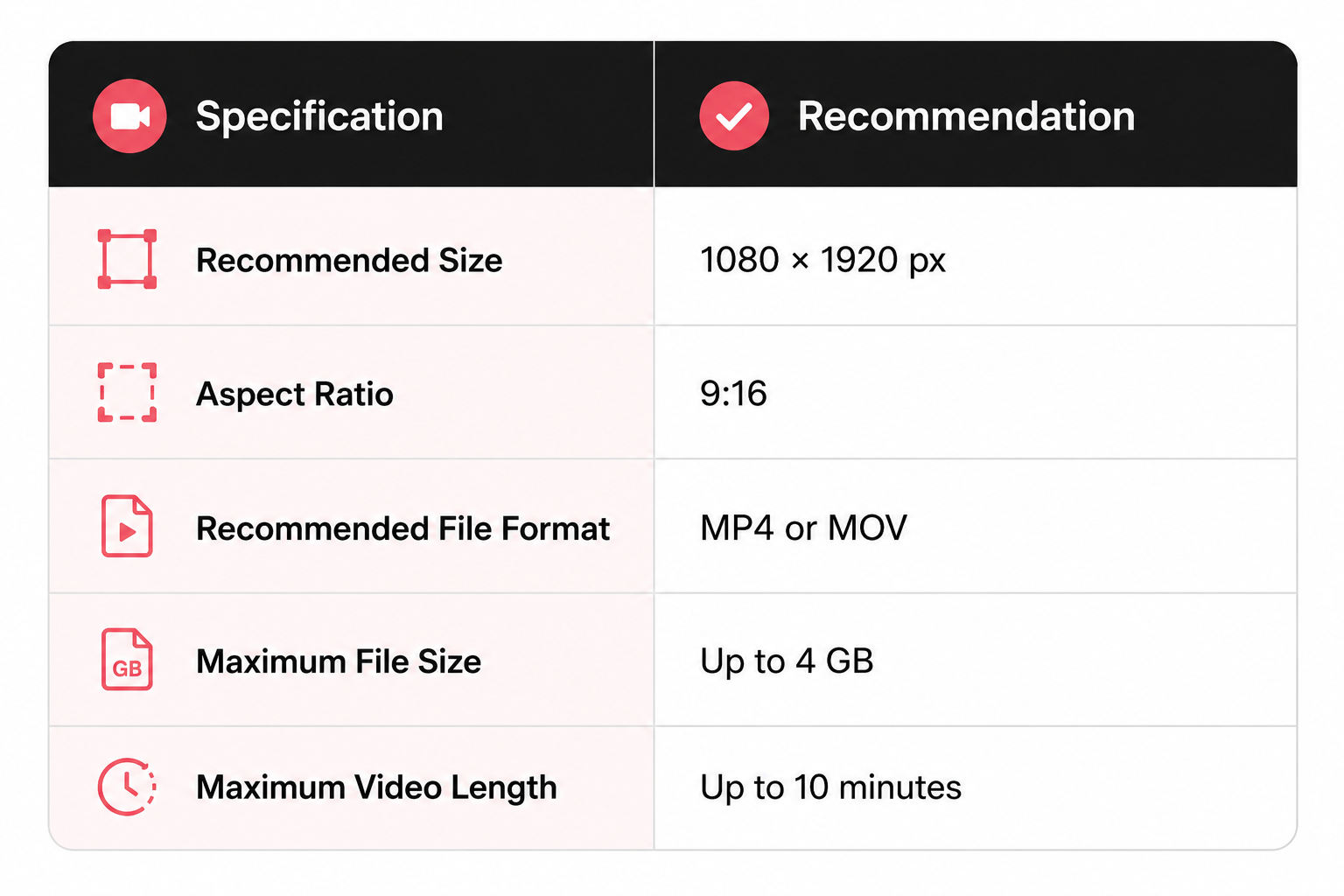
Although TikTok accepts videos in different orientations, 1080 × 1920 pixels (9:16) remains the recommended format for almost every upload. It fills the entire screen and creates the immersive viewing experience TikTok is known for.
For the best results, export your videos in MP4 or MOV format using a high-quality bitrate. It’s also a good idea to keep important text, subtitles, and your main subject within the center of the frame so they aren’t covered by TikTok’s interface.
If your editing software allows it, preview your video in a vertical 9:16 canvas before exporting. This makes it much easier to spot any text or graphics that may end up behind the action buttons or caption area once the video is published.
TikTok Carousel Specifications
TikTok’s Photo Mode lets you publish a series of images that viewers can swipe through, making it a great format for tutorials, before-and-after comparisons, travel highlights, product showcases, and storytelling.
Although these are photos rather than videos, they should still be designed for TikTok’s vertical layout.
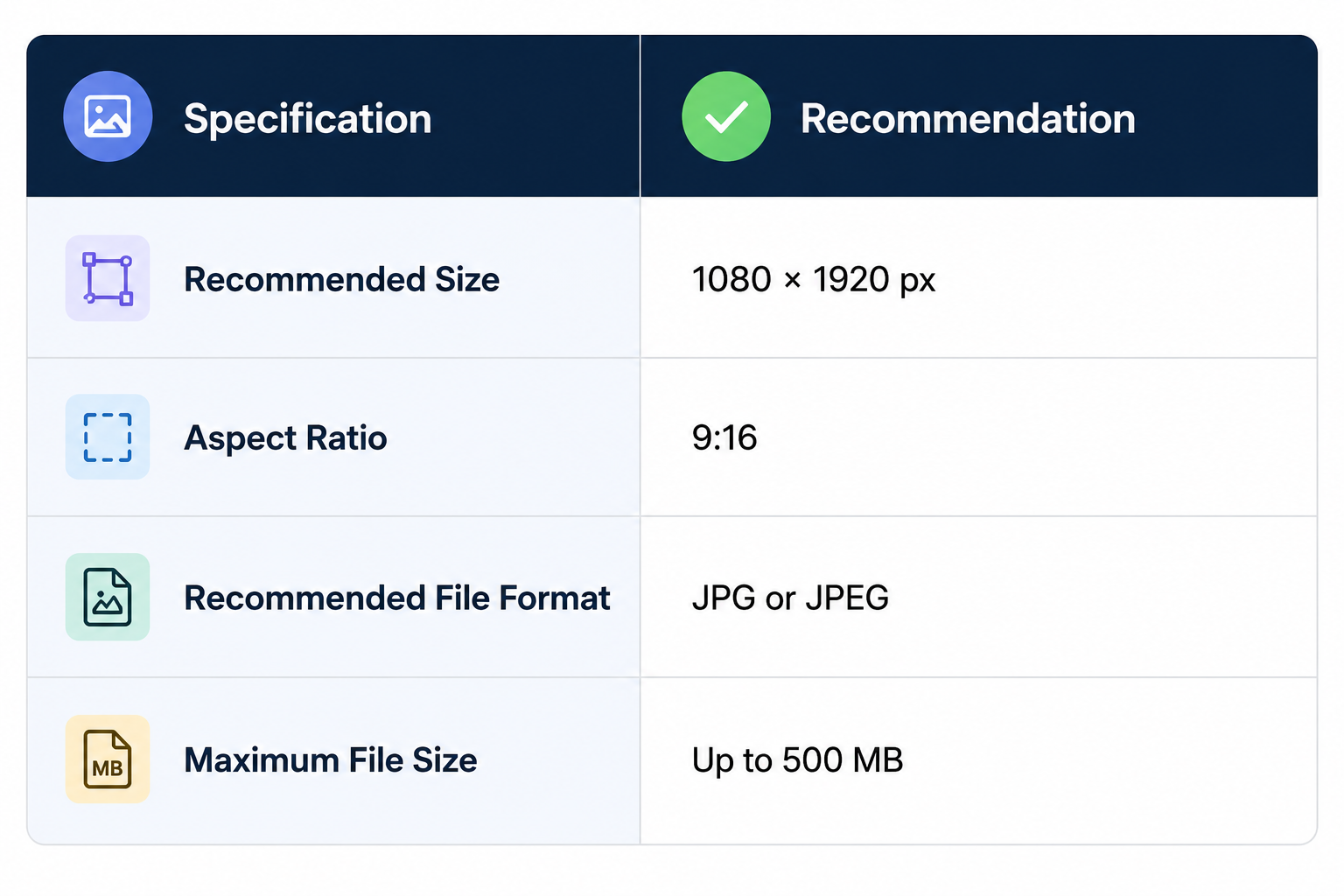
The recommended size for every carousel image is 1080 × 1920 pixels (9:16). Using this full-screen format ensures each slide fills the display naturally and creates a more immersive viewing experience.
It’s also important to keep every image in the carousel the same size and aspect ratio. Mixing portrait, square, or landscape images can result in inconsistent cropping and make your carousel feel less polished.
If your carousel includes text, leave enough space around the edges so nothing important is obscured by TikTok’s interface when viewers swipe through the images.
TikTok Profile Picture Specifications
Your profile picture is one of the first things people notice when they visit your TikTok account. While it appears relatively small across the app, a clear and recognizable profile photo helps strengthen your brand and makes your account easier to identify.
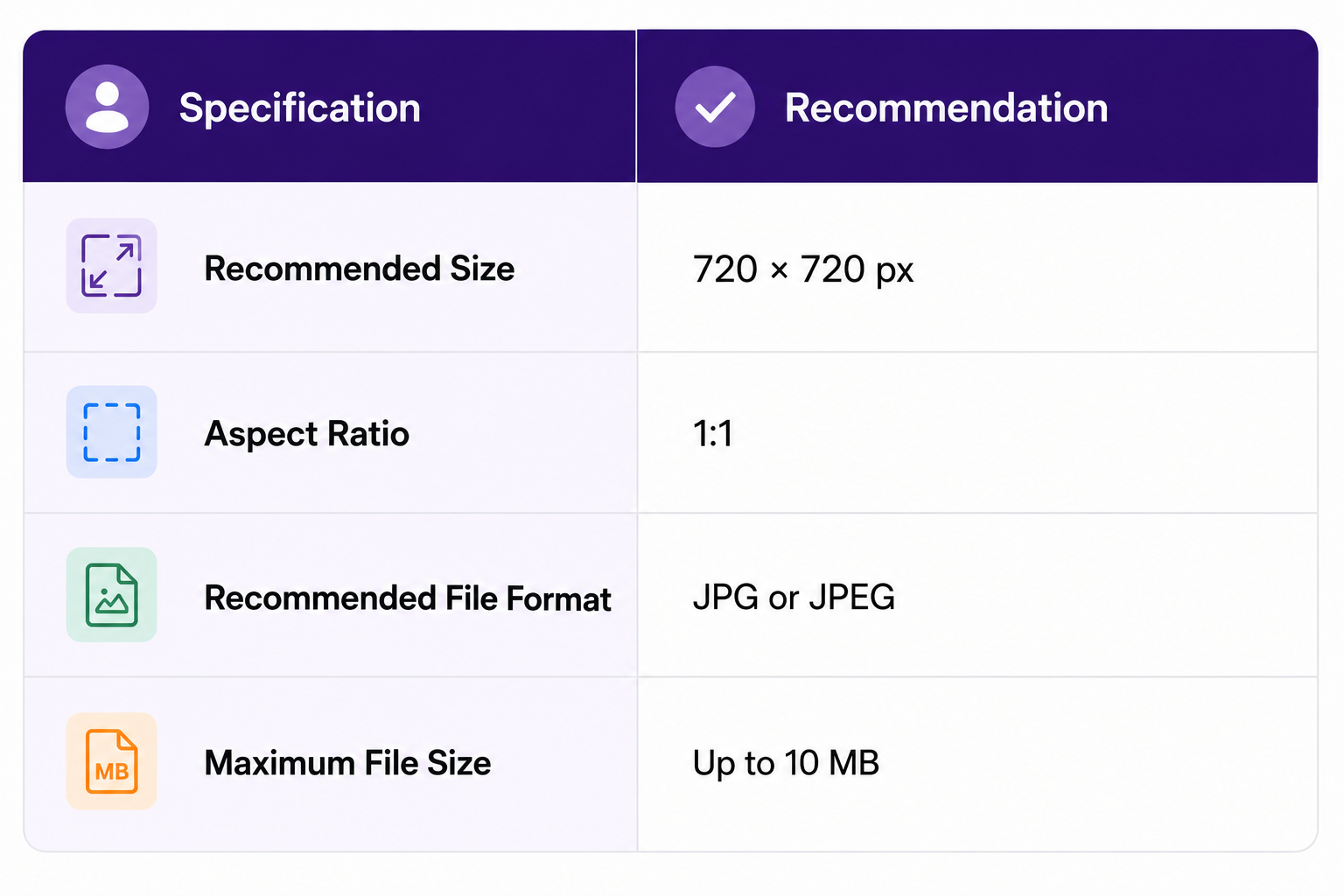
TikTok profile pictures are uploaded as square images but displayed inside a circular frame. For that reason, keep your logo, face, or other important elements centered to avoid them being cropped around the edges.
Choose a high-resolution image with good contrast so it remains easy to recognize even at thumbnail size. If you’re using a company logo, avoid placing small text inside it, as fine details can become difficult to read on mobile devices.
Choosing the Right TikTok Dimensions for Different Content
Not every TikTok post serves the same purpose. Some are designed to capture attention with video, while others work better as swipeable image carousels.
Using the right format from the start makes content creation easier and helps your posts look more natural on the platform.
| Content Type | Recommended Dimensions | Best For |
| Video | 1080 × 1920 px | Trends, tutorials, product demos, vlogs, storytelling, behind-the-scenes content |
| Photo Carousel | 1080 × 1920 px | Step-by-step guides, educational posts, before-and-after comparisons, travel highlights, product showcases |
| Profile Picture | 720 × 720 px | Personal branding, business logos, creator profiles |
If you’re creating content for the For You feed, a vertical 1080 × 1920 px canvas should be your default choice. It fills the entire screen and works for both videos and photo carousels.
For your profile picture, a clean 720 × 720 px square image is ideal. Since TikTok displays it as a circle, keeping your main subject centered will ensure it remains clear and recognizable throughout the app.
Choosing the correct dimensions before you begin editing can save time later and reduce the chances of cropping, compression, or hidden text after your content is published.
TikTok Best Practices
Using the recommended dimensions is a great starting point, but a few extra habits can make your TikTok content look even better. These best practices help improve quality, keep important information visible, and create a smoother viewing experience.
Export in 1080 × 1920 Pixels
Always export videos and photo carousels at 1080 × 1920 pixels (9:16) whenever possible. This is TikTok’s preferred format and delivers the best full-screen experience.
Keep Important Content Inside the Safe Zone
Like we already explained, always pay keen attention to the safe zones. Leave enough space around the top, bottom, and right side of your videos. This helps prevent captions, subtitles, and calls to action from being hidden behind TikTok’s interface.
Upload High-Quality Files
Start with the highest-quality version of your content. Although TikTok compresses uploads, using sharp source files helps preserve more detail after processing.
Use the Right File Format
For videos, stick with MP4 or MOV. For photo carousels and profile pictures, JPG or JPEG files offer the best compatibility and reliable upload quality.
Grab Attention Early
The first few seconds often determine whether someone keeps watching or scrolls away. Open with your strongest visual or message while keeping it clearly visible within the safe zone.
Use a Clear Profile Picture
Choose a high-resolution profile photo or logo that remains easy to recognize at a small size. Simple, high-contrast images generally perform better than designs with lots of fine detail.
Common TikTok Size Mistakes to Avoid
Even great content can lose its impact if it’s uploaded with the wrong dimensions or layout. Here are some of the most common mistakes creators make and how to avoid them.
Uploading Horizontal Videos
TikTok is built for vertical viewing. Horizontal videos often appear with empty space around them or are cropped awkwardly, making them less engaging than full-screen content.
Placing Text Behind the Interface
Captions, subtitles, and calls to action placed too close to the bottom or right edge can be covered by TikTok’s buttons, captions, and other interface elements. Keep important content within the safe zone.
Mixing Different Image Sizes in Carousels
Using portrait, square, and landscape images in the same carousel creates inconsistent cropping and an uneven viewing experience. Keep every slide the same size and aspect ratio.
Uploading Low-Quality or Over-Compressed Files
If your original file is blurry or heavily compressed, TikTok can’t restore that lost quality. Export your videos and images at the recommended dimensions using high-quality settings before uploading.
Using a Busy Profile Picture
Tiny text, detailed graphics, or low-contrast images can be difficult to recognize in TikTok’s circular profile thumbnail. A simple logo or clear headshot usually works much better.
Ignoring the Recommended Export Settings
Using the wrong aspect ratio, unsupported file formats, or incorrect dimensions can lead to unnecessary cropping, compression, or black bars around your content. Starting with TikTok’s recommended specifications helps avoid these issues altogether.
Most of these mistakes take only a few minutes to fix before you upload, but they can make a noticeable difference in how professional your content looks once it’s live.
Create, Schedule, and Publish TikTok Content with OnlySocial
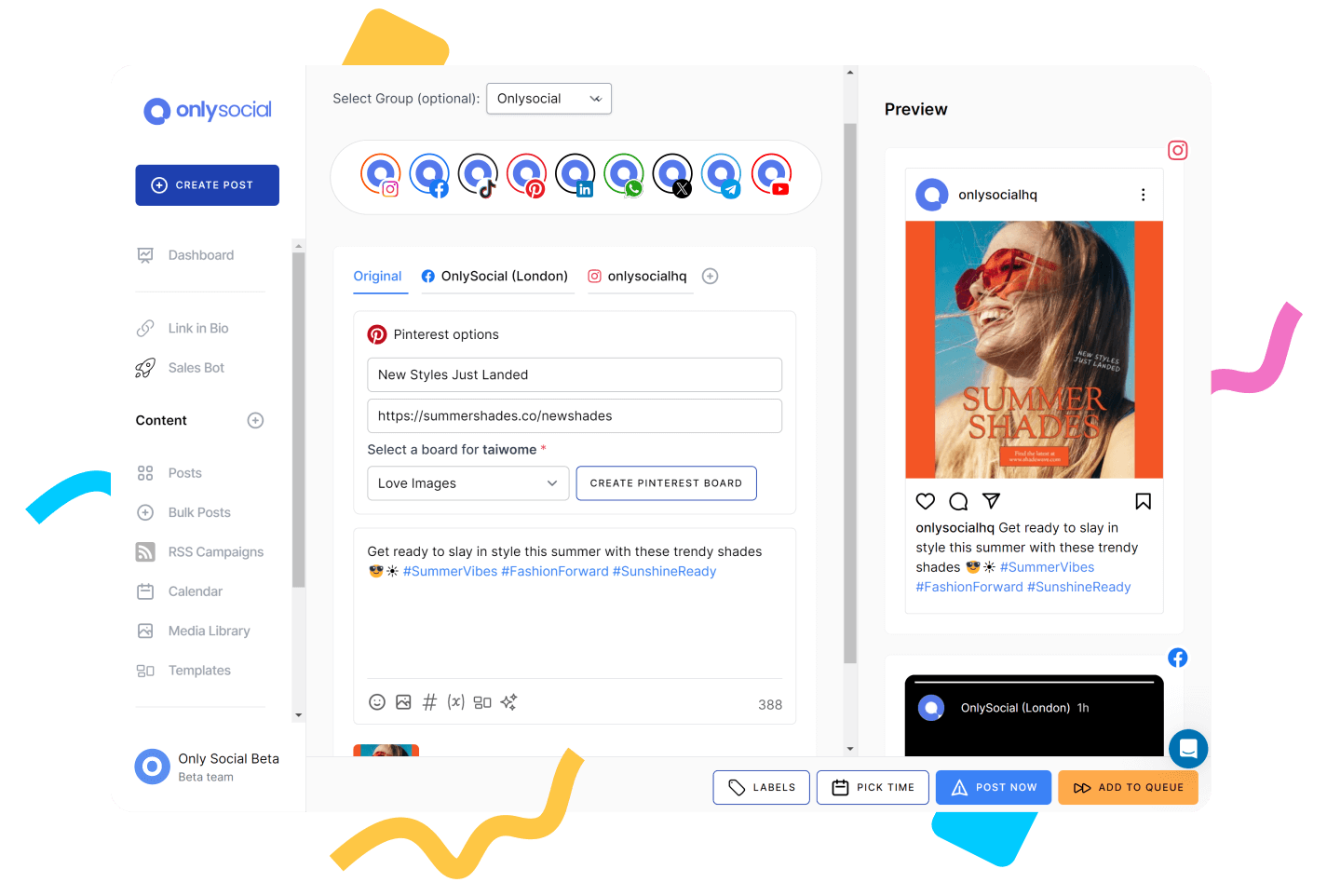
Getting your TikTok dimensions right is only one part of creating great content. Posting consistently is just as important, and that’s much easier when you have a scheduling tool built for social media.
OnlySocial lets you plan, organize, and publish TikTok content from one streamlined dashboard. Whether you’re managing a personal account, a business profile, or multiple client accounts, you can prepare your content in advance and keep your publishing schedule on track.
Some of the features that make OnlySocial a great companion for TikTok creators include:
- Schedule TikTok videos alongside content for Instagram, Facebook, LinkedIn, X, Threads, Bluesky, Pinterest, YouTube, Google Business Profile, and more.
- Visual content calendar for planning campaigns and maintaining a consistent posting schedule.
- Bulk scheduling to upload and queue weeks or months of content in one sitting.
- AI-powered caption generation to speed up content creation and overcome writer’s block.
- Team collaboration tools with shared workspaces and approval workflows for agencies and marketing teams.
- Performance analytics to monitor engagement and identify the content that resonates most with your audience.
Instead of switching between multiple tools, OnlySocial helps you manage your TikTok strategy alongside your other social channels, making it easier to stay organized and publish consistently.
TikTok Size Cheat Sheet
Need a quick reference before you upload? This cheat sheet brings together the recommended dimensions and key specifications for every major TikTok content type.
| Content Type | Recommended Size | Aspect Ratio | Best File Format |
| Video | 1080 × 1920 px | 9:16 | MP4, MOV |
| Photo Carousel | 1080 × 1920 px | 9:16 | JPG, JPEG |
| Profile Picture | 720 × 720 px | 1:1 | JPG, JPEG |
For most TikTok content, 1080 × 1920 pixels (9:16) is the size to remember. It works for both videos and photo carousels, filling the screen the way TikTok was designed to be viewed.
For your profile picture, a 720 × 720 pixel square image provides the best balance between quality and file size.
Bookmark this table or keep it handy whenever you’re creating content, and you’ll always have the right TikTok dimensions within reach.
Final Thoughts
Creating content in the correct TikTok dimensions is a simple step that can make a noticeable difference. Full-screen videos, properly sized carousels, and a clear profile picture all contribute to a better viewing experience and a more professional-looking account.
If you’re publishing TikTok content regularly, combining these best practices with a scheduling platform like OnlySocial can save time and keep your content calendar organized.
You’ll spend less time worrying about technical details and more time creating videos your audience wants to watch.
Frequently Asked Questions
What is the recommended TikTok video size?
The recommended TikTok video size is 1080 × 1920 pixels with a 9:16 aspect ratio. This fills the entire screen and provides the best viewing experience.
What aspect ratio does TikTok use?
TikTok primarily uses a 9:16 aspect ratio for videos and photo carousels. Profile pictures use a 1:1 square aspect ratio.
What size should TikTok photo carousels be?
TikTok photo carousels should be 1080 × 1920 pixels (9:16). Using the same dimensions for every image keeps your carousel looking clean and consistent.
What size should a TikTok profile picture be?
The recommended TikTok profile picture size is 720 × 720 pixels. Although it’s uploaded as a square image, TikTok displays it inside a circular frame.
Does TikTok reduce video quality?
Yes. TikTok compresses uploaded videos to optimise playback across different devices and internet connections. Exporting your videos at 1080 × 1920 pixels using a high-quality MP4 or MOV file helps minimise quality loss.
What is the TikTok safe zone?
The safe zone is the central area of your video where important text, graphics, and your main subject remain visible. Avoid placing key elements near the right edge, bottom, or top of the screen, where TikTok’s interface may cover them.
What file formats does TikTok support?
TikTok supports MP4 and MOV for videos, while JPG and JPEG are recommended for photo carousels and profile pictures.
How long can TikTok videos be?
TikTok currently supports videos of up to 10 minutes, although shorter videos are often more effective at holding viewers’ attention.