TikTok Gifts in 2026: How They Work, Worth, and How to Maximize Earnings

At first, TikTok Gifts don’t look like a big deal.
Someone taps a button, an animation appears, and the creator says thanks. It feels like a small, fun interaction.
But here’s the part most people don’t realize. Every one of those gifts has value. Real value.
Behind the scenes, TikTok runs a full system where viewers buy coins, send gifts, and creators convert them into earnings. And once you understand how it works, it changes how you see TikTok LIVE completely.
In this guide, we’ll break it all down in simple terms. What TikTok Gifts are, how much they’re worth, how to send them, and how creators can actually make the most out of them without guessing.
We will also show you how you can leverage a TikTok scheduler like OnlySocial to help keep your content consistent, while ensuring you show up just when your audience are active for utmost engagement and growth on the platform.
Table of Contents
- 1 What Are TikTok Gifts?
- 2 How Much Are TikTok Gifts Worth in 2026?
- 3 How to Buy and Send TikTok Gifts on Desktop and Mobile
- 4 Safety Tips for Buying and Sending Gifts on TikTok
- 5 How to Enable and Maximize TikTok Gifts as a Creator
- 6 How to Actually Maximize TikTok Gifts
- 7 Are TikTok Gifts Worth It? (Pros and Cons for Creators & Viewers)
- 8 How OnlySocial Helps You Maximize TikTok Gift Strategies
- 9 Final Note
- 10 Frequently Asked Questions
- 10.0.1 What are TikTok Gifts and how do they work?
- 10.0.2 How much money do you get from gifts on TikTok?
- 10.0.3 How much is a TikTok gift worth in dollars?
- 10.0.4 What are the most popular TikTok Gifts?
- 10.0.5 How do you get gifts on TikTok as a creator?
- 10.0.6 What does commission and taxes look like on TikTok?
What Are TikTok Gifts?
TikTok Gifts are virtual items that viewers send to creators during LIVE streams.
That’s the simple version.
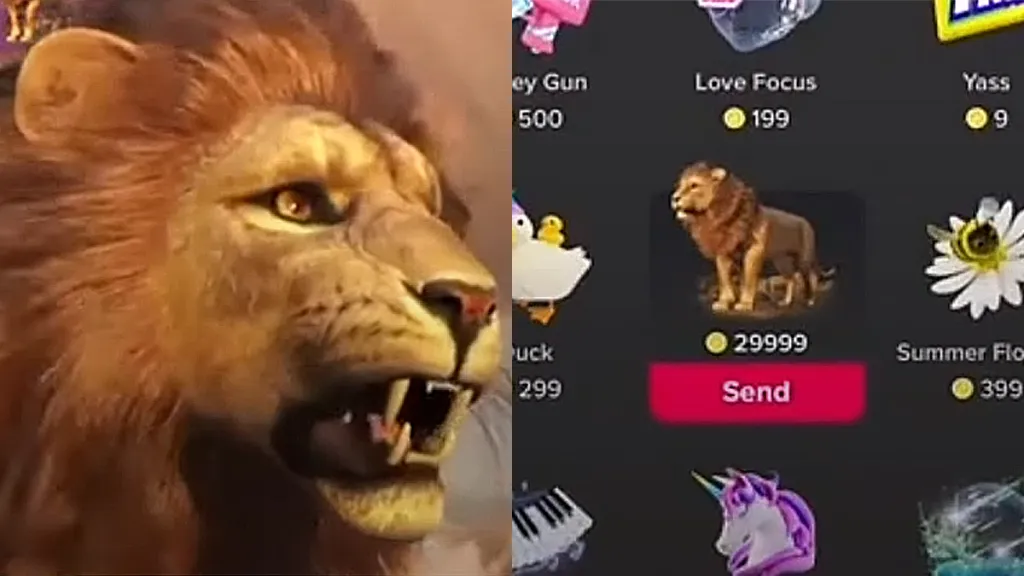
When you’re watching someone go live, you can tap a gift, send it, and it shows up instantly on their screen as an animation. It could be something small like a rose or something more flashy like a lion or a galaxy.
It looks fun. And it is.
But behind that animation is real value.
How TikTok Gifts Actually Work
Here’s the basic flow:
- Viewers buy coins inside the TikTok app
- They use those coins to send gifts during a LIVE
- Each gift has a different coin value
- When creators receive gifts, they’re converted into Diamonds
- Diamonds can then be exchanged for real money
So when someone sends a gift, they’re not just reacting. They’re tipping.
Why Do People Send Gifts?
It’s part support, part interaction. Viewers send gifts to:
- Show appreciation
- Get noticed by the creator
- Support their favorite streamers
- Be part of the moment
And for creators, it’s one of the main ways to earn directly from their audience on TikTok.
However, not all gifts are equal. Some gifts cost just a few coins. Others cost a lot more.
That’s why you’ll see bigger reactions when certain gifts come through. They carry more value, and creators know it.
How Much Are TikTok Gifts Worth in 2026?
This is the part most people are curious about. They want to know how much those gifts actually worth?
Well, the answer isn’t as straightforward as it looks, because TikTok uses a multi-step system behind the scenes. Money doesn’t move directly from viewer to creator. It goes through a few layers first.
To break it down, TikTok runs on this flow:
Coins → Gifts → Diamonds → Cash
In practice, this means:
- Viewers buy coins with real money
- They use those coins to send gifts during LIVE streams
- TikTok converts those gifts into Diamonds for the creator
- Creators convert Diamonds into real money
Each step affects how much the creator actually earns.
What Coins Are Worth
Coins are the starting point. In the U.S., one coin is roughly worth about $0.01–$0.013, depending on how many you buy at once. Prices can vary slightly by region and package size.
So if someone spends $10, they’re buying a set number of coins first. Not sending cash directly.
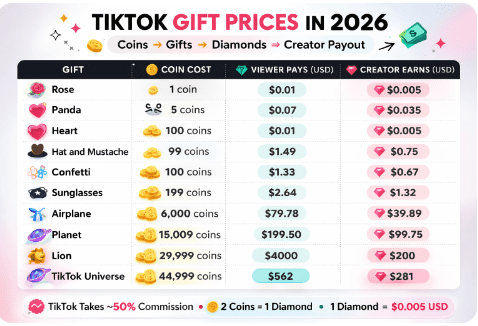
Below is a snapshot of a TikTok live gifts list showing how much common gifts cost in coins and what their creator payout looks like after TikTok’s commission.
How Gifts Convert to Earnings
Every gift has a coin value. Some are small and some are expensive.
For example:
- A simple gift might cost just a few coins
- Mid-tier gifts can cost hundreds
- Premium gifts can run into thousands or even tens of thousands of coins
But here’s the key part.
Creators don’t receive the full coin value.
TikTok converts coins into Diamonds at roughly a 2:1 ratio. So for every 2 coins spent, the creator gets 1 Diamond.
And each Diamond is worth about $0.005 when cashed out.
The Real Earnings (After TikTok’s Cut)
TikTok also takes a significant commission. In most cases, it’s around 50% of what viewers spend.
So if a viewer spends $10 on gifts:
- About $5 goes to TikTok
- The remaining value is converted into Diamonds
- The creator receives roughly half of the original spend
A Quick Way to Estimate Gift Value
If you want a fast way to calculate earnings, use this:
(Coins ÷ 2) × $0.005 = Estimated payout
For example:
- A 1,000-coin (galaxy) gift
- 1,000 ÷ 2 = 500 Diamonds
- 500 × $0.005 = $2.50 earned
That’s your rough take-home amount before taxes or fees.
How to Buy and Send TikTok Gifts on Desktop and Mobile
If you want to send gifts on TikTok, you need one thing first.
Coins.
Everything starts there. Once your wallet is loaded, sending gifts becomes quick and seamless.
Let’s break it down step by step.
How to Buy TikTok Coins on Desktop
If you’re using a laptop or desktop, here’s how to get coins:
- Log in to your TikTok account on your browser
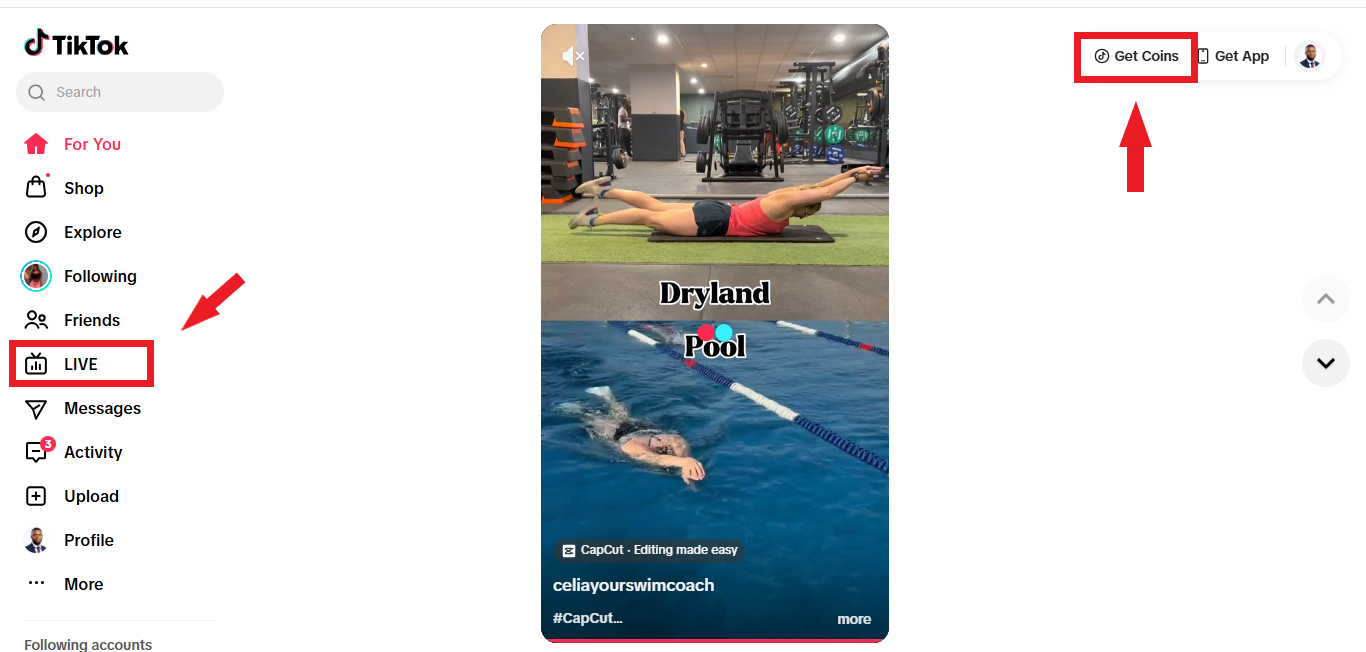
- Look for “Get Coins” (you can also find it inside the LIVE section)
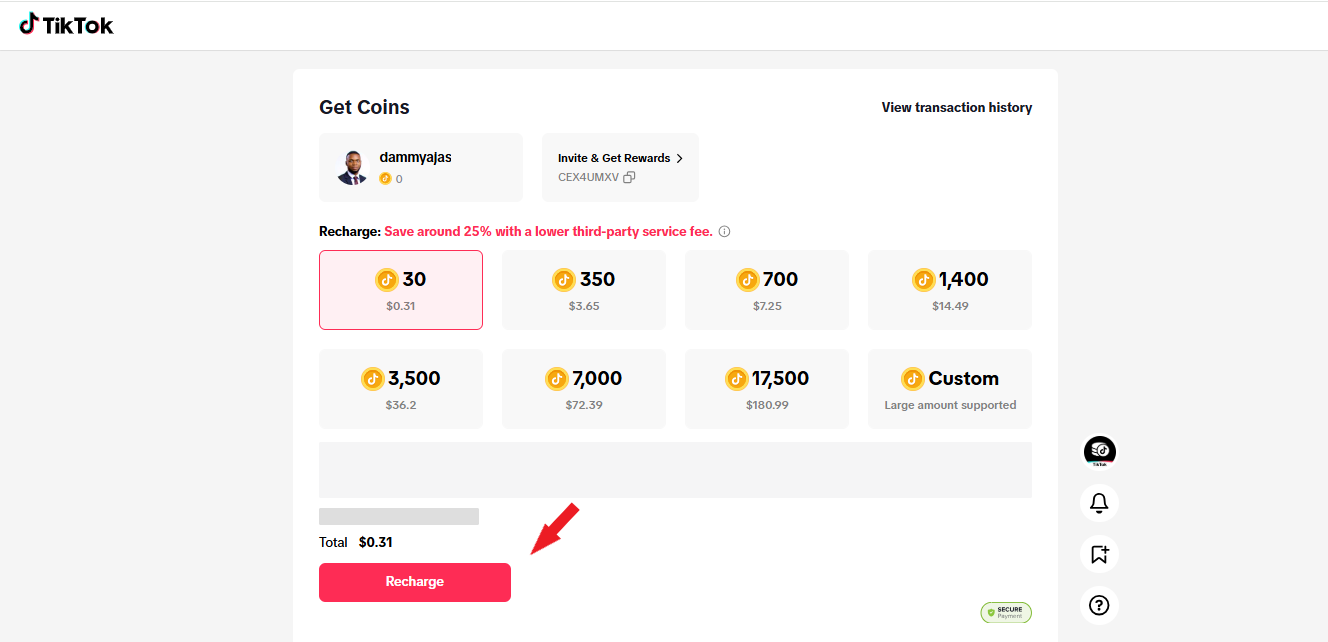
- Choose the number of coins you want to purchase
- Click “Recharge”
- Select your payment method (card, PayPal, etc.)
- Enter your details and confirm payment
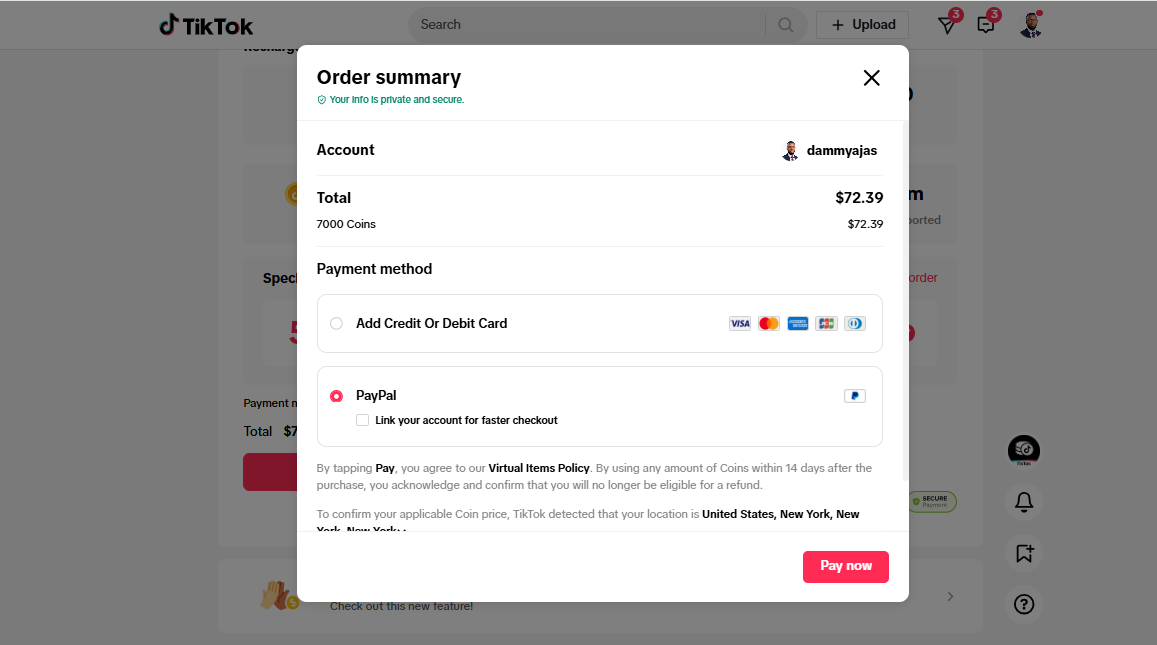
Once that’s done, your coins will be added to your account instantly.
How to Buy TikTok Coins on Mobile
Buying coins on your phone is just as simple:
- Open TikTok and go to your profile
- Tap the three-line menu (top right corner)
- Select “Balance”
- Tap “Get Coins”
- Choose your coin package
- Complete the payment using your preferred method
Your coins will appear in your wallet right away.
How to Send TikTok Gifts
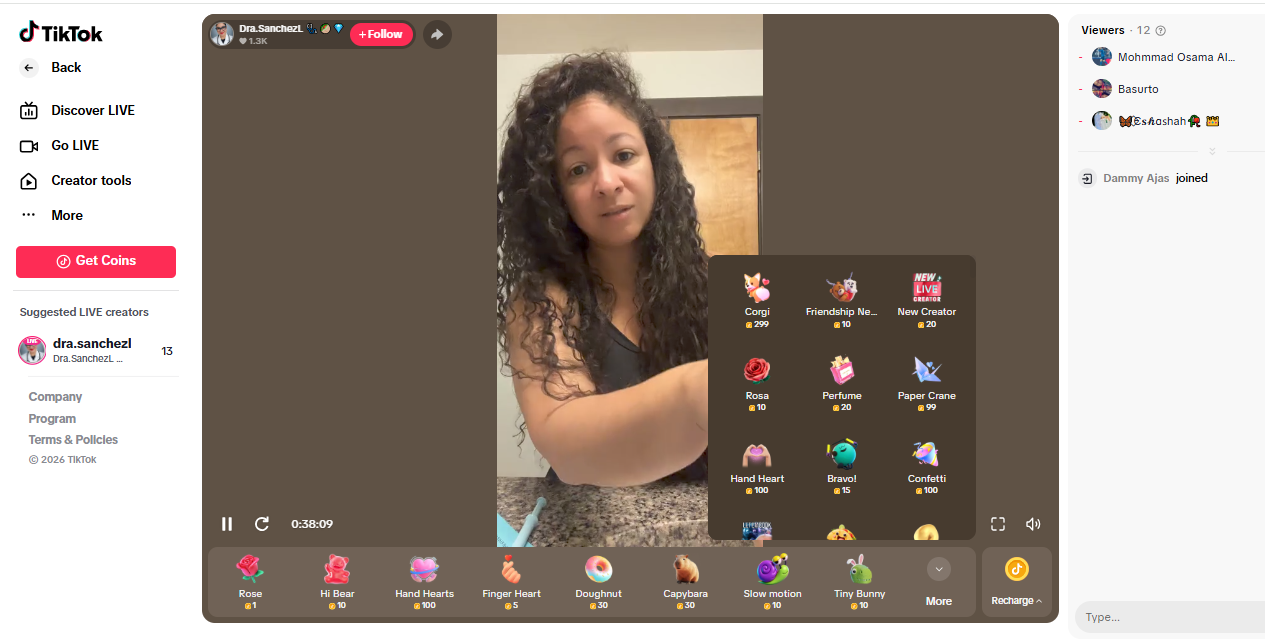
Now for the fun part. Once you have coins, sending gifts takes just a few taps:
- Open a LIVE stream (or eligible video)
- Tap the gift icon at the bottom of the screen
- Browse available gifts (tap “More” to see all options)
- Select the gift you want
- Tap Send
That’s it.
The gift appears instantly on the creator’s screen, and they’ll usually react in real time.
Safety Tips for Buying and Sending Gifts on TikTok
TikTok Gifts are fun. But since real money is involved, it’s important to stay in control and avoid mistakes. So, let’s show you some simple ways you can keep things safe and stress-free.
1. Set a Clear Budget
It’s easy to get carried away during a LIVE. One gift turns into two… then five.
So, set a monthly or weekly budget for gifts and stick to it. That way, you enjoy the experience without worrying about overspending later.
2. Avoid “Cheap Coin” Websites
If a deal looks too good, it usually is.
Some third-party sites claim to sell TikTok coins at a lower price. Don’t trust them. These are often scams and can put your account or payment details at risk. Always buy coins directly through TikTok or official app stores.
3. Double-Check Before You Send
Once you send a gift, it’s gone. There’s no undo button.
Before tapping “Send,” take a second to confirm the gift and its cost. This helps you avoid accidental high-value sends.
4. Use Secure Payment Methods
Stick to trusted payment options like Credit or debit cards, PayPal, and App Store or Google Play billing. Avoid saving sensitive payment details on shared devices, and always make purchases through TikTok’s official system.
5. Enable Extra Security on Your Account
Add an extra layer of protection. Turn on two-factor authentication (2FA) for your TikTok account. This makes it harder for anyone else to access your account or make purchases without your permission.
- Be Careful on Shared or Public Devices
If you’re logged into TikTok on a shared phone, tablet, or computer, log out after use. This prevents accidental purchases or someone else sending gifts from your account without you knowing.
How to Enable and Maximize TikTok Gifts as a Creator
Turning on TikTok Gifts is simple. Getting people to actually send them? That’s where the real work is.
Let’s start with the basics, then move into how to make it work in your favor.
Step 1: Make Sure You’re Eligible
Before anything else, you need to meet TikTok’s requirements:
- You must be 18 years or older
- You typically need at least 1,000 followers to go LIVE
- LIVE gifting must be available in your region
- Your account must be in good standing (no restrictions)
Quick note: In some regions, TikTok has started allowing LIVE access with 500-800 followers, so it’s worth checking your Creator Tools even if you haven’t hit 1,000 yet.
Step 2: Enable TikTok Gifts
Once you’re eligible, here’s how to turn it on:
- Open TikTok and go to your profile
- Tap the menu (three lines)
- Go to Settings & Privacy
- Select Creator Tools
- Tap LIVE Gifts or Gifts
- Toggle the feature ON
- Confirm your details if prompted
That’s it.
When you go LIVE, viewers will now see the gift option.
Step 3: Start Your LIVE Stream
Now comes the visible part.
Go LIVE as you normally would. Once your stream starts, the gift icon will appear for viewers. Any gifts sent during the stream will be converted into Diamonds in your account.
You can track your earnings later in your Wallet or Balance section.
How to Actually Maximize TikTok Gifts
Again, turning the feature on is just step one. If you want consistent gifts, you need to give people a reason to send them.
Show Up with Energy
People don’t send gifts to silent streams. They send gifts when the experience feels alive.
Talk. React. Engage. Make viewers feel like they’re part of something, not just watching from the outside. Energy is what drives interaction.
Acknowledge Every Gift
When someone sends a gift, respond. Say their name. Thank them. React in real time.
This does two things: It makes the sender feel seen and also encourages others to do the same. If you are looking for a way to fuel more gifting, you need to learn how to recognize those gifting you in your sessions.
Create Moments, Not Just Streams
Don’t just “go live.” Have a reason.
Examples:
- Q&A sessions
- Product demos
- Challenges or mini-games
- Behind-the-scenes content
When something interesting is happening, people stay longer. And longer watch time increases the chances of gifts.
Encourage Without Being Pushy
You don’t need to beg for gifts. But you can guide your audience.
Simple lines like: “Tap the gift button if you’re enjoying this,” or “Let’s see who sends the first gift today,” will usually work better than constant asking.
Be Consistent with Your LIVE Schedule
Random streams don’t build momentum. Pick a schedule and stick to it. When your audience knows when you’ll be live, they show up ready to engage. Consistency builds habits. And habits lead to more support.
Track and Improve
After each LIVE, check your performance.
- When did gifts come in?
- What were you doing at that moment?
- Which streams performed best?
Do more of what works.
Are TikTok Gifts Worth It? (Pros and Cons for Creators & Viewers)
TikTok Gifts sound like a perfect setup.
Viewers support creators. Creators earn money. Everyone wins.
But like most things on social media, it’s not that simple. Whether TikTok Gifts are “worth it” depends on how you use them and what you expect from them.
Let’s break it down from both sides.
For Creators
The Pros
- You can earn in real time: Gifts turn into Diamonds, and Diamonds turn into cash. That means you’re making money while you’re live. No waiting for brand deals or payouts from ads.
- They boost engagement instantly: When a gift comes in, it changes the energy of the stream. You react. The audience reacts. It creates moments that keep people watching longer.
- They build social proof: Big gifts grab attention. When viewers see others sending gifts, it makes your stream feel active and popular. That alone can encourage more people to join and participate.
The Cons
- TikTok takes a cut: This is the big one. TikTok keeps a significant percentage of what viewers spend. So while gifts can add up, you’re not receiving the full value.
- Income isn’t predictable: One stream might perform well. The next might not. Gift earnings depend on timing, audience mood, and how engaging your stream is in that moment.
- It can attract distractions: Not every gift is sent with good intentions. Some viewers send gifts just to interrupt or get attention, which can throw off your flow if you’re not careful.
For Viewers
The Pros
- It’s a fun way to interact: Sending gifts feels immediate. You get noticed. The creator responds. It makes the experience more personal.
- You’re supporting creators directly: Unlike likes or views, gifts have real value. You’re helping creators earn from their content in a direct way.
The Cons
- It adds up quickly: Small gifts don’t feel like much. But over time, they can turn into real spending. Without a budget, it’s easy to overspend without realizing it.
- There’s no real return: Gifting is one-sided. You’re giving support, not receiving something tangible in return. For some people, that’s fine. For others, it may not feel worth it.
So, Are TikTok Gifts Worth It?
For creators, they’re a solid extra income stream. Not always consistent, but valuable when used well.
For viewers, they’re more about experience than value. You’re paying for interaction, not a product.
So, the key is balance.
Creators should treat gifts as one part of their monetization strategy while viewers should treat gifting as entertainment, not obligation.
When both sides understand that, the system works exactly as it should.
How OnlySocial Helps You Maximize TikTok Gift Strategies
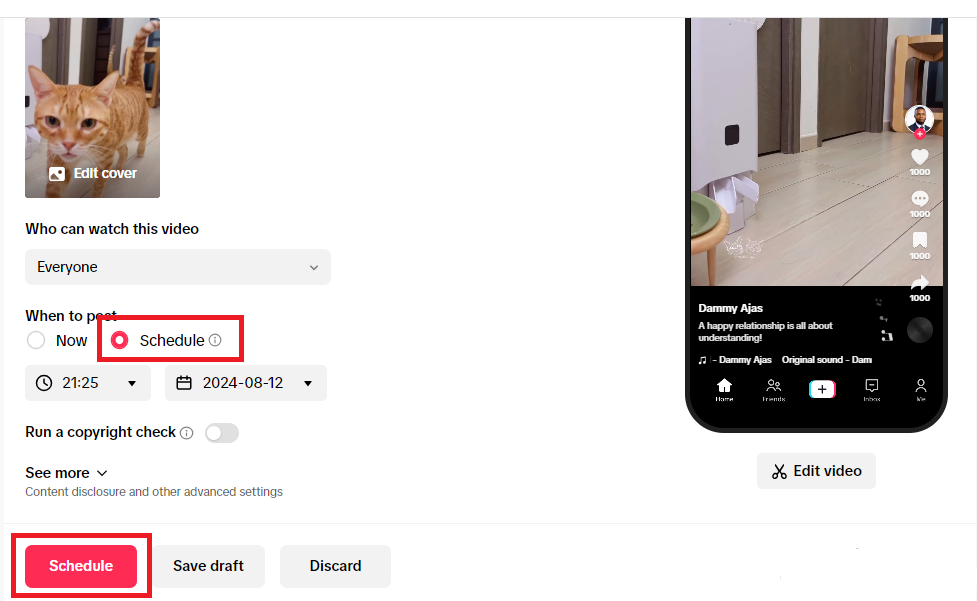
If you’re always thought getting gifts on TikTok is just about going LIVE and hoping for the best.
It’s about showing up consistently, building anticipation, and being live when your audience is actually there. That takes planning.
And that’s where you will need a tool like OnlySocial by your side.
It helps you turn random LIVE sessions into a structured system that attracts more viewers and increases your chances of receiving gifts.
Let’s take a closer look at some ways the tool can help take your TikTok gift game to the next level:
Build hype before you go LIVE
The best streams don’t start when you hit “Go LIVE.” They start before that.
With OnlySocial, you can schedule teaser videos, countdown posts, and reminders leading up to your LIVE session. This keeps your audience aware and ready to join when you go live. Remember, more awareness means more viewers, and more viewers is more chances for gifts.
Go LIVE at the right time
Timing matters more than most creators realize. Streaming when your audience is inactive leads to low engagement, no matter how good your content is. OnlySocial’s analytics help you identify when your followers are most active, so you can plan your LIVE sessions around peak times.
Promote your LIVE across platforms
Your TikTok audience isn’t your only audience. With OnlySocial’s content calendar, you can promote your upcoming LIVE sessions across Instagram, Facebook, and other platforms at the same time.
That means more people know when you’re going live. And more people joining means more interaction… and more gifts.
Stay consistent without burning out
While you’re focused on your LIVE sessions, your regular content shouldn’t stop. OnlySocial keeps your TikTok feed active by scheduling posts in advance. So even when you’re busy engaging with your audience in real time, your profile continues to grow in the background.
Final Note
TikTok Gifts might look simple on the surface, but there’s a real system behind them. Coins, Diamonds, payouts, timing, engagement. Once you understand how it all connects, it stops feeling random and starts feeling like an opportunity.
If you’re a creator, think of gifts as one piece of a bigger strategy. Show up consistently, create engaging LIVE sessions, and make it easy for your audience to support you. And if you’re a viewer, enjoy the experience, but stay mindful of how you spend.
The creators who get the most out of TikTok Gifts aren’t just lucky. They’re prepared.
Frequently Asked Questions
What are TikTok Gifts and how do they work?
TikTok Gifts are virtual items viewers send to creators during LIVE streams. Viewers buy coins with real money, use those coins to send gifts, and TikTok converts those gifts into Diamonds for the creator. Creators can then exchange Diamonds for real cash. So in simple terms, it’s a tipping system built into TikTok.
How much money do you get from gifts on TikTok?
Creators don’t receive the full amount viewers spend. TikTok takes a significant cut (often around 50%), and the remaining value is converted into Diamonds. Each Diamond is worth about $0.005, so earnings depend on how many gifts you receive.
How much is a TikTok gift worth in dollars?
It varies. Each gift has a different coin cost, and coins convert into Diamonds before becoming cash. A rough estimate is:
(Coins ÷ 2) × $0.005 = your earnings
For example, a 1,000-coin gift would earn you around $2.50.
What are the most popular TikTok Gifts?
Some gifts show up more often because they’re affordable and fun to send. Common ones include Rose, Heart, and TikTok logo.
Then there are premium gifts like Galaxy, Lion, and Universe. These cost more coins and usually get bigger reactions during LIVE streams.
How do you get gifts on TikTok as a creator?
First, you need to enable LIVE Gifts in your Creator Tools and meet the eligibility requirements.
After that, it comes down to:
- Going LIVE consistently
- Engaging your audience
- Creating interactive, entertaining streams
- Acknowledging viewers who send gifts
Gifts don’t come automatically. They come from connection and engagement.
What does commission and taxes look like on TikTok?
TikTok takes a commission on all gifts, which reduces the final payout creators receive. On top of that, earnings from gifts may be subject to taxes depending on your country. TikTok typically doesn’t handle taxes for you, so it’s your responsibility to report that income.