On this page
- Is YouTube a Reliable Source? Why It Is a Platform, Not a Source
- YouTube Channel Credibility: Signs of a Credible Channel
- Signals That Do Not Prove Credibility
- What YouTube’s Labels, Panels and Badges Mean
- A Five-Minute YouTube Credibility Check
- Free Tools That Help You Check a YouTube Video
- Example: Two Channels, One Topic
- Is YouTube Reliable for News, Health and Money?
- How Much of YouTube Is True? AI and Misinformation in 2026
- How YouTube Handles Misinformation
- Why YouTube Channel Credibility Matters for Your Business
- Teaching Teams and Students to Judge YouTube
- Can You Cite YouTube in School or Work?
- How Brands Build a Credible YouTube Channel
- Credibility Mistakes YouTube Channels Make
- Frequently Asked Questions
- Is YouTube a reliable source of information?
- Is everything on YouTube true?
- Does the verification badge mean a channel is reliable?
- Is YouTube news reliable?
- How can I tell if a YouTube channel is credible?
- Can I use YouTube videos as sources for school?
- What does “altered or synthetic content” mean on YouTube?
- Are YouTube health videos trustworthy?
- Is a channel with millions of subscribers more reliable?
- The Short Version
Is YouTube a reliable source? The honest answer is that YouTube is not a source at all. It is a platform, like a library that lets anyone put a book on the shelf. Some of the best teachers, scientists, journalists and practitioners in the world publish there, and so do people who are confidently wrong, paid to persuade, or making things up for views. The same search can return both, sometimes next to each other.
That makes the useful question “is this channel reliable, for this claim?” This guide gives you a practical way to answer it: the signals that genuinely indicate credibility, the ones that only look like it, what YouTube’s labels, panels and badges tell you, and a five-minute check you can run on any video. In the second half, we turn it around for marketers: how to build a YouTube channel that viewers, journalists and search engines treat as trustworthy.
YouTube can be a reliable source when the channel is: a creator or organisation with real, checkable expertise, who cites sources, separates fact from opinion, discloses sponsorships, and corrects mistakes. Subscriber counts, verification badges and polished production do not prove accuracy. For anything important (health, money, law, news), cross-check with primary sources before you act or cite it.
Is YouTube a Reliable Source? Why It Is a Platform, Not a Source
Reliability belongs to the person or organisation speaking, not to the website hosting the video. A lecture from a university physics department and a conspiracy video about the same topic are both “on YouTube”, but nobody would say they are equally reliable. The platform affects what you see, through recommendations and search, but it does not vouch for what is said.
YouTube does take some steps: it removes content that breaks its Community Guidelines, adds context panels to topics prone to misinformation, and promotes authoritative sources in news and health searches. Those measures reduce the worst problems, but they are not fact-checking for every video, and most videos never get a label of any kind. The judgement is still yours.
So when someone asks whether everything on YouTube is true, the answer is clearly no, but the better question is how to find the channels that deserve your trust. That is a skill anyone can learn.
YouTube Channel Credibility: Signs of a Credible Channel
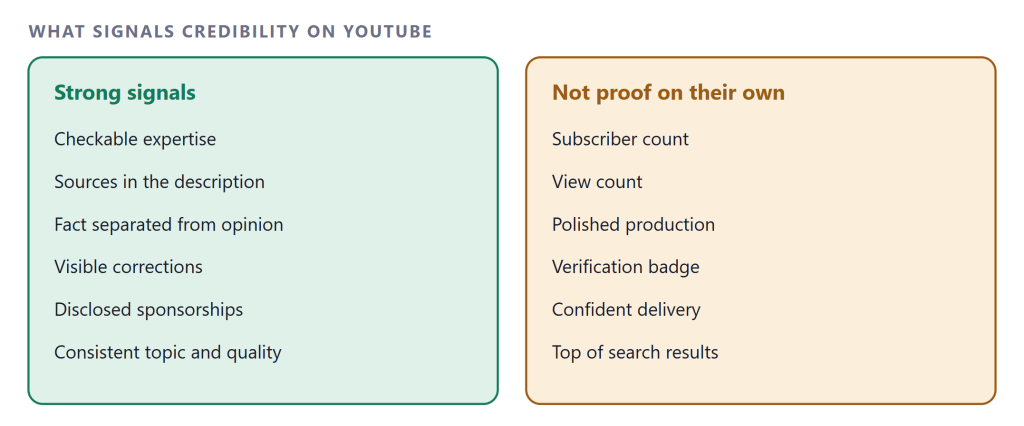
Credible channels share a handful of habits that are visible if you know where to look. None of them is proof on its own, but together they are strong evidence.
1. Checkable expertise
Who is speaking, and why should they know? Look at the channel’s About section, the creator’s name, and whether that person has a verifiable track record elsewhere: a university page, a professional licence, published work, a company, or years of documented practice. Experience counts too. A carpenter with twenty years of builds on camera is a credible source on joinery, even without a degree.
2. Sources in the description
Good educational and news channels list their sources: studies, official documents, datasets, interviews. Click a few. Do they exist, and do they say what the video claims? A channel that cites carefully is inviting you to check its work, which is a strong sign of confidence.
3. Fact separated from opinion
Credible creators signal when they are speculating, giving a personal view or simplifying. Phrases like “the evidence suggests”, “in my experience” or “we don’t know yet” are good signs. Constant certainty about complex, disputed topics is not.
4. Corrections and updates
Everyone makes mistakes. Reliable channels admit them, with a pinned comment, a correction in the description or a follow-up video. A channel that has never corrected anything in hundreds of videos is either extraordinary or not paying attention.
5. Transparent sponsorships
Sponsorship is normal, but it should be disclosed. Look for YouTube’s “Includes paid promotion” label and a clear verbal mention. Be extra careful with product reviews and financial advice where the creator benefits from what you buy.
6. A healthy comment section
Thoughtful comments, including respectful disagreement and expert additions, suggest a real audience. Comments that are disabled on contested topics, or full of generic praise and bot-like replies, are worth noting.
7. Consistency over time
Scroll back through the channel. Does it stick to topics within the creator’s expertise? Has the tone and quality been consistent, or does it pivot to whatever is trending? Channels that suddenly jump from cooking to crypto to geopolitics deserve scepticism.
Signals That Do Not Prove Credibility
Several things that feel like trust signals actually measure popularity or polish.
- Subscribers and views. Huge audiences can form around entertaining but inaccurate content. Popularity tells you a channel is engaging, not that it is right.
- Production quality. Good cameras, motion graphics and confident narration are cheap now. AI voices and stock footage can make anything look authoritative.
- The verification badge. YouTube’s check mark confirms that the channel belongs to the creator, artist or organisation it represents. YouTube Help says channels need at least 100,000 subscribers, among other requirements, to apply. It says nothing about accuracy.
- Search ranking. Appearing first means the video matches your query and engages viewers, not that it has been verified.
- Confidence. Experts often sound less certain than amateurs, because they know where the evidence runs out.
What YouTube’s Labels, Panels and Badges Mean
YouTube adds several kinds of context to videos; knowing what each one means stops you over- or under-reading them.
| Label or feature | What it means | What it does not mean |
|---|---|---|
| Verification check | The channel is the official presence of the creator, artist or organisation | That the content is accurate |
| Information panels | Context from third parties on topics prone to misinformation, or about publishers that receive public funding | That the video is false or approved |
| Health source panels | The channel belongs to a recognised health source, such as a licensed organisation | That every claim has been reviewed |
| “Altered or synthetic content” | The creator disclosed realistic AI-generated or altered content | That unlabelled videos are real |
| “Includes paid promotion” | The creator declared a sponsorship or paid placement | That unlabelled videos have no sponsor |
| Top news and breaking news shelves | YouTube is prioritising authoritative news sources for this search | That videos outside the shelf are unreliable |
The pattern is that labels add context; they do not certify truth. Absence of a label is not evidence either way. Use them as one input in your own judgement.
A Five-Minute YouTube Credibility Check
When a video matters, for a decision, a purchase, a school project or something you will share, run this quick check.
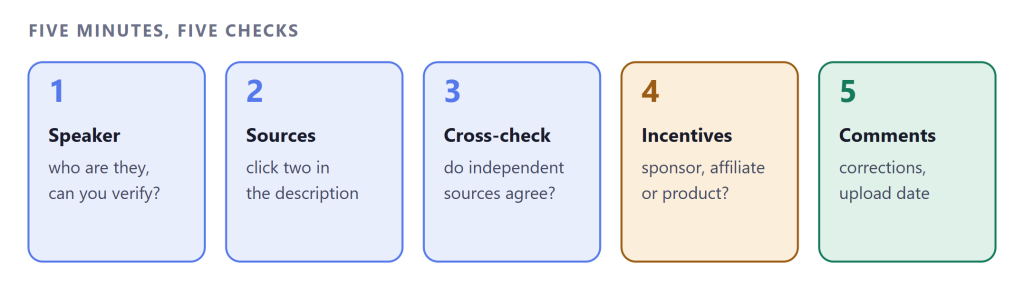
- Identify the speaker (1 minute). Open the channel’s About page. Search the creator’s name with their claimed profession. Can you verify who they are?
- Check the sources (1 minute). Open the description. Click two cited sources. Do they exist and support the claim?
- Cross-reference the key claim (1 minute). Search the claim plus “study”, “official” or a reputable outlet. Do independent sources agree?
- Look for incentives (1 minute). Is there a sponsor, affiliate link, course or product being sold? How might that shape the message?
- Scan the comments and date (1 minute). Are experts correcting it? Is the video old enough that the facts have changed?
If the channel passes all five, it is a reasonable source for that claim. If it fails two or more, treat it as opinion or entertainment, not information.
Free Tools That Help You Check a YouTube Video
You do not need special software to check most videos; a few free habits and tools cover the majority of cases.
- The transcript: open the video’s transcript from the description and search it for the exact claim, so you can quote it accurately and search for it elsewhere.
- The channel’s About page: check when the channel was created, its links and how many videos it has published. A channel created last month with hundreds of uploads is a warning sign.
- Fact-check search: Google’s Fact Check Explorer searches published fact checks from news organisations; type in the claim and see whether it has been reviewed.
- Reverse image search: take a screenshot of a key frame or thumbnail and search it, to see whether the footage is older or from somewhere else.
- Upload date versus events: make sure the video was published after the events it describes, and that the facts have not changed since.
Used together with the five-minute check, these tools catch most recycled footage, misattributed quotes and outdated advice.
Example: Two Channels, One Topic
Here is how the signals play out in practice, using two hypothetical channels that both publish a video called “How to care for a leather bag”.
| Signal | Channel A | Channel B |
|---|---|---|
| Who is speaking | A named leatherworker with a workshop, website and ten years of build videos | An unnamed narrator over stock footage |
| Sources | Links to tannery care guidance and the products used | None |
| Claims | “Condition every few months, more often in dry climates; test on a hidden patch first” | “This one product makes any bag last forever” |
| Incentives | Mentions it sells its own conditioner and suggests alternatives | Affiliate link at the top, not mentioned in the video |
| Comments | Questions answered; one correction pinned | Comments turned off |
| Other videos | All about leather and making | Leather today, crypto and diet tips tomorrow |
Channel B might have more views and slicker editing, but Channel A is the reliable source. Notice that Channel A also sells something; commercial interest is not the problem, hiding it is. This is exactly the profile a brand channel should aim for: expert, transparent and focused.
A note on reaction and commentary channels
Reaction, commentary and “explainer” channels sit in between. They can be valuable when they add analysis and link to the original source, and misleading when they summarise selectively or strip away context. When a video is about someone else’s work, research or statement, go to the original before forming a view, and prefer creators who link to it prominently.
Is YouTube Reliable for News, Health and Money?
The higher the stakes, the higher the bar.
News
Is YouTube news reliable? It depends on who publishes it. Established news organisations with editorial standards and correction policies are generally reliable on YouTube as elsewhere. Commentary channels can be insightful but mix reporting with opinion. For breaking news, early videos are often wrong; wait for confirmed reports, and prefer outlets that show their sources.
Health
Look for YouTube’s health source panels, channels run by hospitals, universities, public health bodies and licensed professionals, and creators who cite peer-reviewed research. Never change medication or treatment based on a video alone; use it to prepare questions for a qualified professional.
Money and investing
Financial content is full of incentives: affiliate links, courses, paid groups and undisclosed positions. Be wary of guaranteed returns, urgency (“buy before it is too late”) and income screenshots. Use YouTube to learn concepts, then verify specifics with official sources and, where appropriate, a licensed adviser.
How-to and skills
For practical skills, YouTube is often excellent, because results are visible. You can see whether the shelf is level or the recipe works. Check comments for people who tried it, and prefer creators who explain safety steps.
How Much of YouTube Is True? AI and Misinformation in 2026
Nobody can measure how much of YouTube is true, but AI has made convincing fakes far cheaper to produce, so the burden of checking has grown. Realistic synthetic voices, AI presenters, generated footage and faceless channels that churn out videos on any topic are now common. Many are harmless, such as explainer channels using AI narration for convenience. Some impersonate real people, invent events or recycle false claims at scale.
YouTube requires creators to disclose realistic altered or synthetic content, and shows a label when they do. But disclosure depends on honesty, and the label covers realistic content, not every use of AI. A few practical signs that a video deserves extra scrutiny:
- No identifiable person behind the channel, only a generic name and stock imagery.
- Very high upload volume across unrelated topics, often several videos a day.
- Narration that sounds slightly off, with odd emphasis, mispronounced names or no breathing.
- Footage that does not quite match what is being described, or that loops.
- Claims about real people saying or doing things you cannot find reported anywhere else.
None of these proves a video is false, but each is a reason to run the five-minute check before believing or sharing it.
How YouTube Handles Misinformation
YouTube’s approach combines removing content that breaks its rules, reducing the reach of borderline videos, and raising authoritative sources. Its Community Guidelines prohibit certain kinds of misinformation that can cause real-world harm, such as specific categories of medical misinformation and content that misleads people about how to vote. Videos that break those rules can be removed and channels can receive strikes.
For content that does not break the rules but is close to the line, YouTube has said for years that it limits recommendations rather than removing videos. In news and health searches, it promotes authoritative sources through shelves and panels. It has also tested features that let viewers add context notes to videos.
These measures matter, but they are designed for the most harmful categories. Most everyday inaccuracies, outdated tips, exaggerated product claims and confident but wrong explanations are never labelled. Judging YouTube channel credibility remains a job for the viewer.
Why YouTube Channel Credibility Matters for Your Business
For brands, credibility is not just an ethical choice; it is what turns views into customers. People increasingly research purchases on YouTube, watching reviews, tutorials and comparisons before they buy. A channel that viewers trust becomes a shortcut in that research. A channel that oversells or hides sponsorships gets skipped, called out in comments, or both.
Credibility also travels beyond YouTube. Google often shows videos in search results, and its search quality guidance emphasises experience, expertise, authoritativeness and trustworthiness. Journalists, bloggers and educators link to and embed videos they trust, which brings new viewers and strengthens your brand’s reputation. And credible creators are far more willing to collaborate with credible brands.
The good news is that credibility is built from habits any business can adopt: show real people with real expertise, explain how you know what you know, disclose incentives and fix mistakes in public.
Teaching Teams and Students to Judge YouTube
If you manage a team, teach, or have children who learn from YouTube, the five-minute check is worth teaching directly. A few approaches work well:
- Compare two videos on the same topic, one credible and one not, and ask people to find the differences using the signals in this guide.
- Practise “lateral reading”: instead of judging a channel by its own videos, open a new tab and search what others say about the creator.
- Make source-checking normal. In meetings or classrooms, ask “where is that from?” whenever a video is quoted.
- Discuss incentives openly. Talk about sponsorships, affiliate links and why a creator might present things a certain way.
For marketing teams in particular, the same skills protect you from citing a dubious statistic in your own content, which is an easy way to lose credibility with your audience.
Can You Cite YouTube in School or Work?
You can cite a YouTube video, but you should cite the creator, not “YouTube”, and only when the creator is a credible source for the claim. Many teachers accept videos from universities, museums, news organisations and recognised experts. For academic work, it is usually better to trace a video’s claim back to the original study or document and cite that, using the video only for a recorded talk, interview or demonstration that exists nowhere else.
Major citation styles (APA, MLA, Chicago) all have formats for online videos, typically including the creator or channel name, the date, the title, the platform and the URL. Check your institution’s guidelines.
How Brands Build a Credible YouTube Channel
Everything viewers use to judge credibility, your channel can provide on purpose. For businesses, credibility on YouTube means more watch time, more subscribers who become customers, and more links and mentions from people who trust your content.
- Show who is speaking. Put real people from your team on camera, with names and roles. Link to their profiles from the About section.
- Cite your sources. Add sources, data and links to the description. If you share results, show how you measured them.
- Stay in your lane. Make videos about what your business genuinely knows. Expertise compounds; random topics dilute it.
- Disclose everything. Use YouTube’s paid promotion setting for sponsorships, and be clear when a video features your own products.
- Use the altered or synthetic content disclosure when you use realistic AI-generated footage or voices.
- Correct quickly. Pin a correction comment and update the description when you get something wrong.
- Complete your channel. Profile picture, banner, description, links and a consistent upload schedule all signal a serious channel.
- Engage in comments. Answer questions and thank people who add useful information.
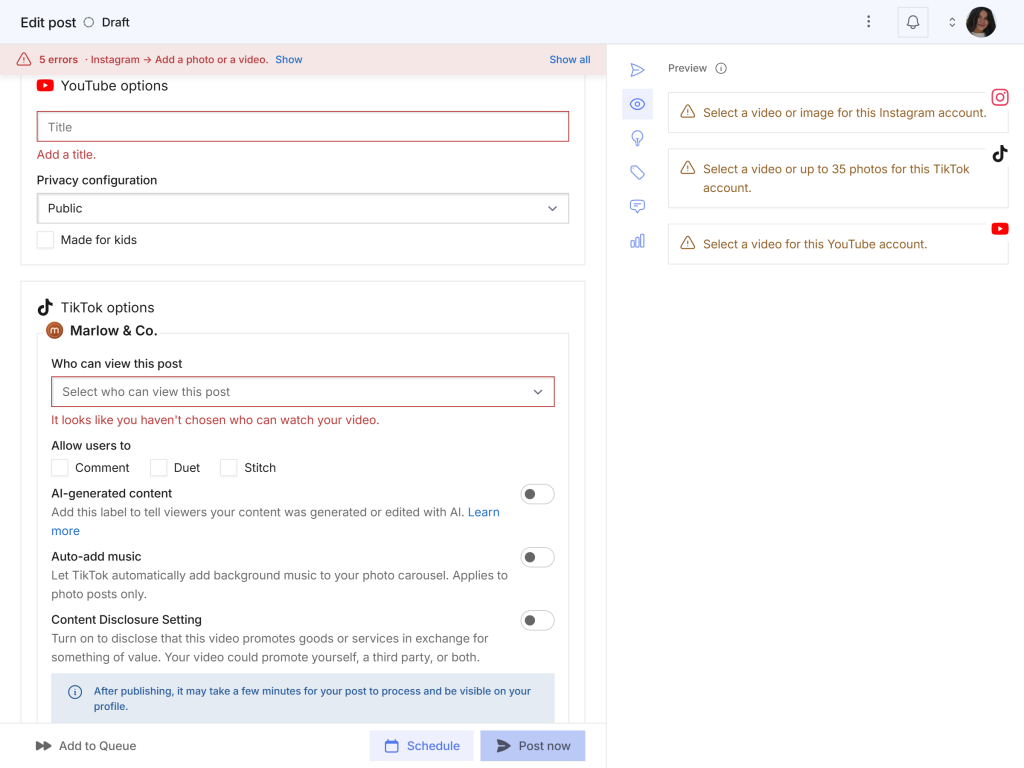
OnlySocial lets you schedule YouTube videos with their title, description, privacy and made-for-kids setting, alongside TikTok, Instagram and Facebook versions of the same clip with their own disclosures. Every plan includes YouTube, from $29 a month for 15 social profiles and 2 team members.
Publish consistently, and look the part. Plan YouTube uploads and Shorts with the rest of your social media in one calendar.
Credibility Mistakes YouTube Channels Make
- Clickbait titles and thumbnails that the video does not deliver on.
- Hiding sponsorships or mentioning them only in small print.
- No sources for statistics and claims.
- Deleting critical comments instead of answering them.
- Chasing trends outside your expertise.
- Using realistic AI content without disclosure.
- Buying views or subscribers, which breaks YouTube’s fake engagement policy and damages trust when noticed.
Frequently Asked Questions
Is YouTube a reliable source of information?
YouTube itself is a platform, not a source. Some channels are highly reliable and others are not; judge the creator’s expertise, sources, transparency and track record.
Is everything on YouTube true?
No. Anyone can upload, and most videos are not fact-checked. YouTube removes content that breaks its rules and adds context panels to some topics, but you still need to check important claims.
Does the verification badge mean a channel is reliable?
No. It confirms the channel is the official presence of the creator or organisation. It says nothing about accuracy.
Is YouTube news reliable?
Videos from established news organisations with editorial standards generally are. Commentary and anonymous channels vary widely. Cross-check breaking news.
How can I tell if a YouTube channel is credible?
Verify who the creator is, check the sources in the description, separate fact from opinion, look for disclosed sponsorships and corrections, and cross-reference key claims.
Can I use YouTube videos as sources for school?
Often yes, if the creator is credible, but trace claims to original sources where possible and follow your institution’s citation guidelines.
What does “altered or synthetic content” mean on YouTube?
The creator has disclosed that the video contains realistic content that was made or changed with AI or other tools.
Are YouTube health videos trustworthy?
Look for health source panels and channels from recognised health organisations and licensed professionals. Always confirm with a qualified professional before acting.
Is a channel with millions of subscribers more reliable?
Not necessarily. Subscribers measure popularity, not accuracy.
The Short Version
Is YouTube a reliable source? Individual channels can be, and the platform as a whole is not. Judge the creator, not the website: checkable expertise, cited sources, fact separated from opinion, disclosed sponsorships and visible corrections. Treat subscribers, polish and badges as popularity signals, not proof. And if you run a brand channel, give viewers every one of those credibility signals on purpose.
The habit worth keeping is simple: before you believe, share or cite a video that matters, spend five minutes on the speaker, the sources, an independent cross-check, the incentives and the comments. It quickly becomes second nature, and it works on every platform, not just YouTube. The same questions apply to a TikTok explainer, a LinkedIn carousel or a podcast clip, and asking them consistently is the best protection against confident misinformation wherever it appears.