LinkedIn New Features & Updates in 2026: What’s Changed and How to Use Them to Grow
LinkedIn doesn’t stand still for long. One month there’s a new way to share videos, the next there’s an analytics update, a fresh profile feature, or another tool designed to help creators and businesses reach more people.
These changes may seem small at first, but they often influence how your content performs and how easily people discover your brand.
The good news is that you don’t have to keep checking LinkedIn’s changelog to stay ahead. In this guide, we’ll walk through the most important LinkedIn features and updates this year. We’ll explain what they do and also show you how to use them to grow your brand in 2026.
Table of Contents
- 1 LinkedIn Features That Were Retired Between 2023 and 2026
- 2 New LinkedIn Features and Updates You Should Be Using in 2026
- 2.1 1. Vertical Video and the Dedicated Video Feed
- 2.2 2. Conversational AI Search
- 2.3 3. Custom LinkedIn Profile URL
- 2.4 4. Advanced Content Analytics
- 2.5 5. Expanded LinkedIn Headline
- 2.6 6. Name Pronunciation
- 2.7 7. Verified Identity for Individuals and Company Pages
- 2.8 8. LinkedIn Newsletters for Everyone
- 2.9 9. BrandLink Video Ads
- 2.10 10. AI-Powered Job Search and Job Tracker
- 2.11 11. In-App Games and Leaderboards
- 2.12 12. Smarter AI Content Moderation
- 2.13 13. GIF Comments
- 2.14 14. “Actively Reviewing Applications” Status
- 2.15 15. Premium All-in-One for Small Businesses
- 3 Conclusion
- 4 FAQs
LinkedIn Features That Were Retired Between 2023 and 2026
Before diving into the newest LinkedIn features, it’s worth looking at a few that quietly disappeared over the past few years.
If you’ve been following older LinkedIn advice, you may come across features that no longer exist or work differently today. Knowing what’s changed will help you avoid outdated strategies and focus on the tools that are still available.
Here are the biggest LinkedIn features that were retired or replaced between 2023 and 2026.
Creator Mode
Creator Mode officially disappeared in 2024, but that doesn’t mean its benefits went away.
Instead of requiring users to turn on a separate setting, LinkedIn rolled many of its most useful features into every profile. Today, features like the Follow button, the Featured section, audience insights, and creator-focused analytics are available without enabling a special mode.
Skill Assessments
LinkedIn also phased out Skill Assessments. The assessment badges that once appeared on profiles were removed, and the feature is no longer available.
The platform now encourages members to showcase their expertise by adding relevant skills to work experience, projects, certifications, and other profile sections. This provides a more complete picture of your professional experience than a simple assessment badge.
Cover Story and Native Carousel Posts
In late 2023, LinkedIn retired two familiar profile features at the same time.
The first was Cover Story, the short introductory video that appeared on your profile photo. LinkedIn has not introduced a direct replacement for this feature.
The second was native multi-image carousel posts. Instead, LinkedIn shifted its focus to PDF document posts, which have become the standard format for creating carousel-style content on the platform.
Native Audio Events
LinkedIn discontinued standalone Audio Events in 2024.
If you want to host live audio discussions today, you’ll need to use LinkedIn Live, which supports audio-based broadcasts through compatible third-party streaming tools. While the experience is different, it still allows creators and businesses to host live conversations on the platform.
Fortunately, LinkedIn hasn’t slowed down when it comes to innovation. While these features have been retired, the platform has introduced plenty of new tools that offer even more opportunities for creators, professionals, and businesses.
Let’s look at the updates that are shaping LinkedIn in 2026.
New LinkedIn Features and Updates You Should Be Using in 2026
LinkedIn has introduced several updates over the past year, many of them focused on helping creators, professionals, and businesses reach more people and create richer content.
Some are completely new, while others build on existing features with better functionality and improved visibility.
Here are the LinkedIn updates that deserve your attention in 2026 and how you can use them to strengthen your presence on the platform.
1. Vertical Video and the Dedicated Video Feed
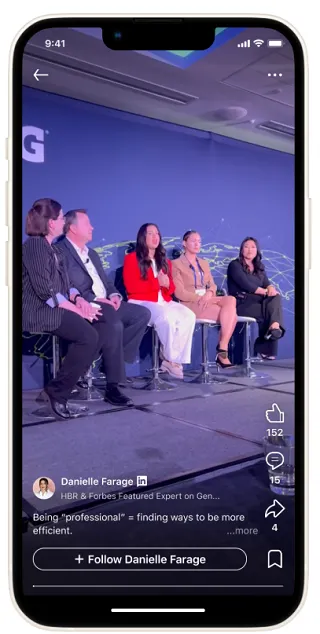
Video has become one of LinkedIn’s fastest-growing content formats. To support this shift, LinkedIn introduced a full-screen vertical video experience, complete with a dedicated video feed that lets users swipe through recommended videos much like they do on other social platforms.
Vertical videos now receive greater visibility than traditional landscape formats, making them one of the easiest ways to attract new viewers.
LinkedIn has also made video creation more convenient. Features like playback speed controls improve the viewing experience, while integrations with editing tools like CapCut make it quicker to produce and publish content without leaving your workflow.
Why This Update Matters
LinkedIn is clearly investing in video, but relatively few professionals are creating it consistently. That creates an opportunity for brands and creators who start early. With less competition and increased algorithm support, well-made vertical videos have a better chance of reaching people beyond your existing network.
How to Make the Most of It
- Record videos in a vertical (9:16) format designed for mobile viewing.
- Capture attention within the first few seconds using a strong opening statement or question.
- Add captions so viewers can follow along even with the sound turned off.
- Review your analytics to identify the topics that generate the most views and engagement, then create more content around those themes.
Even one quality vertical video each week can help expand your reach as LinkedIn continues to prioritize video discovery.
2. Conversational AI Search
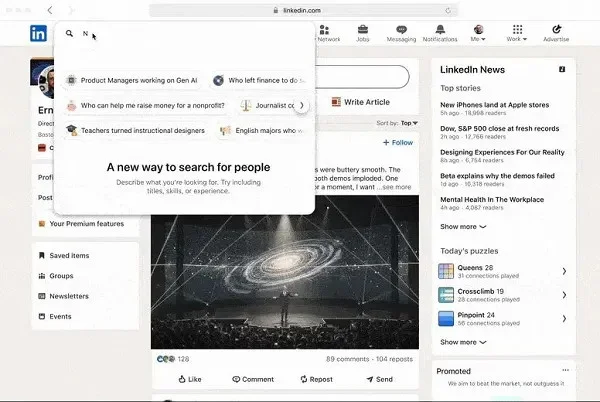
LinkedIn has made search much smarter with the introduction of Conversational AI Search. Instead of relying on exact keywords and multiple filters, you can simply describe what you’re looking for in natural language.
For example, you can search for marketing managers in London with SaaS experience or HR leaders in healthcare who recently changed jobs, and LinkedIn will return more relevant results.
This AI-powered approach now extends beyond people search. It’s also being used to improve job discovery and content recommendations, making it easier to find the information that matters without spending time refining search filters.
Why This Update Matters
Searching LinkedIn is now faster and far more intuitive. Instead of guessing the right keywords or building complicated searches, you can describe exactly what you need. That saves time and often surfaces results you may have missed using traditional search methods.
How to Make the Most of It
- Write complete, descriptive search queries instead of single keywords.
- Include useful details like industry, location, job title, or years of experience.
- Refine your search naturally by adding more context if the first results aren’t quite right.
- Save promising profiles or searches so you can return to them later.
3. Custom LinkedIn Profile URL
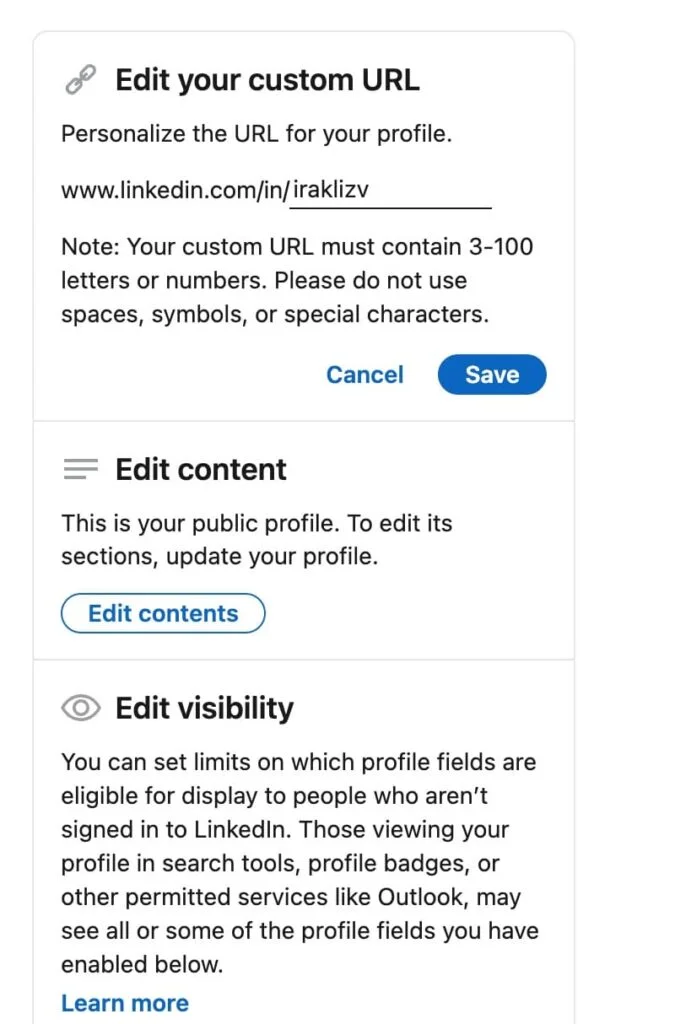
A custom LinkedIn URL might seem like a small change, but it gives your profile a much cleaner and more professional appearance. Instead of sharing a long web address filled with random numbers and characters, you can personalize it with your name or personal brand.
A simple profile URL is easier to remember, looks more credible on resumes and business cards, and makes your LinkedIn profile easier to share in emails, presentations, and other marketing materials.
Why This Update Matters
First impressions matter online. A personalized LinkedIn URL looks polished, strengthens your personal brand, and makes it easier for people to find and trust your profile.
How to Make the Most of It
- Update your profile URL to include your name or professional brand. Keep it short, simple, and easy to spell.
- Use the same naming style across your website and other social platforms where possible.
- Add your custom LinkedIn URL to your email signature, resume, portfolio, and business cards for a more consistent online presence.
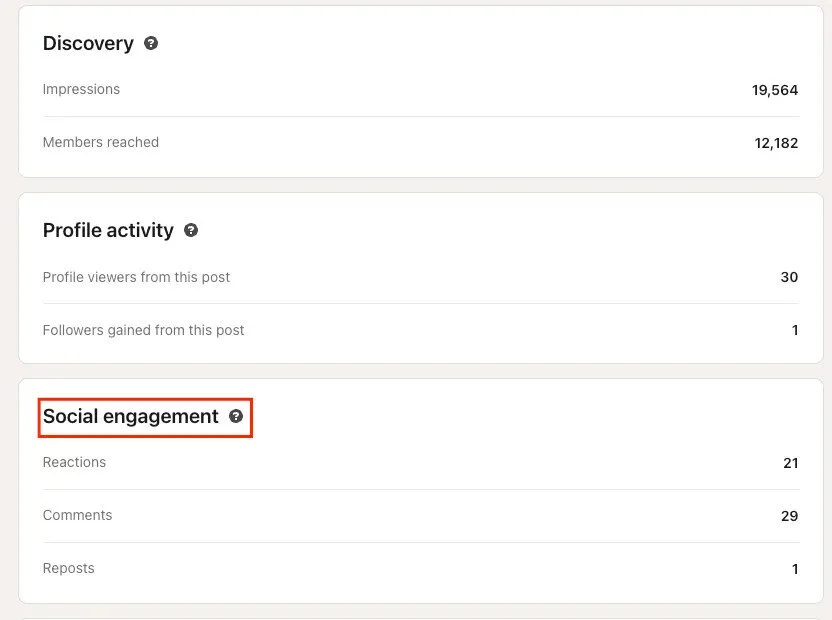
4. Advanced Content Analytics
LinkedIn has expanded its analytics to provide insights that go beyond likes and comments. You can now see metrics such as Saves, Shares (Sends), and the difference between in-network and out-of-network reach.
These numbers offer a clearer picture of how people are interacting with your content and how far the LinkedIn algorithm is distributing your posts.
Instead of focusing only on engagement, you can now understand which posts people found valuable enough to save, share privately, or discover outside your existing network.
Why This Update Matters
These metrics make it easier to identify content that genuinely resonates with your audience. A post with high saves or shares often has more long-term value than one with lots of likes, while strong out-of-network reach signals that LinkedIn is recommending your content to new audiences.
How to Make the Most of It
- Review your analytics regularly to identify posts with the highest saves and shares.
- Look for common themes, topics, or formats among your best-performing content.
- Repurpose successful posts into videos, carousel documents, or newsletters.
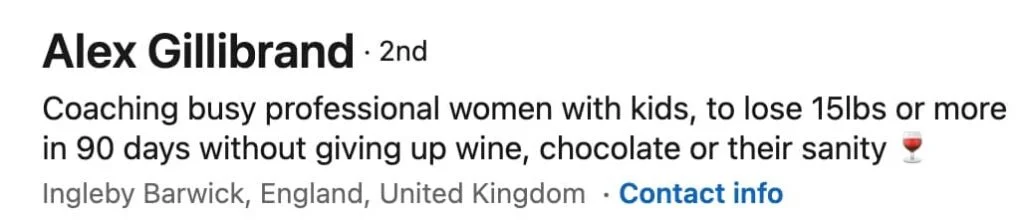
5. Expanded LinkedIn Headline
Your LinkedIn headline has become one of the most important parts of your profile. With up to 220 characters available, you have more room to explain who you help, what you do, and what makes you different instead of simply listing your current job title.
Because your headline appears in search results, connection requests, comments, and messages, it’s often the first thing people read before deciding to view your profile.
Why This Update Matters
A well-written headline improves both discoverability and first impressions. It quickly tells potential clients, employers, or collaborators why they should connect with you, making it one of the highest-impact profile updates you can make.
How to Make the Most of It
- Focus on the value you provide rather than just your job title.
- Include keywords that describe your expertise and industry.
- Highlight a key achievement, specialty, or result where appropriate.
- Update your headline whenever your role, business, or career focus changes.
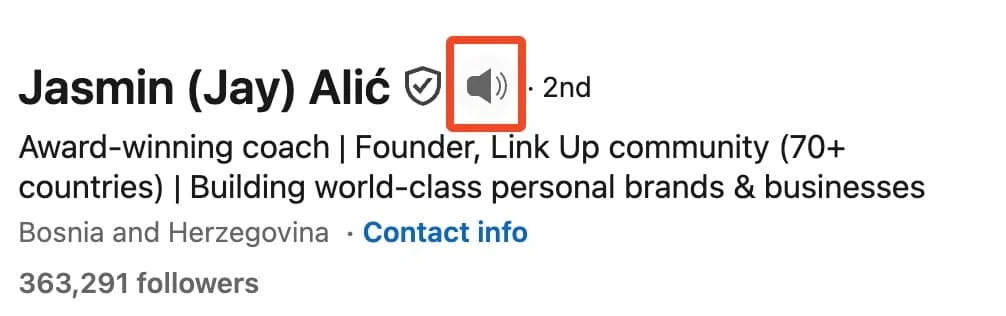
6. Name Pronunciation
LinkedIn now lets you add a short audio recording that tells people how to pronounce your name correctly. Visitors can simply tap the speaker icon on your profile to hear your pronunciation before reaching out or meeting with you.
It may seem like a small feature, but it creates a more personal experience and helps eliminate awkward introductions during networking, interviews, or client meetings.
Why This Update Matters
Getting someone’s name right leaves a positive first impression. This feature helps people address you confidently while adding a more human touch to your LinkedIn profile.
How to Make the Most of It
- Record your pronunciation in a quiet environment using the LinkedIn mobile app.
- Speak naturally and keep the recording clear and concise.
- Consider enabling it if you regularly network with international audiences or attend virtual meetings.
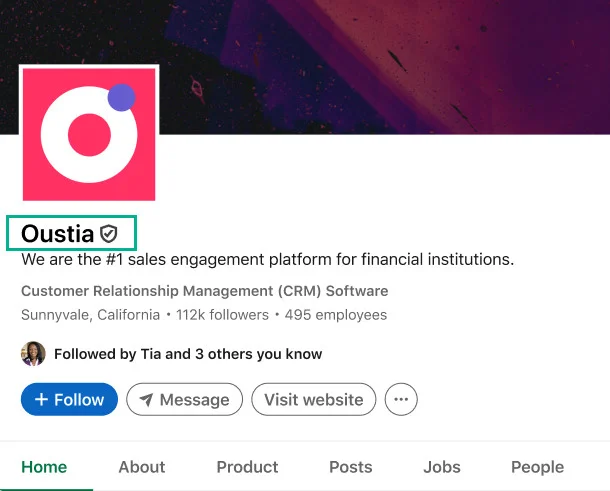
7. Verified Identity for Individuals and Company Pages
LinkedIn has continued expanding its verification program, making it easier for both individuals and businesses to prove they’re authentic.
Members can verify their identity using methods such as a government-issued ID or a work email, while eligible businesses can apply for verification on their Company Pages. Once approved, a verification badge helps distinguish genuine profiles from impersonators and fake accounts.
As trust becomes more important online, verified profiles stand out and give visitors greater confidence when deciding who to connect with or follow.
Why This Update Matters
Verification provides an instant trust signal. It reassures potential clients, employers, and followers that they’re interacting with the real person or organization, which can improve credibility before someone even reads your profile or content.
How to Make the Most of It
- Complete LinkedIn’s identity verification process if you’re eligible.
- Check if your Company Page qualifies for business verification.
- Highlight your verified status naturally within your profile or company description.
8. LinkedIn Newsletters for Everyone
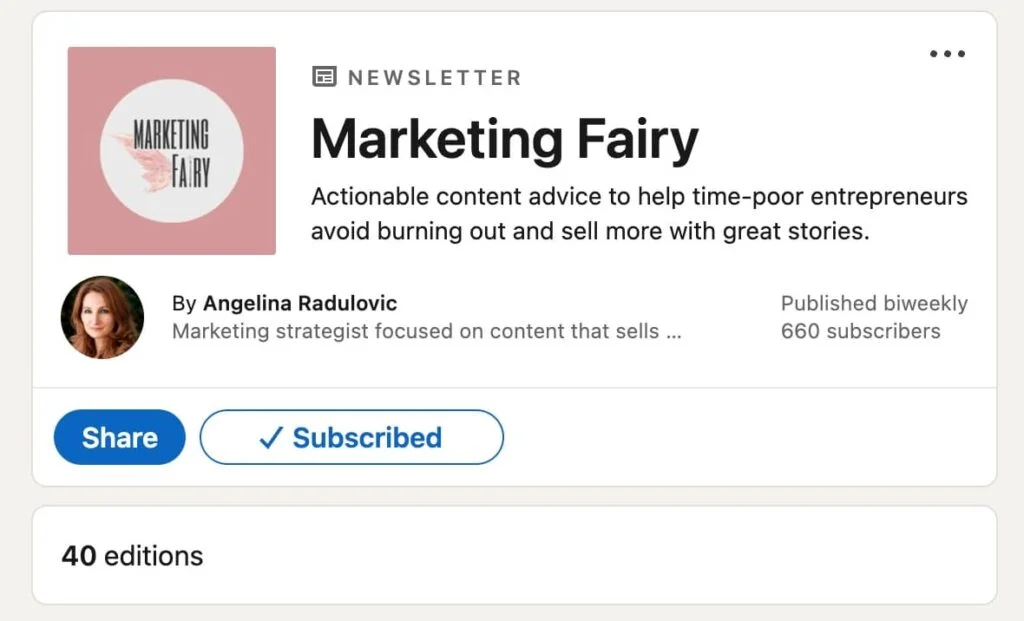
LinkedIn Newsletters are no longer limited to a select group of creators. Today, almost anyone can launch a newsletter, making it easier to build a loyal audience that receives your content on a regular schedule.
LinkedIn has also introduced improvements such as richer article presentation and additional performance insights, helping publishers better understand how readers engage with each edition.
Unlike standard posts that may disappear quickly in the feed, newsletters encourage ongoing subscriptions and repeated engagement from your audience.
Why This Update Matters
Newsletters give you a reliable way to stay connected with your audience over time. Instead of depending entirely on the LinkedIn feed, subscribers receive notifications when you publish, increasing the chances that your content gets seen.
How to Make the Most of It
- Choose a clear topic you can consistently write about.
- Publish on a regular schedule so subscribers know what to expect.
- Write attention-grabbing titles that focus on the value readers will receive.
- Review your newsletter analytics to identify the topics that attract the most readers and engagement.
9. BrandLink Video Ads
LinkedIn has expanded its video advertising options with BrandLink, a format that places brand videos alongside premium creator and publisher content.
Rather than appearing as standalone feed ads, BrandLink campaigns benefit from being shown within trusted, high-quality video environments, giving advertisers another way to reach professional audiences.
The format is designed to increase viewer attention while helping brands deliver messages in a more engaging setting.
Why This Update Matters
As video consumption continues to grow on LinkedIn, BrandLink gives advertisers an opportunity to improve campaign performance and reach audiences in a context that encourages higher engagement. It’s another sign that LinkedIn is investing heavily in video-first experiences across the platform.
How to Make the Most of It
- Create high-quality vertical video ads designed for mobile viewing.
- Compare BrandLink campaigns with your standard LinkedIn video ads to measure performance.
- Focus on meaningful metrics such as video completion, engagement, and lead generation.
- Scale campaigns that consistently outperform your existing video advertising strategy.
10. AI-Powered Job Search and Job Tracker
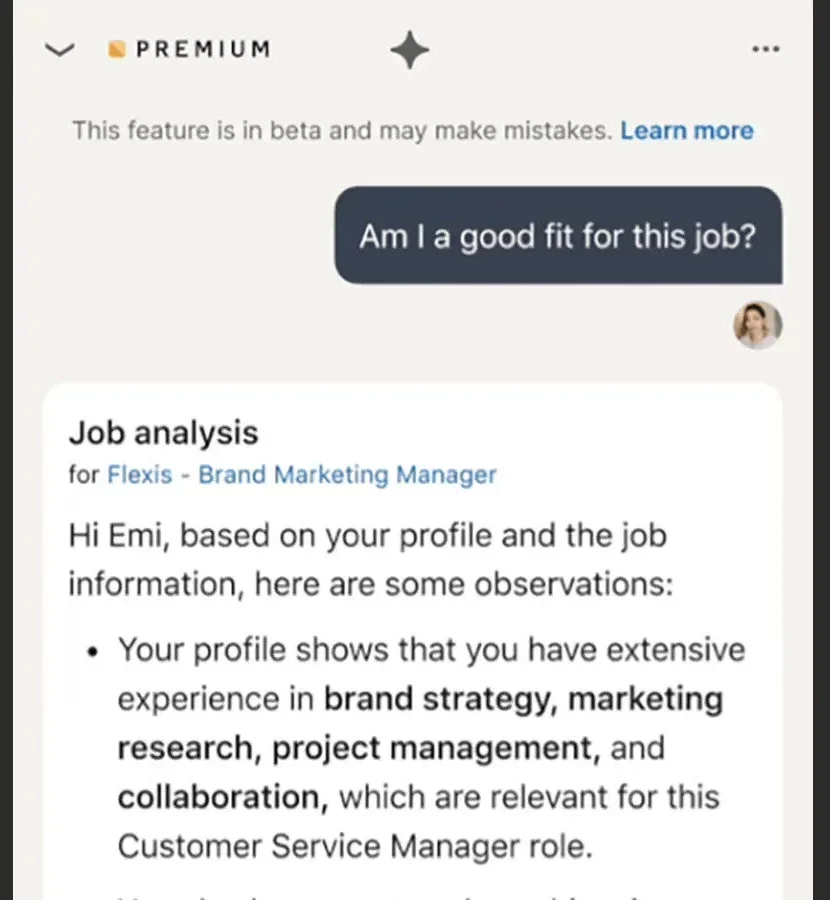
LinkedIn has introduced a collection of AI-powered career tools that make finding the right opportunities much easier. Instead of relying only on filters, AI Job Search lets users describe the kind of role they’re looking for in plain language.
LinkedIn then recommends relevant positions and even suggests profile improvements that could increase their chances of being noticed.
Alongside this is AI Career Coach, available through LinkedIn Learning, which recommends learning paths based on your career goals.
There’s also the Job Tracker, a centralized dashboard that helps users organize applications, interview progress, and follow-ups without relying on spreadsheets or separate apps.
Why This Update Matters
These features make LinkedIn more useful long after someone finishes updating their profile. More people are returning to the platform daily to search for jobs, develop new skills, and manage applications, creating more opportunities for brands and creators to reach an active audience.
How to Make the Most of It
- Describe your ideal role using natural language instead of only selecting filters.
- Explore Career Coach recommendations to identify valuable skills to learn.
- Use Job Tracker to monitor applications and follow-up tasks in one place.
11. In-App Games and Leaderboards
LinkedIn’s collection of daily games has become more than just a fun distraction. With leaderboards and social features encouraging friendly competition, these games are giving people another reason to visit the platform every day. The result is more frequent user activity and longer engagement across LinkedIn.
While the games themselves aren’t a marketing feature, the increased daily traffic creates new opportunities for content creators and businesses to reach audiences when they’re already active.
Why This Update Matters
The more often people open LinkedIn, the more chances your posts have to gain early engagement. Understanding when your audience is most active can help you publish content at times when it’s more likely to be seen and shared.
How to Make the Most of It
- Monitor when your audience is most active on LinkedIn.
- Schedule important posts during those peak engagement periods.
- Experiment with posting times to see when your content performs best.
- Use LinkedIn’s engagement data to refine your publishing schedule over time.
12. Smarter AI Content Moderation
As AI-generated content has become more common, LinkedIn has increased its focus on promoting authentic, high-quality posts.
The platform is becoming better at identifying repetitive, low-value AI content while rewarding posts that offer genuine expertise, unique perspectives, and meaningful conversations.
This doesn’t mean creators can’t use AI tools. Instead, LinkedIn encourages content that feels original, useful, and written for real people rather than content created solely to generate impressions.
Why This Update Matters
Authenticity is becoming a competitive advantage. Brands and creators who share real experiences, practical insights, and original ideas are more likely to earn engagement than those relying on generic, formulaic posts.
How to Make the Most of It
- Use AI to brainstorm or organize ideas, but personalize the final content.
- Include your own experiences, examples, or opinions wherever possible.
- Avoid repetitive phrases and generic business jargon.
- Focus on creating content that teaches, informs, or starts meaningful conversations instead of simply chasing engagement.
13. GIF Comments
LinkedIn has added support for GIFs in comments, giving users a more casual and visual way to react to posts. While the platform remains professional, GIFs make it easier to celebrate achievements, congratulate colleagues, or respond to light-hearted conversations without typing a lengthy reply.
It’s a small update, but one that reflects LinkedIn’s gradual shift toward more engaging and human interactions.
Why This Update Matters
Comments play a major role in LinkedIn’s algorithm, and thoughtful engagement helps increase visibility. Used appropriately, GIFs can make conversations feel more natural while encouraging others to join the discussion.
How to Make the Most of It
- Use GIFs in informal or celebratory conversations where they fit the tone.
- Pair a GIF with a short written comment for a more meaningful response.
- Avoid using GIFs on sensitive or highly professional discussions.
- Stay consistent with your personal or brand voice when engaging.
14. “Actively Reviewing Applications” Status
LinkedIn now displays an “Actively Reviewing Applications” label on eligible job postings. This lets candidates know that recruiters are currently evaluating applications, giving them more confidence that the position is active and receiving attention.
The feature also helps recruiters provide greater transparency throughout the hiring process, improving the experience for potential applicants.
Why This Update Matters
Many job seekers hesitate to apply for roles that appear inactive or outdated. This status provides reassurance that applications are being reviewed, helping candidates prioritize opportunities that are more likely to move forward.
How to Make the Most of It
- Prioritize job listings that display the active review status.
- Submit complete, well-tailored applications as early as possible.
- Keep your LinkedIn profile updated before applying.
15. Premium All-in-One for Small Businesses
LinkedIn’s Premium All-in-One plan brings several business tools together under a single subscription. Instead of paying separately for different services, eligible users can access features for prospecting, networking, profile optimization, recruiting, and advertising from one account.
The plan includes benefits such as advanced search filters, daily prospect recommendations, monthly InMail credits, profile improvement suggestions, advertising credits, and post promotion credits.
It’s designed for businesses that want an all-in-one workspace for growing their presence on LinkedIn.
Why This Update Matters
For small businesses with limited resources, managing multiple subscriptions can become expensive and inefficient. Premium All-in-One simplifies that workflow by combining several commonly used LinkedIn tools into a single package.
How to Make the Most of It
- Explore all the included features before deciding if the plan fits your business needs.
- Use advanced search and prospect recommendations to build targeted outreach lists.
- Take advantage of the included advertising and post boost credits to expand your content’s reach.
- If your primary focus is only sales or recruitment, compare this plan with LinkedIn’s specialized Premium options to choose the most cost-effective solution.
Conclusion
LinkedIn continues to evolve, and each new feature changes the way professionals, creators, and businesses connect with their audiences.
You don’t need to use every update, but understanding what’s new helps you focus on the features that can improve your visibility, strengthen your brand, and make your time on the platform more productive.
As you start creating more content, consistency becomes just as important as keeping up with new features. That’s where OnlySocial can help.
With its intuitive content calendar, post scheduling, and multi-platform publishing tools, you can plan your LinkedIn content alongside your other social channels from one place.
Instead of worrying about when to post, you can focus on creating content that takes full advantage of LinkedIn’s latest updates and keeps your audience engaged.
FAQs
Are the new LinkedIn features free or Premium-only?
Many new features are available to all LinkedIn users, including vertical video, AI search, newsletters, improved analytics, GIF comments, and profile enhancements.
However, some tools, such as Premium All-in-One, advanced sales features, and certain recruiting capabilities, require a LinkedIn Premium subscription.
How often does LinkedIn release new features?
LinkedIn rolls out updates throughout the year rather than in one large annual release. Some features launch globally within weeks, while others are introduced gradually, meaning users may receive access at different times.
Do I need to turn new features on manually?
Most new LinkedIn features become available automatically once they’re rolled out to your account. Some, such as profile verification, newsletters, or name pronunciation, require you to enable or configure them before you can start using them.
Which new LinkedIn feature matters most for a small business?
For many small businesses, the dedicated video feed, improved content analytics, newsletters, and verified Company Pages offer the biggest opportunities. Together, these features can help increase visibility, build trust, and grow an audience without requiring a large advertising budget.
What’s the best LinkedIn feature for B2B lead generation?
Conversational AI Search is one of the most valuable updates for B2B lead generation because it makes it easier to find qualified prospects using natural language.
Combined with advanced search tools, profile optimization, and consistent content publishing, it can significantly improve prospecting and relationship building on LinkedIn.