Top 10 CoSchedule Alternatives for Effective Social Media Management in 2025

Managing content and social media isn’t always as smooth as it looks from the outside. If you’ve spent time with CoSchedule, you’ll know what I mean. The tool is popular, but it has its fair share of roadblocks.
From clunky integrations to limited flexibility when juggling multiple accounts, many users have started looking elsewhere for something that fits better.
The truth is, keeping everything on track, including deadlines, campaigns, posts, and client approvals, can feel overwhelming if your tool doesn’t keep up. That’s why so many marketers, myself included, test out alternatives to see which ones make the workload lighter, not heavier.
In this guide, I’ll walk you through ten CoSchedule alternatives that stood out to me in 2025. These aren’t just names on a list. They’re tools I’ve explored firsthand, each bringing something fresh to the table.
If CoSchedule has been slowing you down, one of these options might be the upgrade you’ve been waiting for.
Table of Contents
- 1 Why Consider a CoSchedule Alternative?
- 2 10 CoSchedule Alternatives Worth Considering
- 3 1. OnlySocial ($29/Month)
- 4 2. SocialBee ($19/Month)
- 5 3. Buffer ($6/Month)
- 6 4. Planable ($39/Month)
- 7 5. Hootsuite ($99/Month)
- 8 6. Loomly ($35/Month)
- 9 7. Sprout Social ($199/Month)
- 10 8. Later ($25/Month)
- 11 9. ContentStudio ($99/Month)
- 12 10. RecurPost ($25/Month)
- 13 Final Note
- 14 FAQs
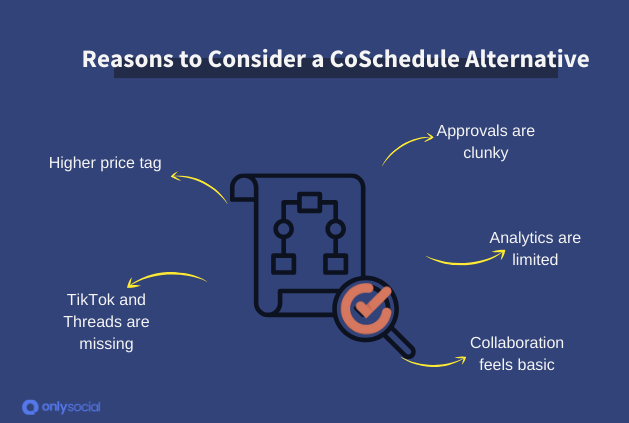
Why Consider a CoSchedule Alternative?
CoSchedule has built a strong reputation, and to be fair, it does some things really well.
The calendar view is clean, the scheduling is reliable, and little extras like the headline analyzer are genuinely helpful. For a busy marketing team running campaigns across blogs, newsletters, and social media, it can feel like a control room for content.
But let’s be honest. Most of us aren’t running a Fortune 500 content department. In 2025, many marketers are freelancers, small business owners, or agency folks managing multiple client accounts.
That’s where CoSchedule starts to feel more like a headache than a helping hand.
Here are some of the sticking points that push people toward alternatives:
The price adds up fast
Even the “basic” plan is $19 per user per month. By the time you add a team, or want access to the full suite of features, the bill gets heavy, especially if you’re just running a small brand or freelancing.
Approvals are clunky
If you’ve ever gone back and forth with a client about a post, you know how important smooth approvals are. CoSchedule’s process isn’t as intuitive, and it lacks the visual previews that many alternatives make so easy.
TikTok and Threads are missing
It’s hard to ignore where the real engagement is happening today, yet CoSchedule still doesn’t support these platforms directly. That’s a big drawback if you’re trying to stay relevant in 2025.
Analytics are limited
The standard Marketing Calendar doesn’t include social campaign analytics. You only get those if you upgrade to the pricier Marketing Suite, which feels like a paywall for something most tools now include as standard.
Collaboration feels basic
Sure, you can comment and set things to read-only, but deeper collaboration features only unlock with higher-paid versions. For teams, this can feel restrictive.
In short, CoSchedule still has strengths, but it’s not keeping pace with the way marketers work today. That’s why so many are switching to tools that are lighter, more affordable, and built for modern platforms.
10 CoSchedule Alternatives Worth Considering
1. OnlySocial ($29/Month)
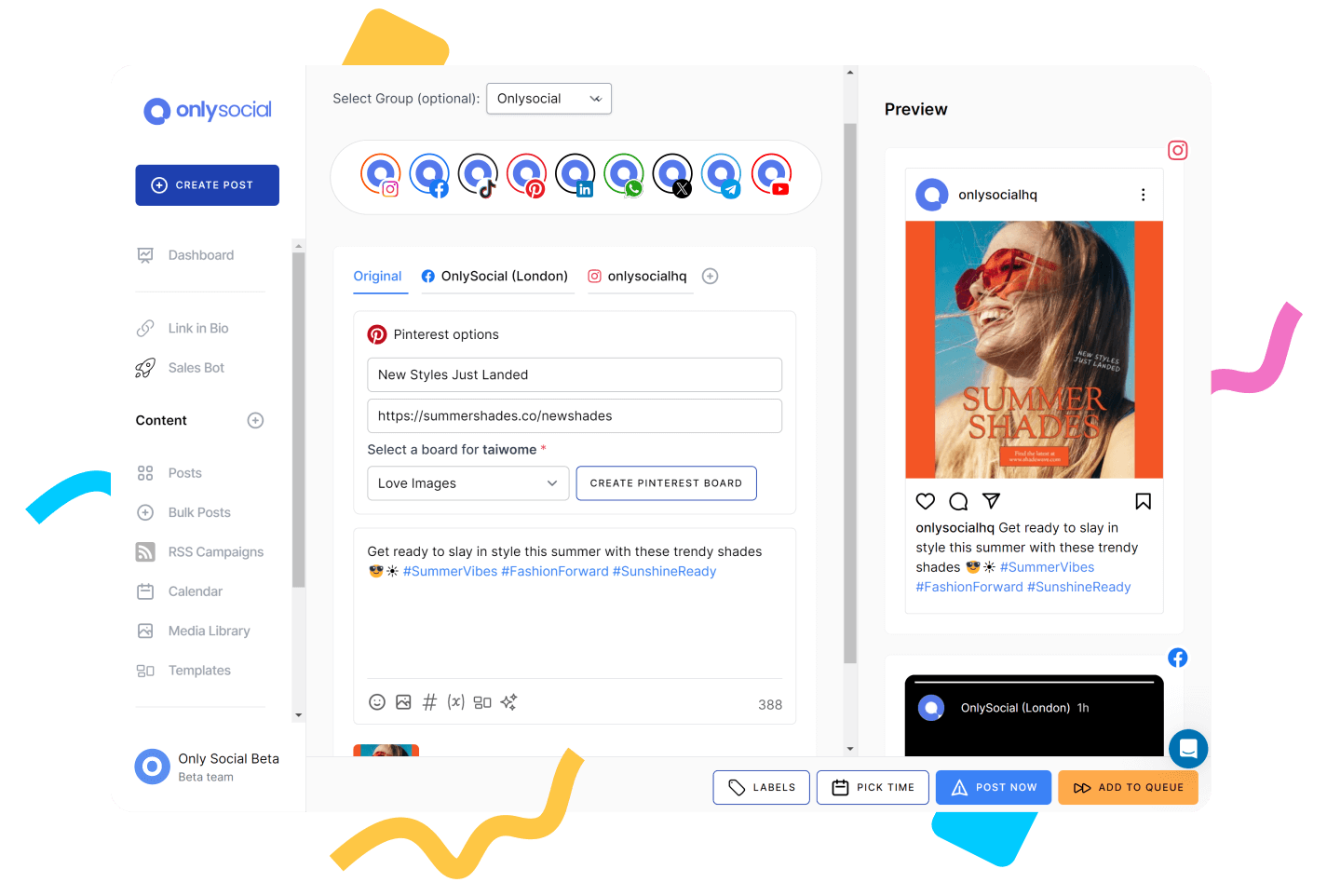
If you’ve been hunting for a tool that feels built for how we manage social media today, OnlySocial is that one tool you need to have in your kit.
Unlike CoSchedule, which sometimes feels a bit rigid, OnlySocial is lighter, more flexible, and covers the platforms people actually use in 2025 – yes, that includes TikTok, Threads, and even Bluesky.
From my testing, it’s one of the rare tools that balances simplicity with powerful features. The dashboard feels intuitive, the calendar is visual without being overwhelming, and the AI actually understands tone instead of spitting out robotic captions.
It’s not trying to be a massive “all-in-one” marketing suite; it’s laser-focused on social media management – and that’s exactly why it works so well.
Key Features:
Cross-platform scheduling for 15+ networks
This is where OnlySocial immediately stands out. I was able to post seamlessly across Instagram, TikTok, LinkedIn, Pinterest, YouTube, Threads, and even Bluesky. No clunky workarounds, no missed formats – everything published natively. For anyone juggling multiple accounts, this saves a ton of time.
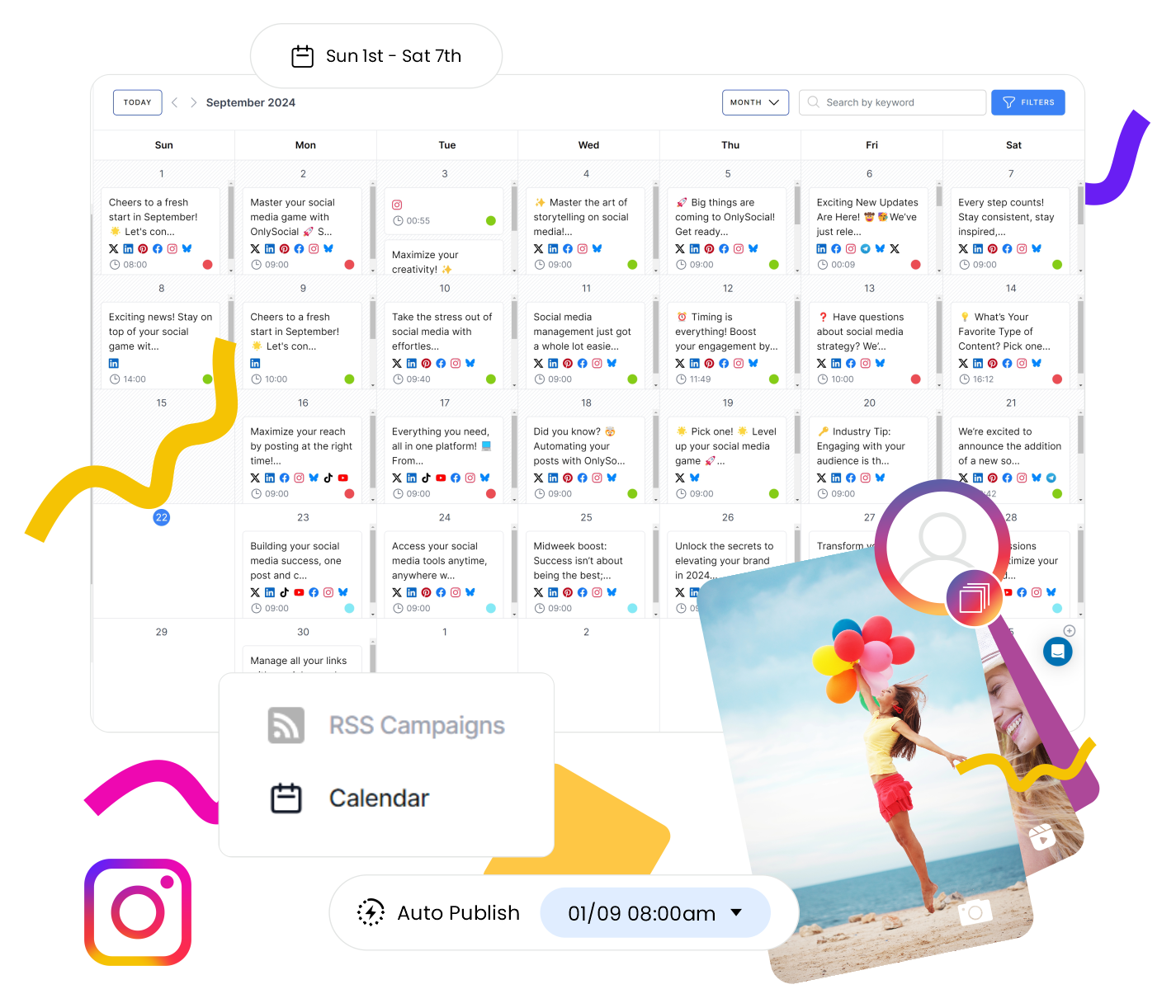
Visual calendar with bulk upload
The calendar is a dream compared to the old-school list views. You can drag and drop posts to reshuffle your week in seconds.
When I had a batch of 40 posts ready, the bulk upload feature handled it smoothly – no copy-paste marathon. I also liked the color-coding option, which makes it easy to see which posts belong to which channel or campaign.
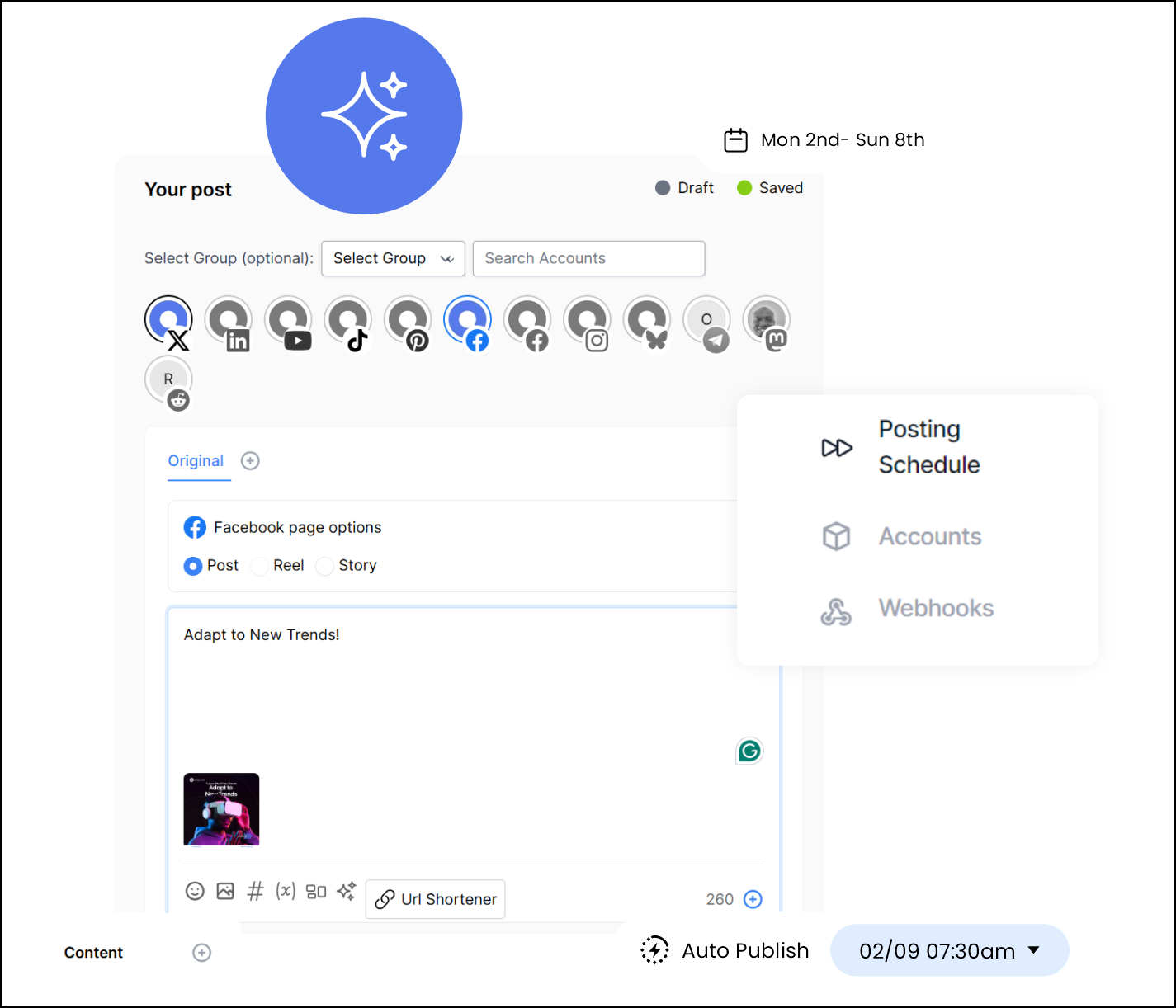
Intuitive post composer with built-in AI
Writing posts in OnlySocial feels refreshingly easy. The composer lets you tweak content for each platform side-by-side, and the AI suggestions felt on point. I tested it for captions, hashtags, and even post ideas – and over time, it started sounding more aligned with my brand’s style.
Honestly, compared to CoSchedule’s AI, OnlySocial feels less stiff and more like an assistant who “gets it.”
If you’ve ever had to bounce between Instagram DMs, Facebook comments, and LinkedIn messages, you know how easy it is to miss something. OnlySocial’s Unified Inbox pulls everything into one place. During my trial, this made a massive difference in keeping conversations flowing, especially with clients who value quick responses.

Clear, visual analytics
Instead of drowning you in spreadsheets, OnlySocial shows what matters: which posts are working, what times your audience engages, and how your platforms compare. I found it much easier to explain results to clients using these reports than the data-heavy charts in CoSchedule.
Team collaboration tools
Working with a team? You can assign roles, set up approval workflows, and keep assets in a shared library. I tested this with a small team, and it cut down on endless email threads. Everyone knew what stage the content was in.
Seamless integrations
Little touches matter. OnlySocial connects with Adobe Express, Bit.ly, and OpenAI directly inside the platform. You can use Adobe Express to mock up graphics without leaving the dashboard, and Bit.ly links to auto-tracked performance. These integrations make the workflow smooth and fast.
OnlySocial vs CoSchedule: Our Experience
After testing both tools side by side, I noticed a few clear areas where OnlySocial pulls ahead of CoSchedule. If you’ve been frustrated with some of CoSchedule’s limits, these differences are worth paying attention to.
Scheduling and Content Planning
CoSchedule’s calendar is nice, but OnlySocial’s is simply easier to work with. The drag-and-drop layout feels smoother, and the bulk upload feature shaved hours off my workflow when planning posts in batches.
Plus, OnlySocial supports platforms like TikTok, Threads, and Bluesky – which CoSchedule still doesn’t. For me, this alone made OnlySocial feel like the more “2025-ready” tool.
Analytics and Reporting
CoSchedule locks campaign analytics behind its pricier Marketing Suite. With OnlySocial, you get clear visual reports without needing to upgrade.
During client reviews, I found OnlySocial’s charts easier to explain. They highlight what’s working, when audiences engage most, and which platforms deliver results. CoSchedule’s data felt more buried, and honestly, a little harder to translate into insights.
Engagement and Client Management
Managing client accounts in CoSchedule can be frustrating. The approval process isn’t intuitive, and there’s no real-time preview of posts. OnlySocial fixes that.
The unified inbox was a game-changer. I could reply to Instagram DMs, Facebook comments, and LinkedIn mentions all from one place. Clients loved that they never missed a message, and I loved not juggling tabs.
Team Collaboration
CoSchedule only offers basic collaboration unless you’re paying more. With OnlySocial, I could assign roles, set up approval workflows, and keep brand assets in a shared library without the extra cost.
When I tested this with a small team, the workflow felt much clearer. Everyone knew their part, and there was less confusion compared to CoSchedule.
Pricing & Value
On paper, CoSchedule looks cheaper at $19/month. But once you start adding extra profiles ($5 each) and realize you only get Facebook and Instagram in the inbox unless you jump to the $59/month plan, the costs add up quickly. And that’s without approvals or advanced collaboration tools.
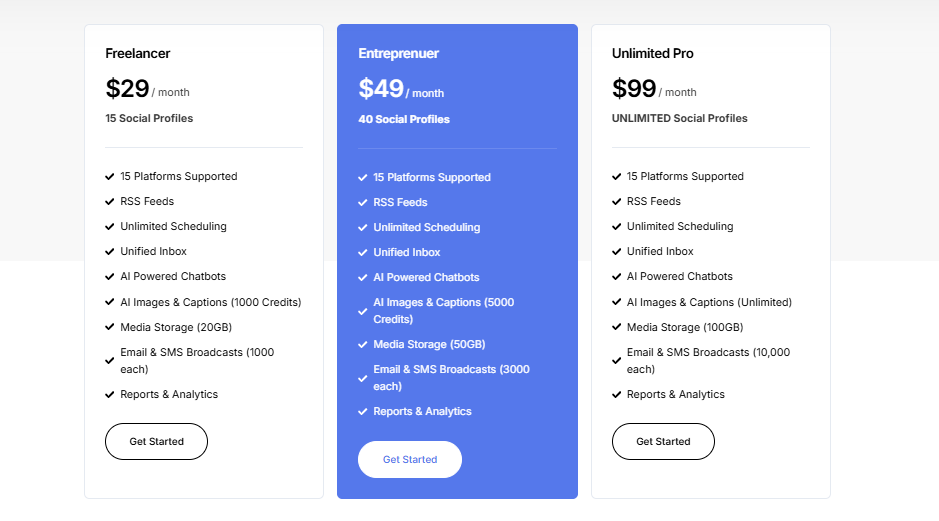
OnlySocial, on the other hand, keeps it straightforward. The Freelancer plan is $29/month for 15 profiles, which is already five times more than CoSchedule’s entry tier.
Need to grow? The Entrepreneur plan at $49/month covers 45 profiles and 3 users, and the Professional plan at $99/month expands that to unlimited social accounts and 10 users. No hidden charges, no upsells for basic features.
When you compare the two side by side, OnlySocial seems to give more room to scale without charging you for every little add-on. For agencies, freelancers, or even small brands, the value feels much stronger.
Overall Verdict
If you’ve outgrown CoSchedule or felt boxed in by its pricing and feature gaps, OnlySocial is the alternative that makes sense in 2025.
It’s more affordable at scale, supports all the platforms that matter today, and simplifies workflows with tools like the unified inbox and intuitive analytics.
Now, let’s take the next tool. That will be SocialBee. For this, we will have the short intro, key features, Socialbee vs Coschedule (including pricing and value), and the overall verdict sections. But for the key features, we will not be as detailed as we are for Onlysocial. We will just talk about what those features are that they offer without too much details.
2. SocialBee ($19/Month)
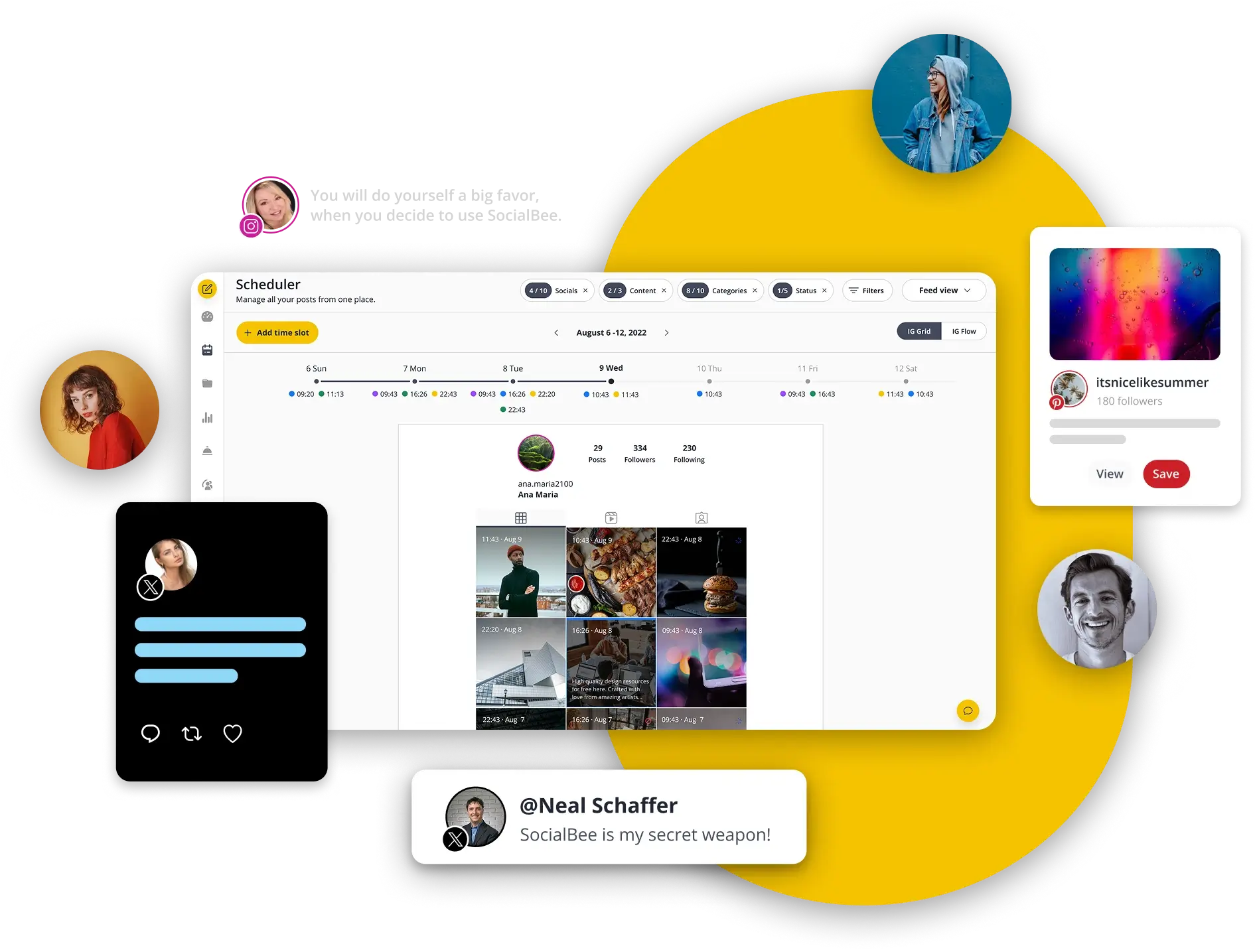
SocialBee is a smart option for anyone who wants structure and automation without overcomplicating things.
It’s especially handy for small businesses, solopreneurs, and agencies that need to keep content consistent but don’t have time to constantly juggle schedules.
The biggest selling point is its category-based approach that makes it easy to balance different types of posts, so your feed never feels repetitive or one-dimensional.
Key Features
Content categories: You can sort posts into groups like promotions, blog posts, or quotes, then schedule them on rotation to keep your feed varied.
Evergreen recycling: High-performing content doesn’t disappear after one use. SocialBee re-queues it automatically so your accounts stay active.
AI-powered assistance: When you need ideas, the built-in AI generates captions and post concepts tailored to your niche.
Bulk upload & import: This is a perfect feature for loading up multiple accounts in one go using CSV files or RSS feeds.
Analytics and reporting: Simple performance reports that show how your content is doing across channels.
SocialBee vs CoSchedule: Our Experience
When putting SocialBee up against CoSchedule, a few things stood out during testing:
- Keeping content fresh: SocialBee’s recycling feature was a big time-saver. CoSchedule doesn’t offer this kind of automatic re-queueing, which means more manual work to keep feeds active.
- Content planning and organization: The category system in SocialBee made it easy to balance promotional posts with value-driven content. With CoSchedule, it felt harder to maintain that variety without extra effort.
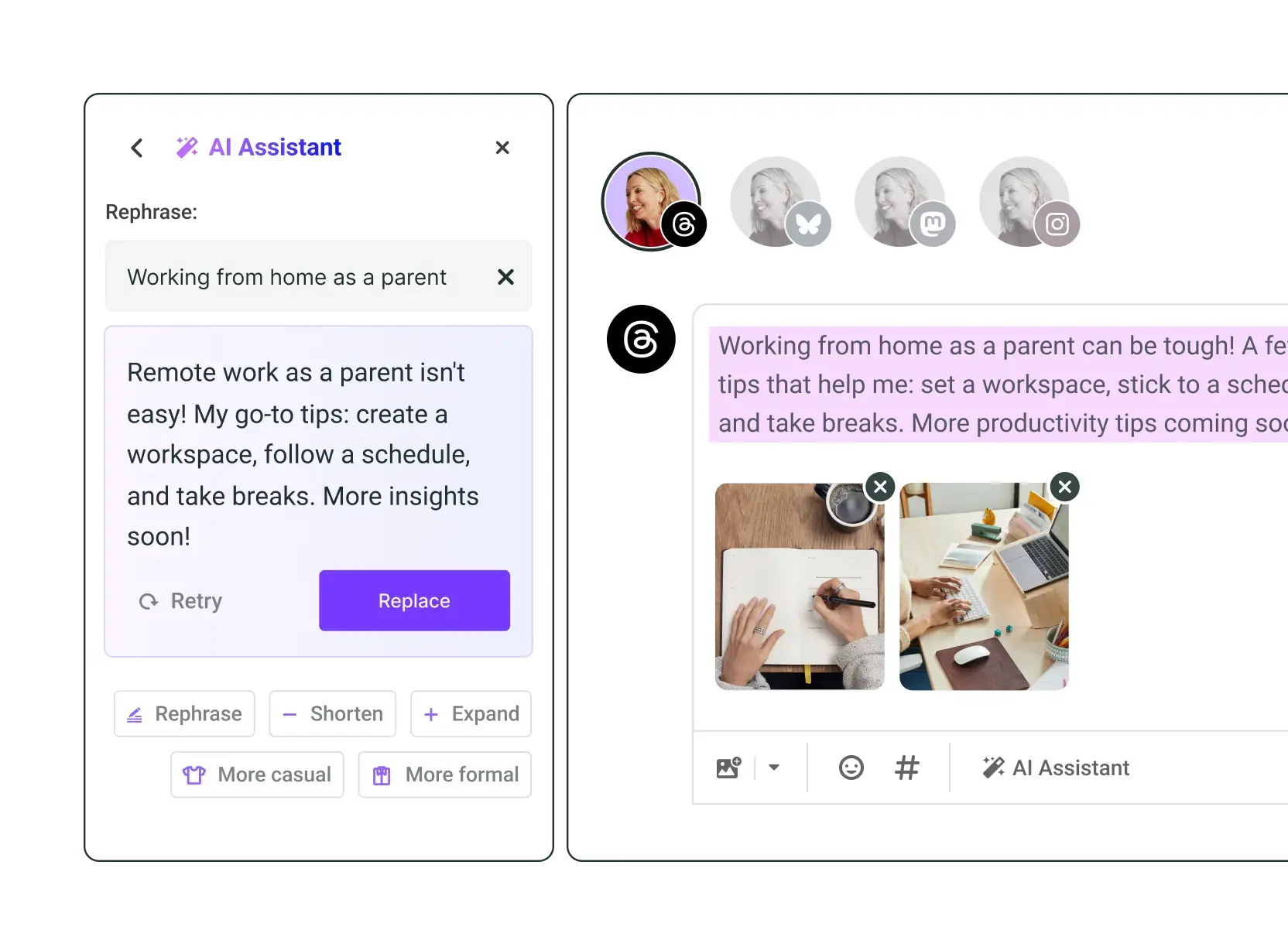
- Creative support: SocialBee’s AI tools gave us quick caption and idea prompts, which CoSchedule simply doesn’t have built-in.
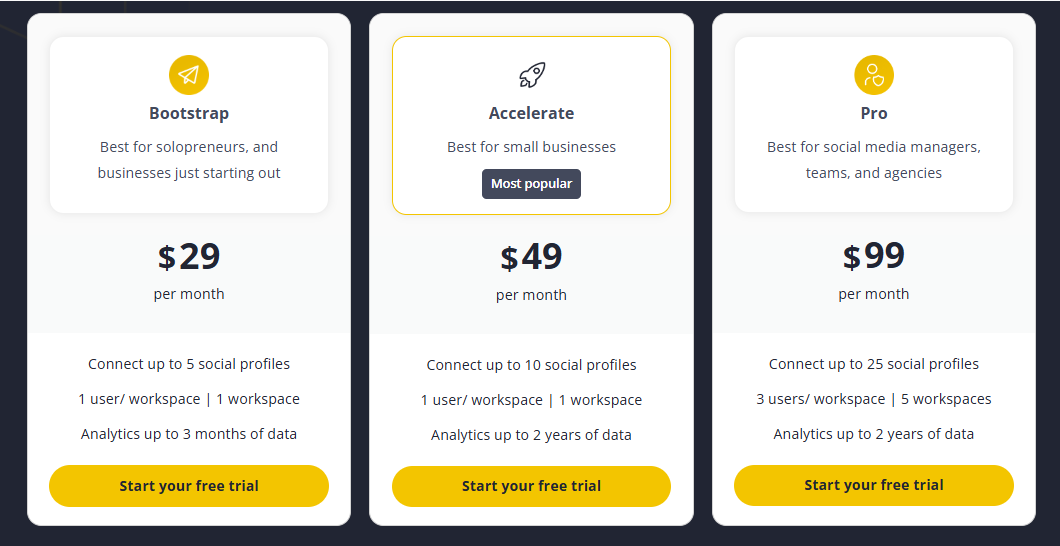
- Value for money: Starting at $19/month for 5 profiles, SocialBee felt like better value compared to CoSchedule’s base plan, which becomes pricey once you add more profiles.
Final Verdict:
SocialBee is a strong alternative for anyone who wants to automate scheduling while keeping their content mix balanced. It doesn’t overwhelm you with features you’ll never use, but it does make everyday posting and planning feel lighter.
3. Buffer ($6/Month)

Buffer has always been the go-to for creators, freelancers, and small teams who want simplicity above all else. It doesn’t try to be an “everything in one” marketing suite.
Instead, it focuses on what matters most, which is helping you schedule posts quickly, keep your feeds consistent, and track the basics without fuss. If CoSchedule feels too heavy for your day-to-day needs, Buffer is like a breath of fresh air.
Key Features
Multi-platform scheduling
From Instagram and LinkedIn to Facebook, X (Twitter), and Pinterest, Buffer covers the major platforms most small businesses rely on. The single dashboard keeps everything tidy, so you’re not bouncing between multiple apps just to queue up posts.
Clean, minimalist interface
The first thing I noticed with Buffer is how uncluttered it feels. The layout is simple, the buttons are where you expect them to be, and it’s easy to teach team members in minutes. Compared to CoSchedule’s more layered dashboard, this speed and clarity can be a big relief.
Link-in-bio tool
Buffer includes its own “Start Page” feature for Instagram. This means you don’t need an extra tool to manage links. You can drive followers from a single bio link to multiple destinations – perfect for creators or businesses promoting content, offers, or products.
Post analytics
Buffer provides straightforward analytics on engagement, reach, and click-through rates. While it’s not as deep as enterprise tools, it gives enough data to refine your strategy without overwhelming you with charts.
Team collaboration & roles
Even though Buffer is light, it supports small teams. You can assign roles, review drafts, and manage approvals. It’s ideal if you’re working with one or two other people, without needing the complex workflows that CoSchedule pushes.
Buffer vs CoSchedule: Our Experience
When we tested Buffer against CoSchedule, four areas stood out:
Ease of Use
Buffer’s design is built for speed. It strips away extra layers and puts scheduling front and center. CoSchedule, by contrast, tries to handle blog posts, email campaigns, and broader marketing workflows. If all you need is to keep your social feeds running smoothly, Buffer’s streamlined interface is far easier to work with.
Affordability and Plans
CoSchedule’s base plan starts at $19/month for just 3 profiles, and adding more profiles quickly raises costs. Buffer starts at $6/month, and it even offers a free plan that’s genuinely usable. For creators or smaller teams, Buffer clearly wins on price without cutting essential features.
Instagram-Friendly Features
With Buffer, you get the built-in link-in-bio tool at no extra cost. CoSchedule doesn’t offer this natively, which means you’d need another service. For anyone heavily using Instagram, this feature is a big convenience.
Focused Functionality
Buffer does one thing and does it well: social scheduling. CoSchedule spreads itself across multiple areas (blogs, emails, project management). For some teams, that’s great, but for smaller operations, it can feel bloated. Buffer’s focused approach makes the tool lighter and less overwhelming.
Final Verdict
Buffer is ideal for creators, freelancers, and small businesses who want to keep things simple. It’s affordable, easy to pick up, and has thoughtful extras like the link-in-bio tool. If CoSchedule feels like overkill, Buffer is a refreshing alternative that delivers just what you need.
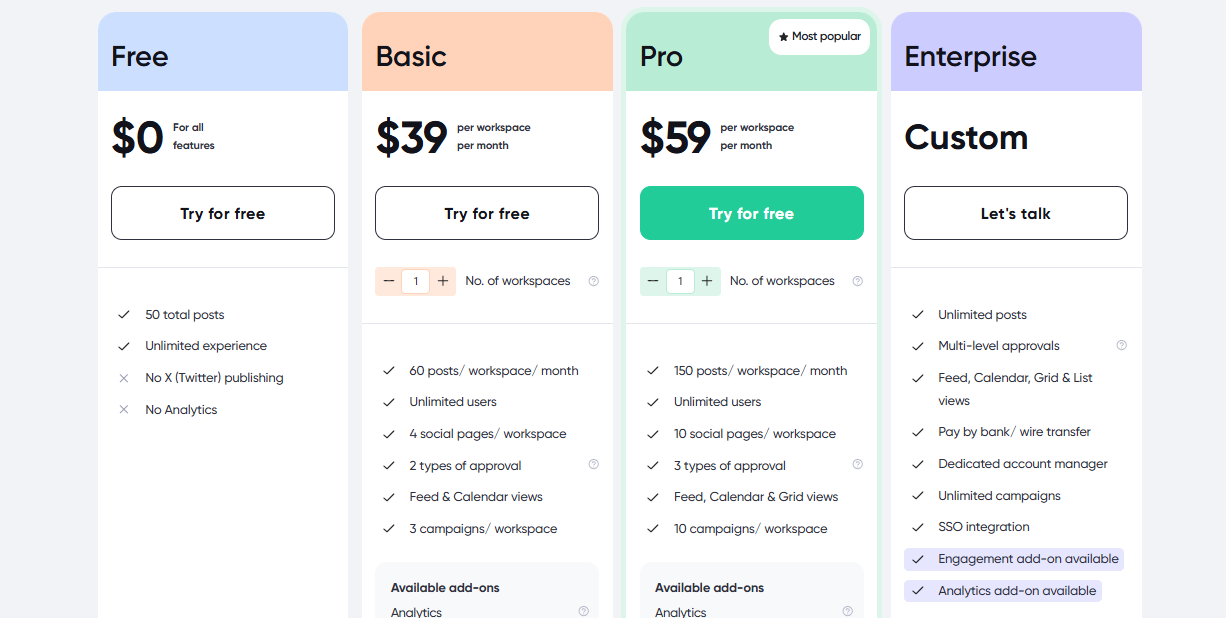
4. Planable ($39/Month)
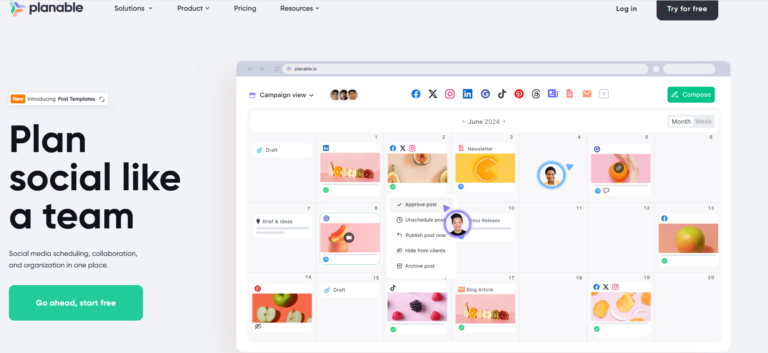
Planable is built for one thing: making collaboration smooth. If you’ve ever had endless email chains with clients about post drafts, or struggled to explain how a feed will actually look once published, Planable solves that problem.
It’s especially popular with agencies and marketing teams that need a clear, visual-first space to plan, review, and approve content together.
Key Features:
Visual content planning
Planable gives you a true-to-life preview of posts. Whether it’s Instagram, Facebook, LinkedIn, or TikTok, you can see exactly how content will appear in the feed before it goes live. The calendar, feed, and list views make planning easy for both marketers and clients.
Collaborative editing & commenting
Think of it like Google Docs for social media. Team members and clients can leave feedback, edit drafts, and chat directly within the post. It removes the back-and-forth confusion of email threads.
Approval workflows
You can set up single or multi-step approvals. For agencies handling multiple stakeholders, this feature makes sure nothing slips through the cracks and quality stays consistent.
Multi-platform scheduling
Supports all the major platforms – Facebook, Instagram, TikTok, YouTube, LinkedIn, Google Business, and X. Each post can be tailored to the platform while staying inside the same dashboard.
Version history & drafts
Every tweak is tracked. You can roll back to an earlier draft or compare changes across versions, which is a lifesaver when clients change their minds mid-project.
Planable vs CoSchedule: Our Experience
When comparing Planable with CoSchedule, here’s what stood out most during our testing:
Clarity in Collaboration
CoSchedule gives you task assignments and checklists, but Planable makes teamwork feel natural. Seeing posts in real time, editing together, and keeping all comments in one place drastically reduced miscommunication with clients. CoSchedule doesn’t offer that visual co-creation experience.
Approval Control
CoSchedule’s approval setup is fairly basic. Planable lets you build structured, multi-step approvals, so posts can move through designers, editors, and clients before publishing. For teams with complex workflows, this added control made the process far smoother.
Visual Accuracy
This was the game-changer. In Planable, I could scroll through posts in a pixel-perfect feed view, just like Instagram or Facebook. Clients instantly understood how campaigns would look. With CoSchedule, it’s harder to visualize beyond the calendar grid.
Team & Agency Focus
Planable is laser-focused on agencies and collaboration-heavy teams. CoSchedule is more about managing the content calendar and blog integration, which felt less relevant when the real challenge was keeping clients in sync.
Final Verdict:
Planable shines for agencies and visual-first teams who care about how posts look and how smoothly they move through approvals. If CoSchedule has ever left you stuck in endless client feedback loops, Planable is the alternative that will cut the noise and keep everyone aligned.
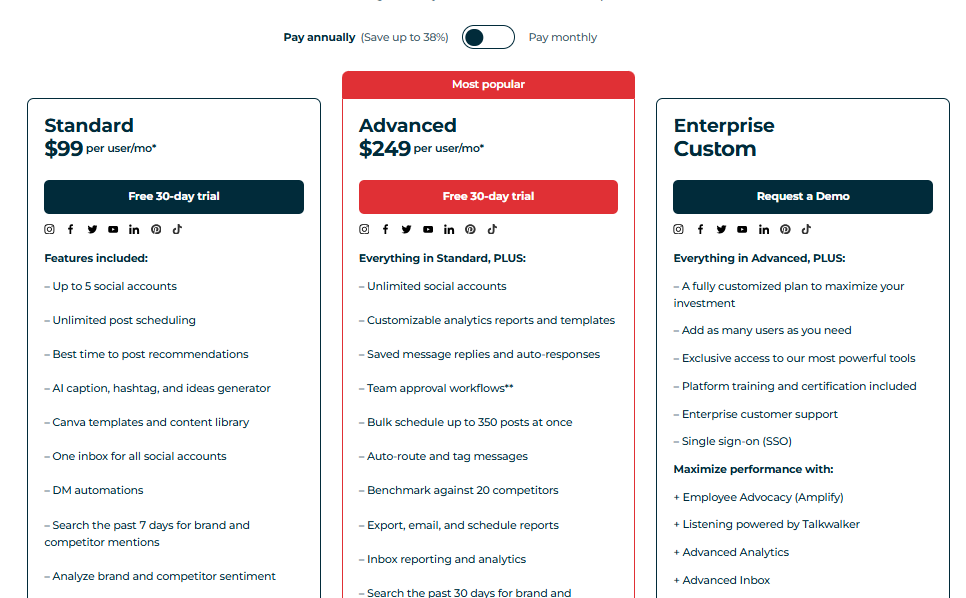
5. Hootsuite ($99/Month)

Hootsuite is one of the longest-standing names in social media management. It’s been around since 2008 and has grown into a full-featured platform trusted by big brands, agencies, and enterprise teams.
While it’s often seen as heavyweight, it still appeals to smaller teams who want a powerful, all-in-one hub for scheduling, monitoring, and reporting.
Key Features
Wide platform coverage
Hootsuite supports nearly every major social network – Facebook, Instagram, LinkedIn, TikTok, YouTube, Pinterest, and X – plus integrations with apps like WordPress. For teams managing multiple channels, this reach is invaluable.
Streams for monitoring
The Streams feature lets you track mentions, hashtags, and conversations in real-time. It’s like having your social listening and publishing in one place, helping you keep up with brand chatter without extra tools.
Post scheduling & queues
You can plan content weeks in advance or set up recurring queues for evergreen posts. The calendar view makes it easy to organize campaigns at a glance.
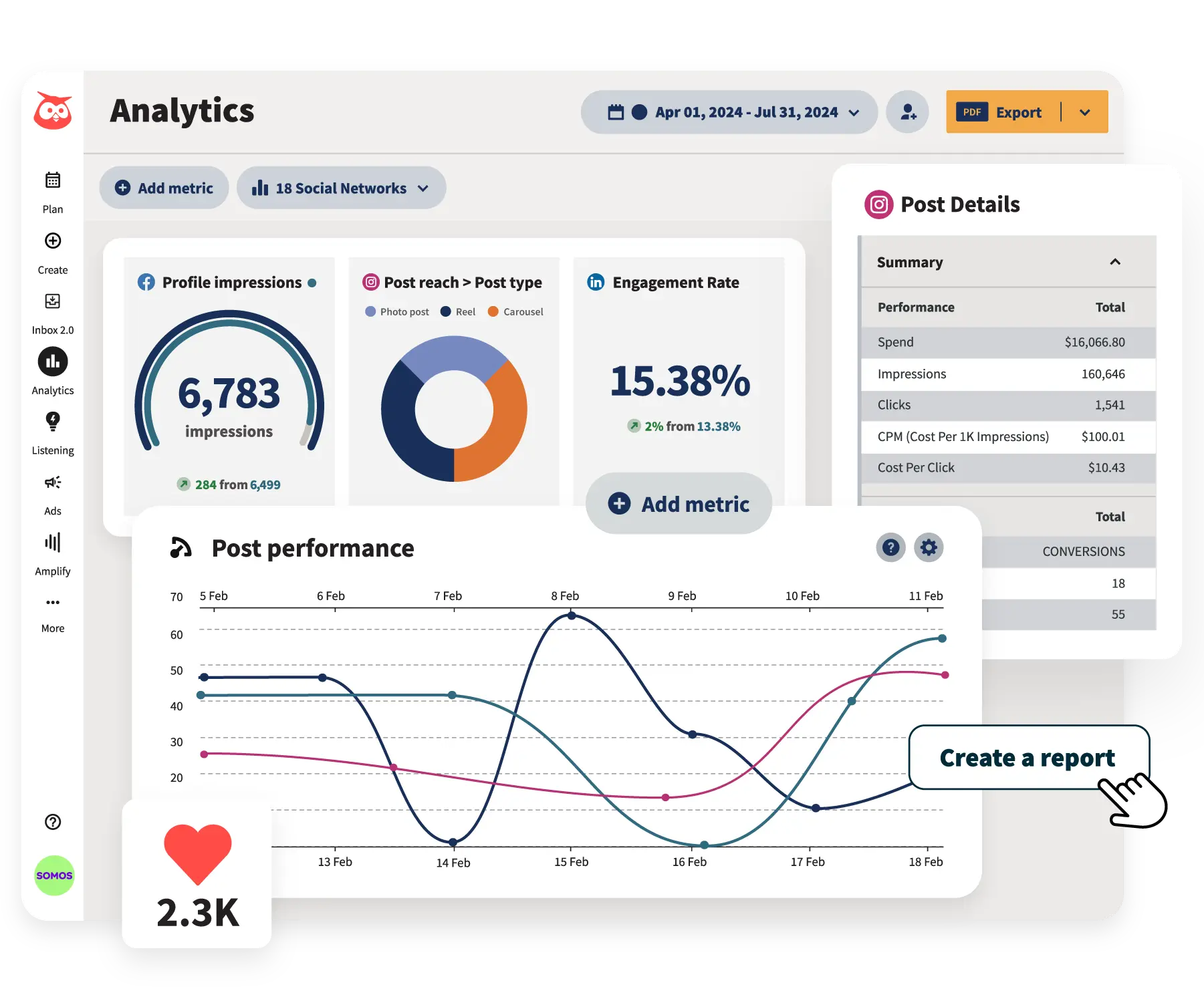
Robust analytics
Hootsuite offers advanced reporting that drills deep into engagement, demographics, and ROI. The reports are customizable, so you can show exactly what matters to your stakeholders.
Team collaboration
You can assign posts to teammates, control permissions, and even route incoming messages to the right person. For large teams, this prevents overlap and ensures accountability.
Hootsuite vs CoSchedule: Our Experience
Testing Hootsuite against CoSchedule highlighted some clear differences:
Breadth of Platform Support
CoSchedule still misses modern platforms like TikTok and Threads, which can be a dealbreaker in 2025. Hootsuite not only supports these but adds monitoring streams, so you can track conversations alongside your content. It feels more complete for multi-channel management.
Real-Time Engagement
With Hootsuite Streams, I could reply to mentions and messages directly in the dashboard. CoSchedule doesn’t offer this level of monitoring. For brands managing active communities, this makes Hootsuite much more responsive.
Reporting Depth
CoSchedule hides advanced analytics behind its Marketing Suite, which comes with a steep price tag. Hootsuite’s reporting is available at lower tiers and offers richer insights, from demographics to ROI tracking. For data-driven teams, this is a significant advantage.
Scalability for Teams
While CoSchedule works fine for small teams, Hootsuite scales better. The ability to assign tasks, set permissions, and use integrations made collaboration smoother when we tested it with larger groups. CoSchedule felt limited in comparison.
Final Verdict
Hootsuite is a powerhouse for teams and brands that want full control over their social presence. It covers more platforms, offers stronger analytics, and supports real-time engagement in ways CoSchedule doesn’t.
The trade-off is cost and a steeper learning curve, but if you need enterprise-level capability, Hootsuite is a strong alternative.
6. Loomly ($35/Month)
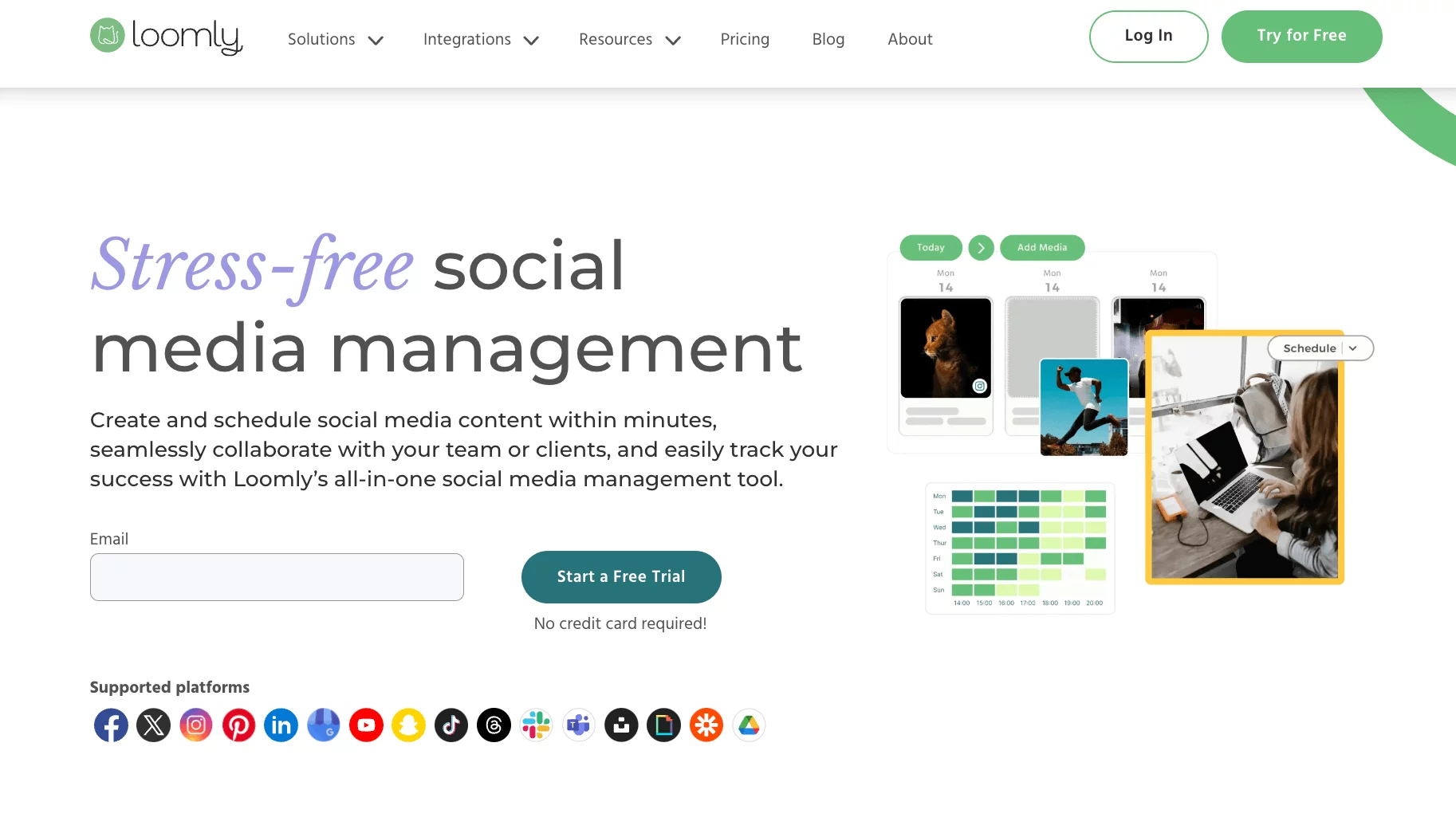
Loomly positions itself as more than just a scheduling tool. It’s built around the idea of guiding brands, agencies, and freelancers through the full content journey – from brainstorming and drafting to collaboration and approvals.
For teams handling multiple clients or brands, its structured workflow and visual previews make social media planning feel more organized and less guesswork.
Key Features
Post ideas & optimization tips
Loomly takes some of the pressure off brainstorming by suggesting content ideas and trending topics. As you draft, it also gives optimization tips on hashtags, timing, and formatting. This is especially useful when you’re staring at a blank screen.
Step-by-step content builder
The guided workflow leads you from idea → draft → preview → approval. It feels structured without being restrictive, which is ideal for teams managing multiple brands or campaigns simultaneously.
Approval workflow & roles
Assign roles like creator, approver, or viewer, and track posts through each stage. This reduces confusion and ensures quality control, especially with clients or larger teams.
Performance tracking
Analytics are displayed in simple dashboards, showing reach, engagement, and performance trends. It’s easy to digest and helpful for adjusting strategy.
Custom branding (advanced plans)
For agencies, the ability to white-label reports and client-facing dashboards adds professionalism and keeps everything consistent with the brand.
Loomly vs CoSchedule: Our Experience
When we compared Loomly with CoSchedule, four differences stood out:
Creative Guidance
CoSchedule is mainly a calendar-based tool. Loomly goes further by offering post ideas and optimization suggestions as you create. For us, this meant fewer creative roadblocks and more polished content without extra tools.
Structured Workflow
Loomly’s guided builder felt more intuitive than CoSchedule’s calendar-first approach. Having a clear workflow was especially helpful when managing multiple campaigns at once. It kept the team organized and confident at every stage.
Visual Accuracy
Loomly’s pixel-perfect previews, including carousels and Instagram grid views, were a big step up from CoSchedule. Showing clients exactly how a post would appear saved us from endless rounds of clarification.
Collaboration Clarity
While CoSchedule allows task assignments, Loomly’s role-based approvals felt better suited for agency workflows. Everyone knew their responsibilities, and feedback stayed tied directly to the content, not scattered across email threads.
Overall Verdict
Loomly is a strong alternative to CoSchedule for brands and agencies that value structure, creative guidance, and visual accuracy. If your team deals with multiple campaigns and client approvals, Loomly’s organized workflow and post previews make it much easier to keep everyone aligned and confident before hitting publish.
7. Sprout Social ($199/Month)
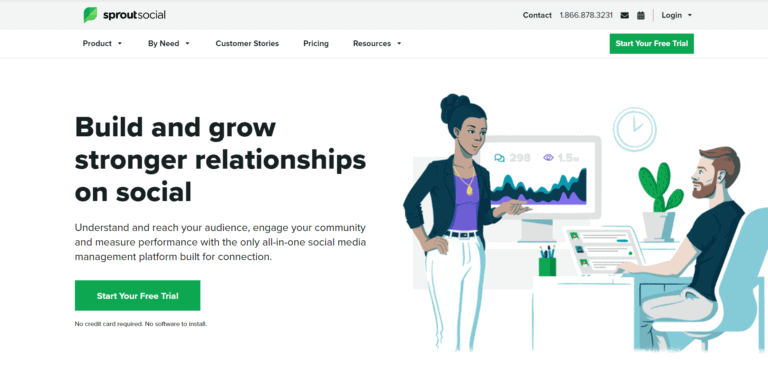
Sprout Social is often seen as the premium choice among social media management tools. It’s built for businesses that want more than just scheduling. It’s about insights, engagement, and managing relationships at scale.
While it comes with a higher price tag, it also delivers enterprise-level features that make it a favorite for large teams, agencies, and brands with a strong focus on analytics and customer care.
Key Features
Advanced publishing & scheduling
Sprout Social lets you create, queue, and publish content across major platforms – Facebook, Instagram, LinkedIn, TikTok, X, Pinterest, and YouTube. The smart scheduling feature also recommends the best posting times based on when your audience is most active.
Smart inbox
Instead of juggling tabs, Sprout pulls all your messages, mentions, and comments into one inbox. It even adds tagging and filtering, making it easier to prioritize important conversations.
Deep analytics & reporting
This is where Sprout Social shines. Reports drill down into audience demographics, engagement trends, competitor benchmarking, and even paid campaign performance. Customizable reporting makes it easy to present client-ready data.
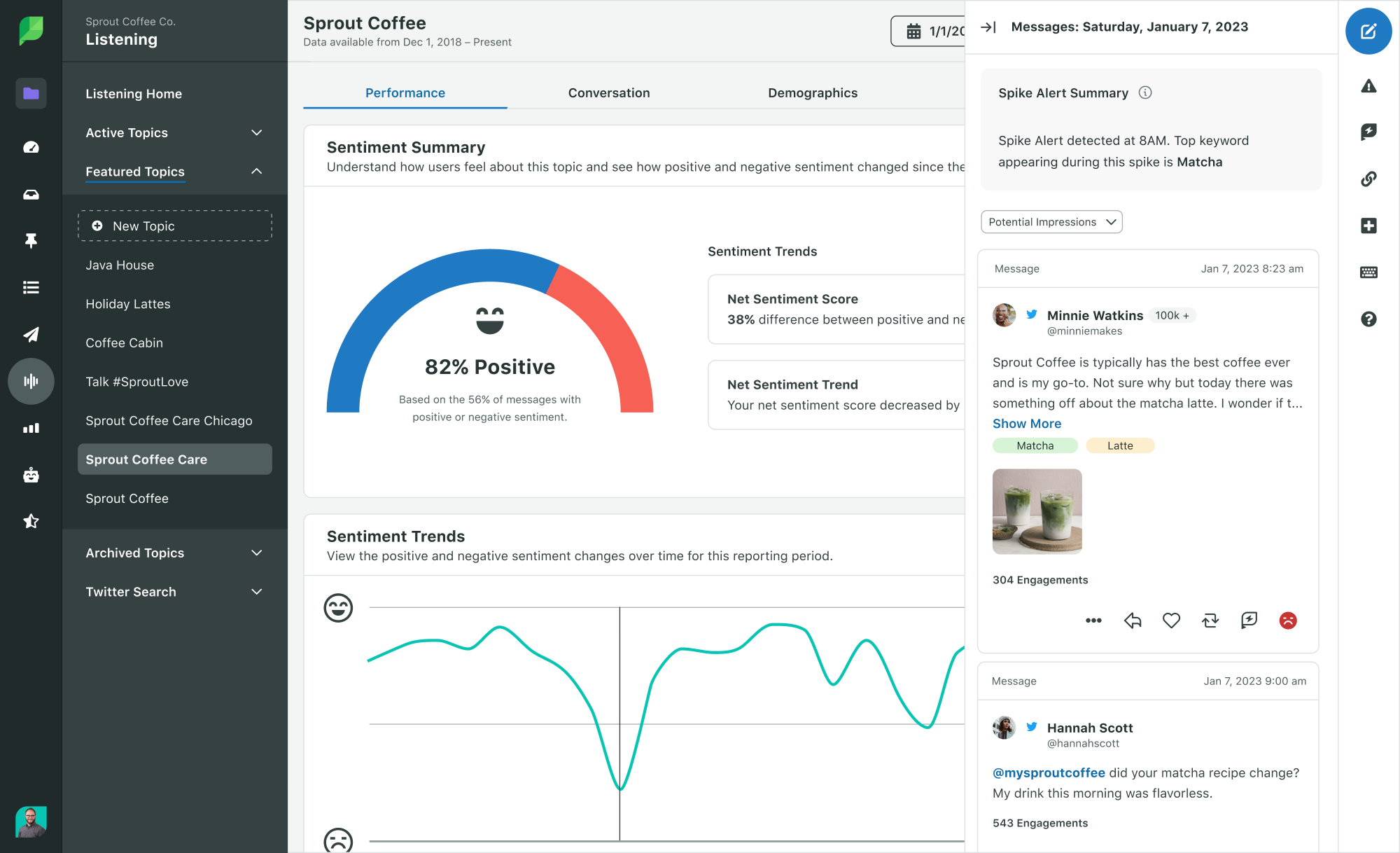
Social listening
With built-in listening tools, you can track conversations around your brand, industry trends, or competitors. This gives you insights beyond your own pages and helps inform strategy.
Team collaboration & workflows
Assign tasks, manage approvals, and track progress across large teams. Sprout is designed for scale, making sure nothing slips through when multiple people are involved.
CRM integration
Sprout Social has features that help track customer interactions and even integrates with CRM systems. This makes it more than just a marketing tool – it’s also about building relationships.
Sprout Social vs CoSchedule: Our Experience
Analytics Depth
CoSchedule offers only basic reporting on its entry-level plans, and advanced analytics are locked behind higher tiers. Sprout Social, while more expensive, delivers analytics that felt genuinely insightful. It goes beyond just numbers to actionable insights into what drives growth and engagement.
Engagement Management
CoSchedule doesn’t provide a unified inbox or social listening. With Sprout, we had all conversations in one place, plus tools to track industry chatter. For brands that prioritize community engagement, this was a big win.
Scalability for Large Teams
Sprout’s task assignments, approvals, and workflows are built for enterprise-level collaboration. CoSchedule felt more suited to small-to-mid teams, while Sprout scaled effortlessly when we tested it with larger groups.
Strategic Insights
Sprout’s social listening gave us a pulse on trends and competitors, something CoSchedule simply doesn’t do. This added layer turned social management into a strategy-driven process, not just content scheduling.
Pricing & Value
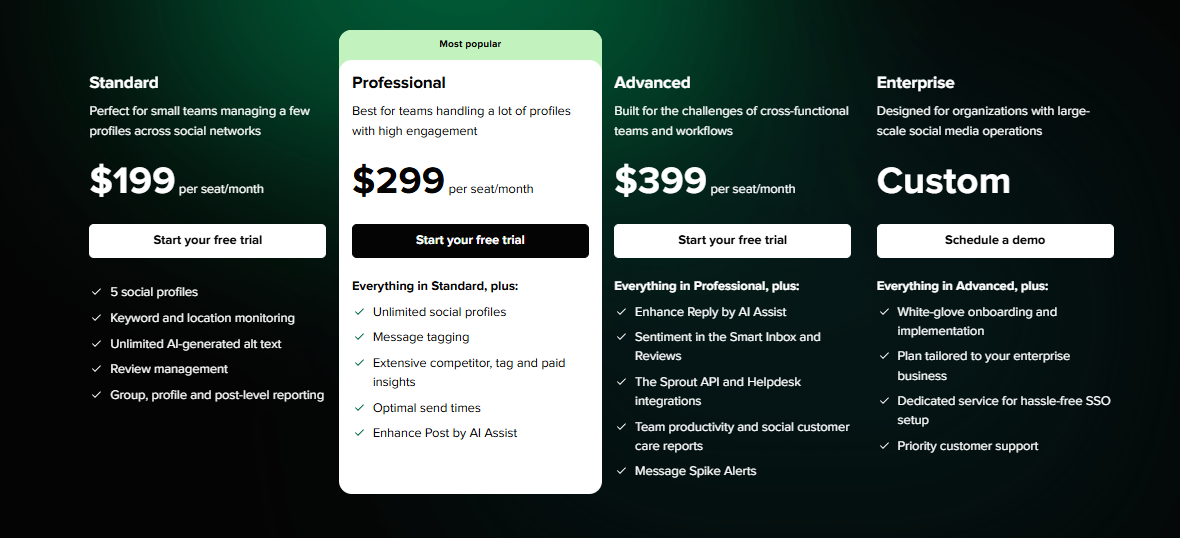
Sprout Social starts at $199/month per user for the Standard plan, with higher tiers (Professional and Advanced) adding more analytics and listening features. It’s undeniably more expensive than CoSchedule (starting at $19/month), but the difference lies in depth and scalability. For businesses that need advanced insights and engagement tools, Sprout delivers value despite the price.
Final Verdict
Sprout Social is a powerhouse alternative for larger teams and brands that need more than just scheduling. Its robust analytics, unified inbox, and social listening tools put it leagues ahead of CoSchedule when it comes to strategy and engagement.
The price may be steep, but if insights and scalability matter, Sprout Social earns its spot as one of the strongest CoSchedule alternatives.
8. Later ($25/Month)
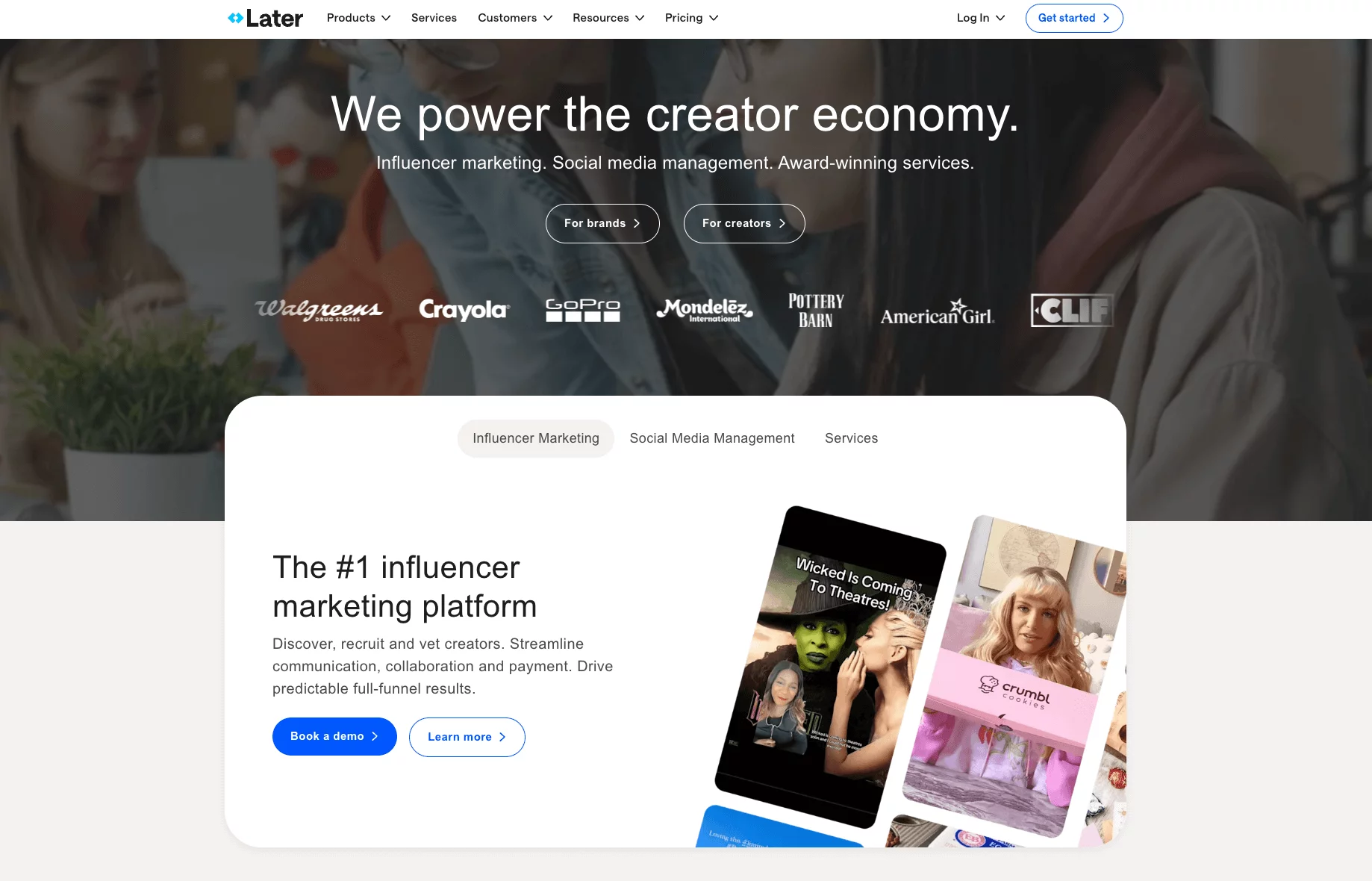
Later started as an Instagram scheduler but has grown into a full social media management tool for creators, brands, and small businesses.
It’s still very visual-first, making it one of the easiest options for planning content across Instagram, TikTok, Pinterest, LinkedIn, Facebook, and X. If your brand relies heavily on visuals, Later feels like a natural fit.
Key Features
Visual content calendar
Later’s drag-and-drop calendar is built for visual thinkers. You can literally see how your feed will look before publishing, which is especially handy for Instagram and Pinterest.
Instagram-first tools
Features like grid preview, carousel scheduling, and story scheduling make Later a standout for Instagram. It also supports TikTok and Reels, giving creators flexibility to plan across trending formats.
Media library
You can store, organize, and label all your media in one place. If you’re working with lots of visuals or a team sharing assets, this saves time digging through folders.
Linkin.bio
Later includes its own customizable link-in-bio tool, allowing you to drive followers to multiple destinations from a single Instagram bio link. It even connects posts directly to URLs for easy traffic tracking.
Analytics & insights
Later provides engagement metrics like reach, clicks, and follower growth. It’s not as deep as Sprout Social or Hootsuite, but it’s enough for creators and small businesses to adjust strategies.
Collaboration support
You can invite teammates, assign roles, and manage approvals. While it’s simpler than OnlySocial or Loomly, it works well for small teams.
Later vs CoSchedule: Our Experience
Visual Planning Power
CoSchedule focuses on calendar grids and task lists. Later makes visual planning its superpower. Being able to preview feeds, carousels, and Reels before posting made content feel more polished and on-brand.
Creator-Centric Features
CoSchedule is built for broader marketing campaigns (blogs, emails, social). Later stays focused on creators and social-first brands. The Instagram tools – from story scheduling to link-in-bio – felt far more useful day-to-day.
Ease of Use
Later’s interface is clean and intuitive. CoSchedule, by comparison, felt heavier and sometimes too complex. For creators or small businesses with limited time, Later made scheduling feel effortless.
Affordable Flexibility
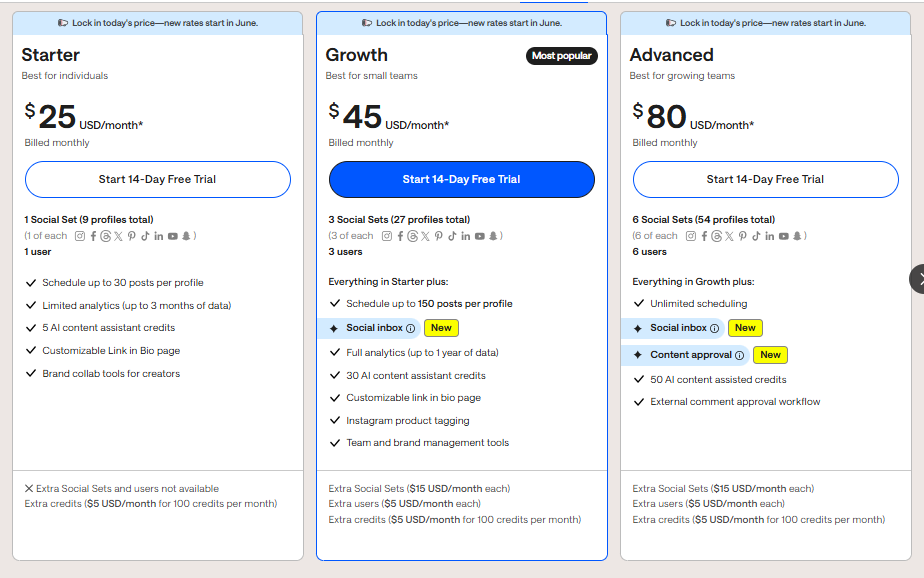
CoSchedule’s entry plan starts at $19/month for 3 profiles, and costs rise quickly as you add more. Later offers a free plan, and paid plans start at $25/month with more features. For visual-heavy users, this felt like a better value.
Final Verdict
Later is an excellent CoSchedule alternative for creators, influencers, and small businesses that live on Instagram, TikTok, and other visual platforms.
Its visual-first design, link-in-bio tool, and ease of use make it ideal if you want to keep things simple, polished, and social-first without paying for extra features you won’t use.
9. ContentStudio ($99/Month)
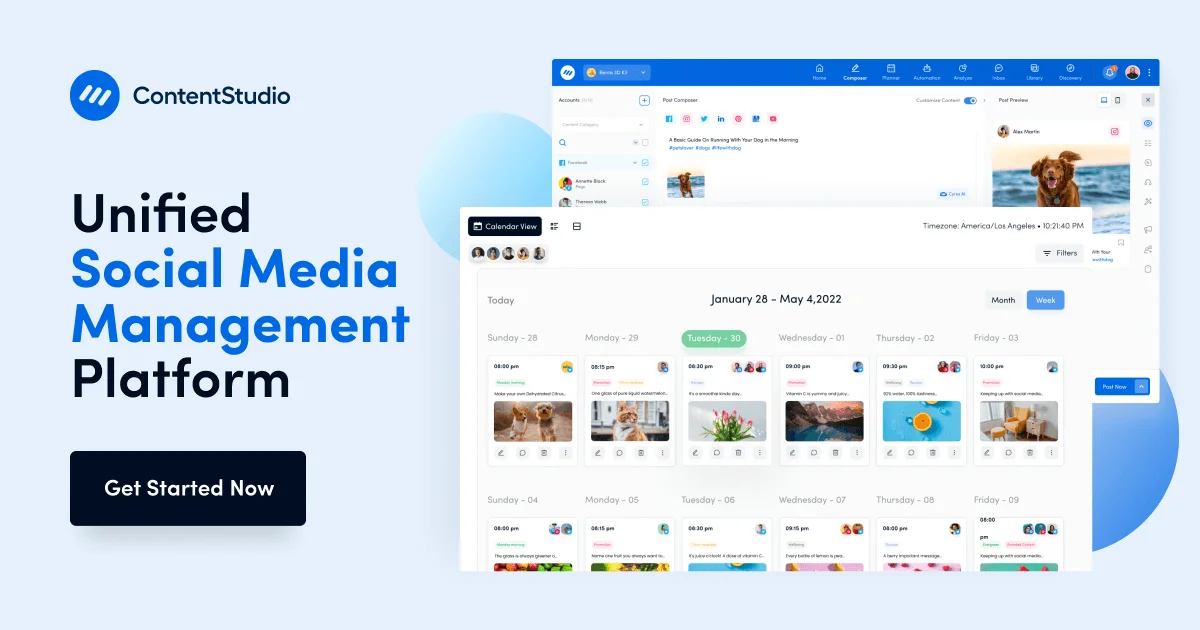
ContentStudio is one of those tools that tries to cover the entire content cycle – from discovery and creation to publishing and monitoring. It’s built with agencies, creators, and content-heavy teams in mind.
Key Features
Multi-platform scheduling
Supports publishing to all the big names – Facebook, Instagram, LinkedIn, TikTok, YouTube (including Shorts), Pinterest, and X. You can instantly publish, queue, or set custom times for each channel.
AI content generator
The AI tools here make it easy to whip up captions, adapt blog content, or draft promos. When I tested it, it shaved time off repetitive tasks without making posts sound robotic.
Content discovery & curation
This is a standout. You can search trending content by keyword or domain to find viral articles in your niche. Then, schedule or curate them straight from the discovery tab.
Automation workflows
Think evergreen loops, RSS-to-social, or recurring schedules. These no-code automations are perfect for teams who want to keep accounts active without doing everything manually.
Social inbox & monitoring
Like Hootsuite or OnlySocial, ContentStudio pulls all your comments, mentions, and DMs into one place. You can also track hashtags, keywords, and even competitors in real-time.
ContentStudio vs CoSchedule: Our Experience
Testing ContentStudio against CoSchedule, here’s where it clearly came out ahead:
AI-Powered Creativity
CoSchedule doesn’t offer native AI help. With ContentStudio, the built-in AI kept workflows moving faster – from captions to repurposing blog posts. For busy teams, this was a time-saver.
Content Discovery & Curation
CoSchedule focuses on planning and scheduling. ContentStudio goes a step further by letting you discover trending articles and curate them directly. For agencies or creators wanting to mix original and curated content, this was a huge advantage.
Automation Depth
CoSchedule offers some automation, but mostly around blogs and calendars. ContentStudio’s evergreen loops, RSS feeds, and bulk imports gave us far more flexibility. It felt more like “set it and forget it” compared to CoSchedule’s manual-heavy approach.
Engagement & Monitoring
CoSchedule lacks real-time monitoring tools. With ContentStudio’s unified inbox and keyword tracking, we could respond quickly and stay ahead of brand mentions. This made a big difference in community management.
Pricing & Value
ContentStudio starts at $99/month, which makes it pricier than other CoSchedule alternatives on this list, but it delivers more depth. Compared to CoSchedule’s $19/month entry plan, ContentStudio may seem expensive, but when you factor in discovery, AI, automations, and engagement tools, the value is clear for agencies and larger teams.
Overall Verdict
ContentStudio is a powerful alternative if you want more than just scheduling. It combines AI, automation, and content discovery into one hub, making it ideal for agencies or content-driven brands managing multiple accounts.
While it costs more, it gives you a fuller toolkit than CoSchedule, which often feels restricted to planning and calendars.
10. RecurPost ($25/Month)
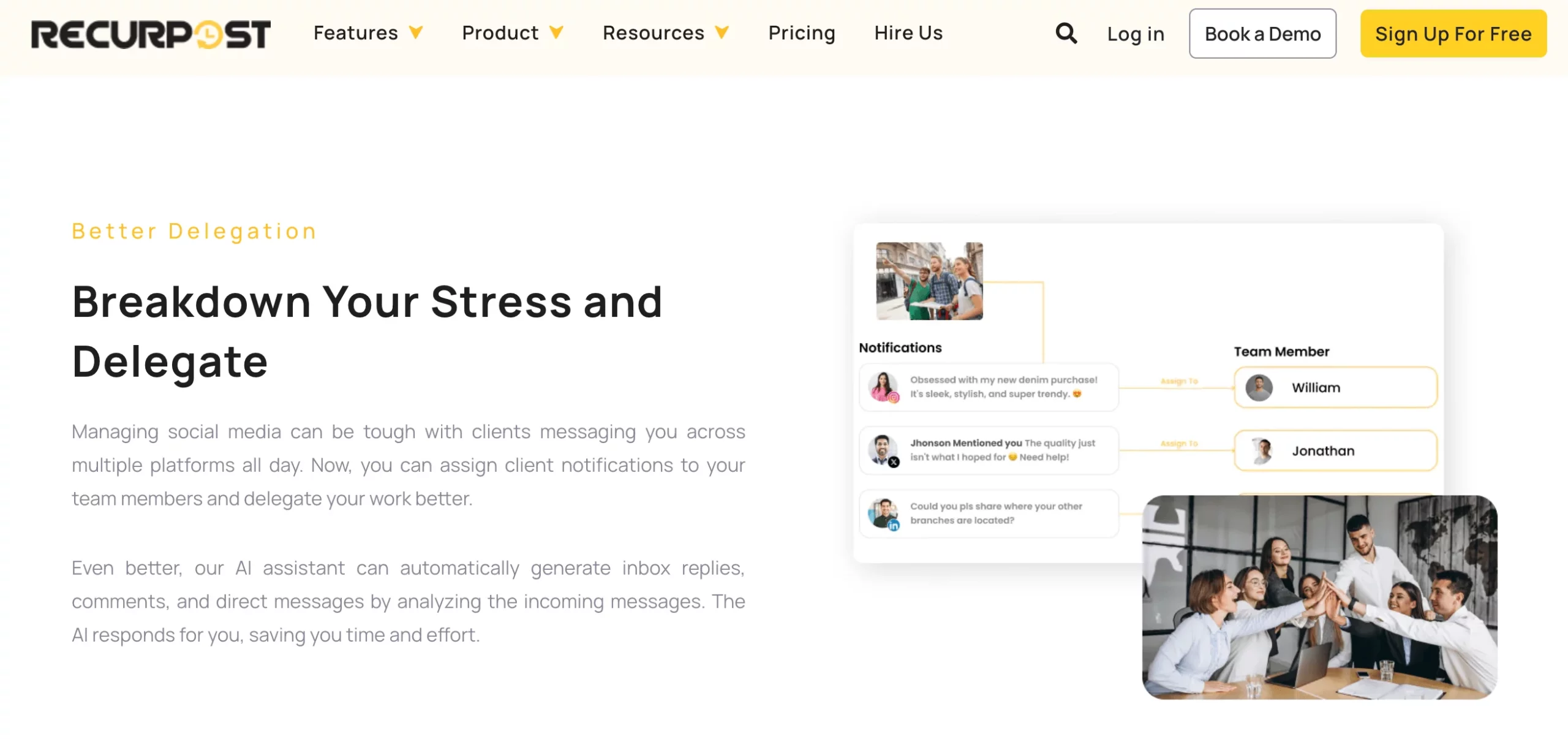
RecurPost is a scheduling tool built around one big idea: evergreen content. Instead of constantly creating new posts, it helps you recycle and re-share your best-performing content on a loop.
For small businesses, coaches, or solopreneurs who want to stay active without burning out on content creation, this is where RecurPost shines as a CoSchedule alternative.
Key Features
Evergreen content libraries
You can create libraries (e.g., blog posts, promos, quotes) and let RecurPost re-share them on a schedule. It keeps your accounts active without you manually queuing posts every week.
Smart scheduling
RecurPost automatically picks the best posting times based on audience engagement, removing the guesswork from when to post.
Multi-platform publishing
Supports Facebook, Instagram, LinkedIn, X, Pinterest, and Google Business. While not as wide as Hootsuite or OnlySocial, it covers the key platforms most businesses use.
Social inbox
Reply to comments and messages across platforms from one place. It’s simpler than Sprout Social’s inbox but works well for smaller teams.
Bulk upload
Import a large batch of posts using CSV files, which is useful if you want to load content libraries in one go.
RecurPost vs CoSchedule: Our Experience
Evergreen Posting Advantage
CoSchedule requires manual re-scheduling of old posts, which can be time-consuming. RecurPost’s evergreen libraries kept content cycling automatically, which felt like a huge time-saver for long-term strategies.
Ease of Automation
CoSchedule’s automation is tied more to blogs and marketing campaigns. RecurPost simplifies it – just set categories and times, and the tool handles the rest. This hands-off approach worked especially well for smaller brands.
Affordability
CoSchedule starts at $19/month but quickly rises as you add profiles and features. RecurPost starts at $25/month, offering evergreen posting and reports right from the start. For solo entrepreneurs and small businesses, the balance of price and automation felt like better value.
Client-Friendly Reporting
While CoSchedule locks advanced analytics in its Marketing Suite, RecurPost’s white-label reports (on higher plans) were easy to export and present to clients. This added a level of professionalism without added cost.
Final Verdict
RecurPost is a smart CoSchedule alternative for anyone who wants their social feeds to stay alive without daily effort. Its evergreen posting libraries and simple automation workflows make it ideal for small businesses, coaches, and solopreneurs.
Final Note
CoSchedule has earned its place as a well-known tool, but in 2025, it’s clear that many marketers, creators, and agencies are looking for something more flexible, modern, and cost-effective.
From evergreen posting with RecurPost to visual planning with Later and Planable, each of the alternatives we’ve explored brings its own strengths to the table.
That said, if there’s one tool that stood out to us during testing, it’s OnlySocial. It strikes the right balance between simplicity and power, offering many amazing features at fair price that scales with you as your business or client list grows.
If you’ve been looking for a scheduling platform that keeps you ahead without weighing you down, OnlySocial is the one we’d recommend starting with.
FAQs
Is there a free alternative to CoSchedule?
Yes. Tools like Buffer and Later offer free plans that cover basic scheduling. While they don’t include every advanced feature, they’re great options for creators or small teams who want to get started without paying upfront.
Can CoSchedule publish on TikTok?
No. As of 2025, CoSchedule does not support TikTok or Threads. If TikTok is part of your strategy, alternatives like OnlySocial, Hootsuite, and Later handle TikTok scheduling natively.
Are there more affordable alternatives to CoSchedule for small teams?
Definitely. OnlySocial starts at $29/month with 15 profiles, which is far more generous than CoSchedule’s entry plan. Other budget-friendly options include SocialBee (from $19/month) and Buffer (from $6/month). These tools are often simpler, more affordable, and better suited for small teams.
What are the best CoSchedule alternatives for social media planning?
If your focus is planning and organizing, Planable and Loomly are excellent for visual collaboration and structured workflows. For a more well-rounded option, OnlySocial offers both a powerful calendar and built-in AI features, making it the best balance between planning, publishing, and engagement.