Bluesky Messaging in 2025: How to Keep Up with DMs & Mentions
Imagine being in a crowded café and trying to follow three conversations at the same time. That’s exactly how keeping up with Bluesky messages feels like in 2025. Mentions pop up fast, DMs get buried under new threads, and if you manage more than one account? It gets overwhelming quickly.
Bluesky moves differently from other platforms. The conversations are more open, more community-driven, and sometimes harder to track.
But here’s the good news: staying organized doesn’t need to feel like a full-time job.
With the right setup, you can handle every DM, reply to every mention, and keep conversations flowing without hopping across apps all day.
In this guide, we’ll break down how Bluesky messaging works, the challenges that trip most people up, and how tools like OnlySocial make staying on top of everything surprisingly easy.
Table of Contents
- 1 How Bluesky Messaging Works
- 2 The Challenges of Managing Bluesky DMs & Mentions Manually
- 3 Managing Bluesky Messages Like a Pro with OnlySocial
- 3.1 See All Your Bluesky DMs & Mentions in One Inbox
- 3.2 Real-Time Updates Without Missing Notifications
- 3.3 Assign Messages to Team Members
- 3.4 Saved Replies & Smart Templates for Faster Messaging
- 3.5 Use AI to Craft Natural Replies
- 3.6 Tag, Filter & Prioritize Conversations
- 3.7 Manage All Your Social Channels Together
- 4 Best Practices for Managing Bluesky DMs and Mentions
- 5 How to Stay Organized If You Manage Multiple Bluesky Accounts
- 5.0.1 Separate the purpose of each account
- 5.0.2 Create small “office hours” for each account
- 5.0.3 Use a single place to manage conversations
- 5.0.4 Set simple rules for prioritizing conversations
- 5.0.5 Use internal notes if multiple people are involved
- 5.0.6 Track recurring questions across all accounts
- 6 Final Note
- 7 FAQs
How Bluesky Messaging Works
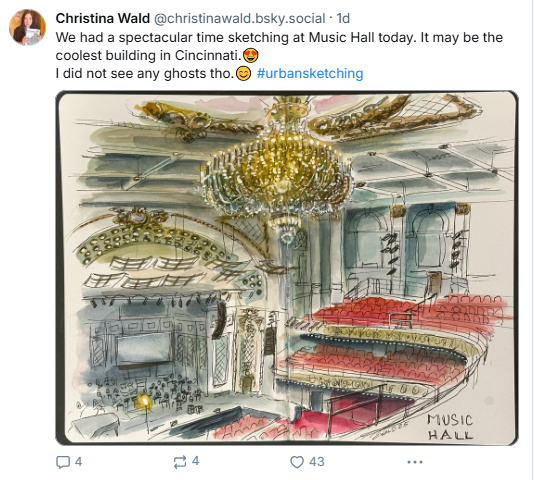
Bluesky isn’t built like the traditional social networks most people are used to, so its messaging system feels a little different at first.
Instead of one giant platform where everything lives in the same place, Bluesky runs on the AT Protocol – meaning content, messages, and mentions can flow across different servers (called “PDS instances”). It’s still one network, but not one centralized inbox.
DMs on Bluesky (as of 2025) are now more refined than they were at launch, but they still work differently from Instagram or Facebook. DMs feel closer to private threads rather than a classic chat window.
They don’t always behave the same across third-party apps, which is why some messages show up instantly while others feel delayed or get buried under new activity.
Mentions, on the other hand, appear in your notifications whenever someone tags your handle (@yourname.bsky.social). Because discussions often spread across long threads, mentions can get lost if the thread moves quickly or if multiple replies stack up.
Here’s the simple way to look at it:
- DMs = private, thread-style conversations
- Mentions = your name popping up in public or semi-public discussions
- Threads can move across servers, so you might miss things without a good system
Bluesky’s growth has made these interactions more frequent, which is great for engagement, but tough to manage manually. That’s why understanding how the system flows is the first step toward staying on top of your messages without getting overwhelmed.
The Challenges of Managing Bluesky DMs & Mentions Manually
Notifications Don’t Always Sync Cleanly
Depending on the app you’re using (official Bluesky, third-party clients, or desktop), notifications can behave differently.
A mention that shows up instantly on mobile may not appear on desktop for minutes. DMs might show as “new” in one app and “read” in another. It’s easy to think you’ve already responded when you haven’t.
High-Traffic Threads Move Too Quickly
A single post can turn into a long conversation with replies stacked across multiple layers. If you’re tagged early in a thread, your mention can get buried under newer replies. Without a proper dashboard, staying on top of fast-moving discussions is almost impossible.
No Central Inbox for Multiple Accounts
If you run several Bluesky profiles – maybe one personal, one for your brand, one for a project – you’re forced to switch accounts constantly. There’s no built-in way to view all DMs and mentions in one place, which leads to missed messages, late replies, and unnecessary tab-hopping.
Hard to Track Mentions Across Federated Servers
Because Bluesky posts spread across different servers, your mentions don’t always appear in one tidy list. Some replies can arrive late, some never show up unless you manually open the thread, and some get lost in notification clutter.
Organization Is Limited
You can’t tag messages, filter conversations, or sort DMs by type, sentiment, or urgency. Everything comes in the same stream. Without filtering tools, you end up scrolling endlessly just to find one important reply.
These challenges don’t mean Bluesky is difficult. It just means it wasn’t designed with multi-account workflows, brand management, or high-volume messaging in mind.
But the good news is that tools like OnlySocial fill those gaps and make Bluesky message management far easier. Let’s show you how.
Managing Bluesky Messages Like a Pro with OnlySocial
Bluesky is fantastic for building real conversations, but keeping up with everything manually can drain your time fast. That’s where OnlySocial steps in.
Instead of bouncing between apps, missing mentions, or switching accounts all day, you can centralize everything into one clean workspace.
It turns Bluesky’s scattered notifications into something organized, calm, and easy to manage – whether you’re a solo creator or part of a team handling multiple accounts.
Below, let’s break down exactly how OnlySocial helps you stay on top of every DM and mention without the chaos.
See All Your Bluesky DMs & Mentions in One Inbox
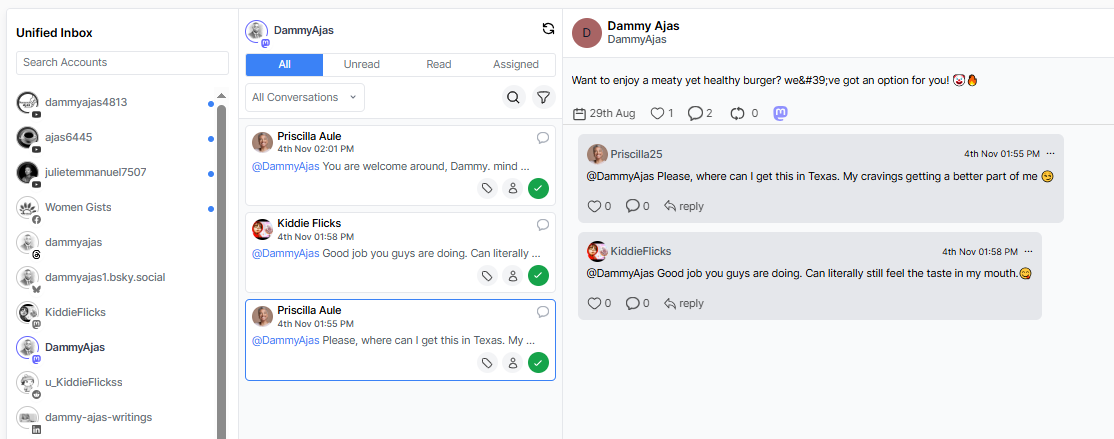
The biggest pain point on Bluesky is fragmentation – DMs in one place, mentions buried in another, and multiple accounts creating even more clutter. OnlySocial fixes this by pulling every interaction from every Bluesky account into one inbox.
You see:
- All DMs
- All mentions
- All replies in long threads
- All interactions across all connected profiles
Everything loads in real time, with full context, so you don’t need to chase conversations across servers or third-party apps. It’s the easiest way to avoid missed messages and stay truly responsive.
Real-Time Updates Without Missing Notifications
Bluesky notifications aren’t always reliable – some arrive late, some don’t sync, and fast-moving threads can bury your mentions in minutes. OnlySocial smooths this out by giving you instant, unified updates for everything happening on your Bluesky accounts.
You can:
- Track replies as they happen
- See mentions the moment someone tags you
- Follow threads without manually refreshing
- Catch late-delivered notifications that Bluesky might delay
It’s a simple upgrade that makes staying active on Bluesky feel effortless instead of overwhelming.
Assign Messages to Team Members
If you’re handling Bluesky messaging with a team, things can get messy fast.
One person replies to a DM, another doesn’t realize it’s been handled, and someone else completely misses a mention because everyone is juggling their own notifications. OnlySocial clears up that confusion.
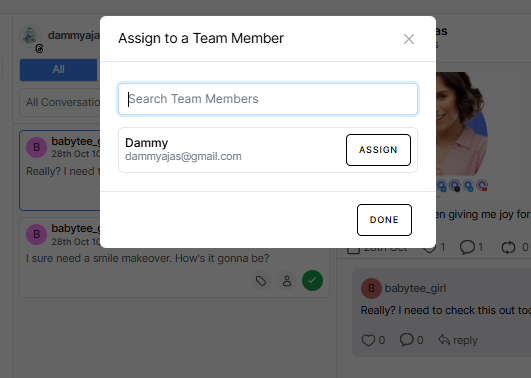
You can assign any message – whether it’s a DM, a mention, or a thread you need someone else to take over – directly to a teammate.
Everyone sees who’s responsible, what’s been replied to, and what still needs attention. No overlap, no double replies, no guessing. It turns what’s normally a scattered process into a clean, trackable workflow.
This is especially helpful for brands, agencies, and creators who get a mix of customer questions, media requests, and community conversations every day.
Saved Replies & Smart Templates for Faster Messaging
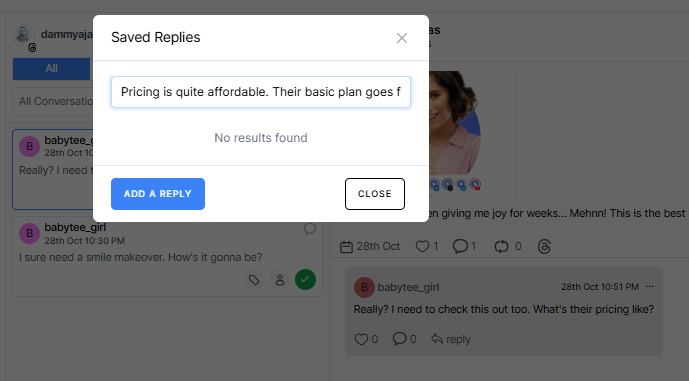
If you’ve been on Bluesky for even a few weeks, you’ve probably noticed that many questions repeat themselves – pricing inquiries, feature requests, “how do I join your community?”, or even simple thank-you messages. Typing the same response twenty times a day gets old quickly.
OnlySocial helps by giving you saved replies and smart templates you can pull up instantly. You can create your own responses in your brand voice so everything still sounds personal and human.
When a familiar question comes in, you just tap, tweak, and send. It keeps your tone consistent without eating up your day.
Use AI to Craft Natural Replies
Not every message needs a deeply personalized response, but you also don’t want to sound robotic. OnlySocial’s AI assistant strikes that balance beautifully.
When you’re busy, tired, or simply unsure how to phrase something, the AI suggests a clear, natural reply that still feels like you.
You stay in full control – you can edit, shorten, or rewrite the suggestion before sending. And because the AI learns from your past responses, the tone becomes more aligned with your style over time.
AI-powered messaging works especially well during busy hours or viral threads, when messages pile up faster than you can type. Instead of scrambling, you keep the conversation flowing smoothly and stay present with your audience, without burning out.
Tag, Filter & Prioritize Conversations
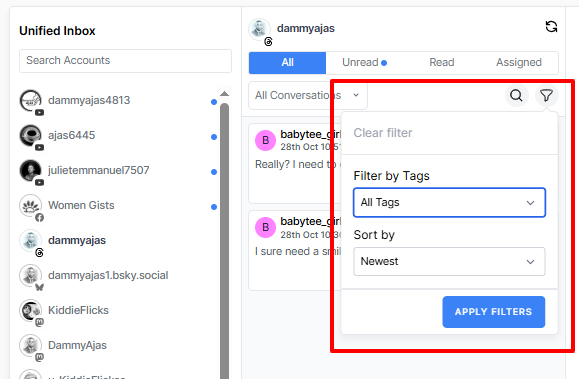
When your Bluesky inbox gets busy, everything starts to blend together – mentions from a community chat, DMs from customers, replies to an old thread you forgot existed. OnlySocial helps you cut through the noise by letting you tag and filter every conversation.
You can organize messages by topic, urgency, campaign, or anything that makes sense for your workflow.
If you’re working through support questions, filter by “Support.” If you’re handling brand mentions, filter by “Mentions.” Need to focus only on high-priority threads? Tag them as such, and they’ll be waiting for you in one clean view.
It’s a simple system, but it keeps you sharp. Instead of scrolling endlessly or relying on memory, you can tackle your messages in a way that feels structured, calm, and manageable.
Manage All Your Social Channels Together
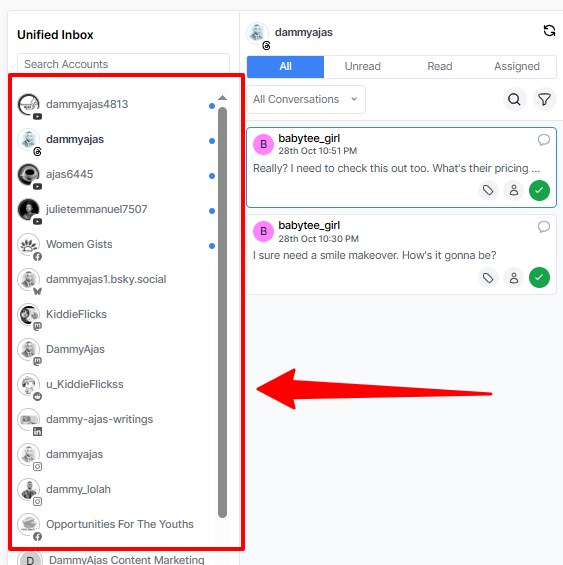
Most people on Bluesky aren’t just on Bluesky. You probably have an Instagram page, a Threads profile, maybe a Facebook page or a Mastodon account too – and if you’re running multiple brands, multiply that by ten.
OnlySocial brings all of them under one roof. You can manage Bluesky DMs and mentions in the same dashboard where you handle comments from Instagram, messages from Facebook, replies from Mastodon, and more.
This is where the tool really shines. You don’t have to jump between apps or remember which account got which question. Everything lives in one unified inbox, with the same tagging, filtering, and team features working across every platform.
Best Practices for Managing Bluesky DMs and Mentions
Keeping up with Bluesky conversations isn’t just about replying quickly but replying smartly. Bluesky’s culture leans heavily toward community-driven interaction, so the way you handle DMs and mentions can shape how people perceive you or your brand.
Here are some practical, human-friendly best practices to keep you steady and organized:
1. Reply Within a Reasonable Timeframe
You don’t need to respond instantly, but disappearing for days can make your audience feel ignored. Bluesky users value genuine conversation, so a simple, timely acknowledgment goes a long way.
If your inbox gets busy, tools like OnlySocial help you prioritize messages so nothing sits unread for too long.
2. Keep Your Tone Conversational
Bluesky thrives on authenticity. People can tell when you’re using scripted lines or overly polished corporate language. Speak normally. Keep your replies warm, clear, and easy to read – as if you were chatting with someone at a meetup rather than writing a press release.
On Bluesky, hashtags and mentions help drive discovery, but using too many can make your replies look forced. Stick to keywords that genuinely fit the conversation. If you’re replying to someone in a thread, keep it simple and relevant.
4. Don’t Treat Every DM Like a Sales Pitch
One of the quickest ways to lose trust on Bluesky is to push offers in private messages. Use DMs for support, clarifications, and personal conversation – not cold pitching. People appreciate when brands respect their space.
5. Keep an Eye on Ongoing Threads
A single thread can evolve into five different sub-conversations. Make it a habit to check back on threads where you’ve been tagged or replied recently. Sometimes the real engagement happens hours after the original mention.
6. Pin Posts That Answer Common Questions
If you keep getting asked the same thing – pricing, availability, how to join your community – create a helpful post and pin it. This reduces repetitive DMs and keeps new followers informed without needing you to repeat yourself all day.
How to Stay Organized If You Manage Multiple Bluesky Accounts
Managing a single Bluesky account is already a little demanding. Managing two, three, or even more? That’s where things can spiral into a full-time job if you’re not careful.
Each account has its own DMs, its own mentions, and its own community tone, and keeping them all straight requires a clean system, not frantic tab-hopping.
So, let’s discuss how you can stay organized without burning out:
Separate the purpose of each account
If you run multiple profiles, make sure each one has a clearly defined role. Maybe one is for your personal presence, another for customer support, and another for product updates.
When each account has its own lane, your replies feel more focused, and you won’t accidentally send a support message from your main account (we’ve all been there).
Create small “office hours” for each account
Instead of bouncing between profiles all day, block short time windows to check DMs and mentions. Even 10-15 minutes per account keeps conversations moving without taking over your day. This approach makes messaging feel structured rather than reactive.
Use a single place to manage conversations
If you’re tired of switching accounts, a unified inbox like OnlySocial is your best friend. You can pull all Bluesky accounts into one dashboard and work through every DM or mention in a neat queue. It’s less mental load, less clicking around, and more time to actually talk to your audience.
Set simple rules for prioritizing conversations
Not every message needs the same level of attention. Decide what matters most for each account:
- Support questions get answered first
- Mentions in active community threads get handled next
- Light chatter or low-urgency DMs can wait
This keeps you from getting lost in casual conversations when something important is waiting.
Use internal notes if multiple people are involved
If you’re working with a team, notes are a lifesaver. Leave quick context like “waiting for the user to send details” or “reply tomorrow morning with the update.” It prevents repeat work and keeps communication smooth behind the scenes.
Track recurring questions across all accounts
If you’re seeing the same questions across your Bluesky profiles, that’s a sign to create templates, FAQs, or even a pinned post. It cleans up your inbox and gives your audience fast answers without you typing the same sentences over and over.
Final Note
Keeping up with Bluesky messages doesn’t have to feel like a daily scramble. The platform may be decentralized and fast-moving, but with the right approach, you can turn all those DMs and mentions into meaningful conversations instead of stress points.
Whether you’re a creator growing your community, a brand handling support, or someone managing multiple accounts, staying organized is what keeps everything running smoothly.
And that’s exactly where OnlySocial makes all the difference. Instead of juggling notifications across apps or switching accounts endlessly, you can bring everything into one calm, central inbox.
At the end of the day, Bluesky rewards presence, not perfection. If you show up, reply genuinely, and stay consistent, the platform’s community will respond in kind.
FAQs
How do I check my Bluesky DMs more efficiently?
Bluesky’s native inbox is improving, but it can still feel scattered, especially across multiple accounts or devices. If you want a smoother workflow, a unified inbox lets you see all your DMs in one place so nothing gets lost.
Do mentions help with visibility on Bluesky?
Yes. Bluesky doesn’t rely heavily on algorithms. Mentions help your posts appear in more timelines because they keep your name active in ongoing discussions. The more genuine conversations you’re part of, the more your presence grows naturally.
Can I manage multiple Bluesky accounts from one dashboard?
Not inside Bluesky itself – you’d still have to switch accounts manually. But with OnlySocial, you can connect all your Bluesky accounts and manage the messages, replies, and mentions from one clean inbox.
Are Bluesky DMs private?
Yes, they’re private, but they work more like restricted posts than traditional chat messages. That’s why they behave differently across apps. If you need more structure or reliability, using a tool that centralizes all incoming messages helps a lot.
What’s the best way to avoid missing mentions on Bluesky?
Because Bluesky is decentralized, some mentions don’t arrive instantly. Setting routine check-ins helps, but using a platform that brings all your mentions into one place is the best way to stay ahead, especially when threads get active.