How to Shorten a URL: Benefits, Best Practices, and Real-World Examples
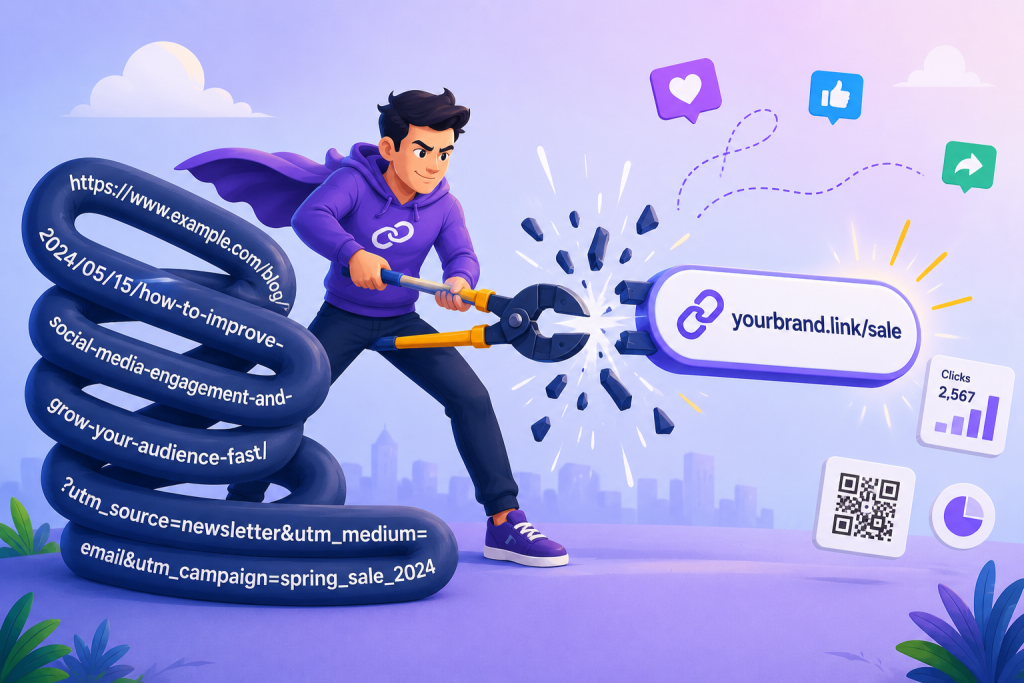
Every click starts with a link. But if that link is long, cluttered with random characters, or packed with tracking parameters, it can make your content look less trustworthy before anyone even visits your page.
That’s why URL shortening has become a staple in modern marketing. A short, clean link is easier to share. It looks more professional and fits naturally across social media posts, emails, text messages, QR codes, and even printed materials.
Better still, many URL shorteners let you track clicks, customize your links, and gain valuable insights into how people engage with your content.
In this guide, you’ll learn what URL shortening is, why it matters, and how to create short links that work harder for your business. We’ll also explore common use cases, practical examples, and how tools like OnlySocial can help you create, manage, and monitor your links alongside the rest of your social media strategy.
Table of Contents
What Is URL Shortening?
URL shortening is the process of turning a long web address into a much shorter, cleaner link that still takes people to the exact same destination.
Instead of sharing a URL filled with folders, tracking codes, and random characters, you get a simple link that’s easier to read, share, and remember.
For example, a lengthy product page or blog post URL can be transformed into something as short as yourbrand.link/sale or short.ly/summer. When someone clicks the shortened link, they’re automatically redirected to the original page. The experience is seamless for the visitor, but the link looks far more polished.
Short URLs are especially useful on social media, where clean posts tend to attract more attention. They’re also easier to include in emails, text messages, digital ads, presentations, and printed materials like flyers or business cards.
What Is a URL Shortener?
A URL shortener is a tool that converts a long web address into a shorter, easier-to-share link. When someone clicks the shortened URL, they’re automatically redirected to the original webpage.
At its most basic, a URL shortener saves space and makes links look cleaner. More advanced tools also help you customize, organize, and track your links, making them valuable for businesses, marketers, and content creators.
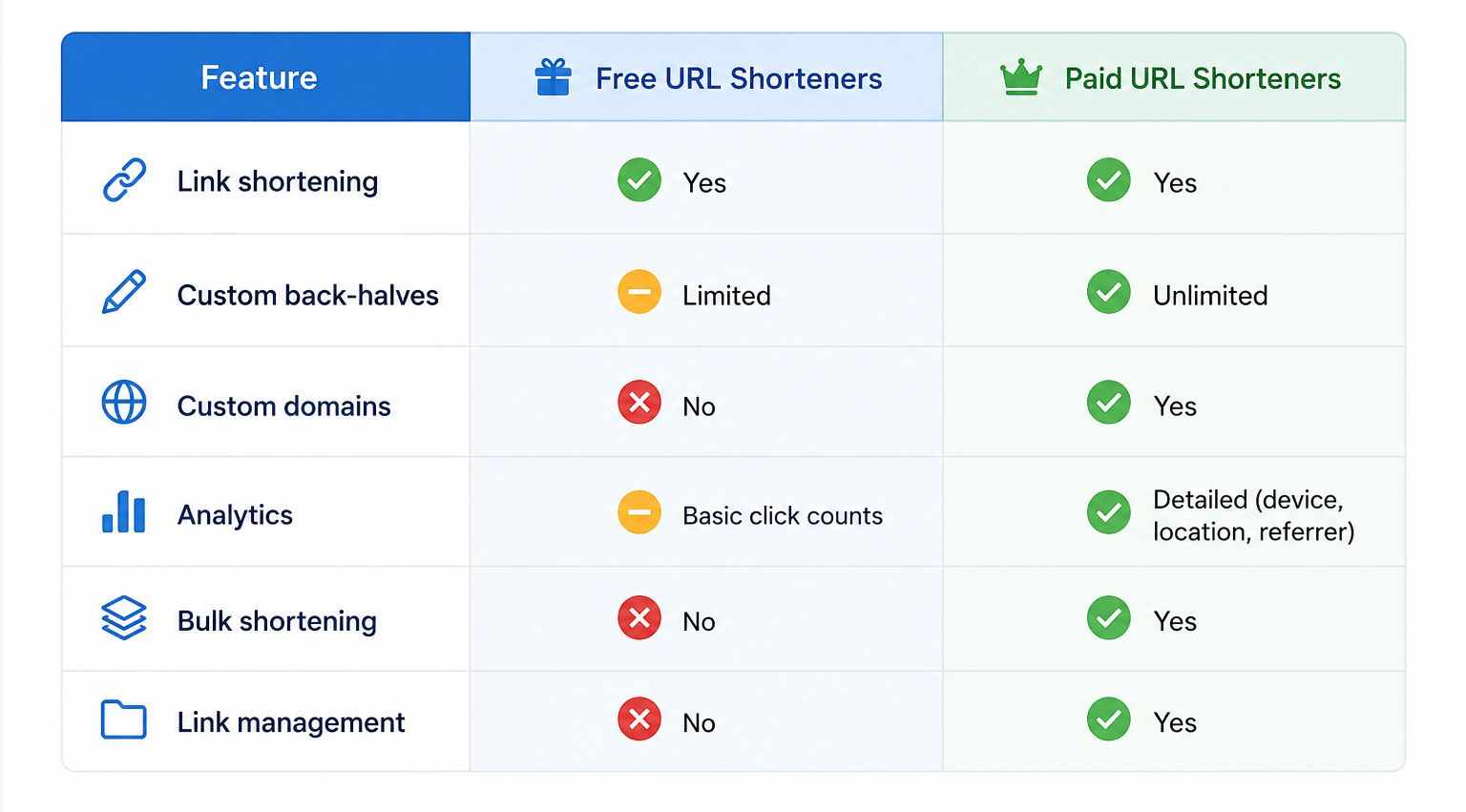
URL shortener can be free or paid. Why both does a good job, they have their own unique distinctions.
If you only need to shorten the occasional link, a free tool will usually do the job. But if you’re managing campaigns, working with a team, or tracking marketing performance, a paid solution offers much more control and flexibility.
What Is the Purpose of a URL Shortener?
A URL shortener does more than make links look shorter. It helps you share links that are cleaner, easier to recognize, and more likely to earn clicks.
Here are some of the biggest reasons people use URL shorteners:
- Make links look cleaner. Long URLs filled with tracking codes can appear cluttered. Short links create a more professional appearance.
- Build trust with branded links. Using your own custom domain helps people recognize your brand before they even click.
- Track link performance. Many URL shorteners provide analytics that show how many people clicked, where they came from, which devices they used, and more.
- Save space. Short links fit naturally into social media posts, SMS campaigns, QR codes, printed materials, and anywhere space is limited.
- Simplify link management. Instead of juggling multiple long URLs, you can organize, update, and monitor your links from one dashboard.
So, a URL shortener helps you share links more professionally while giving you better insight into how your audience interacts with your content. For businesses and marketers, it’s a simple tool that can improve both branding and campaign performance.
5 Real-World Examples of URL Shortening
Short URLs aren’t just for social media. Businesses and organizations use them every day to make links easier to share, improve branding, and measure campaign performance. Here are a few common examples.
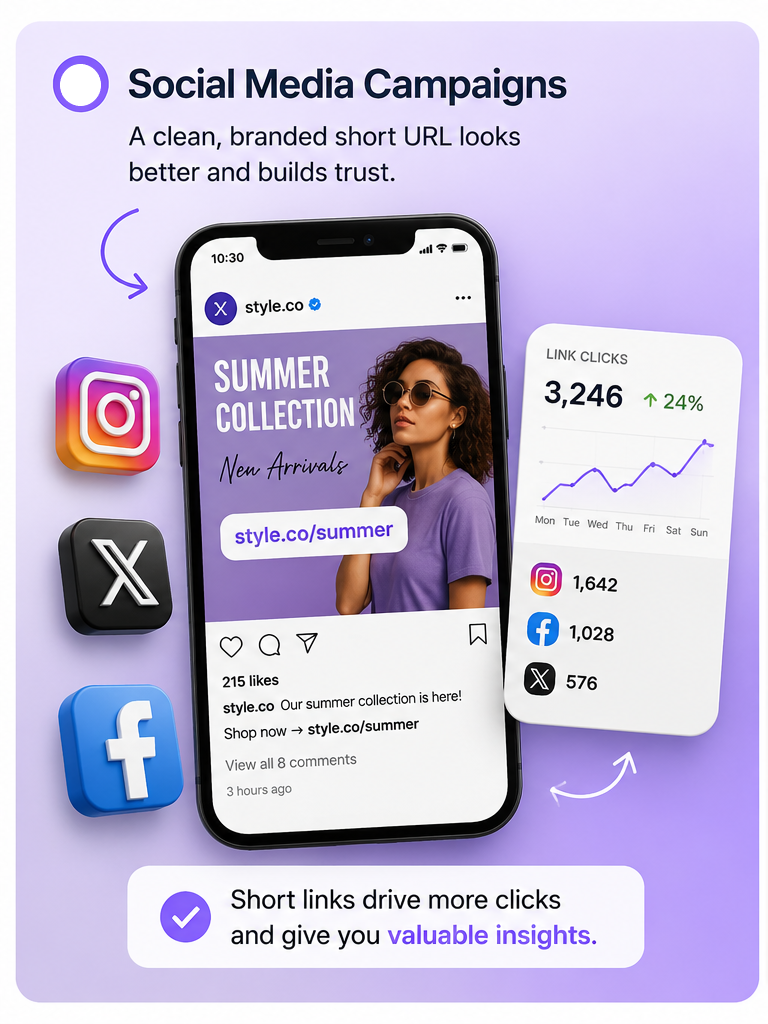
1. Social Media Campaigns
A clothing brand launches its summer collection across Facebook, Instagram, and X. Instead of posting a long product URL, it shares a branded link like style.co/summer.
The cleaner link looks more professional, is easier to remember, and lets the marketing team track how many clicks each social platform generates.
2. Email Marketing
An online software company sends a newsletter announcing a new feature. Rather than including a long URL with tracking parameters, it uses a short link such as app.io/new-feature.
The email looks cleaner, and the team can monitor click-through rates to see how many subscribers visited the announcement page.
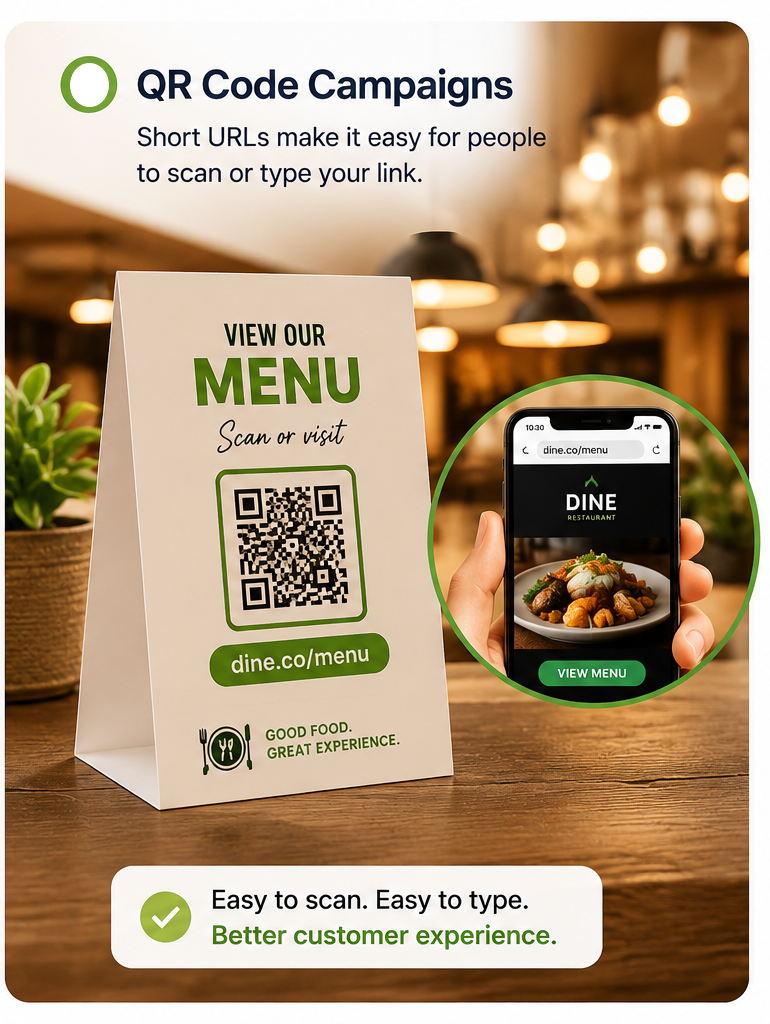
3. QR Code Campaigns
A restaurant prints QR codes on its tables that direct customers to the digital menu. Alongside the QR code, it includes a short URL like dine.co/menu.
If someone can’t scan the code, they can simply type the short link into their browser, making the experience more convenient.
4. Printed Marketing Materials
A real estate agency includes a short URL on brochures, billboards, and property signs to showcase virtual home tours.
Instead of asking people to type a long listing URL, visitors only need to enter something simple like homes.co/tour, making it much more likely they’ll visit the page.
5. Event Registration
A conference organizer promotes an upcoming event through posters, social media, and email campaigns using the same branded link, such as events.co/register.
By using one memorable URL everywhere, the team creates a consistent experience and can easily measure which marketing channels drive the most registrations.
How to Shorten a URL with OnlySocial
OnlySocial makes URL shortening simple by connecting with Bitly directly inside the platform. This means you can create clean, trackable links without switching between different tools.
Here’s how to shorten your first URL:
1. Log In to OnlySocial
Sign in to your OnlySocial account. Create an account first if you haven’t already.
2. Open the Link Shortener
Click Create New, then choose Shorten a Link from the menu.
3. Paste Your Long URL
Add the original web address to the destination field. This could be a blog post, landing page, product page, event registration form, or any other link you want to share.
4. Customize the Link
Make the URL easier to recognize by editing the back half of the link.
You can also select a custom domain, add a title, or use tags to keep your links organized. For example, instead of a random link ending, you could create something cleaner like yourbrand.co/summer-sale.
5. Create the Short Link
Click Create Your Link. OnlySocial will generate the shortened URL through its Bitly integration.
Your new link is ready to use. Copy it and add it to social media posts, emails, text messages, QR codes, ads, or printed materials.
How to Choose the Best URL Shortening Service
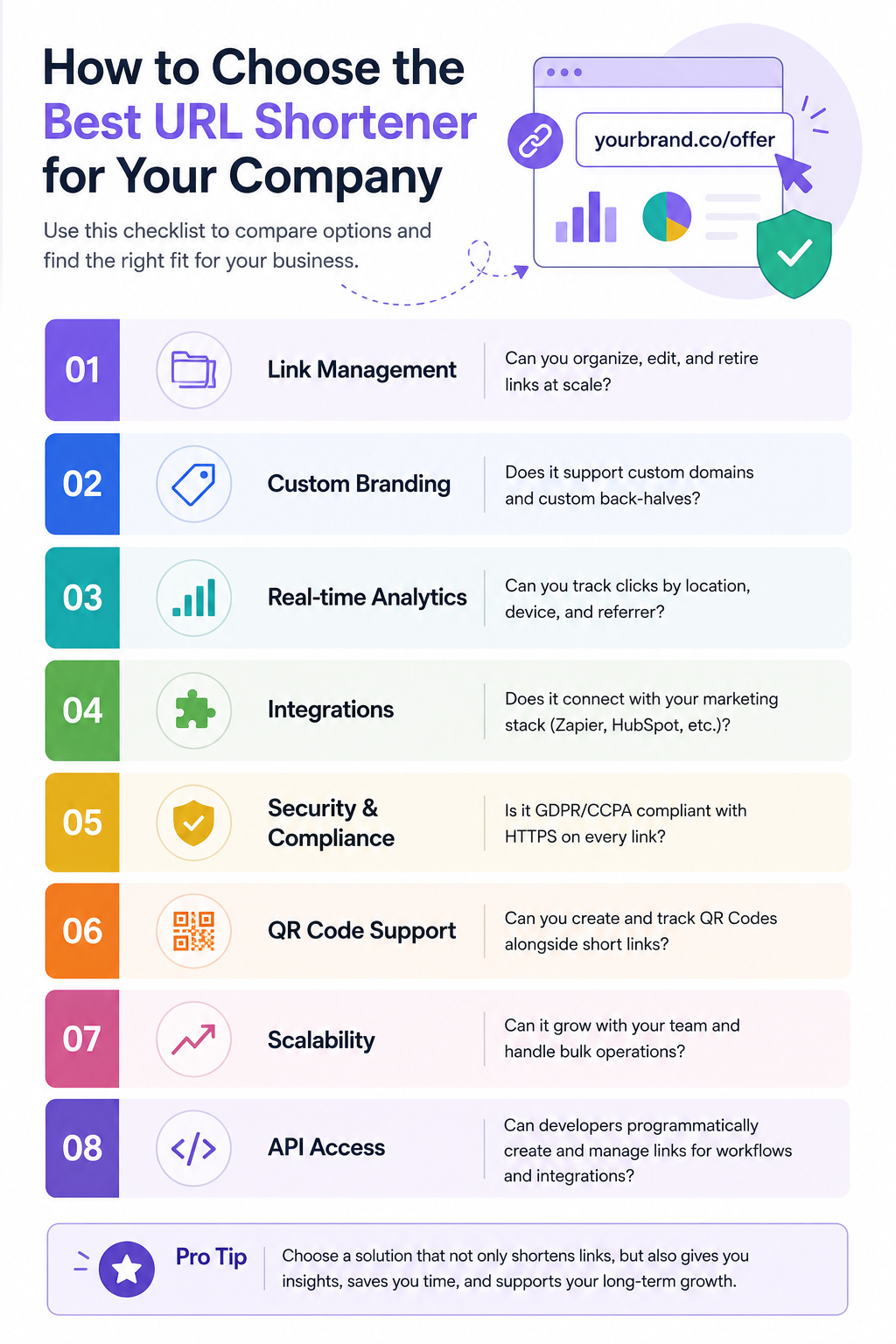
Not all URL shorteners offer the same features. Some are designed for occasional use, while others are built to support growing businesses, marketing teams, and large campaigns.
As you compare your options, here are the features worth looking for.
Easy Link Management
The best URL shorteners make it easy to organize all your links in one place. Look for features like folders, tags, search, and the ability to edit or archive links when campaigns end.
Branded Short Links
Using your own custom domain instead of a generic short URL helps build trust and reinforces your brand every time someone sees your link. It’s also useful to customize the back half of your URL so people know what they’re clicking before they open it.
Detailed Analytics
A good URL shortener should tell you more than just the total number of clicks. Look for insights such as where your visitors came from, which devices they used, and which channels generated the most engagement. These metrics can help you improve future campaigns.
Integrations with Your Marketing Tools
Your URL shortener should fit naturally into your existing workflow. Support for tools like social media schedulers, CRMs, marketing platforms, and automation apps can save time and reduce manual work.
Security and Reliability
Every shortened link should use HTTPS to keep visitors safe. It’s also worth choosing a provider that follows modern privacy standards and keeps your links available when you need them.
QR Code Support
Many marketing campaigns use both QR codes and short links together. Choosing a platform that lets you create, manage, and track both from the same dashboard makes campaign management much easier.
Room to Grow
If your business is expanding, your URL shortener should be able to grow with you. Features like bulk link creation, team collaboration, and advanced management tools become increasingly valuable as your marketing efforts scale.
Works Well with Your Content Workflow
If social media is a big part of your marketing strategy, it helps to choose a solution that goes beyond shortening links. OnlySocial, for example, lets you create Bitly-powered short links while planning, scheduling, and publishing content from the same platform.
Instead of juggling multiple tools, you can manage your links and your social media campaigns in one place.
Final Thoughts
A short URL does much more than save a few characters. It makes your links cleaner, strengthens your brand, and helps you understand how people interact with your content.
Whether you’re sharing posts on social media, running email campaigns, or promoting an event, the right URL shortener can make every link work harder.
With OnlySocial, you can create Bitly-powered short links, organize them in one place, and manage them alongside your social media content.
Instead of switching between multiple tools, you can plan, publish, and track your campaigns from a single platform, making your marketing simpler and more effective.
FAQs
What is the best URL shortener?
The best URL shortener depends on your needs. If you only need to shorten a few links occasionally, a free tool may be enough. For businesses and marketers, a solution that offers branded links, analytics, QR codes, and link management, such as OnlySocial with its Bitly integration, provides much greater value.
Are URL shorteners free?
Many URL shorteners offer free plans that let you create basic short links. However, advanced features like custom domains, branded links, and detailed analytics are usually available on paid plans.
Do shortened URLs expire?
It depends on the service you use. Some free URL shorteners may remove inactive links after a period of time, while many paid services keep your links active for as long as your account remains in good standing.
Can I customize a shortened URL?
Yes. Most modern URL shorteners let you edit the back half of the link, replacing random characters with something meaningful, such as yourbrand.co/spring-sale. Many platforms also support custom branded domains for a more professional appearance.
Can I track how many people click my shortened links?
Yes. Most URL shorteners include click tracking. Advanced tools provide even more insights, including visitor location, device type, referral source, and the time of each click, helping you measure the success of your campaigns.
Are shortened URLs safe?
Shortened URLs are generally safe when they’re created by trusted services. To build even more trust, businesses often use branded domains so visitors can immediately recognize who’s sharing the link before they click.
Can I use shortened URLs for QR codes?
Absolutely. Short URLs are commonly paired with QR codes because they make the destination easier to manage and update. Many platforms also let you track QR code scans alongside link clicks, giving you a complete view of campaign performance.