How to See Your Competitors’ Facebook Ads (and Turn Them into Winning Ideas)
Running Facebook ads without checking your competitors first?
That’s like guessing your way through a test when the answers are already on the board.
Every day, brands are spending money testing creatives, headlines, and offers across Meta’s platforms. Some ads work. Some don’t. But all of them leave clues. And those clues are public.
You can see what your competitors are pushing, how they position their products, and even how long they’ve been running certain ads. That last part matters. If an ad has been running for weeks, it’s probably working.
So instead of starting from zero, you can learn from what’s already been tested.
In this guide, we’ll walk you through how to find your competitors’ Facebook ads, what to look for, and how to turn those insights into campaigns that perform better from day one.
Table of Contents
- 1 Why Keep an Eye On Your Competitor’s Facebook Ads?
- 2 Is It Legal to Spy on Your Competitors’ Facebook Ads?
- 3 How to See Your Competitors’ Facebook Ads
- 4 What Can You Learn from Competitor Facebook Ads?
- 5 How to Turn Competitor Ads into a Strategy (Not Just Inspiration)
- 6 How Often Should You Check Your Competitors’ Facebook Ads?
- 7 Turning Competitor Insights into Better Ads with OnlySocial
- 8 Final Note
- 9 Frequently Asked Questions
Why Keep an Eye On Your Competitor’s Facebook Ads?
If you’re running ads without checking your competitors, you’re missing easy wins.
Every ad they run is a test. And every test leaves behind clues. What works. What doesn’t.
What people respond to. It’s all there in plain sight.
Here’s why paying attention gives you an edge.
You See What Actually Grabs Attention
Instead of guessing what might work, you get to see what’s already working.
After a while, patterns start to show up. Certain styles, formats, or visuals keep appearing again and again. That’s usually a sign they’re performing.
For example, fitness brands often lean on quick transformation clips or before-and-after visuals. They don’t do that by accident. It’s because those formats stop people from scrolling.
You can take those ideas and adapt them to your own brand.
You Learn What Messaging Hooks People
Your competitors are constantly testing their copy.
Headlines, captions, calls to action. They’re tweaking everything to get more clicks. By watching their ads, you start to notice the phrases and angles they rely on.
Things like urgency, simplicity, or clear benefits tend to show up often.
You’re not copying. You’re learning what language connects with your audience.
You Understand How Offers Are Positioned
Ads aren’t just about visuals or words. They’re about the offer.
By looking at competitor ads, you’ll see how they package what they’re selling. Discounts, bundles, free trials, limited-time deals. The way they present these offers can tell you a lot about what people respond to.
Sometimes a small change in wording can make a big difference.
You Pick Up Clues About Their Audience
You won’t see their exact targeting settings. But you can still figure out who they’re trying to reach.
Look at the tone. The visuals. The comments. All of it gives you hints.
An ad with fast edits, trending sounds, and casual language likely targets a younger audience. A more polished, benefit-driven ad usually speaks to professionals or older buyers. These signals help you refine your own targeting.
You Stay in Line with What’s Working in Your Industry
Every industry has its patterns. Some rely heavily on video. Others use testimonials or product demos. By watching competitor ads over time, you start to understand what’s standard in your space.
And more importantly, where you might be falling behind.
If everyone in your niche is running short-form videos and you’re still using static images, that’s a sign it’s time to adjust.
So, watching competitor ads isn’t about copying. It’s about learning faster.
You’re using real-world data, not guesses. And that puts you in a much better position to create ads that actually work.
Is It Legal to Spy on Your Competitors’ Facebook Ads?
Perhaps you’re wondering if all of this is legal in the first place. Well, the short answer is yes, it’s completely legal.
You’re not hacking anything or accessing private data. Platforms like Meta Ads Library are designed to make ads public. That means anyone can view active ads from any brand. It’s part of Meta’s transparency efforts, not a loophole.
The only line you shouldn’t cross is copying.
Use competitor ads for insight, not imitation. Learn from their messaging, structure, and ideas. Then adapt it to your own voice and audience. That’s how you stay ethical and still get the advantage.
How to See Your Competitors’ Facebook Ads
If you want a clear view of what your competitors are running, there’s one tool that does most of the heavy lifting.
It’s called the Meta Ad Library.
It’s free, easy to use, and shows you active ads across Facebook and Instagram. No guesswork. No special access needed. Here’s how to use it step by step.
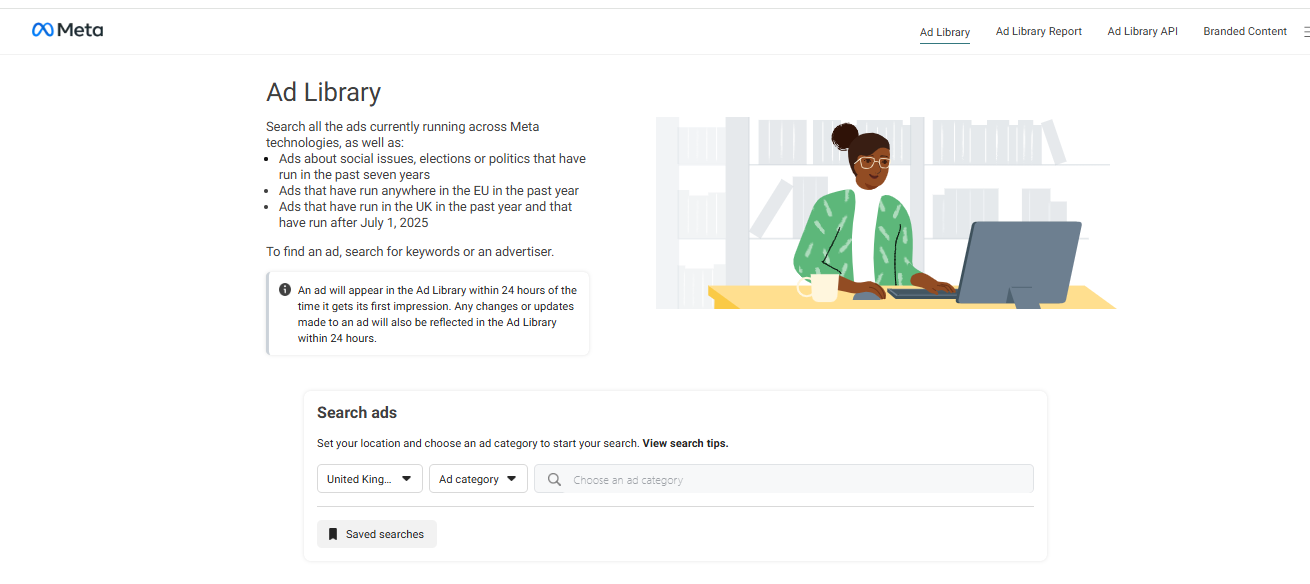
1. Start with the Meta Ad Library
Head to the Meta Ad Library in your browser. It works on both desktop and mobile, so you can check ads anytime. Whether you’re doing focused research or just browsing casually, it’s all accessible.
2. Select Your Country
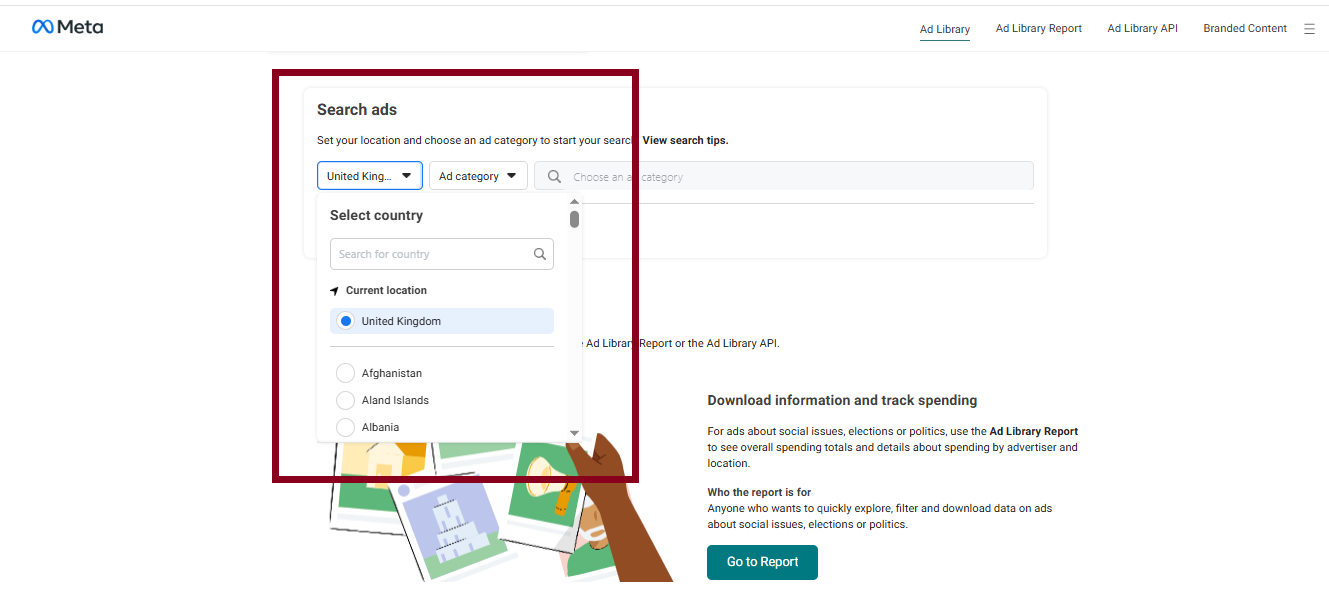
Once you’re in, choose the country you want to view ads from.
This matters more than people think. If you’re targeting customers in a specific location, you want to see ads that are relevant to that market. Otherwise, you might end up analyzing campaigns that don’t apply to your audience.
3. Choose the “All Ads” Category
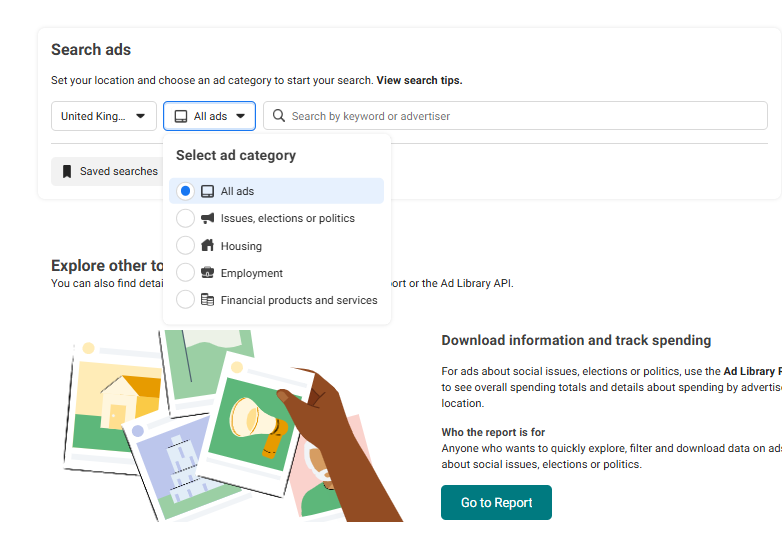
By default, you might see different ad categories.
Switch to “All Ads” so you can view standard business ads instead of political or issue-based ones. This keeps your research focused on what actually matters for your business.
4. Search for Competitors or Keywords
Now, type in a competitor’s name. You can also search using keywords related to your niche if you want to discover new brands you hadn’t considered before.
This is where things get interesting. You’ll start to see real ads that are currently running.
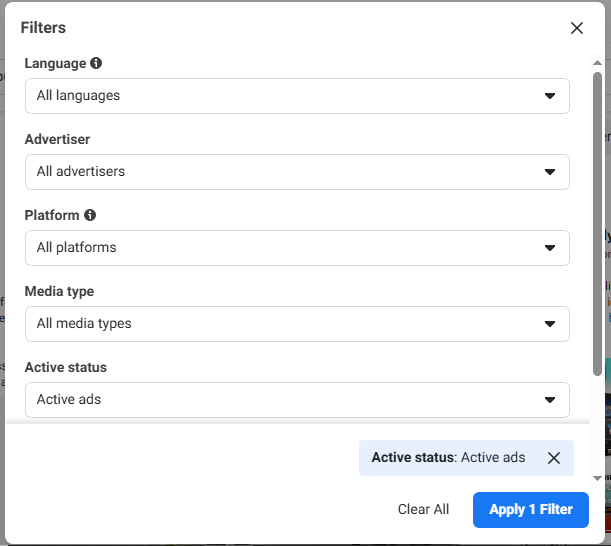
Use Filters to Narrow Things Down
If you’re seeing too many results, use filters. You can refine by:
- Platform (Facebook or Instagram)
- Media type (image, video, etc.)
- Active status
This helps you focus on the kind of ads you actually care about.
Study the Ads Properly
Don’t just scroll past. Take time to look at:
- The visuals
- The headline and caption
- The call-to-action
- The overall style
You’ll start to notice patterns. Certain formats, tones, or offers showing up again and again. That’s where the real insights are.
Click into Ads for More Details
When you click on an ad, you can see extra information, such as when the ad started running, different variations of the same ad, and whether it’s still active. If an ad has been running for a long time, there’s a good chance it’s performing well.
What Can You Learn from Competitor Facebook Ads?
Looking at competitor ads isn’t just about seeing what they’re doing.
It’s about understanding why it works.
Once you start paying attention, you’ll realize there’s a lot you can pick up. And most of it can directly improve your own campaigns.
The Formats That Get Attention
Some ads show up once. Others keep appearing.
That usually tells you something.
You’ll start to notice if your competitors rely more on videos, carousels, or simple image ads. If a certain format keeps popping up, there’s a good chance it’s performing well.
And if everyone in your space is leaning into short videos, it’s probably worth testing them too.
The CTAs That Drive Clicks
Calls to action might seem small but they matter. Watch how competitors guide people to take the next step. Some keep it direct with “Shop Now” or “Learn More.” Others use more conversational phrases.
Even small changes in wording can shift how people respond. That’s why it’s worth paying attention to what shows up consistently.
The Angles That Make Offers Feel Valuable
Every ad is trying to answer one question.
“Why should I care?”
Some brands focus on price. Others highlight quality, speed, or exclusivity. By watching competitor ads, you’ll see how they position their offers and what they lead with.
This helps you refine your own message so it feels more relevant to your audience.
The Visual Styles That Stop the Scroll
Design isn’t random. If you keep seeing certain styles, there’s usually a reason.
It could be bold colors, clean layouts, lifestyle shots, or user-generated content. These patterns tell you what’s catching attention in your niche.
You don’t need to copy them. But you can use them as a starting point for your own creative direction.
The Timing Behind Campaigns
Ads often follow a rhythm. You’ll notice spikes around holidays, sales periods, or specific seasons. Competitors plan these campaigns in advance, and their ads reflect that.
If you spot these patterns early, you can prepare your own campaigns ahead of time instead of reacting late.
The Ideas Worth Saving
As you go through ads, don’t rely on memory. Save the ones that stand out.
Build a simple swipe file. A place where you keep strong ideas, creative angles, and patterns you’ve noticed. Over time, this becomes a reference you can use whenever you’re planning new campaigns.
How to Turn Competitor Ads into a Strategy (Not Just Inspiration)
Seeing competitor ads is useful.
Understanding why they work is where the real advantage comes from.
Instead of just scrolling, you want to break things down and look for patterns you can actually use. Here’s how to do that properly.
1. Look at Ad Frequency and Longevity
This is one of the simplest signals.
If an ad has been running for weeks or even months, it’s probably working. Brands don’t keep spending money on ads that don’t perform.
On the other hand, ads that disappear quickly are often tests that didn’t go well. Pay attention to this. It helps you separate strong ideas from weak ones.
2. Study How They Test Variations
Most competitors don’t run just one version of an ad. They test different angles.
You might notice the same ad with slight changes. A different headline. A new image. A tweaked call-to-action. These small variations show you what they’re experimenting with.
This is a big takeaway.
Instead of changing everything at once, focus on testing one element at a time in your own campaigns.
3. Break Down Copywriting Trends
Copy tells you a lot. Some brands go straight to the point with short, sharp lines. Others tell a quick story. But you’ll often see repeating patterns.
Things like urgency, social proof, or highlighting a specific pain point.
When you start spotting these trends, you get a clearer idea of what kind of messaging connects with your audience.
4. Read Between the Lines on Targeting
You won’t see their exact audience settings. But the ads still give clues.
The visuals, tone, and language usually point to who they’re trying to reach. Casual language and fast edits often target younger users. More polished messaging tends to speak to professionals or higher-ticket buyers.
These details help you refine your own targeting.
5. Build Hypotheses for A/B Testing
This is where most people stop too early.
They see something that works and either copy it or ignore it. A better approach is to turn it into a test.
If you notice competitors using video testimonials, try your own version. If they lean on urgency, test that angle in your copy.
Think in terms of small experiments. Over time, these tests give you real data. And that’s what helps you build campaigns that actually perform.
How Often Should You Check Your Competitors’ Facebook Ads?

This isn’t something you do once and forget.
Competitor ads change. New creatives come in. Old ones disappear. If you’re not checking regularly, you miss the patterns.
The goal isn’t to monitor everything all the time. It’s to find a rhythm that keeps you informed without overwhelming you.
Keep It Monthly if Your Industry Moves Fast
If you’re in a space like e-commerce, digital products, or anything trend-driven, things change quickly.
New offers show up. Creatives get refreshed. Formats evolve.
A quick monthly check helps you stay in sync with what’s happening. You catch trends early and avoid running ads that already feel outdated.
Go Quarterly if Things Are More Stable
Some industries don’t shift as often.
If you’re in B2B, local services, or more traditional sectors, you don’t need to check as frequently. A quarterly review is usually enough.
This gives you a clearer view of bigger changes like messaging shifts, positioning, or new campaign angles without getting lost in small details.
Pay Extra Attention During Key Seasons
Certain periods matter more than others. Holidays. Big sales. Industry-specific events.
This is when competitors usually bring out their strongest campaigns. Watching closely during these moments gives you ideas you can use for your own peak periods.
Timing plays a big role here.
Keep Your Findings Organized
Insights are only useful if you can find them again. Instead of scattered notes, keep everything in one place. A simple document, spreadsheet, or workspace where you track:
- Ads that stand out
- Patterns you notice
- Ideas worth testing
Over time, this becomes your go-to reference.
Turning Competitor Insights into Better Ads with OnlySocial
Finding great ad ideas is one thing. Actually using them properly is another.
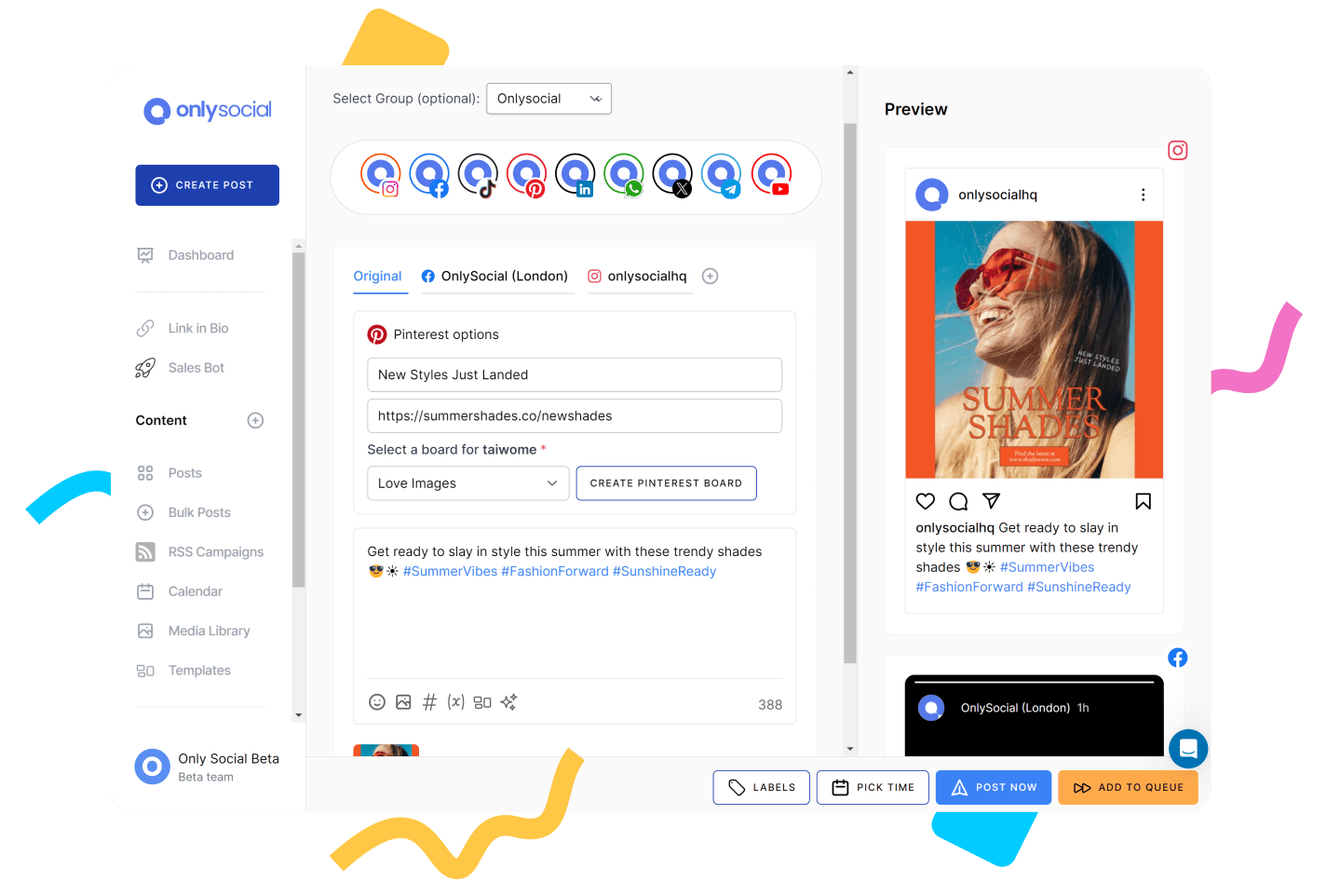
But OnlySocial can make this seamless. The tool helps you take what you’ve learned from competitor ads and turn it into campaigns that are organized, consistent, and backed by real data.
Here are some ways it can help:
Keep Your Best Ideas in One Place
When you’re reviewing competitor ads, ideas come quickly.
Hooks, visuals, angles. But they’re easy to lose if you don’t store them properly.
OnlySocial gives you a central space to keep everything organized. You can build your own swipe file, map ideas into a content plan, and see how everything fits together on a visual calendar.
So instead of random inspiration, you have a clear system.
Plan, Schedule, and Act Without Switching Tools
Once you’ve got your ideas, execution should be simple.
With OnlySocial, you can schedule your Facebook content in advance and keep your campaigns running without constant manual work. And when a post performs well, you can quickly turn it into a boosted post without jumping between platforms.
This helps you move faster. You’re not just planning. You’re acting on what works.
Use Data to Refine Your Strategy
Ideas are good, but data makes them better.
OnlySocial’s analytics help you track how your content performs and compare it against what you’ve observed from competitors. You can see what’s getting engagement, what’s falling flat, and where to adjust. Over time, this turns your ad strategy into something more predictable.
Final Note
Your competitors are already doing the hard part.
They’re testing ads, spending money, and figuring out what works. All you’re doing is paying attention, learning from it, and applying those insights in a smarter way.
That’s not copying. That’s strategy.
The more consistently you study competitor ads and refine your approach, the better your campaigns become. And with the right system in place, like using OnlySocial to plan and execute, you’re not just keeping up. You’re staying ahead.
Frequently Asked Questions
How can I see the Facebook ads my competitors are running?
The easiest way is through the Meta Ads Library. Just search for your competitor’s name, and you’ll see all their active ads across Facebook and Instagram. It’s free and works on both mobile and desktop.
Can I find ads from a specific Facebook page?
Yes. Just go to the Meta Ads Library and type in the page name. Once you select the page, you’ll see all active ads linked to that account. You can then browse through creatives, copy, and variations to understand their strategy.
Are competitor Facebook ads actually public?
Yes, they are. Meta makes ads publicly accessible for transparency. That means anyone can view active ads from any brand without needing special access or permissions.
Can I see how well my competitor’s ads are performing?
Not directly. You won’t get exact numbers like clicks or conversions. But you can make smart guesses based on how long an ad has been running, how often it appears, and the level of engagement it gets.
What tools can I use to monitor competitor ads?
The main one is the Meta Ads Library. You can also use tools like OnlySocial to organize insights, track patterns, and manage your own campaigns based on what you’ve learned.