13 Best NapoleonCat Alternatives in 2026
NapoleonCat works well for social media teams that want inbox management, analytics, and competitor tracking in one place. But it’s not always the best fit for everyone.
Pricing, feature limits, and workflow preferences often push brands and agencies to explore other tools that feel more flexible or easier to scale.
This guide walks through 13 of the best NapoleonCat alternatives to consider in 2026, based on real usage and practical needs. We’re looking at tools that handle scheduling, engagement, reporting, and collaboration in ways that actually make daily social media work smoother.
If you’re searching for an option that better matches how you work, this list will help you narrow things down quickly.
Table of Contents
- 1 Why Choose a NapoleonCat Alternative?
- 2 13 NapoleonCat Alternatives Worth Switching to
- 3 1. OnlySocial – $29/Month
- 4 2. Buffer – $6/Month
- 5 3. Later – $25/Month
- 6 4. Hootsuite – $99/Month
- 7 5. SocialPilot – $30/Month
- 8 Key Features
- 9 6. Sprout Social – $199/Month
- 10 7. ContentStudio – $25/Month
- 11 8. Loomly – $65/Month
- 12 9. Agorapulse – $99/Month
- 13 Key Features
- 14 10. SocialBee – $29/Month
- 15 11. Metricool – $18/Month
- 16 Statusbrew – $89/Month
- 17 13. Zoho Social – $15/Month
- 18 Choosing the Right NapoleonCat Alternative for Your Brand
- 19 FAQ
Why Choose a NapoleonCat Alternative?
NapoleonCat works fine at the start, especially for teams focused on inbox management and analytics. But as your social media needs grow, its limitations start to show.
We’ve seen this happen with brands, agencies, and social media managers who simply outgrow the platform and want more flexibility without added friction.
One of the biggest reasons people switch is platform coverage and flexibility. Some networks don’t get the same level of support, and newer or niche platforms can feel like an afterthought. If you’re managing content across multiple channels, these gaps slow you down quickly. Many alternatives now offer broader platform support and smoother cross-channel workflows.
Scalability is another common pain point. What works for one brand often doesn’t work when you’re handling five or ten. Teams start to feel boxed in by rigid user roles and limited collaboration tools. Growing teams usually need tools that scale naturally without forcing constant upgrades or workarounds.
Then there’s the pricing problem. As you add users, profiles, or advanced features, costs rise fast. Several features that come standard in other tools sit behind higher plans in NapoleonCat. For many teams, the value just stops matching the price.
That’s why so many are now looking for NapoleonCat alternatives that offer better performance, more features, and clearer pricing, without the extra weight.
If you’re feeling any of this, exploring alternatives isn’t a downgrade. It’s often the smarter next step.
13 NapoleonCat Alternatives Worth Switching to
1. OnlySocial – $29/Month
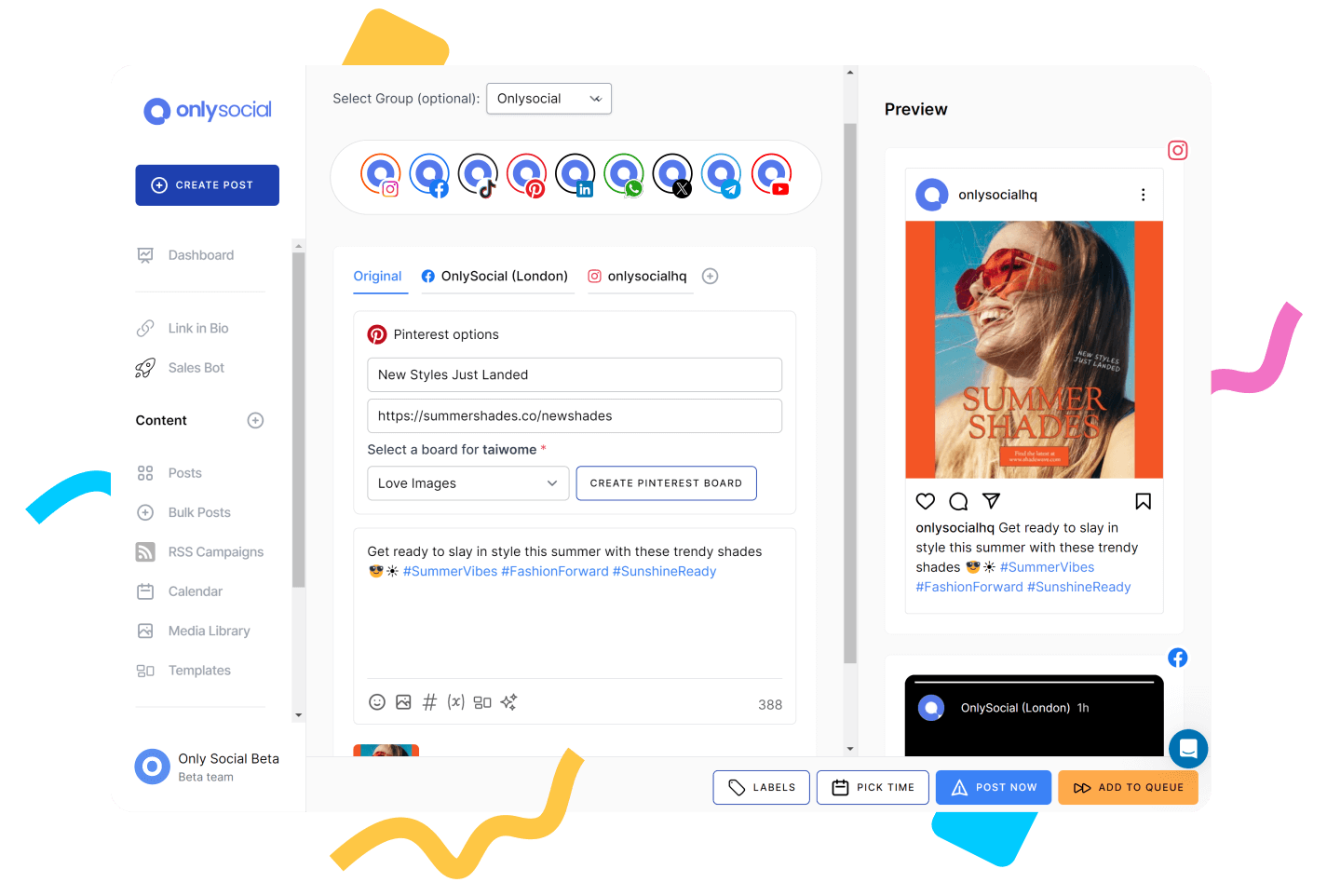
OnlySocial is a social media automation tool built with real, everyday workflows in mind. What really stood out about the tool isn’t flashy features. It was how balanced the tool feels. Scheduling, collaboration, inbox management, and AI support all live in one place without the platform feeling heavy or complicated.
It’s especially well-suited for social media managers, small teams, and agencies that manage multiple brands. Instead of forcing you into rigid workflows, OnlySocial adapts well to how most people already work.
You can plan content in batches, collaborate with teammates, manage conversations, and keep things moving without constantly switching tools.
Key Features
Multi-platform scheduling across 15+ network
OnlySocial lets you schedule content for Instagram, Facebook, LinkedIn, TikTok, Pinterest, YouTube, Google Business Profile, Threads, Bluesky, Mastodon, and more from one dashboard. You can customize captions per platform, which helps avoid the “copy-paste everywhere” problem.
Smart scheduling and bulk publishing
You can set posting time slots for each account or upload large batches of posts using CSV. This is useful if you plan content weekly or monthly and don’t want to manually pick dates every time.
Messages, comments, and mentions from supported platforms land in one inbox. It’s easier to stay responsive, especially when managing multiple accounts. Compared to NapoleonCat, this feels more straightforward and less rigid.

AI-assisted content creation
The built-in AI helps with captions, rewrites, hashtag suggestions, and even visuals. It’s not there to replace your voice. It’s more of a productivity booster when ideas run dry or deadlines are tight.
Team collaboration and approvals
You can assign roles, request approvals, and manage workflows without endless back-and-forth. This is especially useful for agencies or teams working with clients who want visibility before posts go live.
Content calendar and library
The visual calendar gives a clear overview of what’s scheduled, what’s in draft, and what’s coming next. The content library helps store and reuse assets, which is handy for recurring campaigns.
White-label support for agencies
Agencies can brand the dashboard and reports, making it easier to present the tool as part of their service offering.
Pricing
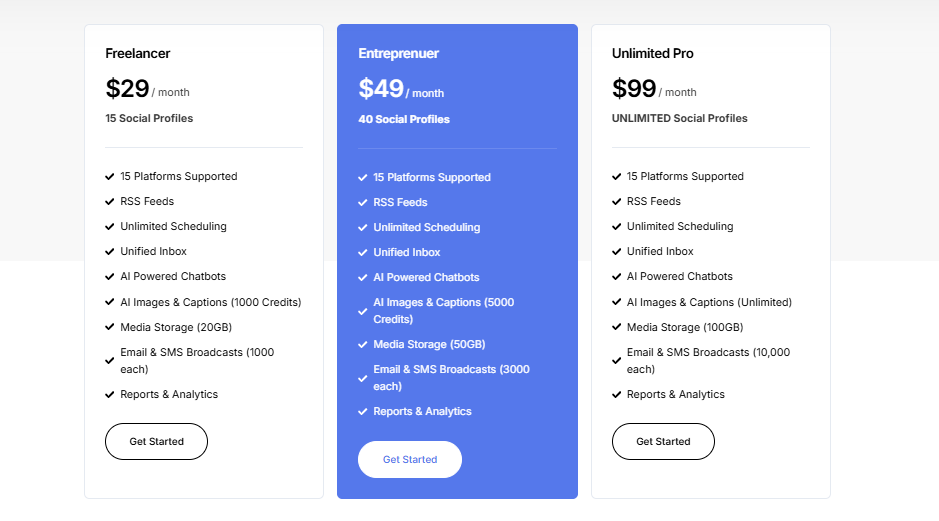
OnlySocial keeps pricing simple and predictable:
- Freelancer – $29/month (15 social accounts)
- Entrepreneur – $49/month (45 social accounts)
- Professional – $99/month (unlimited social accounts)
All plans include scheduling, bulk uploads, AI tools, collaboration features, analytics, and the unified inbox.
Pros
- Easy to learn, even for non-technical users
- Handles multiple platforms smoothly without feeling cluttered
- Strong scheduling and bulk publishing for busy workflows
- Unified inbox makes daily engagement easier to manage
- Pricing scales well for teams and agencies
Cons
- No permanently free plan
- Doesn’t include competitor analysis tools
Why it works as a NapoleonCat alternative
OnlySocial offers many of the same core capabilities – scheduling, inbox management, collaboration, and AI support – but with clearer pricing and fewer restrictions as you scale. For teams that want flexibility without paying extra for every add-on, it’s one of the strongest alternatives heading into 2026.
2. Buffer – $6/Month

Buffer is one of the most approachable social media tools on the market, and it shows the moment you log in. As a NapoleonCat alternative, Buffer appeals to users who want clarity over complexity. It doesn’t try to do everything at once.
Instead, it focuses on helping you plan content, publish consistently, and understand what’s working without overwhelming you with data or settings.
From our experience, Buffer works best for solo creators, small businesses, and lean marketing teams. It’s the kind of tool you can hand to a teammate and trust they’ll figure it out quickly.
While it doesn’t match NapoleonCat in areas like deep analytics or moderation workflows, it offers a calmer, more flexible way to manage daily posting.
Key Features
- Multi-platform scheduling
Buffer allows you to schedule posts across major platforms from a single dashboard. Each post can be adjusted per channel, which helps maintain platform-specific tone and formatting without extra tools. - Clean content calendar
The calendar view is simple and easy to scan. You can quickly see what’s scheduled, what’s coming up, and where gaps exist in your content plan. It’s not packed with extras, but that’s part of the appeal. - Buffer AI Assistant
The AI tool helps generate captions, rework existing text, and suggest ideas when you’re stuck. It’s practical rather than flashy, and works best as a support tool when you’re batching content. - Start Page (link-in-bio tool)
Buffer includes a built-in landing page feature that lets you create a central hub for links, offers, or featured content. This is useful if you want something simple without using a separate tool. - Basic engagement and inbox features
You can reply to comments and messages from within Buffer, though it’s not as advanced as NapoleonCat’s moderation-focused inbox. For lighter engagement needs, it does the job.
Pricing
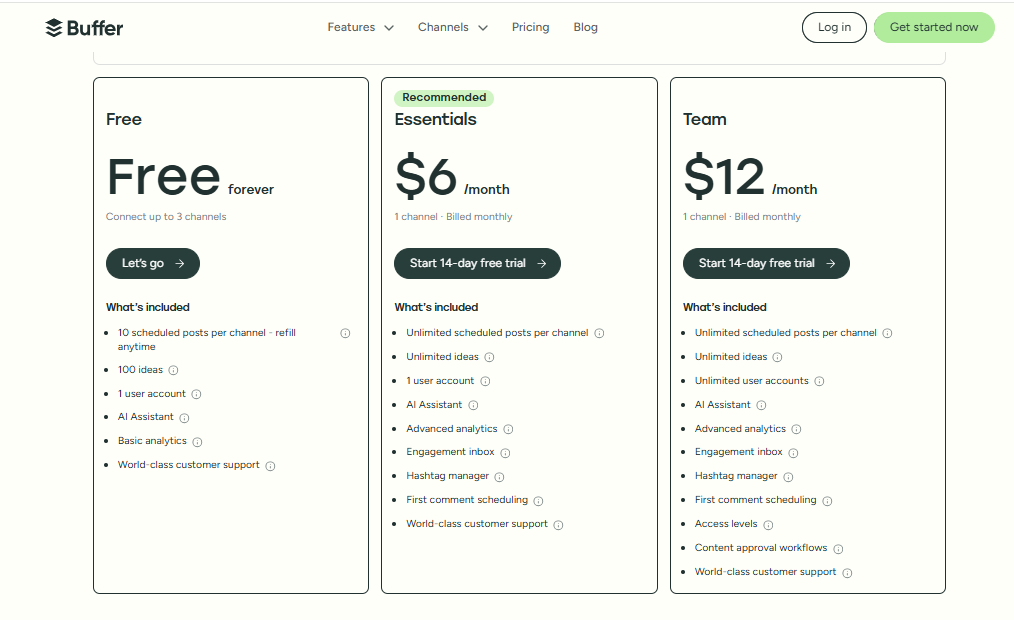
Buffer offers flexible pricing with a free option:
- Free plan – limited features, suitable for beginners
- Paid plans start from around $6/month per channel
- Higher tiers go up to $120/month depending on accounts and features
Pricing scales by social account, which can add up for teams managing many profiles.
Pros
- Very easy to use, even for first-time users
- Clean interface that reduces mental overload
- Flexible pricing with a free entry point
- Helpful AI support for content creation
- Works well for solo users and small teams
Cons
- Analytics are basic compared to NapoleonCat
- Engagement and inbox features are limited
- Costs can rise as you add more social accounts
Why it works as a NapoleonCat alternative
Buffer is a strong option if NapoleonCat feels too heavy or expensive for your needs. It trades advanced moderation and analytics for simplicity, flexibility, and ease of use.
If your focus is consistent posting and clear workflows rather than deep reporting, Buffer can be a more comfortable long-term choice.
3. Later – $25/Month
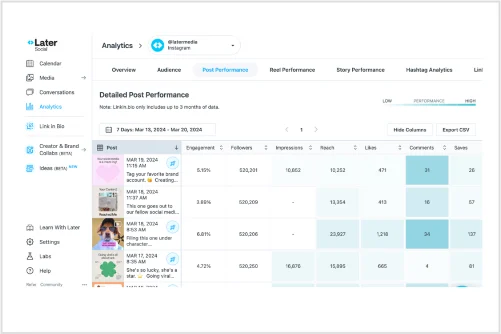
Later is best known for visual-first social media planning, especially for Instagram, and that focus still defines the tool today. As a NapoleonCat alternative, Later works well for brands and creators who care a lot about how their feed looks and want an easy way to plan content visually before it goes live.
From our experience, Later feels less like a “social media command center” and more like a clean planning space. It doesn’t try to cover everything at once. Instead, it helps you plan posts, keep your content looking consistent, and publish without stress.
For teams that don’t need heavy moderation or competitor tracking, this lighter approach can be refreshing.
Key Features
- Visual content calendar
Later’s drag-and-drop calendar lets you plan posts visually before scheduling them. This is especially useful for Instagram grids, where layout and flow matter just as much as captions. - Multi-platform scheduling
You can schedule posts for Instagram, Facebook, TikTok, LinkedIn, Pinterest, and X. The setup is straightforward, and platform-specific tweaks are easy to make. - Link in bio tool (Linkin.bio)
Later’s link-in-bio feature turns your Instagram feed into a clickable landing page. It’s useful for driving traffic to products, blog posts, or offers without using a separate tool. - Hashtag suggestions and saved captions
Later helps with hashtag research and lets you save caption templates. This speeds up posting when you’re working with recurring formats or campaigns. - User-generated content management
You can collect, organize, and repost user-generated content, which is handy for brands that rely on community posts or creator collaborations. - Basic analytics
Later provides performance insights around engagement, reach, and best posting times. It’s more about guidance than deep analysis.
Pricing
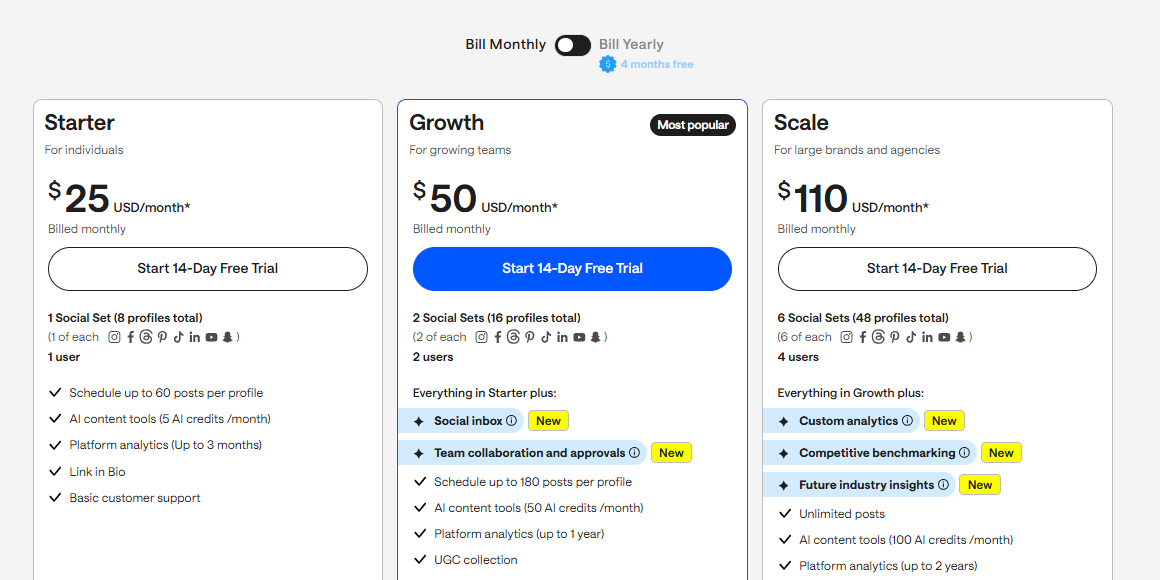
Later offers tiered pricing based on features and number of social profiles. The Starter plans begin around $25/month while higher tiers scale up for teams and advanced features. There’s also a limited free plan for basic use.
Pros
- Excellent visual planning for Instagram-focused strategies
- Clean, beginner-friendly interface
- Strong link-in-bio feature included
- Helpful tools for managing user-generated content
- Easy to adopt with minimal setup time
Cons
- Analytics are not as detailed as NapoleonCat’s
- Limited inbox and moderation capabilities
- Less suitable for teams needing advanced reporting or competitor tracking
Why it works as a NapoleonCat alternative
Later is a good fit if NapoleonCat feels too analytics-heavy or expensive for a visually driven workflow. It’s ideal for creators, ecommerce brands, and small teams that want to plan content visually and stay consistent without dealing with complex dashboards.
4. Hootsuite – $99/Month
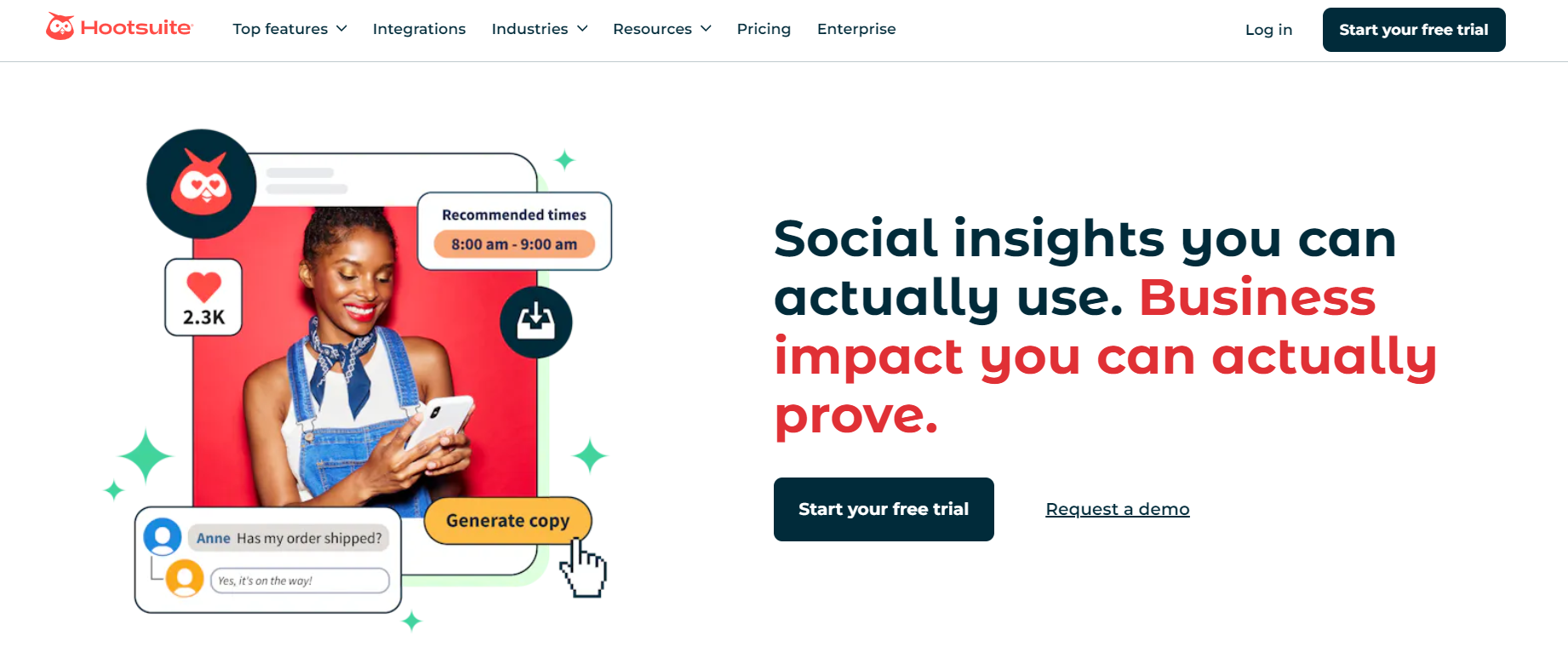 Hootsuite is one of the most established names in social media management, and as a NapoleonCat alternative, it targets teams that need structure, scale, and visibility across multiple channels. When we revisited Hootsuite, it felt very much like an “all-in-one” workspace. Publishing, engagement, analytics, ads, and listening all live inside a single dashboard.
It’s clearly built for growing teams and larger organizations. While that depth can feel heavy for smaller users, it becomes valuable once you’re managing multiple accounts, team members, or regions. Compared to NapoleonCat, Hootsuite leans more toward enterprise workflows and broad platform integrations.
Key Features
- Advanced post scheduling and bulk publishing
Hootsuite lets you plan posts individually or in bulk, with auto-scheduling that recommends optimal posting times. This helps teams stay consistent without constantly monitoring performance trends manually. - Unified inbox with team controls
Messages, comments, and mentions from different platforms are centralized in one inbox. Features like saved replies and agent collision detection reduce duplicate responses when multiple team members are involved. - Social listening and monitoring streams
You can track keywords, hashtags, competitors, and brand mentions in real time. This makes it easier to spot trends, manage reputation, and respond quickly during high-activity periods. - Analytics and reporting
Hootsuite offers both standard and advanced analytics. You can track post performance, audience growth, and campaign results, with options to customize reports for stakeholders. - Ad management tools
The platform allows you to manage and boost social ads directly from the dashboard, which helps teams keep organic and paid efforts aligned.
Pricing
Hootsuite’s pricing reflects its enterprise focus:
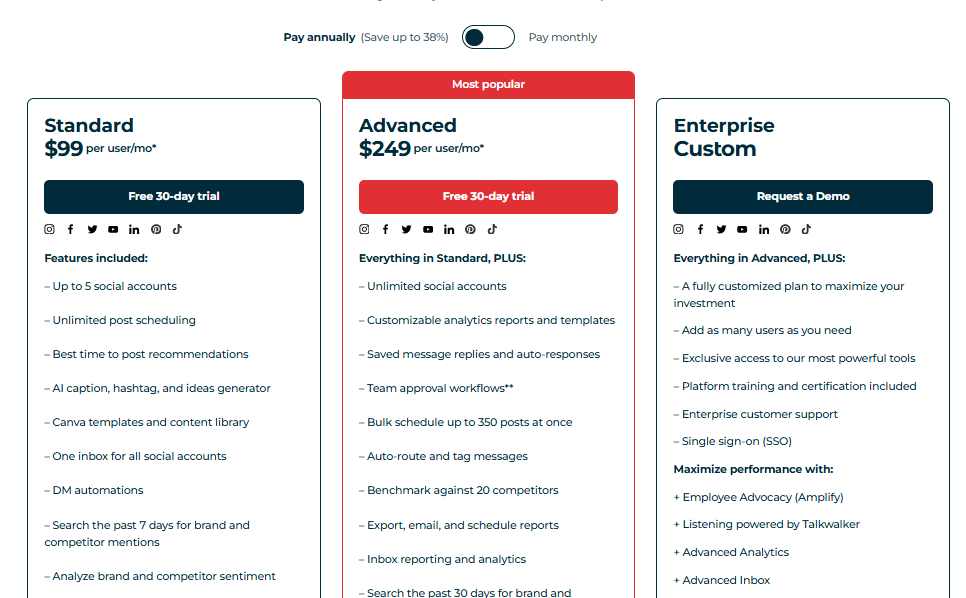
- Plans start at $99/month
- Higher tiers go up to $249/month and beyond, depending on features and users
Advanced analytics and listening features are often priced as add-ons.
Pros
- Strong platform coverage and integrations
- Centralized inbox designed for team workflows
- Built-in social listening and monitoring
- Robust analytics for tracking performance at scale
- Suitable for managing large volumes of content
Cons
- Pricing can be steep for small teams
- Advanced features often require add-ons
- Interface may feel overwhelming at first
Why it works as a NapoleonCat alternative
Hootsuite offers similar moderation, analytics, and monitoring capabilities but with broader integrations and deeper enterprise tooling. For teams that have outgrown NapoleonCat’s structure and want a more scalable, organization-wide solution, Hootsuite is a logical next step, as long as the budget supports it.
5. SocialPilot – $30/Month

SocialPilot is designed for people who want strong scheduling and collaboration features without paying enterprise-level prices. As a NapoleonCat alternative, it fits nicely between simple tools like Buffer and heavier platforms like Hootsuite.
When we tested it, SocialPilot felt practical and focused. It’s built to help you plan, publish, and manage multiple accounts efficiently, especially if you’re handling client work.
It’s particularly popular with agencies and freelancers because it supports a high number of accounts at a relatively affordable rate. While it doesn’t try to be flashy, it covers the essentials well and keeps workflows predictable.
Key Features
- Multi-platform scheduling
SocialPilot supports scheduling across major platforms including Facebook, Instagram, LinkedIn, X, Pinterest, TikTok, and Google Business Profile. You can customize posts per platform, which helps keep content native instead of generic. - Bulk scheduling and CSV upload
You can upload hundreds of posts at once using a CSV file. This worked smoothly during testing and is ideal for agencies planning content weeks or months ahead. - Content calendar with drag-and-drop editing
The visual calendar gives you a clear overview of scheduled posts. You can move content around easily when plans change, without recreating posts. - Team collaboration and approvals
You can assign roles, request approvals, and control who can publish content. This is useful when working with clients or multiple team members who need visibility but not full access. - Analytics and reporting
SocialPilot provides engagement metrics, audience growth data, and performance summaries. Reports can be exported and shared with clients, which saves time during monthly reporting.
Pricing
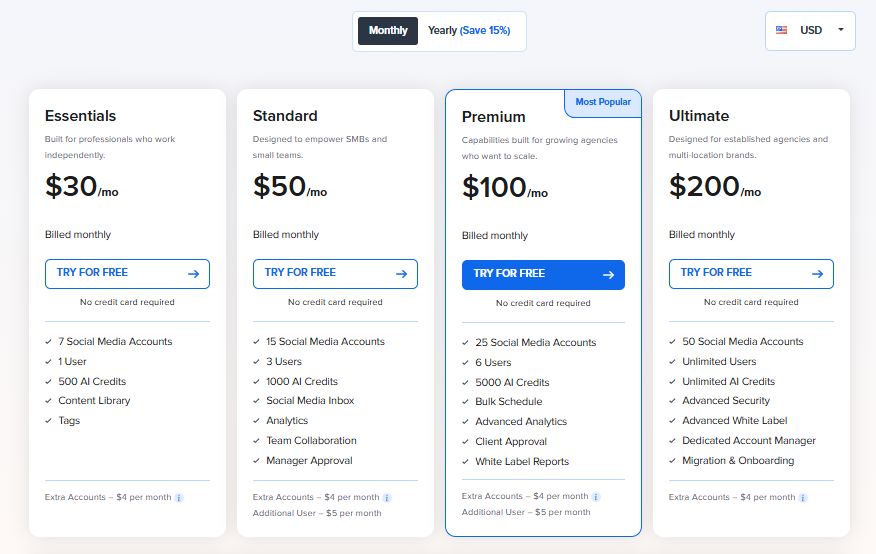
SocialPilot is known for competitive pricing. Plans start at around $30/month and its higher tiers scale based on number of accounts and users. Overall, it’s more affordable than NapoleonCat for teams managing many profiles.
Pros
- Supports a large number of social accounts at lower cost
- Bulk scheduling is reliable and easy to use
- Simple client and account organization
- Collaboration features work well for agencies
- Clear, no-frills interface
Cons
- Analytics are not as deep as NapoleonCat’s
- No advanced social listening features
Why it works as a NapoleonCat alternative
SocialPilot is a strong choice if NapoleonCat feels too expensive or restrictive as your account count grows. It delivers solid scheduling, collaboration, and reporting at a lower price point, making it especially attractive for agencies and freelancers who prioritize efficiency over advanced monitoring features.
6. Sprout Social – $199/Month
Sprout Social is built for teams that care deeply about engagement, reporting, and understanding what’s happening behind the numbers. The tool leans more toward structured workflows and insight-driven decision-making compared to NapoleonCat. When we used it, Sprout felt less like a simple scheduler and more like a full social operations platform.
It’s best suited for established brands and teams that want visibility across conversations, campaigns, and performance in one place. Compared to NapoleonCat, Sprout puts more emphasis on analytics, sentiment, and inbox intelligence, but that depth comes with higher costs.
Key Features
- Unified smart inbox with message prioritization
Sprout pulls comments, messages, mentions, and reviews into one inbox and uses AI to surface high-priority conversations. This is useful for teams managing large volumes of interactions and trying to avoid missed messages. - Advanced analytics and reporting
Sprout separates organic and paid performance clearly and offers interactive charts that make trends easy to spot. Reports can be customized for different stakeholders, which helps when sharing insights internally or with clients. - Social listening and sentiment analysis
You can track brand mentions, keywords, and industry conversations while analyzing sentiment. This gives a clearer picture of how people feel about your brand, not just how often they engage. - Campaign planning and tagging
Posts can be grouped into campaigns, making it easier to measure performance around launches, promotions, or events instead of looking at posts in isolation. - Employee advocacy tools
Teams can share approved brand content through employee profiles, extending reach without creating extra content.
Pricing
Sprout Social is priced per user, which adds up quickly:
- Standard – $199 per user/month
- Professional – $299 per user/month
- Advanced – $399 per user/month
This makes it one of the more expensive NapoleonCat alternatives on the market.
Pros
- Powerful inbox management for high-volume engagement
- Deep analytics that go beyond surface-level metrics
- Strong listening and sentiment tracking
- Clean, professional reporting for stakeholders
- Well-suited for structured team workflows
Cons
- Pricing can be hard to justify for small teams
- Charged per user, which limits scalability
- Can feel overwhelming if you only need basic scheduling
Why it works as a NapoleonCat alternative
Sprout Social offers many of the same core strengths as NapoleonCat. Talk of engagement, analytics, and moderation – but with more depth around sentiment, listening, and reporting. If your team relies heavily on data and customer interactions to guide strategy, Sprout is a strong alternative, provided the budget allows for it.
7. ContentStudio – $25/Month

ContentStudio is a solid NapoleonCat alternative for teams that want to balance content discovery, scheduling, and analytics without leaning too heavily into enterprise complexity. Think of a very practical and flexible tool. It’s built to help you keep content flowing, especially if you rely on curated content alongside original posts.
It works well for freelancers, small businesses, and agencies that want to automate publishing while still having enough insight to adjust strategy.
Key Features
- Content discovery and curation engine
ContentStudio scans the web, YouTube, and X (Twitter) for trending and keyword-based content. This is useful if you want to keep your feeds active without constantly creating everything from scratch. - AI-powered captions and visuals
The AI helps generate captions, rewrite posts, and suggest visual ideas. It’s especially helpful when batching content or refreshing evergreen posts. - Bulk scheduling and automation
You can schedule hundreds of posts at once using bulk uploads. Evergreen recycling helps resurface top-performing content automatically. - Drag-and-drop content calendar
The calendar gives a clear overview of scheduled posts and allows quick rescheduling when plans change. - Analytics and competitor benchmarking
ContentStudio provides channel-level performance metrics and lets you compare results against competitors, which helps put your growth into context. - Unified inbox for engagement
Messages and comments from supported platforms can be managed in one place, with basic assignment and response tools.
Pricing
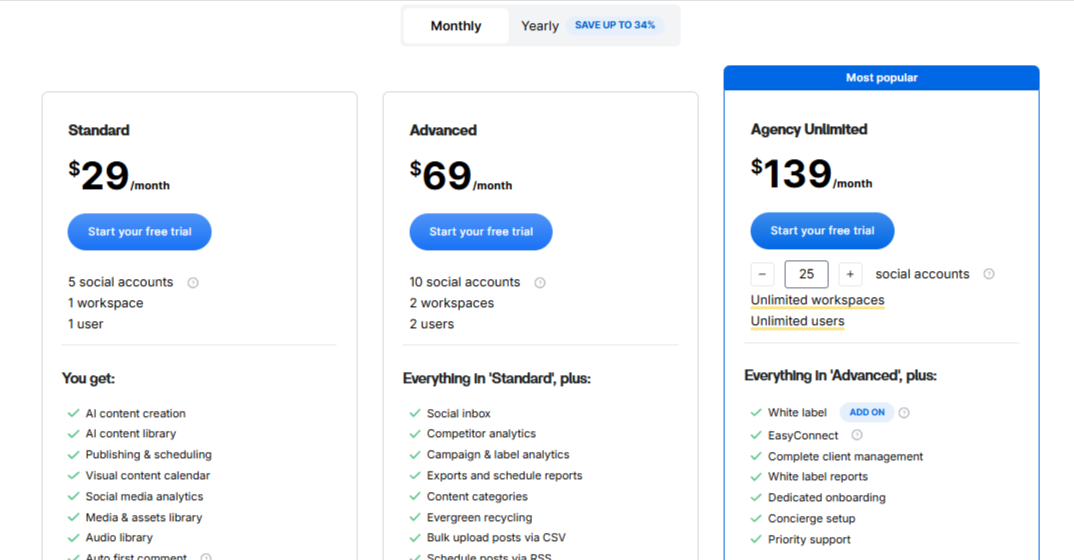
ContentStudio offers flexible pricing:
- Starter – $25/month
- Pro – $49/month
- Agency plans scale up to around $300/month, depending on account volume
This makes it more affordable than NapoleonCat for growing teams.
Pros
- Strong content discovery for filling posting gaps
- Bulk scheduling works well for long-term planning
- Evergreen recycling saves time on repeat content
- Cleaner pricing compared to many competitors
- Suitable for both solo users and agencies
Cons
- Social listening features are limited
- Interface can feel busy when managing many accounts
Why it works as a NapoleonCat alternative
ContentStudio is a good fit if you want less emphasis on moderation and more focus on content planning, discovery, and automation. It offers many of NapoleonCat’s core scheduling and analytics features at a lower cost.
This makes it a practical option for teams that value efficiency over heavy engagement management.
8. Loomly – $65/Month

Loomly is a planning-first social media tool that focuses on keeping teams organized and consistent. The tool works well for brands and agencies that care more about content coordination and approvals than heavy moderation or competitor tracking.
It’s especially useful for teams that collaborate a lot. Instead of jumping between tools for planning, feedback, and publishing, Loomly keeps the entire process in one place. Compared to NapoleonCat, it trades deep inbox and analytics features for clarity and control around content workflows.
Key Features
- Unified content calendar
Loomly’s calendar gives a full overview of drafts, scheduled posts, and published content across platforms. This makes it easier to spot gaps and maintain consistency. - Multi-platform scheduling
You can schedule posts for multiple social networks and customize each version per platform, which helps keep content native and relevant. - Post ideas and inspiration tools
Loomly suggests post ideas, trending topics, and content prompts. This is helpful when planning campaigns or filling quieter weeks. - Approval workflows and task assignments
Content can be reviewed, commented on, and approved inside the platform. Tasks and deadlines keep everyone aligned. - Basic analytics dashboard
Loomly shows engagement and performance metrics to help you understand what content resonates, without overwhelming you with data. - Custom branding options
Agencies can apply their own branding to dashboards and reports, which adds a professional touch for client-facing work.
Pricing
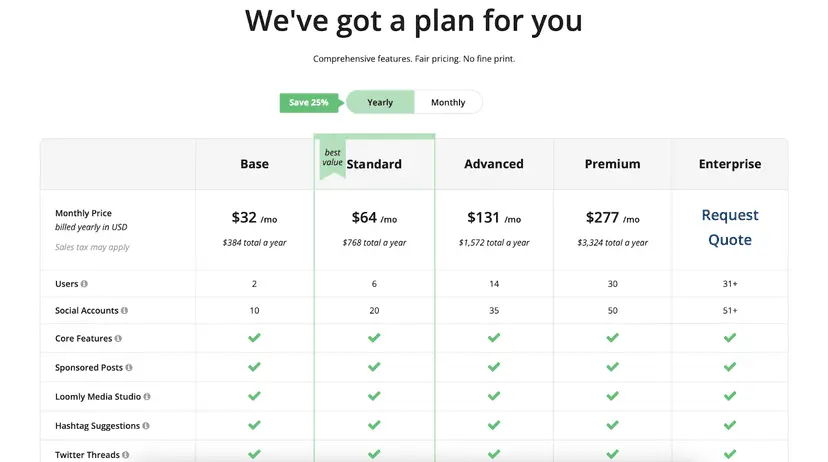
Loomly’s pricing is mid-to-high range. Plans start at around $65/month, and can go as up as $332/month, depending on users, brands, and features. There’s no permanently free plan.
Pros
- Excellent for content planning and coordination
- Clean interface that’s easy to navigate
- Strong approval workflows for teams and agencies
- Helpful post ideas for planning ahead
- Keeps content processes organized
Cons
- Analytics are fairly basic compared to NapoleonCat
- No advanced social listening features
- Pricing may feel high for teams needing only scheduling
Why it works as a NapoleonCat alternative
Loomly is a strong alternative if your priority is organised content planning rather than deep engagement management. It offers clearer workflows, simpler collaboration, and less complexity than NapoleonCat, making it a good fit for teams that value structure and consistency over advanced moderation tools.
9. Agorapulse – $99/Month

Agorapulse is a social media management tool that puts a lot of emphasis on engagement and inbox control. As a NapoleonCat alternative, it feels familiar in a good way — moderation, scheduling, reporting, and team workflows are clearly a priority.
Compared to NapoleonCat, Agorapulse offers a slightly cleaner experience around engagement, while still covering scheduling and reporting well.
Key Features
- Unified social inbox with moderation tools
Agorapulse brings comments, messages, and mentions into one inbox. You can reply, assign, label, or review conversations, which makes it easier to stay on top of engagement without missing anything. - Publishing and scheduling tools
You can schedule posts across major platforms, customize content per channel, and manage everything through a visual calendar. The workflow feels steady and predictable. - Analytics and reporting
Agorapulse provides clear performance reports with engagement, reach, and growth metrics. Reports are easy to export and share, which helps during client reporting. - Team collaboration features
Roles, permissions, and assignments help teams work together without stepping on each other’s toes. - Competitor analysis
You can track competitor performance and compare growth and engagement trends to your own accounts.
Pricing
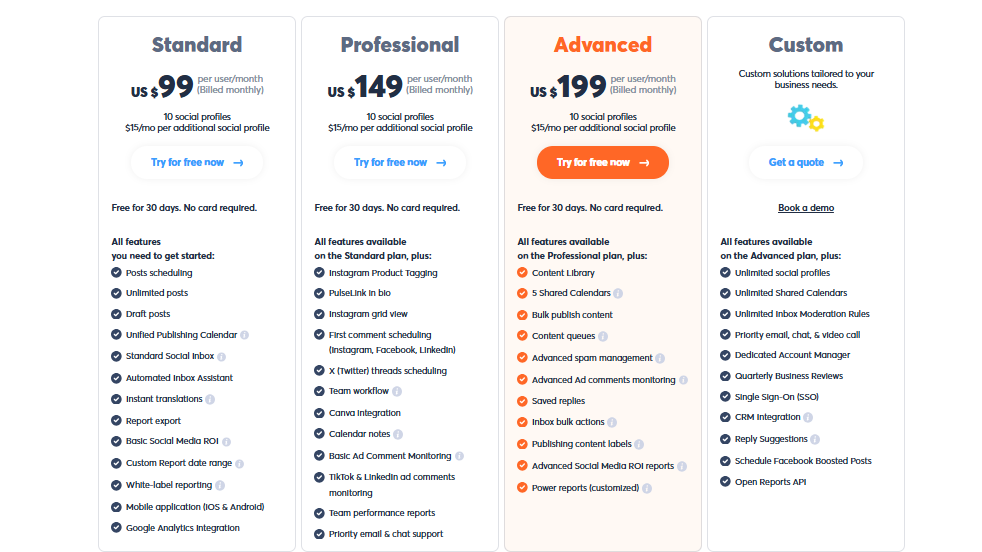
Agorapulse pricing is positioned toward professional teams. Plans start at around $99/month. Higher tiers scale based on users, profiles, and features. There’s also a limited free trial available.
Pros
- Strong inbox and moderation features
- Automation rules save time on repetitive engagement
- Clean and reliable publishing workflow
- Reporting is clear and client-friendly
- Good balance between structure and usability
Cons
- Pricing increases quickly as teams grow
- Analytics are solid but not deeply customizable
Why it works as a NapoleonCat alternative
Agorapulse covers many of the same strengths as NapoleonCat, especially inbox management and moderation, but with a cleaner, more user-friendly approach.
For teams that prioritize engagement control and structured workflows, Agorapulse is a dependable alternative that doesn’t feel overwhelming.
10. SocialBee – $29/Month

SocialBee is built around one clear idea: helping you stay consistent on social media without constantly creating new content. As a NapoleonCat alternative, it works best for users who rely heavily on evergreen posts and want a system that keeps their accounts active with minimal daily effort.
When we tested it, the platform felt very process-driven, especially around content recycling and categorization. It’s a good fit for small businesses, solopreneurs, and marketers who value structure.
Key Features
- Category-based content scheduling
SocialBee lets you organize posts into categories (tips, promos, testimonials, evergreen content) and schedule them on rotation. This keeps your feed balanced without manually planning every post. - Evergreen content recycling
Posts can be reused automatically based on your rules. This is useful for content that stays relevant over time, like FAQs or core brand messages. - Multi-platform publishing
You can post to platforms like Facebook, Instagram, LinkedIn, X, Pinterest, Google Business Profile, and more. Posts can be customized per platform to keep them native. - Content creation assistance
SocialBee includes tools to help write captions faster and refine existing posts, which helps when batching content. - Simple analytics
Engagement and performance metrics help you understand what content categories perform best, rather than just individual posts. - Team collaboration
You can add team members, assign roles, and manage approvals, though collaboration is lighter compared to enterprise tools.
Pricing
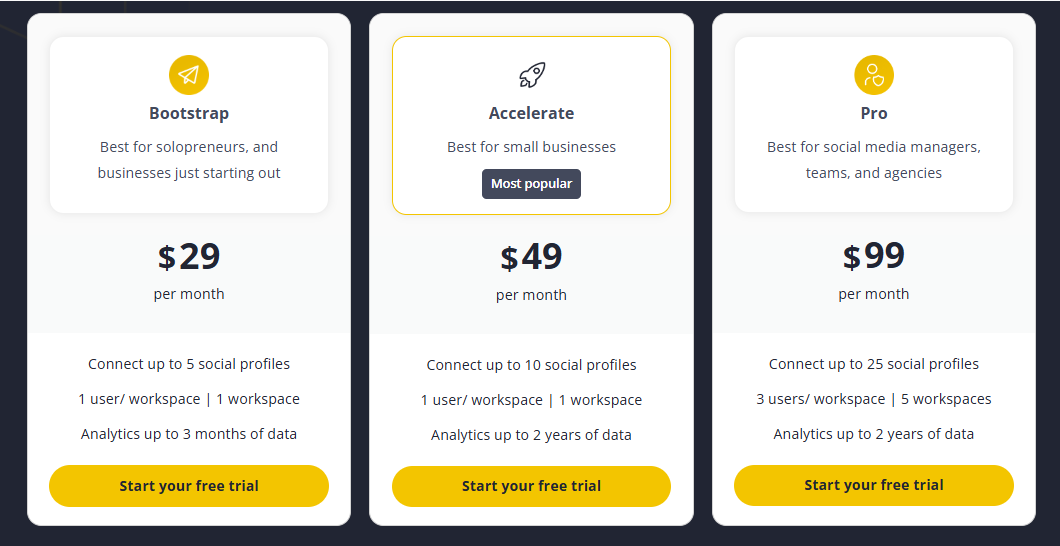
SocialBee offers tiered pricing based on features and users. Its basic plan starts at around $29/month. Higher tiers unlock more profiles, users, and automation options. Unfortunately, the tool also does not offer a permanent free plan. However, there is a 14-day free trial that allows you test the waters.
Pros
- Excellent for evergreen and recurring content strategies
- Category-based scheduling keeps feeds balanced automatically
- Reduces the need for constant content creation
- Clear and structured workflow
- More affordable than many enterprise-focused tools
Cons
- Limited social listening and moderation features
- Analytics are basic compared to NapoleonCat
- Interface may feel rigid if you prefer flexible planning
Why it works as a NapoleonCat alternative
SocialBee is a strong alternative if your main goal is consistency rather than conversation-heavy engagement. It replaces NapoleonCat’s moderation depth with smart content recycling and structured scheduling, making it a great option for marketers who want steady output without daily manual work.
11. Metricool – $18/Month
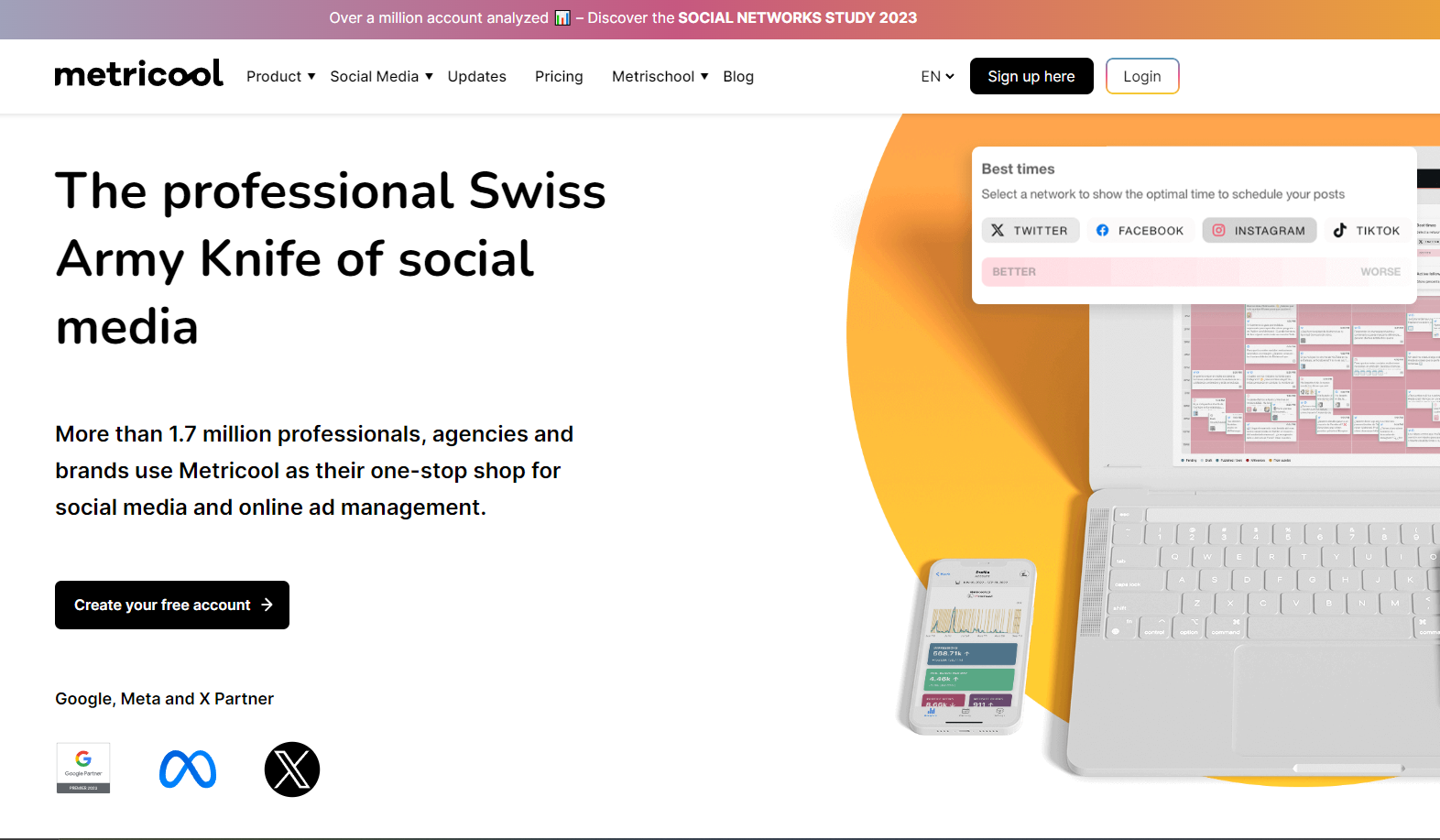
Metricool is a performance-focused social media tool that combines scheduling, analytics, and ad tracking in one place. As a NapoleonCat alternative, it stands out for users who care just as much about measuring results as they do about publishing content.
It’s a strong option for creators, marketers, and small teams who want to understand what’s working across social media and paid campaigns without juggling separate analytics platforms.
Key Features
- Visual content calendar
The calendar gives a clear overview of scheduled posts, making it easy to plan ahead and spot gaps. Rescheduling content is simple and doesn’t require rebuilding posts. - In-depth analytics and performance tracking
Metricool excels here. You get clear insights into engagement, reach, follower growth, and posting times. The data is easy to read and useful for improving strategy, not just reporting numbers. - Paid ads tracking
You can track performance for Facebook and Google Ads alongside organic social content. This is especially helpful if you want one view of how paid and organic efforts work together. - Competitor analysis
Metricool allows you to benchmark your performance against competitors, helping you understand where you stand in your niche. - Reporting and exports
Reports can be generated quickly and exported for clients or internal use, saving time on manual reporting.
Pricing
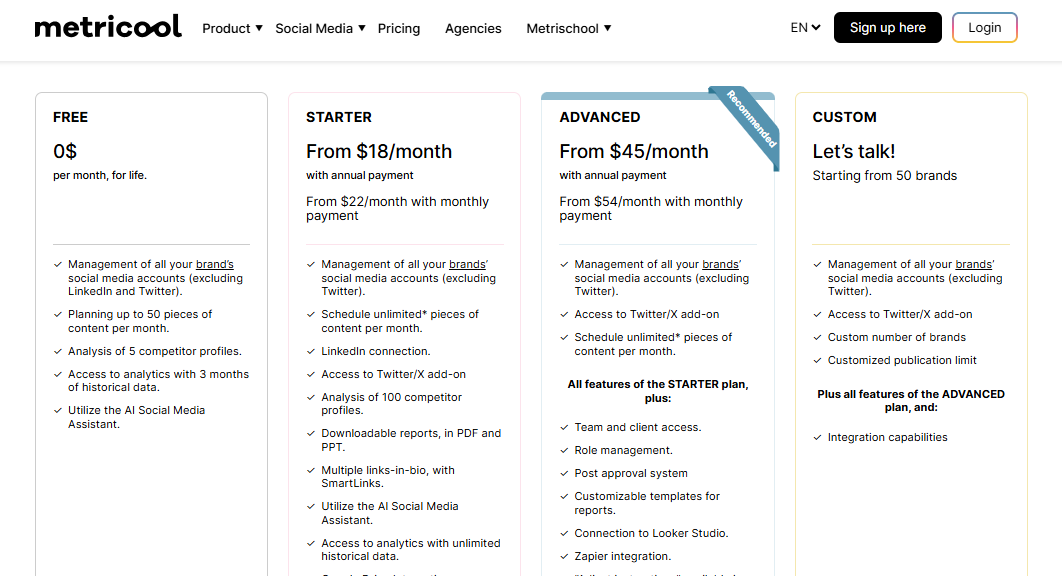
Metricool offers flexible pricing:
- Free plan – limited features and profiles
- Paid plans start around $18/month
- Higher tiers scale based on number of brands and features
Pros
- Strong analytics that are easy to understand
- Combines organic and paid performance in one dashboard
- Competitor benchmarking included
- More affordable pricing for smaller teams
- Useful free plan for testing the platform
Cons
- Inbox and engagement tools are fairly basic
- Not ideal for heavy moderation workflows
Interface leans more toward analytics than content planning
Why it works as a NapoleonCat alternative
Metricool is a great alternative if NapoleonCat feels too focused on moderation and not enough on performance insights. It offers clearer analytics, ad tracking, and competitor comparisons at a lower cost, making it ideal for marketers who want to base decisions on data without paying enterprise prices.
-
Statusbrew – $89/Month
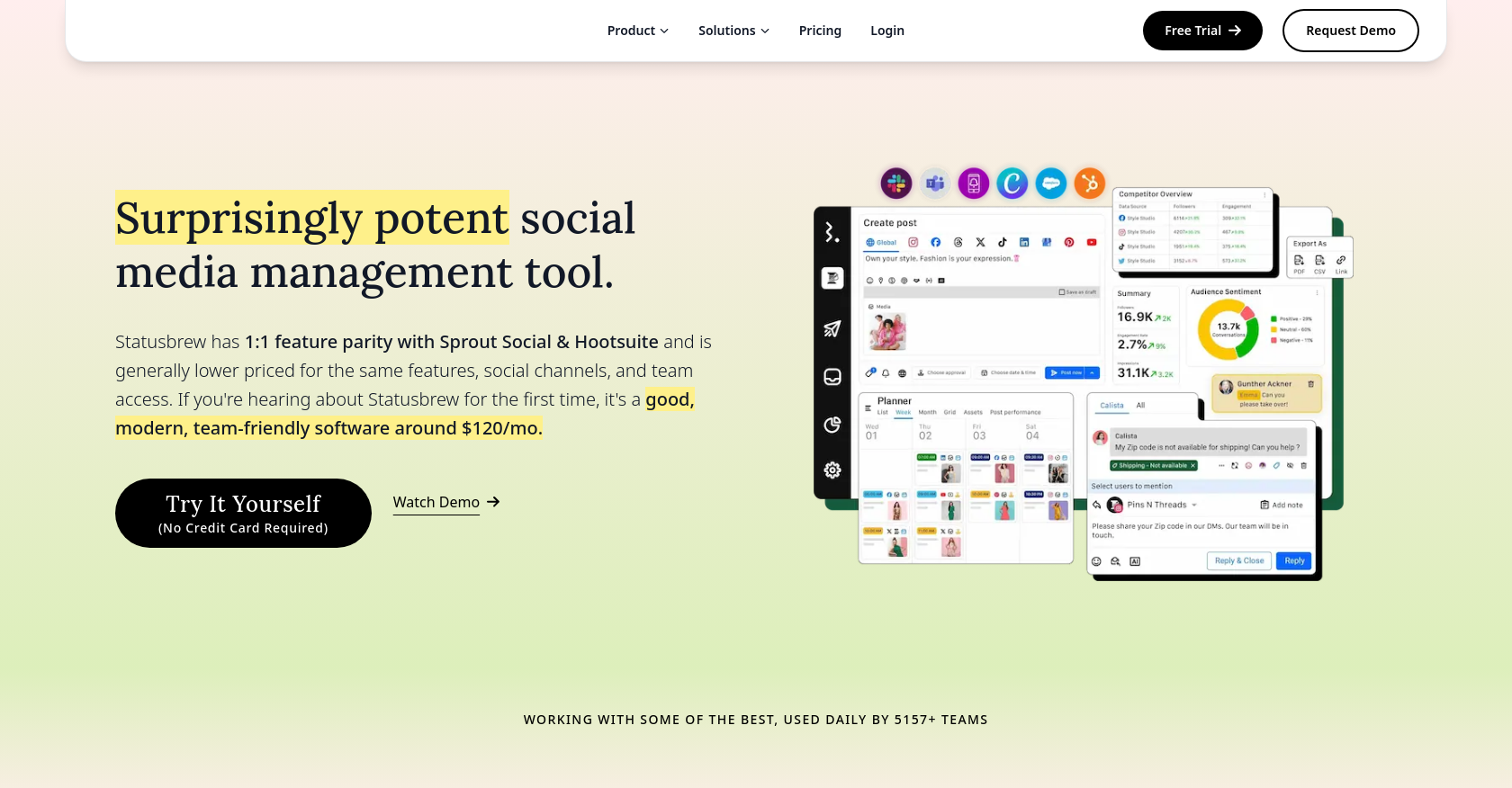
Statusbrew is a collaboration-first social media management tool designed for teams that handle a lot of engagement and need clear internal workflows. If you’ve been using NapoleonCat before, the tool will immediately feel familiar in terms of moderation and inbox control, but with a stronger emphasis on teamwork and permissions.
Statusbrew is not a flashy tool, and that’s kind of the point. It focuses on helping teams publish consistently, manage conversations efficiently, and stay organized when multiple people are involved.
Key Features
- Unified inbox with conversation management
Statusbrew centralizes comments, messages, and mentions from supported platforms into one inbox. You can assign conversations, leave internal notes, and track responses, which helps teams avoid duplicated work. - Content scheduling and publishing
Posts can be scheduled across major social networks with platform-specific customization. The publishing flow feels steady and reliable, without unnecessary complexity. - Team roles and permission controls
You can define who can create, approve, or publish content. This is especially helpful for agencies working with clients or larger teams that need structured access. - Analytics and reporting
Statusbrew provides engagement and growth metrics that help track performance over time. Reports are clear, though not deeply customizable. - Audience and conversation tagging
Messages and users can be tagged, making it easier to organize conversations and identify recurring issues or opportunities.
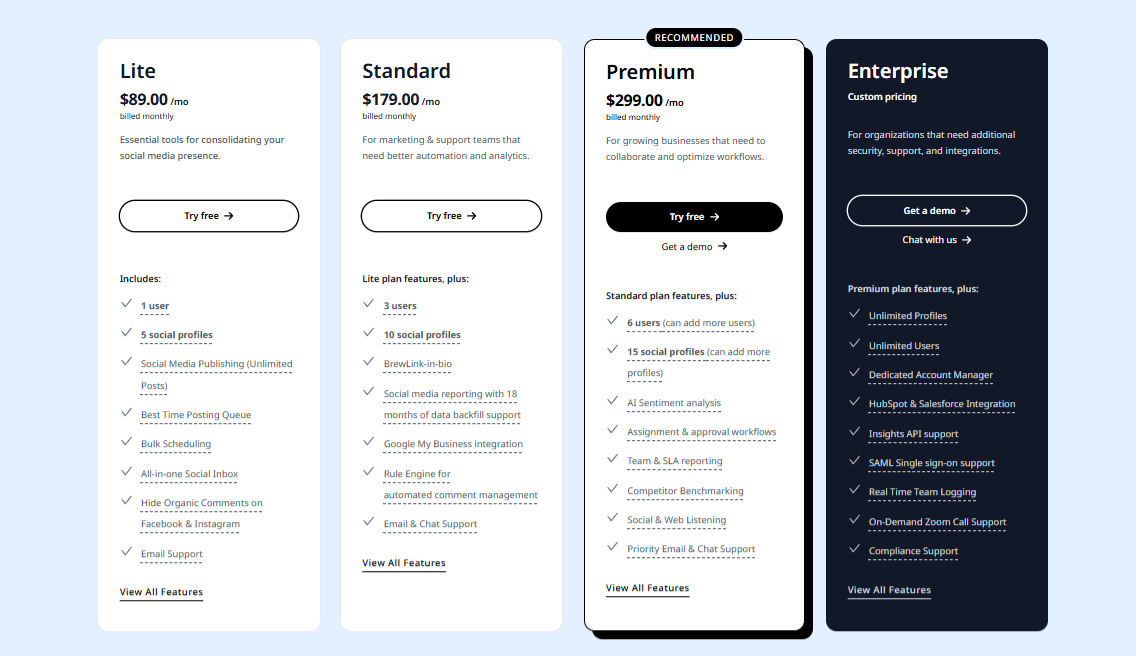
Pricing
Statusbrew pricing is geared toward teams:
- Plans start around $89/month
- Higher tiers scale based on users, profiles, and features
There’s typically a free trial available to test the platform.
Pros
- Strong inbox and engagement management
- Excellent collaboration and approval workflows
- Clear role and permission controls
- Reliable publishing experience
- Well suited for agency-style teams
Cons
- Analytics lack advanced depth
- Not ideal for solo users or very small teams
Why it works as a NapoleonCat alternative
Statusbrew covers many of the same moderation and inbox use cases as NapoleonCat, but with better collaboration controls and clearer team workflows. If your main challenge is managing conversations and approvals across multiple people, Statusbrew is a solid alternative that keeps things organized without unnecessary complexity.
13. Zoho Social – $15/Month
Zoho Social is built for teams that want structure, collaboration, and real-time awareness of what’s happening around their brand. The tool it sits somewhere between content scheduling and relationship management.
When we tested it, Zoho Social felt very process-driven, especially if you’re already using other Zoho tools like Zoho CRM. It’s designed for growing businesses and agencies that want to coordinate publishing, monitor conversations, and keep stakeholders in the loop.
Key Features
- SmartQ scheduling for optimal posting times
Zoho Social analyses engagement patterns and suggests the best time slots to publish posts. This is useful if you don’t want to manually test posting times across platforms. - Multi-platform content scheduling
You can plan and publish posts across major social networks from one dashboard, with the option to customize content per platform. - Unified social inbox
Messages, mentions, and comments are pulled into a single inbox, making it easier to track conversations and respond without switching tools. - Custom listening dashboards
You can monitor brand mentions, keywords, and hashtags in real time. This helps teams stay aware of ongoing conversations, even though the listening depth isn’t as advanced as some enterprise tools. - Team collaboration and roles
Zoho Social allows discussion threads, approval workflows, and permission controls, which helps teams coordinate content and responses. - Analytics and reporting
The platform provides performance metrics, audience insights, and downloadable reports. Reports can be automated and shared with clients or internal teams. - Zoho CRM integration
Social interactions can be connected to CRM records, which is helpful for businesses that treat social media as a lead-generation channel.
Pricing
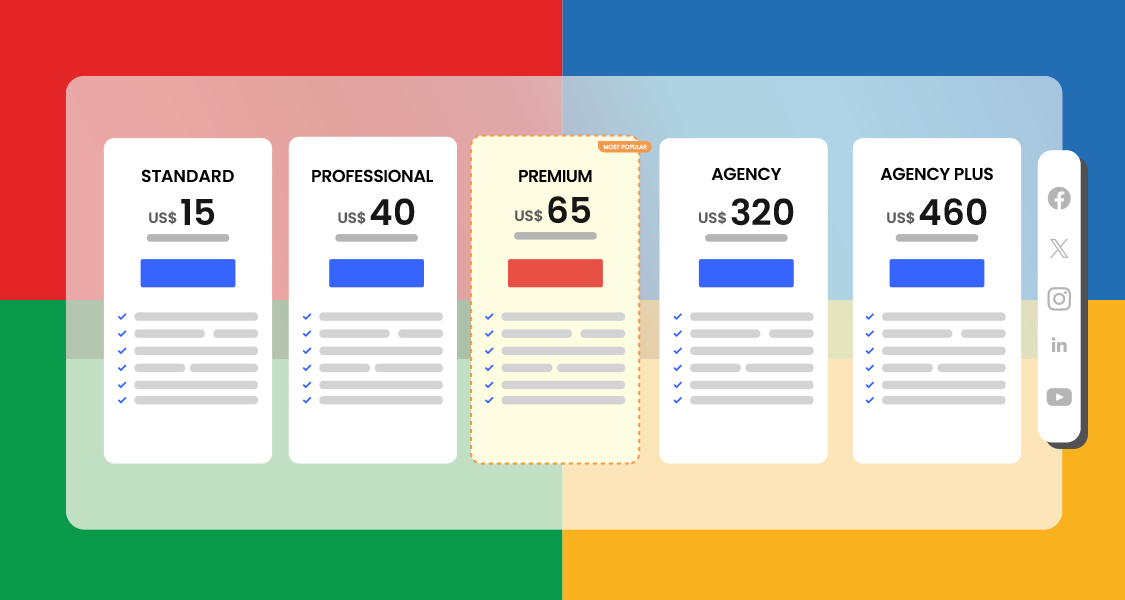
Zoho Social separates pricing for businesses and agencies:
- Business plans start at around $15/month
- Agency plans scale up to approximately $460/month, depending on users and brands
Costs increase as you add team members and advanced features.
Pros
- Smart scheduling removes guesswork around posting times
- Strong collaboration features for growing teams
- CRM integration adds value for lead-focused businesses
- Clean calendar view for planning content
- Automated reporting saves time
Cons
- Analytics are not deeply consolidated across channels
- Pricing becomes less flexible as teams grow
- Social listening is fairly basic compared to NapoleonCat
Why it works as a NapoleonCat alternative
Zoho Social is a good alternative if you want a more collaborative, CRM-connected approach to social media management. It covers scheduling, inbox management, and monitoring well, and works best for teams that already rely on Zoho’s ecosystem.
While it doesn’t match NapoleonCat’s moderation depth, it offers a more structured and business-oriented workflow that suits growing teams.
Choosing the Right NapoleonCat Alternative for Your Brand
Switching from NapoleonCat isn’t just about finding another tool with similar features. It’s about choosing a platform that fits how your brand actually works day to day. Below are the key factors worth weighing carefully before making a decision.
Your Core Social Media Workflow
Start by looking at what takes up most of your time. Is it scheduling content? Managing comments and DMs? Reporting to clients or stakeholders?
Some tools are built around engagement and moderation, while others focus more on planning and automation. If content planning and publishing sit at the center of your workflow, look for a tool with a clear calendar, bulk scheduling, and flexible posting options.
Tools like OnlySocial stand out here because they balance planning, automation, and engagement without forcing you into a rigid system.
Team Size and Collaboration Needs
A tool that works fine for one person can quickly become frustrating when more users get involved. If you work with a team, pay attention to how roles, approvals, and access levels are handled.
Clear approval workflows and permission settings reduce mistakes and save time. This is especially important for agencies or brands working with clients who need visibility without full control.
Engagement and Inbox Management
If your brand receives a steady stream of comments, mentions, or DMs, inbox features matter more than you might expect. A unified inbox helps you stay responsive without switching between platforms all day.
Look for tools that allow message assignment, internal notes, and saved replies. On the other hand, if engagement is fairly light, you may not need advanced moderation and can prioritize scheduling and analytics instead.
Analytics and Reporting Expectations
Not every brand needs deep, enterprise-level analytics. Some teams want detailed breakdowns and benchmarking, while others just need to know what content performs best and when engagement peaks.
Choose a tool that matches your reporting needs without overwhelming you with data you won’t use. Clear, easy-to-read reports are often more valuable than complex dashboards.
Platform Coverage and Flexibility
Make sure the tool supports all the platforms your brand actively uses, and does so well. Limited support for certain networks can slow your workflow and force workarounds. Flexibility matters too. Being able to customize posts per platform helps content feel native instead of duplicated.
Pricing and Long-Term Scalability
One of the biggest reasons teams leave NapoleonCat is pricing. As you add users, profiles, or advanced features, costs can rise quickly. Look for transparent pricing that scales with your growth. A tool should feel like it supports your long-term plans, not one that you’ll need to replace again in a year.
So, choosing the right NapoleonCat alternative comes down to fit. When the tool aligns with your workflow, team structure, and growth goals, managing social media becomes far less stressful, and far more effective.
FAQ
What is NapoleonCat used for?
NapoleonCat is mainly used for social media management tasks like scheduling posts, managing comments and messages, tracking performance, and monitoring competitors. It’s popular with teams that focus heavily on engagement moderation and reporting across multiple social platforms.
Why are people looking for NapoleonCat alternatives?
Many users start looking for alternatives when pricing increases, platform limits become restrictive, or collaboration features no longer scale with their team. Others want simpler workflows, better automation, or tools that support more platforms without additional costs.
Is OnlySocial a good alternative to NapoleonCat?
Yes. OnlySocial is a strong alternative if you want flexible scheduling, bulk publishing, a unified inbox, and team collaboration without rigid pricing tiers. It works well for freelancers, small teams, and agencies that want to manage multiple accounts efficiently while keeping costs predictable.
What should I look for when choosing a NapoleonCat alternative?
Focus on how the tool fits your workflow. Key things to consider include scheduling flexibility, inbox and engagement management, collaboration features, reporting depth, platform coverage, and long-term pricing. The best alternative is the one that supports how your team actually works day to day.
Are NapoleonCat alternatives suitable for small businesses?
Yes. Many NapoleonCat alternatives are better suited for small businesses because they offer simpler interfaces and more flexible pricing. Tools like Buffer, SocialBee, and OnlySocial are often easier to adopt and scale without the overhead that comes with enterprise-focused platforms.