OnlySocial vs MavSocial: Best White-Label Social Media Tool for Agencies in 2026
If you’re considering white-label software for your agency, there’s a good chance you’ve already come across OnlySocial and MavSocial.
On paper, both look capable. Both support multiple social networks. Both offer white-label features. And both position themselves as serious tools for professional teams.
But agencies don’t live on feature lists. They live on deadlines, client expectations, and margins.
The real question isn’t which platform has more features. It’s which one makes it easier to grow your agency, manage clients efficiently, and stay profitable in 2026?
In this comparison, we’ll walk through how OnlySocial and MavSocial differ in pricing, workflows, white-label depth, and long-term scalability. That way, you can choose the best white label social media platform for your agency.
Table of Contents
- 1 What White-Label Social Media Means for Agencies in 2026
- 2 What MavSocial White-Label Solution Offers
- 3 OnlySocial White-Label Solution: Built for Agency Growth
- 3.1 Full Platform White Label, Not Just Reports
- 3.2 Unlimited Scheduling and Bulk Automation
- 3.3 Workspace-Based Client Management
- 3.4 Unified Inbox for Engagement Management
- 3.5 AI Tools to Speed Up Content Creation
- 3.6 Advanced Analytics Clients Can Understand
- 3.7 Collaboration, Approvals, and Impersonation
- 3.8 Built-In Billing and Payments
- 3.9 Transparent, Agency-Friendly Pricing
- 4 OnlySocial vs MavSocial: Head-to-Head Comparison
- 5 Which Platform Is Right for Your Agency in 2026?
- 6 FAQs
What White-Label Social Media Means for Agencies in 2026
White-label social media tools used to be a “nice extra.” Right now, they are fast becoming a requirement for agencies that want to stay competitive.
Clients no longer want screenshots, spreadsheets, or email-heavy updates. They expect a login. A dashboard. A place where they can see posts, approvals, reports, and results under your brand.
That experience alone can be the difference between a short-term client and a long-term retainer.
For agencies, white-label software is no longer just about hiding another company’s logo. It’s about control. Control over how your service is presented, how clients interact with your team, and how efficiently your operations run behind the scenes. The more polished and seamless that experience feels, the more professional your agency appears.
There’s also a financial side to it. In 2026, agencies are under pressure to do more without constantly increasing headcount. A solid white-label platform helps you take on more clients, standardize your workflow, and protect your margins.
Instead of building custom systems or juggling multiple tools, everything lives in one branded environment.
That said, not all white-label solutions are built with agencies in mind. Some are enterprise tools adapted for agencies. Others are agency-first platforms designed around scalability, pricing predictability, and day-to-day usability.
This distinction matters, and it becomes very clear when you start comparing OnlySocial and MavSocial side by side.
What MavSocial White-Label Solution Offers
MavSocial positions its white-label solution as part of its Enterprise plan, which already tells you a lot about who the platform is built for. It’s designed with larger teams and structured campaign workflows in mind, rather than small or fast-growing agencies looking for flexible scaling.
Here’s how MavSocial approaches white-label social media management.
White Label Access Through the Enterprise Plan
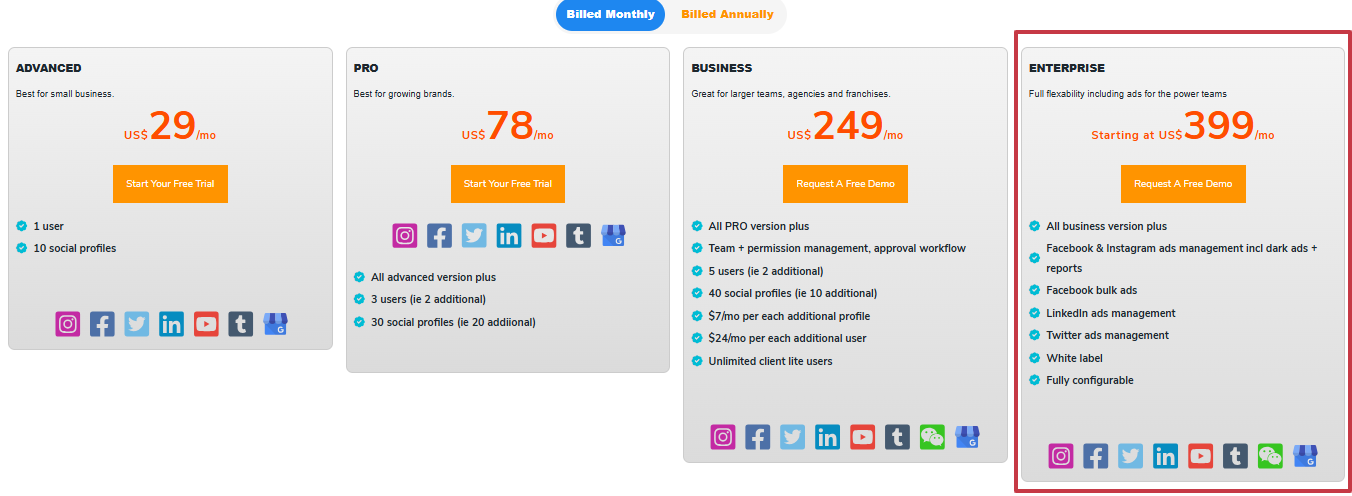
MavSocial’s white-label features are only available on its Enterprise plan, which starts at $399 per month. This plan includes platform branding and configuration options that allow agencies to present reports and dashboards under their own identity.
However, white labeling here is closely tied to enterprise-level usage. That means agencies need to be comfortable with higher base costs and additional fees as they grow.
User and Social Profile Limits
The Enterprise plan includes 5 users and 40 social profiles by default. For agencies managing many clients, this can quickly become restrictive.
Additional users cost $24 per user per month, and extra social profiles cost $7 per profile per month. While this structure works for teams with a fixed setup, it can make scaling unpredictable for agencies onboarding new clients regularly.
Unlimited Scheduling and Visual Campaign Calendar
MavSocial does well in scheduling. Agencies get unlimited post scheduling and access to a visual campaign calendar that makes it easy to plan content across multiple channels.
This is particularly useful for agencies running structured campaigns with strict timelines. The interface is clean and campaign-focused, making it easier to visualize content flow across networks.
Bulk Uploading
For agencies managing large volumes of content, MavSocial supports bulk uploads through spreadsheets. You can schedule content across multiple networks in one go, which saves time during planning phases.
It also supports RSS feeds, allowing agencies to curate content automatically and publish posts using the bulk uploader. This works well for content-heavy brands or news-driven campaigns.
Digital Asset Library
One of MavSocial’s standout features is its digital asset library. Agencies can store, organize, and manage images and videos in a central location, with metadata tagging to improve search and reuse.
For teams working with large content libraries or creative assets, this feature helps keep things organized and reduces duplication.
Social Inbox and Engagement Management
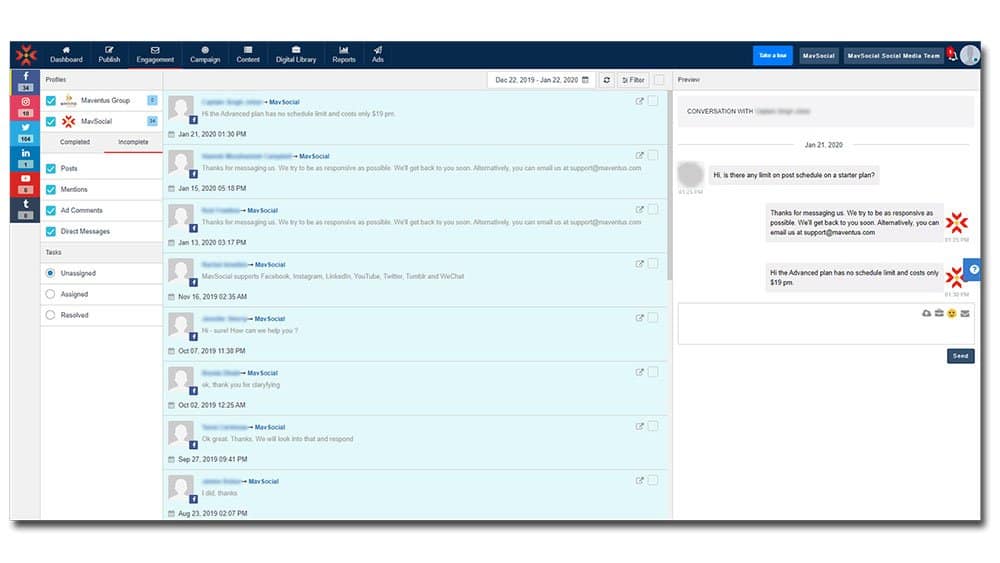
MavSocial includes a social inbox that allows agencies to monitor and respond to messages across connected social channels. This helps centralize engagement and reduces the need to log into individual platforms.
It also includes online reputation management, allowing agencies to respond to Facebook and Google Business reviews from the platform. This is useful for agencies offering reputation or review management as part of their services.
Ad Campaign Management
Unlike many scheduling-focused tools, MavSocial includes ad campaign management. Agencies can create and manage boosted posts and unpublished (dark) ads directly within the platform.
This makes MavSocial appealing to agencies that handle both organic social content and paid social campaigns from a single interface.
White-Label Reporting
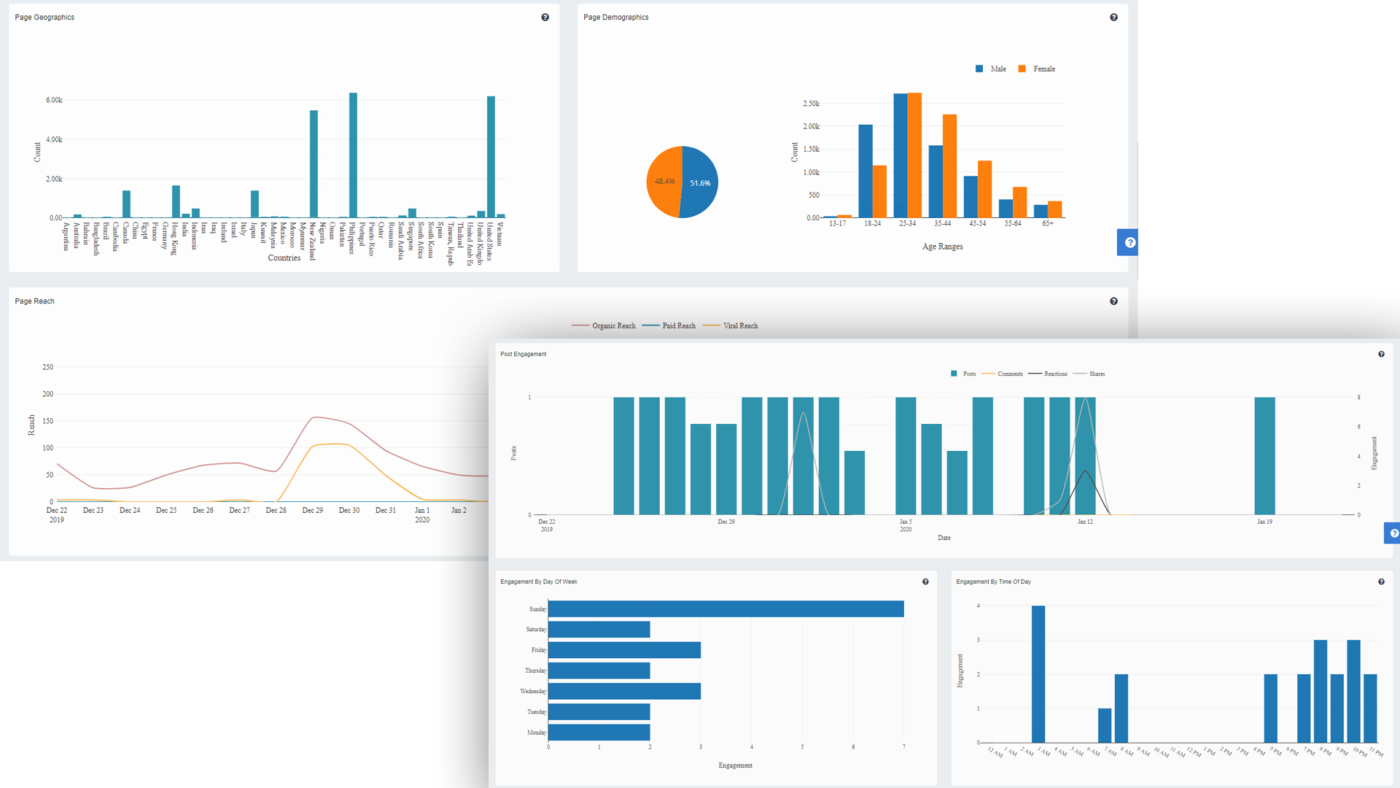
MavSocial offers unlimited reporting by network, with exports available in PDF or Excel formats. Agencies can add their branding or logo to reports, making them client-ready.
The reporting tools are detailed and flexible, especially for agencies that rely heavily on performance data and structured reporting.
So, we can simply say MavSocial’s white-label solution works best for agencies that:
- Manage larger brands
- Run ad-heavy or campaign-focused social strategies
- Prefer enterprise-style workflows
- Are comfortable with per-user and per-profile pricing
OnlySocial White-Label Solution: Built for Agency Growth
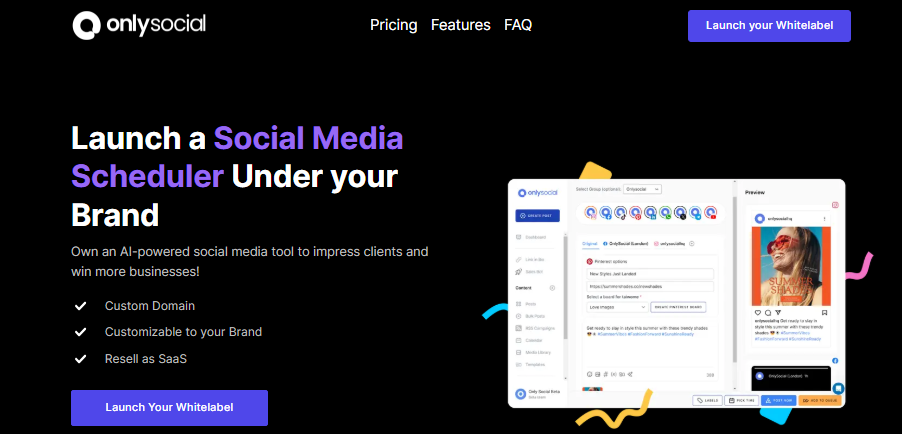
Where MavSocial takes an enterprise-first approach, OnlySocial is clearly built around how modern agencies actually operate. The focus here isn’t just on powerful features, but on making it easy for agencies to scale, stay organized, and protect their margins as client numbers grow.
Here’s how OnlySocial approaches white-label social media management.
Full Platform White Label, Not Just Reports
OnlySocial gives agencies full control over how the platform looks and feels. From the login screen to the client dashboard, everything can be branded with your logo, colors, and custom domain.
Clients never see OnlySocial’s name – the platform feels like software your agency built and owns.
This goes beyond cosmetic branding. Emails, notifications, dashboards, reports, and workspaces all carry your identity, which helps agencies look more established and professional, even at smaller sizes.
Unlimited Scheduling and Bulk Automation
OnlySocial allows unlimited post scheduling across all supported platforms. Agencies can schedule content one-by-one, in bulk, or via CSV uploads, making it easy to plan weeks or months of content at once.
RSS automation is also included, which helps agencies auto-publish curated content or blog updates without manual work. This level of automation saves time and reduces repetitive tasks, especially for content-heavy clients.

Workspace-Based Client Management
Instead of charging per social profile or per user, OnlySocial uses a workspace model. Each client gets their own workspace, which can contain multiple social accounts, team members, and content calendars.
For agencies, this is a big deal. It makes onboarding new clients simple and keeps costs predictable as you scale. You don’t have to worry about adding a few extra profiles suddenly increasing your monthly bill.
Unified Inbox for Engagement Management
Managing comments and messages across multiple platforms can quickly become messy. OnlySocial solves this with a unified inbox that brings comments, mentions, and direct messages into one place.
This means teams can respond faster, stay organized, and provide better client support without switching between platforms. For agencies offering engagement management, this feature alone can save hours each week.

AI Tools to Speed Up Content Creation
OnlySocial includes built-in AI tools that help agencies move faster. The AI assistant can generate captions, suggest hashtags, and help spark content ideas when teams are short on time.
There’s also AI image generation, which allows agencies to quickly create visuals without relying entirely on external design tools. It’s not about replacing creativity, but about removing bottlenecks.
Advanced Analytics Clients Can Understand
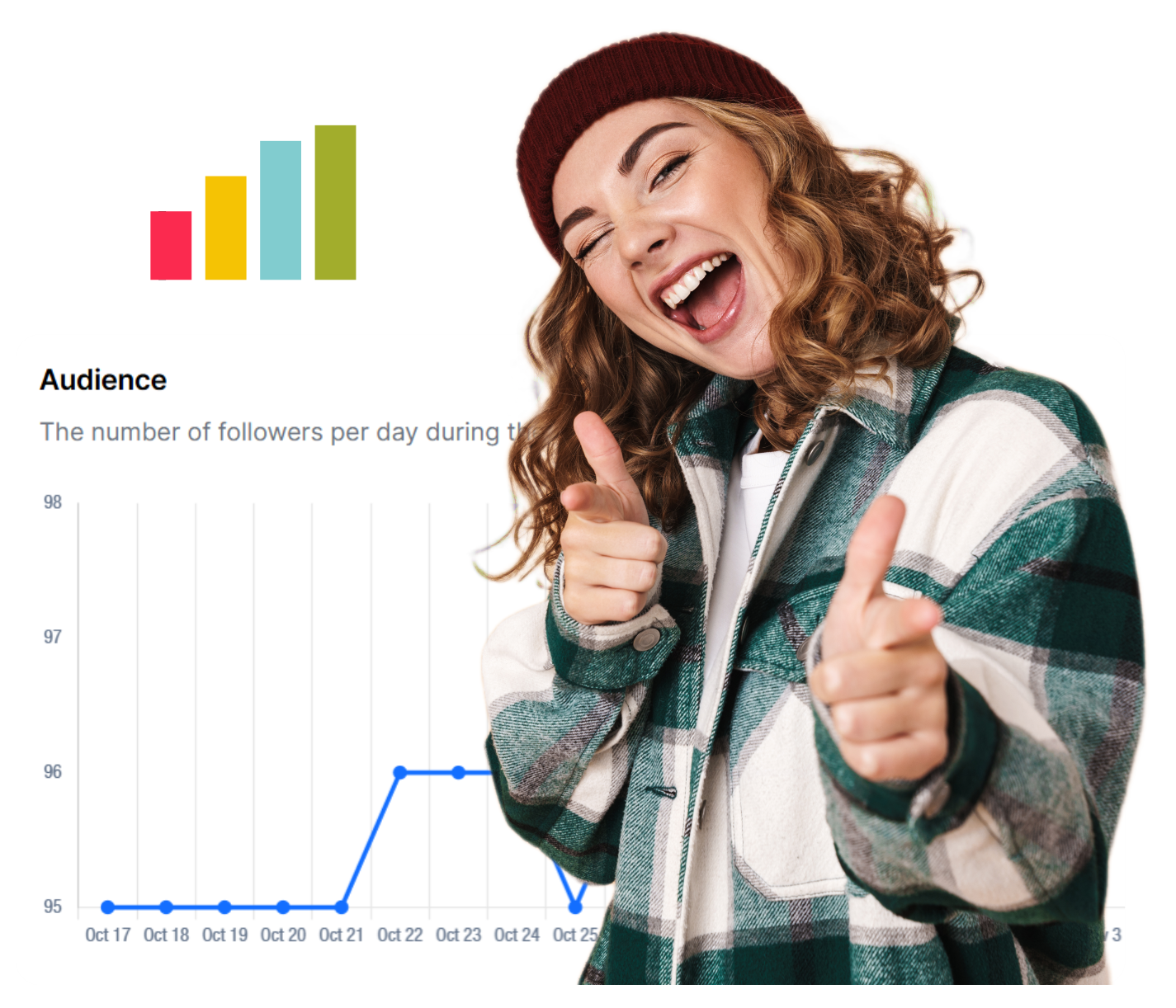
OnlySocial’s analytics are designed to be clear and actionable. Agencies can track performance across platforms, spot trends, and present results in clean, white-label reports that clients actually understand.
Instead of exporting data from multiple tools, everything lives in one place.
Collaboration, Approvals, and Impersonation
OnlySocial is built for teams. Role-based access, approval workflows, and shared calendars help keep everyone aligned. Clients can review and approve content directly inside the platform, reducing back-and-forth emails.
One standout feature is user impersonation. Agencies can securely step into a client’s account to troubleshoot or make updates, without requesting passwords or scheduling calls. This makes support faster and more professional.
Built-In Billing and Payments
Unlike most white-label tools, OnlySocial includes payment management. Agencies can connect Stripe, Paddle, or Paystack and sell subscriptions directly through their branded platform.
This turns OnlySocial into more than just a management tool; it becomes the foundation for running a SaaS-style service under your own brand, with recurring revenue built in.
Transparent, Agency-Friendly Pricing
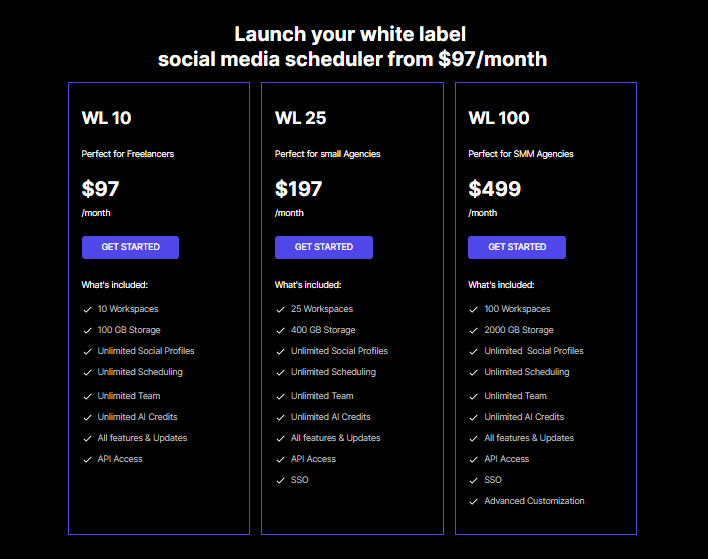
OnlySocial’s pricing is simple and predictable:
- $97/month for 10 workspaces
- $197/month for 125 workspaces
- $499/month for 100 workspaces
There are no extra fees for users or social profiles. As agencies grow, the cost per client drops, which makes scaling far more sustainable.
OnlySocial vs MavSocial: Head-to-Head Comparison
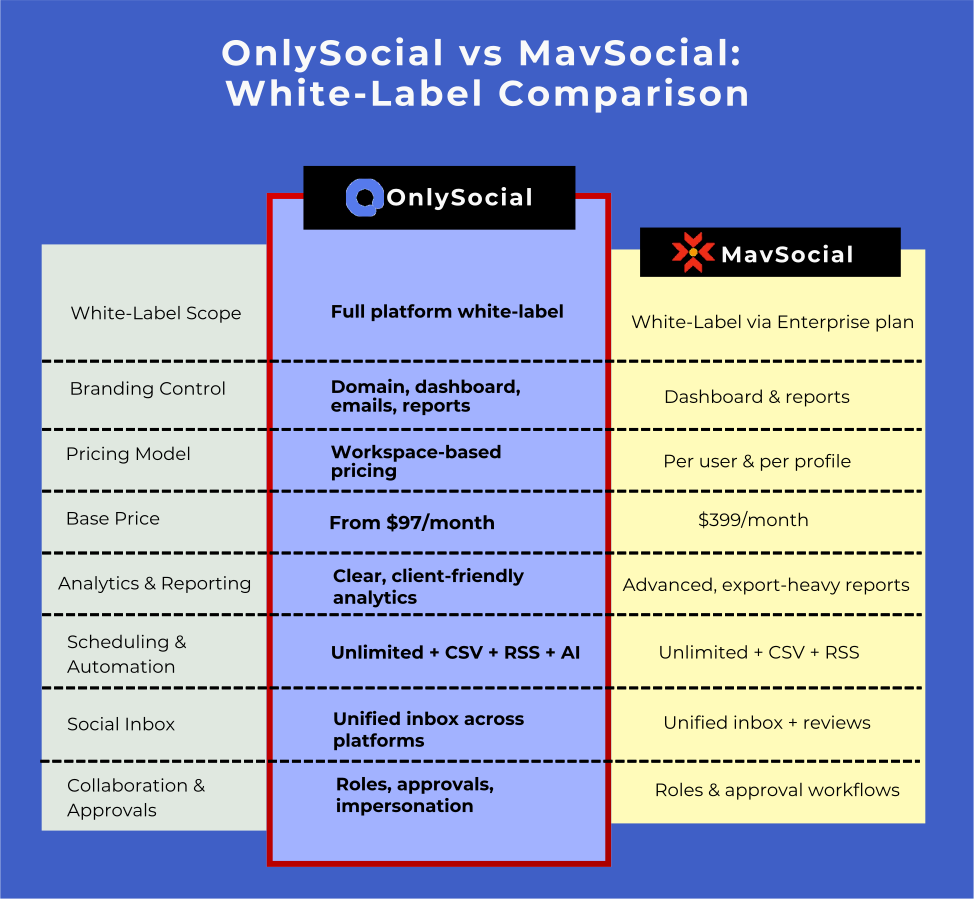
At a glance, OnlySocial and MavSocial both look like capable white-label platforms. They handle scheduling, engagement, reporting, and branding. But once you step into day-to-day agency work, the differences start to show, especially around cost structure, scalability, and how much control you actually get.
White-Label Depth and Branding Control
MavSocial’s white-label offering is solid, but it’s primarily tied to reporting and enterprise-level configuration. Agencies can brand dashboards and reports, but the experience still feels like an enterprise tool adapted for agencies rather than something designed specifically for them.
OnlySocial takes a different approach. The entire platform is white-labeled from top to bottom. From the login page to client dashboards, notifications, emails, and reports, everything carries your brand. Clients never see OnlySocial’s name at any point. This creates the impression that your agency owns the software, not just resells access to it, which makes a big difference when positioning your services as premium.
Pricing Structure
This is where many agencies feel the biggest difference.
MavSocial starts at $399 per month, but that’s just the beginning. The plan includes limited users and social profiles, and agencies pay extra for each additional user and each additional profile.
As client numbers grow, costs increase in small but constant increments. Over time, this makes budgeting harder and margins thinner, especially for agencies onboarding clients regularly.
OnlySocial uses a workspace-based model, which is much easier to manage. You pay a flat monthly fee based on how many client workspaces you need; not how many users or social profiles are inside them.
As your agency grows, the cost per client actually goes down, not up. This predictability is a major advantage for agencies planning long-term growth.
Scalability for Growing Agencies
MavSocial works well for agencies with a fixed structure – a known number of clients, users, and social profiles. It’s strong for campaign-driven teams, especially those heavily involved in paid social and asset management. But scaling requires careful cost tracking, because every new client often brings additional fees.
OnlySocial is built with growth in mind. Unlimited scheduling, unlimited team members, and flexible workspaces mean agencies can add new clients quickly without rethinking their pricing or setup. It’s easier to grow from 10 clients to 100 without restructuring your entire workflow.
Workflow and Ease of Use
MavSocial leans toward an enterprise workflow. It’s powerful, but it can feel structured and slightly rigid, especially for smaller or mid-sized agencies. Teams that enjoy detailed campaign planning and asset management will appreciate this, but others may find it slower to move with.
OnlySocial prioritises simplicity without sacrificing power. Everything – from scheduling and approvals to engagement and analytics – is designed to reduce friction. Features like client approvals, unified inbox, and impersonation remove a lot of manual work and back-and-forth communication.
Automation and Time-Saving Features
Both platforms support bulk uploads and RSS automation, which is essential for agencies managing large volumes of content. MavSocial does this well, particularly for structured campaigns.
OnlySocial adds another layer by combining bulk scheduling with AI tools, automation, and integrated workflows. Caption writing, hashtag suggestions, and even image generation are built directly into the platform. This helps agencies move faster without adding extra tools to their stack.
Analytics and Reporting
MavSocial’s reporting is detailed and flexible, especially for agencies that rely heavily on performance data and exports. White-label reports are a strong part of the platform, particularly for Excel and PDF delivery.
OnlySocial focuses on clarity. Analytics are designed to be easy for both agencies and clients to understand. Reports are fully white-labeled and live inside the platform, reducing the need to export data unless necessary. For agencies focused on client communication rather than raw data analysis, this approach works very well.
Revenue Opportunities Beyond Management
MavSocial is a strong management and reporting tool, but it doesn’t offer built-in billing or subscription management. Agencies still need external systems to charge clients and manage recurring payments.
OnlySocial includes billing and payment integrations directly in the platform. Agencies can connect Stripe, Paddle, or Paystack and sell subscriptions under their own brand. This opens the door to running a true SaaS-style offering, not just a managed service.
Which Platform Is Right for Your Agency in 2026?
At this point, the differences between OnlySocial and MavSocial are pretty clear. The real decision comes down to how your agency works today and how you plan to grow over the next few years.
When MavSocial Makes More Sense
MavSocial is a strong option for agencies that operate more like enterprise teams. If your work revolves heavily around structured campaigns, paid social ads, and large volumes of creative assets, MavSocial’s campaign tools, digital asset library, and ad management features can be very useful.
It’s also a better fit if your agency has a relatively fixed setup – a known number of users, a set list of social profiles, and clients that don’t change often. In that kind of environment, the per-user and per-profile pricing is easier to manage, and the enterprise-style workflow feels natural.
That said, this approach works best when budgets are higher, and margins aren’t as sensitive to incremental costs.
When OnlySocial Is the Better Choice
OnlySocial is built for agencies that want flexibility and room to grow without constantly recalculating costs. If your agency regularly onboards new clients, adds social profiles, or expands teams, the workspace-based pricing model makes life much easier.
It’s also a better option if you want your agency to feel more like a product company. Full platform white-labeling, built-in billing, AI tools, unified inbox, and automation features allow you to deliver a polished experience while spending less time on manual work.
For agencies focused on long-term growth, predictable pricing, and running a scalable operation that doesn’t rely on enterprise complexity, OnlySocial fits more naturally.
FAQs
Is MavSocial fully white-label?
MavSocial offers white-label functionality through its Enterprise plan. Agencies can brand dashboards and reports, but the white-label experience is tied to enterprise configuration rather than a fully agency-owned platform feel.
Why is MavSocial more expensive for growing agencies?
MavSocial uses per-user and per-profile pricing. As agencies add clients, social accounts, or team members, monthly costs increase. This model works for stable teams but can become expensive as agencies scale.
Which platform is easier to scale with many clients?
OnlySocial is generally easier to scale. Its workspace-based pricing means agencies can add clients without worrying about extra fees for users or social profiles.
Can both platforms handle bulk scheduling and RSS posting?
Yes. Both OnlySocial and MavSocial support bulk uploads and RSS automation. OnlySocial combines this with AI tools and workflow automation to reduce manual effort further.
Which tool is better for agencies focused on paid social ads?
MavSocial has a stronger focus on ad campaign management, including boosted and dark posts. Agencies that manage paid social heavily may find this useful.
Is OnlySocial suitable for small agencies or freelancers?
Yes. OnlySocial’s pricing and feature set work well for freelancers and small agencies, while still supporting growth into larger teams without changing platforms.