Top 10 Metricool Alternatives to Consider for Effective Social Media Growth
Metricool is a solid tool. Clean layout. Straightforward features. Easy enough for beginners, reliable enough for busy marketers.
But once you start managing multiple brands, planning long-term content, or juggling different platforms, you quickly spot the gaps. We did too.
That’s why we spent the last few weeks test-driving other social media management tools, poking around their schedulers, running posts, checking analytics, and seeing how they hold up in real workflow situations.
Some options genuinely surprised us. Others felt like what Metricool should have been from the start.
In this guide, we’ve pulled together the top 10 Metricool alternatives that don’t just match it –they solve the things Metricool overlooks.
These are tools that speed up planning, simplify team work, support more platforms, or just feel better to use when you’re in the trenches of content creation every day.
Let’s walk through them.
Table of Contents
- 1 Why Consider a Metricool Alternative in the First Place?
- 2 10 Metricool Alternatives Worth Considering
- 3 1. OnlySocial – $29/Month
- 4 2. Hootsuite – $99/Month
- 5 3. Loomly – $65/Month
- 6 4. SocialPilot – $30/Month
- 7 5. Later – $25/Month
- 8 6. Sendible – $29/Month
- 9 7. Planable – $39/Month
- 10 8. Agorapulse – $99/Month
- 11 9. Buffer – $6/Month
- 12 10. SocialBee – $29/Month
- 13 Choosing the Best Metricool Alternative: Factors to Consider
- 14 Final Note
- 15 FAQs
Why Consider a Metricool Alternative in the First Place?
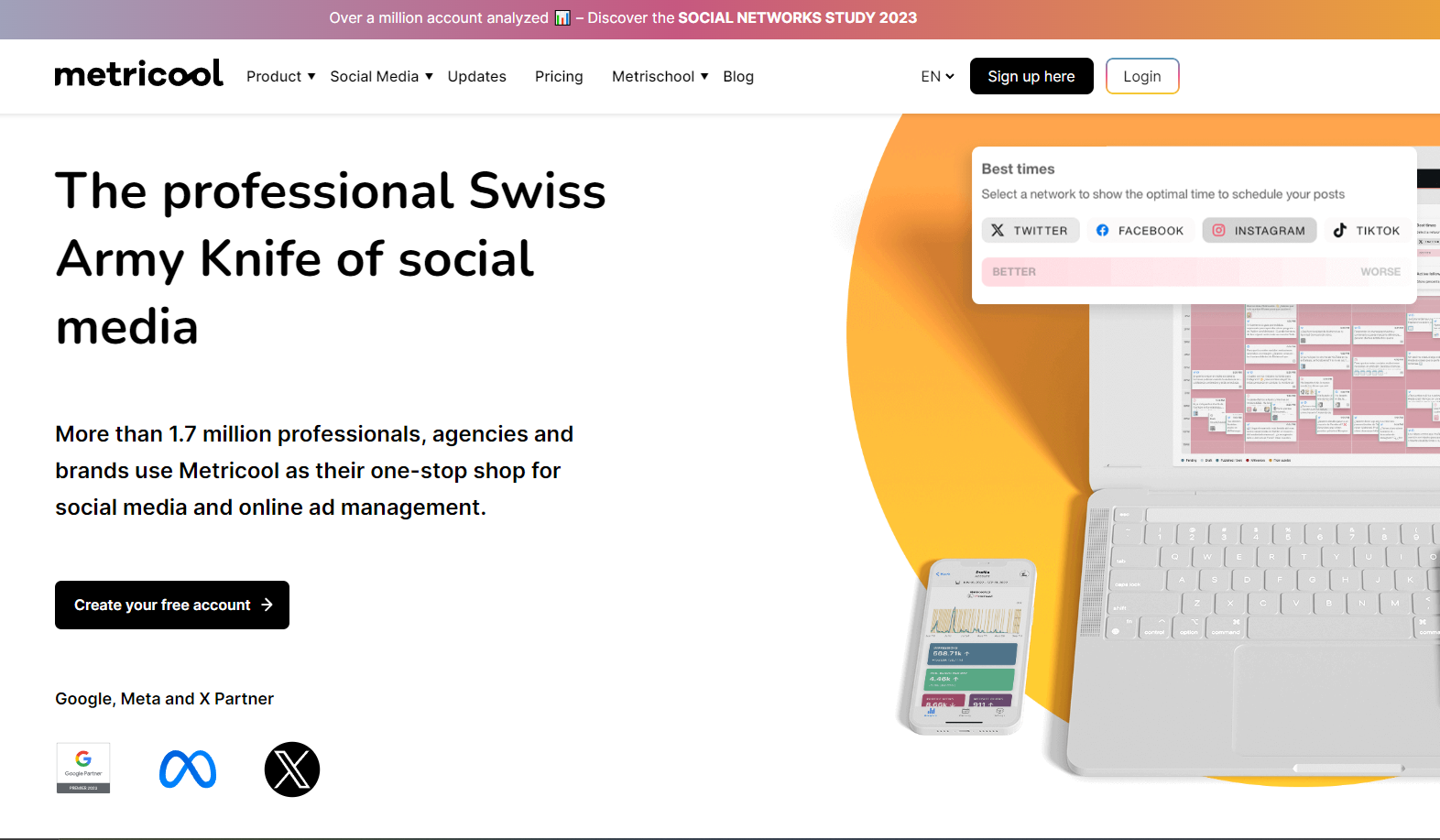
Metricool does a lot of things right, but once you start using it every day, a few cracks begin to show. And if you manage multiple brands or handle content at scale, those cracks turn into real roadblocks.
Platform restrictions
One of the biggest issues is platform restrictions. Twitter (now X) isn’t included in any of the main plans. You have to pay extra for it. For agencies juggling several Twitter accounts, that gets old pretty quickly.
Collaboration gap
If you work with a small team and want everyone involved without jumping to a high-priced tier, Metricool can feel limiting. Even on the pricier plans, the collaboration setup doesn’t come close to what some competing tools offer.
Limited analytics
Analytics is another sticking point. Metricool gives you a very short window of historical data. In some cases, you only get two months’ worth. And for Instagram, follower and Stories data only start tracking from the day you connect the account. So if you love digging into past performance or spotting long-term trends, you’ll hit a wall.
Customization feels basic
You can tweak reports on higher plans, but the real-time dashboard is locked in. No rearranging. No custom layouts. If you like dashboards that adapt to the way you work, this might feel restrictive.
Scaling gets expensive fast
Scaling with Metricool gets expensive. Each “brand” only includes one account per platform. So if you manage multiple Facebook or Instagram accounts for a client, you’re forced to keep upgrading or buying more slots. For multi-location businesses, costs rise fast.
These limitations are exactly why many marketers look for alternatives that give them more freedom, more flexibility, and better long-term value.
Now that you know where Metricool falls short, let’s look at the tools that fill those gaps beautifully.
10 Metricool Alternatives Worth Considering
1. OnlySocial – $29/Month
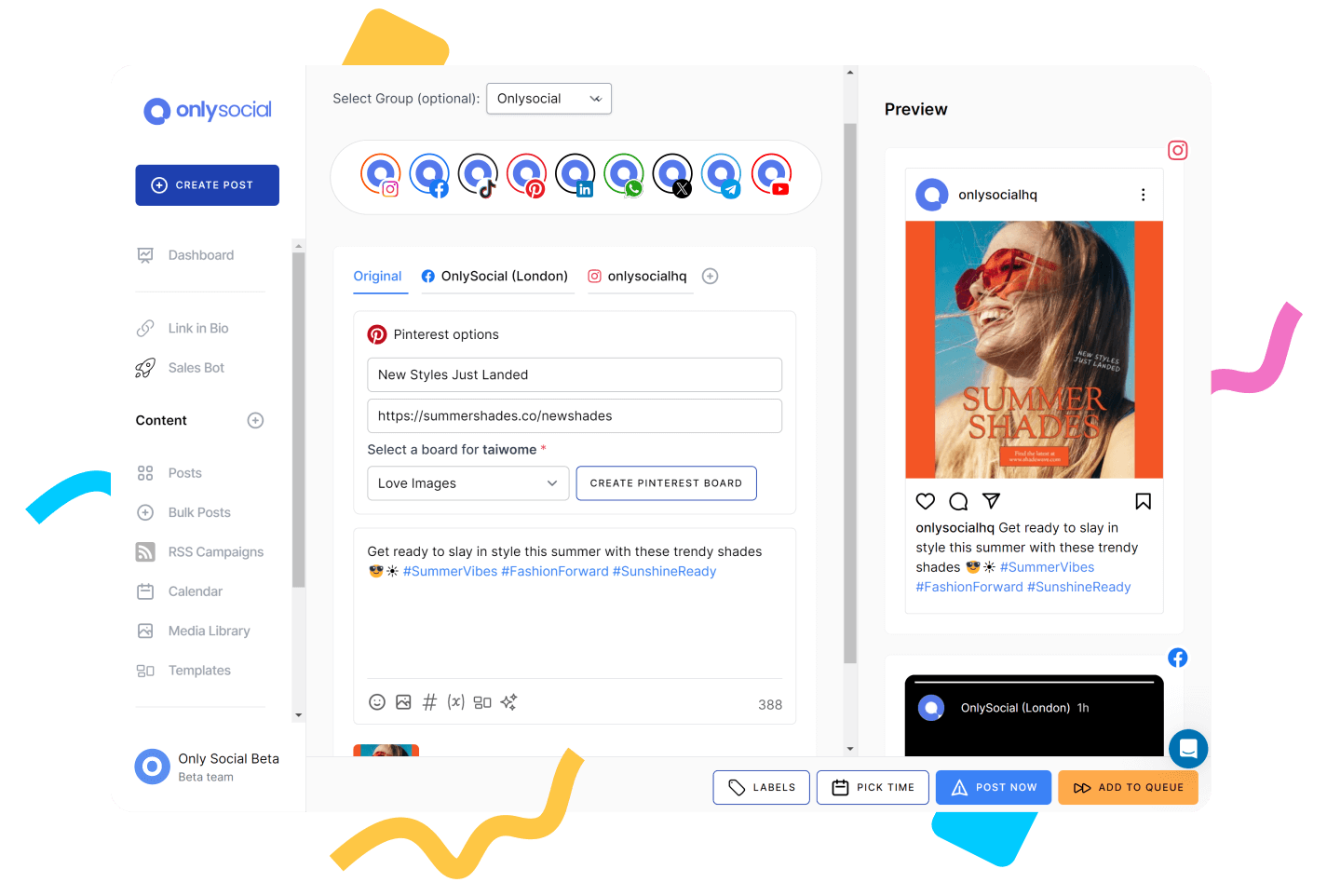
If there’s one tool that genuinely surprised us while testing Metricool alternatives, it’s OnlySocial. It’s clean, fast, and packed with features that actually make day-to-day social media management feel lighter.
Everything sits in one straightforward dashboard, so you don’t need to be a tech-savvy marketer to find your way around. Even better, it’s built with busy teams and multi-location brands in mind, so nothing feels clunky or half-done.
We loved how quickly it adapts to different workflows. Solo creators can schedule content with ease, while agencies get room to collaborate without stress. And the AI tools baked inside make brainstorming posts, captions, and images feel almost too easy.
If you’ve been craving a modern social media tool that doesn’t overwhelm you, this is one of the strongest replacements for Metricool.
Key Features
Multi-Platform Publishing
OnlySocial gives you one dashboard for everything. You can schedule and publish across 15+ platforms – Facebook, Instagram, LinkedIn, TikTok, Pinterest, YouTube, Google Business Profile, Threads, Mastodon, Bluesky, and more. For brands trying to stay visible everywhere, this alone felt like a relief.
Advanced Scheduling Options
The scheduling engine is one of the smoothest we’ve tested. You can bulk-upload hundreds of posts, set up evergreen queues, and drag and drop content on the calendar like you’re arranging puzzle pieces. The system handles up to 500 posts at once, so planning ahead becomes effortless.
AI-Powered Content Creation
OnlySocial’s AI tools fit right into the workflow. Stuck on captions? It writes them. Need post ideas? It suggests them. Want images or hashtags tailored to a niche? It generates those too. It cuts your prep time in half, especially on heavy weeks.
Unified Social Inbox
Instead of clicking through multiple tabs or apps, every comment, DM, and message lands in one neatly organized inbox, including WhatsApp Business. That way, responding becomes quicker, and nothing slips through the cracks.
Collaboration & Approval Workflows
Team structure can make or break a marketing operation. OnlySocial lets you assign roles, create approval flows, and keep your content process tidy. It’s ideal for teams that need oversight but don’t want complicated tools slowing them down.
Analytics & Reporting
You can track detailed analytics for every platform and build reports that actually make sense. Great for anyone who needs to show progress to clients or managers without digging through numbers manually.
Social Media Calendar
The calendar view is clean, visual, and easy to understand, even at a glance. This is especially helpful if you manage several brands and need to keep everything organized.
White-Label Dashboard
For agencies, this is a gem. You can customize the dashboard with your own branding and domain, giving clients a polished, professional experience under your name.
OnlySocial’s Standout Feature
The unified inbox is honestly one of the reasons we kept coming back to OnlySocial during testing. Everything – from Instagram DMs to Facebook comments to WhatsApp Business chats – shows up in one place. No extra tabs, no switching apps, no wasted time.
It feels especially useful if you manage multiple brands or if you’re responsible for both engagement and customer support. The inbox keeps things tidy and helps you reply faster, which is something clients and followers notice almost immediately.

Where OnlySocial Outshines Metricool
The biggest difference we felt was flexibility. OnlySocial lets you connect multiple profiles from the same platform, which is a huge advantage for agencies, franchises, and multi-location brands. With Metricool, you hit limits faster and end up upgrading just to add more accounts.
Collaborating on Metricool can also feel a bit rigid. OnlySocial, on the other hand, gives you smoother workflows and clearer approvals, so teams stay in sync without confusion. If you’ve ever had content stuck waiting for someone to “see” it, OnlySocial solves that problem.
Even the scheduling experience feels more fluid. The drag-and-drop calendar, deeper AI tools, and wide platform support make it a better fit for marketers who want speed and freedom in their day-to-day work.
Pricing
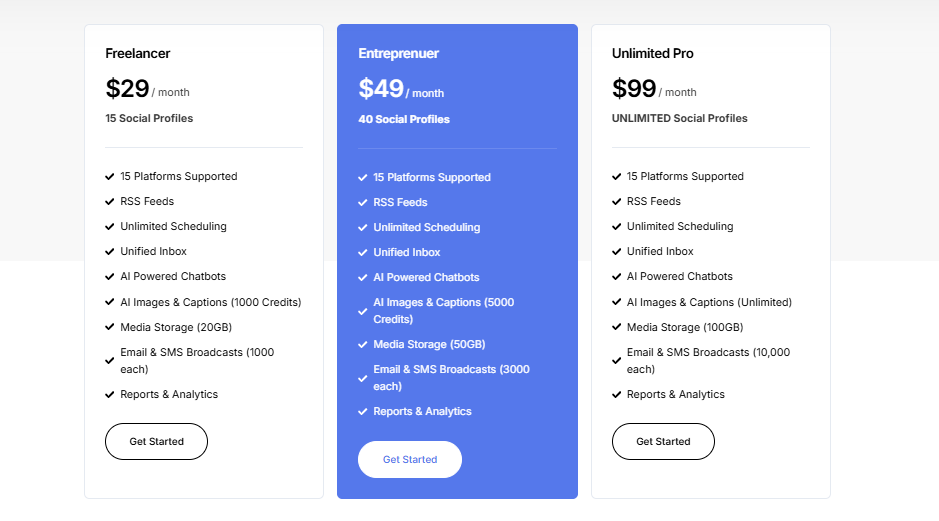
OnlySocial keeps things simple with three straightforward plans:
- Freelancer – $29/month (includes 15 social accounts)
- Entrepreneur – $49/month (includes 45 accounts)
- Professional – $99/month (includes unlimited social accounts)
No hidden fees. No confusing add-ons. Just clear pricing that scales with your needs.
2. Hootsuite – $99/Month
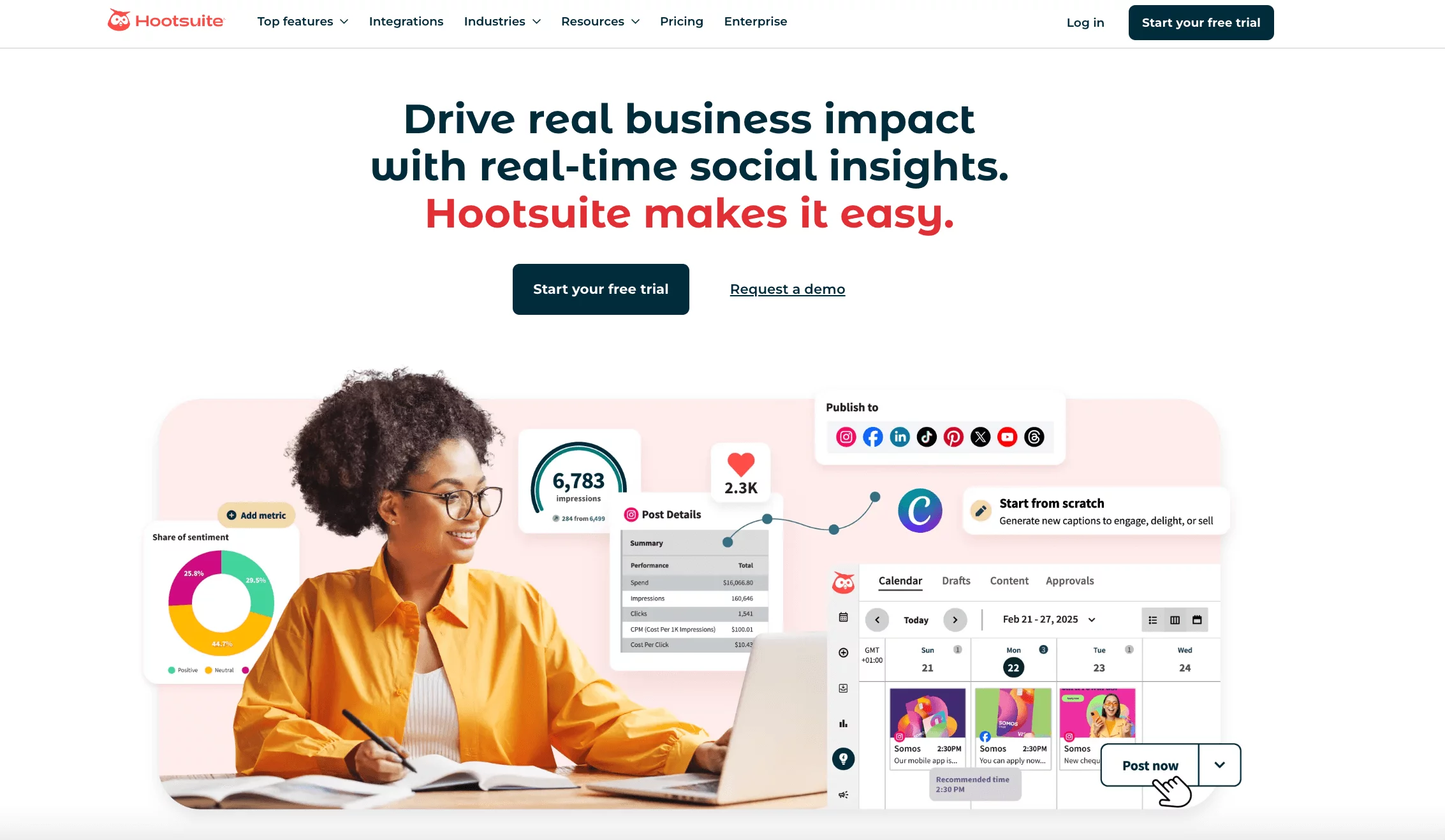
Hootsuite is one of those tools you’ve probably heard about long before you ever touched a social scheduler. It’s been around for years, and for many businesses, it still feels like the “classic” all-in-one social media solution.
When we tested it again for this guide, the biggest thing that stood out was how much control it gives you in one place. You get scheduling, monitoring, publishing, analytics, ads management – pretty much everything under one roof.
Its Streams dashboard is still one of the most helpful features for real-time monitoring. You can watch conversations, mentions, trends, and competitor activity without jumping between tabs. For teams that want a clear bird’s-eye view of what’s happening across platforms, that’s a big plus.
Key Features
- Core Metrics Tracker: Hootsuite gives you access to essential metrics across multiple platforms, and you can build customizable reports or compare performance with competitors.
- Scheduling and Publishing: You can plan and schedule content across all major platforms, with AI-powered recommendations that help you hit the best posting times.
- Real-time Collaboration: Its collaboration tools let teams share calendars, assign tasks, and manage approvals without confusion.
- AI Content Creation: OwlyWriter AI helps create captions, hashtags, and even creative briefs when you need quick inspiration.
- Advanced Social Listening: Track brand mentions, monitor sentiment, and catch new trends before they blow up.
- Ads Management: You can manage ads directly inside Hootsuite – boost posts, track performance, and optimise campaigns.
Hootsuite’s Standout Feature
Hootsuite’s collaboration system still holds its ground as one of the strongest in the industry. Larger teams especially benefit from the approval workflows, shared inboxes, and task assignments, which make communication feel smoother.
If you’ve ever struggled with content getting stuck in review or messages being missed between team members, Hootsuite solves that effortlessly.
Why Hootsuite Outshines Metricool
Hootsuite simply offers more depth. Its collaboration tools are more complete, real-time workflows feel faster, and the shared inbox system handles larger teams better.
Compared to Metricool, you get more flexibility, especially if multiple people are managing content across several accounts at the same time. The detailed analytics and stronger social listening tools also give it an edge for brands that care about deeper insights.
Pricing
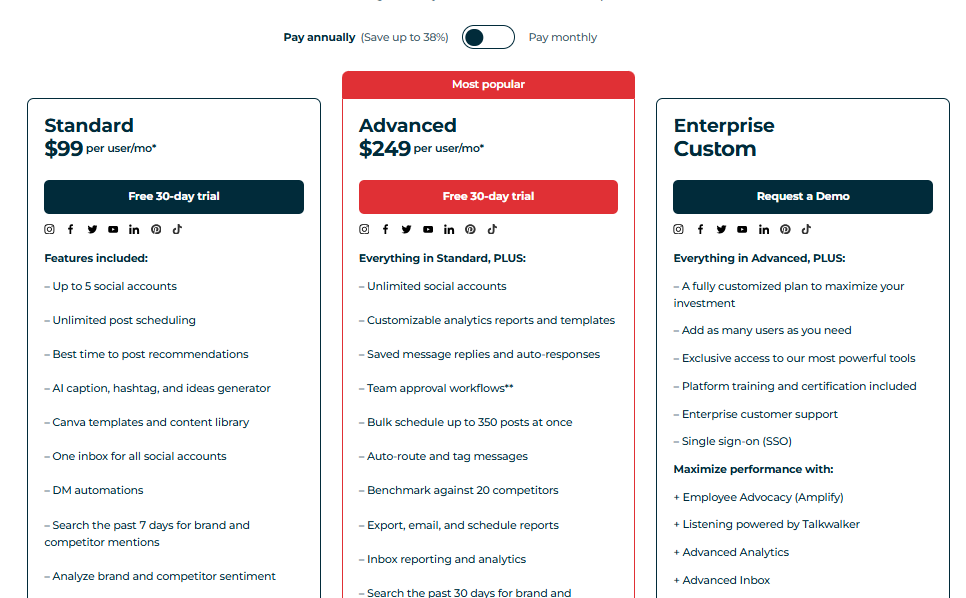
Hootsuite offers three plans, and the good news is that each one comes with a 30-day free trial:
- Standard – $99/month per user (includes 10 social profiles)
- Advanced – $249/month per user (includes unlimited profiles)
- Enterprise – Custom pricing (includes unlimited profiles and multiple users)
Extra users cost the same monthly price as the plan you’re on, which can add up quickly. So it’s worth checking what your team actually needs before committing.
3. Loomly – $65/Month

Loomly is a solid pick for teams that want structure without stress. When we tested it, the first thing that stood out was how clean and organized everything feels.
Its visual calendar makes planning content almost enjoyable, and the workflow tools make it easy to work with teammates or clients without endless back-and-forth messages.
It’s especially handy for startups, agencies, and freelancers who handle multiple brands and need everything stored neatly in one place.
Key Features
- Post Planning & Scheduling: A visual calendar that keeps your content organized and helps you publish consistently across channels.
- Approval & Feedback Workflow: Set up clear, custom approval steps for clients or team leads.
- Analytics & Insights: Track how your campaigns perform with detailed analytics for all major platforms.
- Content Library: Store your assets, ideas, and evergreen posts in one central hub.
- All-in-One Calendar: Sync your planning, scheduling, and collaboration into a single view.
Loomly’s Standout Feature
Loomly shines when you’re working with others. The calendar, multi-layer approval system, and content library all come together to create a workflow that feels natural.
We liked how you can brainstorm ideas inside Loomly and get platform-specific tips to improve posts before hitting publish. It takes away a lot of the guesswork that usually slows teams down.
Where Loomly Outperforms Metricool
Loomly’s asset management is simply stronger. The media library is easier to use, more organized, and offers tagging and filtering that Metricool doesn’t match. It also gives tailored post suggestions based on trending topics, which is extremely useful during planning.
If you handle a lot of creative assets or manage multiple brands, Loomly’s environment feels more polished and flexible than Metricool’s.
Pricing
Loomly’s pricing isn’t shown upfront, but once you sign up, you’ll see four plans:
- Free – $0/month (includes 1 user, 3 accounts, 5 posts/month)
- Starter – $65/month (includes 3 users, 12 accounts)
- Beyond – $332/month (includes unlimited users, 60 accounts)
- Enterprise – Custom pricing (includes unlimited users, 61+ accounts)
4. SocialPilot – $30/Month

SocialPilot is one of the closest competitors to Metricool, but with a more flexible setup, especially for agencies and businesses managing multiple clients. It keeps everything simple and clean while packing in a surprising number of features.
During testing, we found it easy to use from day one, which is great for marketers who don’t want to spend hours learning a new tool. Its built-in AI assistant, AI Pilot, helps speed up content creation and brainstorming.
Key Features
- White-Label Dashboard: Rebrand the entire experience to match your agency’s identity.
- Advanced Publishing: Schedule recurring posts, set first comments, and choose optimal times.
- AI Assistant: Create captions, ideas, and engagement text in seconds.
- RSS Feeds: Pull fresh content automatically and add it to your posting queue.
- Analytics & Reporting: Build easy-to-read reports with detailed data for each platform.
- Unified Inbox: Manage all your messages and comments in one central place.
SocialPilot’s Standout Feature
SocialPilot’s “Approvals on the Go” system is incredibly convenient. Clients and managers can approve or reject posts straight from their phones. No login needed. No complicated steps. This alone makes it a favourite for agencies that constantly need quick sign-offs.
Where SocialPilot Beats Metricool
SocialPilot gives more flexibility with multiple profiles from the same platform – something Metricool struggles with. For agencies, franchises, or businesses with many locations, that feature alone makes life easier.
Its mobile-friendly approval workflow also runs smoother than Metricool’s collaboration system, which can feel a bit stiff and slower during busy periods.
Pricing
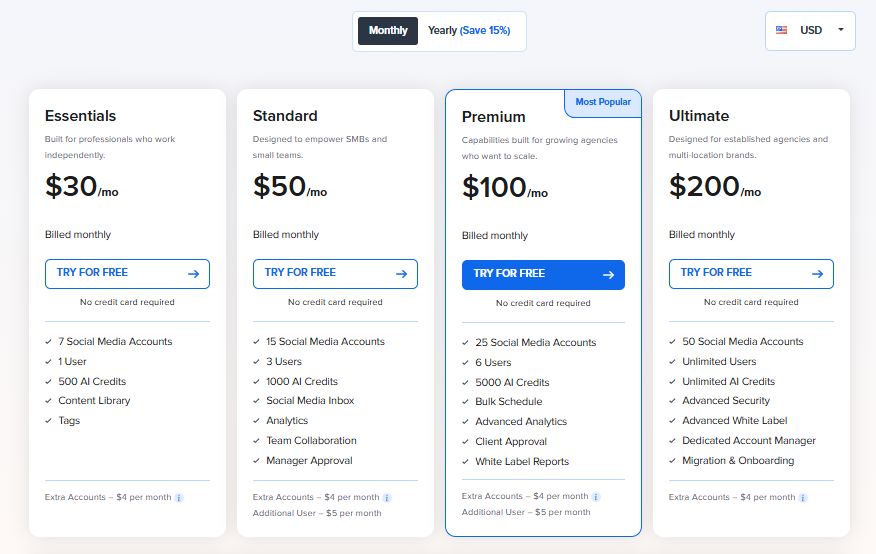
SocialPilot offers four plans, all with a 14-day free trial that unlocks every premium feature:
- Ultimate – $200/month (includes 50 social profiles and unlimited user)
- Premium – $100/month (includes 25 social profiles and 6 user)
- Standard – $50/month (includes 15 social profiles and 3 user)
- Essentials – $30/month (includes 7 social profiles and 1 user)
Billed annually, you save 15% on each plan.
If you want an affordable, flexible, agency-friendly alternative to Metricool, SocialPilot is definitely worth considering.
5. Later – $25/Month
Later is a favorite among creators and growing brands, mainly because it makes planning content feel easy. When we tested it, the first thing that stood out was how visual the whole experience is. You can drag, drop, shuffle, preview – everything feels smooth and intuitive.
If you prefer working with a calendar that shows you exactly how your feed will look, Later makes that process effortless.
It supports all the major social platforms, but it’s particularly strong with Instagram, thanks to its grid preview and Link in Bio tools. For creators or brands that care a lot about visuals, consistency, and planning out a clean aesthetic, Later hits the sweet spot.
Key Features
- Link in Bio Integration: Create a customizable mini landing page to drive traffic from Instagram.
- Visual Content Calendar: A drag-and-drop calendar that makes planning and scheduling feel natural.
- AI-Powered Captions: Generate ready-to-use captions quickly with Later’s built-in AI.
- Team & Client Collaboration: Work together on approvals and shared calendars.
- Unified Inbox: Manage comments and messages across platforms from one place.
- Analytics Dashboard: Track performance with easy-to-understand visual reports.
Later’s Standout Feature
Later’s visual planning tools are a huge win. Seeing your Instagram grid before it goes live, and being able to rearrange posts with a quick drag, makes it easier to keep your brand’s look consistent. You also get a clear preview for other platforms, so you’re never posting blindly.
Where Later Beats Metricool
Later is simply more visual. Its planning tools are easier to use, especially if you rely on aesthetics or want to maintain a consistent theme. The content library, tagging features, and organizational tools also feel smoother. While Metricool does offer scheduling, Later’s interface just feels more inviting and more creator-friendly.
Pricing
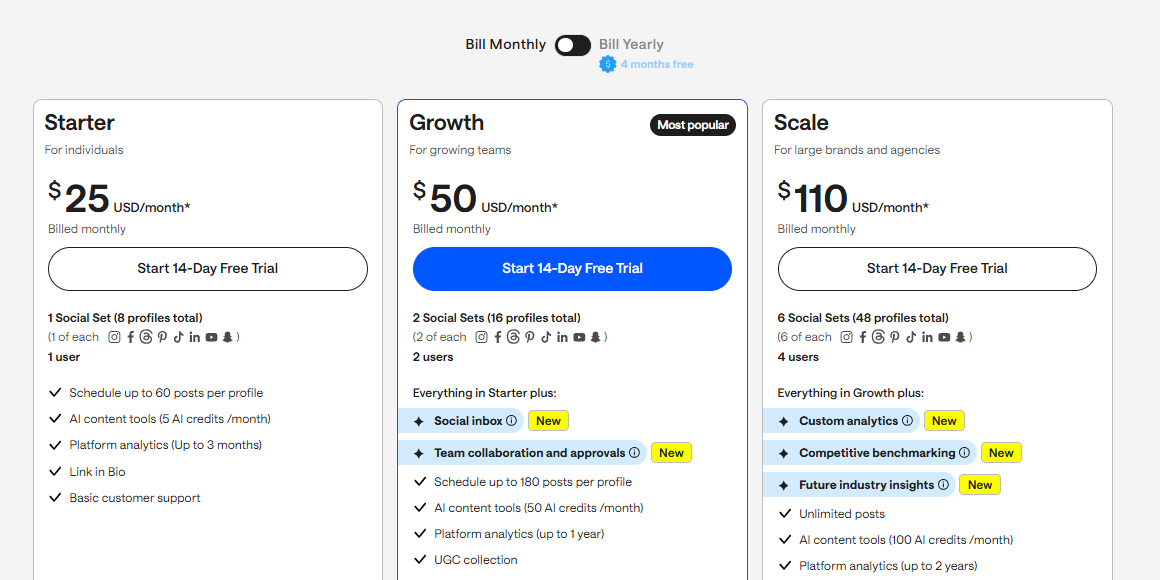
Later offers four plans, plus a free trial:
- Starter – $25/month (includes 1 social set, 1 user)
- Growth – $50/month (includes 2 social sets, up to 2 users, includes Link in Bio + analytics)
- Advanced – $110/month (includes 6 social sets, up to 4 users, advanced analytics & collaboration)
You can also add extra social sets for $15 and extra users for $5 on all plans except Starter.
6. Sendible – $29/Month

Sendible is a reliable scheduling platform built for agencies, creators, and growing teams that want a simple but powerful tool. When we tested it, what stood out was just how clean the interface feels. You can plan posts, manage clients, store content, and review analytics without jumping through hoops.
It’s also very flexible for agencies. The onboarding process is smooth – you can connect client accounts without asking for their login details, which makes everything more professional and less awkward.
Key Features
- Simple Content Scheduling: Queue and publish content easily across multiple platforms.
- Client-Friendly Onboarding: Connect client accounts securely without shared passwords.
- Priority Inbox: Manage messages from all social platforms in a single dashboard.
- White-Label Options: Add your own branding and offer a polished client portal.
- Analytics & Reporting: Access cross-channel analytics and generate detailed reports.
- Smart Queues: Automate evergreen content posting at the best times.
Sendible’s Standout Feature
Sendible’s Smart Queues are incredibly useful if you post a lot of evergreen content. You can set up categories – like tips, testimonials, quotes – and the tool takes care of posting them at optimal times. This keeps your content flowing without constant manual effort.
Where Sendible Outperforms Metricool
Sendible’s workflow tools feel more flexible. The customizable dashboard, white-label options, and advanced queue management give it an edge for agencies and creators who want more automation.
Metricool’s interface is more fixed, while Sendible lets you tailor the workspace to your needs. Its collaboration and queue systems also feel more polished and intentional.
Pricing
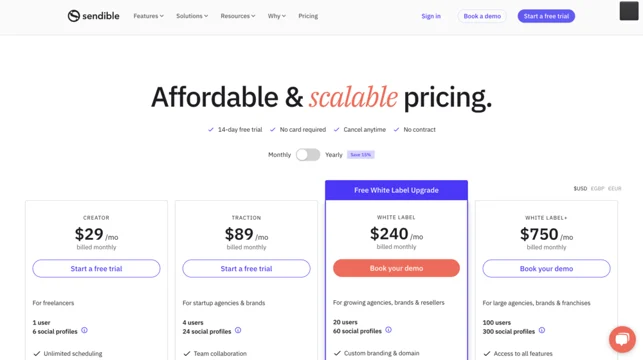
Sendible offers five plans, depending on the size of your team:
- Creator – $29/month (includes 1 user, 6 profiles, unlimited scheduling & reporting)
- Traction – $89/month (includes up to 4 users, 24 profiles, collaboration tools)
- Scale – $199/month (includes up to 7 users, 49 profiles, content libraries + custom reports)
- Advanced – $299/month (includes up to 20 users, 100 profiles, advanced permissions + white-label)
- Enterprise – from $750/month (includes 80+ users, 400 profiles, includes account manager)
You can add more users or profiles for the same per-unit cost as your plan.
7. Planable – $39/Month
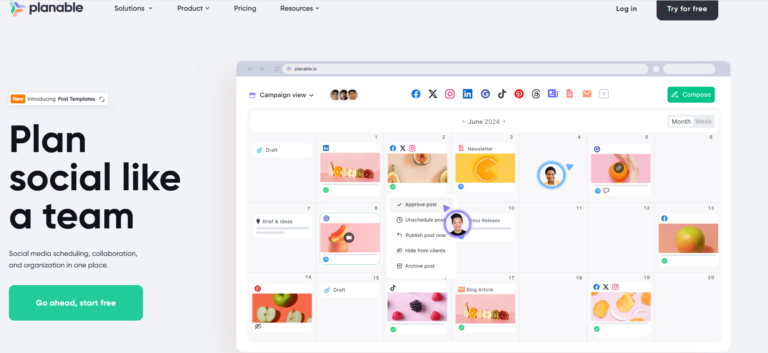
Planable is one of those tools that immediately feels friendly the first time you open it. It keeps things clean, organized, and easy to follow, especially when you’re working with multiple brands or several people touching the same content.
During testing, we noticed how much smoother planning becomes when drafts, feedback, and approvals all live inside one calendar. It’s built for teams that want a clear process from brainstorming all the way to publishing.
You can store assets, organize campaigns, and collaborate with clients without messy email chains or scattered comments.
Key Features
- Multi-Level Collaboration: Assign roles and keep approvals structured across teams and clients.
- Automated Publishing: Schedule posts across multiple platforms in one go.
- Content Library: Save and reuse assets in a central location.
- Team & Client Collaboration: Get real-time comments, edits, and approvals without friction.
- Planable Calendar: See everything at a glance in an organized visual calendar.
- Post Labeling: Tag posts to keep campaigns organized and easier to report on.
Planable’s Standout Feature
Planable truly shines in content organization. You can plan social posts, newsletters, blogs, and campaigns inside one workspace without juggling files or separate tools. Each brand gets its own neatly structured area, making it perfect for multi-brand teams and agencies that want an overview without confusion.
Where Planable Beats Metricool
Collaboration is where Planable pulls far ahead. Feedback, approvals, comments, and content tracking feel much smoother than Metricool’s more basic workflow.
If your team relies on clear structure and shared calendars, Planable’s system feels more intuitive and advanced. Its content calendar also has more flexibility and is easier to work with during busy campaign periods.
Pricing
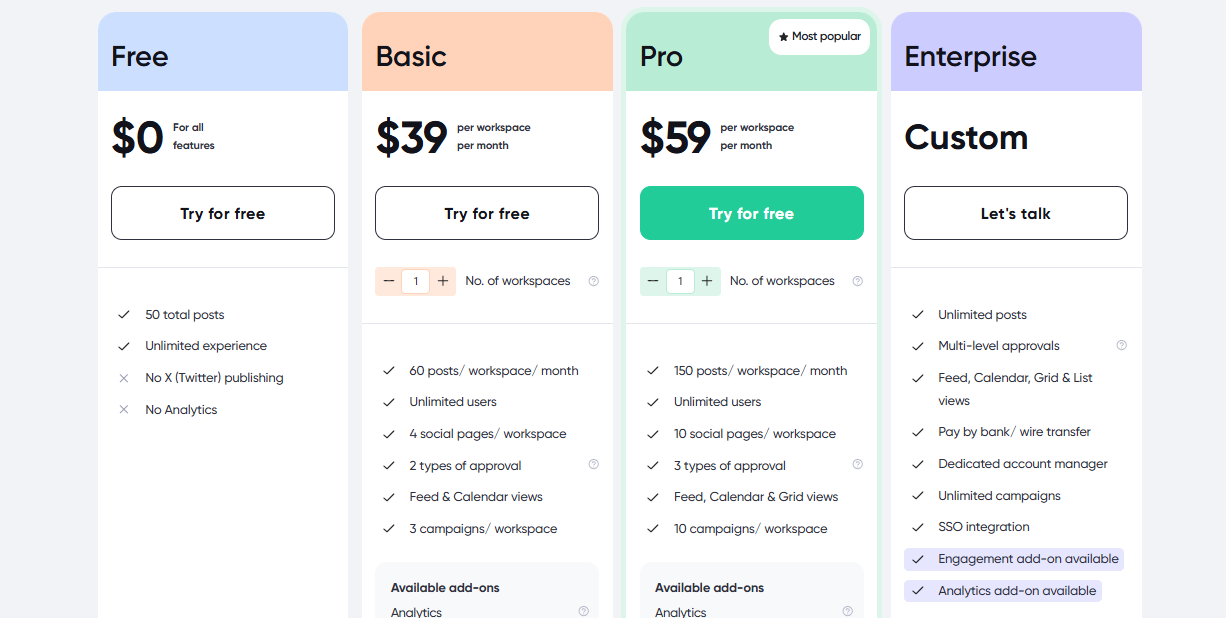
Planable’s pricing is based on workspaces, not users:
- Free: Create up to 50 posts
- Basic – $39/workspace/month: 60 posts/month, unlimited users, 4 social pages
- Pro – $59/workspace/month: 150 posts/month, unlimited users, 10 social pages
- Enterprise: Custom pricing
You can add more workspaces at the same plan price.
8. Agorapulse – $99/Month

Agorapulse is a strong all-in-one platform made for agencies, e-commerce brands, and teams managing multiple social accounts. It brings scheduling, monitoring, analytics, and collaboration into one dashboard without feeling cluttered. When we tested it, the tool’s depth stood out, especially with its social listening and ROI tracking features.
It’s a good fit for businesses that care about both content and measurable results. Everything from publishing to inbox management is clear and responsive, which makes day-to-day social media operations a lot more manageable.
Key Features
- Direct Publishing: Publish directly to all major platforms in one place.
- Social Listening: Track hashtags, mentions, keywords, and brand conversations.
- AI Image & Content Assistant: Generate ideas, captions, and visuals with AI suggestions.
- PulseLink in Bio: Create a multi-link landing page for Instagram traffic.
- Unified Social Inbox: Handle comments, DMs, and mentions across platforms in one dashboard.
- ROI Tracker: Connect Google Analytics to see which content drives real results.
Agorapulse’s Standout Feature: ROI Tracking & Revenue Insights
Agorapulse sets itself apart with its social media ROI tracker. You don’t just see likes and impressions; you see how your content affects traffic and revenue.
Its integration with Google Analytics gives you a clearer picture of which posts or campaigns actually bring results, which is something many tools overlook.
Where Agorapulse Outshines Metricool
Metricool gives basic interaction and analytics, but Agorapulse goes deeper. With social listening, detailed inbox insights, and ROI reporting, it’s better suited for teams managing several accounts or running high-volume campaigns.
The unified inbox and listening tools make engagement faster and more organized, especially for brands that track community sentiment closely.
Pricing
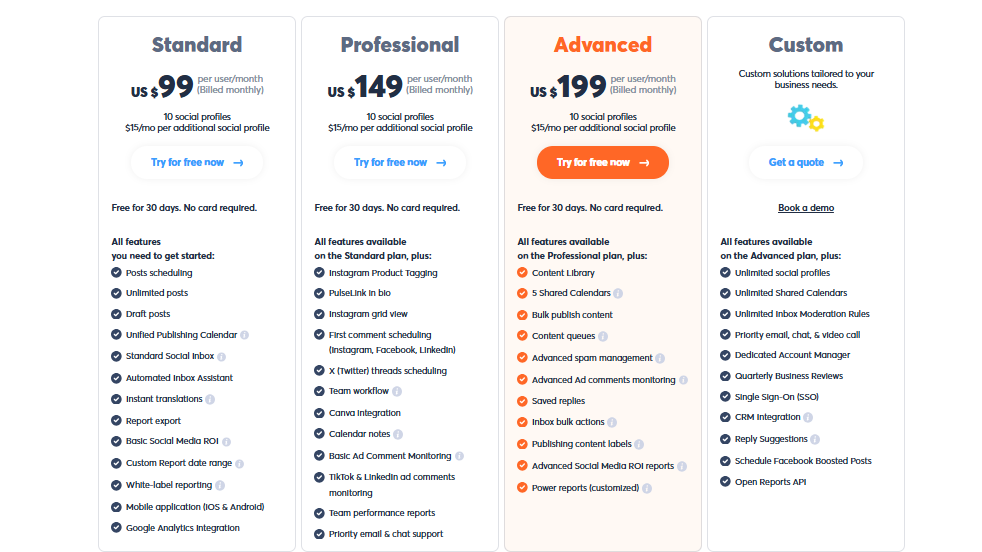
Agorapulse offers four plans, each with a 30-day free trial:
- Standard – $99/month (includes 10 profiles, 1 user)
- Professional – $149/month (includes 10 profiles, 1 user, built for agencies and growing teams)
- Advanced – $199/month (includes 10 profiles, 1 user, enhanced features for large teams)
- Custom – Tailored pricing (For businesses needing multiple users/profiles)
Each additional user and profile costs the same as your base plan rate.
9. Buffer – $6/Month
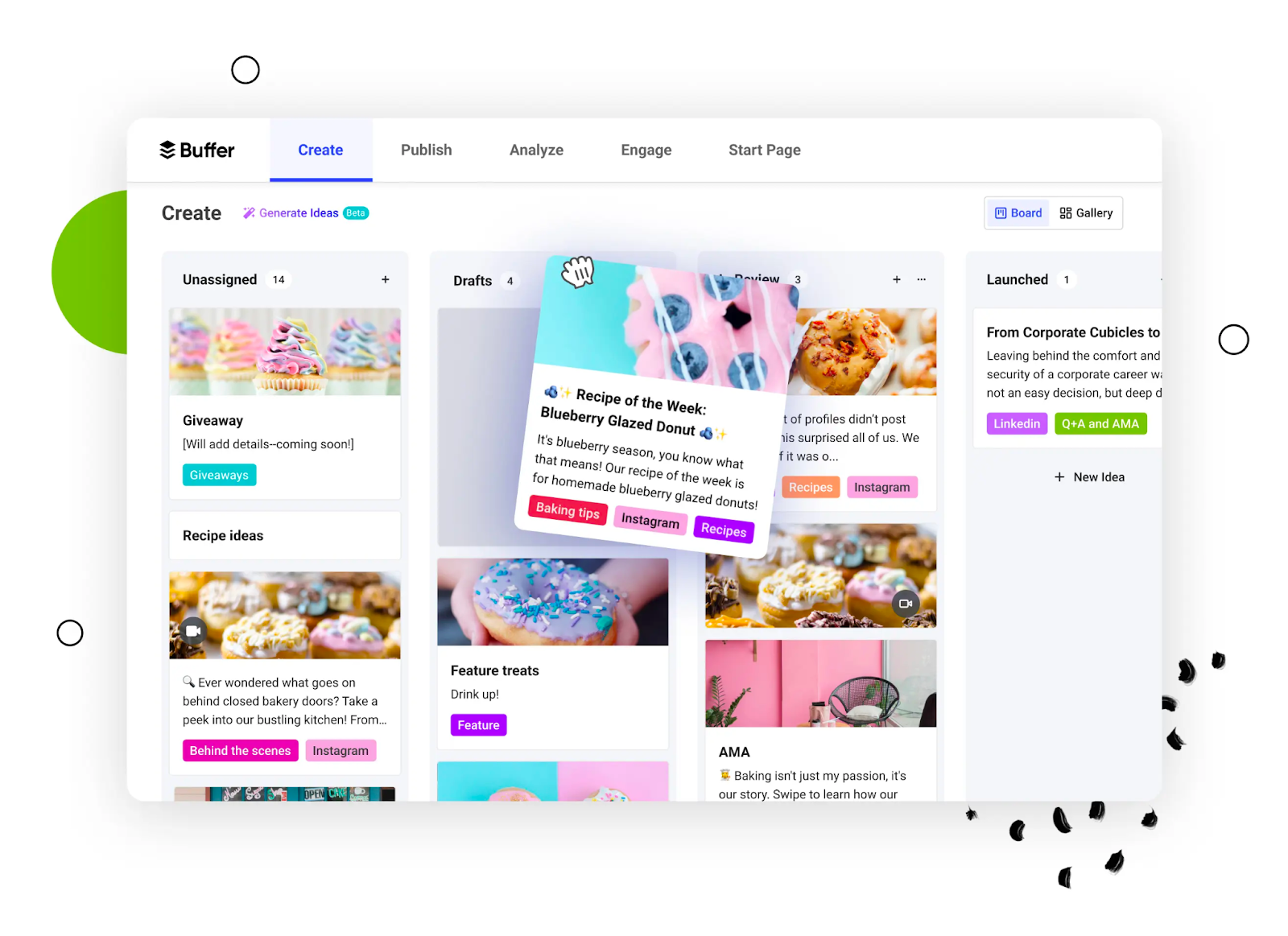
Buffer has made its mark for being friendly, clean and easy to use, especially for small teams, freelancers, and simpler social media management needs.
While testing it, what stood out was the simplicity of scheduling and the reliability of posting. If you want something that “just works” without a steep learning curve, Buffer is a smart choice.
Key Features
- Scheduling & publishing across major platforms with a smooth interface.
- Intuitive queue system: add posts, set times, and forget them.
- Analytics that cover basic performance metrics (engagement, clicks, etc.).
- Team permissions, review/approval workflows, and unlimited user invites (depending on plan).
Buffer’s Standout Feature
In our time with Buffer, the feature that kept coming back was the “queue and forget” model. You can load your posts, set your schedule, and trust that they’ll go live. No major fuss, and for smaller brands or solo operators that’s a huge relief.
Where Buffer Beats Metricool
For folks who prefer simplicity over complex setups, Buffer wins. It has a cleaner interface and fewer distractions. Some reviewers noted that Buffer felt more modern and less clunky than Metricool when it came to scheduling.
If your workflows are straightforward and you don’t need a ton of advanced customization, Buffer is a solid alternative.
Pricing
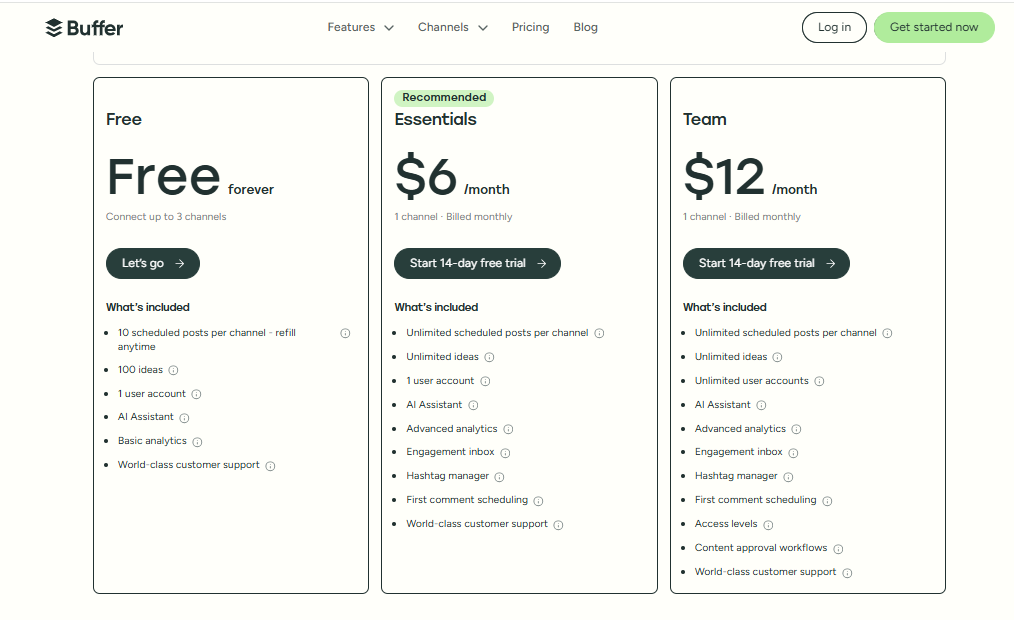
One of Buffer’s biggest draws is its pricing. Plans start at just $6 per channel/month, making it one of the most affordable tools on this list.
This flexible pricing means you only pay for the channels you actually use – something that makes Buffer especially attractive for freelancers and small businesses.
10. SocialBee – $29/Month
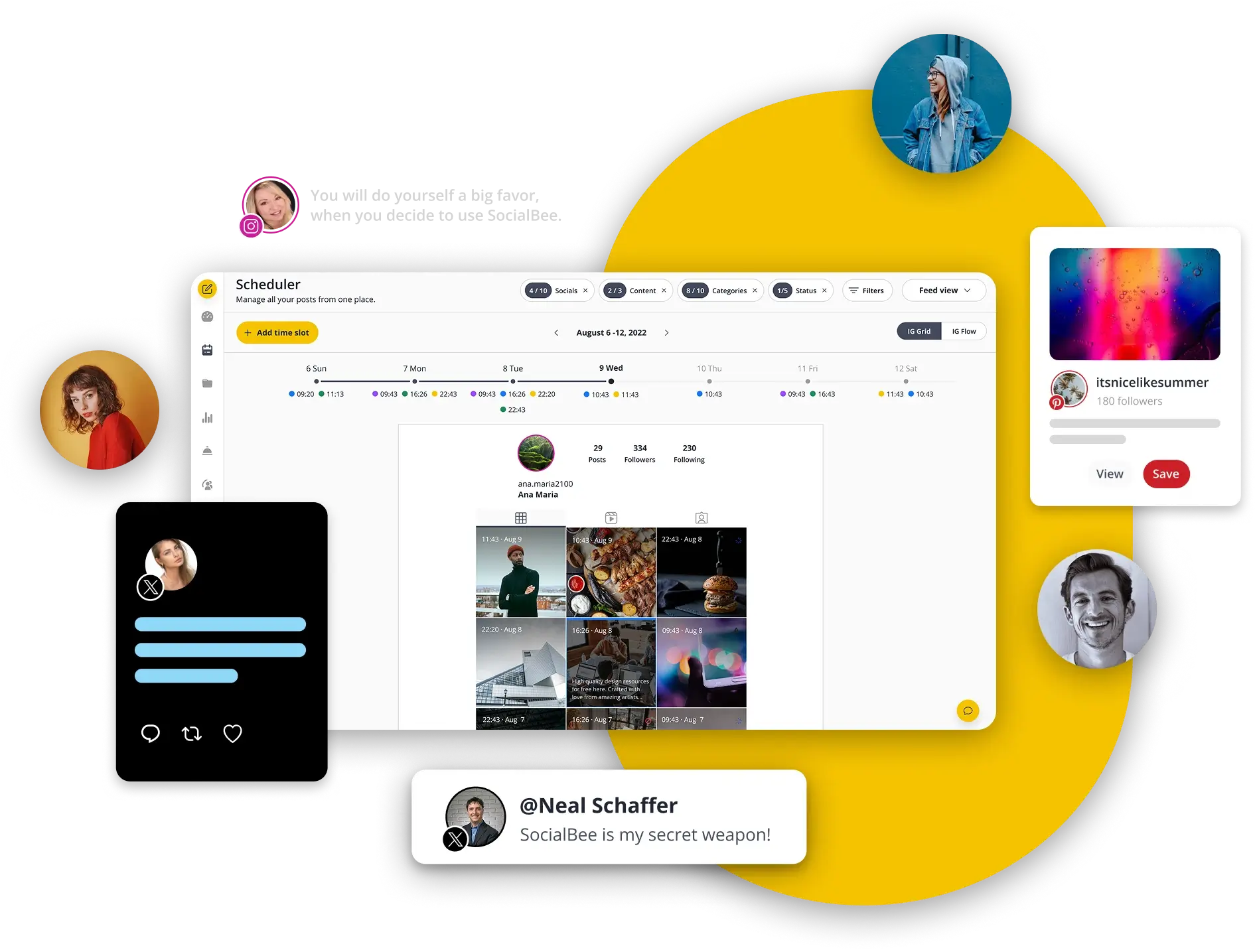
If you’re looking for something with a little more “oomph” but still user-friendly, SocialBee is worth checking out. We found that it places a heavy emphasis on content creation, reuse, AI support and scheduling categories – great for workflows where you want to keep a constant flow of content without reinventing the wheel every time.
Key Features
- AI-powered caption, image generation and content suggestions.
- Content categorization and evergreen queues: recycle content, organize posts by topic, and keep things consistent.
- Visual calendar and support for many platforms.
- Analytics, report generation (including PDF), and workspace/team management.
SocialBee’s Standout Feature
What stood out for us with SocialBee was how it handles evergreen content and categorization. You can set up folders or categories (blog posts, tips, quotes, etc.), then let the tool publish them in a smart rhythm. That’s a big time-saver when you want continuity but have limited resources.
Where SocialBee Surpasses Metricool
If you manage multiple clients, or you’re an agency wanting to streamline content reuse and scheduling, SocialBee is a strong alternative. The tool gives more control over content categories and evergreen flows than what we saw in Metricool.
Also the AI features and broad platform support make it appealing when you want slightly more than just “schedule and publish”.
Pricing
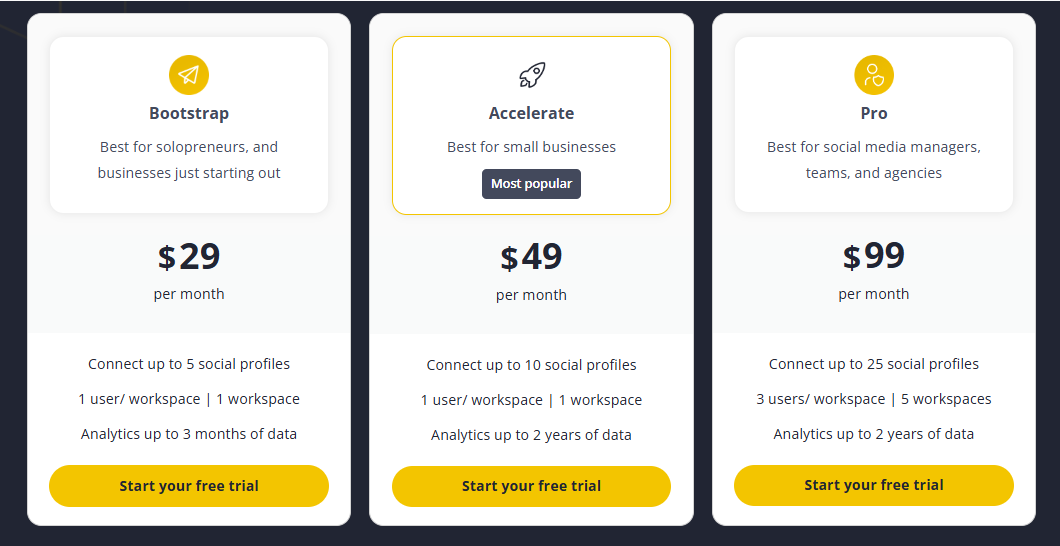
SocialBee offers a free trial (14 days) and various paid plans depending on how many profiles, users and workspaces you need.
Here’s a quick breakdown:
- Bootstrap: $29/month for 5 social profiles
- Accelerate: $49/month for 10 social profiles
- Pro: $99/month for 25 social profiles
Choosing the Best Metricool Alternative: Factors to Consider
By the time you start exploring Metricool alternatives, it usually comes down to two things: you’ve already tried Metricool and hit a wall, or you’ve heard about it but want something more flexible, more affordable, or simply easier to grow with.
Whatever side you fall on, choosing the right replacement shouldn’t feel like guesswork. Here are the key things to look out for before you make the switch.
1. Multi-Account Management
If you manage several brands or multiple profiles on the same platform, this becomes a deal-breaker. Your new tool should support every platform you rely on and let you publish directly without extra add-ons.
A good example is Twitter (X): Metricool doesn’t include it by default, which pushes costs up fast. Look for a tool that includes the platforms you need from day one, plus extras like AI-powered content generation and smart posting times to keep your accounts active.
2. Team Collaboration
If you work with a team or manage clients, strong collaboration features are non-negotiable. Look for tools that offer clear user roles, easy approvals, shared calendars, and ways to manage feedback without long email threads. The goal is to keep everyone in sync, not slow them down.
3. Integrations
Your social media tool shouldn’t sit in a corner on its own. It should connect naturally with the rest of your workflow – your CRM, email marketing tool, cloud storage, or project management apps. When everything talks to each other, your work feels smoother and more organized.
4. Analytics and Reporting
Numbers matter, especially if you’re showing results to clients or managers. Real-time analytics should be a basic requirement. Beyond that, look for tools that offer ROI tracking, deeper insights, and customizable reports. Tools like Agorapulse and SocialPilot give you reporting options that many agencies rely on to justify strategy and performance.
5. Ease of Use & Customer Support
Switching tools can feel intimidating. That’s why onboarding and support make a huge difference. Choose a platform that feels easy from the first click and offers reliable help through chat, email, or phone. Good customer support saves you hours of frustration, especially during those early setup days.
6. Budget
Let’s be real; pricing plays a big role. Maybe Metricool’s add-on costs or brand limits pushed you to find something more flexible. Look for a tool that gives you room to grow without forcing constant upgrades. Plans that let you add extra accounts or team members at a fair cost are usually the best long-term fit.
Final Note
Finding the right Metricool alternative doesn’t have to be stressful. Once you understand what Metricool lacks and what your workflow truly needs – better scheduling, deeper analytics, stronger collaboration, or more affordable scaling – the options become much clearer.
The tools we covered above each bring something different to the table, and after testing them firsthand, we can confidently say there’s a perfect fit for every type of creator, business, or agency.
Pick the one that aligns with your goals, your team, and your budget, and your social media management instantly becomes smoother, faster, and far more enjoyable.
FAQs
What is the best alternative to Metricool for agencies?
OnlySocial, SocialPilot, and Agorapulse are top picks for agencies because they support multiple profiles per platform, offer approval workflows, and provide strong collaboration features.
Which Metricool alternative has the best analytics?
Agorapulse stands out for ROI tracking and social listening, while Hootsuite offers detailed competitor benchmarks. Both go deeper than Metricool in insights.
What is a cheaper alternative to Metricool?
Tools like OnlySocial, SocialBee, and SocialPilot offer more affordable plans with better scaling options, especially for users managing multiple accounts.
Which Metricool competitor is best for Instagram planning?
Later is one of the best for Instagram because of its visual calendar, grid preview, and Link in Bio features.
Does Metricool offer more platform support than other tools?
Not always. In fact, Metricool requires an add-on for Twitter (X), while many alternatives like OnlySocial, include it in their base plans at no extra cost.