Threads Comment Management 2025: Best Practices & Hacks
If you’ve been active on Threads lately, you’ve probably noticed one thing — the conversations move fast. What starts as a single post can quickly turn into a comment storm of questions, reactions, and debates. For brands and creators, that’s both exciting… and a little overwhelming.
In 2025, Threads isn’t just a place to post; it’s a place to connect. Every reply, mention, and comment shapes how people see your brand.
A single unanswered question can make you look distant. A thoughtful response, though, can turn a casual follower into a loyal fan.
However, the problem is that managing those comments takes time. Keeping up with replies across multiple posts, filtering out spam, and staying on top of your community’s tone can feel endless.
That’s why mastering Threads comment management has become an essential skill – not just for social media managers, but for anyone serious about growing an audience.
In this guide, we’ll break down everything you need to know – from best practices and time-saving hacks to tools that can make it easier to stay in control of your Threads comments without losing your human touch.
Table of Contents
- 1 Why Threads Comment Management Matters in 2025
- 2 Understanding the Threads Comment System
- 3 Best Practices for Managing Threads Comments in 2025
- 3.0.1 Reply Fast – But Don’t Rush the Tone
- 3.0.2 Engage Beyond Emojis
- 3.0.3 Priorities Important Comments First
- 3.0.4 Keep Your Tone Consistent Across Threads
- 3.0.5 Handle Negative Comments Calmly and Publicly
- 3.0.6 Use Analytics to Learn What Works
- 3.0.7 Don’t Be Afraid to Automate the Repetitive Stuff
- 3.0.8 End Conversations with a Call to Action
- 4 How OnlySocial Makes Threads Comment Management Easier
- 5 Common Challenges of Threads Comment Management (and How to Fix Them)
- 6 Advanced Hacks for Streamlining Threads Comment Replies
- 7 Final Thoughts
- 8 FAQs
Why Threads Comment Management Matters in 2025
Threads is much more than a platform for just quick updates. It’s now a space for real conversation. Whether you’re running a personal brand or managing a company page, your comment section is where people connect, question, and decide whether they trust you.
In 2025, managing those comments the right way can make or break your social presence. Here’s why it matters more than ever.
Comments Drive Engagement and Visibility
Threads’ algorithm rewards interaction. Every time someone comments on your post, and you reply, it signals activity and relevance. That’s what pushes your content higher in feeds and keeps it visible for longer.
Think of your comment section as fuel for your reach. The more authentic conversations you generate, the more your posts continue to live and circulate.
And it’s not just about numbers. Comment threads are where new followers often decide if your brand is approachable or disconnected.
They Build Trust and Brand Personality
People don’t just read your posts; they read how you respond. A thoughtful reply shows there’s a human behind the account – someone who listens and values their audience.
Brands that reply consistently (and naturally) tend to earn more loyalty.
Even a quick “thanks for the feedback!” can make your audience feel seen. Over time, those small moments build the kind of trust that paid ads can’t buy.
Comments Offer Real-Time Feedback
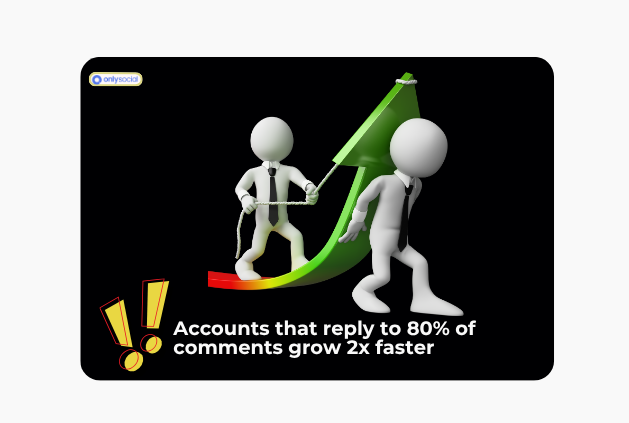
Your audience is constantly telling you what’s working – and what’s not – through comments. Whether it’s praise, complaints, or suggestions, this feedback is pure gold.
You can spot trends early, understand what resonates, and even shape future posts or products based on real audience input. Some of the most successful Threads accounts treat their comments like a focus group – always listening, always learning.
Good Comment Management Protects Your Brand
Not all comments are kind or relevant. Spam, fake accounts, and off-topic debates can derail a conversation fast.
Having a clear moderation process helps you maintain a positive space without stifling real dialogue. It shows you’re present, professional, and protective of your community.
So, it’s obvious that Threads comment management in 2025 isn’t about micromanaging conversations but more about guiding them. When done right, it becomes one of the strongest tools for visibility, loyalty, and genuine connection.
Understanding the Threads Comment System
Before we go into strategies and tools, it’s important to understand how Threads handles comments – because knowing the system helps you work smarter, not harder.
Threads may look simple on the surface, but its comment structure has a few unique quirks that make it different from other platforms like Instagram or X.
Replies Are the focus of the platform
Threads was built for conversations – not just broadcasting. Unlike many other social apps, comments and replies are treated as part of the main feed’s activity.
That means when you reply to someone, it’s not buried; it often appears in your followers’ feeds or even in related discussions. This means your replies can carry the same visibility as your original post – and that’s a big deal for engagement.
Threads Encourages Nested Conversations
Threads uses a nested reply structure, meaning comments can have replies of their own. It’s a bit like Reddit, where one thread can turn into multiple mini-discussions.
This setup is great for community-building but can quickly get messy if you’re not keeping track. One small discussion can grow into dozens of sub-threads, each needing attention.
Comment Notifications Can Be Overwhelming
Anyone managing a busy Threads account knows that notifications can pile up pretty fast. Every mention, reply, and tag shows up in the same stream, which is great for visibility, but not so great for organization.
That’s why having a centralized dashboard (like what OnlySocial provides) can be a game changer. It keeps everything visible in one place instead of forcing you to scroll endlessly through the app. We will show you how this works later in this guide.
Comments Affect Discoverability
Threads’ algorithm favors active, ongoing conversations. If a post continues to get replies and interactions over time, it remains visible in feeds far longer than inactive posts.
That’s why brands that regularly engage with commenters, instead of just posting and disappearing, tend to see better performance overall.
You Can Moderate, But Only Manually
Threads allows you to hide or report comments, but moderation tools are still quite limited compared to platforms like Facebook or YouTube.
You can restrict who replies to your post or filter offensive words, but there’s no built-in system for assigning moderation roles or setting automated filters.
That’s where third-party tools step in to fill the gap with smarter moderation features and team collaboration.
Best Practices for Managing Threads Comments in 2025
Managing comments on Threads doesn’t just mean replying quickly. You want to ensure you’re engaging meaningfully, protecting your brand voice, and staying organized even when your notifications blow up.
Here are the best practices that can make all the difference this year.
Reply Fast – But Don’t Rush the Tone
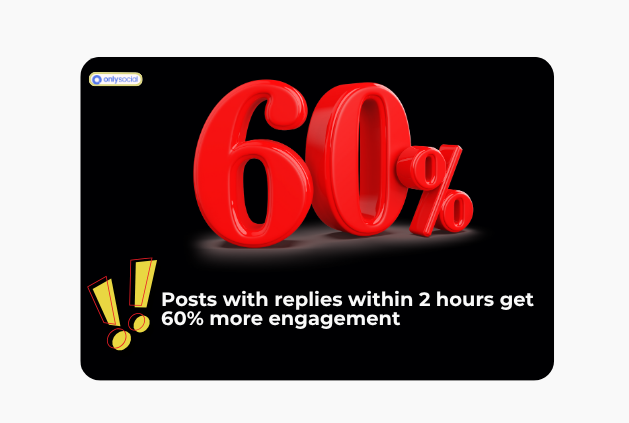
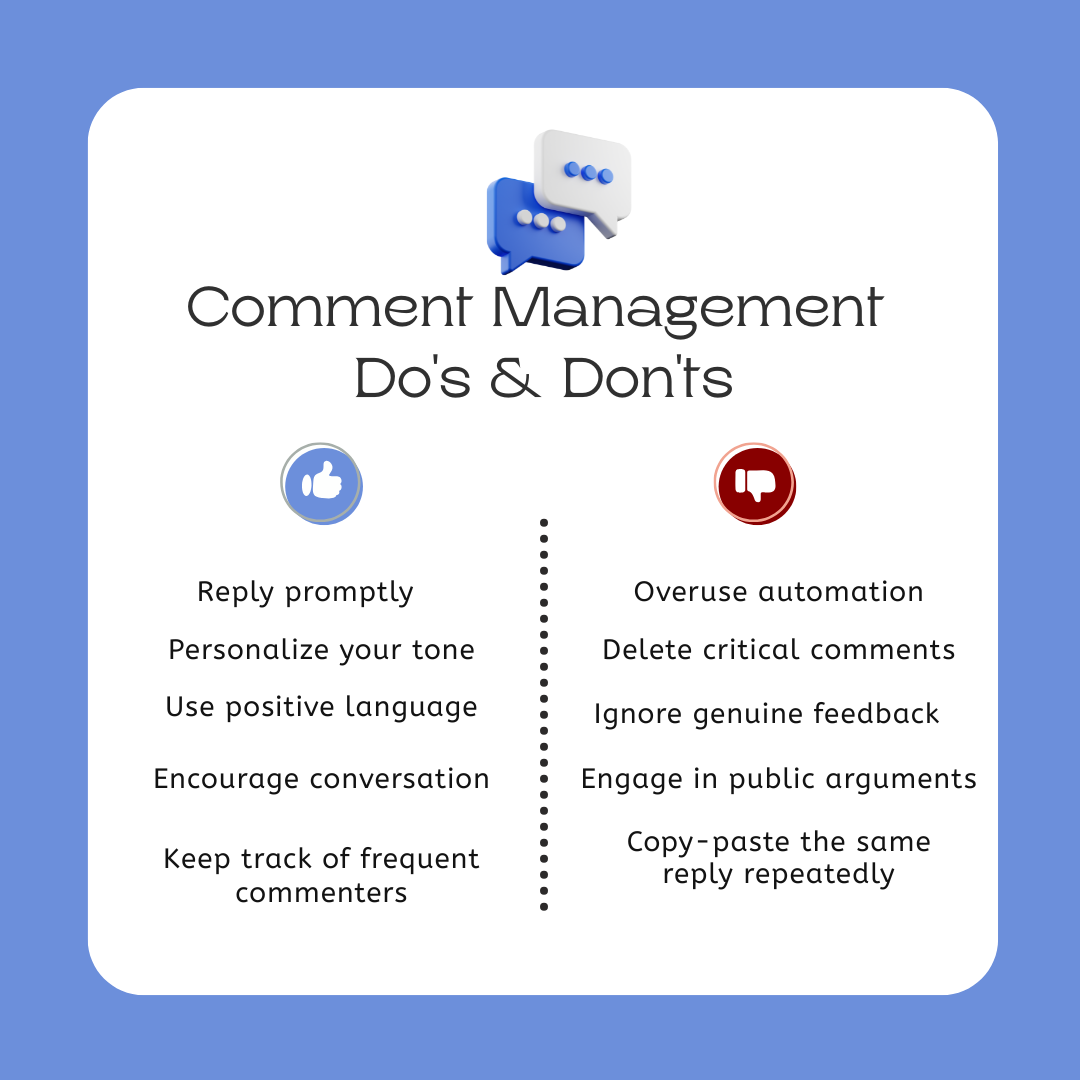
Speed matters. A quick reply shows your audience that you’re listening, active, and approachable.
But don’t let speed kill sincerity. Take a few seconds to personalize your response – mention the commenter’s name, refer to their point, or add a touch of humor when appropriate.
Pro tip: Draft quick-response templates for FAQs (“Thanks for sharing your thoughts!” / “Glad you enjoyed this post!”) – then tweak them before sending so they don’t sound robotic.
Engage Beyond Emojis
It’s easy to drop a “❤️” or “🔥” when you’re busy, but a thoughtful comment goes further. Ask a follow-up question, acknowledge insights, or invite discussion.
For example:
Instead of replying “Thanks!”, try “That’s a great point, Sarah – do you usually post on this topic too?”
This kind of engagement encourages longer comment threads, which Threads’ algorithm loves.
Priorities Important Comments First
When your post takes off, the flood of replies can feel impossible to manage. Start by replying to high-value comments, such as:
- Questions that need answers
- Feedback about your product or content
- Comments from verified users or influencers in your niche
You can always circle back to the lighter replies later. This ensures your audience gets real value before the conversation cools off.
Keep Your Tone Consistent Across Threads
Your comment tone should reflect your brand personality – whether that’s friendly, witty, or professional.
If you manage multiple accounts or team members help with replies, create brand voice guidelines. This ensures consistency, especially as your team grows.
Example: Always respond in first person (“I” instead of “we”) if you’re a creator, or include a name or emoji signature if you’re a brand.
Handle Negative Comments Calmly and Publicly
You’ll eventually run into criticism – it’s part of being visible. The key is to acknowledge, not argue.
A polite, professional reply can defuse tension and show others you handle feedback well.
Example:
“Hey Mark, I’m really sorry that happened. Can you DM us so we can make it right?”
If the comment violates community rules or is spam, hide or report it, but don’t delete legitimate feedback. Transparency earns more respect.
Use Analytics to Learn What Works
Look for trends in your comment activity.
- Which posts spark the most discussions?
- What topics get people emotional or curious?
- When do your audience reply most?
Threads doesn’t offer deep insights yet – but tools like OnlySocial help track engagement metrics across platforms, showing you what types of replies and posts truly connect with your audience.
Don’t Be Afraid to Automate the Repetitive Stuff
Automation doesn’t mean losing the human touch. It means freeing up time for real conversation.
With Thread management tools, you can:
- Save pre-approved reply templates for common questions
- Automatically flag or filter spam
- Assign comment replies to specific team members
You’ll still sound authentic – just a lot less overwhelmed.
End Conversations with a Call to Action
Don’t let good conversations fade out. Encourage the next step – ask them to follow, check out a related post, or share their own take.
Example:
“Love your thoughts on this! We’re discussing something similar in our latest post – would love your input there too.”
These gentle nudges keep people engaged and help your content ecosystem grow naturally.
How OnlySocial Makes Threads Comment Management Easier
If you’ve ever tried managing an active Threads account, you know how chaotic it gets – notifications everywhere, missed replies, and that nagging feeling you might’ve ignored an important comment.
That’s where OnlySocial comes in.
It’s more than a scheduler; it’s a complete comment management assistant designed to help you stay organized and responsive – all without burning out.
Here’s how it transforms your Threads experience:
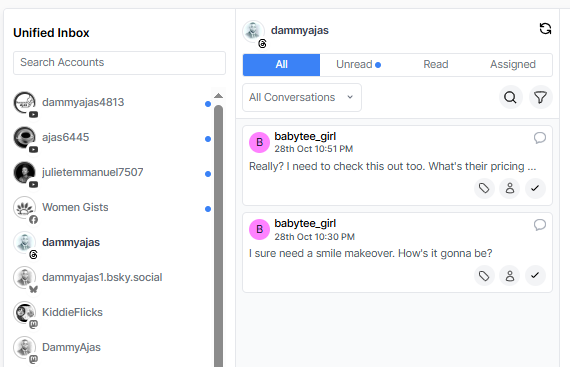
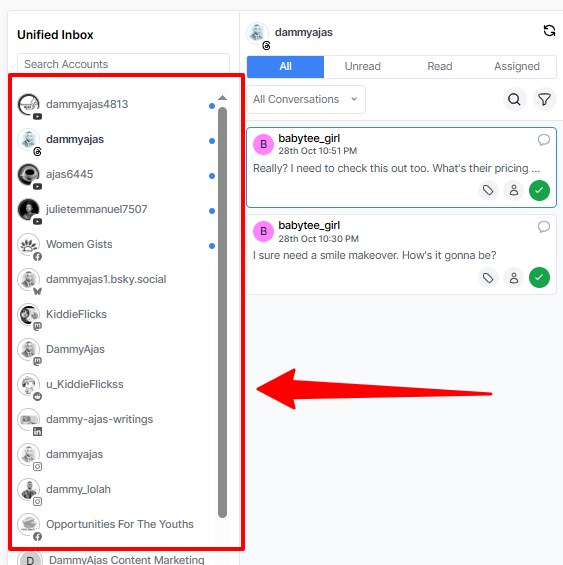
1. All Your Comments in One Unified Inbox
No more jumping between tabs or scrolling endlessly through Threads notifications.
OnlySocial brings all your comments and replies from Threads (and your other social channels) into one clean dashboard.
You can read, reply, and manage everything from a single place.
For many brands and agencies, this has been a game-changer, especially when managing multiple brand accounts. You see the full conversation history, who replied, and when, so you never lose context.
And because it’s all synced in real-time, you’ll never miss a mention or a message again.
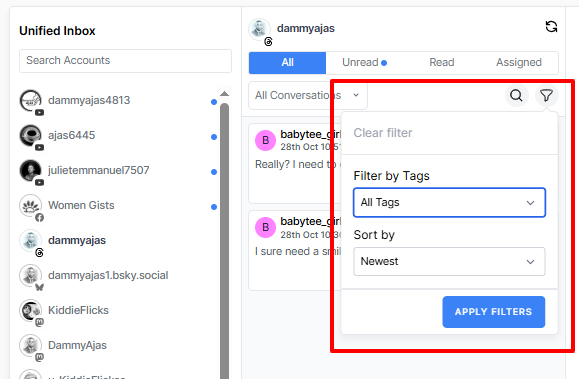
2. Smart Filters That Save Time
Let’s face it – not all comments deserve the same level of attention.
OnlySocial lets you filter comments based on:
- Keywords or hashtags
- Sentiment (positive, neutral, negative)
- Mentions or tagged users
- Time or post type
So, instead of drowning in noise, you can focus on what matters most, answering genuine questions, resolving concerns, and engaging meaningfully with fans.
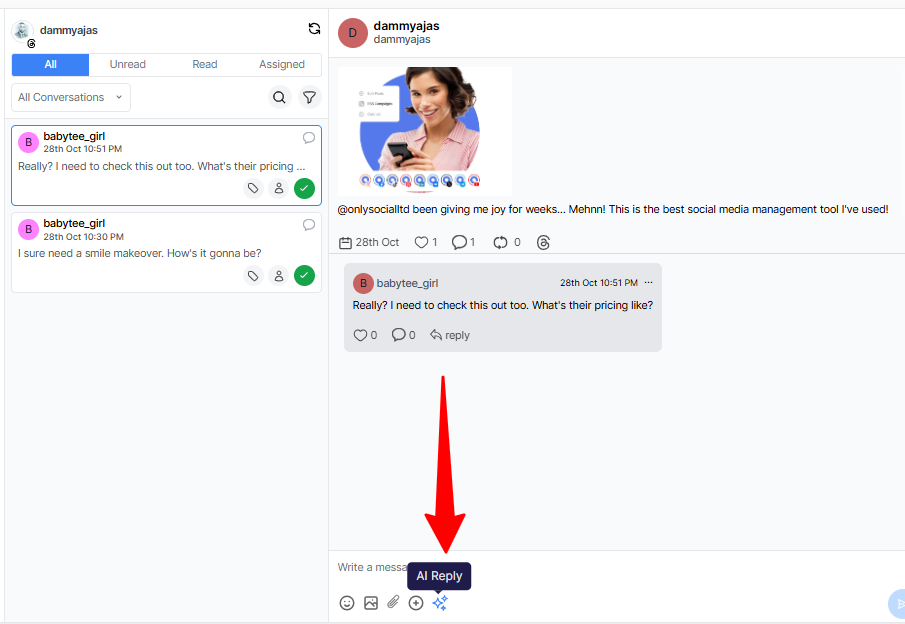
3. AI-Powered Replies That Still Sound Human
OnlySocial’s AI assistant is surprisingly natural. It doesn’t just auto-reply – it learns your tone and suggests responses that sound like you.
You can:
- Approve or edit suggested replies before sending
- Train the AI to match your brand voice
- Automatically handle FAQs or thank-you messages
Imagine freeing up your afternoons while your AI assistant keeps your comment section lively and professional.
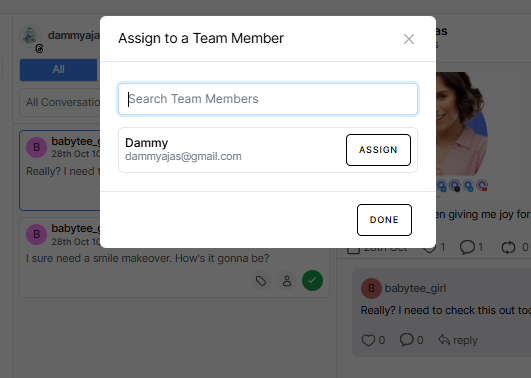
4. Team Collaboration Made Simple
If you manage a team, you’ll love this part. You can assign comments or Threads discussions to specific members – for example, your support rep handles complaints, your community manager answers fans, and your marketing lead tackles partnerships.
Each person sees their assigned items clearly, so there’s no overlap or missed responses. You can also add internal notes, like:
“Follow up next week after campaign launch.”
or
“Handled on Instagram – no further reply needed.”
It’s organized teamwork without endless email chains or screenshots.
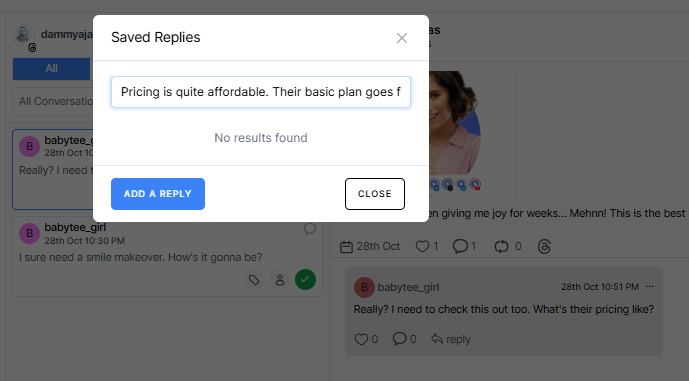
5. Save Time with Smart Templates and Auto-Replies
Some questions come up over and over again – pricing, hours, features, you name it.
With OnlySocial, you can create custom saved replies or auto-response templates. These pre-written responses can be quickly edited and sent out in seconds.
It helps you stay consistent while still sounding personal – and it’s a massive time-saver when managing hundreds of comments.
6. Measure What Matters
OnlySocial’s analytics go beyond likes and replies. You can track:
- Average response time
- Sentiment trends (positive vs. negative comments)
- Top-performing posts by engagement
- Team response performance
This data helps you fine-tune your engagement strategy, showing what’s working and where you can improve.
7. Multi-Platform Power
While Threads is a big focus here, OnlySocial’s strength lies in how it unifies all your social media engagement – Instagram, LinkedIn, YouTube, TikTok, Bluesky, and more – under one roof.
So you’re not just managing Threads efficiently… you’re managing your entire social presence smarter and faster.
Common Challenges of Threads Comment Management (and How to Fix Them)
Managing Threads comments sounds simple until your notifications explode, and suddenly you’re juggling dozens of conversations, trolls, and missed mentions.
Here are some of the biggest struggles most creators and brands face on Threads, plus practical ways to fix them.
#1: Missing Important Comments in the Chaos
Threads’ notification stream can be relentless. Comments, mentions, and replies all show up together, and it’s easy for an important one – like a customer query or influencer tag – to slip through the cracks.
Fix:
Use a centralized inbox tool like OnlySocial, which pulls all comments into one clean dashboard. You can mark conversations as resolved, add internal notes, or assign them to teammates.
That way, nothing gets buried, and you can always track which comments still need attention.
#2: Negative Comments Turning Toxic
Every brand gets criticism. But one rude comment left unchecked can spiral into a thread full of negativity, scaring off potential followers or customers.
Fix:
Respond calmly, publicly, and quickly. Acknowledge their frustration, offer to move the discussion to DMs, and keep things respectful.
If it’s pure trolling or spam, use Threads’ moderation options to hide, restrict, or report – and lean on OnlySocial’s sentiment filters to flag negative comments early before they cause damage.
#3: Repetitive Questions Eating Up Time
“How do I sign up?”
“When’s your next drop?”
“Is this available in Canada?”
Sound familiar? These repetitive comments eat up hours, especially when you’re answering them manually.
Fix:
Create a library of saved replies for FAQs inside OnlySocial. You can customize and reuse them in seconds, saving tons of time while keeping your tone consistent and friendly.
#4: Off-Topic or Spam Comments Hijacking Threads
Spam bots and irrelevant self-promotion are everywhere. They clutter up your post, distract genuine commenters, and make your feed look messy.
Fix:
Filter them out automatically. OnlySocial allow you to set keyword filters that catch spammy comments (like “follow me,” “DM for collab,” or random links) before they even appear in your inbox.
It’s one of the easiest ways to keep your Threads section clean and focused.
#5: Losing Brand Voice Across Multiple Team Members
When multiple people reply on behalf of your brand, tone and consistency can easily slip. One teammate might sound formal, another overly casual – and your audience notices.
Fix:
Establish simple reply guidelines – short, friendly, and on-brand. Then, use OnlySocial’s team roles and internal notes so everyone knows who’s handling what and how to keep the same tone across responses.
This keeps your replies cohesive, no matter who’s typing.
#6: Burnout from Manual Management
Let’s be honest; staying on top of comments 24/7 isn’t sustainable. Without a system, it’s easy to burn out or miss opportunities because you’re constantly reacting instead of planning.
Fix:
Automate where you can.
Let AI handle repetitive replies, use filters to surface key comments, and schedule specific times each day for engagement instead of constantly checking.
That’s how pros stay consistent and sane.
Every Threads creator or brand will hit these challenges at some point. The difference is in how you manage them, and the right workflow can turn chaos into effortless, authentic engagement.
Advanced Hacks for Streamlining Threads Comment Replies
Once you’ve nailed the basics of managing Threads comments, it’s time to take things up a notch.
These advanced tactics will help you reply faster and turn comment sections into mini engagement engines, without spending all day glued to your phone.
Create a Comment Triage System
Treat your Threads comments like customer service tickets – some are urgent, some can wait.
Here’s a simple triage setup that works wonders:
- Priority A: Questions or issues that need a quick response (within 1 hour)
- Priority B: Feedback or ideas that deserve thoughtful replies
- Priority C: Simple thank-yous or compliments (use short, friendly responses)
Tools like OnlySocial make this even smoother. You can tag or label comments by priority level, so your team knows exactly which ones to handle first.
Use Smart Keywords to Catch Opportunities
People don’t always tag your brand when they talk about you. Set up keyword monitoring for your brand name, product names, or even common misspellings.
With OnlySocial, you can automatically pull these mentions into your dashboard and respond before your competitors even notice the conversation.
It’s one of the easiest ways to capture attention, address hidden feedback, and join discussions that matter.
Keep Saved Replies That Sound Personal
Pre-written replies can be your best friend – or your biggest red flag if they sound robotic. The trick is to create templates that are flexible.
For example:
“Hey Sarah, we’re so glad you liked this! Curious – what part stood out most to you?”
“Appreciate the love, Sarah! 💬 We’re planning something similar next week – stay tuned.”
You can tweak them in seconds, but they’ll still feel warm and human.
OnlySocial allows you to store, edit, and insert these replies instantly – perfect for big campaigns or product launches.
Schedule Dedicated Reply Sessions
Constantly checking notifications kills productivity. Instead, set two or three dedicated reply sessions per day – morning, midday, and evening.
During those sessions, use filters to focus only on unanswered comments or specific sentiment tags. You’ll get more done in less time and still look super active to your audience.
Bonus tip: Mark resolved conversations as “closed” in OnlySocial to avoid confusion later.
Turn Engaged Commenters into Content Collaborators
When someone consistently leaves thoughtful replies, don’t just thank them, invite them to collaborate.
You can:
- Feature their comment in a future post (with credit)
- Ask for their opinion on an upcoming idea
- DM them to discuss partnerships or feedback
These small moves transform passive followers into loyal community members, and they often become your best brand advocates.
Repurpose Your Best Comments into Posts
Your comment section is full of insights, jokes, and mini-stories waiting to be reused.
Turn top comments or funny interactions into posts, graphics, or carousels.
Example: “Our followers said THIS was their biggest Threads struggle… Do you agree?”
Not only does this fill your content calendar, but it also shows your audience you value their input — which boosts engagement even more.
Final Thoughts
Threads may be one of the newest players in social media, but it’s already reshaping how brands and creators connect with their audiences.
The comment section – once an afterthought – is now the heart of engagement. It’s where conversations happen, reputations are built, and loyal communities take shape.
But keeping up with those conversations isn’t easy. Between notifications, spam, and scattered messages, it’s easy to feel overwhelmed. That’s why smart comment management isn’t optional anymore – it’s a strategy.
And tools like OnlySocial make that strategy effortless. By centralizing your Threads comments, guiding your replies with AI, and giving your team an organized workflow, it helps you focus less on the chaos and more on connection.
So if you’re ready to turn your Threads comment section into a real growth engine, OnlySocial is the smartest place to start.
FAQs
How important are comment replies on Threads?
Extremely important. Threads’ algorithm rewards genuine engagement, and replies are a big part of that. Every time you respond, it signals that your account is active and community-driven. It also boosts visibility, helping your post stay longer in feeds and conversations.
Can I manage Threads comments from other platforms?
Yes – but not directly from Threads itself. Tools like OnlySocial now integrate Threads comment management into their unified dashboards, allowing you to reply, filter, and assign comments alongside Instagram, TikTok, and LinkedIn conversations.
It saves tons of time if you’re managing multiple accounts.
What’s the best way to deal with spam or irrelevant comments?
The best approach is to use moderation tools or keyword filters. You can hide or report spam manually on Threads, but if you’re using a platform like OnlySocial, you can set automated filters that catch spammy or offensive comments before they clutter your feed.
How fast should I reply to comments on Threads?
Ideally within the first few hours. That’s when the conversation (and the algorithm) is most active. Quick replies show you’re present, which encourages more engagement and helps build stronger community trust.
Can I automate comment replies without sounding robotic?
Absolutely – if done right. With OnlySocial’s AI-powered assistant, you can set smart automations that craft replies in your brand voice. You can review and edit suggestions before sending, ensuring every response sounds natural and personal.
What metrics should I track for comment management success?
Keep an eye on:
- Response time
- Comment-to-reply ratio
- Sentiment trends (positive vs. negative comments)
- Growth in repeat commenters
These metrics tell you whether your engagement is actually deepening relationships — not just generating noise.
Can multiple team members handle Threads comments together?
Yes, if you use a collaborative tool. OnlySocial makes teamwork simple by allowing you to assign comments to different users, leave internal notes, and track who handled what. It’s great for agencies or growing brands managing several Threads accounts.
What’s the biggest mistake people make when managing Threads comments?
Trying to do it all manually. It’s not scalable, and you’ll miss important interactions. The smarter move is to centralize, automate the repetitive stuff, and focus your energy on meaningful replies – exactly what tools like OnlySocial are built for.