10 Cloud Campaign Alternatives for Brands and Agencies
Running social media in 2025 isn’t just about posting a few updates here and there. It’s about keeping multiple accounts active, consistent, and on-brand.
For freelancers, that might feel manageable. But for agencies or growing teams, doing everything manually is a headache.
Cloud Campaign helps take some of that weight off with scheduling and automation, but it isn’t the only option. We’ve tested and compared other tools that often go further – whether that’s with stronger collaboration features, smarter analytics, or just better value for the price.
In this guide, we’ll walk through 10 Cloud Campaign alternatives worth checking out.
Each one brings something different to the table, giving you the chance to find a tool that fits your workflow and helps your brand or agency grow.
Table of Contents
- 1 Why Consider a Cloud Campaign Alternative?
- 2 Top Cloud Campaign Alternatives for Enhanced Social Media Management
- 3 1. OnlySocial ($29/Month)
- 4 2. SocialPilot ($30/Month)
- 5 3. Loomly ($64/Month)
- 6 4. Metricool ($22/Month)
- 7 5. Sprout Social ($199/Month)
- 8 6. SocialBee ($29/Month)
- 9 7. Sendible ($29/Month)
- 10 8. eClincher ($149/Month)
- 11 9. Sprinklr ($249/Month)
- 12 10. Buffer ($120/Month for 12 accounts)
- 13 How to Choose the Best Cloud Campaign Alternative
- 14 Final Note
- 15 FAQs
Why Consider a Cloud Campaign Alternative?
Cloud Campaign gets the job done, but many social media managers find themselves running into roadblocks. Here are some of the most common frustrations we’ve seen:
Tricky calendar scheduling
The content calendar looks good at first, but once you try to shift things around, it becomes a hassle. Changing post timings after they’ve been added isn’t smooth, which can be frustrating if you’re managing busy campaigns that often need last-minute tweaks.
No mobile app
In 2025, flexibility matters. Not having a mobile app means you can’t adjust schedules or respond to issues on the go. For managers who juggle multiple accounts or need to approve content quickly, this can feel like a serious limitation.
Users report frequent disconnects between Cloud Campaign and social platforms. When channels drop out, scheduled content fails to post, disrupting campaigns and forcing you to constantly re-authenticate accounts. That’s a time sink no one needs.
Cumbersome user interface
The platform isn’t the most intuitive. Glitches while editing or replacing media make the process slower than it should be. When you’re running multiple accounts, a clunky interface adds up to lost time and productivity.
Higher price tag
Cloud campaign basic plan starts at $49/month. Compared to similar tools, Cloud Campaign sits on the pricier side. For freelancers or small teams, that cost can be hard to justify, especially when alternatives offer more features for less.
Inconsistent reporting metrics
Tracking ROI is critical, but Cloud Campaign’s reporting can be unreliable. Inconsistent or inaccurate metrics make it harder to measure performance, which is a big drawback for brands and agencies that need clear data to guide their strategy.
All of this explains why many managers and agencies are starting to look for alternatives. They are looking for tools that deliver smoother workflows, better reporting, and stronger value.
Top Cloud Campaign Alternatives for Enhanced Social Media Management
1. OnlySocial ($29/Month)
OnlySocial is no doubt one of the best Cloud Campaign alternatives you will find out there. Upon testing the tool, it turned out to be way ahead of Cloud campaign.
Cloud Campaign has useful features, but it often feels clunky and overpriced. OnlySocial, on the other hand, is built to be simple, reliable, and affordable – without cutting out the features that matter most. From AI-assisted content creation to smooth collaboration tools, it gives brands and agencies everything they need to manage social media efficiently.
Let’s consider some of its key features to help you see why it leads the pack when it comes to social media management.
Key Features of OnlySocial:
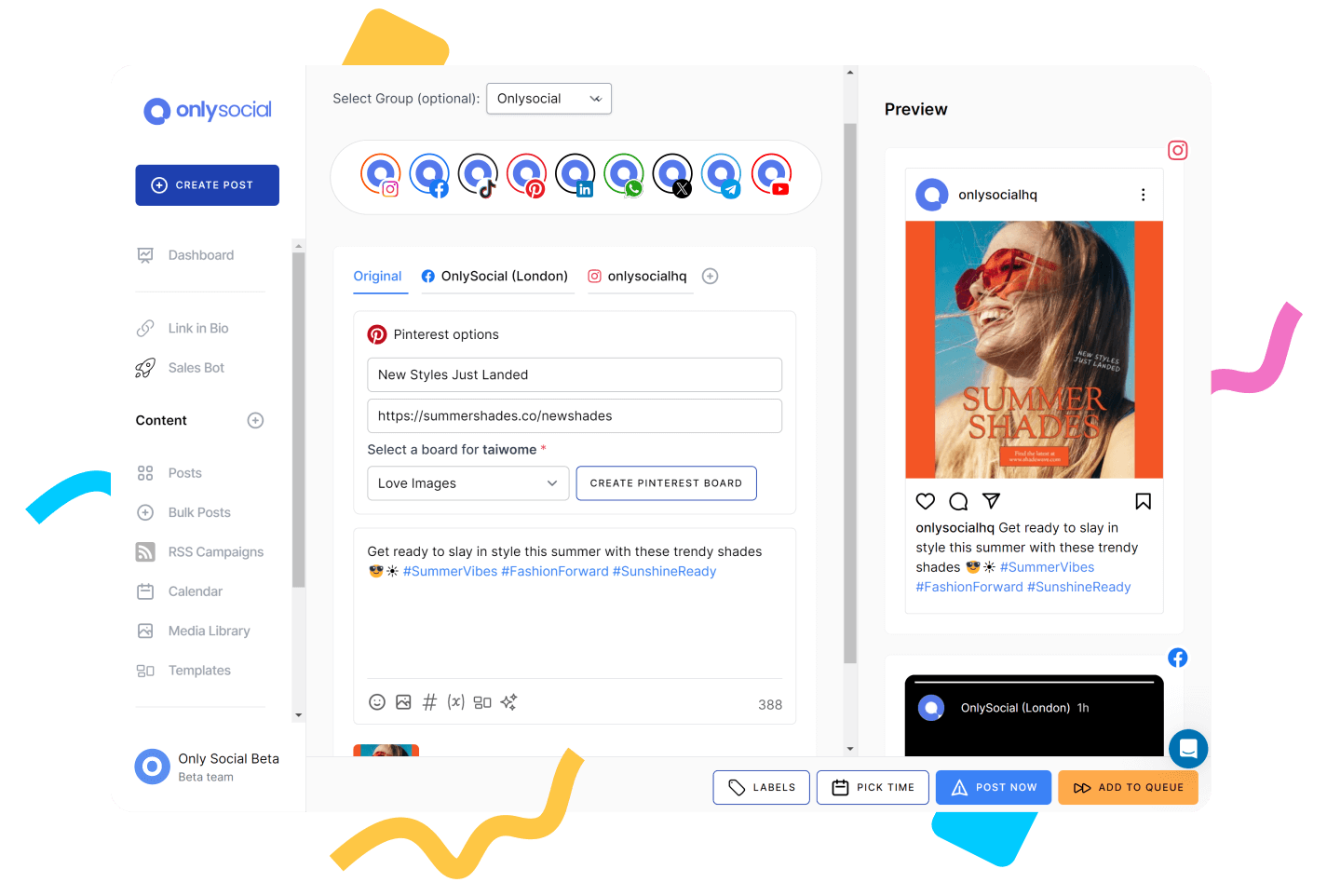
Intuitive post composer with AI
Creating posts in OnlySocial is effortless. You can draft, preview, and customize content for multiple platforms in one place. The built-in AI assistant is a big plus. It generates captions, suggests hashtags, and even provides visuals. Unlike Cloud Campaign, which leans on manual input, this feature saves serious time and keeps your content fresh.
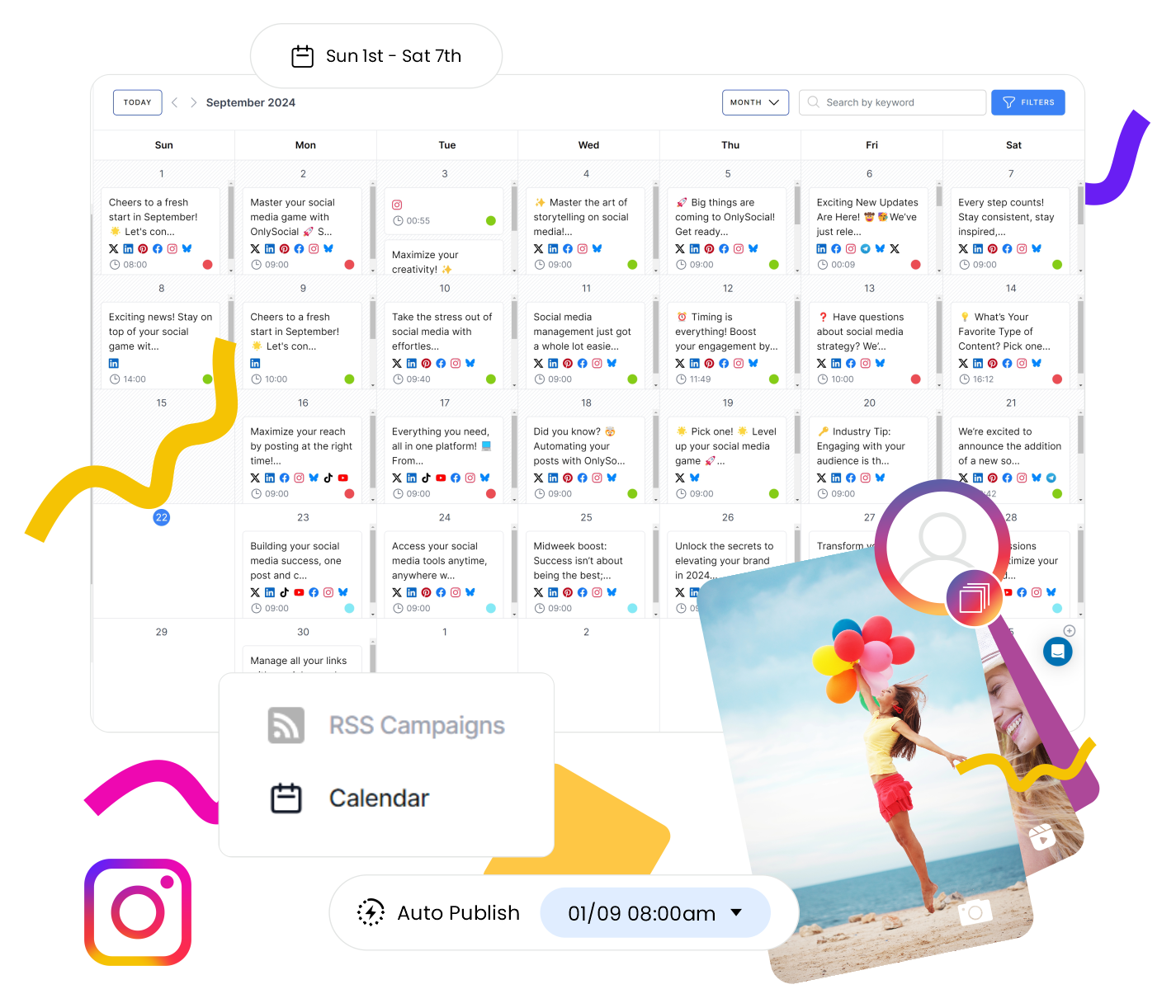
Visual content calendar
OnlySocial’s calendar gives you a clear view of all your scheduled posts. You can drag and drop posts to reschedule, bulk upload campaigns with a CSV file, and even color-code by theme or channel. Cloud Campaign’s calendar can feel tricky to adjust. This one is much more flexible.
Cross-platform scheduling for 15+ networks
From Instagram and TikTok to LinkedIn, Pinterest, YouTube, Threads, and Bluesky, OnlySocial covers more platforms than Cloud Campaign. Each is handled natively, so you don’t need workarounds to post consistently across all your accounts.
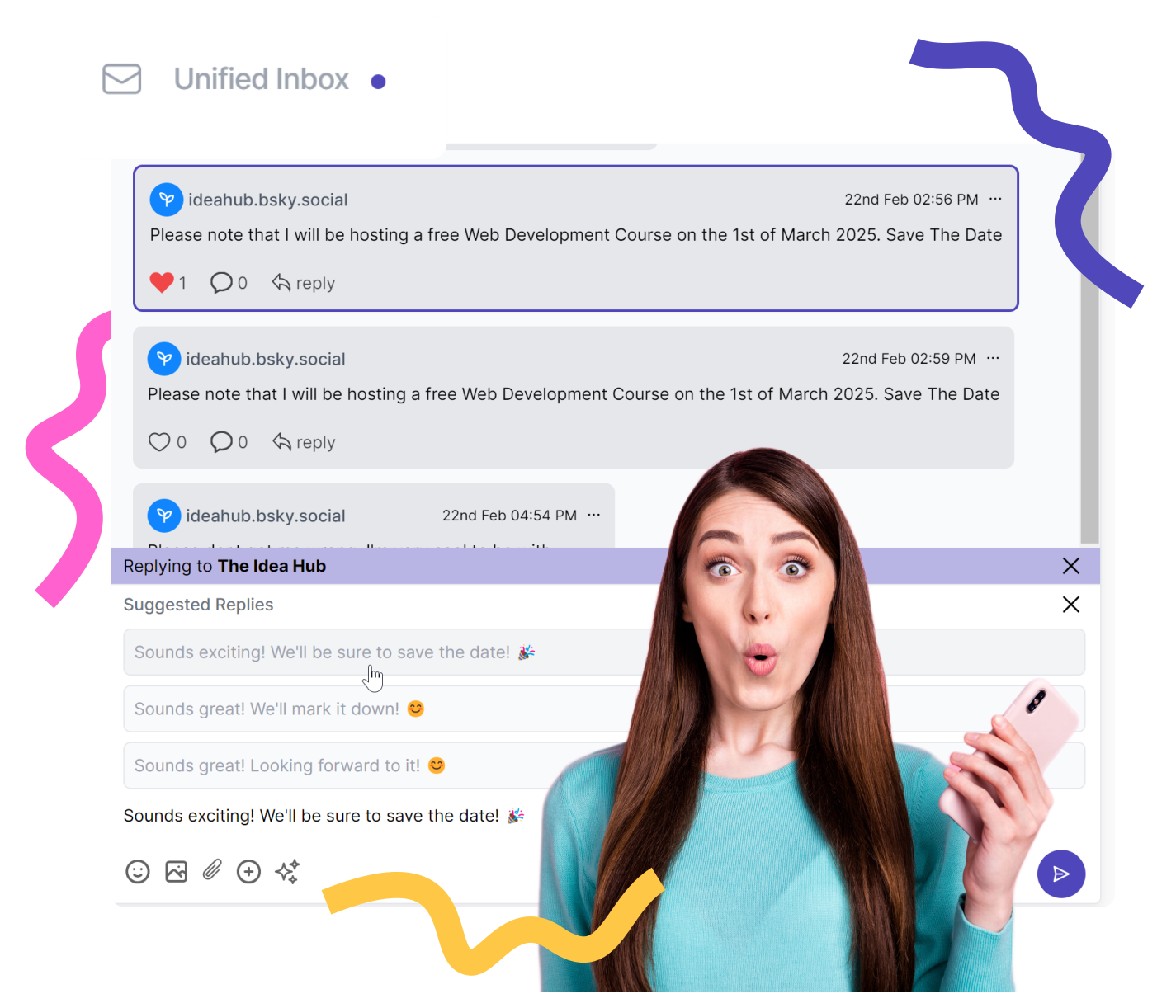
Managing conversations is simple with the unified inbox. Instead of jumping between apps, you can see Instagram DMs, Facebook messages, comments, and mentions all in one feed. Cloud Campaign lacks this level of convenience, which makes OnlySocial stand out.
Smart analytics
Reports in OnlySocial are clear and actionable. You can track performance by platform, post type, engagement levels, and even identify your best posting times. Cloud Campaign has been criticized for inconsistent metrics, while OnlySocial offers data you can actually rely on.
Team collaboration
If you’re working with a team, you can assign roles, set up approval workflows, and store brand assets in a shared library. This makes collaboration seamless, without endless back-and-forth emails or confusion.
Integrations
OnlySocial integrates with tools like Adobe Express, Bit.ly, and OpenAI, so you can design visuals, shorten links, and generate captions without leaving the dashboard. It’s small touches like these that keep workflows smooth.
Pros
- Clean, modern interface that’s easy to use
- AI assistant for captions, hashtags, and visuals
- More platform support than Cloud Campaign
- Unified inbox to manage all conversations in one place
- White Label features for agencies (custom dashboards and branded reports)
- Affordable pricing compared to Cloud Campaign
- Reliable publishing with no glitches or delays
Cons
- No direct posting to Instagram Stories
- Doesn’t include competitor analysis
- No forever free plan
Pricing & Value
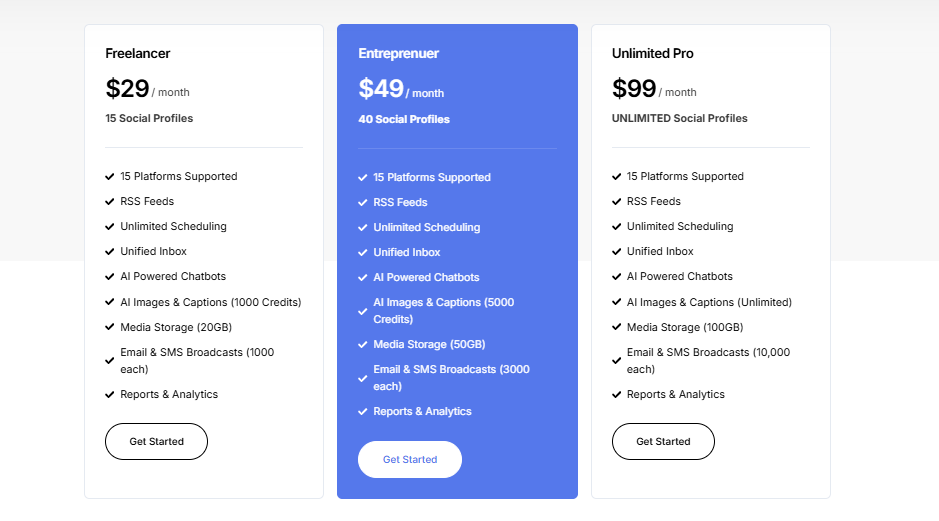
OnlySocial is far more affordable than Cloud Campaign, especially as you scale. Here is how it’s priing breaks down:
- Freelancer Plan – $29/month for up to 15 social accounts
- Entrepreneur Plan – $49/month for 45 accounts and 3 users
- Professional Plan – $99/month for unlimited social accounts and 10 users
Each plan includes AI tools, bulk scheduling, analytics, and team collaboration features. Cloud Campaign, by contrast, charges more while offering fewer native integrations and a less user-friendly workflow.
Overall Verdict
OnlySocial is one of the best alternatives to Cloud Campaign if you want a tool that’s affordable, easy to use, and packed with features.
It delivers on everything Cloud Campaign promises, without the clunky calendar, unreliable reporting, or higher costs. For agencies and small businesses alike, it’s a reliable platform that grows with your needs.
2. SocialPilot ($30/Month)
Key Features:
- Bulk Scheduling
- Direct Publishing to All Social Networks
- Unified Social Inbox
- Client Collaboration
- Intuitive Social Media Calendar
- White Label Dashboard
- AI Assistant
- RSS Feeds
- Social Media Analytics and Reporting
Pros
- Affordable compared to most social media scheduling tools
- White-label reports and dashboards for agencies
- Bulk scheduling of up to 500 posts at once
- Reliable publishing with no delays
- Clean, beginner-friendly interface
Cons
- No social media ad management feature
- Can’t post to more than one Twitter account at the same time
- Post preview available, but no grid-style feed display
Our Experience
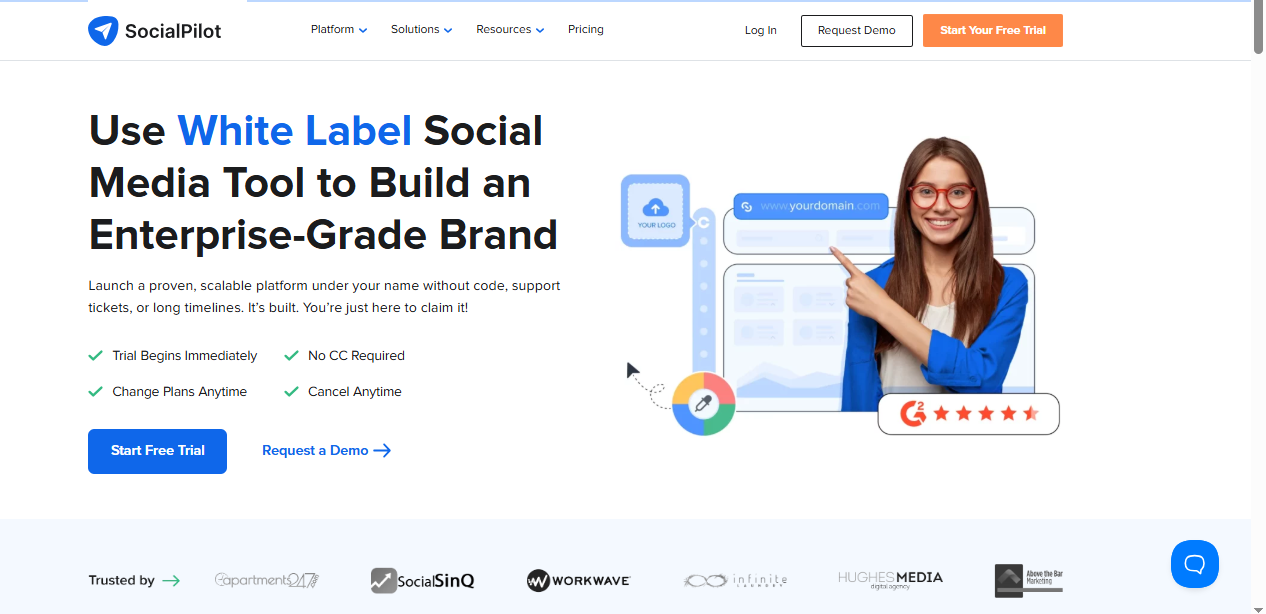
When we tested SocialPilot against Cloud Campaign, it immediately felt smoother and more straightforward. It supports all major platforms, including Facebook, Instagram, TikTok, LinkedIn, Pinterest, Twitter, and even Google My Business, making it versatile for brands and agencies alike.
What really stood out was the bulk scheduling feature, which lets you schedule up to 500 posts in one go. That’s a lifesaver for busy agencies managing multiple accounts.
The white-label functionality is another highlight, giving agencies the option to send branded reports and dashboards to clients. Compared to Cloud Campaign’s clunky interface, SocialPilot’s design is far cleaner and easier to get used to.
Pricing & Value
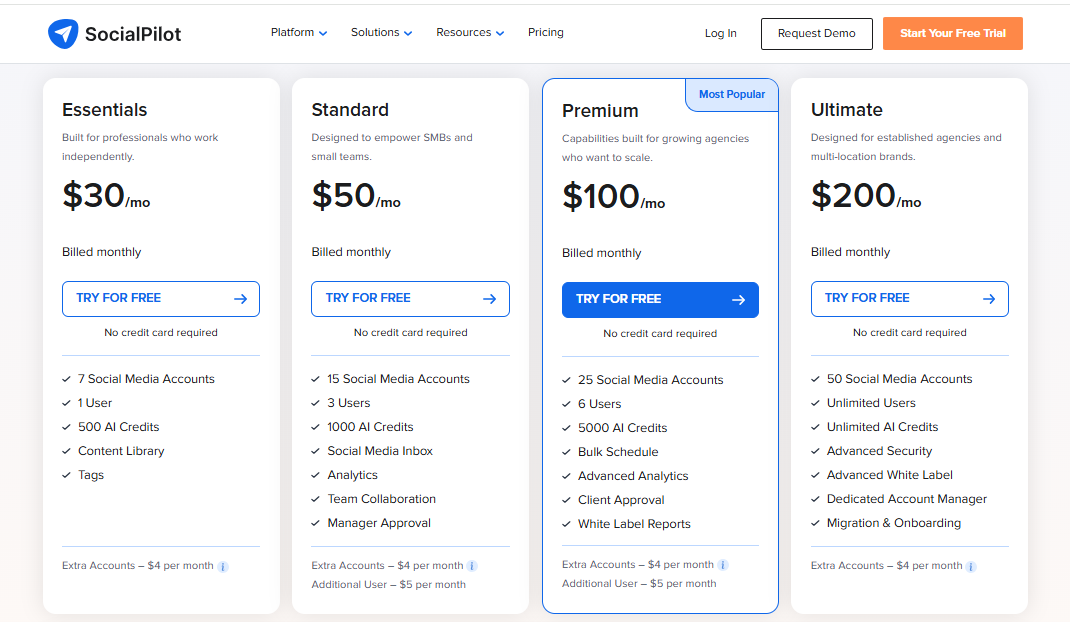
SocialPilot offers a 14-day free trial with access to all premium features and no credit card required. Its pricing plans are flexible, starting from $30/month, and grows with your business while remaining more affordable than Cloud Campaign’s.
Overall Verdict
SocialPilot is a worthy Cloud Campaign alternative, especially for agencies and small businesses. With its budget-friendly plans, strong scheduling capabilities, and white-label features, it provides more value while keeping the user experience clean and simple.
3. Loomly ($64/Month)

Key Features:
- Unlimited Scheduling
- Post Planning and Scheduling
- Approval and Feedback Workflow
- Social Analytics and Insights
- Media + Content Library
- All-in-one Content Calendar
Pros
- Clean and easy-to-use dashboard
- Strong approval workflows for team collaboration
- AI-powered post ideas to spark creativity
- Centralized content calendar for organized planning
- Responsive customer support
Cons
- Pricing is higher compared to some alternatives
- No direct publishing to Instagram Stories
- Extra costs to share calendars with clients or teams
- Occasional glitches with account or calendar disconnects
Our Experience
Compared to Cloud Campaign, Loomly feels much smoother and more team-friendly. Its all-in-one content calendar makes it simple to plan and visualize posts across different platforms, while the approval workflow keeps teams aligned without endless email chains.
We also found the AI-powered idea generator handy for sparking content inspiration – something Cloud Campaign doesn’t offer.
The platform also includes a content library for storing brand assets and clear reporting to measure performance. While Cloud Campaign struggles with clunky scheduling and unreliable metrics, Loomly makes the workflow cleaner and easier to manage.
Pricing & Value
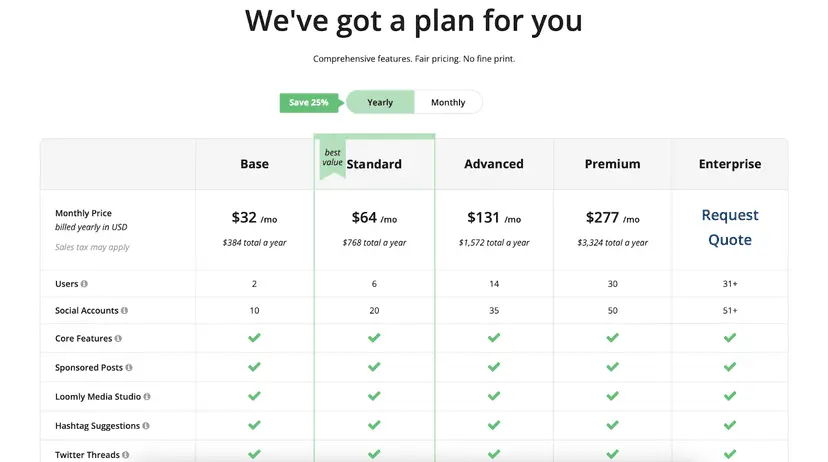
Loomly’s pricing starts at $64/month for 12 social profiles. It’s not the cheapest option, but for teams or agencies that need structured collaboration, the value is there.
Overall Verdict
Loomly is a strong Cloud Campaign alternative for teams that prioritize collaboration and organization. With its clean interface, approval workflows, and creative support tools, it’s a reliable choice – though the higher cost may put it out of reach for freelancers or very small businesses.
4. Metricool ($22/Month)
Key Features:
- Data-Driven Analytics and Reports
- In-depth Competitor Analysis
- Looker Studio
- Unified Planner and Calendar
- Streamlined Approval Workflow
- AI Assistant
- Centralized Social Inbox
Pros
- Simple, intuitive interface with everything visible at a glance
- Easy scheduling for multiple accounts in one place
- Strong data-driven analytics and real-time performance tracking
Cons
- Customer support via chat can be slow to respond
- Content review and notifications aren’t as reliable as they should be
Our Experience
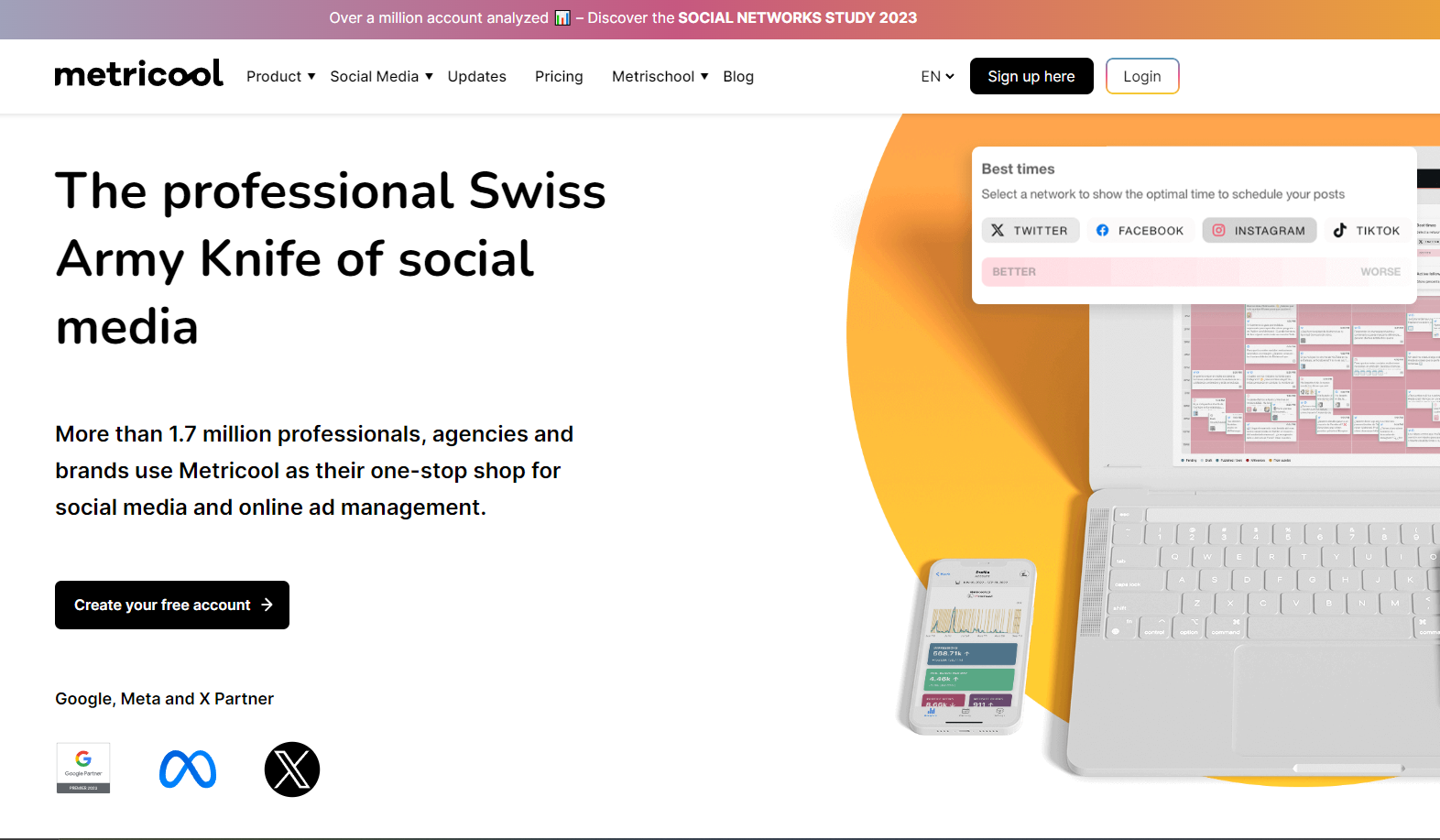
Using Metricool felt straightforward from the start. Compared to Cloud Campaign’s clunky interface, Metricool makes it easy to manage multiple accounts across platforms like Facebook, Instagram, LinkedIn, and Twitter. Scheduling posts was smooth – you just set the content, pick the time, and the tool takes care of the rest.
Where Metricool really shines is in analytics. The platform gives clear, real-time data on post performance and audience engagement, making it easy to understand what’s working. The unified content calendar also helped us plan ahead without losing track of campaigns.
Add in features like competitor analysis, SmartLinks tracking, and an AI assistant, and it feels like a much more data-focused alternative to Cloud Campaign.
Pricing & Value
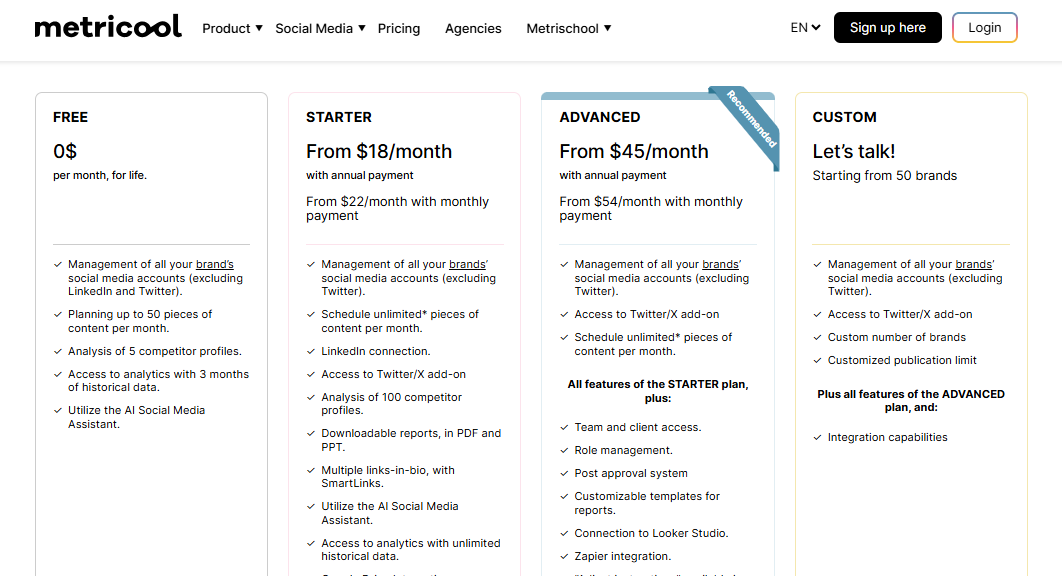
Metricool has an appealing pricing model: a forever free plan with basic features, and a paid plan at just $22/month. This makes it far more affordable than Cloud Campaign, especially for freelancers and small businesses who need core features without the higher cost.
Overall Verdict
Metricool is a solid Cloud Campaign alternative for those who value ease of use and strong analytics. While it doesn’t have the most advanced collaboration or review system, its affordability and real-time reporting make it a great pick for small teams and data-driven marketers.
5. Sprout Social ($199/Month)
Key Features:
- Advanced Social Media Scheduling Tool
- Social Media Monitoring
- Custom URL Tracking
- Unified Social Inbox
- Influencer Collaboration Features
- Social Listening Tools
- Customizable Reporting
- Robust Analytics Dashboard
Pros
- Combines scheduling, publishing, analytics, and listening in one platform
- Detailed, customizable reports ideal for agencies and larger teams
- Social listening tools give deeper insight into brand reputation
- Strong collaboration features with approval workflows
Cons
- Very expensive compared to Cloud Campaign and most alternatives
- Video scheduling can sometimes be glitchy
- No TikTok integration yet
Our Experience
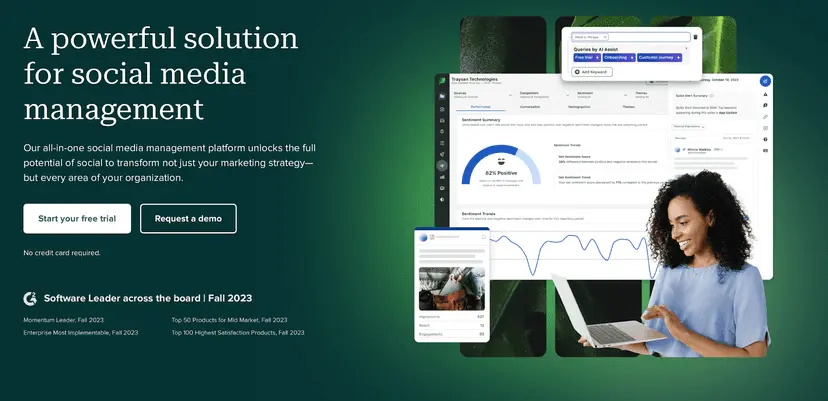
Sprout Social feels like a premium tool the moment you start using it. Compared to Cloud Campaign, Sprout offers a polished and professional experience. Its advanced analytics and reporting were a highlight – reports are detailed, highly customizable, and easy to share with clients.
We also liked its social listening capabilities, which help track conversations and sentiment around your brand. For teams, the workflow and approval system makes collaboration much smoother than Cloud Campaign’s setup. It’s clear Sprout Social was built for larger teams and agencies that need power and precision.
Pricing & Value
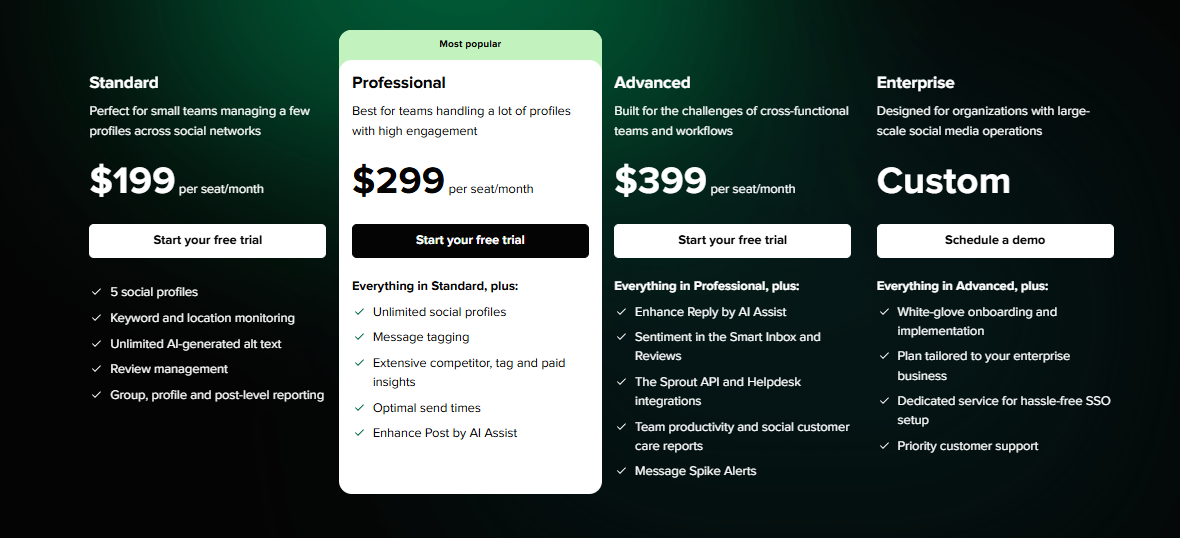
Sprout Social starts at $199/month for 5 social profiles, making it one of the most expensive tools on this list. While that puts it out of reach for freelancers or small businesses, agencies and enterprises may find the advanced reporting and collaboration features worth the investment.
Overall Verdict
Sprout Social is a top-tier Cloud Campaign alternative for brands and agencies managing at scale. While its price tag is steep, it offers the advanced scheduling, analytics, and collaboration features Cloud Campaign lacks.
6. SocialBee ($29/Month)
Key Features:
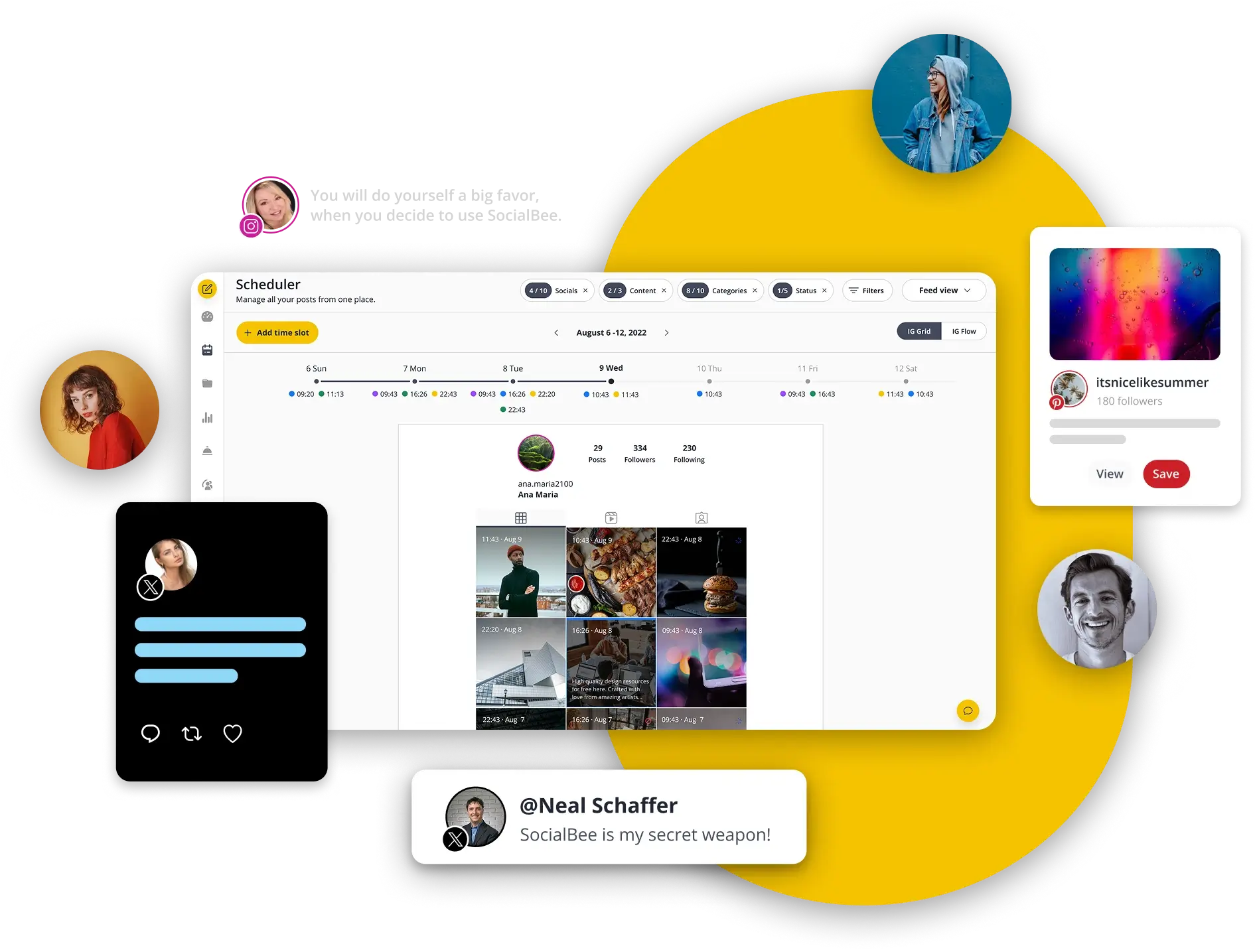
- Advanced Social Media Scheduling Tool
- Social Media Monitoring
- Social Listening Tools
- Custom URL Tracking
- Robust Analytics Dashboard
- Unified Social Inbox
- Influencer Collaboration Features
- Customizable Reporting
- Employee Advocacy
- Team Collaboration and Workflow Approval
Pros
- Excellent for evergreen content scheduling and recycling posts
- Category-based scheduling keeps content balanced
- Affordable pricing plans
- Automation tools save time for small teams and solopreneurs
Cons
- Interface looks a bit dated compared to modern competitors
- Analytics aren’t as advanced as tools like Sprout Social
- Learning curve for some of its automation features
Our Experience
SocialBee stands out for its category-based scheduling, which Cloud Campaign lacks. You can divide posts into categories, such as promotions, blogs, or quotes, and the tool rotates them automatically. This helps keep your feeds active and balanced without constant manual input.
We also found SocialBee’s evergreen content recycling handy, as it saves time by reusing posts strategically. Compared to Cloud Campaign’s clunky scheduling, SocialBee felt lighter, quicker, and better suited for solopreneurs or smaller teams.
Pricing & Value
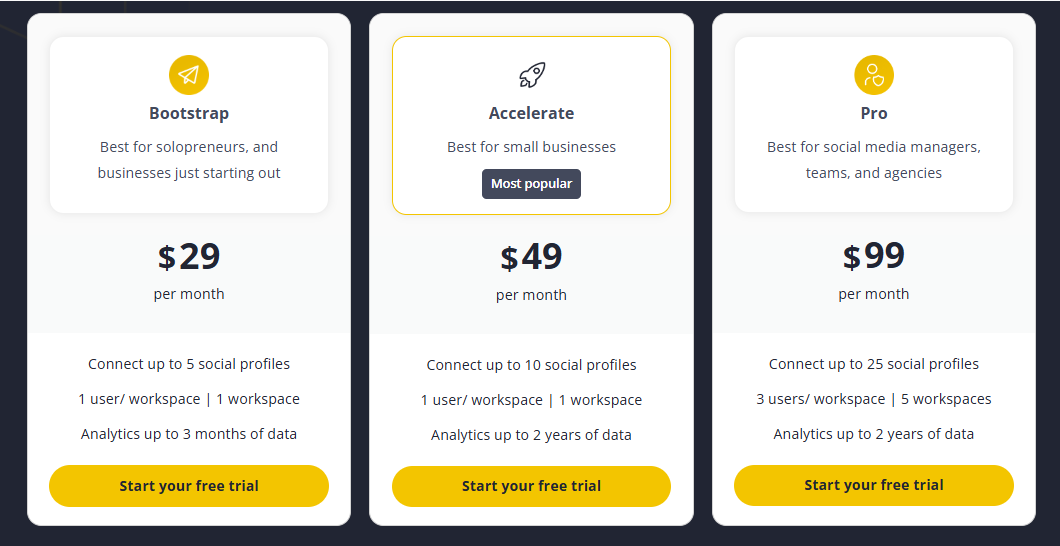
SocialBee starts at around $29/month, which is half the cost of Cloud Campaign’s starter tier. For what it offers – automation, evergreen scheduling, and category organization – It’s excellent value for small businesses.
Overall Verdict
SocialBee is a great Cloud Campaign alternative for those who want automation and consistency without overspending. It’s not packed with advanced analytics, but for keeping content flowing, it’s one of the most efficient and affordable options out there.
7. Sendible ($29/Month)
 Key Features:
 Key Features:
- White Label Dashboard
- Analytics and Reporting
- Smart Compose Box
- Simplified Content Scheduling
- Smooth Workflows and Approval Process
- Ad Performance Insights
- Priority Inbox
- Team and Client Collaboration
- Shareable Social Media Calendar
Pros
- Built with agencies in mind, offering strong client management features
- Clean interface and easy-to-use content calendar
- Smart content recommendations to help with curation
- Customizable, presentation-ready reports for clients
- Integrations with Canva, Dropbox, and Google Drive for smoother workflows
Cons
- Pricing is higher than some alternatives
- Advanced features locked to higher-tier plans
- Can slow down a bit when handling a very large number of accounts
Our Experience
When we compared Sendible with Cloud Campaign, the agency focus was clear. The content calendar is simple yet powerful, making campaign planning a lot smoother. We also liked the smart content recommendations, which pull in trending articles and ideas that make content curation easier – something Cloud Campaign doesn’t handle well.
For agencies, the biggest win is the customizable reports. They’re polished, client-ready, and can be automated, which saves time compared to Cloud Campaign’s less reliable reporting. Add in integrations with tools like Canva and Dropbox, and the workflow feels much more complete.
Pricing & Value
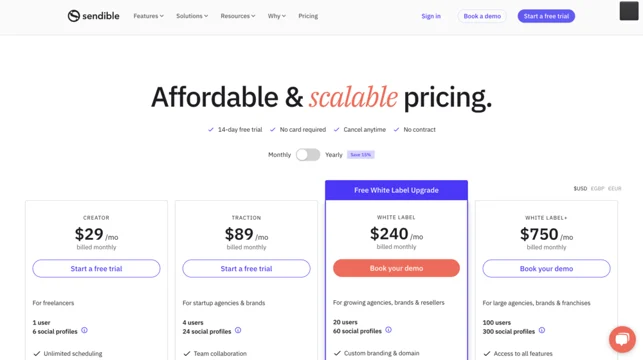
Sendible’s pricing starts at around $29/month for individuals, with higher tiers aimed at agencies needing more profiles and users. It’s not the cheapest option, but the client-focused features make it worth considering if you’re running multiple accounts.
Overall Verdict
Sendible is a stronger Cloud Campaign alternative for agencies and marketers managing several clients. With its polished reporting, smooth scheduling, and helpful integrations, it delivers a professional experience that’s better suited for client work than Cloud Campaign.
8. eClincher ($149/Month)
Key Features
- AI and Automation
- Community Engagement
- Multi-platform Scheduling and Management
- AI-Powered Social Listening
- Tailored Analytics and Reporting
- Content Discovery and Curation
Pros
- Advanced scheduling options, including queues and auto-posting
- Unified social inbox for managing all comments and messages
- Built-in media library with stock image integrations
- Supports publishing across multiple social platforms
- Reliable all-in-one tool trusted by many businesses
Cons
- Pricing is higher than Cloud Campaign’s starter plan
- Interface feels clunky and less beginner-friendly
- Analytics lack the clarity and visual polish of some competitors
- Customer support can be slow at times
Our Experience
eClincher is one of the more established social media management tools, and it brings a robust feature set to the table. Compared to Cloud Campaign, eClincher offers more advanced scheduling options, like auto-posting queues and bulk scheduling, which help streamline campaign planning.
We also found the unified inbox useful. It gathers all social interactions in one place, cutting down the need to jump between platforms.
The media library with direct stock image access is another feature we appreciated, especially for quick post creation. While the interface isn’t the slickest, the tool does cover all the essentials and more.
Pricing & Value
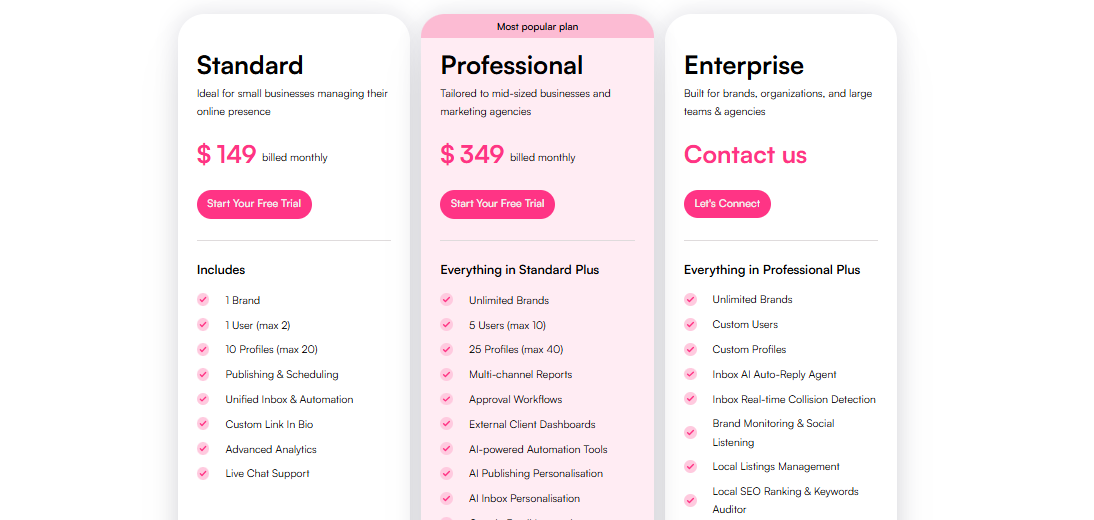
eClincher starts at $149/month, which is way higher than Cloud Campaign’s $59 starter plan. While not the cheapest, it offers better scheduling options and inbox management, making it a solid step up in functionality.
Overall Verdict
eClincher is a reliable Cloud Campaign alternative for businesses that need strong scheduling and community management features. It’s pricier and less beginner-friendly, but for teams that want robust, all-in-one management, it’s a worthy option.
9. Sprinklr ($249/Month)
Key Features
- AI and Automation
- Community Engagement
- Multi-platform Scheduling and Management
- AI-Powered Social Listening
- Tailored Analytics and Reporting
- Content Discovery and Curation
Pros
- Enterprise-level platform with advanced social media management tools
- Strong social listening and sentiment analysis features
- Handles publishing, engagement, ads, and analytics in one platform
- Highly customizable dashboards and reporting
- Scales easily for global teams and large organizations
Cons
- It’s way too expensive
- Overwhelming for small businesses due to its complexity and pricing
- Steep learning curve for new users
Our Experience
Sprinklr is in a completely different league compared to Cloud Campaign. While Cloud Campaign is built with smaller teams in mind, Sprinklr is an enterprise-grade platform designed for global brands and large agencies.
It goes far beyond scheduling, covering publishing, engagement, ads management, social listening, and even customer experience tools all in one system.
We found its social listening and sentiment analysis especially impressive, helping brands understand not just what people are saying, but how they feel. The custom dashboards and detailed reporting also make it easy for large teams to track KPIs across multiple markets. That said, the platform is complex and not something smaller businesses would need.
Pricing & Value
Sprinklr doesn’t have public pricing, as it’s tailored for enterprise clients. However, it’s significantly more expensive than Cloud Campaign and is best suited for large brands with the budget and need for advanced, global-scale tools.
Overall Verdict
Sprinklr is a powerful Cloud Campaign alternative, but only if you’re an enterprise-level organization. For small to mid-sized businesses, it’s overkill. For large brands needing advanced social listening, custom reporting, and global scalability, it’s one of the most comprehensive tools available.
10. Buffer ($120/Month for 12 accounts)
Key Features
- AI and Automation
- Community Engagement
- Multi-platform Scheduling and Management
- AI-Powered Social Listening
- Tailored Analytics and Reporting
- Content Discovery and Curation
Pros
- Simple, clean interface that’s easy for beginners
- Flexible scheduling with queues and bulk uploads
- Built-in AI for captions and content ideas
- Supports all major platforms with wide coverage
- Helpful customer support and strong learning resources
Cons
- No built-in hashtag suggestions
- Occasional account reconnect issues
- Doesn’t recommend best posting times automatically
Our Experience
Buffer feels refreshingly straightforward compared to Cloud Campaign’s clunky setup. Scheduling is smooth – you can queue posts, bulk upload, and easily shuffle content around the visual calendar. Its AI assistant is also handy, helping brainstorm captions and keep your brand voice consistent across platforms, something Cloud Campaign lacks.
We liked how Buffer manages engagement, letting you reply to comments and messages without switching apps. The analytics are another strong point, giving clear insights into what’s working and what needs adjusting.
Overall, it’s a much simpler, more user-friendly experience than Cloud Campaign, especially for small teams or solopreneurs.
Pricing & Value
Buffer’s pricing starts at around $120/month for 10 accounts, which is higher than Cloud Campaign’s starter plan. But given its smooth scheduling, AI tools, and cleaner interface, it delivers better value for teams who want reliability without the bloat.
Overall Verdict
Buffer is a strong Cloud Campaign alternative for anyone who values simplicity and usability. While it doesn’t have the most advanced features, it nails the essentials, making it a great choice for small businesses and growing brands.
How to Choose the Best Cloud Campaign Alternative
With so many tools on the market, the trick isn’t just finding a Cloud Campaign alternative, but finding one that fits your workflow. Here are some key things to look out for:
Multi-channel management
A good alternative should let you handle all your major social platforms, including Instagram, Facebook, LinkedIn, TikTok, YouTube, and more, from one dashboard. The broader the support, the easier it is to stay consistent across channels.
Ease of use
If a tool feels clunky, it’ll slow you down. Look for platforms with clean dashboards, intuitive calendars, and drag-and-drop functionality. The less time you spend figuring out the software, the more time you can focus on content and strategy.
Automation features
Smart tools do the heavy lifting for you. Features like bulk scheduling, recurring posts, queues, and AI assistants can save hours every week. Automation will also help you maintain a steady presence without constant manual work.
Advanced analytics
Vanity metrics don’t cut it anymore. The right tool should give you deeper insights into engagement, reach, and ROI. Bonus points if reports are exportable, customizable, and easy to share with clients or stakeholders.
Collaboration and team management
If you’re part of a team or managing accounts for clients, look for role-based permissions, approval workflows, and internal comments. These keep everyone aligned and reduce back-and-forth communication.
Custom branding and white labeling
For agencies, white-label reports and branded dashboards make a big difference. They let you present insights professionally under your own brand, which builds trust with clients.
The best Cloud Campaign alternative will balance these factors in a way that works for your business size and goals. Test a few with free trials, and choose the one that makes your workflow smoother, not more complicated.
Final Note
Cloud Campaign has its strengths, but it’s far from perfect. From tricky scheduling and unreliable reporting to its higher pricing, many brands and agencies eventually feel the need to explore other options.
The good news is there’s no shortage of alternatives.
Tools like OnlySocial and SocialPilot shine for affordability and ease of use, while platforms like Sprout Social and Sprinklr go all-in on advanced features for bigger teams. So, whether you’re a freelancer, a small business, or a full-scale agency, there’s a tool in this list that can match your workflow and budget.
At the end of the day, the best alternative is the one that saves you time, keeps your content consistent, and makes managing social media less of a headache. Try a couple of free trials, see how they fit, and invest in the one that helps your brand or agency grow with confidence.
FAQs
Is Cloud Campaign really free?
No, Cloud Campaign isn’t a free tool. While they may offer trials or demos, their full feature set comes with a paid subscription.
Who are the typical users of Cloud Campaign?
Cloud Campaign is mostly used by marketing agencies and social media managers who need to schedule posts and manage multiple client accounts. However, many small businesses also try it before moving to alternatives that offer better value.
How many social platforms does Cloud Campaign support?
Cloud Campaign supports 7 platforms: Facebook, Instagram, LinkedIn, Twitter (X), TikTok, Pinterest, and YouTube. Some alternatives cover even more, including emerging platforms like Threads and Bluesky.
Which is better: OnlySocial or Sprout Social?
It depends on your needs. OnlySocial is more affordable and user-friendly, making it a great choice for small businesses and agencies that want AI tools, bulk scheduling, and white-label reporting.
Sprout Social, on the other hand, is an enterprise-level solution with advanced analytics and social listening, but it comes with a much higher price tag.