Bluesky Content Guidelines 2026: Rules, Limits and Media Sizes for Brands

Bluesky has grown from a curious invite-only experiment into a network of more than 40 million people, with especially active communities of journalists, scientists, artists, developers, finance commentators and sports fans. For brands, it is an attractive place: engagement is often more genuine than on older networks, the feed is chronological by default, and users can choose the algorithms that shape what they see. That makes the Bluesky content guidelines, and the culture behind them, especially important to get right.
It is also a place with strong opinions about how brands should behave, which is why the Bluesky content guidelines deserve a careful read before you post. Bluesky rewrote its Community Guidelines in 2025, and its users are quick to block or mute accounts that feel spammy, automated or deceptive. Understanding the Bluesky content guidelines, both the written rules and the technical limits, is the difference between building a following and being ignored. This guide covers both, with the practical habits I recommend to clients starting out on the platform.
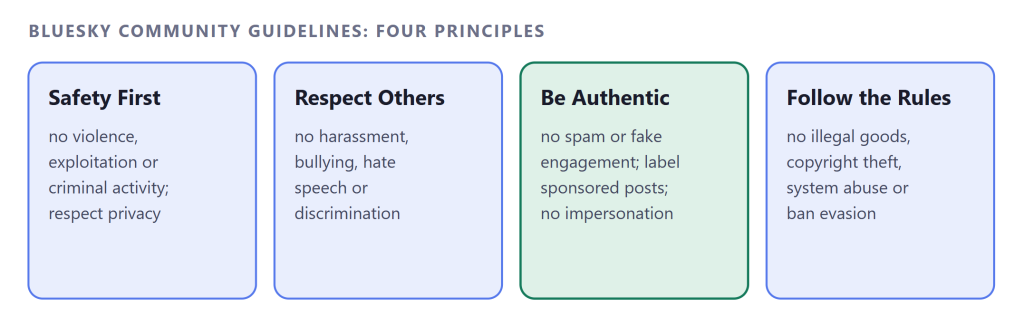
Bluesky’s Community Guidelines (last updated 19 September 2025) rest on four principles: Safety First, Respect Others, Be Authentic, and Follow the Rules. For brands, the key rules are: no spam or artificial engagement, clearly identify sponsored or commercial content, label adult or graphic material, respect copyright, and do not share or sell accounts. Technically, posts allow 300 characters, up to 4 images (each about 1 MB after compression) or one video, and alt text on every image.
What the Bluesky Community Guidelines Say
Bluesky’s Community Guidelines set baseline rules for the Bluesky app, enforced by human moderators working alongside automated systems. The current version, last updated on 19 September 2025, came out of a six-month review with community feedback and took effect in October 2025. It is organised under four principles:
- Safety First: no content that shows or promotes violence, harm, exploitation or criminal activity, and no sharing of other people’s private information.
- Respect Others: no harassment, bullying, hate speech or discrimination, including targeting people for protected characteristics.
- Be Authentic: no content intended to misrepresent, defraud, trick, deceive or mislead.
- Follow the Rules: no content or behaviour that breaks the law, platform policies or Bluesky’s systems, or evades enforcement.
Bluesky describes its approach as “composable moderation”. On top of its own baseline rules, people can subscribe to independent labelling services and choose to hide, warn about or show different kinds of content. That means two people can see the same post very differently depending on their settings, which is worth remembering when you plan sensitive or edgy content.
The guidelines apply to the Bluesky app. Other apps built on the same AT Protocol can set their own rules, although content you post is visible across the network.
The Bluesky Content Guidelines That Matter Most for Brands
Most brands will never come near the safety rules, but the authenticity and intellectual property rules apply to everyday marketing. These are the points from the guidelines worth sharing with everyone who posts for you.
- No spam. The guidelines prohibit sending spam or “repeatedly” posting content in ways that disrupt normal conversations. Posting the same promotional message over and over, or dropping links into unrelated replies, crosses that line.
- No artificial engagement. You may not manipulate features or social signals, such as likes, reposts, follower counts or engagement metrics, to gain unearned reach. Buying followers, engagement pods and follow-for-follow schemes are out.
- Disclose commercial content. Sponsored material, advertising and other commercial content must clearly identify its commercial nature. If you pay a creator to post about you, or you post as part of a paid partnership, say so in the post.
- Be who you say you are. Impersonating people, brands or official groups is banned. Parody and fan accounts are allowed only when clearly labelled in both display name and bio.
- Do not share or sell accounts. The guidelines list selling, transferring or sharing accounts as abuse of Bluesky’s trust and safety systems. Teams should use a tool that connects the account properly rather than passing around a password.
- Respect copyright. No stealing content, removing attribution or watermarks, or impersonating brands. Repost with credit, and only use images and music you have rights to.
- Regulated goods. You cannot unlawfully sell or advertise controlled substances, weapons, counterfeit goods and other restricted items.
Bluesky has no self-serve advertising platform at the time of writing, so brand presence here is organic: your own posts, replies, partnerships with creators and community participation.
Content Labels and Sensitive Media
Bluesky handles sensitive content mainly through labels rather than removal, and you are expected to label your own posts where needed. Under the guidelines, consensual adult content is allowed when it is appropriately labelled and subject to age restrictions. Graphic media should be labelled too.
Labels come from three places: the author (self-labels), Bluesky’s own moderation systems, and independent labelling services people subscribe to. Each person then decides whether labelled content is hidden, shown behind a warning or shown normally. Bluesky’s 2025 transparency report says self-labelling does not lead to removal or downranking; it simply respects users’ choices.
For most brands this rarely comes up, but it matters for some industries: art, photography, health, news, gaming and anything with medical or violent imagery. When in doubt, label. A warning screen costs a little reach with some users; an unlabelled graphic image can cost you followers and trigger reports.
Self-labels available when posting include adult content, sexual content, nudity and graphic media. You can apply them in the Bluesky app, and OnlySocial includes a content moderation label option in its Bluesky settings so scheduled posts carry the right label too.
How Bluesky Enforces Its Content Guidelines
Bluesky’s moderation combines automated systems, human moderators and user reports, with proportional enforcement rather than instant bans for most issues. Understanding the process helps you react calmly if one of your posts is labelled or removed.
- Reports: anyone can report a post or account from the app, choosing a reason such as spam, harassment or unlabelled adult content. Bluesky added more specific reporting options in late 2025.
- Labels first: for content that is allowed but sensitive, the usual outcome is a label, which lets each user decide whether to see it.
- Proportional actions: the guidelines describe enforcement that prioritises safety while preserving legitimate expression, ranging from labels and reduced visibility to removal and suspension for serious or repeated violations.
- Appeals: if you think a decision is wrong, the Terms of Service describe an appeals process.
- Moderation inbox: since October 2026, a moderation inbox in the app (in beta) collects notices about moderation decisions on your account in one place.
For brand accounts, the practical advice is simple: check the moderation inbox and notifications regularly, appeal politely with context if a label is wrong, and fix the underlying issue, for example adding a missing self-label, rather than reposting the same content.
Bluesky Community Guidelines and Formats Compared With X and Threads
Bluesky looks similar to X and Threads, but its rules and formats differ in ways that change how you write.
| Bluesky | X | Threads | |
|---|---|---|---|
| Text per post | 300 characters | 280 (much longer with Premium) | 500 characters |
| Images per post | Up to 4 | Up to 4 | Up to 20 in a carousel |
| Default feed | Following, plus custom feeds you choose | Algorithmic For You | Algorithmic For You |
| Sensitive content | Self-labels and user-chosen labellers | Sensitive media settings | Meta’s community guidelines |
| Advertising | No self-serve ads at the time of writing | Self-serve ads | Meta ads |
The biggest practical difference is the feed. Because many Bluesky users rely on the chronological Following feed and community-built custom feeds, consistency and timing matter more, and gaming an algorithm matters less. Posts reach people who chose to follow you or who subscribe to a feed that matches your topic, so clear topics, hashtags and hidden tags pay off.
A Simple Bluesky Content Plan for Brands
Bluesky rewards a steady rhythm of useful posts and genuine replies, not volume. Here is a weekly plan that fits within the Bluesky content guidelines and the platform’s culture.
| Day | Post | Format |
|---|---|---|
| Monday | A practical tip from your field | Text, under 300 characters |
| Tuesday | Behind the scenes | Up to 4 images with alt text |
| Wednesday | A short explainer | A thread of 3 to 5 posts |
| Thursday | A question to your followers | Text post, then reply to every answer |
| Friday | A short video or a link to your best article, summarised | One video, or a link card with context |
| Every day | Replies and reposts with credit | Fifteen minutes of conversation |
Schedule the planned posts at the start of the week, spread them across the times your followers are active, and keep the daily replies for live moments. That balance, planned value plus real conversation, is what makes brand accounts feel at home on Bluesky.
Bluesky Character Limit and Post Format
A Bluesky post can contain up to 300 characters of text, plus media or a link card. The limit is counted in graphemes, the characters you see on screen, so an emoji counts as one even if it is technically several code points. Bluesky famously teased a new character limit on 1 April 2025; it was an April Fools’ joke, and 300 remains the limit.
- Text: up to 300 characters per post. For longer ideas, write a thread of replies to your own post.
- Media: up to 4 images, or one video, or one GIF per post.
- Links: a link in a post shows as a card with a preview image and title. Links do not count against the media limit, but a post with images will not also show a link card.
- Mentions and hashtags: both are clickable. Hashtags are searchable, and Bluesky also supports hidden tags that improve discoverability without cluttering the text.
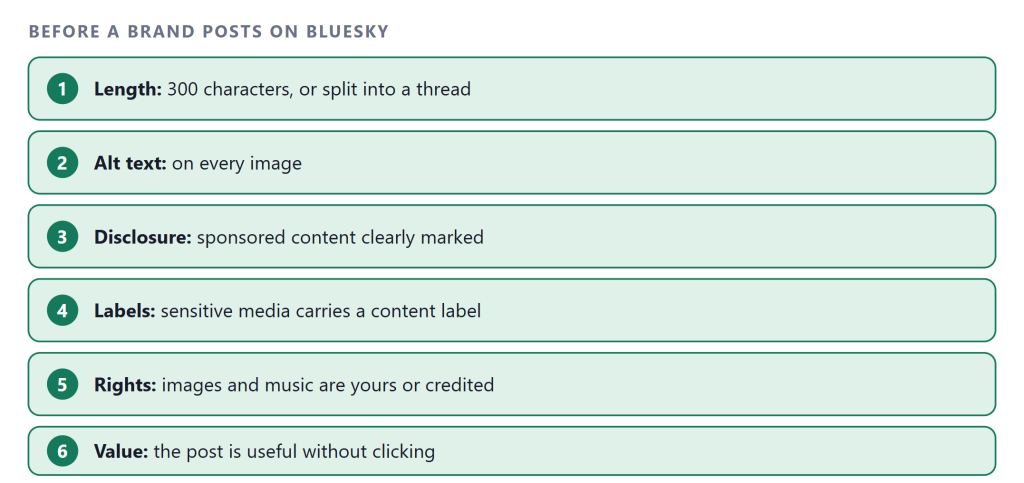
- Alt text: every image can carry a description. Bluesky’s community strongly values alt text, and many users boost or follow accounts that use it consistently.
Bluesky Image Sizes
Bluesky is flexible about image shape but strict about file size, so focus on clean compression rather than exact dimensions. Each image is stored as a file of roughly 1 MB at most; the Bluesky app compresses larger images automatically, and so does OnlySocial when it publishes.
| Image type | Recommended size | Notes |
|---|---|---|
| Single image post | 1080 x 1350 (4:5) or 1200 x 1200 (1:1) | Tall and square images fill more of the feed |
| Landscape image | 1600 x 900 (16:9) | Good for screenshots and charts |
| Multiple images | Up to 4, same ratio | Shown in a grid; tap to view full size |
| Profile picture | 400 x 400 or larger, square | Displayed as a circle |
| Banner | 3000 x 1000 (3:1) | Keep key content central; crops on mobile |
| File size | About 1 MB per image after compression | JPEG, PNG and WebP are common |
To keep images sharp after compression, export at the size you need rather than uploading a 6000-pixel original, use JPEG at around 80 to 85% quality for photos, and PNG for screenshots with text. Charts and infographics need large, simple text, because many people see them at phone size in a grid.
GIFs on Bluesky
Bluesky has a built-in GIF picker, and a post can carry one GIF instead of images or a video. GIFs work well for reactions and light humour in replies, less so for main brand posts. Use them sparingly, add alt text that describes the reaction, and avoid GIFs from films or TV shows in promotional posts, since the copyright rules in the guidelines apply to them too. A short looping video you made yourself is often a better choice for showing a product in motion, and it gives you control over quality and captions. If you schedule posts with a tool, check that it supports GIFs for Bluesky before you plan a GIF-led campaign.
Bluesky Video Length and Format
Each Bluesky post can include one video, and vertical, captioned clips of a minute or two suit the feed best. When Bluesky launched video in September 2024, clips could be up to 60 seconds, with a limit of 25 videos or 10 GB uploaded per day. The limit was raised to three minutes, and Bluesky’s January 2026 roadmap post said three-minute videos “aren’t enough”, signalling longer uploads to come. Check the composer for the current maximum before you edit a long cut.
- Format: MP4 is the safest choice; MOV, WebM and MPEG are also widely accepted.
- Ratio: vertical 9:16 and square 1:1 look best on phones; landscape works for screen recordings.
- Captions: Bluesky supports caption files and many users watch muted, so add captions.
- One per post: you cannot combine a video with images in the same post.
Our guide to how long a social media video should be compares Bluesky with the other networks.
Profile Picture, Banner, Verification and Profile Links
Your Bluesky profile is your first impression, and it now offers more ways to show who you are.
- Custom domain handle: brands can use their own domain as their handle, such as @yourbrand.com, by adding a DNS record. It is one of the strongest signals that an account is genuine.
- Verification: since April 2025, Bluesky shows a blue check for notable and authentic accounts, and independent organisations can act as Trusted Verifiers.
- Profile links: introduced in October 2026, profile links let you highlight your website, newsletter or other social accounts at the top of your profile.
- Bio: say who runs the account and what you post about. Bluesky users appreciate knowing whether a human or a team is behind a brand account.
- Pinned post: pin an introduction or your most useful post so new visitors understand you quickly.
Scheduling Bluesky Posts With OnlySocial
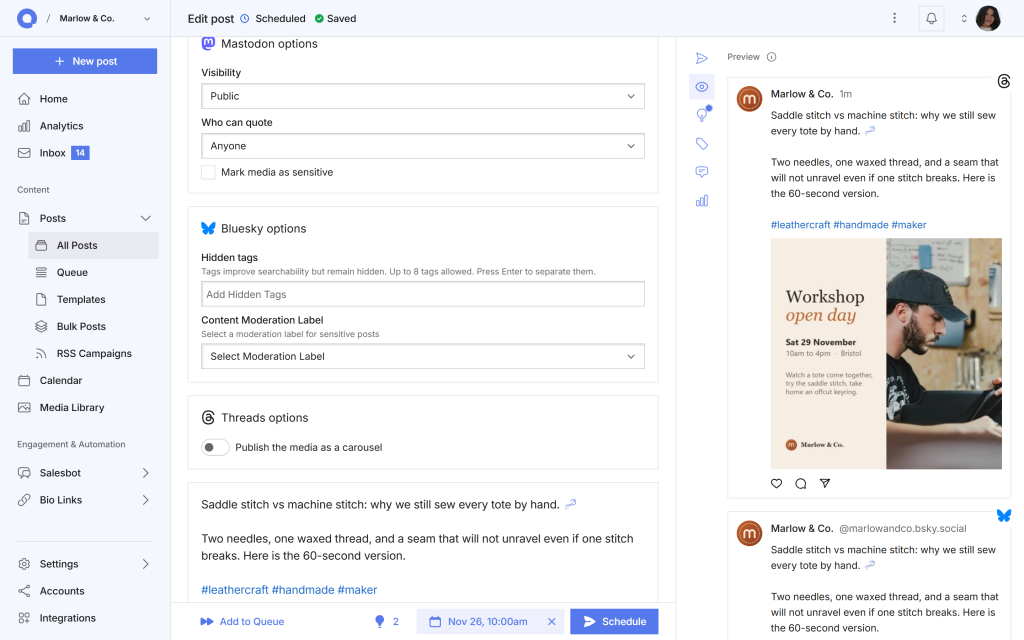
OnlySocial connects to Bluesky and lets you schedule posts with images, video, hidden tags and content labels, alongside 15+ other networks. In the composer, select your Bluesky account and open Bluesky options.
- Hidden tags: add up to 8 tags that improve searchability without appearing in the text.
- Content moderation label: choose adult content, sexual content, nudity, graphic media or other labels for sensitive posts.
- Images: up to 4 per post, with alt text; OnlySocial compresses them to fit Bluesky’s file size limit.
- Threads: use Add Post to build a thread of replies for ideas longer than 300 characters.
- Preview: see the post as it will appear on Bluesky, next to Mastodon, Threads or any other network you selected.
What it costs: every OnlySocial plan includes Bluesky along with 15+ other networks, from $29 a month for 15 social profiles and 2 team members.
Plan Bluesky with the rest of your social media. Schedule posts with alt text, hidden tags and content labels, and reply to comments from one inbox.
Getting Started on Bluesky as a Brand
A good first month on Bluesky is mostly listening, setting up properly and joining conversations. Here is the order I recommend.
- Claim your handle and set a custom domain so people can see the account really belongs to you.
- Complete the profile: clear avatar, banner, a bio that says who posts, and profile links to your website and newsletter.
- Read the Community Guidelines with everyone who will post, and agree how you handle sponsored posts, labels and replies.
- Find your community: follow people in your field, subscribe to relevant custom feeds and look for starter packs that list accounts in your niche.
- Post an introduction and pin it: who you are, what you will share and who runs the account.
- Reply more than you post for the first few weeks. Thoughtful replies are how new accounts get noticed.
- Then build a rhythm of three to five planned posts a week, scheduled ahead, with daily replies.
Bluesky for Agencies and Teams
Because the guidelines prohibit sharing accounts, teams need a proper setup from day one. Connect the brand’s Bluesky account to a social media management tool, so each team member logs in with their own credentials and access can be removed when someone leaves. Agree a house style for alt text, hashtags, content labels and disclosure, and keep it written down, since consistency is noticed on Bluesky.
For agencies, keep each client’s Bluesky account in its own workspace with its own approvals, so a sponsored post is never published without the client seeing the disclosure. And because conversations matter more than broadcasts here, plan who answers replies and when, not just who writes the posts. A shared inbox for comments and mentions makes that realistic even across several clients.
Bluesky Culture: The Unwritten Rules
The written guidelines tell you what gets removed; the culture tells you what gets followed. These habits come from watching what works for brands on Bluesky and what gets them muted.
- Be a person, not a press release. Brand accounts that reply, joke and admit mistakes do far better than ones that only announce.
- Write alt text, always. It is close to a social norm on Bluesky.
- Join conversations before starting them. Reply thoughtfully to people in your field, follow relevant custom feeds and starter packs, and add value before promoting.
- Post the value, not just the link. Summarise the key point in the post itself; people engage more with posts they can understand without clicking.
- Avoid engagement bait. “Like if you agree” posts and growth hacks feel out of place and can attract blocks.
- Respect blocks and mutes. Bluesky users curate heavily. If someone blocks you, move on.
- Use custom feeds. Many communities organise around custom feeds based on keywords or hashtags; posting relevant content with the right tags helps you appear in them.
Mistakes to Avoid When Posting on Bluesky
- Cross-posting X content word for word. Different audience, different tone. Adapt it.
- Hashtag stuffing. One to three relevant tags, or hidden tags, are enough.
- Skipping alt text. It is noticed, and not in a good way.
- Forgetting to disclose sponsored posts, which the guidelines require.
- Posting sensitive images without a label.
- Sharing the account password with a team instead of connecting the account through a proper tool.
- Broadcasting without replying. Bluesky rewards conversation.
Frequently Asked Questions
What are Bluesky’s content guidelines?
Bluesky’s Community Guidelines, last updated 19 September 2025, set rules under four principles: Safety First, Respect Others, Be Authentic and Follow the Rules.
What is the Bluesky character limit?
300 characters per post, counted as the characters you see on screen. Use a thread for longer ideas.
How many images can I post on Bluesky?
Up to 4 images per post, or one video, or one GIF.
What is the best image size for Bluesky?
1080 x 1350 (4:5) or 1200 x 1200 (1:1) for posts, 3000 x 1000 for banners, and a square profile picture of at least 400 x 400. Keep files around 1 MB.
How long can videos be on Bluesky?
Video launched with a 60-second limit in 2024, later raised to three minutes, and Bluesky said in January 2026 that it wanted to go further. Check the composer for the current limit.
Can brands advertise on Bluesky?
Bluesky has no self-serve ads platform at the time of writing. Brands can post organically and work with creators, but sponsored content must be clearly disclosed.
Is adult content allowed on Bluesky?
Consensual adult content is allowed when it is properly labelled and subject to age restrictions, under the Community Guidelines.
Can I schedule posts on Bluesky?
Not in the Bluesky app itself. Tools such as OnlySocial let you schedule Bluesky posts with images, video, hidden tags and content labels.
What happens if I break Bluesky’s rules?
Bluesky uses proportional enforcement, from labels and reduced visibility to post removal and account suspension, and offers an appeals process.
The guidelines prohibit selling, transferring or sharing accounts. Teams should connect the account through a management tool rather than sharing a password.
The Short Version
The Bluesky content guidelines come down to safety, respect, authenticity and the law, and for brands the authenticity rules matter most. Do not spam or fake engagement, disclose sponsored posts, label sensitive media and respect copyright. Then work within the format: 300 characters, up to 4 images with alt text or one video, and a profile that proves who you are. Add a human voice and genuine replies, and Bluesky can become one of your most rewarding networks.
Ready to plan Bluesky alongside your other networks? Try OnlySocial.