10 TweetDeck Alternatives for All Your Business Needs [2025 Review]
Managing X (formerly Twitter) in 2025 is about more than just scheduling tweets. It’s about keeping conversations flowing, tracking engagement, and balancing multiple accounts without burning out.
TweetDeck, now rebranded as X Pro, was once the tool of choice for power users. But with its limited features, many marketers and businesses are starting to look for something more.
If you’re juggling multiple platforms, relying on X Pro alone can feel restrictive. Modern social media tools now go beyond basic timelines. They let you schedule across platforms, manage DMs and mentions in one place, and deliver analytics that actually guide your strategy.
In this guide, we’ll walk through 10 of the best TweetDeck alternatives for 2025. Whether you’re a solo creator, a growing business, or part of a large marketing team, these tools will help you cover what X Pro leaves out and make managing social media far more efficient.
Table of Contents
- 1 1. OnlySocial ($29/Month)
- 2 2. Sendible ($29/Month)
- 3 3. SocialPilot ($30/Month)
- 4 4. Zoho Social ($40/Month)
- 5 5. Sprout Social ($199/Month)
- 6 6. Buffer ($120/month)
- 7 7. Tweet Hunter ($29/Month)
- 8 8. Agorapulse ($99/Month)
- 9 9. Hootsuite ($99/Month)
- 10 10. ContentStudio ($19/Month)
- 11 How to Choose the Best TweetDeck Alternative
- 12 Final Note
- 13 FAQs
1. OnlySocial ($29/Month)
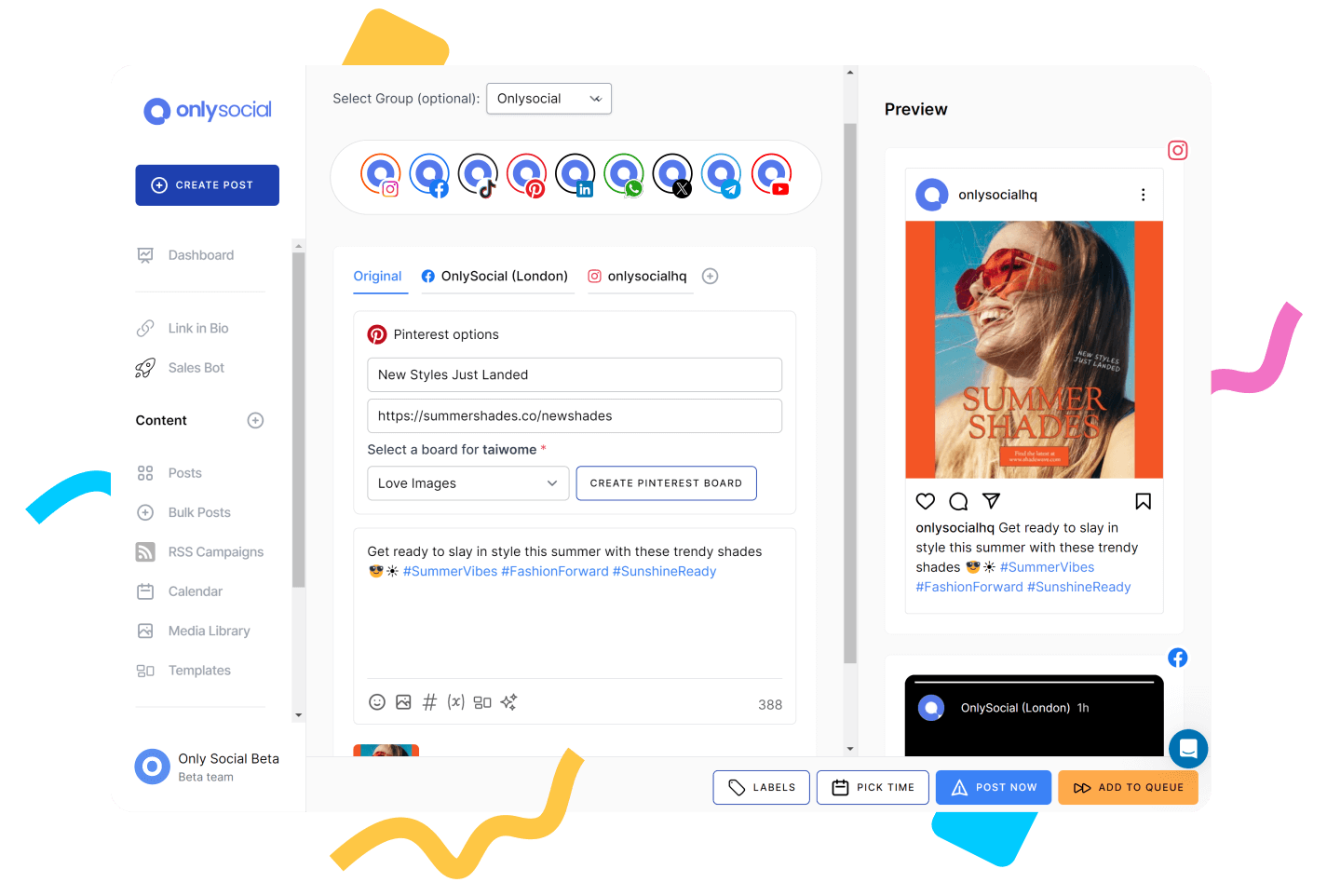
OnlySocial is a modern social media management tool designed to simplify scheduling, analytics, and collaboration across multiple platforms, including X (formerly Twitter).
Where TweetDeck is limited to managing tweets in real-time, OnlySocial offers a complete suite of tools for agencies, teams, and individuals who want more control and efficiency in their workflows.
Let’s take a closer look at the tool and see why it’s a worthy TweetDeck alternative to consider in 2025.
Key Features:
- Bulk Scheduling
- Advanced Publishing
- Intuitive Social Media Calendar
- Social Media Analytics and Reporting
- AI Content Assistant
- Team Collaboration
- Content Library
- Unified Social Inbox
- Shared Calendar
- White Label Dashboard
Pros
- Offers bulk scheduling to manage large volumes of tweets at once
- User-friendly interface for smooth navigation and post management
- Reliable publishing with no glitches or missed schedules
- Multi-user collaboration with draft sharing, comments, and approvals
- Flexible pricing tiers for different business sizes and budgets
Cons
- No forever free plan
- Lacks competitor performance analysis tools
Our Experience with OnlySocial:
Scheduling and Content Creation
OnlySocial makes scheduling effortless compared to TweetDeck. It allows bulk scheduling of up to 500 tweets at once, a lifesaver for agencies managing multiple clients.
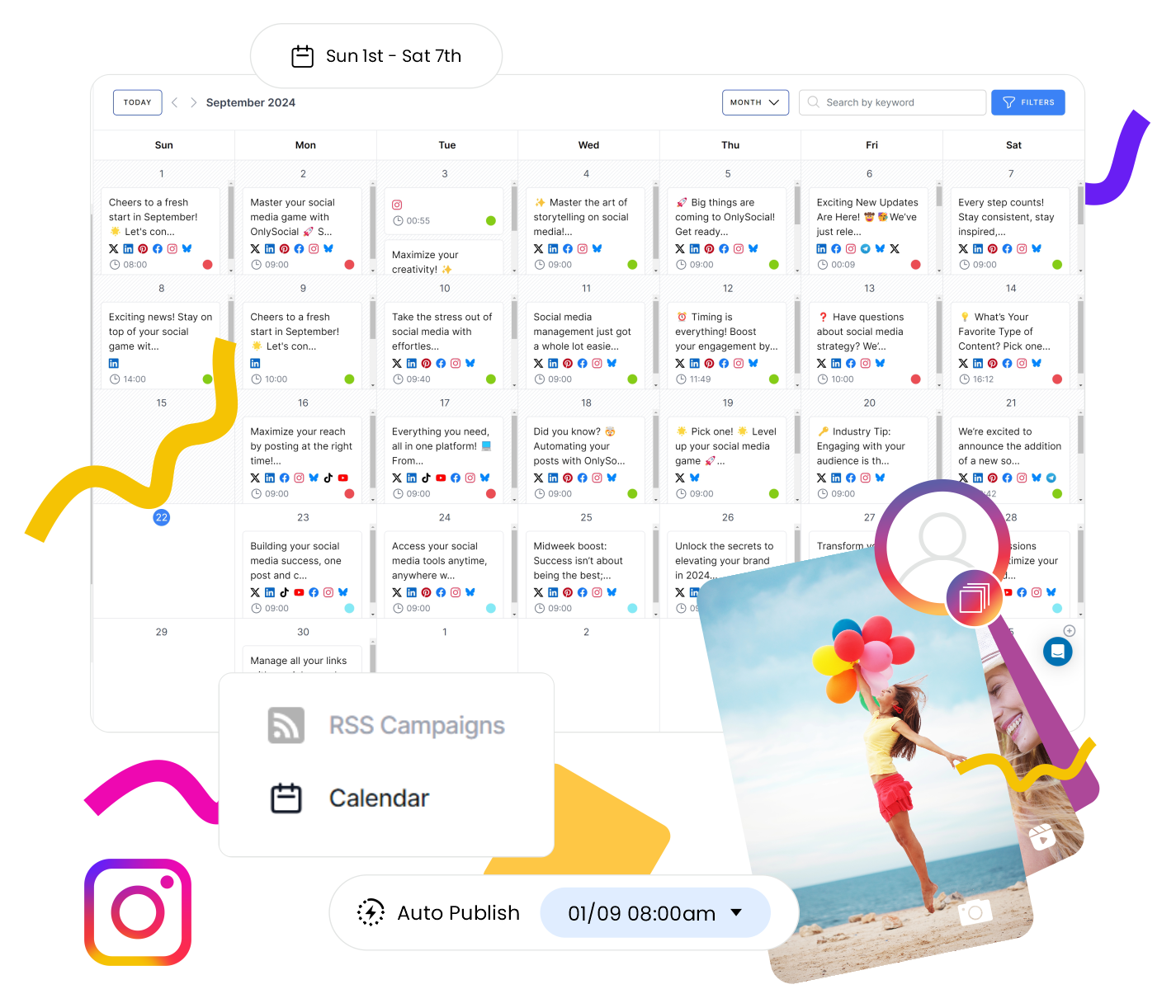
The content library stores media, hashtags, and past posts for easy access and reuse. Unlike TweetDeck’s barebones layout, OnlySocial’s visual calendar offers a clear view of upcoming posts across accounts, so nothing gets lost.
Collaboration and AI Assistant
Teams can collaborate in real time, sharing drafts, leaving comments, and using approval workflows. The AI Assistant helps generate tweet ideas, captions, and hashtags, saving time and keeping content engaging. It also lets you generate quality and relevant visuals for your tweets for speed and efficiency.
User-Friendly Interface and Image Customization
One of the things we noticed right away was how clean and intuitive the platform feels. Managing multiple X accounts didn’t feel overwhelming at all.
Uploading visuals is straightforward, with options to customize images, videos, or GIFs before publishing. Features like adding watermarks or tailoring visuals to brand aesthetics are small but powerful upgrades.
White Label and Analytics
Agencies will love the White Label dashboards and reports, which let you add your own branding when sharing data with clients. This makes you look professional and gives clients more confidence in the reporting process.
On the analytics side, OnlySocial beats TweetDeck by offering deeper insights, including engagement metrics, impressions, and trending hashtags. Instead of just tracking tweets, you can actually refine your strategy based on the data.
Pricing & Value
TweetDeck is bundled into X Premium for $8/month, but its functionality is barebones. OnlySocial costs more, but the value is significantly higher for teams or businesses serious about social media.
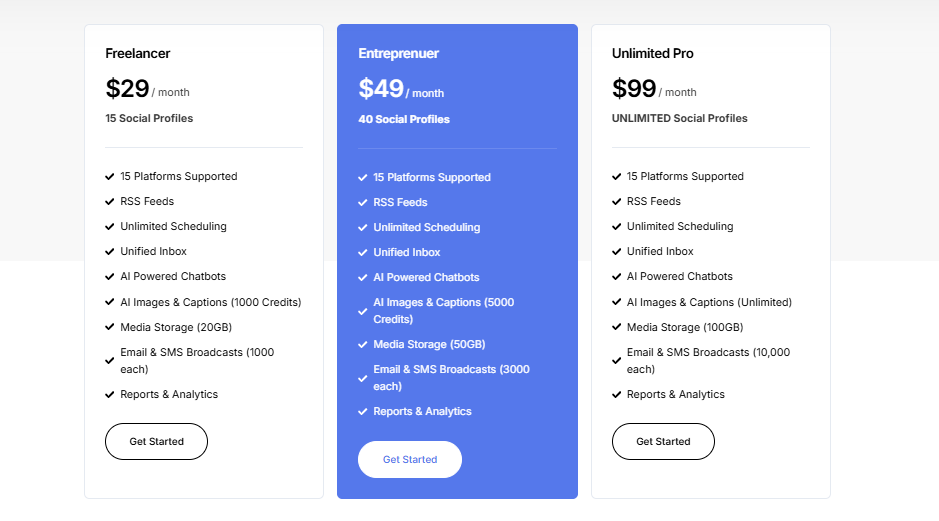
Plans start at $29/month for 15 accounts, move up to $49/month for 45 accounts with 3 users, and top out at $99/month for unlimited social accounts and 10 users. Each plan includes the full suite of scheduling, AI, analytics, and collaboration tools, making it scalable for freelancers, small businesses, and large agencies alike.
Final Verdict
From our experience, OnlySocial is a far more complete alternative to TweetDeck. It doesn’t just manage tweets. It helps you plan, create, schedule, and analyses campaigns across multiple X accounts with ease.
The interface is cleaner, the features are richer, and the White Label option makes it ideal for agencies. While it costs more than X Premium, the return in productivity, collaboration, and analytics is well worth it.
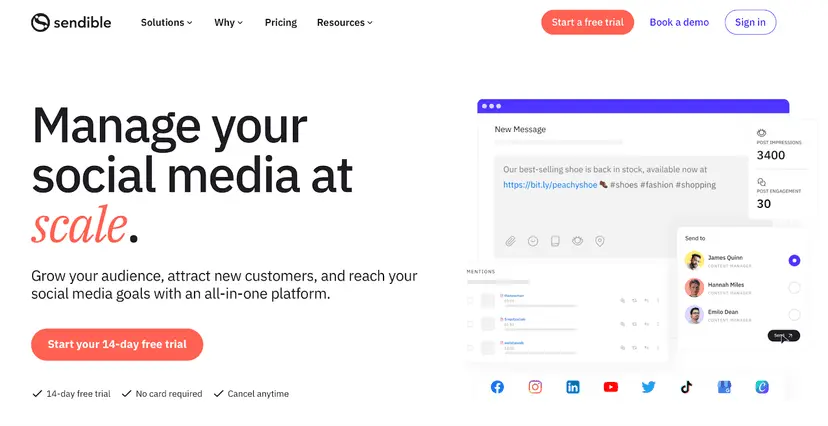
2. Sendible ($29/Month)
Key Features:
- White Label Dashboard
- Analytics and Reporting
- Smart Compose Box
- Simplified Content Scheduling
- Smooth Workflows and Approval Process
- Ad Performance Insights
- Priority Inbox
- AI Assist
- Team and Client Collaboration
- Shareable Social Media Calendar
Pros
- Clean interface and easy-to-use content calendar
- Smart content recommendations to help with curation
- Customizable, presentation-ready reports for clients
- Strong engagement reports with suggested posting times
- Excellent customer support available by email, chat, or phone
Cons
- Advanced features locked to higher-tier plans
- Initial setup for scheduling and team access can be tricky for beginners
Our Experience:
Content Management and Scheduling
Sendible impressed us with its content library, which goes beyond simple media storage. You can categorize assets, tag them for quick retrieval, and even integrate with platforms like GIPHY and Pexels to pull royalty-free content directly into your campaigns.
Scheduling is equally robust, with options for bulk posting, recurring content, and suggested times based on engagement data. Compared to TweetDeck’s basic scheduling, Sendible feels miles ahead.
Collaboration and Workflow
Team collaboration is one of Sendible’s strong suits. Multiple users can work on tweets together, adding hashtags, links, and refining copy. The approval workflows are straightforward, ensuring content is reviewed and approved without confusion.
Robust Analytics
Analytics are another standout. Sendible offers detailed, customizable reports that provide actionable insights into engagement and performance. This level of depth is something TweetDeck simply doesn’t provide, making Sendible better for data-driven strategies.
Pricing & Value
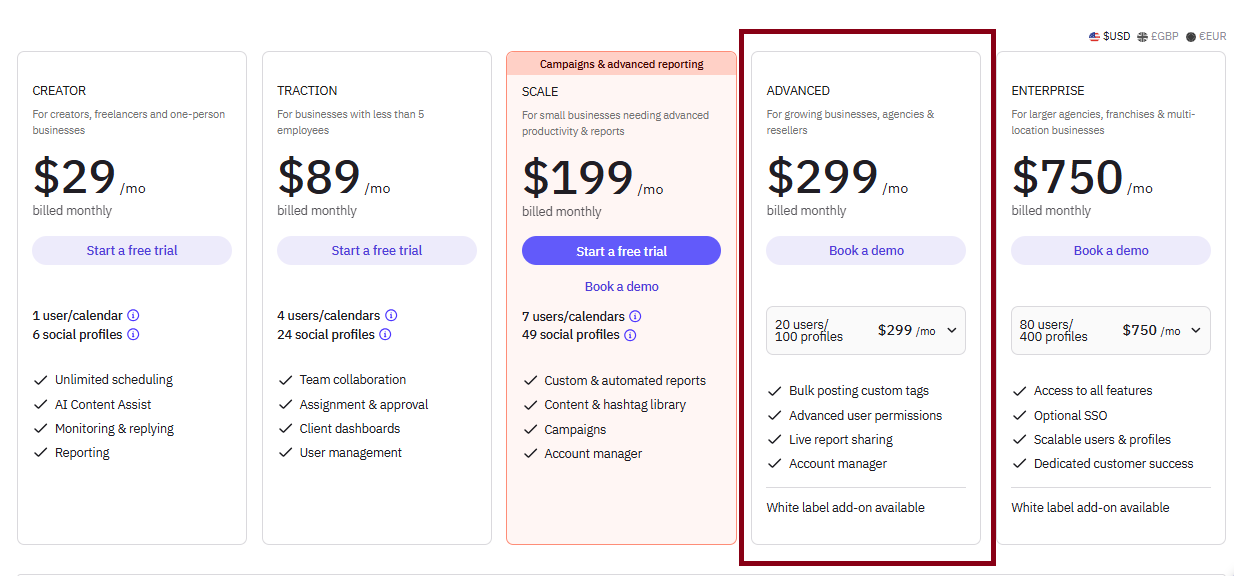
Sendible’s pricing reflects its premium feature set. It starts at $29/month for solo users, with agency-focused plans going up to $240/month. There’s also a 14-day free trial so you can test everything before committing.
While pricier than TweetDeck, Sendible offers advanced features, better analytics, and client-friendly tools that justify the cost for businesses and agencies.
Final Verdict
Sendible is a feature-rich alternative to TweetDeck, designed with agencies and growing businesses in mind. Its combination of content management, advanced scheduling, collaboration workflows, and detailed reporting makes it a clear upgrade.
If your budget allows, Sendible offers more control, more insight, and far more flexibility than TweetDeck ever could.
3. SocialPilot ($30/Month)

Key Features:
- Bulk Scheduling
- Direct Publishing to All Social Networks
- Unified Social Inbox
- Client Collaboration
- Intuitive Social Media Calendar
- White Label Dashboard
- AI Assistant
- RSS Feeds
- Social Media Analytics and Reporting
Pros
- Affordable compared to many other TweetDeck alternatives
- Bulk scheduling of up to 500 posts across platforms
- White-label reports and dashboards, ideal for agencies
- Clean and organized interface that’s beginner-friendly
- Posts publish reliably at the exact scheduled time
Cons
- No social media ad management feature
- It lacks tools for analyzing competitor performance.
Our Experience:
Scheduling and Content Management
SocialPilot stands out with its bulk scheduling feature, letting you upload and schedule up to 500 posts at once – something TweetDeck doesn’t come close to offering.
Managing multiple X accounts alongside platforms like Facebook, Instagram, TikTok, and LinkedIn was straightforward, thanks to the platform’s clear and intuitive calendar. It’s beginner-friendly but still packed with features that agencies can use at scale.
Collaboration and White Label Reporting
We found SocialPilot especially useful for agencies. The white-label reports and dashboards allow you to deliver polished, branded insights directly to clients, giving it a professional edge that TweetDeck lacks entirely.
Collaboration was smooth too, with roles and workflows that keep teams aligned without needing endless back-and-forth.
Pricing & Value
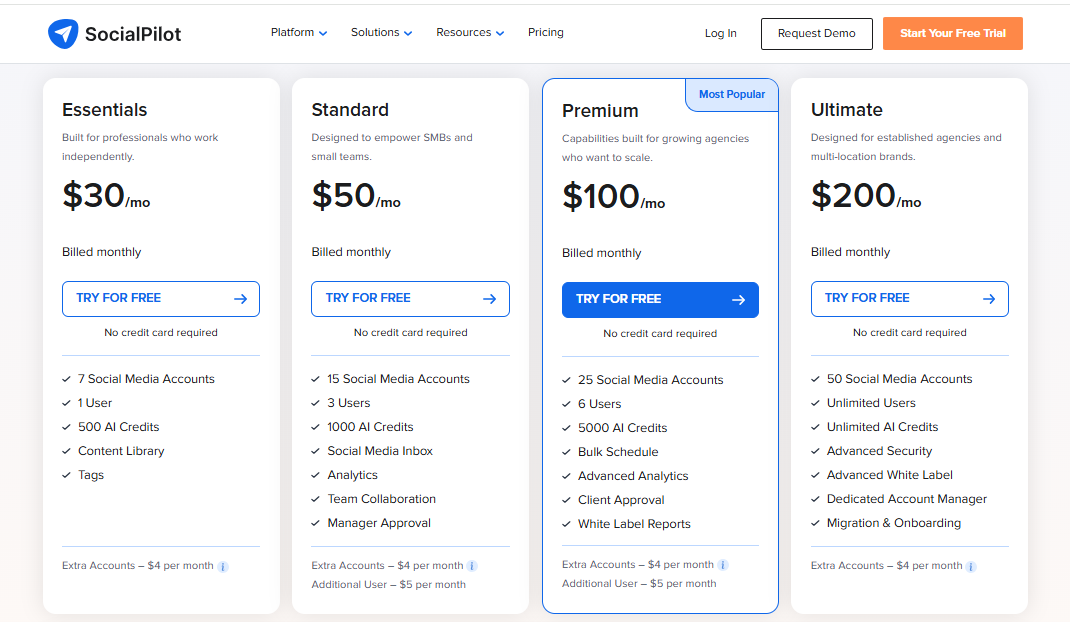
SocialPilot offers flexible pricing, starting from $30/month. Its 14-day free trial gives access to all premium features with no credit card required.
While TweetDeck is bundled into X Premium for $8/month, SocialPilot’s higher price point is justified by its far broader scheduling, collaboration, and reporting features. It stays affordable even as your team or client list grows, making it one of the best value options on the market.
Final Verdict
SocialPilot is a reliable, cost-effective TweetDeck alternative that’s perfect for agencies and small businesses. With its bulk scheduling, white-label reports, and clean interface, it offers far more than TweetDeck while remaining beginner-friendly.
For teams that want professional features without breaking the bank, SocialPilot is an excellent choice.
4. Zoho Social ($40/Month)
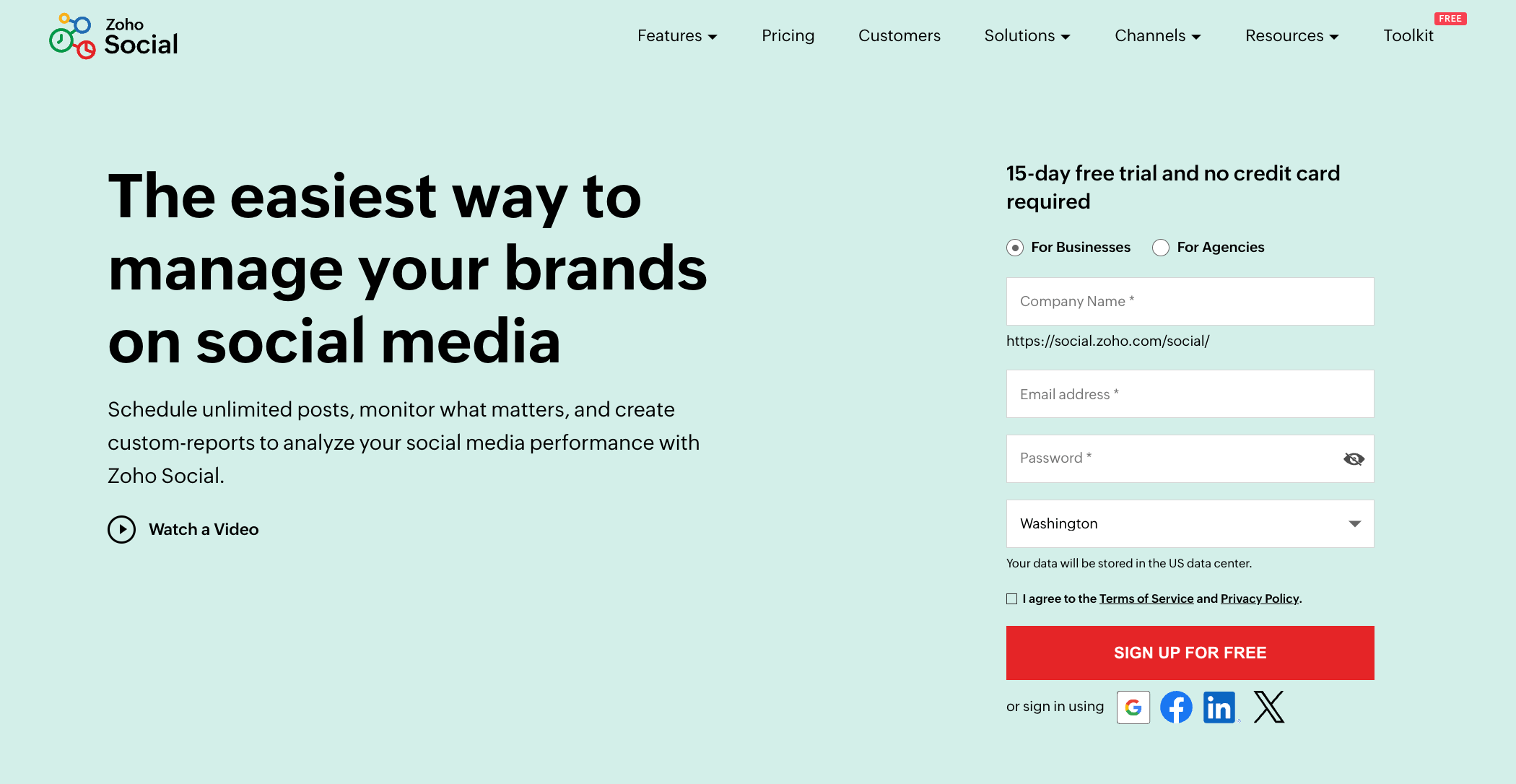
Zoho Social is a flexible tool designed for businesses and agencies looking to go beyond TweetDeck’s basic timelines. With smarter scheduling, real-time monitoring, and reporting features, it provides more control over how brands manage their X presence.
Key Features:
- Bulk Scheduling
- Zia AI Assistant
- Visual Content Calendar
- Team Collaboration
- Centralized Inbox
- Social Media Monitoring
- Rich Analytics Dashboard
- Analytics and Custom Reports
Pros
- Intuitive interface that makes setup quick and painless
- SmartQ feature suggests the best times to post for engagement
- Support is straightforward and easy to navigate
Cons
- Lacks advanced analytics like sentiment analysis and competitor benchmarking
- Adding more profiles can get expensive for multi-brand management
Our Experience
Smarter Scheduling
Zoho Social’s SmartQ feature was a highlight for us. It predicts the best posting times based on audience activity, making scheduling much more strategic than TweetDeck’s manual process. We also liked the flexibility of CustomQ and repeat scheduling for campaigns that need consistent visibility.
Streamlined Publishing and Collaboration
The publishing dashboard combines everything you need in one place. think of attachments, videos, shortened URLs, and even UML tags for more tailored posts. Team members can review, edit, and approve content, which keeps workflows smooth, especially for agencies with multiple accounts.
Monitoring and Insightful Reports
Zoho Social lets you track hashtags, competitors, and industry influencers with real-time monitoring. Custom columns made it easy to filter conversations that mattered most to us. The analytics dashboard also provided useful data on engagement and follower growth.
While not as advanced as some premium tools, the ability to customize and share reports already puts it ahead of TweetDeck.
Pricing & Value
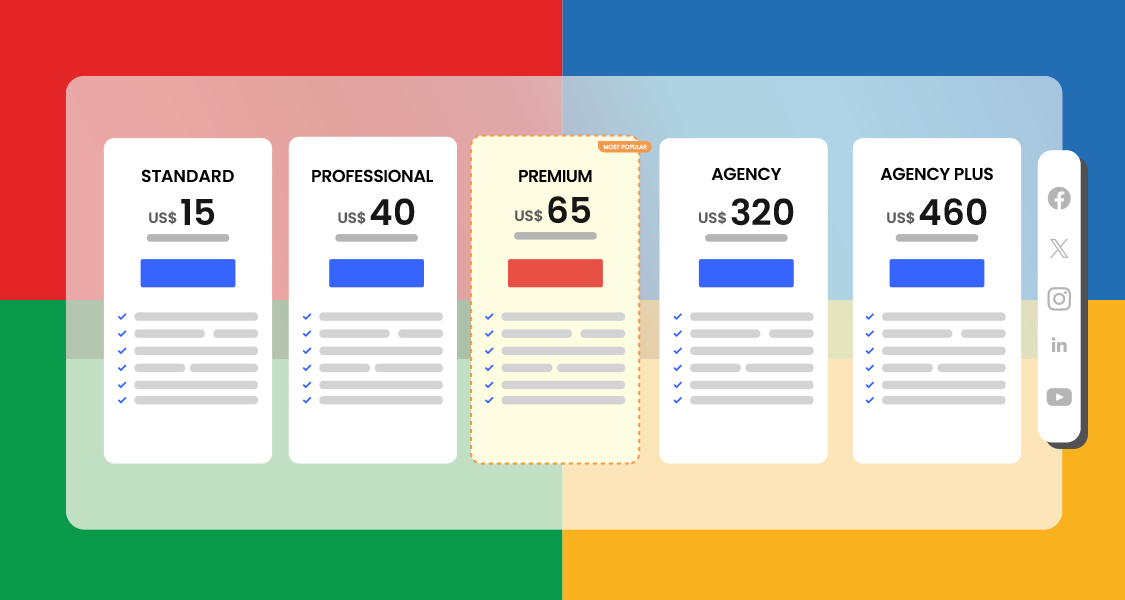
Zoho Social offers a 15-day free trial and flexible subscriptions. Its business plan, at $40/month, covers essentials, while the more robust agency plan at $320/month is better for larger operations. Some advanced features are locked to higher tiers, so costs can add up quickly.
Final Verdict
Zoho Social is a solid upgrade from TweetDeck, particularly for businesses that want scheduling intelligence, monitoring, and client-ready reporting. It’s easy to use, packed with useful features, and scalable – though the higher-tier pricing may be tough for small teams.
5. Sprout Social ($199/Month)

Sprout Social is a premium social media management tool that offers far more than TweetDeck ever has. It’s designed for teams and agencies that need in-depth analytics, smart engagement tools, and collaboration features all in one place.
Key Features:
- Bulk Scheduling
- Visual Content Calendar
- Zia AI Assistant
- Centralized Inbox
- Team Collaboration
- Social Media Monitoring
- Rich Analytics Dashboard
- Analytics and Custom Reports
Pros
- Excellent collaboration tools that keep teams aligned
- Detailed analytics with actionable insights
- Smart Inbox consolidates all mentions, replies, and DMs
Cons
- Expensive, making it less accessible for smaller teams
- Steep learning curve due to its complexity
- Customer support relies heavily on self-service resources
Our Experience
Engagement and Team Collaboration
We found Sprout Social’s Smart Inbox to be one of its strongest features. It centralizes all X activity, from DMs to mentions, in a single feed.
Collaboration was also smooth thanks to message classification and automated routing, which help team members prioritize responses. The ability to identify VIPs and influencers added another layer of value for brands looking to build relationships.
Social Listening and Analytics
Sprout Social goes well beyond TweetDeck’s limited scope. Its social listening tools helped us track keywords and hashtags relevant to our industry, giving real-time insight into conversations. The analytics suite was equally impressive, delivering detailed, presentation-ready reports that highlighted follower growth, content performance, and trending topics.
Campaign Optimization
What stood out was the ability to track hashtag and keyword usage over time. This helped us spot trends and adjust campaigns quickly. It’s a level of data-driven strategy that TweetDeck doesn’t come close to supporting.
Pricing & Value
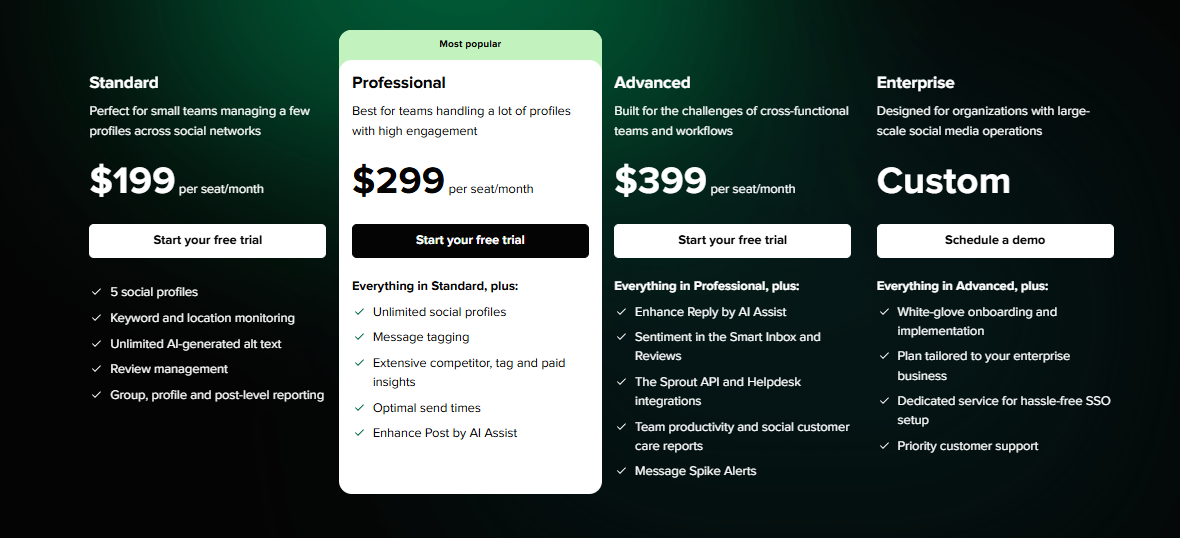
Sprout Social starts at $199/month per user, with higher tiers offering even more features. It’s pricey, but the depth of features, especially analytics and collaboration, makes it worthwhile for teams that can justify the investment. A 30-day free trial gives you time to test whether it fits your needs.
Final Verdict
Sprout Social is one of the most powerful TweetDeck alternatives available. While it comes at a premium, it provides unmatched tools for engagement, analytics, and collaboration. For teams and agencies with the budget, it’s a serious upgrade over TweetDeck.
6. Buffer ($120/month)
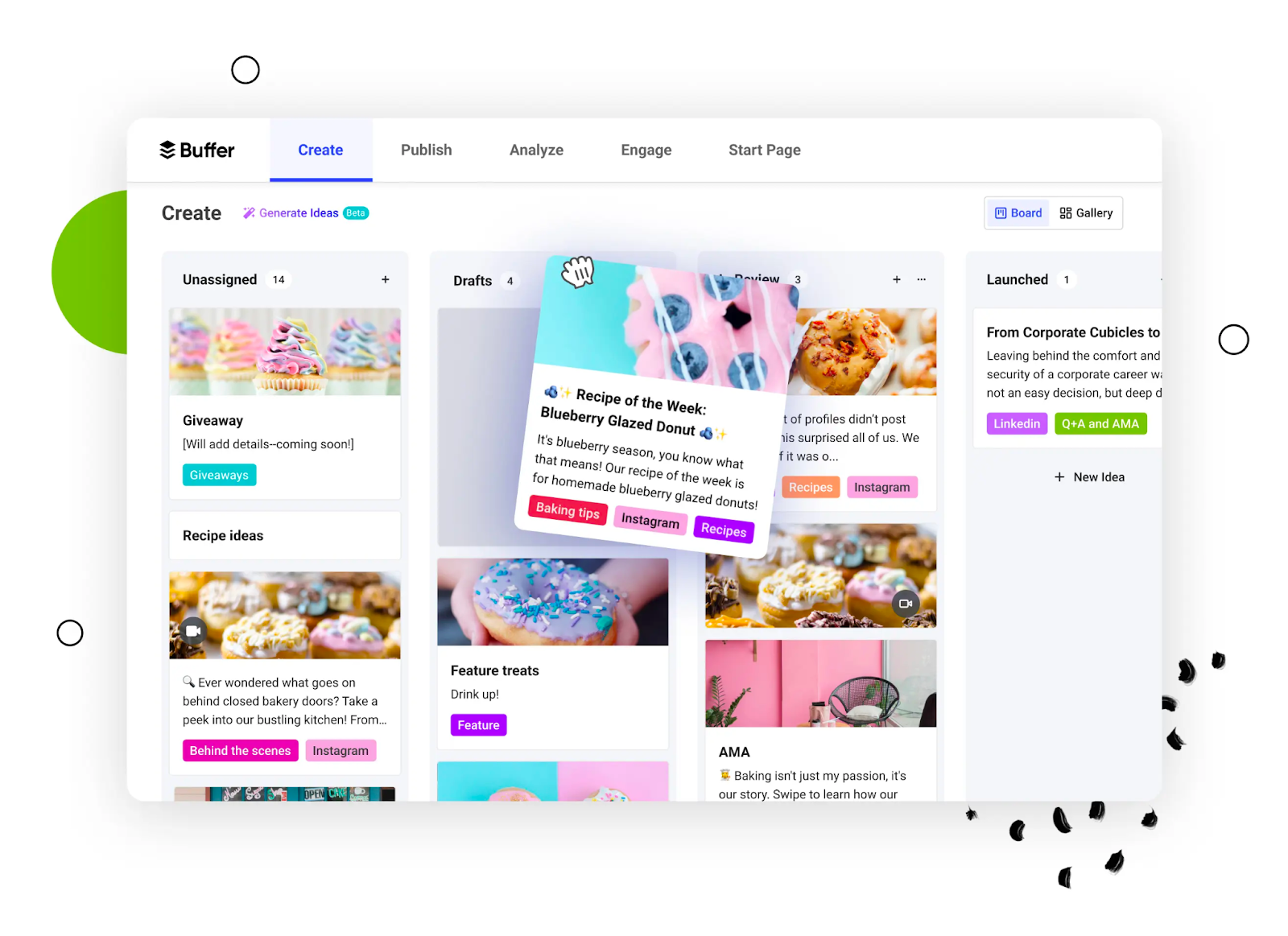
Buffer has long been known for its simplicity, and it’s still one of the best tools for businesses that want straightforward scheduling and reporting. Unlike TweetDeck, which limits you to managing X timelines, Buffer helps you handle multiple platforms while keeping the experience clean and user-friendly.
Key Features:
- Schedule and Queue Posts
- Thread Scheduling
- AI Content Generator
- Social Media Calendar
- In-depth Analytics
- Canva and Dropbox Integration
Pros
- Simple, intuitive interface perfect for beginners
- Flexible scheduling with queues and bulk uploads
- Built-in AI assistant for captions and post ideas
- Clear, actionable analytics for performance tracking
Cons
- No hashtag suggestion feature
- Occasional account reconnect issues
- Doesn’t automatically suggest best posting times
Our Experience
Scheduling and Content Flexibility
We found Buffer’s scheduling features to be a major step up from TweetDeck. You can bulk upload posts, create queues, and easily shuffle content in the visual calendar. Managing multiple X accounts alongside other platforms felt smooth and far less chaotic than TweetDeck’s column-heavy design.
AI Support and Engagement
Buffer’s AI assistant helps brainstorm captions and content ideas, which makes posting less of a chore. The engagement tools also centralize comments and mentions, making it easier to reply without hopping between platforms.
Analytics and Insights
TweetDeck offers no meaningful reporting, while Buffer provides clear, easy-to-read analytics. We were able to track engagement, reach, and performance trends to refine strategies in real time. It’s not as advanced as something like Sprout Social, but it’s far more useful than TweetDeck.
Pricing & Value
Buffer’s pricing starts at around $120/month for 10 accounts. That’s significantly higher than X Premium’s $8/month TweetDeck bundle, but you’re paying for more robust scheduling, reporting, and cross-platform support. For small businesses or teams, it delivers strong value for the price.
Final Verdict
Buffer is a great alternative to TweetDeck for businesses that value simplicity and efficiency. Its clean interface, AI features, and scheduling tools make it a practical upgrade, especially for small teams or solo marketers who want an easy way to manage multiple accounts.
7. Tweet Hunter ($29/Month)
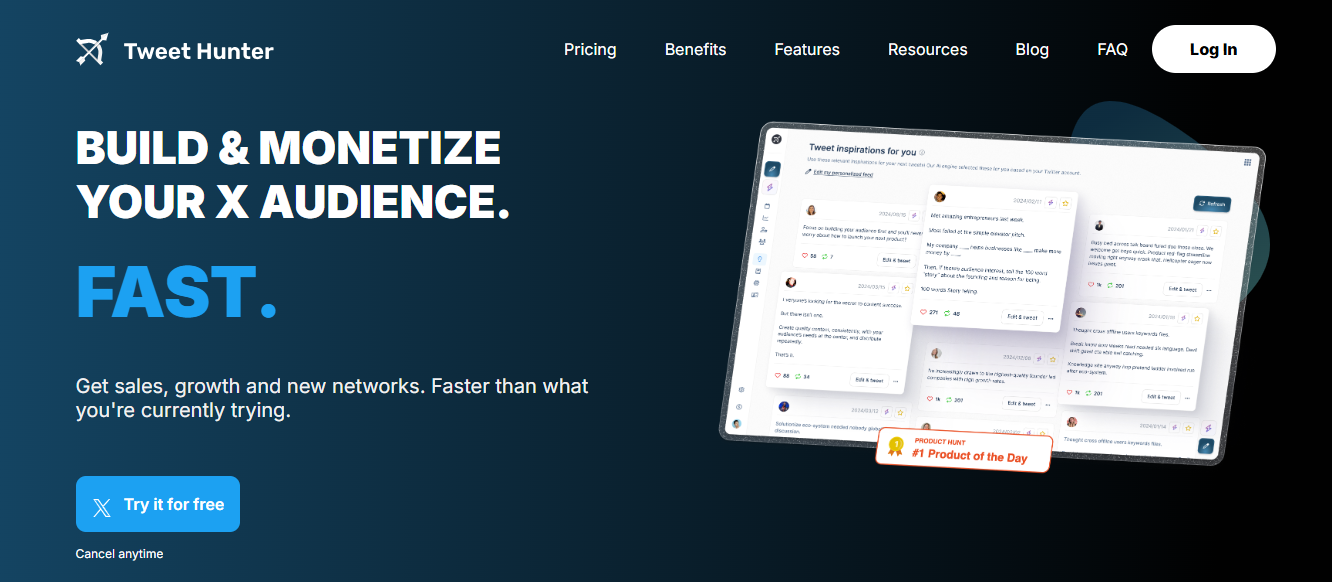
Tweet Hunter is built specifically for creators, marketers, and entrepreneurs who want more than just a scheduler. Unlike TweetDeck, it combines scheduling with AI-driven content creation and detailed analytics, making it a powerful growth tool for X.
Key Features:
- Tweets and Threads Scheduling
- Viral Tweets Library
- Detailed tweet analytics
- AI Tweet Generator
- Best Time to Tweet Feature
- X Hunter X Browser Extension
Pros
- AI-powered tweet generation and content ideas
- Access to a library of 3M+ viral tweets for inspiration
- Easy “add to queue” scheduling for bulk planning
- Detailed analytics that track engagement and profile growth
- Includes features like auto-retweeting and re-sharing to extend reach
Cons
- Some features can become temporarily inaccessible
- Pricing may be steep for individual creators or smaller businesses
Our Experience:
AI-Powered Content Creation and Scheduling
Tweet Hunter’s viral tweets library is a goldmine. Being able to search millions of high-performing tweets by keyword or handle gave us instant inspiration.
Add in the AI-powered rewriter, daily suggestions, and thread ideas, and creating engaging content became far easier than TweetDeck’s manual drafting. Scheduling was seamless too. We queued posts for a month in one sitting, with the option to auto-retweet top content for maximum exposure.
Robust Analytics
Where TweetDeck offers no performance insights, Tweet Hunter delivered in-depth analytics. We could see which tweets brought the most followers, engagement, or profile visits. The ability to sort tweets by specific goals made refining strategies much simpler. Even better, AI suggestions helped rework top tweets for even greater impact.
Pricing & Value
Tweet Hunter starts at $29/month, with the premium plan at $49/month including AI writing tools. All plans come with a 7-day free trial and a 30-day refund guarantee, giving you up to 37 days risk-free to test it. While pricier than TweetDeck, the combination of AI and analytics offers serious value.

Final Verdict
Tweet Hunter is a complete upgrade from TweetDeck for anyone serious about X growth. Its AI-driven features, vast content library, and performance analytics make it ideal for creators and businesses who want results without endless manual work.
8. Agorapulse ($99/Month)

Agorapulse is a robust social media management platform designed for both individuals and teams. Unlike TweetDeck, it offers not just scheduling but also social listening, ROI reporting, and seamless integrations, all within an intuitive interface.
Key Features:
- Direct Scheduling Tool
- Detailed Analytics & Reporting
- AI Writing Assistant
- PulseLink in Bio
- Social Listening Capability
- Customizable Reports
- Canva Integration
- Social Media Monitoring
Pros
- Clean, easy-to-navigate dashboard
- Strong scheduling and publishing calendar
- Canva integration for fast, on-brand visuals
- Centralized inbox for mentions and DMs
- Comprehensive ROI and performance reporting
Cons
- Can be slow at times when uploading or scheduling posts
Our Experience
Scheduling, Design, and Listening
Agorapulse’s publishing calendar gave us an organized view of upcoming tweets and threads, helping us maintain a consistent schedule. The integration with Canva made creating and editing visuals seamless, which saved us from jumping between platforms.
We also found the social listening feature incredibly useful. It brought all mentions and messages into one inbox, allowing quick responses and better follower engagement.
Analytics and ROI Insights
What really sets Agorapulse apart from TweetDeck is its analytics suite. We could track engagement rates, impressions, hashtag performance, and follower growth with ease.
The dedicated Social Media ROI reports were especially valuable, showing us how campaigns contributed to broader business goals. These insights went far beyond what TweetDeck could ever provide.
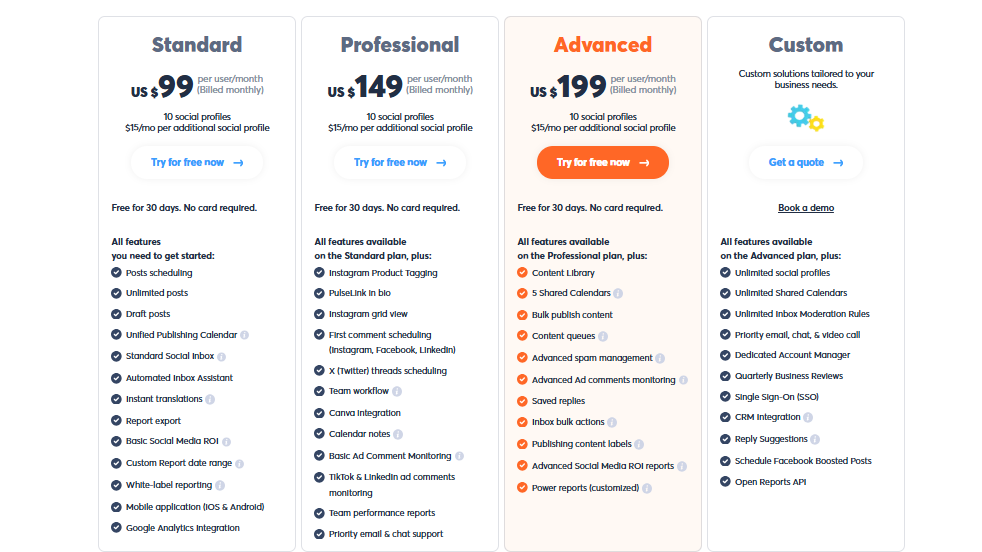
Pricing & Value
Agorapulse starts at $99/month, with four pricing tiers available and a 15-day free trial to test it out. There’s also a forever-free plan for one user with 3 social profiles. Compared to TweetDeck’s limited free inclusion with X Premium, Agorapulse offers far more professional features at a fair cost.
Final Verdict
Agorapulse is a well-rounded alternative to TweetDeck, combining scheduling, social listening, design integration, and detailed ROI tracking. It’s suitable for both new managers and experienced teams, making it one of the most versatile tools on this list.
9. Hootsuite ($99/Month)

Hootsuite is one of the oldest names in social media management and still holds strong as an all-in-one platform. Unlike TweetDeck, which is limited to X timelines, Hootsuite covers multiple platforms and includes advanced features for scheduling, analytics, and even paid ad management.
Key Features:
- Multi-platform Scheduling
- Real-time team collaboration
- AI content creation
- Social media calendar
- Advanced social listening
- UGC and influencer management
- In-depth analytics
- Paid social media ads management
Pros
- Advanced scheduling and bulk publishing tools
- Strong integrations, including Canva and Dropbox
- In-depth analytics with presentation-ready reports
- Supports both organic and paid social media campaigns
- Robust collaboration tools for teams
Cons
- Expensive compared to TweetDeck and most alternatives
- Steep learning curve for beginners
- Some users feel smaller businesses don’t get enough value for the high price
Our Experience:
Scheduling and Team Management
Hootsuite’s calendar and scheduling tools are among the most powerful we tested. We could bulk schedule content across platforms, assign tasks to team members, and track approval statuses – all from one dashboard. For teams, this collaborative setup is a big step up from TweetDeck’s single-user focus.
Analytics and Campaign Oversight
Where TweetDeck has no reporting, Hootsuite excels with detailed analytics and customizable reports. We also appreciated its ability to manage paid ads alongside organic content, making it easier to get a full view of performance in one place.
Pricing & Value
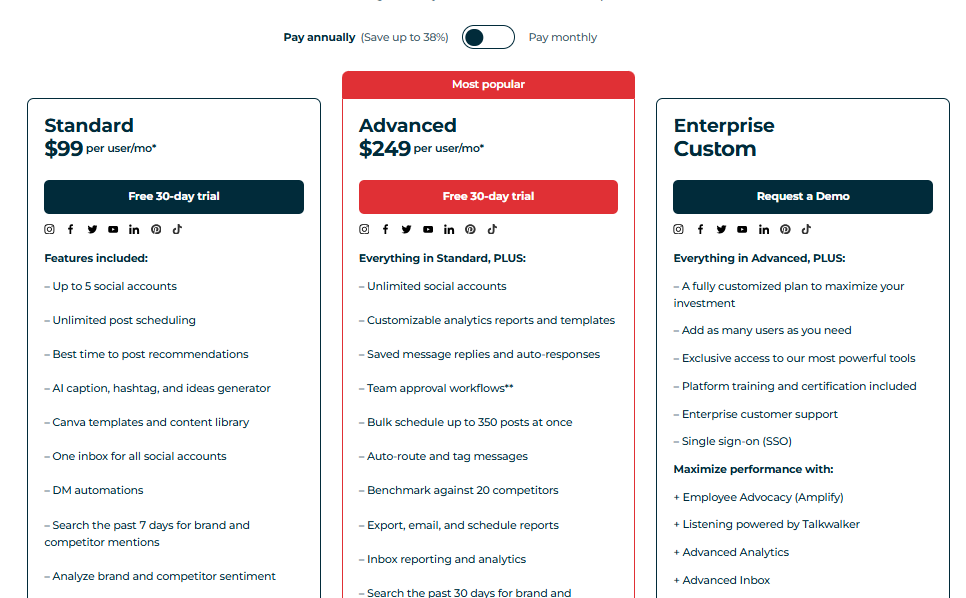
Hootsuite starts at $99/month, making it one of the pricier options on this list. While TweetDeck comes bundled with X Premium at $8/month, Hootsuite’s advanced analytics, ad management, and collaboration features justify the price for larger teams and agencies.
Final Verdict
Hootsuite is a powerful TweetDeck alternative for teams and enterprises that want full oversight of their social strategy. While it’s expensive and not beginner-friendly, its robust scheduling, analytics, and campaign management make it a serious upgrade over TweetDeck.
10. ContentStudio ($19/Month)
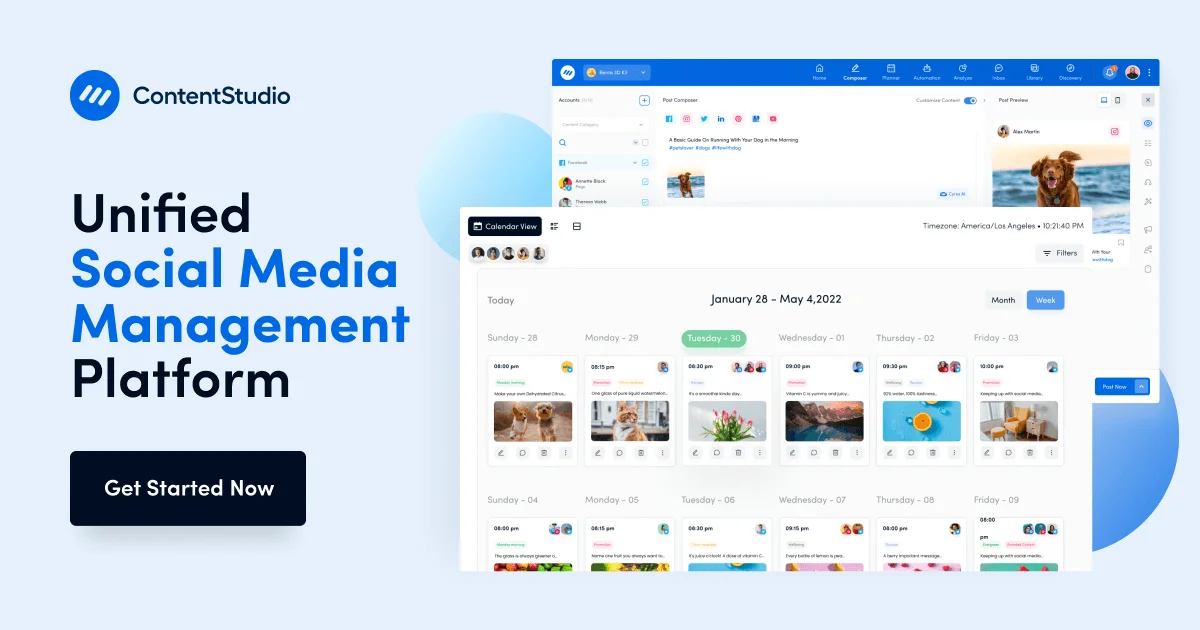
ContentStudio is a modern social media management tool designed for marketers who want a balance of scheduling, analytics, and content discovery. The tool supports multiple platforms and adds features that help you plan, collaborate, and analyze campaigns with ease.
Pros
- Unified content calendar for multiple platforms
- Content discovery tools to find trending topics and articles
- Automation features for bulk scheduling and queues
- Collaboration tools with approval workflows
- Strong analytics and reporting features
Cons
- Can feel overwhelming for beginners due to feature-rich dashboard
- Some advanced features are locked behind higher-tier plans
Our Experience
Content Discovery and Scheduling
One standout feature we found in ContentStudio is its content discovery engine, which helps you find trending topics and articles relevant to your niche.
Scheduling was also straightforward, with options for queues, recurring posts, and bulk uploads – far more advanced than TweetDeck’s limited functionality.
Collaboration and Analytics
For teams, the approval workflows and shared calendar made it easy to keep everyone aligned. The analytics dashboard gave us actionable insights into post performance and engagement trends, offering much clearer guidance than TweetDeck’s non-existent metrics.
Pricing & Value
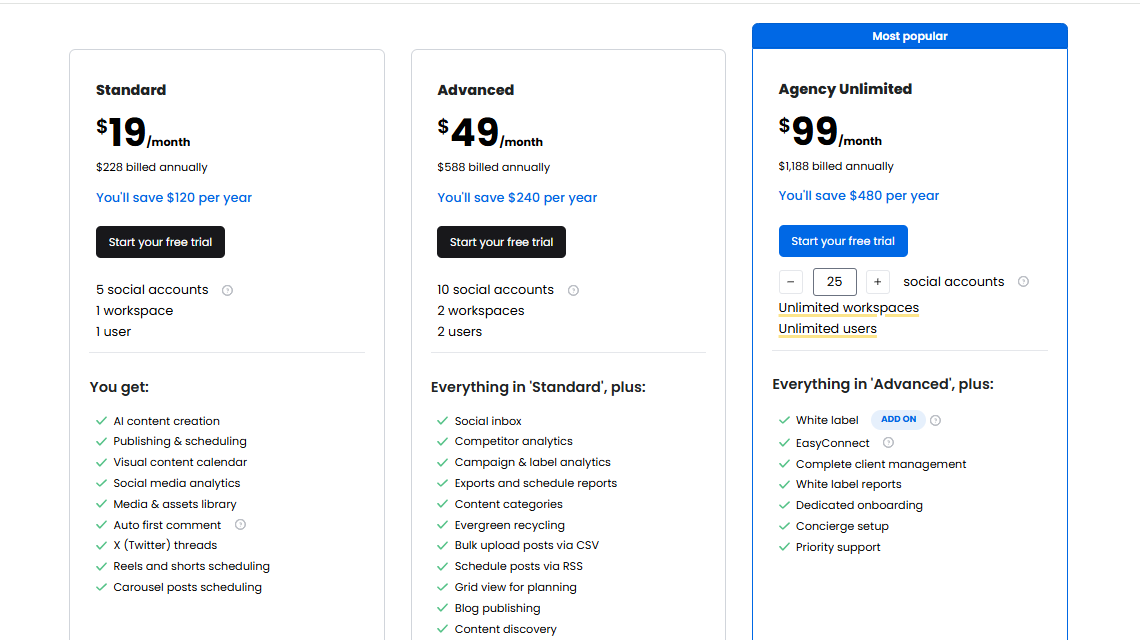
ContentStudio starts at around $19/month, making it far more affordable than tools like Hootsuite or Sprout Social. With its balance of scheduling, analytics, and discovery tools, it delivers solid value for small to mid-sized teams.
Final Verdict
ContentStudio is a versatile and affordable alternative to TweetDeck. With its mix of scheduling, content discovery, and analytics, it’s ideal for marketers who want smarter workflows without breaking the bank.
How to Choose the Best TweetDeck Alternative
Not every TweetDeck alternative will fit your needs. So, how do you know the right one for you? The right choice will depend on your team size, budget, and the type of features you care about most.
Here are some factors worth keeping in mind before making the switch:
Multi-Channel Management
TweetDeck only covers X, but most modern tools support multiple platforms like Instagram, Facebook, LinkedIn, TikTok, and YouTube. If you manage more than just X, pick a tool that lets you schedule and monitor content across all channels in one place.
Ease of Use
A clean, intuitive dashboard saves you hours every week. Some platforms pack in advanced features but overwhelm new users. Look for a tool that balances depth with simplicity, so your team can hit the ground running.
Automation Features
Bulk scheduling, recurring posts, smart queues, and AI assistants can make posting effortless. These features help you stay consistent without spending your whole day manually managing content.
Advanced Analytics
TweetDeck doesn’t offer analytics, so this is a big area to upgrade. Choose a platform with clear, actionable insights into engagement, reach, and follower growth. Even better if it has customizable reports you can share with clients or your team.
Collaboration and Team Management
If you’re working with a team or managing accounts for clients, collaboration tools are a must. Approval workflows, internal notes, and role-based access can prevent mistakes and streamline teamwork.
Custom Branding and White Labeling
For agencies, branded reports and custom dashboards can set you apart. Some platforms even let you white-label the entire experience, giving clients a professional, personalized touch.
Pricing and Support
Finally, consider your budget. Some alternatives offer forever-free plans, while others start at $100+/month. Match your needs with the right plan, and don’t forget to check the platform’s customer support – responsive support can save you when things go wrong.
Final Note
TweetDeck had its moment, but in 2025, businesses and creators need more than just columns and timelines. There are many worthy alternatives out there worth considering.
The right tool depends on your needs. If you’re managing multiple platforms, look for something with strong scheduling and analytics. If you’re running an agency, prioritize collaboration and white-label reporting.
And if you just want something simple, there are affordable options that won’t break the bank.
The bottom line is that you don’t settle for limitations. The tools we have mentioned here will help you grow, save time, and get more out of your social strategy than TweetDeck ever could.
FAQs
Is TweetDeck still free to use?
No. TweetDeck, now rebranded as X Pro, is included in the X Premium subscription, which costs $8/month. It no longer offers a free version like it used to.
What makes OnlySocial better than TweetDeck?
OnlySocial goes beyond TweetDeck’s limited features by supporting 15+ social platforms, offering AI-powered scheduling, a unified inbox for all messages, and detailed analytics. It’s ideal for agencies and teams that need more than just X management.
Can I bulk schedule tweets with OnlySocial?
Yes. OnlySocial allows bulk scheduling of up to 500 posts at once. This is a huge time-saver compared to TweetDeck, which doesn’t support bulk uploading at all.
Which TweetDeck alternative is best for small businesses?
Tools like Buffer and ContentStudio are budget-friendly and easy to use, making them great picks for small businesses. If you’re scaling or managing multiple clients, OnlySocial and Agorapulse provide more advanced features.
Do TweetDeck alternatives provide analytics?
Yes. Most alternatives like Sprout Social, Agorapulse, and Tweet Hunter offer detailed analytics dashboards that track engagement, impressions, and growth – something TweetDeck completely lacks.
Which alternative works best for agencies?
OnlySocial, SocialPilot, and Agorapulse stand out for agencies because they offer white-label reporting, approval workflows, and advanced collaboration tools. These features give agencies more control and a polished way to present results to clients.