10 Best Statusbrew Alternatives for Effective Social Media Management
Managing social media is hard enough. The last thing you need is a tool that slows you down. Statusbrew is powerful, no doubt. It’s packed with features for scheduling, collaboration, and analytics.
But many users find it a bit heavy to get started with. The setup takes time, the interface can feel overwhelming, and the mobile experience doesn’t always live up to expectations.
If you’ve ever wished for something simpler, faster, or more affordable, you’re not alone. A growing number of teams are now exploring Statusbrew alternatives that offer smoother workflows, smarter automation, and better flexibility for day-to-day social media management.
In this guide, we’ve rounded up 10 of the best Statusbrew alternatives that deliver the same powerful results, without the steep learning curve. Just keep reading!
Table of Contents
- 1 Why Consider a Statusbrew Alternative?
- 2 Best Statusbrew Alternatives
- 3 1. OnlySocial
- 4 2. Planable
- 5 3. Buffer
- 6 4. Sprout Social
- 7 5. CoSchedule
- 8 6. RecurPost
- 9 7. Later
- 10 8. ContentStudio
- 11 9. Hootsuite
- 12 10. SocialBee
- 13 Choosing the Best Statusbrew Alternatives
- 14 Final Thoughts
Why Consider a Statusbrew Alternative?
Statusbrew has built a solid reputation in the social media management space. It brings together scheduling, collaboration, and analytics in one platform – and its unified inbox and responsive support definitely deserve credit.
But even great tools have their limits. Depending on your team size, goals, or budget, you might find Statusbrew a little too heavy, too pricey, or not as flexible as you’d like. Here’s where some users start looking elsewhere:
The Price Tag Problem
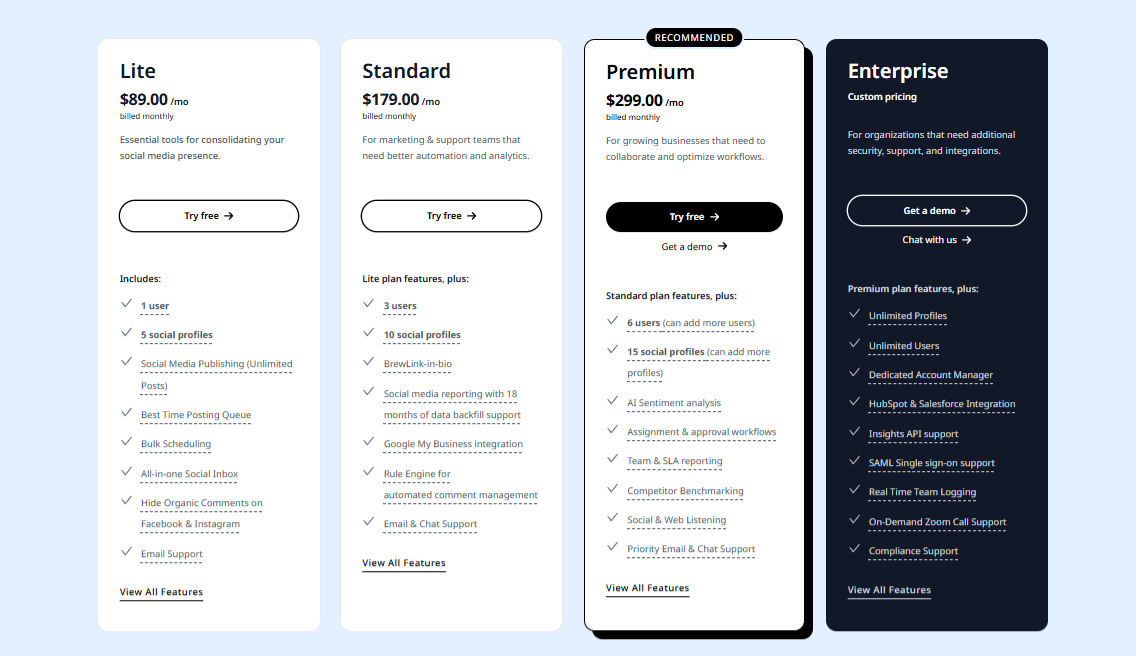
Let’s be honest, Statusbrew isn’t exactly wallet-friendly. Starting at $89/month for one user and five profiles, it feels more suited to enterprise-level teams than small businesses or freelancers. If you’re managing just a few accounts, it can feel like paying for features you’ll never use.
Collaboration Locked Behind Premium Plans
While Statusbrew offers custom approval workflows and content moderation tools, these perks only kick in at the higher-tier plans. For smaller teams or agencies on tighter budgets, that means missing out on smooth collaboration unless you’re willing to pay more.
Analytics That Could Go Deeper
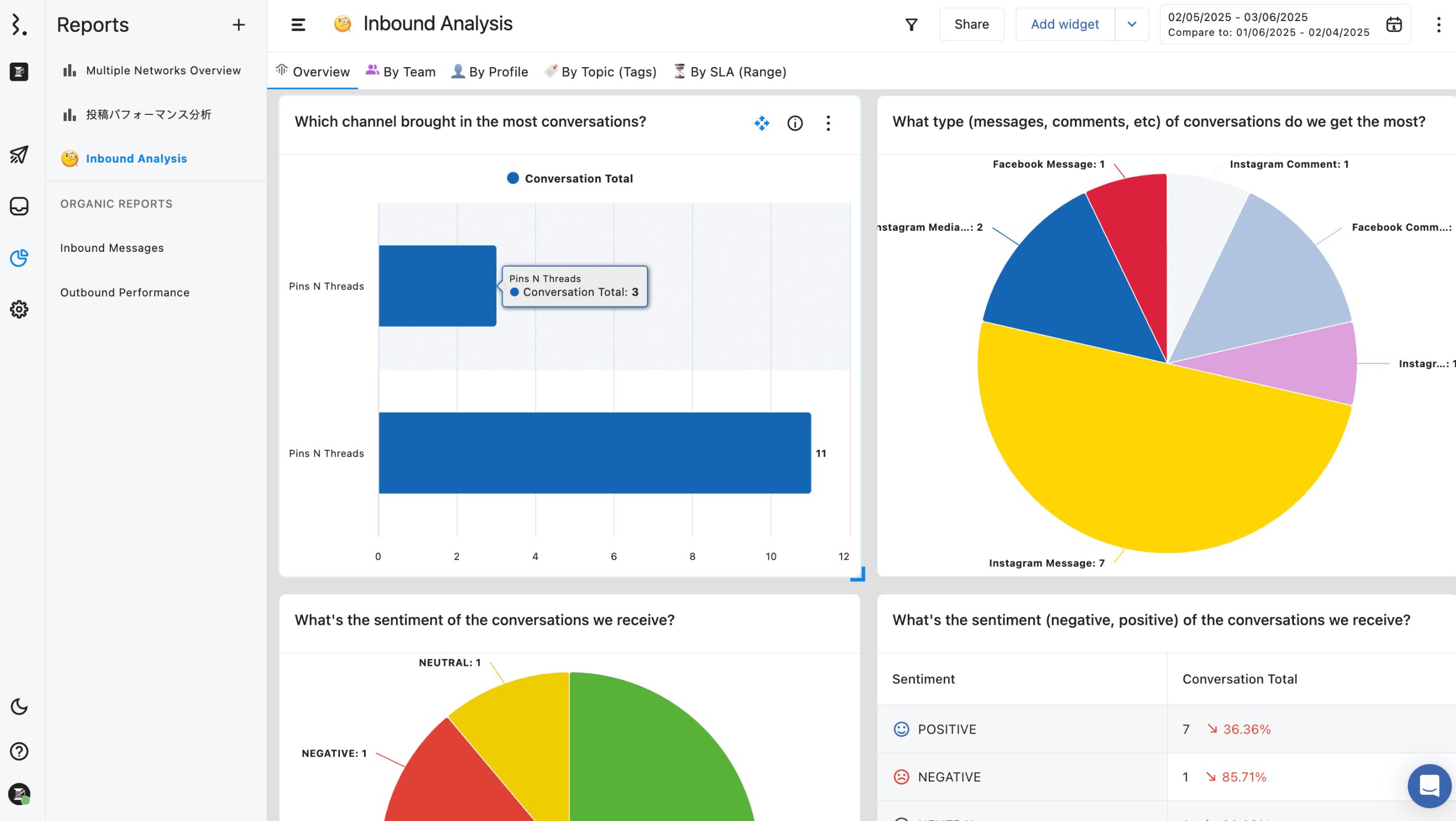
Statusbrew’s reporting covers basics like engagement, sentiment analysis, and ad metrics – but most advanced features are locked to higher plans. Some users mention they’d love more flexibility in customizing reports or drilling deeper into campaign insights. Many alternatives now offer this as standard, not premium.
Scaling Can Get Expensive
Growth is great until your software bill doubles. Adding new users or client profiles on Statusbrew can get expensive fast. For growing agencies, this scaling model can be much of a pain than rewarding, especially when similar tools scale more gently with usage.
Good Calendar, But Some Friction
Statusbrew’s multi-view content calendar (list, week, month, grid) is well-organized, but users have pointed out small workflow hiccups – like queued posts not syncing across platforms. Deleting or adjusting content can sometimes require extra manual steps, which adds friction to an otherwise solid scheduling experience.
In short, Statusbrew does many things right, but it’s not the perfect fit for everyone. Whether it’s cost, complexity, or limited customization, there are plenty of Statusbrew alternatives that match your needs more closely, especially if you want a smoother experience without breaking the bank.
Best Statusbrew Alternatives
1. OnlySocial
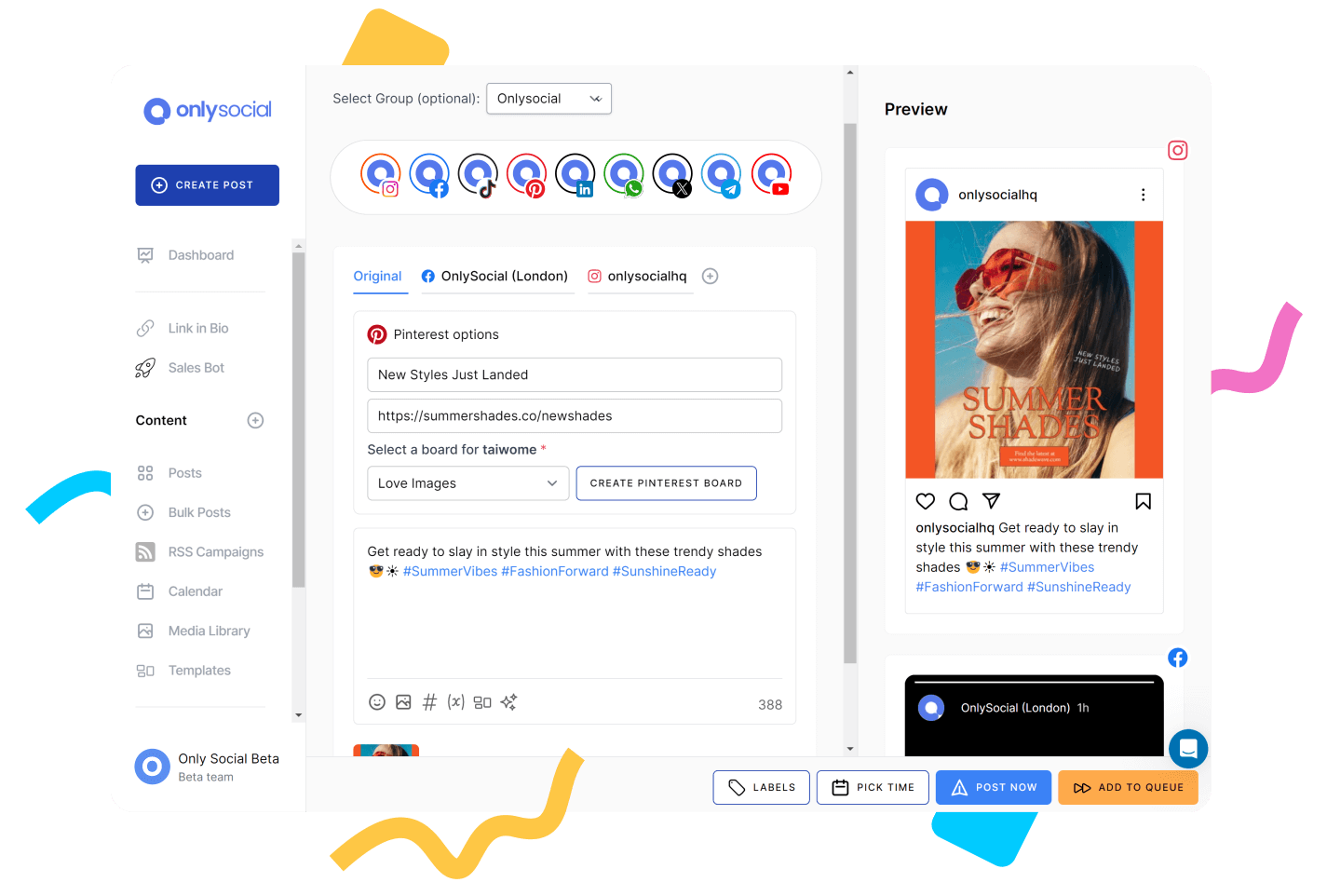
OnlySocial is the all-in-one social media scheduling and management platform built for creators, brands, and agencies that want control without complications. It’s simple enough for freelancers but powerful enough for large teams handling multiple accounts.
From cross-platform posting to AI-powered captions, it’s a tool that feels genuinely designed for how we manage social media today.
Key Features
Cross-platform scheduling (15+ networks)
OnlySocial covers more ground than most tools – from Instagram, TikTok, and LinkedIn to Pinterest, YouTube, Threads, and even Bluesky. Every platform is supported natively, so you don’t need awkward workarounds to publish posts consistently.

Visual calendar with bulk upload
The drag-and-drop calendar makes planning campaigns easy to grasp at a glance. You can color-code posts by platform or theme and upload dozens of posts at once using the bulk uploader – a lifesaver when you’re managing multiple brands.
All your DMs, comments, and mentions flow into a single inbox. This means you no longer need to switch between accounts or tabs to keep up with messages. You can reply, assign, or tag conversations in one dashboard.

AI-powered post creation
The built-in AI assistant helps generate captions, hashtags, and visuals that sound like your brand. It’s responsive and adapts to your tone over time, making it feel like a creative partner, not just a robot spitting out text.
Collaborative team workspace
Assign roles, manage approvals, and store creative assets in a shared library. Teams can work together smoothly, with fewer email threads and less confusion about who’s doing what.
Actionable analytics
Reports are clean, visual, and easy to understand. You can see what content performs best, track engagement trends, and identify the best posting times – all without needing a data analyst to interpret the results.
OnlySocial vs. Statusbrew: Our Experience
After testing both tools side by side, here’s what stood out when comparing OnlySocial with Statusbrew across key areas that matter most to social media teams.
Ease of Use
Statusbrew is powerful but comes with a noticeable learning curve – setup can feel lengthy, and navigating its menus takes time. OnlySocial, on the other hand, feels light and straightforward from the start.
The interface is clean, the dashboard is intuitive, and scheduling or editing posts takes seconds. For teams that want to get up and running quickly, OnlySocial wins on usability.

Platform Coverage
While Statusbrew supports major networks, it doesn’t include newer ones like Threads or Bluesky yet. OnlySocial covers more than 15 platforms out of the box. For brands looking to stay ahead on emerging channels, that extra reach makes a real difference.
Collaboration and Workflow
Both tools support team collaboration, but the experience is smoother in OnlySocial. Roles and approval workflows are included from the start, whereas Statusbrew reserves advanced collaboration features for higher-tier plans.
In practice, we found OnlySocial’s shared asset library and visual calendar far easier for team coordination.
Analytics and Reporting
Statusbrew offers solid analytics, but most customization options sit behind its premium plans. OnlySocial gives clear, visual insights right away – with engagement metrics, audience activity times, and post-performance comparisons all available in the main dashboard.
Pricing and Value
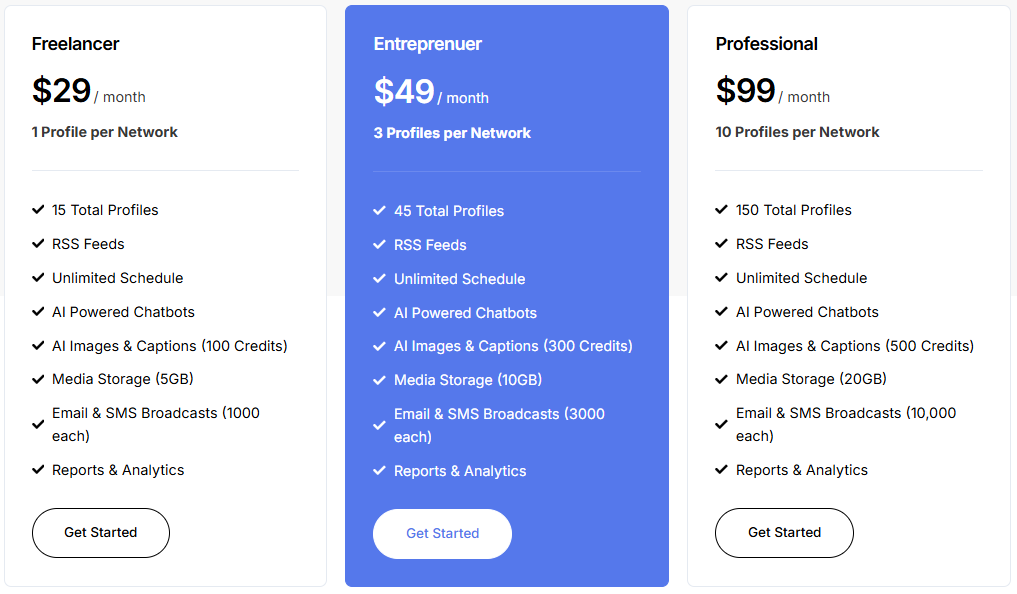
Statusbrew starts at $89/month for one user and five profiles, while OnlySocial’s entry plan starts at $29/month for fifteen profiles. For teams or agencies managing multiple brands, that’s a huge cost difference. With more included features and broader coverage, OnlySocial feels like better value for the money.
Final Verdict
Both tools deliver strong scheduling and engagement features, but OnlySocial offers a more modern, flexible experience at a fraction of the cost. If you’re after smoother workflows, built-in AI, and simpler analytics – without the enterprise price tag – OnlySocial stands out as the smarter, faster alternative to Statusbrew.
2. Planable

If collaboration and visual clarity are at the top of your list, Planable is one of the best Statusbrew alternatives out there. It’s built for social teams, agencies, and content creators who want to plan, review, and approve content together – all without messy feedback loops or endless email threads. Everything about it feels visual, fast, and designed for teamwork.
Key Features
· Visual content planning
Planable lets you preview posts exactly as they’ll appear on each platform – from Instagram and Facebook to TikTok and YouTube. You can scroll through your feed, switch between calendar and list views, and see the entire content flow at a glance.
· Real-time collaboration
The tool works like Google Docs for social media. Multiple people can comment, suggest edits, or tweak captions simultaneously. It’s a game-changer for agencies that want client feedback in one place, not scattered across email chains.
· Approval workflows
You can create multi-step approval flows, making sure every post gets reviewed by the right people before it goes live.
· Multi-platform scheduling
Planable supports all the major social networks. You can adjust each post for platform-specific requirements without switching tabs.
· Version history and drafts
Every edit is saved, so you can revert to older drafts or compare versions whenever needed. It’s a small but powerful feature that helps maintain consistency and transparency.
Planable vs. Statusbrew: Our Experience
When we tested Planable and Statusbrew side by side, both delivered strong scheduling features, but the experience felt entirely different.
Collaboration and Team Workflow
Planable’s workflow is effortless. You can leave comments right on the post, preview how it will appear live, and approve everything within seconds. In contrast, Statusbrew’s approvals are less visual and locked behind higher-priced plans, which made client coordination feel clunkier.
User Experience and Setup
Statusbrew’s setup can feel overwhelming at first, especially for smaller teams. Planable’s interface, however, is clean and intuitive. It feels natural to use from day one. The drag-and-drop calendar makes it easy to visualize campaigns and make last-minute changes.
Visual Accuracy
This is where Planable shines. The ability to scroll through your posts in a true-to-life feed view helps clients and team members instantly understand how the campaign will look. With Statusbrew, the preview experience is much more limited.
Pricing and Accessibility
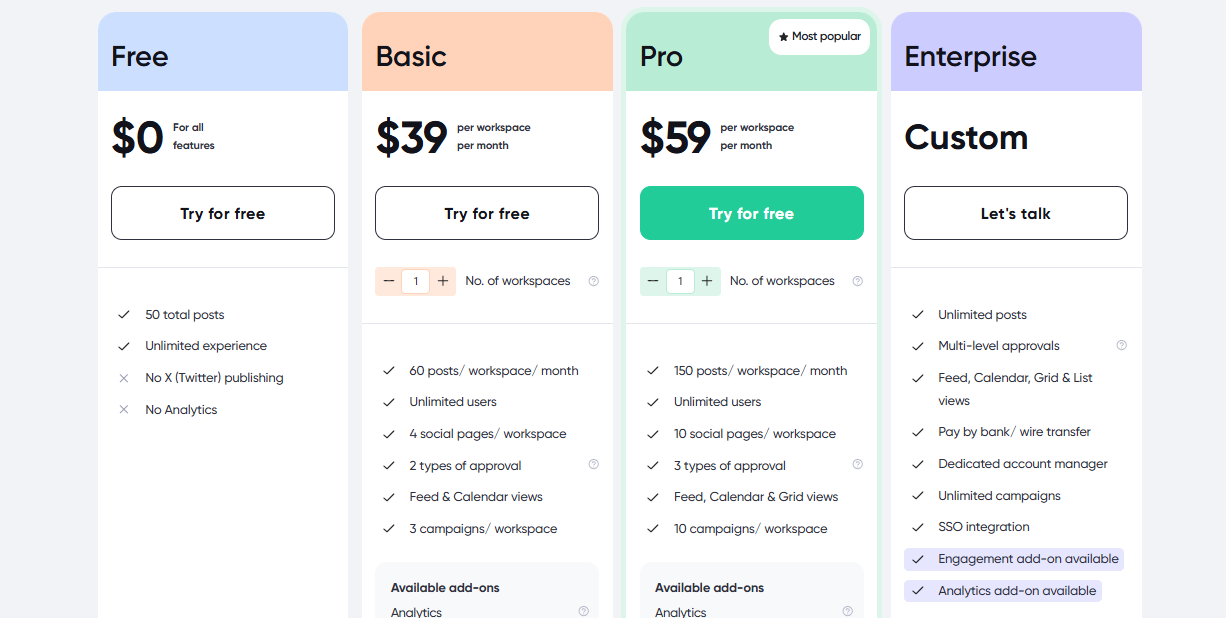
Planable starts at $39/month, while Statusbrew begins at $89/month. For teams that care more about visuals, feedback, and client collaboration rather than deep analytics or enterprise-level monitoring, Planable gives better value for money.
Final Verdict
Planable is a perfect fit for agencies and visual-first teams that care about how their content looks and how easily feedback flows. It strips away the friction of approvals and endless revisions, offering a cleaner, more transparent way to manage social media campaigns.
If you’ve found Statusbrew’s interface or collaboration tools too heavy, Planable will feel like a breath of fresh air.
3. Buffer
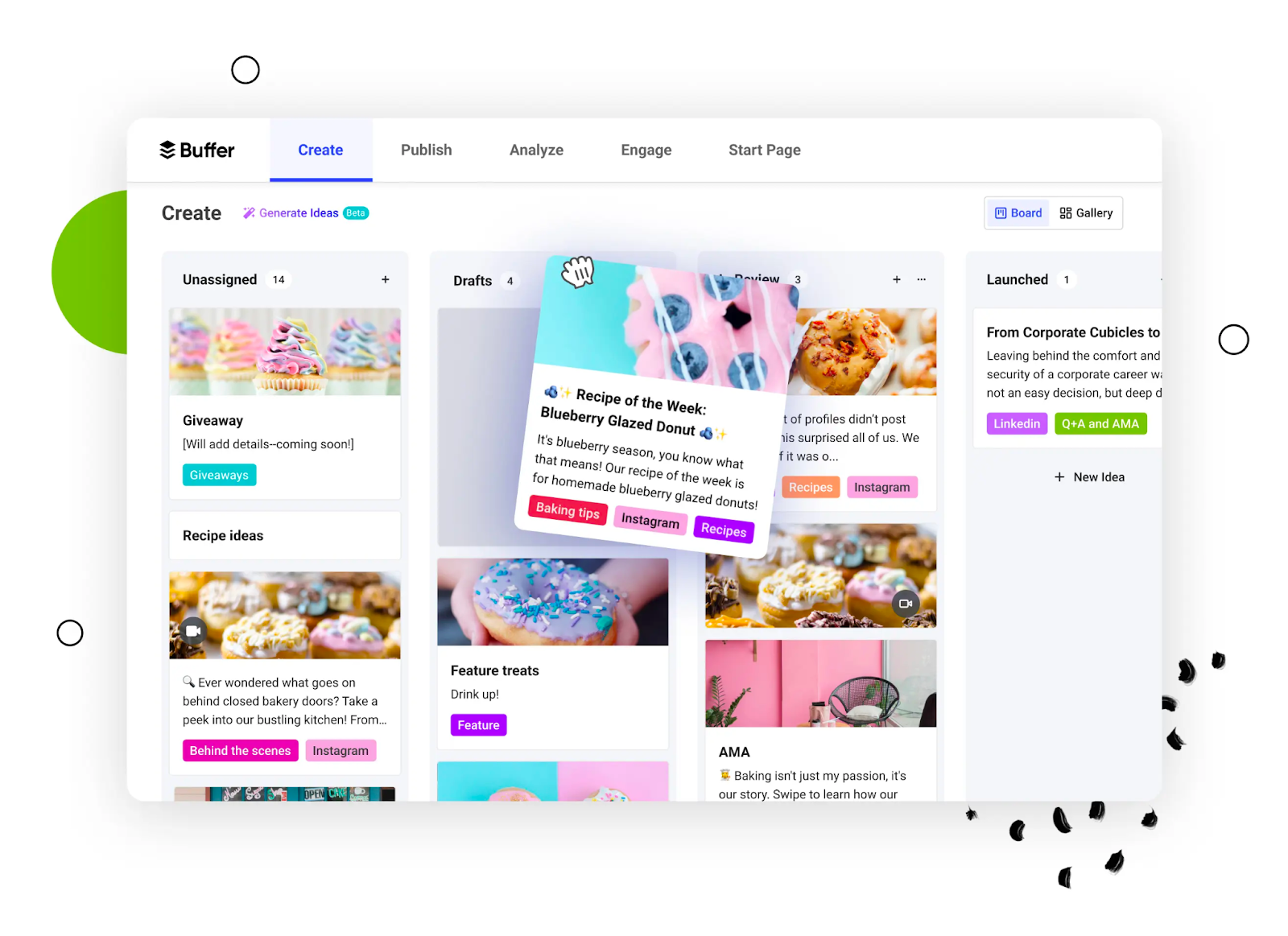
If you’re after a simple, reliable tool that keeps social scheduling stress-free, Buffer is one of the best Statusbrew alternatives to consider. It’s built for creators, small businesses, and growing teams who want to stay consistent across platforms without feeling buried under endless features.
Key Features
· Multi-platform scheduling
Buffer supports posting across major platforms like Instagram, Facebook, LinkedIn, X (Twitter), and Pinterest. You can manage all your accounts from a single dashboard and queue posts in advance to stay consistent without logging in daily.
· Clean, intuitive interface
Buffer is known for its simplicity. The layout is clear, uncluttered, and easy to navigate – making it perfect for teams or freelancers who don’t want to spend hours learning how to use a new tool.
· Link-in-bio tool
Buffer’s built-in “Start Page” lets you create a mini landing page with multiple links for your Instagram bio. It’s free, customizable, and eliminates the need for third-party tools.
· Team collaboration
Buffer allows multiple users to contribute, assign tasks, and manage approvals – handy for small teams balancing content creation and scheduling.
· Post analytics
You can track engagement, reach, and clicks to see which posts perform best. The insights aren’t as deep as enterprise tools like Statusbrew, but they’re practical and easy to understand.
Buffer vs. Statusbrew: Our Experience
After using both tools, it’s clear that Buffer and Statusbrew serve different audiences – and that’s exactly what makes Buffer a great alternative.
Ease of Use
Buffer’s simplicity is its biggest win. Statusbrew’s interface takes time to get used to, while Buffer feels familiar and effortless right away. For small teams or solo users, that’s a major plus.
Pricing and Value
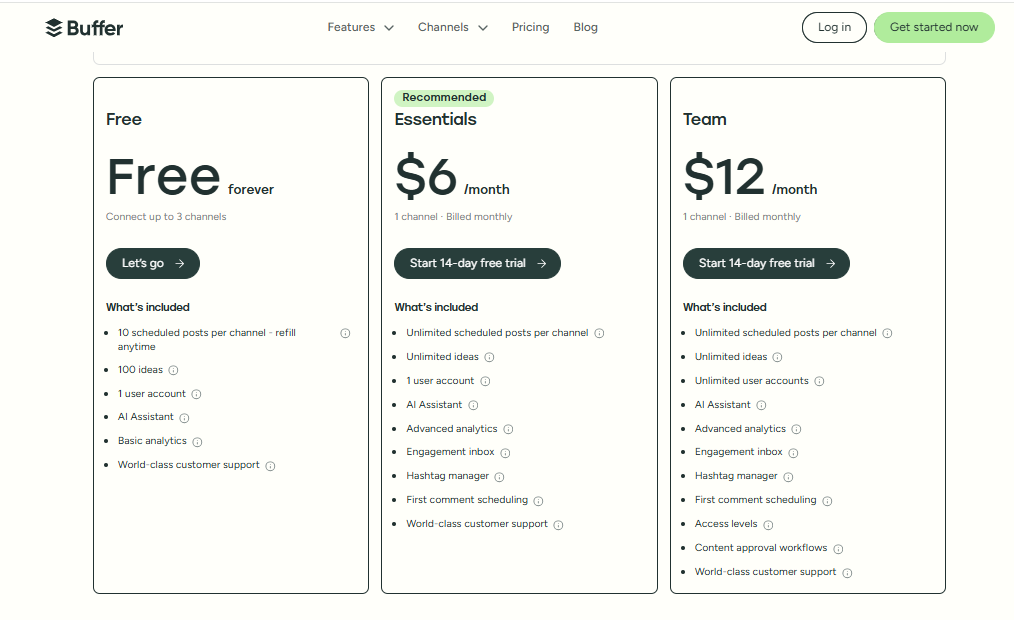
Statusbrew starts at $89/month, which can be steep for small businesses. Buffer’s plans begin at just $6/month, with a solid free tier for light users. It’s one of the most budget-friendly options available.
Collaboration and Workflow
Buffer offers basic collaboration tools that work well for small teams, while Statusbrew’s approval workflows and role management cater more to larger organizations. For most small-scale users, Buffer keeps things refreshingly straightforward.
Analytics and Reporting
Statusbrew provides more comprehensive analytics, including sentiment tracking and ad metrics. Buffer’s reporting is simpler but gives you just enough insight to make data-driven decisions without complexity.
Final Verdict:
Buffer is ideal for individuals, startups, and small teams who want smooth scheduling, clean design, and a fair price tag. It strips away unnecessary extras and focuses on what matters, creating and publishing great content.
If Statusbrew feels like too much, Buffer is the lightweight, reliable alternative that helps you stay consistent without the learning curve.
4. Sprout Social

If you’re managing a large team, multiple brands, or you simply love detailed analytics, Sprout Social is one of the most powerful Statusbrew alternatives out there.
It’s an enterprise-level tool built for businesses that treat social media as a serious part of their marketing strategy. While it comes at a premium, it delivers depth, insights, and collaboration tools that make it a top choice for growing organizations.
Key Features
· Advanced scheduling & publishing
Sprout Social lets you publish and queue posts across major platforms, including TikTok, Instagram, Facebook, LinkedIn, Pinterest, and YouTube. Its smart scheduling feature automatically chooses the best times to post based on your audience’s activity.
· Smart inbox
All your mentions, comments, and messages land in one unified inbox. You can tag, reply, and assign messages to teammates, making customer engagement faster and more organized than Statusbrew’s more segmented inbox system.
· Deep analytics & reports
Sprout’s reporting is one of the best in the industry. You can view everything from audience demographics to engagement metrics, and even compare your performance against competitors. The ability to export white-label reports also makes it great for agencies.
· Social listening tools
You can track keywords, hashtags, and brand mentions across platforms in real time. This helps you stay on top of conversations that matter, monitor sentiment, and make data-driven adjustments.
· Team collaboration & task management
Assign roles, route incoming messages, and track progress within the platform. Every message can be tagged or escalated to the right person, keeping collaboration tidy and transparent.
Sprout Social vs. Statusbrew: Our Experience
When testing Sprout Social and Statusbrew together, both proved strong in analytics and collaboration – but Sprout offered a more refined, scalable experience.
Analytics & Insights
Sprout Social goes deeper. It not only tracks engagement but also gives you audience sentiment, competitor benchmarks, and paid performance metrics. Statusbrew’s analytics are solid, but Sprout’s depth and visualization options were far superior.
Engagement & Inbox Management
Sprout’s Smart Inbox combines all messages into one clean dashboard, while Statusbrew separates conversations by channel. For teams managing high volumes of comments or customer inquiries, Sprout’s unified approach was a huge time-saver.
Collaboration & Workflow
Both tools offer task assignments and approval chains, but Sprout’s routing and tagging system made delegation smoother. Larger teams will appreciate the extra control over who handles what.
Pricing & Scalability
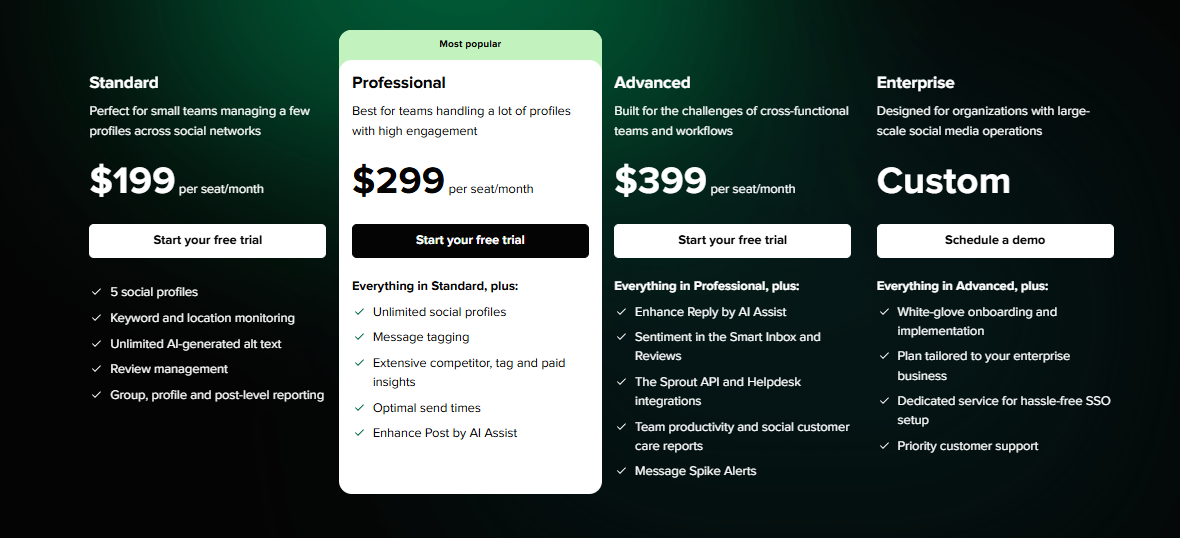
Sprout Social starts at $199/month per user, compared to Statusbrew’s $89/month base plan. It’s pricier, but the value comes through in the reporting depth, automation, and integrations – especially for enterprises or data-focused brands.
Final Verdict
Sprout Social is a top-tier Statusbrew alternative for businesses that rely on analytics, engagement, and scalability. It’s not the cheapest option, but for organizations that need detailed insights, advanced collaboration, and CRM integration, it delivers unmatched power.
5. CoSchedule
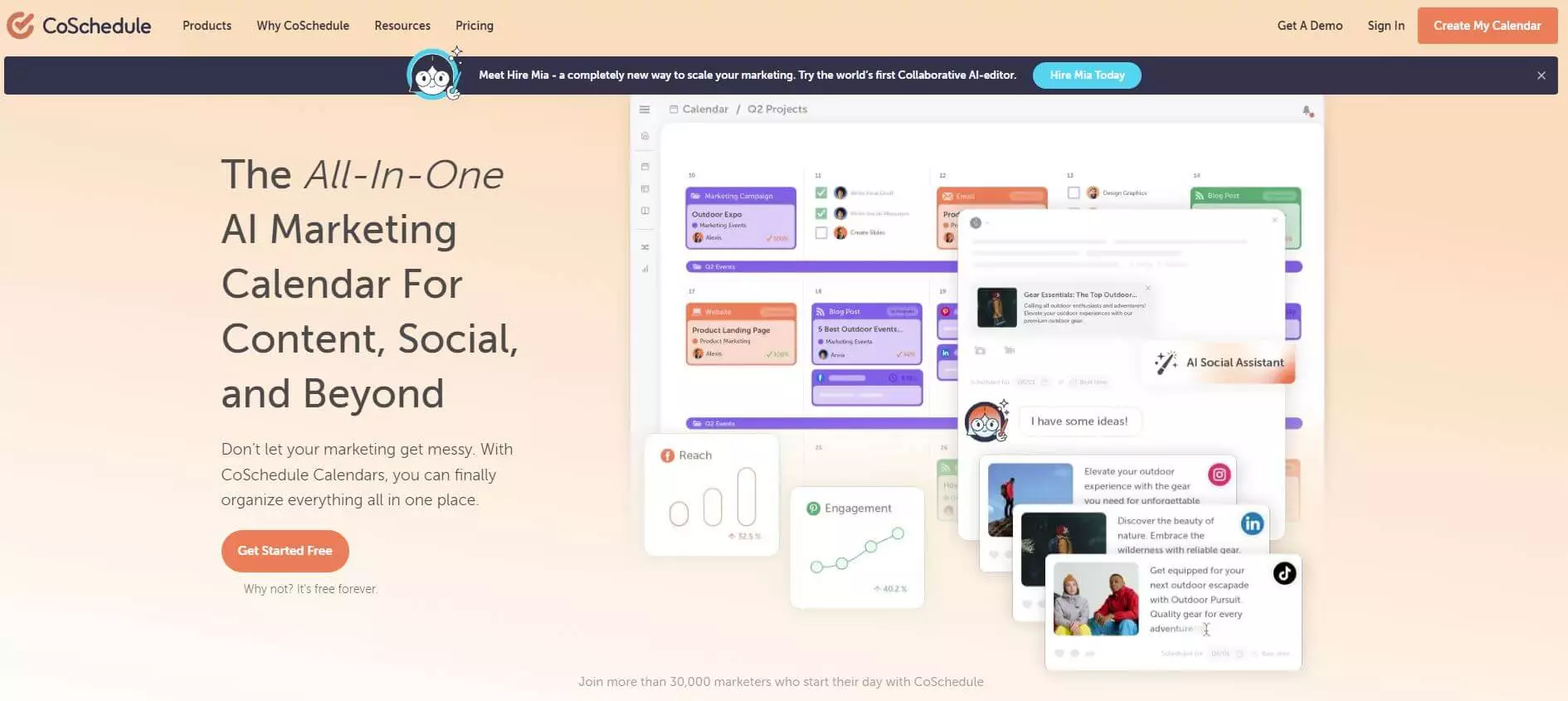
CoSchedule is a long-standing name in the content marketing world. Originally built as a marketing calendar for bloggers and editorial teams, it has grown into a full-fledged social media management and campaign planning platform.
It’s especially popular with marketers who like structure and want their social scheduling tied closely to their content marketing workflow.
Key Features
· Marketing calendar
CoSchedule’s biggest strength is its visual calendar, which helps you plan, organize, and schedule posts across multiple social channels. You can drag, drop, and reschedule content easily while keeping campaigns neatly organized.
· Content collaboration tools
It allows teams to create and edit social posts, blog content, and emails in one place. While it’s not as visually collaborative as tools like Planable, it keeps the workflow organized for marketing teams juggling multiple content types.
· Headline analyzer
One of CoSchedule’s signature features — this built-in tool helps you craft better headlines for social posts and blog articles. It’s a small but valuable touch for teams focused on content performance.
· Task templates and automation
You can create reusable task templates for recurring campaigns. Combined with scheduling automation, it saves time for teams managing multiple projects each week.
· Integrations
CoSchedule connects with WordPress, HubSpot, Mailchimp, and Google Analytics, making it a good fit for marketers who manage both social and content marketing campaigns together.
CoSchedule vs. Statusbrew: Our Experience
When we compared CoSchedule with Statusbrew, both offered great scheduling options, but they serve different kinds of teams.
Content Marketing Focus
CoSchedule shines for teams that manage blog posts, newsletters, and social media from a single calendar. Statusbrew focuses more on social engagement and moderation. So, if your main priority is keeping editorial campaigns aligned with social output, CoSchedule feels more structured.
Ease of Use
CoSchedule’s calendar is visually appealing and easy to navigate, but setup takes time. Statusbrew’s dashboard is cleaner for pure social media management. However, CoSchedule wins for marketers who prefer a centralized place for everything content-related.
Analytics & Reporting
Statusbrew offers more detailed analytics for social media campaigns, while CoSchedule’s basic analytics are limited to engagement stats. To unlock deeper reports, you’d need to upgrade to the Marketing Suite, which increases costs.
Pricing & Value
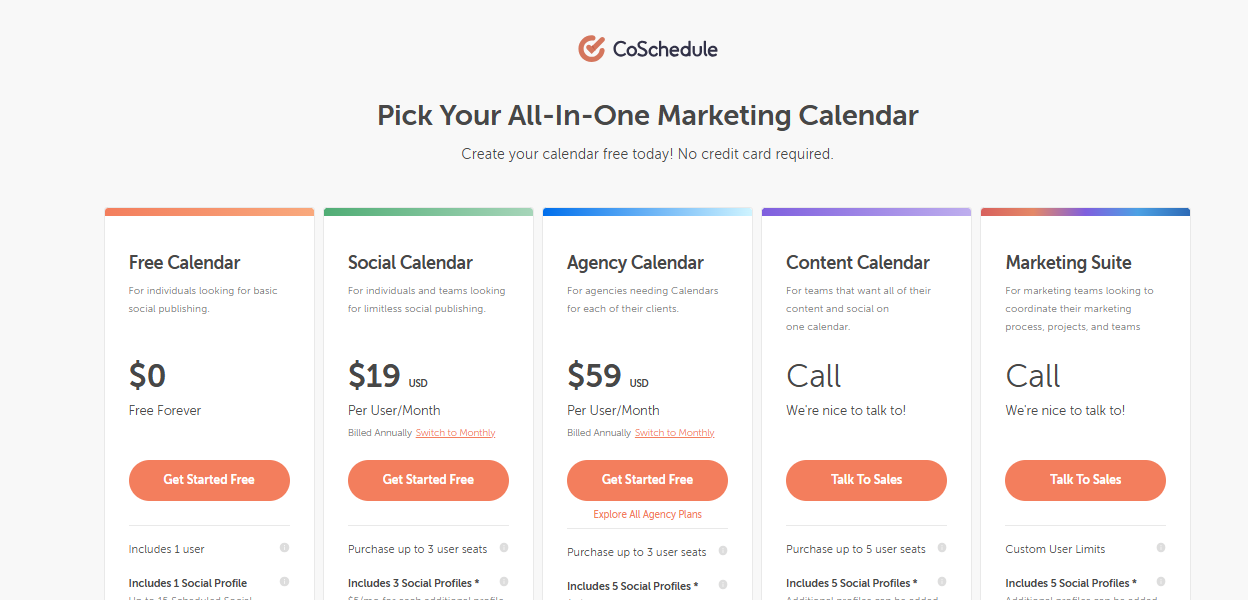
CoSchedule starts at $19/month for three profiles, but additional profiles cost extra. By comparison, Statusbrew’s base plan begins at $89/month for five profiles and one user. CoSchedule is cheaper at first glance but quickly adds up if you need more users or advanced reporting.
Final Verdict
CoSchedule is an excellent Statusbrew alternative for teams that run both content and social campaigns under one roof. It’s not as strong for engagement or analytics, but if you’re a content-driven team that loves structure, calendars, and task workflows, CoSchedule fits right in.
6. RecurPost
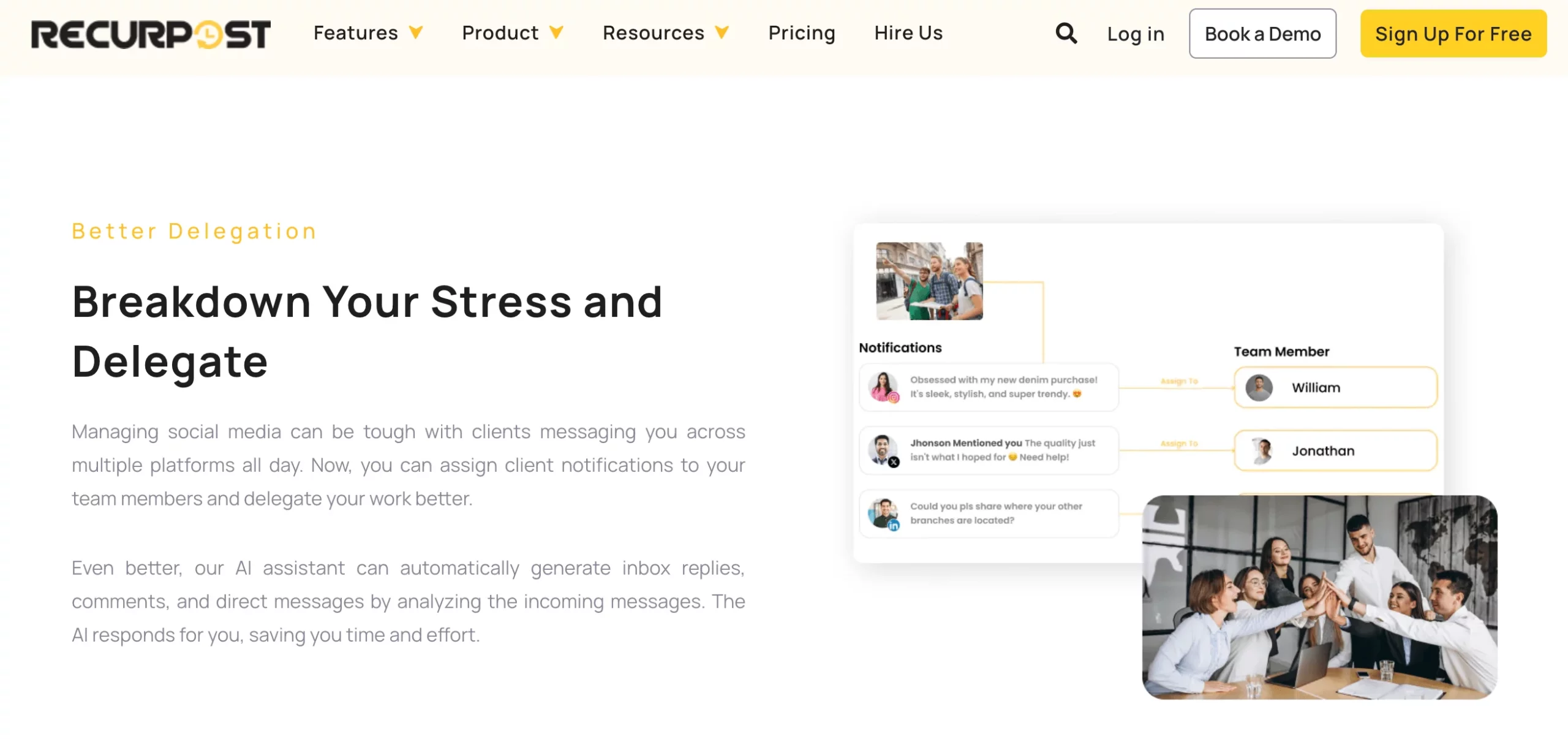
If you’re looking for a simple way to stay consistent on social media without constantly creating new content, RecurPost is a great Statusbrew alternative.
It’s built around one key idea – evergreen automation. Instead of manually rescheduling posts week after week, RecurPost automatically recycles your best-performing content so your feeds never go quiet.
Key Features
· Evergreen content libraries
Create categorized libraries for different post types, like blog links, quotes, or promotions, and let RecurPost keep recycling them automatically. It ensures your content calendar always stays active without extra effort.
· Smart scheduling
RecurPost analyzes engagement patterns and posts your content when your audience is most active. It’s a hands-off way to get better reach without constantly tweaking schedules.
· Multi-platform support
The tool supports Facebook, Instagram, LinkedIn, X (Twitter), Pinterest, and Google Business. It may not cover as many platforms as larger tools, but it includes everything small businesses and freelancers need to stay visible.
· Social inbox
Manage comments and messages from one dashboard. It’s lightweight but handy for users who don’t need the full-blown engagement systems of enterprise tools.
· Bulk upload & RSS automation
You can upload posts in bulk using a CSV file or connect RSS feeds to automatically pull and publish fresh content – perfect for bloggers and publishers.
· White-label reporting
For agencies, RecurPost offers customizable, client-ready reports so you can share performance results professionally without any manual formatting.
RecurPost vs. Statusbrew: Our Experience
When testing RecurPost against Statusbrew, we found they cater to very different workflows – and that’s where RecurPost shines for small teams.
Automation and Efficiency
RecurPost’s automation is effortless. Once you set up your libraries, it takes care of scheduling automatically. With Statusbrew, you’ll need to manually re-queue posts or duplicate them. For users who want “set it and forget it” simplicity, RecurPost is the clear winner.
Ease of Use
RecurPost’s dashboard is minimal and straightforward – no steep learning curve or cluttered menus. Statusbrew is more feature-rich but can feel overwhelming at first, especially for solo users.
Analytics and Reporting
Statusbrew offers deeper data and sentiment insights, but RecurPost keeps it simple with easy-to-read performance reports. Agencies can even white-label reports to send to clients directly.
Pricing and Value
RecurPost starts at $25/month, compared to Statusbrew’s $89/month starting plan. For smaller teams that just need reliable posting and light analytics, that price difference makes a big impact.
Final Verdict
RecurPost is a perfect Statusbrew alternative for small businesses, solopreneurs, and agencies that want to stay active online without spending hours scheduling content. Its evergreen posting system is a huge time-saver, and its pricing is fair for what it delivers.
If Statusbrew feels like overkill, RecurPost gives you a simpler, more affordable way to stay consistent and visible.
7. Later

If visuals drive your social media strategy, Later is one of the best Statusbrew alternatives to consider. Originally built for Instagram scheduling, it’s now a full-fledged multi-platform tool trusted by creators, brands, and small teams.
It shines for visual planning, post previews, and simple automation, making it perfect for anyone who likes to see how their feed will look before it goes live.
Key Features
· Visual content calendar
Later’s drag-and-drop calendar lets you plan your posts visually. You can rearrange content in seconds, preview your feed layout, and schedule posts in bulk across platforms. It’s one of the most user-friendly planners for Instagram and Pinterest.
· Instagram-first focus
Later offers grid previews, story scheduling, and reel support. It’s one of the few tools that handle Instagram visuals with such precision, giving creators a true-to-life preview before posting.
· Linkin.bio tool
Later’s built-in “Linkin.bio” feature creates a mini landing page for your Instagram profile. You can link individual posts to web pages, making it easier to drive traffic to blogs, shops, or product pages.
· Media library
Store, label, and reuse your photos and videos directly inside Later. This is especially useful for teams handling visual assets from multiple campaigns or clients.
· Basic analytics
Later provides simple yet helpful insights — like engagement, follower growth, and best posting times. It’s not as detailed as Statusbrew, but it covers the essentials for creators and small businesses.
Later vs. Statusbrew: Our Experience
Testing Later against Statusbrew revealed how differently the two tools approach social media management.
Ease of Use & Visual Planning
Later’s visual-first layout made content planning feel intuitive and fun. You can see exactly how your feed will look, move posts around, and preview carousels or reels.
In comparison, Statusbrew’s interface focuses more on analytics and engagement, which can feel heavy for users who just want simple scheduling.
Platform Support & Focus
Later prioritizes visual platforms like Instagram, TikTok, and Pinterest, while Statusbrew focuses more on traditional social channels like LinkedIn and X. For brands that live off visual content, Later feels like a natural fit.
Automation & Analytics
Later keeps things light – simple scheduling, queues, and basic analytics. Statusbrew offers deeper reporting and sentiment tracking, but for creators or small businesses, Later’s simplicity was refreshing and enough for everyday use.
Pricing & Value
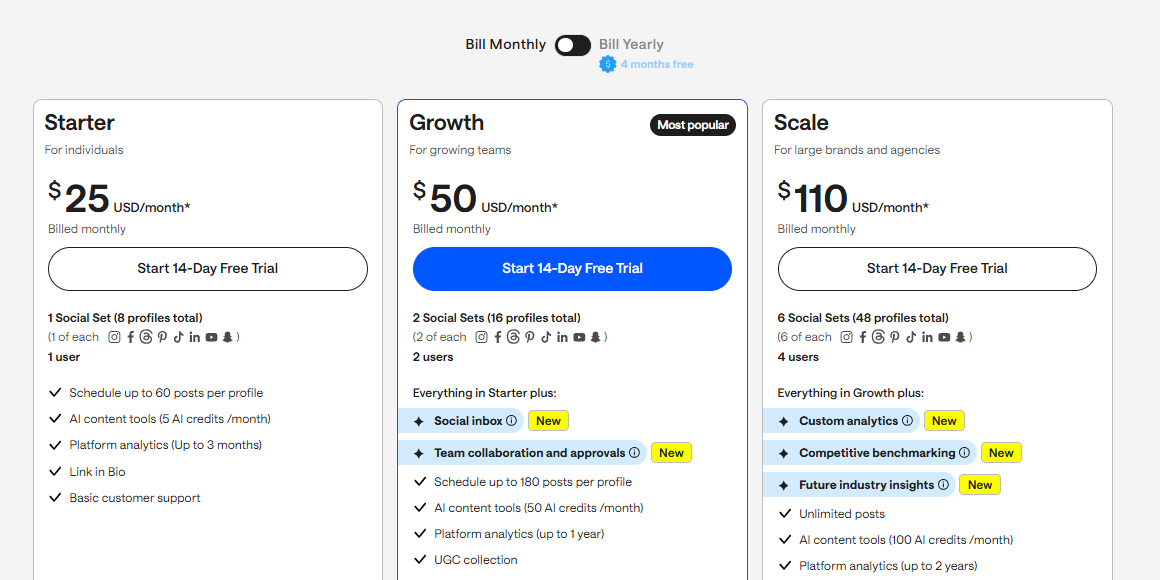
Later starts at $25/month, compared to Statusbrew’s $89/month base plan. It’s affordable, beginner-friendly, and even offers a free plan, making it an ideal choice for startups or personal brands.
Final Verdict
Later is the go-to Statusbrew alternative for creators, influencers, and brands that rely on visuals. It makes social planning easy, looks great, and doesn’t overwhelm you with complexity. If you’re focused on Instagram or TikTok content, Later keeps your workflow simple and your feed looking polished.
8. ContentStudio
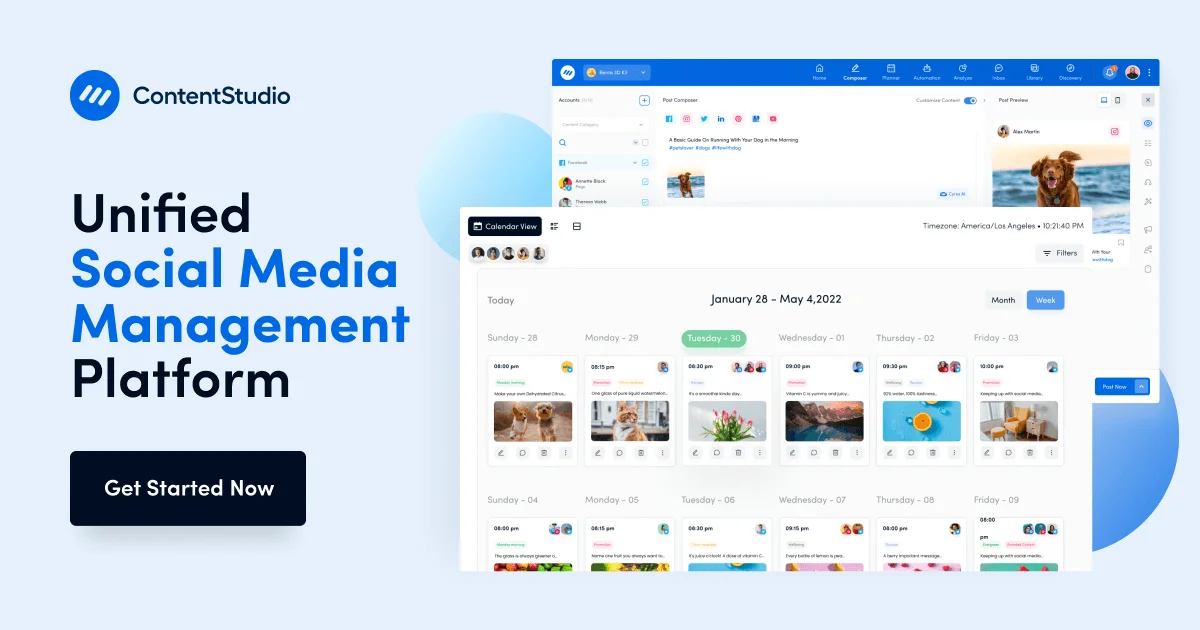
If you want a single tool that can handle everything – from content discovery to creation, scheduling, and analytics – ContentStudio could be the perfect tool for you. It’s designed for agencies, content teams, and creators who need both power and flexibility.
Key Features
· Multi-platform scheduling
ContentStudio supports all major platforms, including TikTok, YouTube Shorts, LinkedIn, Pinterest, Instagram, Facebook, and X. You can instantly publish or queue posts and even set custom posting times per platform.
· AI content generator
The built-in AI tool helps create captions, repurpose blogs, or draft promotional content in seconds. It’s a serious timesaver, especially when you’re managing multiple brands or content calendars.
· Content discovery & curation
You can search trending articles, topics, and domains to uncover viral content in your niche. With a few clicks, you can curate and share right from the discovery tab – something Statusbrew doesn’t offer natively.
· Automation workflows
Create recurring posting schedules, evergreen loops, or RSS-to-social automations. These workflows keep your profiles active automatically, reducing repetitive manual tasks.
· Unified social inbox & monitoring
Handle all your messages, comments, and mentions from one dashboard. You can also track keywords, hashtags, and even competitors in real time – ideal for staying ahead of trends.
· Content planner & analytics
The visual calendar gives a complete view of your scheduled content. Drag, drop, and filter posts easily, while built-in analytics show engagement, reach, and post performance at a glance.
ContentStudio vs. Statusbrew: Our Experience
When comparing ContentStudio to Statusbrew, both deliver strong publishing tools, but ContentStudio gives you more creative and automation power in one place.
· Content Discovery & Creation
This is where ContentStudio pulls ahead. You can discover trending content and instantly schedule it, or use the AI generator to create fresh posts. Statusbrew lacks a discovery engine and relies solely on your own content library.
· Automation & Efficiency
ContentStudio’s automation workflows, including RSS-to-social and evergreen reposting, saved us hours. With Statusbrew, these kinds of recurring automations aren’t as advanced or customizable.
· Engagement & Monitoring
Both have unified inboxes, but ContentStudio includes keyword and competitor tracking, which makes community management and brand monitoring easier.
· Analytics & Reporting
Statusbrew provides solid reporting for sentiment and engagement, but ContentStudio’s built-in visual dashboards made it easier to spot trends quickly without exporting data elsewhere.
· Pricing & Value
ContentStudio starts at $99/month, while Statusbrew begins at $89/month for fewer automation options. ContentStudio costs slightly more, but it packs in AI, automation, and discovery – features that Statusbrew users often have to handle manually.
Final Verdict
ContentStudio is an excellent Statusbrew alternative for agencies, marketers, and teams who want to streamline their entire content process – from ideation to analytics.
Its AI writing tools, discovery engine, and automation features make it a powerhouse for managing content at scale. If you want a platform that does more than schedule posts, ContentStudio delivers the depth and flexibility that Statusbrew often lacks.
9. Hootsuite
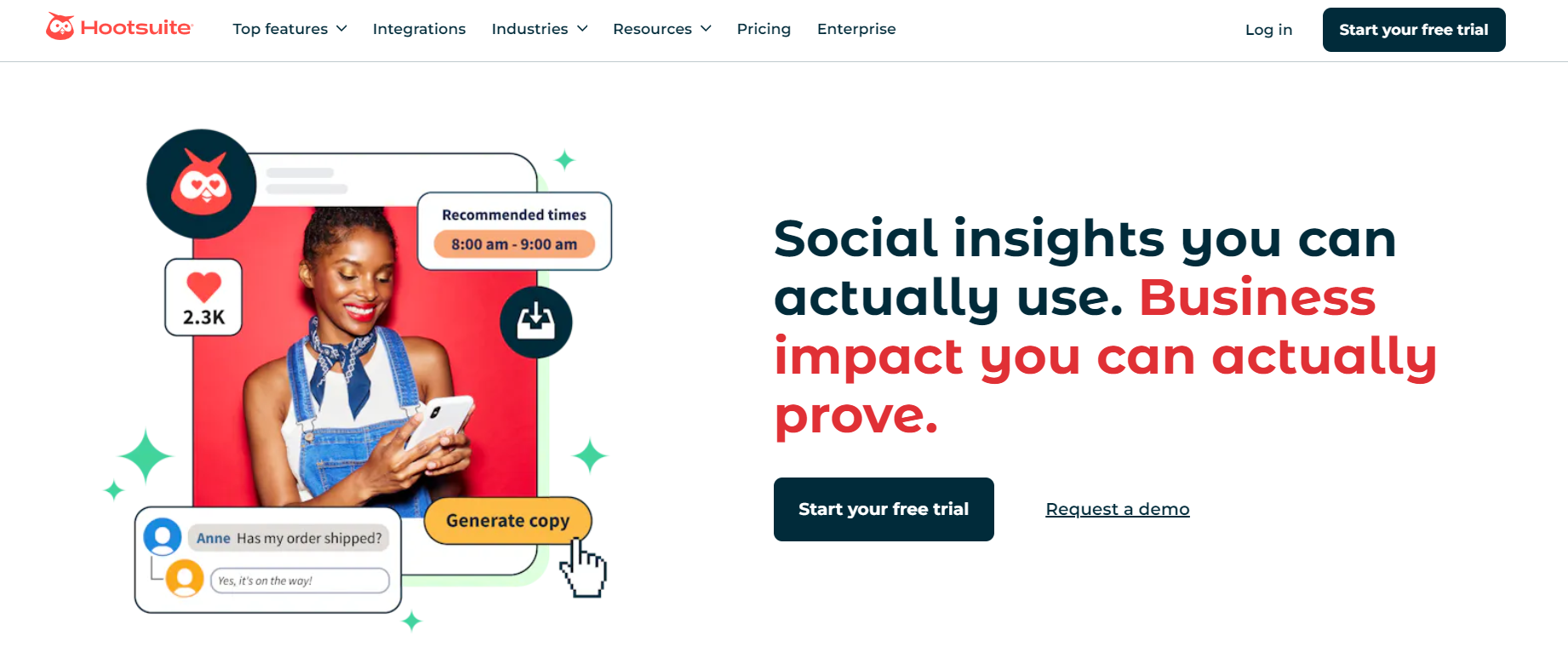
Hootsuite is one of the oldest and most recognized social media management tools around – and for good reason. It’s built for teams that need full control over their social channels, analytics, and community engagement.
While it’s a bit more complex than newer tools, it remains a strong alternative to Statusbrew, especially for larger organizations that need robust functionality and data depth.
Key Features
· All-in-one publishing dashboard
Hootsuite supports nearly every major platform – Facebook, Instagram, TikTok, LinkedIn, Pinterest, YouTube, and X (Twitter). You can plan, create, and schedule content across them all from one calendar view.
· Streams for real-time monitoring
Its “Streams” feature lets you monitor mentions, hashtags, and keywords in real time. You can reply to comments or messages directly from the dashboard, making it easier to stay on top of brand conversations.
· Advanced analytics
Hootsuite provides detailed performance metrics across all platforms. You can build customizable reports to track reach, engagement, conversions, and even ROI – perfect for data-focused teams.
· Team collaboration tools
You can assign posts or messages to team members, track progress, and prevent duplicate replies. For large social teams managing multiple brands, this structure keeps workflows clear.
· App integrations
Hootsuite’s App Directory gives you access to hundreds of integrations – from Canva and Dropbox to Trello and Slack – letting you build a fully connected social management ecosystem.
· Social advertising management
You can manage and track paid social campaigns from within the platform, helping marketing teams handle organic and paid strategies in one place.
Hootsuite vs. Statusbrew: Our Experience
Monitoring & Engagement
Hootsuite’s real-time Streams feature gives it an edge in monitoring brand mentions and trends. Statusbrew also supports engagement tracking, but it’s not as fast or flexible in surfacing real-time conversations.
Analytics & Insights
Both offer strong analytics, but Hootsuite goes deeper. You can customize dashboards, track paid campaign results, and connect data directly with your CRM or business tools. Statusbrew’s analytics are good, but they’re more limited in flexibility.
User Experience & Setup
Hootsuite’s interface is powerful but takes time to learn, especially for new users. Statusbrew’s layout feels slightly cleaner, but Hootsuite’s customization options make it more suitable for complex setups and larger teams.
Pricing & Scalability
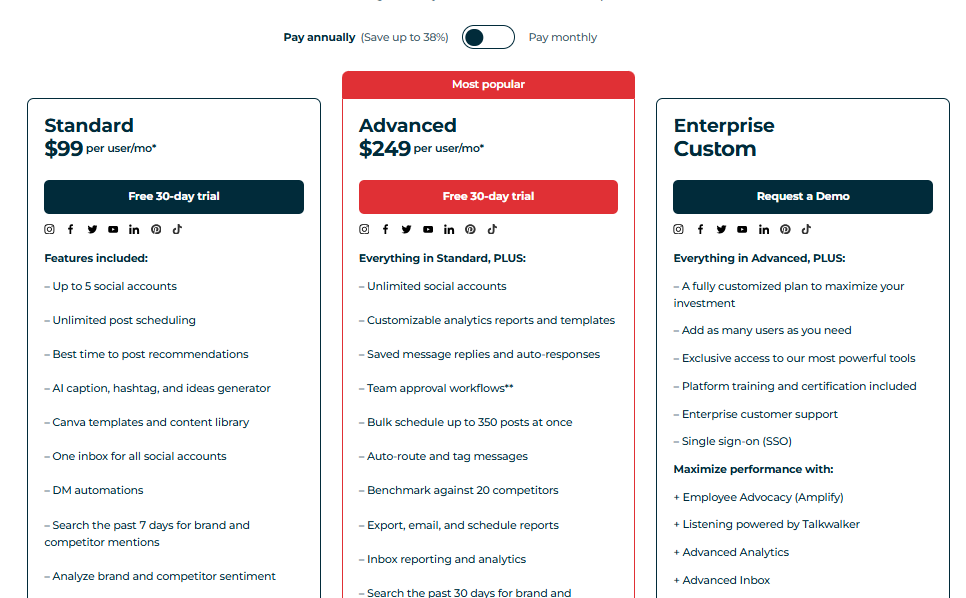
Hootsuite starts at $99/month, while Statusbrew’s base plan is $89/month. Both target professional teams, but Hootsuite offers more scalability for enterprises thanks to its integrations and advertising support.
Final Verdict
Hootsuite remains a powerhouse for social media management, especially for larger organizations that need detailed analytics, strong collaboration tools, and real-time monitoring.
While it’s pricier and slightly harder to learn, it gives teams full visibility and control across all channels. If your brand relies heavily on analytics and audience engagement, Hootsuite is a Statusbrew alternative worth the investment.
10. SocialBee

If your goal is to keep your content organized, consistent, and varied without constant manual scheduling, SocialBee is one of the best Statusbrew alternatives to consider.
It’s built around category-based scheduling and evergreen recycling, perfect for creators, agencies, and small businesses who want to stay active on social media while saving serious time.
Key Features
· Category-based scheduling
SocialBee lets you organize your posts into categories such as promotions, quotes, blogs, or tips. Each category follows its own schedule, so your content stays balanced and diverse, without having to manually adjust things every week.
· Evergreen content recycling
Once you’ve posted something that performs well, SocialBee can automatically re-queue it. This ensures that your top-performing content keeps reaching new audiences instead of disappearing after one post.
· AI-powered content assistance
The built-in AI helps generate captions, rewrite text, and brainstorm ideas. It’s not overbearing – just a helpful creative companion when you’re short on time or inspiration.
· Bulk upload & RSS import
You can upload multiple posts at once via CSV or automatically pull new content from blogs and websites using RSS feeds. It’s ideal for content-heavy teams or agencies managing multiple brands.
· Analytics & reporting
SocialBee provides clear engagement metrics across all connected profiles. While not as in-depth as Statusbrew’s sentiment tracking, it gives a clean overview of what’s working and what’s not.
· Collaboration & workspaces
You can invite team members, assign roles, and organize posts by client or brand using multiple workspaces. It’s structured enough for small agencies without feeling bloated.
SocialBee vs. Statusbrew: Our Experience
Content Organization & Automation
SocialBee’s category system makes automation effortless. You can set up weekly posting patterns and let the platform recycle content automatically. Statusbrew offers automation, but it’s less intuitive and not category-based.
Ease of Use
SocialBee’s interface is clean and beginner-friendly. You can go from setup to scheduling in minutes. Statusbrew, while more powerful, can feel dense with its rule engines and complex workflows.
Affordability
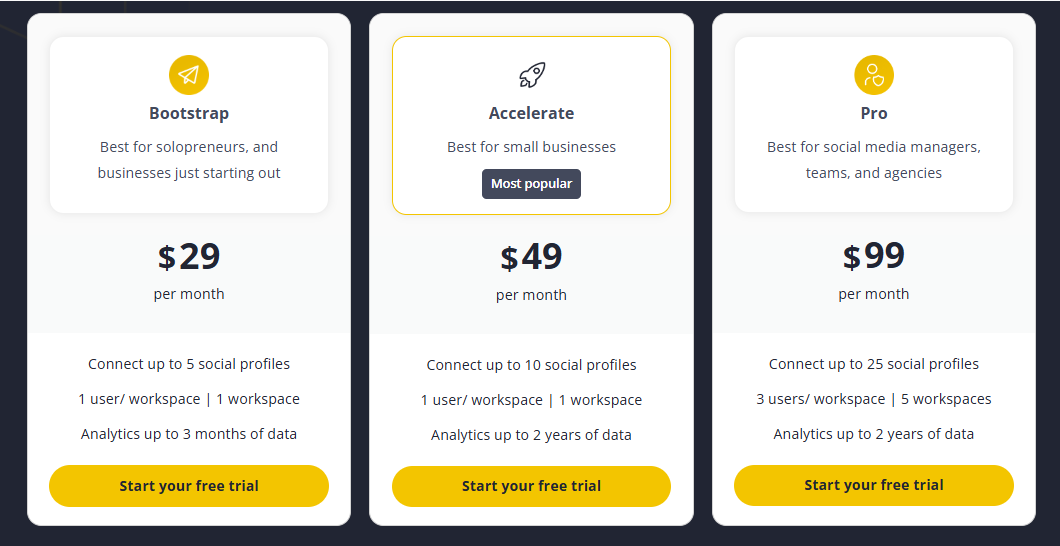
SocialBee starts at $29/month, while Statusbrew’s entry plan begins at $89/month. That’s a huge difference for teams that don’t need enterprise-level reporting or listening tools.
Analytics & Reporting
Statusbrew offers stronger data visualization, especially for large teams that need detailed sentiment analysis. SocialBee focuses on simplicity – you get key engagement metrics without the complexity.
Final Verdict
SocialBee is an excellent Statusbrew alternative for freelancers, small teams, and agencies that value simplicity and smart automation.
Its category-based scheduling and evergreen recycling take the stress out of content planning, while its pricing makes it one of the most budget-friendly options on the market.
Choosing the Best Statusbrew Alternatives

With so many tools on the market, picking the right Statusbrew alternative may not be as easy as one might think. The truth is, there isn’t a one-size-fits-all solution – what works for a small agency might not suit a solo creator or a large marketing team.
To help you narrow things down, here are a few key factors to keep in mind before making your choice:
Features That Match Your Workflow
Start by looking at what you actually need day-to-day. If your focus is content planning and visuals, tools like Planable or Later might fit best. But if you want cross-platform scheduling, AI assistance, and analytics in one place, OnlySocial or ContentStudio offer more versatility. Avoid tools packed with features you’ll never use – they’ll only complicate your process.
Ease of Use and Learning Curve
The best tool is one your team will actually use. Statusbrew can be powerful but also a little intimidating for beginners. If you prefer something lighter and easier to navigate, tools like Buffer or SocialBee are great for quick setup and straightforward scheduling.
Always check if the platform offers a trial period so you can test the experience firsthand.
Collaboration and Team Management
If you work in a team or manage clients, collaboration tools are a must. Look for platforms with approval workflows, role-based permissions, shared content calendars, and unified inboxes. Tools like OnlySocial and Planable make teamwork simple and transparent, while others like Hootsuite and Sprout Social scale well for larger organizations.
Pricing and Scalability
Finally, think long-term. A tool that’s affordable now might become expensive as your team grows. Consider how pricing changes when you add new users or social profiles.
Tools like OnlySocial offer generous profile limits at fair prices, while enterprise options like Sprout Social or Hootsuite can climb quickly as you scale. Always choose one that fits both your current needs and your future growth.
Final Thoughts
Statusbrew is a solid platform – no question. It handles publishing, collaboration, and analytics fairly well. But as social media evolves, so do the needs of the people managing it.
Whether it’s a smoother interface, smarter automation, or simply better value for money, there are now plenty of tools that fill in the gaps Statusbrew leaves behind.
If you’re looking for a tool that truly balances simplicity, scalability, and smart features, OnlySocial stands out above the rest. It supports more platforms, includes built-in AI for faster content creation, and offers a unified inbox – all wrapped in a clean, intuitive dashboard that teams actually enjoy using.
In short, if Statusbrew feels heavy or overpriced, OnlySocial gives you everything you need – and none of the extra fluff – to manage your social media more effectively in 2025 and beyond.