11 Sprinklr Alternatives for Better Social Media Management [2025 Guide]
Sprinklr used to be the darling of enterprise social media management.
Big features, big promises, big price tag. But over time, many marketers and agencies have realized that “big” doesn’t always mean “better.”
Instead of helping teams simplify their workflows, Sprinklr often ends up doing the opposite – feeling clunky, overly complex, and far too expensive for what it delivers.
If logging in feels like preparing for battle, or if your team spends more time wrestling with dashboards than actually engaging with audiences, you’re not alone.
A growing number of businesses are ditching Sprinklr in favor of tools that are faster, more flexible, and designed with real-world marketers in mind.
In this guide, we’ve pulled together the 11 best Sprinklr alternatives for 2025. Each tool has been tried and tested, offering features that actually make your life easier.
Table of Contents
- 1 Why Consider a Sprinklr Alternative?
- 2 How We Arrived at These Sprinklr Alternatives
- 3 Sprinklr Alternatives for Enhanced Social Media Management
- 4 1. OnlySocial ($29/Month)
- 5 2. Hootsuite ($99/Month)
- 6 3. Buffer ($6/Month Per Channel)
- 7 4. Planoly ($16/Month)
- 8 5. Later ($25/Month)
- 9 6. Sprout Social ($199/Month)
- 10 7. Agorapulse ($99/Month)
- 11 8. eClincher ($149/Month)
- 12 9. Loomly ($42/Month)
- 13 10. Sendible ($29/month)
- 14 11. Zoho Social ($15/Month)
- 15 How to Choose the Best Sprinklr Alternative for Your Brand
- 16 Final Note
Why Consider a Sprinklr Alternative?
Sprinklr has built a reputation as a heavyweight in customer experience and social media management. On paper, it promises an all-in-one suite that covers everything from publishing to customer service.
But in practice? Many marketers and agencies find themselves frustrated, stretched thin, and questioning if it’s really worth the price tag.
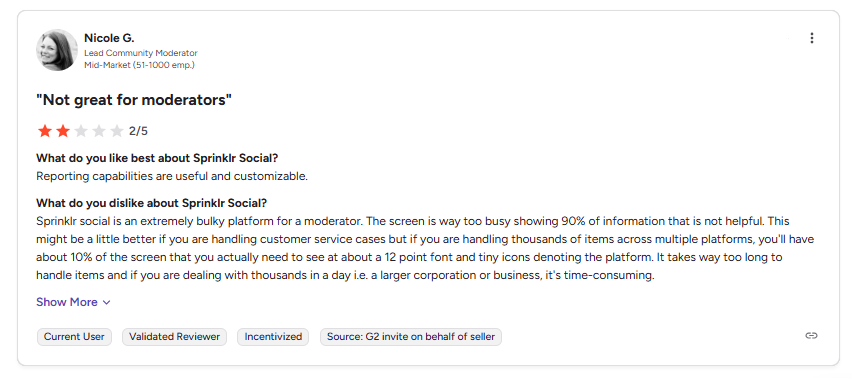
Complex and clunky interface
One of the loudest complaints about Sprinklr is how difficult it is to actually use. The platform is powerful, yes, but that power comes with a steep learning curve.
New users often feel overwhelmed, and teams waste hours trying to figure out what should be simple. Even experienced users admit that features change so often that you can lose work in the middle of a task.
Pricing that feels out of reach
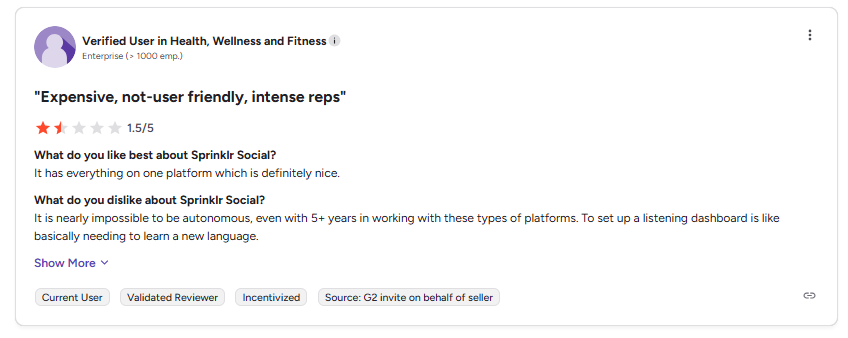
Sprinklr isn’t cheap – and the lack of clear, transparent pricing doesn’t help. For many agencies and mid-sized teams, the cost is simply unsustainable.
You can quickly find yourself paying for features you never touch, locked into contracts that don’t flex with your growth, and forced to pay extra just to add users or channels.
For many, it feels like buying a luxury car when all you needed was a reliable hatchback. Many users are complaining bitterly about this.
Scaling is tougher than expected
Ironically, while Sprinklr claims to be built for large-scale operations, scaling up within the tool isn’t always smooth.
Mid-sized teams often report that permissions, roles, and workflow setups don’t adapt well to their changing needs. It feels better suited for giant enterprises with dedicated admins than for growing agencies that need agility.
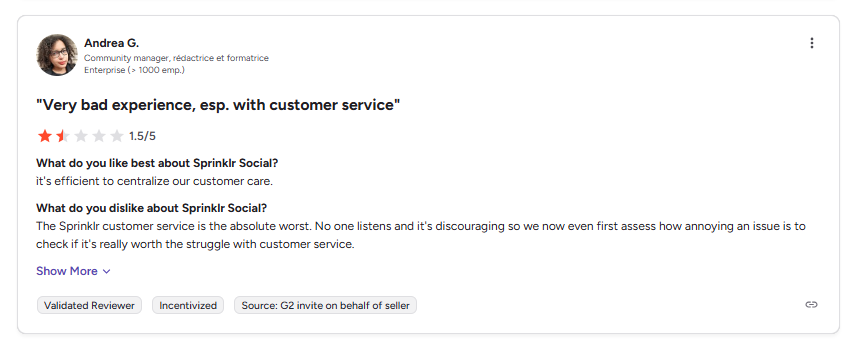
Limited Support and slow response
Another recurring pain point is customer support. Too many users mention long waits, vague answers, and minimal guidance, especially if you’re not one of Sprinklr’s largest enterprise clients.
When you’re managing time-sensitive social campaigns, waiting days for a fix isn’t just frustrating; it’s damaging.
All these issues together explain why more and more marketers are exploring Sprinklr alternatives. They’re not looking for a “watered-down” version, but for tools that are easier to use, more affordable, and actually designed with everyday workflows in mind.
How We Arrived at These Sprinklr Alternatives
We didn’t just throw darts at a board to come up with this list. Every tool mentioned here was carefully reviewed with real-world agencies and growing teams in mind.
Our focus wasn’t only on fancy features, but on what actually makes your day-to-day social media management easier.
Here’s what guided our selection:
- Ease of use – because nobody wants to spend weeks learning a tool that should be saving time.
- Flexible pricing – options that scale with you, not against you.
- Collaboration tools – smooth workflows for teams of all sizes, from freelancers to enterprise setups.
- Advanced analytics – not just vanity metrics, but reports that help you prove ROI.
- Platform integrations – the more seamless, the better.
- Scalability – tools that grow with your client list, not slow you down.
- Customer support – quick, responsive help when you need it most.
- User feedback – insights from real marketers who’ve put these tools to the test.
Sprinklr Alternatives for Enhanced Social Media Management
1. OnlySocial ($29/Month)
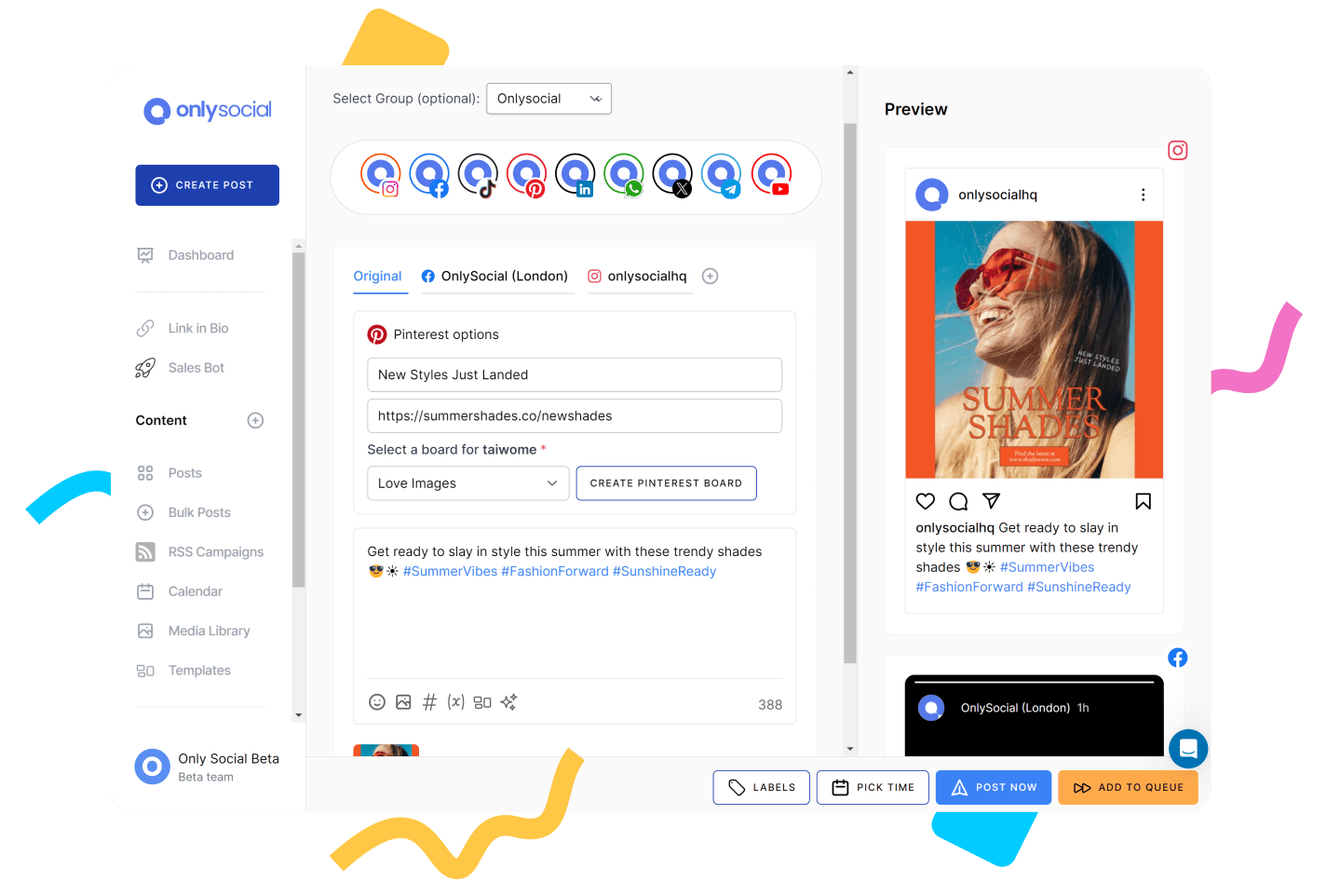
If you’re tired of bulky platforms that feel like they need an instruction manual just to schedule a single post, OnlySocial will be a breath of fresh air.
Built for speed and simplicity, it delivers everything agencies and businesses need, without the over-complicated dashboards or enterprise-level headaches.
Key Features
- Bulk Scheduling
- Unified Content Calendar
- RSS Feed Automation
- AI-Powered Content Assistant
- Content Library
- First Comment Scheduling
- Social Inbox
- Client & Team Collaboration
- White Label Dashboard & Reports
- Advanced Analytics & Reporting
- Seamless Integrations
Pros
- Super intuitive interface – onboarding new teammates or clients takes minutes, not weeks.
- Bulk scheduling (up to 500 posts) saves serious time for busy marketers.
- Packed with handy features like AI-assisted captions, content libraries, and approval workflows.
- Multi-platform support makes it a great fit for agencies managing dozens of client accounts.
Cons
- Occasionally requires reconnecting social platforms (common with X/Twitter).
- No permanent free plan.
Our Experience
We put OnlySocial head-to-head with Sprinklr to see how it performs in the real world. And honestly? The differences were clear from day one.
Scheduling & Publishing
Sprinklr has advanced scheduling features, but the platform feels heavy and complicated. Simple tasks, like setting up a post, can be slowed down by unnecessary steps.
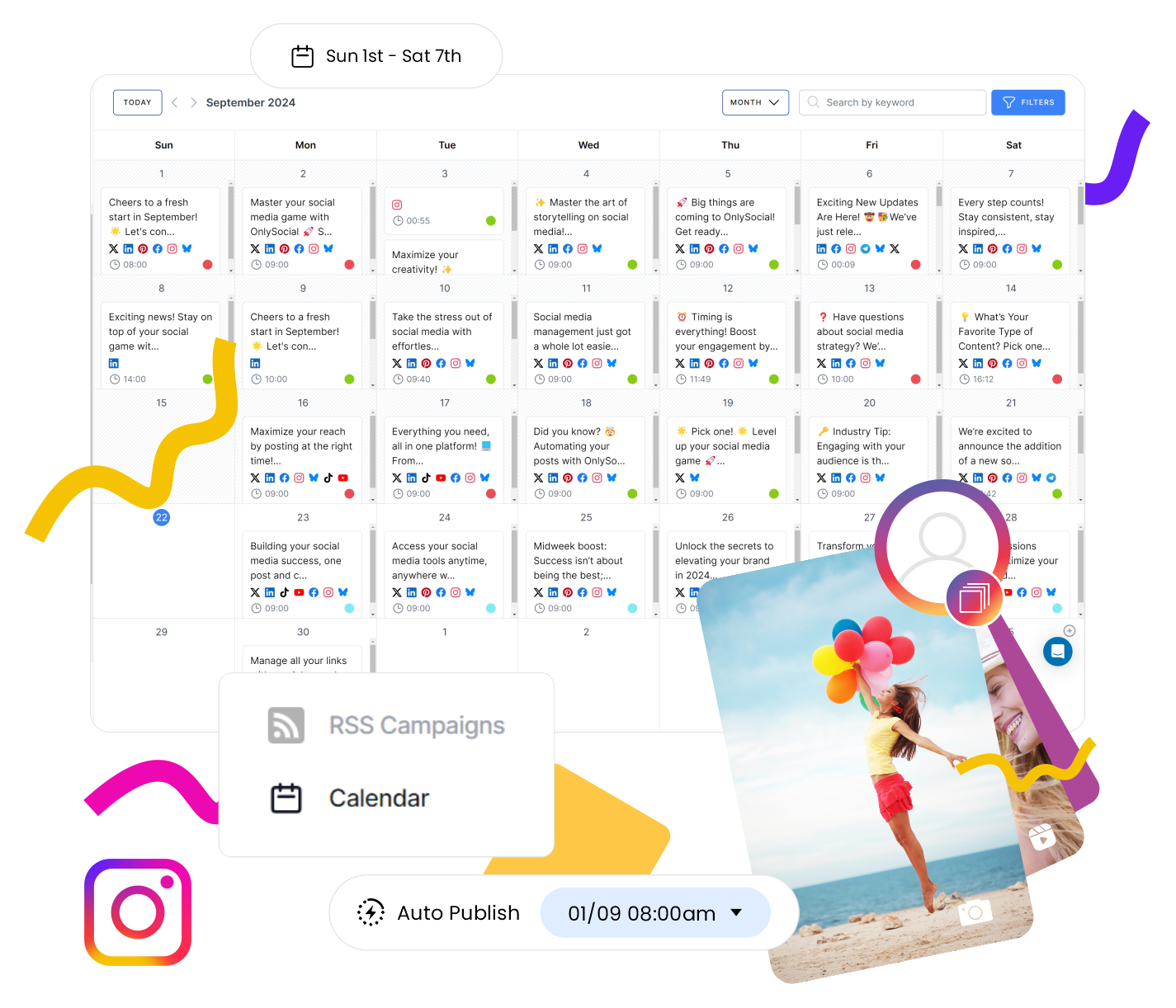
With OnlySocial, scheduling is fast and frictionless. The drag-and-drop calendar is clean and easy to use, and the bulk upload tool (up to 500 posts at once) is a lifesaver for agencies managing multiple brands. Add in RSS automation, and you’ve got a setup that keeps feeds active with minimal effort.

AI Content Assistant
Sprinklr’s AI tools lean enterprise-level, which often means extra setup and training. OnlySocial’s AI, however, is ready out of the box.
Need caption ideas, hashtags, or even post visuals? The assistant gets it done quickly – and adapts to your tone over time. For smaller teams, it feels like having a creative partner always on call.
Collaboration Workflows
Sprinklr’s workflows are powerful but overly complex, requiring more training and higher-tier pricing. OnlySocial simplifies collaboration with approval flows, role-based permissions, and client-friendly review options.
Clients can approve or comment on posts without logging in, which speeds up workflows and reduces friction.
Analytics & Reporting
Sprinklr offers deep analytics, but for smaller or mid-sized teams, it can feel like drinking from a firehose. OnlySocial takes a more practical approach – clear, actionable insights that highlight what’s working and where to improve. Reports are customizable, exportable, and ready to share with clients without any extra formatting.
Pricing & Value
Sprinklr’s entry-level plan starts at around $249/month – well beyond what most agencies or SMBs need. By contrast, OnlySocial offers far more accessible plans without stripping down features.
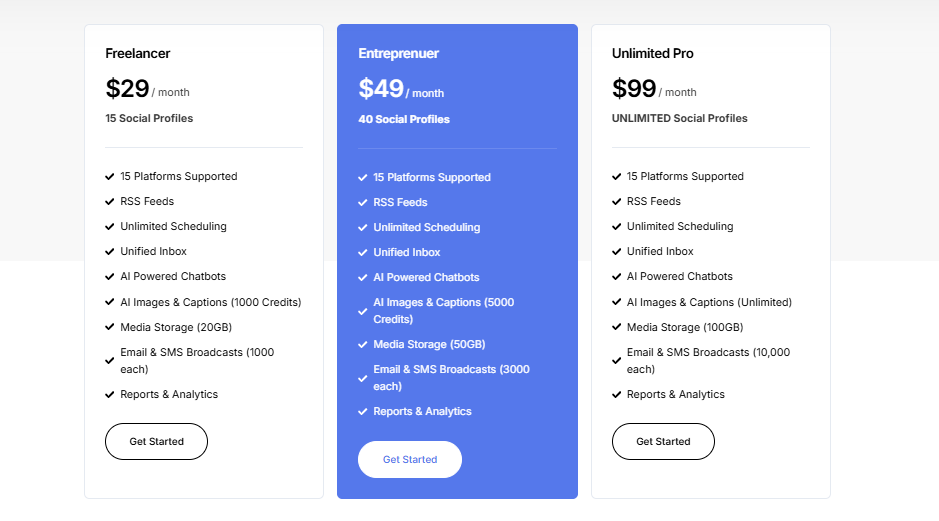
Here’s a breakdown:
- Freelancer Plan – $29/month for 15 accounts
- Entrepreneur Plan – $49/month for 45 accounts + 3 users
- Professional Plan – $99/month for unlimited accounts + 10 users
That means for less than a fraction of Sprinklr’s cost, you get powerful scheduling, AI tools, analytics, and collaboration features – all wrapped in an interface that’s actually enjoyable to use.
Final Verdict
OnlySocial blends simplicity with serious power, making it one of the strongest Sprinklr alternatives for growing agencies and businesses. With AI-driven content tools, scalable scheduling, and client-ready reporting, it delivers everything you need, without the bloated price tag or complexity.
2. Hootsuite ($99/Month)
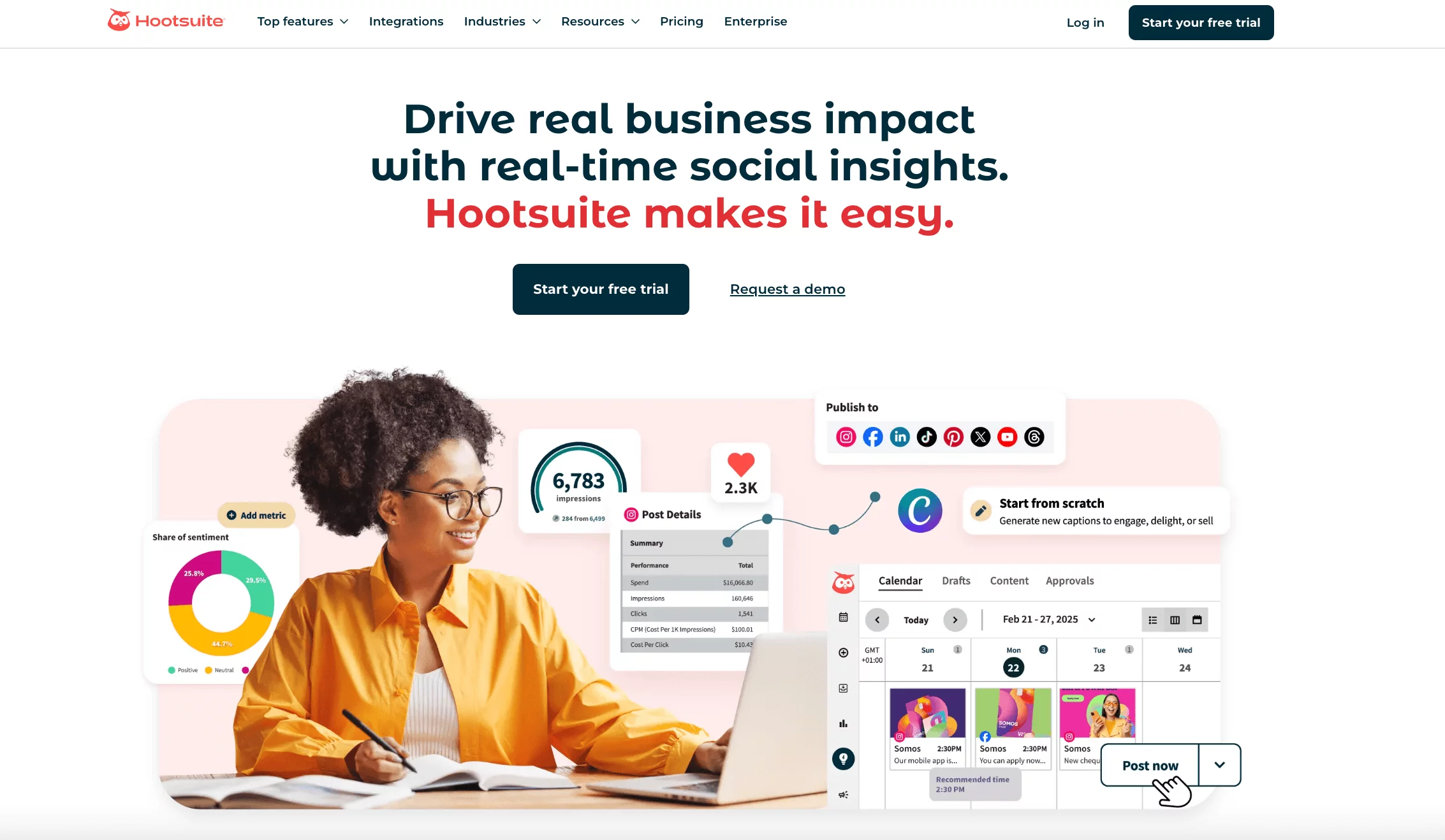
Hootsuite has been around for years and remains one of the most recognizable names in social media management.
For teams that need one dashboard to keep everything in check – from scheduling to engagement to analytics – it’s still a reliable choice. Compared to Sprinklr, it feels less overwhelming, though it comes at a price that not every business will find comfortable.
Key Features:
- Bulk post scheduling
- Social listening and insights
- Auto-schedule for the best times
- Social media monitoring streams
- Social ad management
- Automated reporting
Pros
- Makes scheduling across multiple platforms easy and efficient, saving time for busy teams.
- Clean, intuitive interface that’s beginner-friendly but still powerful for larger teams.
- Centralized dashboard for publishing, engagement, and reporting.
Cons
- Hootsuite can be expensive, making it harder to justify for smaller agencies or solo users.
- Some important features are limited or locked behind higher-tier plans.
- Platform-specific restrictions can limit flexibility in certain channels.
Our Experience
We tested Hootsuite side by side with Sprinklr, focusing on usability, speed, and overall value.
Advanced Publishing Tools
Sprinklr’s publishing suite offers plenty of power, but navigating it often feels clunky. Hootsuite’s publishing calendar, by contrast, is smooth and approachable.
We especially liked the AI-powered caption tool (OwlyWriter), which helped create engaging copy quickly. Suggested posting times also gave us a useful edge without the manual legwork.
Listening and Monitoring
Both tools handle listening, but Sprinklr skews enterprise-heavy. Hootsuite provided a more streamlined experience, with keyword and sentiment tracking that felt more accessible. The real-time alerts were especially handy for staying on top of sudden conversations or campaigns.
Analytics and Reporting
Sprinklr’s analytics can feel like wading through a sea of data – great for enterprises, but overwhelming for leaner teams.
Hootsuite struck a better balance, letting us track performance across multiple platforms, create custom reports, and even benchmark against competitors without advanced training.
Engagement and Ads
Hootsuite’s unified inbox kept all comments and DMs neatly organized, making engagement smoother. Features like saved replies and collision detection helped us avoid duplicate responses. We also liked the ability to boost posts directly, though advanced ad management is locked to higher tiers.
Hootsuite Pricing
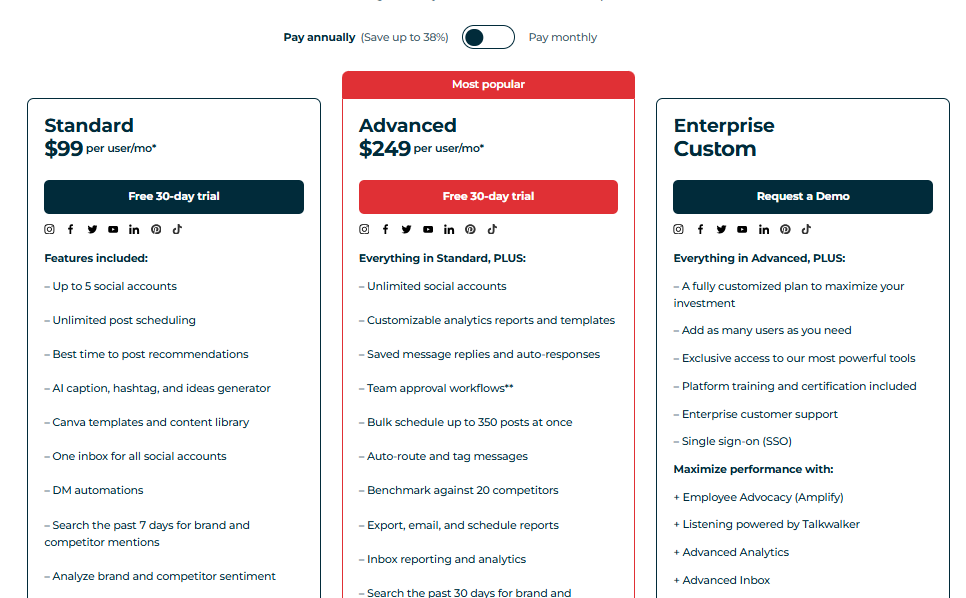
Hootsuite isn’t cheap. After a 30-day trial, pricing starts at $99/month for a single user with 10 social accounts and scales up to $249/month for teams with 3 users and 20 accounts.
Larger organizations can negotiate custom enterprise pricing. While it delivers strong functionality, the cost can be a roadblock for smaller businesses.
Final Verdict
Hootsuite remains a strong contender for teams who need robust scheduling, monitoring, and reporting in one place. It doesn’t carry Sprinklr’s intimidating complexity, but it also isn’t budget-friendly.
If your agency can justify the higher spend, Hootsuite delivers reliable performance and solid integrations, making it a worthy Sprinklr alternative.
3. Buffer ($6/Month Per Channel)
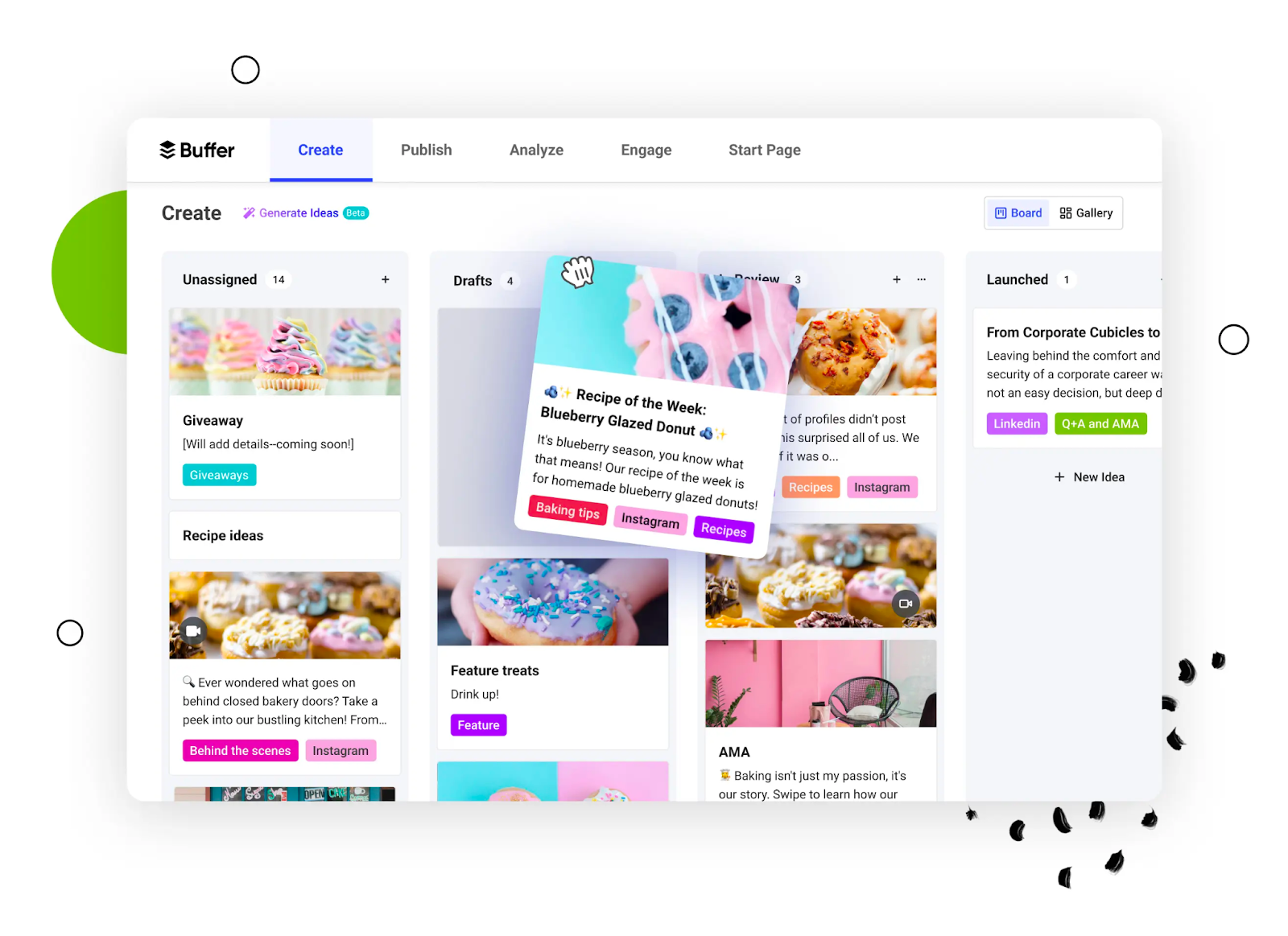
Buffer has built a reputation for being one of the most beginner-friendly tools in social media management.
While Sprinklr often feels like a platform designed only for enterprise giants, Buffer appeals to small businesses, creators, and agencies who just want scheduling, analytics, and engagement features without a steep learning curve. It’s straightforward, budget-friendly, and focused on helping you stay consistent across channels.
Key Features of Buffer:
- Multi-platform Publishing
- Schedule and Queue Posts
- Unified Engagement Tool
- AI Content Generator
- Visual Social Media Calendar
- In-depth Analytics
- Customizable Landing Page Template
Pros
- Super intuitive interface – no training needed to get started.
- Strong scheduling features, including queue management and posting time optimization.
- Affordable pricing that works well for solopreneurs and smaller teams.
- Supports integrations with tools like Canva for easy content creation.
Cons
- Analytics on lower-tier plans are quite basic
- Limited collaboration features compared to Sprinklr.
Our Experience
Simplicity in Scheduling
Sprinklr’s scheduling dashboard is powerful but complicated – sometimes it takes multiple steps just to queue a post. Buffer, by contrast, makes scheduling refreshingly simple. We could set up posting queues, plan weekly campaigns, and adjust timings with just a few clicks. For small teams, this speed is a game-changer.
Content Creation Support
Buffer integrates directly with Canva, making it easy to design and schedule visuals in one workflow. Sprinklr lacks this kind of lightweight convenience. Its creative suite is better suited for large in-house teams with custom design processes.
Analytics
Sprinklr provides exhaustive analytics, but not everyone needs enterprise-level data. Buffer keeps things simple with performance insights that are easy to digest, showing engagement trends and top-performing posts.
While you won’t get the same depth as Sprinklr, for many teams, Buffer’s clarity is exactly what they need.
Collaboration
This is where Sprinklr has the upper hand – its workflows and approval chains are far more advanced. Buffer does offer draft approvals and team roles, but it’s much better suited for smaller groups that don’t need enterprise-level permissions.
Buffer Pricing
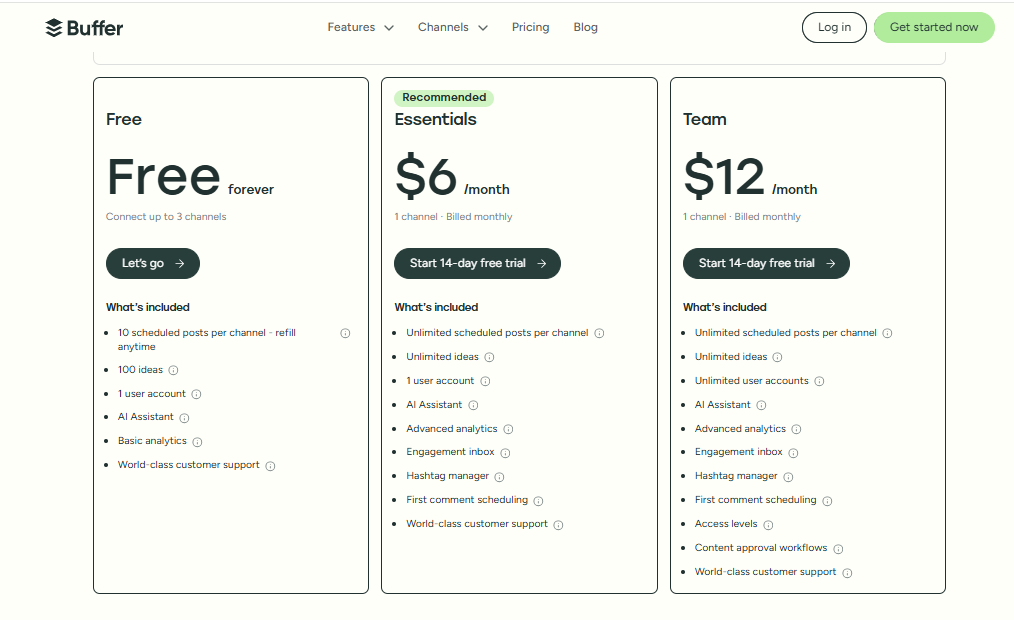
Here’s where Buffer really wins over Sprinklr. Plans start with a free option for up to 3 channels. Paid plans begin at $6/month per channel (Essentials), while the Team plan is $12/month per channel with added collaboration features. Compared to Sprinklr’s $249+ pricing tiers, Buffer delivers far more value for SMBs and startups.
Final Verdict
Buffer is the opposite of Sprinklr: simple, affordable, and built for speed. It doesn’t overwhelm you with features you don’t need, and its pricing makes it accessible for businesses of all sizes.
If you’re tired of overpaying for complex tools, Buffer is one of the best Sprinklr alternatives for lean teams who value ease and consistency.
4. Planoly ($16/Month)
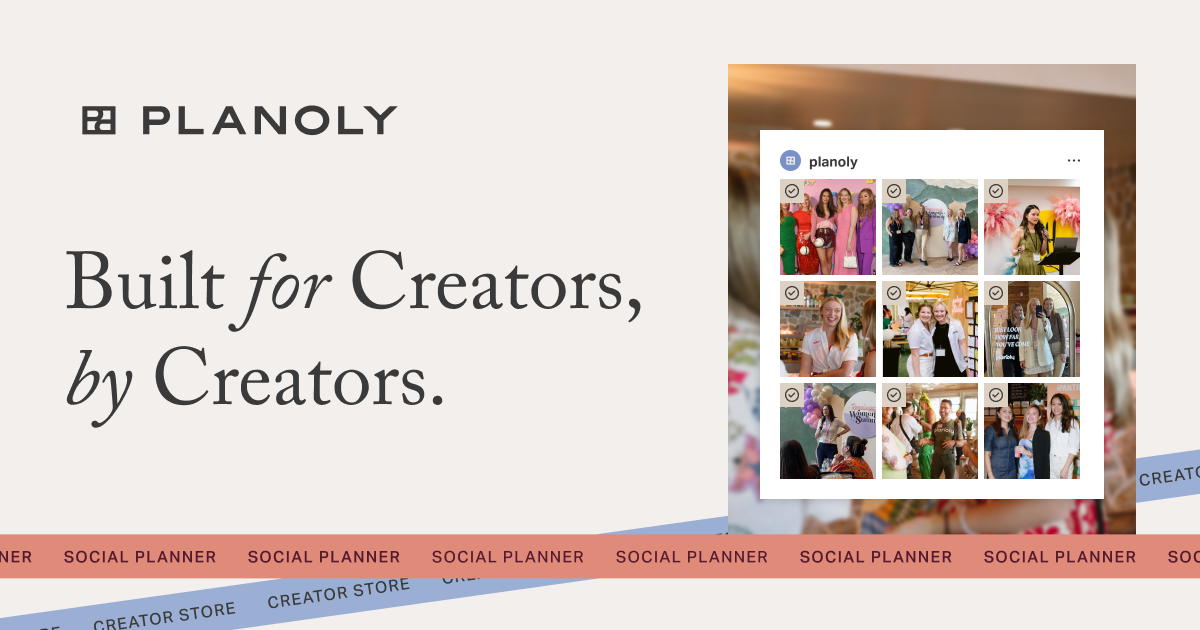
Planoly is a visual-first social media management tool, particularly loved by creators and brands that live on Instagram and Pinterest.
Unlike Sprinklr, which leans heavily toward complex, data-driven dashboards, Planoly’s focus is on simplicity and aesthetics. It’s the tool you turn to when your brand’s visual story matters more than endless streams of analytics.
Key Features:
- Cross-Platform Posting
- Visual Instagram Grid Planner
- Instagram Auto-Posting
- AI Caption Writer
- Instagram Hashtag Manager
- Content Calendar
- Media Library
- Stock Photo Integration
Pros
- Clean, beginner-friendly interface that makes content planning stress-free.
- Centralized scheduling and posting across multiple platforms.
- Perfectly tailored for visual-first brands prioritizing Instagram and Pinterest.
Cons
- Auto-scheduler can be inconsistent, sometimes disrupting carefully planned feed layouts.
- Lacks advanced collaboration tools like approval workflows.
Our Experience
When comparing Planoly with Sprinklr, the difference in philosophy is clear. Sprinklr feels built for enterprises chasing data-heavy, multi-channel operations. Planoly, on the other hand, feels like a creative partner for smaller teams and creators.
Visual Planning & Previews
Planoly’s signature Grid Planner was a highlight during our testing. Seeing the full Instagram feed laid out in advance gave us total control over aesthetics – a feature Sprinklr doesn’t prioritize. For brands that live and die by consistent visuals, this is invaluable.
AI Tools for Faster Publishing
Planoly’s AI Caption Writer and Hashtag Manager streamlined our content creation. They’re not as broad as Sprinklr’s enterprise-level AI, but they’re tailored to the day-to-day needs of small teams. We found them especially handy for cutting down brainstorming time.
Content Management
The drag-and-drop content calendar and media library made organizing posts feel effortless. Compared to Sprinklr’s layered folder structure and steep learning curve, Planoly felt refreshingly frictionless – something smaller teams will appreciate.
Cross-Platform Posting
While Planoly shines brightest on Instagram and Pinterest, it also allows for posting across other social platforms. It’s not as extensive as Sprinklr’s lineup, but for visually focused teams, the coverage was more than enough.
Planoly Pricing
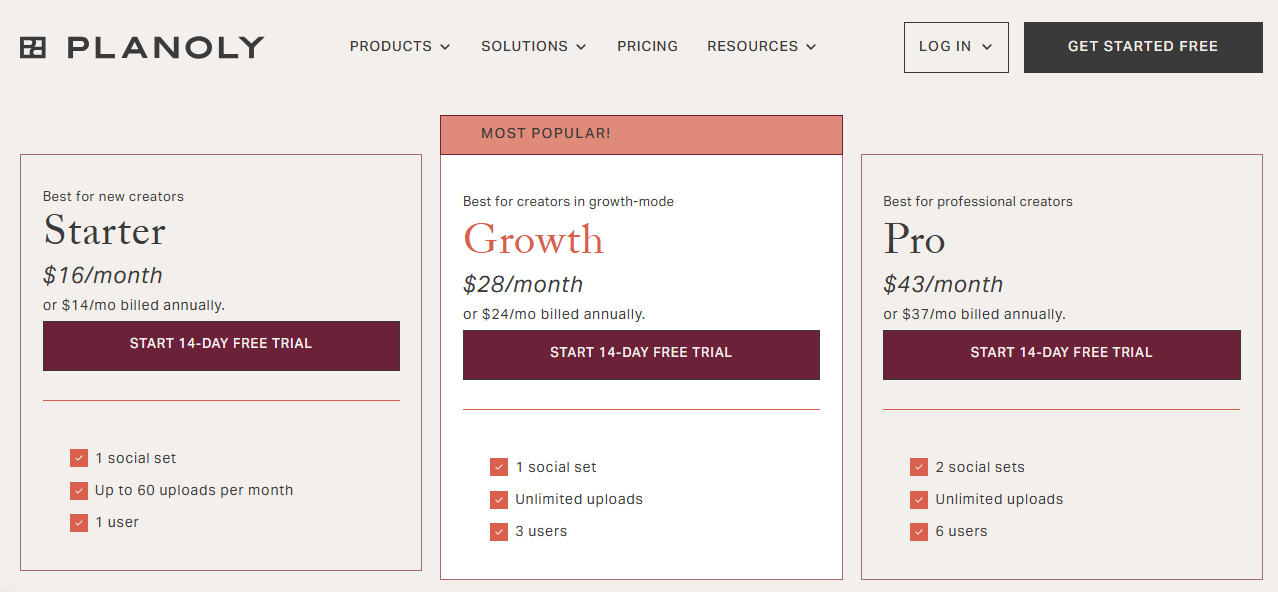
Planoly keeps things affordable. The free plan includes basic features with a 10-upload monthly limit. Paid plans start at $16/month (billed annually) and unlock unlimited uploads and advanced features.
For brands looking to keep budgets tight while managing polished Instagram or Pinterest strategies, it’s a very accessible option.
Overall Verdict
Planoly is a go-to tool for brands that prioritize visual storytelling over enterprise analytics. While Sprinklr tries to be everything at once, Planoly stays in its lane – helping creators and marketers plan, preview, and publish beautiful feeds with ease.
It’s not built for complex workflows, but for visual-first brands, it’s a powerful and cost-effective Sprinklr alternative.
5. Later ($25/Month)
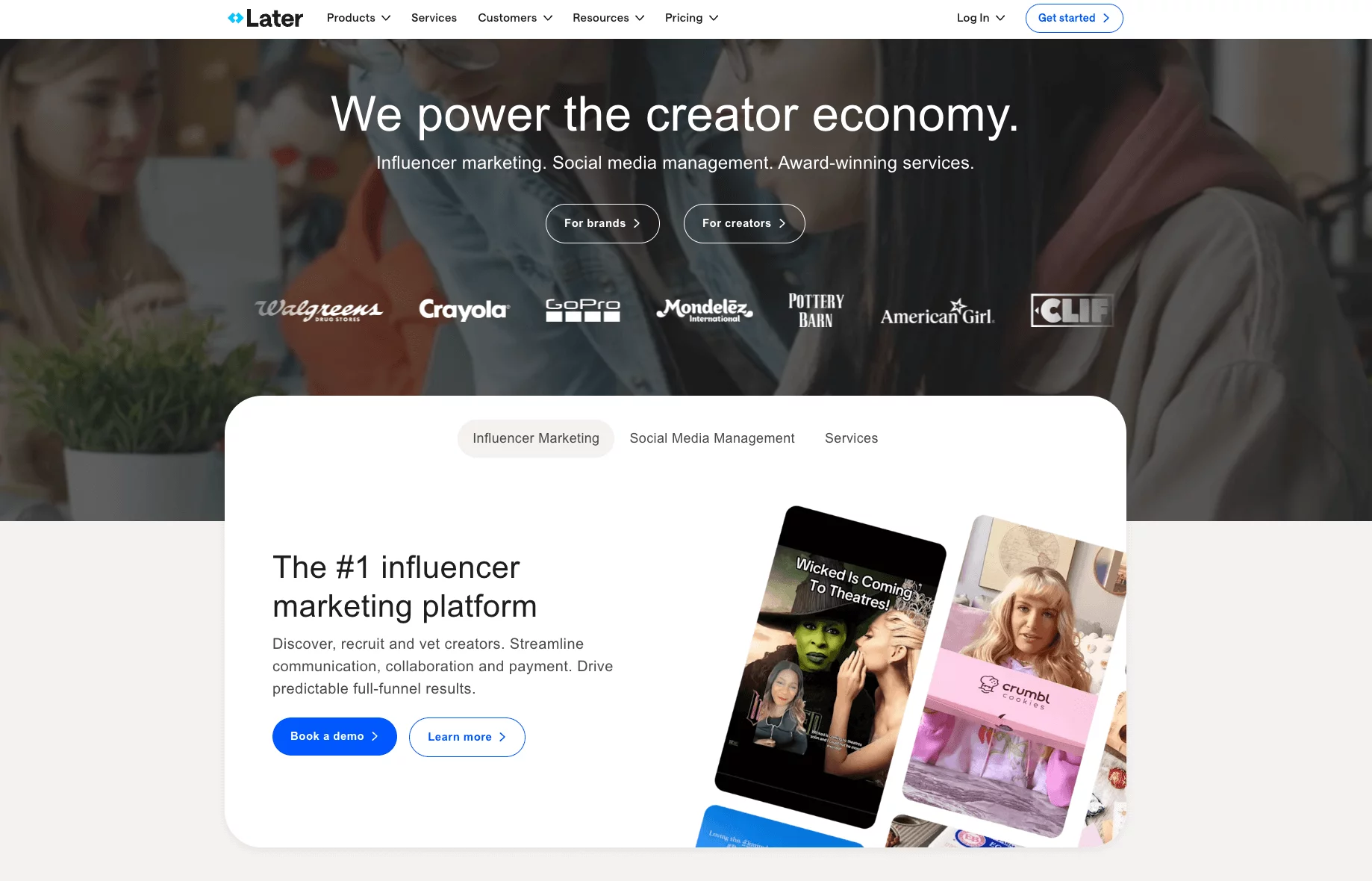
Later has always been a favorite for brands and creators who live and breathe visual content. Originally built with Instagram in mind, it has since expanded to support multiple platforms, but its heart still lies in helping teams create and manage aesthetic-driven campaigns.
Compared to Sprinklr, which often feels data-heavy and complex, Later is more about keeping social media fun, visual, and manageable.
Key Features:
- Intuitive content calendar
- Link in bio integration
- AI-powered captions
- Centralized dashboard
- Team and client collaboration
- Content management hub
- Unified social inbox
- Comprehensive analytics
Pros
- Drag-and-drop calendar makes scheduling quick and visual.
- Strong Instagram and Pinterest focus, ideal for creators and visual-first brands.
- Features like Linkin.bio give marketers simple tools to drive traffic from social feeds.
- Easy to use – great for beginners who don’t want to deal with a steep learning curve.
Cons
- Posting limits on lower-tier plans can feel restrictive.
- Advanced features like full analytics and Conversations (inbox management) are only available on higher, more expensive tiers.
- Not as versatile as Sprinklr when it comes to multi-channel enterprise management.
Our Experience
Visual Content Planning
Later’s drag-and-drop calendar and media library were a huge win for us. Unlike Sprinklr, which buries you in dashboards, Later made it easy to see how a campaign would actually look in-feed. The Grid Preview for Instagram was especially helpful for visual storytelling.
Smart Tools for Instagram
Features like Linkin.bio (Later’s landing page tool) and “best time to post” suggestions felt tailored to Instagram-heavy strategies. While Sprinklr has broader automation options, these specific tools gave Later an edge for engagement-driven campaigns.
Content Management & UGC
We also liked Later’s ability to curate user-generated content directly from social feeds. For brands relying on community-driven marketing, this is a feature Sprinklr doesn’t emphasize. It kept our campaigns fresh with authentic content, while still organized within Later’s library.
Analytics & Insights
Later’s analytics aren’t as deep as Sprinklr’s enterprise-level reporting, but they’re digestible. We could quickly see what was working without drowning in too much data. For smaller teams, that balance between insight and simplicity is a big plus.
Later Pricing
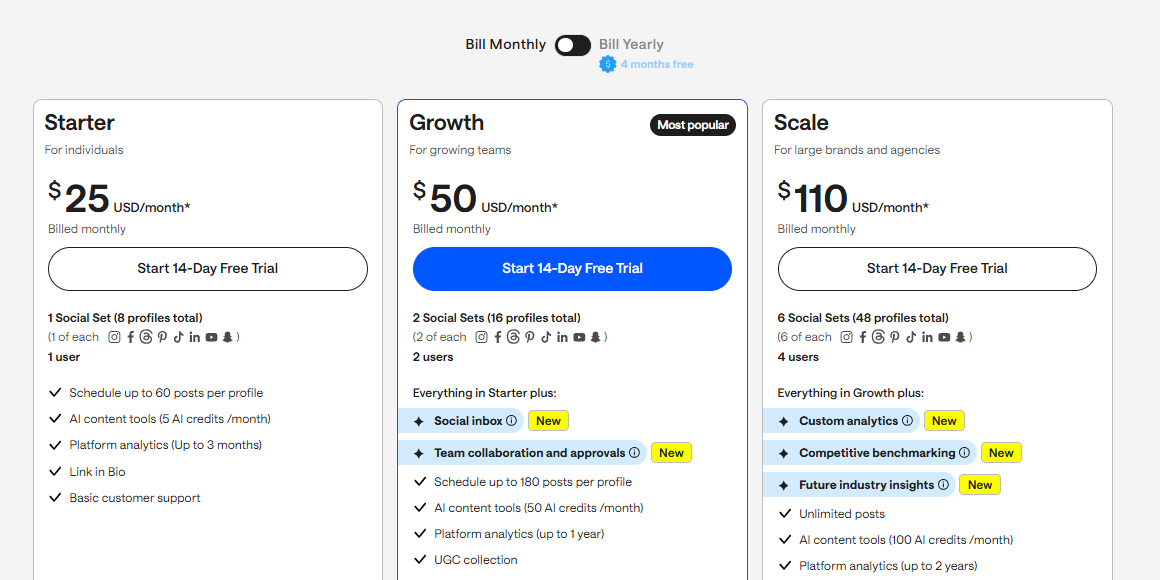
Later offers a free plan with very limited features, but the real value starts at $25/month for the Starter plan. If you want access to better analytics, Conversations (inbox), or more posts per profile, you’ll need the higher tiers, which go up to $80/month and beyond.
While Sprinklr’s pricing runs into enterprise budgets, Later stays accessible for small businesses and creative teams.
Final Verdict
Later is an excellent Sprinklr alternative for brands focused on visual storytelling. It’s not as feature-packed for enterprise teams, but for Instagram and Pinterest-driven strategies, it’s intuitive, affordable, and gets the job done beautifully. If aesthetics and ease of use matter more than advanced enterprise data, Later is a solid pick.
6. Sprout Social ($199/Month)
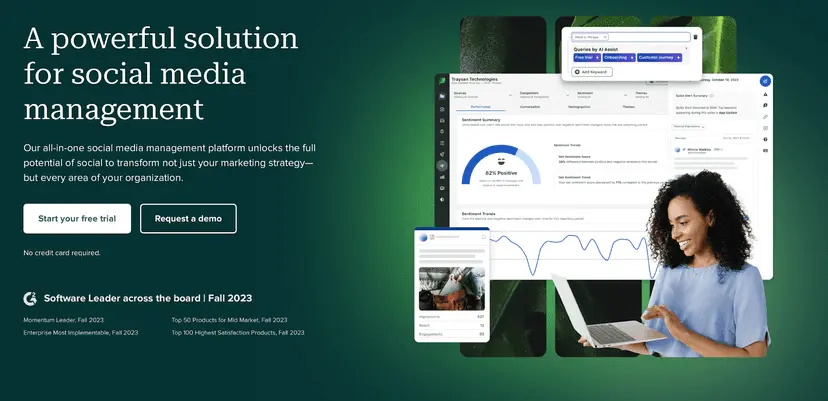
Sprout Social is no doubt one of the more polished social media management platforms out there. It’s user-friendly, visually clean, and packed with advanced features.
Sprout Social makes those capabilities offered by Sprinklr accessible in a way that feels lighter and easier to adopt, perfect for growing teams that don’t want to drown in dashboards.
Key Features:
- Advanced Scheduling Tools
- Robust Analytics Dashboard
- Social Listening Tools
- Unified Social Inbox
- Customizable Reporting
- Influencer Collaboration Features
Pros
- Intuitive and easy-to-navigate interface, even for teams juggling multiple client accounts.
- Strong publishing and workflow tools that streamline content delivery across platforms.
- Advanced analytics and reporting that help uncover actionable insights.
Cons
- Sprout Social can be very expensive, especially for agencies and solo marketers.
- Some key features are locked behind higher-tier plans.
- Occasional hiccups with integrations and link handling.
Our Experience
We put Sprout Social side by side with Sprinklr, and here’s what stood out in our hands-on use:
Publishing and Engagement
Sprout Social was refreshingly simple when it comes to publishing and scheduling. Scheduling posts across platforms felt seamless, and the optimal send time feature helped us boost engagement without second-guessing. It’s exactly the kind of speed-focused workflow mid-sized teams need.
Asset Library & AI Automation
Sprout’s content library helped us keep creative assets consistent across campaigns. And with AI-assisted captions and scheduling, we cut down hours of manual work – something Sprinklr also offers, but with more setup and complexity.
Collaboration and Influencer Discovery
While Sprinklr is built for sprawling enterprise teams, Sprout feels better balanced for agencies. Built-in approval workflows made teamwork smooth, and we really liked the influencer discovery tool. It gave us data-driven insights into influencer credibility, all in one dashboard.
Analytics and Custom Reporting
Sprinklr’s reporting is powerful, but often overwhelming. Sprout gave us digestible, customizable reports that we could export and share without extra training. Scheduling recurring client-ready reports was a big time-saver too.
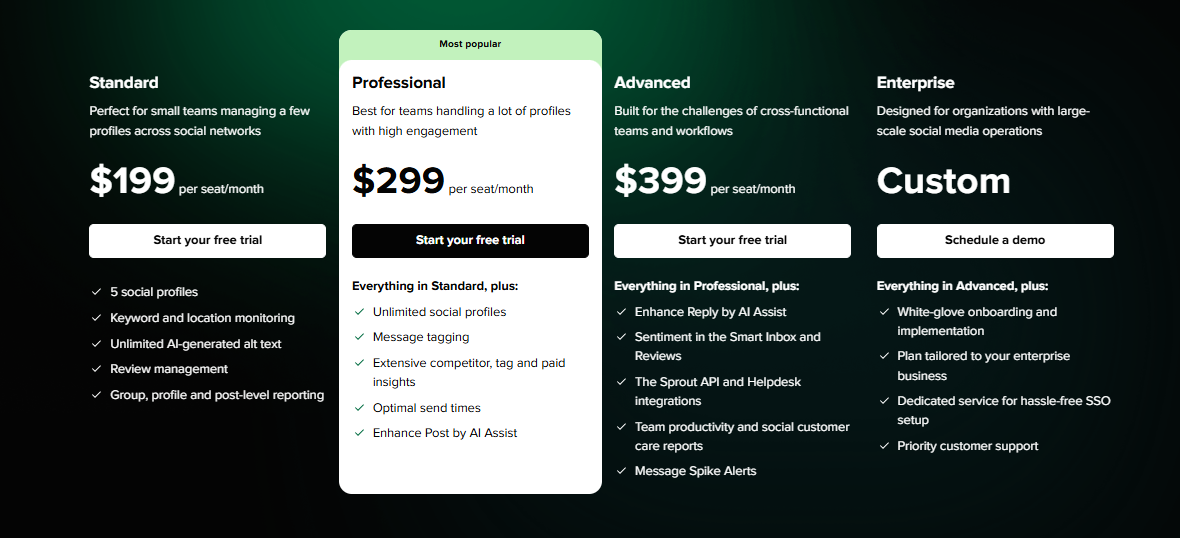
Sprout Social Pricing
Sprout Social’s Agency plan starts at $199/month. It’s not cheap, but for the depth of analytics, approval workflows, and automation it offers, many mid to large agencies will find the cost justified.
Smaller teams may find it a stretch, but for those prioritizing scalability and data-driven insights, it’s a solid investment.
Final Verdict
Sprout Social is a strong Sprinklr alternative for teams that want enterprise-level power without enterprise-level friction.
It balances depth with ease of use, offering streamlined publishing, influencer tools, and robust analytics. While the price tag is higher than simpler tools, for agencies ready to scale smartly, Sprout delivers value where it counts.
7. Agorapulse ($99/Month)
Agorapulse has steadily become a favorite among agencies and mid-sized teams looking for a reliable all-in-one social media tool. Unlike Sprinklr, which can feel overwhelming, Agorapulse offers a clean interface and a more approachable experience.
It brings together publishing, reporting, listening, and engagement in a way that doesn’t require weeks of onboarding.
Key Features:
- Direct Publishing Tool
- Unified Social Inbox
- Social Listening Capability
- Detailed Analytics & Reporting
- PulseLink in Bio
- Smart AI Image and Content Assistant
- Social Media ROI Tracker
Pros
- User-friendly interface that keeps things simple and intuitive.
- Strong publishing features, including bulk scheduling and evergreen post recycling.
- Social inbox that consolidates all messages, comments, and mentions in one place.
- Detailed analytics with customizable reports.
Cons
- Pricing can stretch smaller teams with limited budgets.
- Some advanced listening features are more limited compared to Sprinklr.
Our Experience
Here’s how Agorapulse stacked up when we compared it directly with Sprinklr:
Publishing & Scheduling
Sprinklr’s publishing module is powerful but cluttered. It often takes multiple steps to complete a task. Agorapulse, by contrast, offers a smoother experience.
The calendar view made scheduling intuitive, and bulk scheduling (up to 200 posts) was a real time-saver. Evergreen queues also meant we could recycle top-performing content without rebuilding campaigns from scratch.
Engagement via the Social Inbox
Sprinklr has deep engagement features, but managing them can feel like a job in itself. Agorapulse’s unified Social Inbox was a highlight – it neatly organized DMs, mentions, and comments, allowing our team to stay on top of community management without bouncing between tabs.
Analytics & Reporting
Agorapulse delivered ready-to-use, customizable reports that were client-ready in minutes. We particularly liked the integration with Google Analytics, which tied social performance to web conversions seamlessly.
Social Listening
Sprinklr shines in enterprise-level listening, but Agorapulse’s more streamlined version was enough for our agency needs. We could track keywords, hashtags, and brand mentions, making it easy to stay in tune with conversations that mattered – without wading through too much noise.
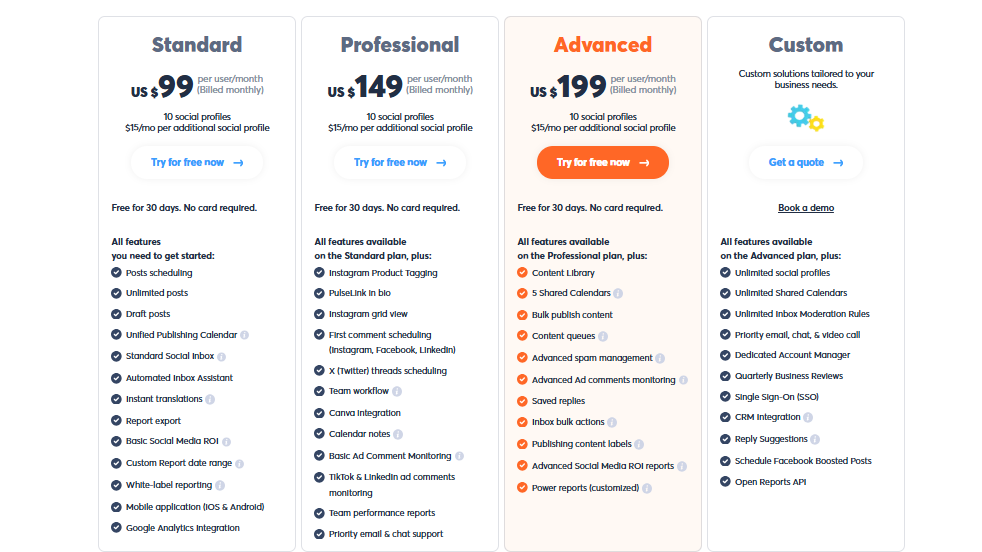
Agorapulse Pricing
Agorapulse starts at $99/month for the Standard plan, with Professional ($149/month) and Advanced ($199/month) tiers that add more collaboration and reporting options.
Compared to Sprinklr’s enterprise-focused (and often non-transparent) pricing, Agorapulse is more accessible and scalable for SMBs and agencies that want premium functionality without the enterprise baggage.
Final Verdict
Agorapulse is a strong Sprinklr alternative for teams that want power without the complexity. It offers excellent scheduling, a best-in-class Social Inbox, and analytics that clients will actually understand.
While it may not match Sprinklr’s enterprise-scale listening tools, for most growing agencies and brands, it strikes the right balance between functionality, usability, and cost.
8. eClincher ($149/Month)
eClincher may not have the name recognition of Sprinklr, but it’s a powerful, all-in-one social media management tool trusted by agencies, brands, and SMBs.
Its strength lies in combining advanced publishing, monitoring, and analytics into one cohesive platform without the steep complexity that Sprinklr is often criticized for.
Pros
- Robust publishing suite, including bulk scheduling and queue categories for evergreen posts.
- Advanced social inbox that centralizes comments, mentions, and DMs across platforms.
- Built-in integrations with Canva, Bitly, and Pocket for smoother content creation and sharing.
- Detailed reporting and analytics that rival higher-priced competitors.
Cons
- The interface can feel a little utilitarian compared to more polished competitors.
- Pricing is higher than some alternatives, which might be challenging for small businesses.
- Some features, like white-label reporting, are only available in higher-tier plans.
Our Experience
Here’s how eClincher stacked up when we tested it against Sprinklr:
Publishing & Scheduling
Sprinklr offers expansive publishing capabilities but requires significant setup and training. With eClincher, we immediately appreciated the queue-based scheduling system. It allowed us to recycle content automatically, fill gaps in the calendar, and keep feeds consistently active without extra effort.
This was especially useful for evergreen campaigns – something Sprinklr also supports, but in a much less intuitive way.
Engagement via the Unified Inbox
eClincher streamlined engagement with its Smart Inbox, which pooled all social interactions into one easy-to-manage feed. Filtering by platform or priority helped our team respond faster without missing mentions.
Analytics & Reporting
Both tools deliver strong analytics, but Sprinklr’s enterprise dashboards can feel like overkill for mid-sized agencies. eClincher’s analytics were more digestible and ready to use right away.
Customizable reports made it simple to track KPIs across multiple accounts and send polished updates to clients. On higher-tier plans, white-label reporting added another layer of professionalism.
Integrations & Automation
While Sprinklr integrates deeply with enterprise systems, eClincher focuses more on marketing workflows. We found its integrations with Canva, Pocket, and Feedly particularly useful for content discovery and quick design.
The RSS automation tool also meant we could auto-publish curated content, keeping feeds active with minimal effort.
eClincher Pricing
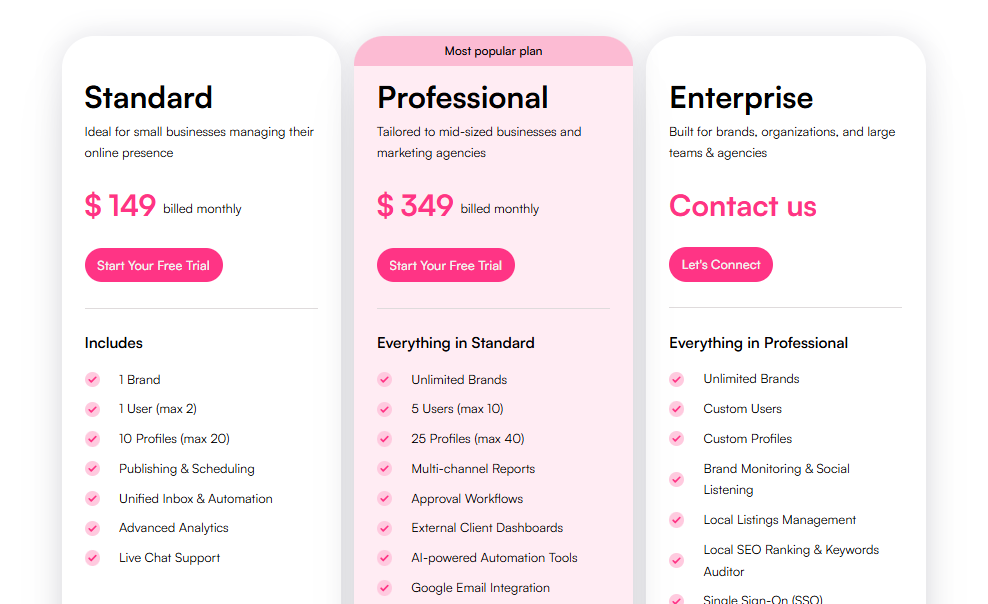
eClincher isn’t the cheapest option, but it packs value. The Standard Plan ($149/month) and ProfessionalPlan ($349/month) both include white-label reporting, making them suitable for agencies managing multiple clients. Compared to Sprinklr, eClincher delivers a clearer, more affordable path to premium features.
Final Verdict
eClincher is a solid Sprinklr alternative for agencies and teams that want powerful features without being locked into an enterprise ecosystem.
With strong scheduling, a versatile social inbox, and polished analytics, it covers the essentials while still offering advanced capabilities like white-label reporting.
While the interface could be friendlier, its balance of features and value makes it a great fit for growing teams and mid-sized agencies looking to streamline social media management.
9. Loomly ($42/Month)

Loomly is well known as a social media management tool designed for simplicity and collaboration. The tool focuses on making campaign planning, scheduling, and approvals easy for small to mid-sized teams.
It’s particularly popular with marketing agencies and brands that value clean workflows and straightforward publishing tools.
Key Features of Loomly:
- Automated Publishing
- Hashtag Manager
- Advanced Analytics & Reporting
- Community Management
- Social Media Platform Integration
- Approval & Feedback Workflow
Pros
- Clean, user-friendly interface that makes onboarding new users easy.
- Strong focus on content collaboration and approvals, ideal for teams working with clients.
- Built-in post ideas and inspiration to help spark creativity.
- A visual content calendar that simplifies campaign planning.
Cons
- Limited social listening compared to advanced tools like Sprinklr.
- Analytics are basic compared to enterprise-focused competitors.
- Can get pricey as you scale up users and accounts.
Our Experience
Here’s how Loomly performed in our side-by-side comparison with Sprinklr:
Content Planning & Scheduling
Sprinklr’s scheduling engine is undeniably powerful, but we found Loomly’s visual calendar far easier to navigate for day-to-day management.
The drag-and-drop interface made campaign adjustments quick and painless. It also provided handy features like automated post previews across different platforms, something Sprinklr does, but with a more complex setup.
Collaboration & Approvals
Where Sprinklr caters to enterprises with layered permissions and workflows, Loomly keeps it simple. The built-in approval system let us streamline client sign-offs without needing additional tools. Notifications and real-time feedback inside the platform helped keep campaigns moving without email back-and-forth.
Post Ideas & Creativity
One area Loomly stood out was its built-in content inspiration feature, which suggests trending topics, events, and hashtag ideas.
Sprinklr is rich in data-driven insights, but Loomly gives smaller teams creative nudges that save time when brainstorming. For lean agencies, this was surprisingly valuable.
Analytics & Reporting
Sprinklr offers deep, enterprise-grade reporting across all touchpoints. Loomly, on the other hand, focuses on basic but clear analytics.
While it doesn’t deliver advanced competitor benchmarking or customer sentiment analysis, it gives you the essentials – engagement, reach, and growth – without drowning you in dashboards.
Loomly Pricing
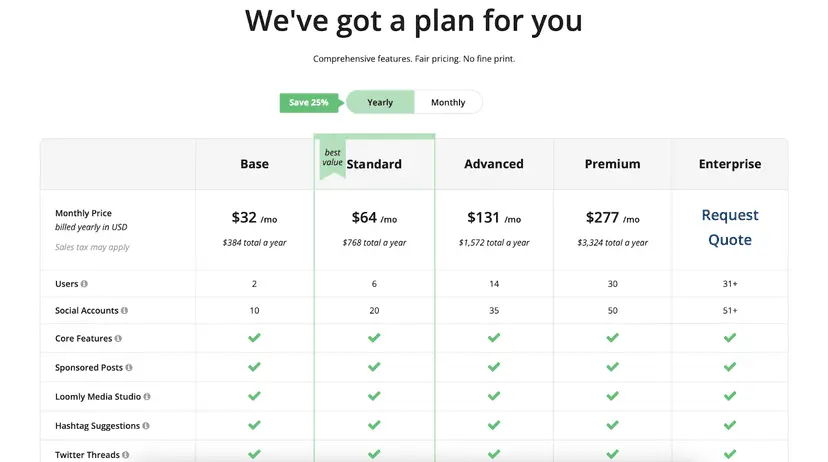
Loomly’s plans start at $42/month for two users and ten social accounts. Higher-tier plans unlock more users, features, and integrations. While not as costly as Sprinklr’s enterprise contracts, Loomly can get expensive if you’re managing many accounts or need advanced collaboration features.
Final Verdict
Loomly is a straightforward, collaboration-friendly alternative to Sprinklr. It’s best suited for small to mid-sized teams that want a cleaner interface, easy approvals, and enough scheduling features to keep campaigns running smoothly.
10. Sendible ($29/month)

Sendible is built with agencies in mind. Sendible makes it easier for small to mid-sized agencies to manage multiple clients under one roof. It balances advanced features with usability, offering a platform that feels approachable without skimping on power.
Key Features:
- Social Media Scheduling
- Smart Compose Box & Priority Inbox
- Bulk Import & White Labeling
- Content Library
- Team Collaboration
- Unified Dashboard
- AI Assistance
- Campaign Management
- Client Onboarding
Pros
- Client-focused dashboards that can be white-labeled for a seamless experience.
- Approval workflows simplify collaboration with clients and internal teams.
- Integrations with Canva, Google Drive, and Dropbox make content creation smoother.
- Priority Inbox brings all comments, mentions, and messages into one space.
Cons
- Analytics are good but not as deep as enterprise tools like Sprinklr.
- Pricing increases significantly if you scale users or need more advanced features.
- Some minor quirks with integrations and scheduled post previews.
Our Experience
Content Planning & Scheduling
Sendible offered a cleaner, more intuitive content calendar compred to Sprinklr. We could bulk upload posts, customize for each platform, and even set up smart queues to keep feeds active. Even though Sprinklr offer this, it is in a much more complicated way.
Collaboration & Client Management
Sprinklr’s collaboration is robust but built for very large teams with complex permissions. Sendible took a more agency-friendly approach.
Features like custom approval workflows, permission groups, and client dashboards made it easy for us to manage campaigns with multiple stakeholders.
The Client Connect feature also allowed clients to securely connect their accounts without handing over login details, which felt like a smart, secure touch.
Engagement Tools
Sprinklr’s engagement suite is massive but often overwhelming. Sendible’s Priority Inbox was refreshingly straightforward. It pulled all mentions, comments, and DMs into one space, which helped us respond faster and keep track of conversations without jumping across platforms.
Analytics & Reporting
Sprinklr is built for data-heavy enterprises, and its analytics reflect that. Sendible’s reporting, by contrast, is easier to digest. We could generate custom client-ready reports quickly, with just enough depth to demonstrate campaign impact without needing a data scientist on the team.
Sendible Pricing
Sendible starts at $29/month for the Creator plan, which covers one user and six accounts. For white-label and more advanced features, agencies will likely need the Traction plan ($89/month) or Scale plan ($199/month).
Compared to Sprinklr’s enterprise-level contracts (which often run into thousands per month), Sendible feels much more accessible for agencies on a budget.
Final Verdict
Sendible shines as a practical, agency-friendly alternative to Sprinklr. It makes collaboration, client management, and reporting straightforward while still offering enough automation to keep campaigns running smoothly.
Although it doesn’t match Sprinklr’s depth in enterprise analytics or listening, its usability, affordability, and client-focused tools make it one of the best options for agencies ready to scale without the enterprise headache.
11. Zoho Social ($15/Month)
Zoho Social is part of the wider Zoho suite, making it a natural choice for teams already using Zoho CRM, Zoho Mail, or other business tools in their ecosystem.
Unlike Sprinklr, which often feels enterprise-heavy and complex, Zoho Social is much more approachable for SMBs, startups, and agencies that want straightforward scheduling, collaboration, and analytics without the steep learning curve or cost.
Key Features:
- Multi-platform Publishing and Scheduling
- Content Rescheduling
- Zia AI Assistant
- Visual Content Calendar
- Social media monitoring
- Team Collaboration
- Centralized Inbox
- Analytics and Custom Reports
Pros
- Seamlessly integrates with the full Zoho ecosystem (CRM, Desk, Campaigns, etc.).
- Intuitive interface that’s easier to learn than Sprinklr’s layered dashboards.
- Robust scheduling with content queues, repeat posting, and smart publishing.
- Built-in team collaboration features with role assignments and approval flows.
- More affordable compared to Sprinklr’s enterprise-level pricing.
Cons
- Analytics are useful but not as advanced as Sprinklr’s enterprise reporting.
- Fewer third-party integrations compared to tools like Hootsuite or OnlySocial.
Our Experience
Content Scheduling & Management
Sprinklr’s scheduling module is powerful but often intimidating for non-enterprise teams. Zoho Social, on the other hand, offered us content queues, repeat scheduling, and an intuitive drag-and-drop calendar. This made it easier for our team to manage campaigns without constant training.
Team Collaboration
Zoho Social made approvals and feedback simple – team members could draft, comment, and approve posts with minimal clicks. For agencies working with multiple clients, this sped up turnaround times.
CRM Integration
Here’s where Zoho Social had a unique edge: its deep integration with Zoho CRM. This allowed us to tie social media engagement directly to leads and sales pipelines. Sprinklr offers customer journey insights too, but usually at a cost and complexity level aimed at large enterprises. For smaller teams, Zoho’s approach felt more practical.
Analytics & Reporting
Zoho Social provided clear, digestible reports – covering engagement trends, follower growth, and content performance. While not as deep as Sprinklr, these insights were actionable and easy to share with clients.
Zoho Social Pricing
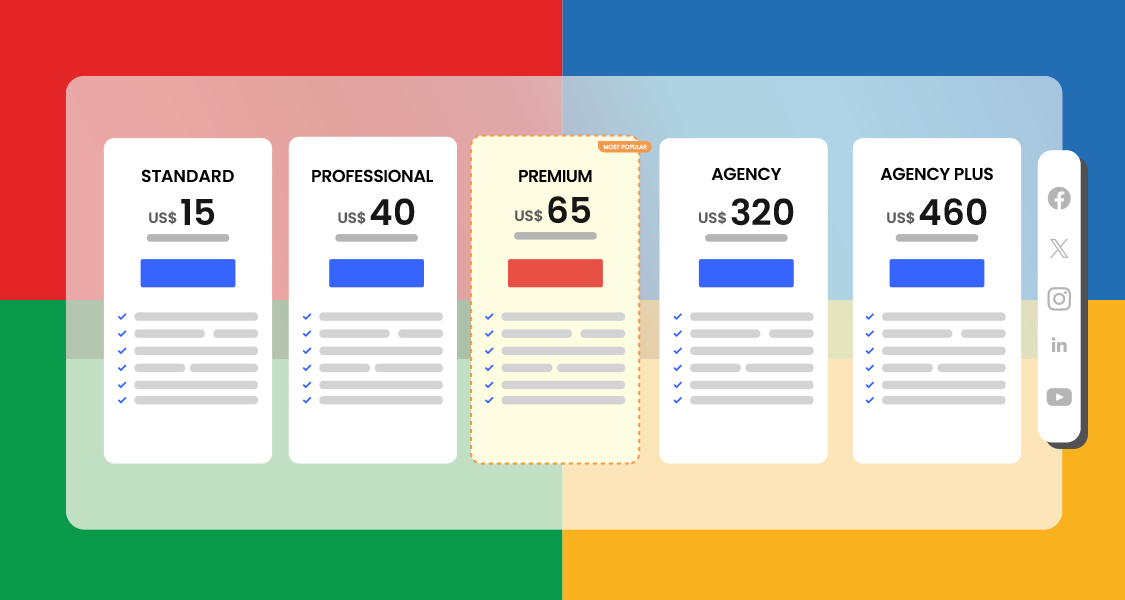
Zoho Social is far more budget-friendly than Sprinklr. Paid plans start at around $15/month for individuals, scaling up to agency-focused plans that allow multiple users, brands, and client dashboards.
The Agency Plus plan ($320/month) even includes white-label options – ideal for agencies that want to present Zoho’s work under their own branding.
Final Verdict
Zoho Social is best suited for small to mid-sized teams and agencies that want smart scheduling, CRM integrations, and streamlined collaboration without the overhead of an enterprise system.
While Sprinklr remains a powerhouse for global enterprises, Zoho Social delivers practical, affordable, and easy-to-use functionality that makes it a strong alternative for growing businesses.
How to Choose the Best Sprinklr Alternative for Your Brand
Switching from Sprinklr to a new platform isn’t just about picking the tool with the fanciest features. It’s about finding one that truly fits the way your team works.
Every brand has different needs, so the “best” alternative will depend on your size, goals, and budget. Here are some factors worth weighing before making the leap:
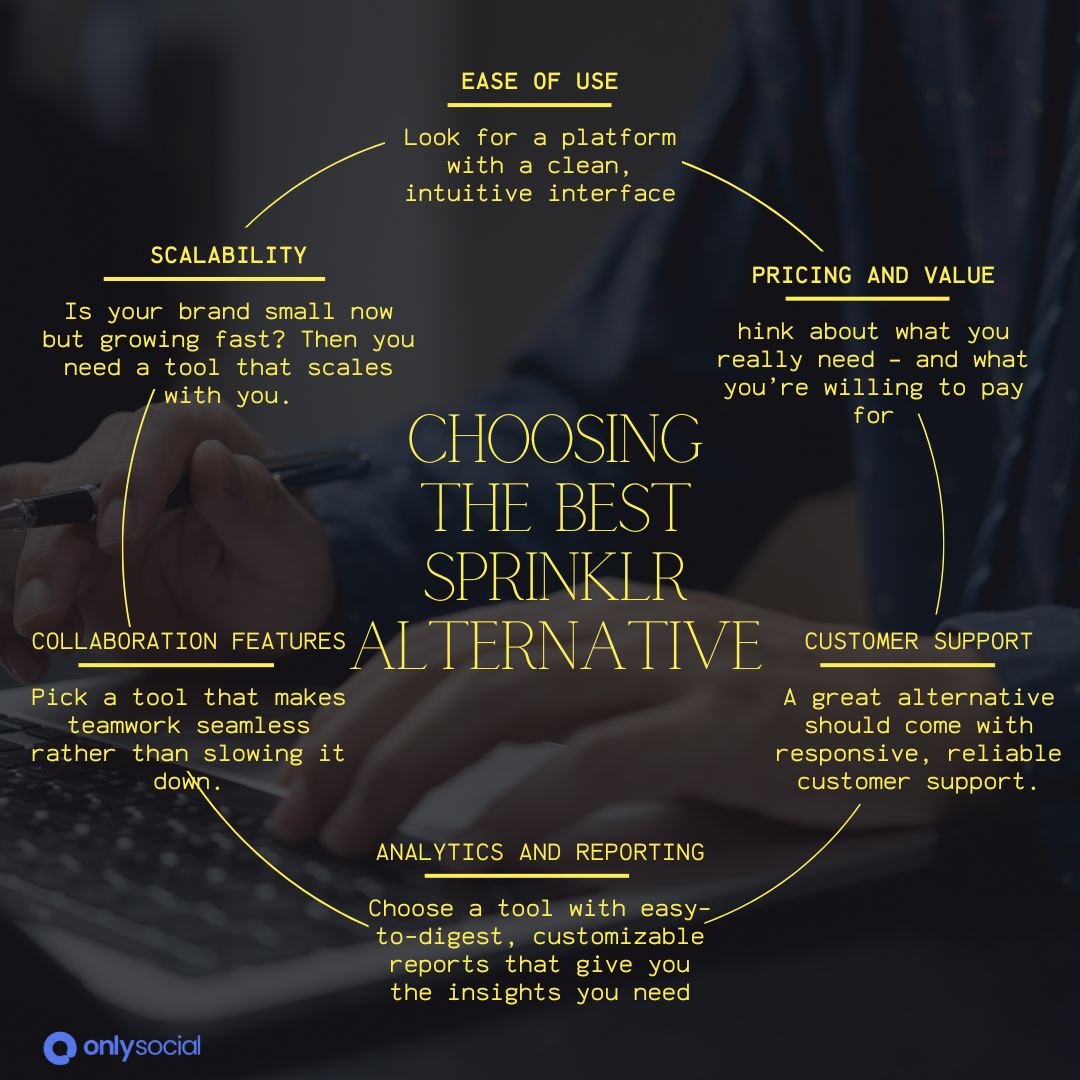
1. Ease of Use
Sprinklr often feels overwhelming with its layers of dashboards and options. If your team spends more time learning the tool than using it, productivity takes a hit. Look for a platform with a clean, intuitive interface that lets new users hit the ground running.
2. Pricing and Value
Before choosing an alternative, think about what you really need – and what you’re willing to pay for. Some tools (like OnlySocial or Buffer) offer robust features at a fraction of Sprinklr’s price, while others (like Sprout Social) still lean premium but justify it with advanced features.
3. Scalability
Is your brand small now but growing fast? Then you need a tool that scales with you. Consider how pricing changes as you add more users, social profiles, or clients. A solution that’s affordable today but breaks the bank tomorrow won’t serve you for long.
4. Collaboration Features
Sprinklr’s workflows are powerful but often too heavy for smaller teams. Think about how your team collaborates day-to-day.
Do you need simple approval flows, or do you require advanced role-based permissions for multiple departments and clients? Pick a tool that makes teamwork seamless rather than slowing it down.
5. Analytics and Reporting
Numbers matter, especially if you’re pitching clients or proving ROI to your boss. Sprinklr excels in deep analytics but can drown you in data. Some alternatives focus on easy-to-digest, customizable reports that still give you the insights you need without overwhelming you.
6. Platform Support & Integrations
If your strategy spans Instagram, TikTok, LinkedIn, and even newer players like Threads or Bluesky, make sure your chosen tool covers them all. Extra integrations (like CRM, ad managers, or design apps) are a big plus if you want everything in one hub.
7. Customer Support
Sprinklr users often complain about slow or unhelpful support. A great alternative should come with responsive, reliable customer support. So when issues pop up, your campaigns don’t stall while you wait on hold.
The key takeaway is that don’t just look at shiny features. Think about how your team works every day, what bottlenecks you want to remove, and what level of investment makes sense.
The right Sprinklr alternative should save you time, simplify your workflows, and give you confidence to scale.
Final Note
Sprinklr may still work for some enterprise teams, but for many agencies and growing brands, it feels like paying premium prices for complexity you don’t really need. The good news is that there’s no shortage of smarter, more agile alternatives ready to step in.
From budget-friendly tools like OnlySocial and Buffer to enterprise-ready platforms such as Hootsuite and Sprout Social, each option offers its own strengths.
The key is choosing the one that fits your workflow, goals, and budget, without dragging your team into endless training sessions or bloated dashboards.
Social media should feel manageable, not overwhelming. The right Sprinklr alternative will help you save time, collaborate smoothly, and deliver results your clients will love.