Managing Mastodon DMs & Comments in 2025: Your Complete Toolkit
Managing DMs and comments on Mastodon isn’t as simple as it sounds.
Unlike traditional social platforms, Mastodon is decentralized, meaning your messages, mentions, and replies are spread across multiple servers.
One comment might appear instantly, another might get delayed, and your inbox? It’s more like a series of separate doors than one central space.
For creators, businesses, and brands juggling multiple accounts or instances, it can feel like trying to hold a conversation in ten different rooms at once.
But here’s the thing – engaging on Mastodon doesn’t have to be overwhelming. With the right system, you can track every DM, respond to every mention, and keep your community conversations flowing smoothly.
In this post, we will show you how to manage Mastodon conversations seamlessly in 2025.
Table of Contents
- 1 Why Mastodon Engagement Matters in 2025
- 2 Understanding How Mastodon DMs & Comments Work
- 3 The Challenges of Managing Mastodon DMs & Comments Manually
- 4 Managing Mastodon DMs & Comments with OnlySocial
- 5 Tips for Better Engagement on Mastodon in 2025
- 6 Common Mistakes to Avoid When Managing Mastodon Engagement
- 7 Other Tools That Can Help Manage Mastodon DMs & Comments
- 8 Final Thoughts
- 9 FAQs
Why Mastodon Engagement Matters in 2025
Mastodon has evolved far beyond being a niche alternative to Twitter. In 2025, it’s become a thriving space for communities that value meaningful conversation over viral noise.
From journalists and developers to artists and educators, more people are using Mastodon to connect directly with audiences who care about substance, not just reach.
For brands and creators, that shift is a big opportunity.
Every DM and comment on Mastodon is a chance to build trust – not through flashy ads, but through real interaction. When you respond to someone’s mention or take a moment to thank a follower for feedback, it stands out. Those small gestures are what really matter on Mastodon.
And because engagement on Mastodon happens in public threads that spread across federated servers, active interaction can also boost your visibility.
The more you reply, boost, and join discussions, the more your posts appear in timelines across different instances. So, genuine engagement isn’t just polite; it’s how you grow and stay relevant in Mastodon’s community-driven ecosystem.
Understanding How Mastodon DMs & Comments Work
Now, let’s talk about what managing DMs and comments feels like on this platform, because for people to Mastodon, things can feel a little… different.
Unlike platforms like Facebook or Instagram, Mastodon isn’t one giant network. It’s a collection of smaller communities called instances. Each instance runs independently but can still interact with others.
Think of it like email: you might be on Gmail, while someone else is on Outlook, but you can still send each other messages.
Now, when it comes to Direct Messages (DMs), Mastodon handles them in a unique way. Instead of a private inbox like you’d find on Twitter, messages work more like private posts. You can choose who sees them by adjusting visibility settings, so they’re “direct” only to specific users.
However, depending on the instance setup, some DMs might not even go through if privacy rules differ between servers. That’s where things can get a bit tricky for businesses or creators managing multiple accounts.
As for comments, Mastodon treats replies as part of the public conversation. When someone comments on your post (or “toot”), it shows up as a threaded reply that can be seen across federated timelines.
But since those timelines spread across different instances, mentions can sometimes slip by unnoticed. This often results in missed messages, lost opportunities to connect, and followers who might think you’ve gone quiet.
That’s why understanding how Mastodon’s communication works is so important. Once you grasp its structure, managing your DMs and comments becomes a lot less intimidating and a lot more rewarding.
The Challenges of Managing Mastodon DMs & Comments Manually
If you’ve ever tried keeping up with Mastodon DMs and comments on your own, you already know it’s not a walk in the park. The platform’s decentralized nature makes engagement authentic, yes – but it also makes management a bit of a maze.
Here are some of the biggest hurdles users face when juggling multiple accounts or instances manually:
- Scattered notifications across servers
Mastodon doesn’t have a single, unified notification center. Each instance has its own alerts, which means you might respond to one conversation and completely miss another happening on a different server. - No central inbox
If you manage multiple accounts or brand instances, there’s no built-in way to see all your DMs and comments in one place. You’ll find yourself hopping between tabs, browsers, or even devices just to stay caught up. - Limited team collaboration
Mastodon was built for individual users, not marketing teams. There’s no native feature to assign messages, share notes, or coordinate who replies to what, making it difficult for teams to work efficiently. - No automation tools
You can’t set up automatic replies natively on Mastodon. That means every single reply is manual, which can eat up hours daily if you’re managing multiple active accounts. - Visibility issues with DMs
Because DMs work like private posts, sometimes messages don’t reach users on other instances – or they appear in unexpected ways depending on visibility settings. It’s confusing and easy to lose track of who said what. - Missed mentions and late responses
With delayed notifications and no unified inbox, it’s all too easy for comments or mentions to go unseen. And when you respond late, it can make your audience feel ignored, even if that wasn’t your intention.
All these challenges add up to one big problem: disconnection. But the good news is that with the right management tool like OnlySocial, you can bring all these scattered interactions into one organized, stress-free place.
Let’s see how the tool works.
Managing Mastodon DMs & Comments with OnlySocial
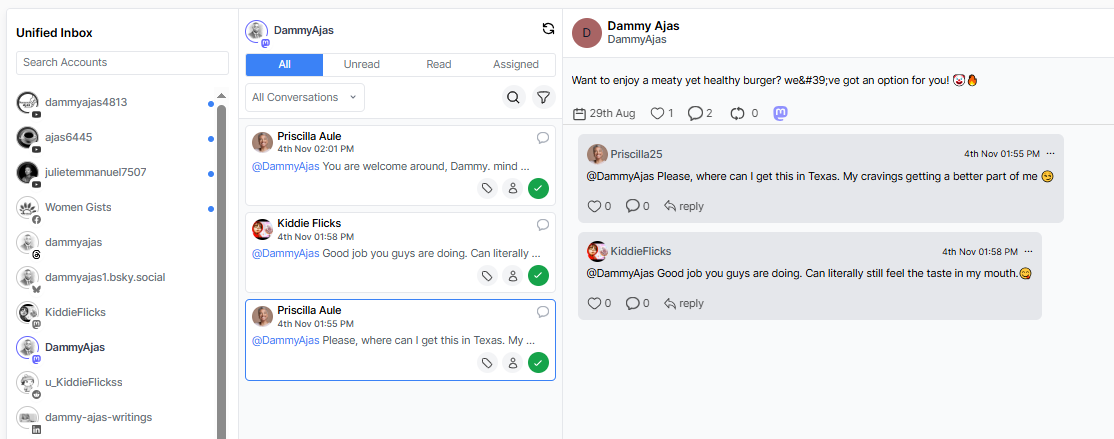
Centralize All DMs and Comments in One Inbox
Mastodon scatters conversations across instances. OnlySocial pulls them back together. Connect your Mastodon accounts (even if they live on different servers) and see every DM, mention, and reply in a single inbox.
You no longer have to hop between tabs or guess which profile got that question about pricing. Threads stay intact, so you can read the full context before you reply.
Need to focus on one brand or campaign? The tool allows you to filter by account, post, or keyword and work through a clean queue.
Real-Time Updates for Mentions and Replies
Timeliness matters on Mastodon, especially when discussions spread across federated timelines. OnlySocial streams new mentions, replies, and DMs as they happen, so you’re not stuck refreshing or waiting for delayed notifications.
If the same conversation appears from multiple instances, OnlySocial groups it neatly, helping you avoid duplicate responses. You can jump straight from a notification into the full thread, reply, boost, or mark it for later – all without breaking flow.
If you prefer to batch your work, you can set quiet hours, then catch up with a fresh, time-ordered feed when you’re ready. The result is simple: fewer misses, faster replies, and smoother conversations.
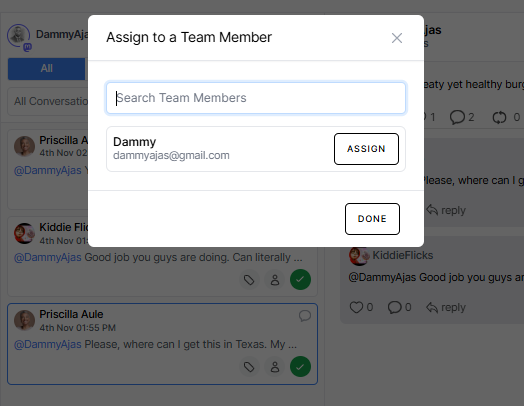
Assign Conversations to Team Members
Mastodon wasn’t built for team workflows, but your brand likely was. With OnlySocial, you can assign any DM, mention, or thread to the right person. That means support can take troubleshooting, while comms handles press, partnership reviews, and collab requests.
Each assignment carries status (Open, Waiting, Done) and an activity trail, so you always know who’s on it and what happened last.
You can also add internal notes to share context (“followed up on @[email protected] yesterday; waiting on order number”) without posting publicly. And if priorities change, you can easily reassign with one click.
Use Filters and Tags to Stay Organized
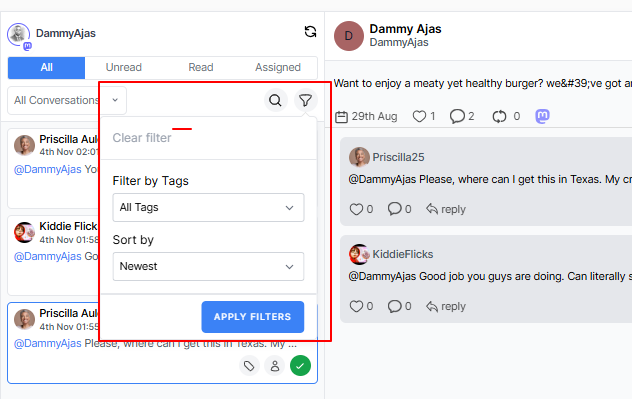
When you’re managing multiple Mastodon accounts or handling conversations across various servers, your inbox can fill up fast. That’s where filters and tags in OnlySocial come in handy.
You can tag messages by category – like “Support,” “Leads,” or “Community” – so nothing gets lost in the shuffle. Need to focus on high-priority comments? Just filter by urgency or sentiment.
You can even create custom tags to track campaigns or ongoing discussions. For instance, if you’re running a product launch, tag all related comments for quick access later.
It’s a simple but powerful way to keep your inbox clean, focused, and easy to navigate.
AI-Assisted Replies and Saved Templates
Sometimes, you know exactly what to say, but typing the same answer a dozen times gets tiring. Other times, you just need a little help finding the right words.
OnlySocial’s AI-assisted replies make both situations easier. It suggests polished, context-aware responses you can send instantly or tweak to sound more personal.
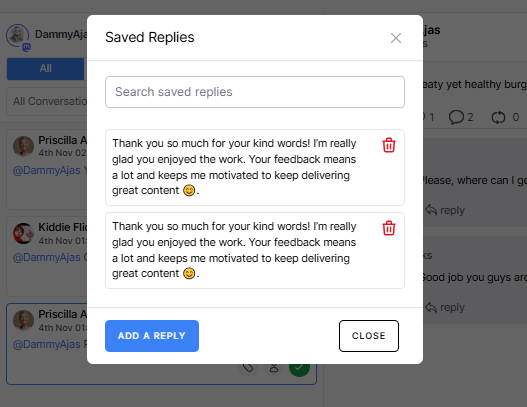
You can also create Saved Templates for common replies, such as FAQs or standard thank-yous, saving time without sounding repetitive.
Automate Keyword-Based Replies
Let’s face it, some messages repeat themselves. People often ask about pricing, hours, collaborations, or how to join your community.
Instead of answering those manually every time, OnlySocial lets you set up keyword-based automation. When someone mentions certain phrases (like “pricing” or “support”), the system automatically sends a friendly, pre-written response or directs them to the right link.
It’s not just efficient; it ensures no message slips through the cracks, even outside business hours.
You can personalize these replies to sound human and on-brand, making automation feel like natural conversation. This way, you stay responsive around the clock, while still keeping that personal Mastodon touch.
Integrate Mastodon with Other Channels
Let’s be honest – Mastodon isn’t the only platform you’re juggling. Between Instagram, Bluesky, Threads, and others, switching apps to handle DMs and comments can burn hours of your day.
That’s why OnlySocial integrates Mastodon seamlessly with your other connected profiles. You can view and reply to comments, DMs, and mentions across all your social channels from one unified dashboard. This not only saves time but also keeps your messaging consistent across platforms.
Planning a campaign? You can cross-reference feedback from Mastodon with your audience’s reactions on other networks – all without leaving OnlySocial.
It’s the easiest way to manage social engagement at scale, without losing your mind (or your momentum).
Tips for Better Engagement on Mastodon in 2025
Engagement on Mastodon isn’t about chasing likes or boosting reach, but about connection. The community values genuine conversation and thoughtful replies over polished marketing.
If you want to stand out and build lasting relationships, these tips will help you make the most of your presence:
1. Engage with intent
Don’t just reply for the sake of activity. Take a moment to read what people are saying, and respond with substance. Whether it’s a compliment, a question, or feedback, show that you’re listening. On Mastodon, meaningful engagement builds loyalty faster than any campaign.
2. Respect the culture
Mastodon users are protective of their space – they prefer authenticity to hard selling. Avoid sounding overly promotional or dropping links in every post. Instead, share insights, respond thoughtfully, and let your value speak for itself.
Unlike some other platforms, hashtags on Mastodon are a key discovery tool across federated instances. Use 2-3 relevant hashtags to help people find your content.
For example, if you’re in tech, tags like #opensource or #fediverse can introduce your posts to entirely new audiences.
4. Encourage conversations, not just clicks
Ask open-ended questions, invite opinions, and follow up on replies. Mastodon thrives on dialogue, not algorithms. The more natural your tone, the more likely users are to engage – and that’s how communities form.
5. Pin key posts or FAQs
If you get repeated questions, pin a post with your most common answers or updates. It saves time and helps new followers find useful information without digging through threads.
6. Keep an eye on mentions
Federated timelines sometimes delay notifications. Check your mentions tab regularly, especially if you’re managing multiple accounts. Missing a mention might mean missing a great collaboration or a customer question that deserves attention.
Common Mistakes to Avoid When Managing Mastodon Engagement
Even experienced social media managers can trip up on Mastodon – mainly because it plays by different rules. If you’re used to the fast, algorithm-driven pace of platforms like X or Instagram, the Fediverse can feel unfamiliar at first.
To help you find your footing, here are a few mistakes worth steering clear of:
Treating Mastodon like Twitter
Mastodon isn’t built for quick takes or self-promotion sprees. If you flood timelines with automated posts or ads, you’ll likely lose followers fast. The culture here rewards genuine conversation and curiosity – not noise.
Ignoring DMs because they look like posts
On Mastodon, direct messages are basically private posts. That makes it easy to miss them if you’re not checking carefully. Failing to respond can come off as rude or inattentive, even if it’s an honest oversight. A unified inbox (like OnlySocial’s) helps make sure nothing slips through.
Copy-pasting identical replies everywhere
Because Mastodon spreads across multiple servers, people notice repetition fast. Using the same canned response for every comment can make you sound robotic. Instead, personalize your replies – even a small tweak can make your message feel more genuine.
Over-automating engagement
Automation can be a lifesaver, but if every response sounds too polished or too instant, people will catch on. Keep some interactions human. Use automation for speed, but always review and personalize before sending when it matters most.
Neglecting federated conversations
A common rookie mistake is replying only to comments visible on your home instance. Conversations often continue across federated servers, and missing those replies makes you seem disconnected. Using a management tool that tracks mentions across instances ensures no thread gets left hanging.
Forgetting tone and context
Mastodon is community-first. A message that might work on LinkedIn or X could feel pushy or offbeat here. Keep your tone friendly, transparent, and conversational. People want to interact with you, not a faceless brand.
Other Tools That Can Help Manage Mastodon DMs & Comments
While OnlySocial offers one of the most complete solutions for managing Mastodon engagement, it’s not the only tool out there. If you’re exploring your options or looking to complement your setup, here are a few others worth knowing:
Fedilab
If you prefer managing your Mastodon accounts on mobile, Fedilab is a powerful Android app designed specifically for the Fediverse. It supports multiple Mastodon instances and gives you more control than the default app.
Key features include:
- Multi-Account Support: Switch between different Mastodon profiles seamlessly.
- Central Feed View: See your mentions, messages, and comments in one place.
- Push Notifications: Stay updated on DMs and replies in real time.
- Scheduling & Translation: Plan posts and automatically translate content when needed.
While Fedilab doesn’t support team workflows or AI automation, it’s great for individuals who want a faster, more flexible Mastodon experience on the go. You can download it from Google Play or F-Droid for around $2.49 (one-time purchase).
Elk
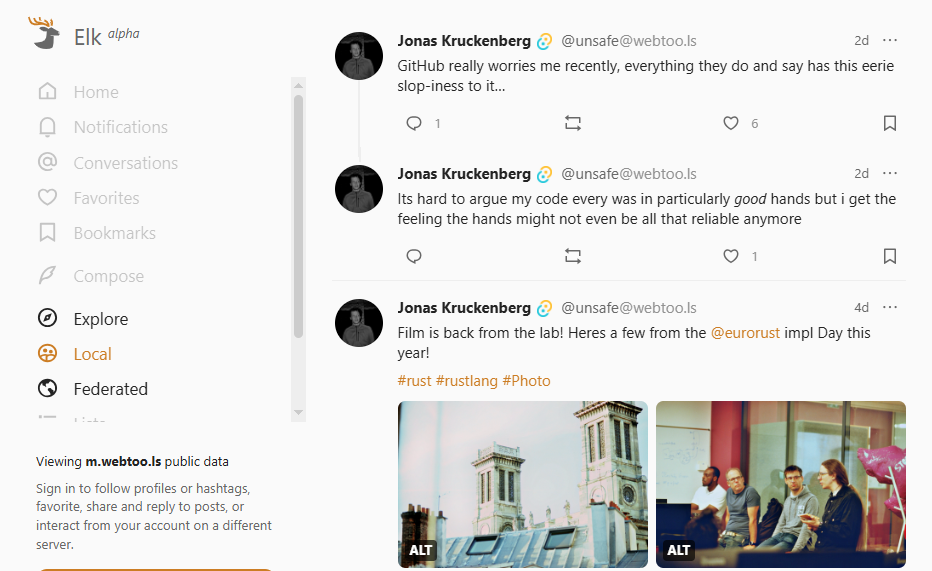
Elk is a sleek, open-source web client that makes using Mastodon feel as smooth as browsing Twitter used to. It focuses on simplicity and performance – ideal for users who find Mastodon’s native interface clunky or slow.
Here’s what stands out:
- Multi-Instance Access: Manage multiple Mastodon accounts from one browser tab.
- Fast Navigation: Quickly move between replies, DMs, and timelines.
- Modern UI: Clean layout, dark mode, and better visibility for threads.
- Lightweight & Private: Runs directly in your browser with no extra setup.
Elk doesn’t include automation or analytics features, but for everyday Mastodon users, especially creators managing personal engagement, it’s an easy, free solution. You can access it directly via elk.zone at no cost.
Sprout Social
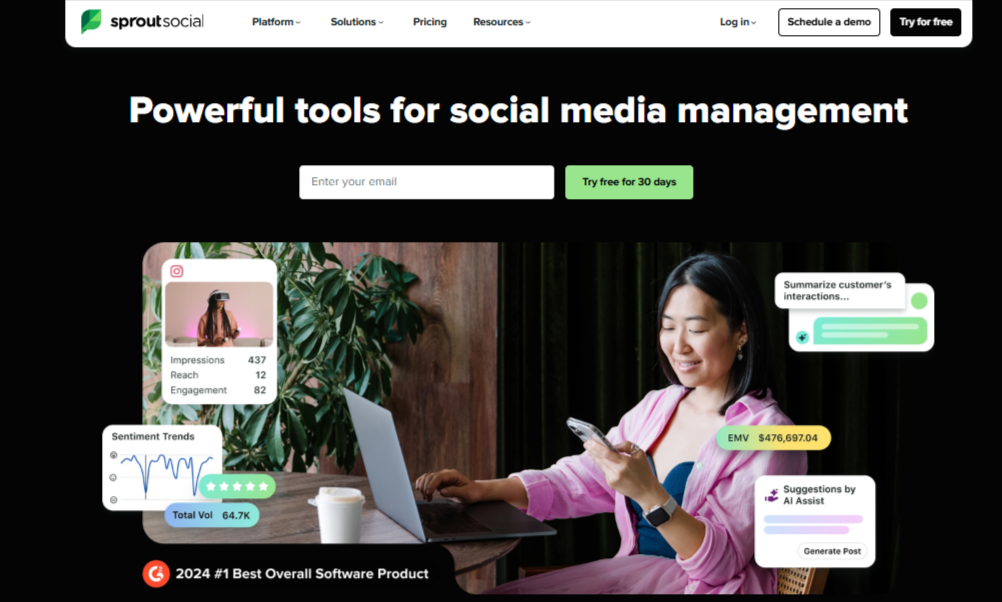
Sprout Social is one of the biggest names in social media management. It’s built for large teams and enterprise-level operations, offering deep analytics, automation, and collaboration tools.
While it doesn’t yet support Mastodon, it’s worth noting because of how well it handles DMs and comments across other major platforms, setting the standard for unified engagement tools.
Its relevant features include:
- Smart Inbox: Pulls together comments, mentions, and messages from Facebook, Instagram, LinkedIn, and X.
- Tagging & Filtering: Sort incoming messages by topic, urgency, or sentiment.
- Saved Replies: Keep communication consistent across large teams.
- Sentiment Analysis: Identify tone and emotion in customer feedback automatically.
Sprout Social is ideal for large organizations that need structure, reports, and collaboration at scale. Its plans start around $199/month, making it a premium choice for businesses that want enterprise-grade tools.
Final Thoughts
Managing DMs and comments on Mastodon might seem complicated at first – and to be fair, it’s not as plug-and-play as other social networks. But once you understand its structure and use the right tools, it becomes one of the most rewarding platforms for genuine engagement.
Mastodon isn’t about vanity metrics; it’s about community. Every comment, every DM, and every conversation helps shape how people see your brand or personal presence. The problem is, when you’re juggling multiple accounts or instances, keeping up can get overwhelming fast.
OnlySocial helps turns the fragmented nature of Mastodon into something simple and seamless, letting you focus on what actually matters: connecting with people. With a unified inbox, AI-assisted replies, and real-time collaboration, you don’t just manage messages; you build relationships that last.
FAQs
Can I manage multiple Mastodon accounts from one dashboard?
Yes. With tools like OnlySocial, you can connect all your Mastodon accounts – even those on different servers – and manage every DM, mention, and comment from a single dashboard. No need to log in and out of each instance separately.
Does responding to comments boost visibility on Mastodon?
It does. Mastodon doesn’t use traditional algorithms, but active engagement helps your posts appear more often in federated timelines. Replying to comments and participating in threads shows you’re part of the conversation – and that increases your reach naturally.
Can I automate Mastodon replies without sounding robotic?
Absolutely. OnlySocial’s AI-assisted replies help you craft natural, context-aware responses that feel human. You can review and edit before sending, so even automated messages still sound personal and aligned with your tone.
What’s the best way to track mentions across Mastodon instances?
Because Mastodon is decentralized, mentions can appear in different servers’ timelines. OnlySocial helps you track all mentions in one inbox, no matter which instance they come from, so you never miss an important message or comment.
Can my team collaborate on Mastodon engagement?
Yes. OnlySocial lets multiple team members manage the same Mastodon accounts. You can assign DMs, leave internal notes, tag conversations, and track who’s handling what, making teamwork easy and transparent.
Can I filter or tag Mastodon messages to stay organized?
Yes. OnlySocial’s inbox lets you tag messages by priority, sentiment, or campaign. You can also filter them by keywords or accounts, making it easy to stay focused and organized – even with hundreds of active threads.