On this page
- What Instagram Marketing Means in 2026
- Step 1: Set Up a Profile That Sells
- Step 2: Choose Formats by the Job They Do
- Step 3: Decide What to Post
- Step 4: Understand How Instagram Ranks Posts
- Step 5: Plan and Schedule
- Step 6: Turn Comments and DMs Into Customers
- Step 7: Measure What Matters
- Step 8: Grow Beyond Your Followers
- A 30-Day Starter Plan
- Common Mistakes
- Frequently Asked Questions
- What is Instagram marketing?
- Is Instagram marketing still worth it for small businesses in 2026?
- How often should a business post on Instagram?
- How many hashtags should I use on Instagram?
- What is a good Instagram marketing strategy for a small business?
- What does the Instagram algorithm look for?
- What is the best format for growth on Instagram?
- Can I schedule Instagram Reels and Stories?
- What is comment-to-DM on Instagram?
- The Short Version
Instagram is no longer a photo feed with a shop window attached. It is a video app, a search engine, a messaging inbox and a storefront at the same time, and Instagram says more than 3 billion people use it every month. That is the opportunity and the problem: there is a lot to do, and most businesses do a little of everything and none of it well.
This is the long version of how to market on Instagram, written for owners and marketers who want one place that explains the whole system. Follow the steps in order and you end up with a complete Instagram marketing strategy; each section links to a deeper guide when you need the detail.
Instagram marketing in 2026 comes down to seven jobs: a professional profile that says who you help, Reels to be found, carousels to be saved, Stories to stay in touch, a steady schedule, fast replies to comments and DMs (ideally with comment-to-DM automation), and a monthly look at analytics to keep what works. Instagram ranks posts mainly on watch time, likes and sends, rewards original content and now allows five hashtags at most per post.
What Instagram Marketing Means in 2026
Instagram marketing is the work of using Instagram to reach the right people, earn their trust and give them an easy next step. That next step might be a visit to your website, a booking, a purchase or a message. Everything else in this guide is a way of doing one of those three jobs better: reach, trust or the next step.
Three changes over the last two years shape how that works now:
- Video carries discovery. Reels are the format most often shown to people who do not follow you yet, so they decide how fast a new account grows.
- Search matters. Instagram reads your captions, alt text and profile to decide what a post is about, and since July 2025 public posts from professional accounts can appear in Google results.
- Conversations close the sale. Comments and DMs are where interest turns into a customer. Businesses that answer quickly, and automate the repetitive part, convert far more of the attention they already get.
Organic Instagram is still free, and Instagram marketing for business still works at any size, from a one-person shop to a multi-location brand. What it costs is time and consistency, which is why the later sections lean on planning, scheduling and automation.
Step 1: Set Up a Profile That Sells
Your profile is the page every curious viewer lands on, so it has to answer three questions in three seconds: who is this, is it for me, and what do I do next.
Switch to a professional account
Instagram has three account types: personal, creator and business. Creator and business accounts are both professional accounts, and you need one for marketing. A professional account unlocks the Professional Dashboard with insights, contact buttons, ads, and the access that scheduling and messaging tools need. In the app, go to Settings, then Account type and tools, and switch. Choose business if you sell products or services; choose creator if you are the brand.
Write the bio for a stranger
- Name field: your brand plus the main thing you do, for example “Marlow & Co. | Leather bags”. The name field is searchable, so the second half helps people find you.
- Bio: who you help, what you offer and one reason to trust you. Skip slogans. Our Instagram bio ideas post has examples by industry.
- Profile photo: a logo for a brand, a face for a personal brand, readable at the size of a fingernail.
- Link: one link in bio that leads to a page with your most important destinations. Instagram allows several links in the profile, but a single link in bio page is easier to update and to measure. See how to add multiple links on Instagram.
- Highlights: save your best Stories into four to six Highlights such as Reviews, Prices, How to order and FAQ.
For a full checklist, read how to create the best Instagram profile.
Turn on the settings you will need later
Two settings are easy to miss and block things down the line. If you plan to use a tool to reply to messages or run comment-to-DM, switch on Allow access to messages under Settings, Messages and story replies, Message controls, Connected tools. And make sure the account is public: private accounts cannot be recommended to non-followers or appear in search engines.
Step 2: Choose Formats by the Job They Do
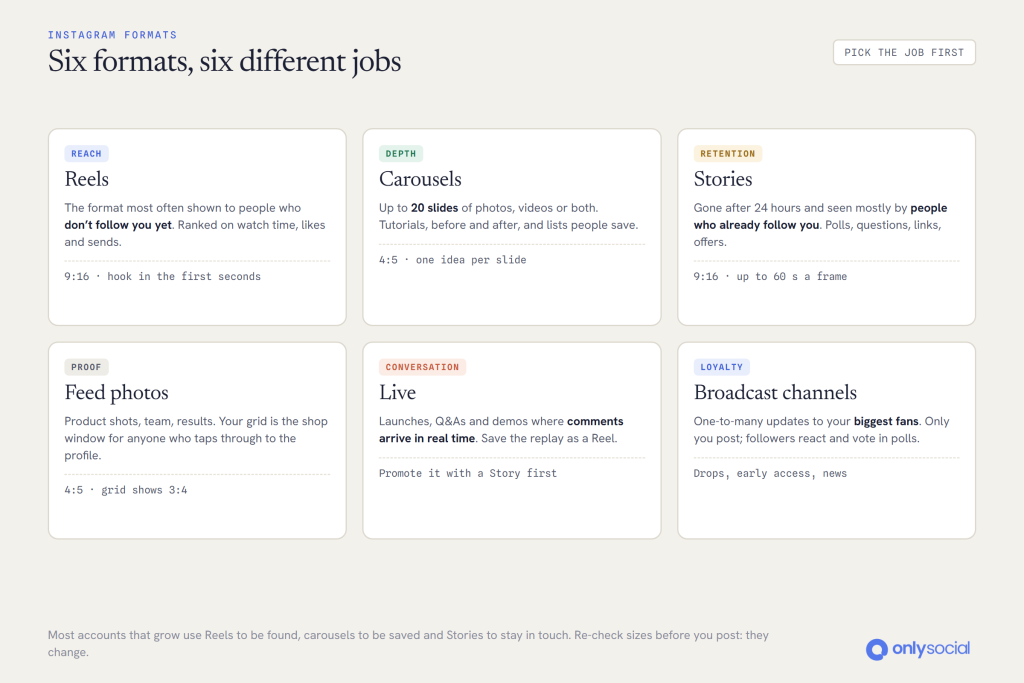
Each Instagram format is good at one job, and the accounts that grow use them on purpose instead of posting whatever is ready.
Reels: reach
Reels are short vertical videos in 9:16. They are the format most often recommended to people who do not follow you, so they do most of the work of growing an account. The first two seconds decide whether anyone watches the rest: open on the result, the problem or the surprise, not on a logo. Instagram now lets you record much longer Reels in the camera, but short and tight still wins attention. Need ideas? Start with our Instagram Reels ideas.
If you are worried about testing something new on your followers, use trial Reels. A trial Reel is shown to non-followers first, and you can share it with your followers later, or let Instagram share it automatically if it performs well within 72 hours. Our guide to Instagram trial Reels explains when to use them.
Carousels: depth and saves
A carousel holds up to 20 photos, videos or a mix. It is the best format for anything people want to keep: tutorials, step-by-step guides, before and after, comparisons and lists. Saves tell Instagram a post was useful. One idea per slide, a cover that promises the payoff, and a last slide that tells people what to do next. See Instagram carousels 101.
Stories: retention
Stories disappear after 24 hours and are seen mostly by people who already follow you. That makes them the place for behind the scenes, polls, questions, quick offers and links. A video Story frame can run up to 60 seconds. Read how to use Instagram Stories and why it matters.
Feed photos: proof
Single photos rarely reach far on their own, but they shape the grid, which is the first thing a profile visitor sees. Post in 4:5 (1080 by 1350 pixels) and keep the important part in the centre, because the profile grid now shows posts as 3:4 thumbnails.
Live: conversation
Live video is for launches, Q&As, demos and anything where questions in real time add value. Announce it in Stories a day before, and keep the replay.
Broadcast channels and collabs: loyalty and borrowed reach
A broadcast channel is a one-to-many chat where only you post and followers react or vote in polls. It suits drops, early access and news for your biggest fans. Collab posts appear on more than one account at once, so a partner’s audience sees your post too. See how to create and use Instagram collab posts.
Sizes to use
| Format | Shape | Pixels | Notes |
|---|---|---|---|
| Reel | 9:16 | 1080 × 1920 | Keep text away from the bottom fifth, where captions sit |
| Feed photo or carousel | 4:5 | 1080 × 1350 | Grid shows a 3:4 crop; up to 20 slides per carousel |
| Story | 9:16 | 1080 × 1920 | Up to 60 seconds per video frame |
| Profile photo | 1:1 | 320 × 320 or larger | Shown as a circle |
Limits change, so re-check before a big campaign. Our Instagram video sizes guide keeps the full list up to date.
Step 3: Decide What to Post
Content pillars stop you starting from a blank page every day: three or four themes you rotate, each tied to something your customers care about.
A simple set that works for most businesses:
- Teach: tips, how-tos and mistakes to avoid in your field. These earn saves and sends.
- Show: the product or service in use, the process, the team, the workshop. These build trust.
- Prove: reviews, results, customer photos and case studies. These answer “does it work?”
- Sell: offers, launches and clear calls to action. These should be the smallest share, roughly one post in five.
Write captions for search as well as for people. Put the words a customer would type into Instagram search in the first line, for example “handmade leather tote” rather than “new drop!”. Captions that open with a hook and end with one clear action do best; our post on Instagram captions that convert has templates.
Make content original. Instagram replaces reposted content with the original in recommendations and keeps aggregator accounts out of them, and since April 2026 that applies to photos and carousels as well as Reels. Film your own footage, use your own photos, and if you share someone else’s work, add something of your own and credit them.
Step 4: Understand How Instagram Ranks Posts
There is no single Instagram algorithm, but the head of Instagram, Adam Mosseri, has said the three signals that matter most for ranking are watch time, likes and sends.
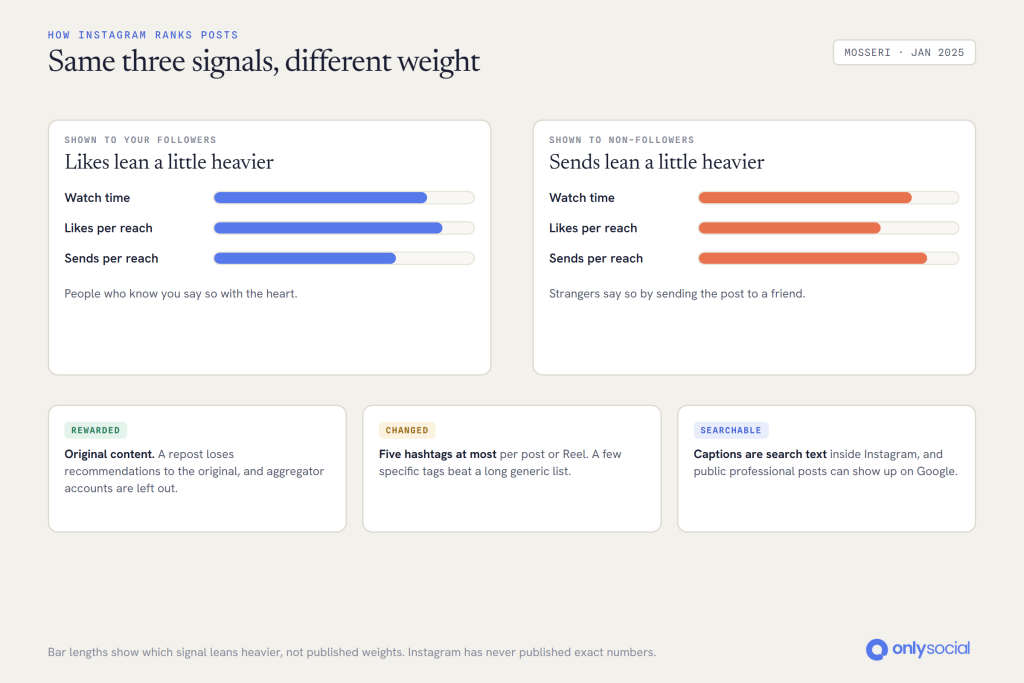
Mosseri added a useful detail in January 2025. Likes per reach count a little more for reaching people who already follow you. Sends per reach count a little more for reaching people who do not. In plain terms:
- To grow your following, make posts people send to a friend: useful, funny, surprising or “this is so you”.
- To keep followers engaged, make posts they want to like and save.
- For both, hold attention. Cut the slow start and the dead air.
Hashtags and search
Instagram limited posts and Reels to five hashtags in December 2025, and Mosseri’s advice is that a few specific tags perform better than a long list of generic ones. Use them to describe the post, not to chase reach. Search matters more than hashtags now: keywords in your caption, alt text, name field and bio help Instagram match posts to searches. Read Instagram SEO strategies and the ultimate guide to Instagram hashtags.
One myth worth retiring: Mosseri said in July 2025 that writing “link in bio” in a caption does not reduce reach. For the full picture, see how the Instagram algorithm works.
Step 5: Plan and Schedule
Consistency beats volume: three good posts a week for three months will do more than daily posting for two weeks followed by silence.
Pick a rhythm you can keep
A sustainable starting point for a small business is three Reels and two carousels a week, plus Stories most days. Larger brands post more; very small teams can start with three posts a week. Whatever you choose, post at roughly the same times so your audience learns when to expect you. Our guide to the best time to post on Instagram explains how to find your own windows from your insights.
Batch, then schedule
Write and film in batches: one session a week for captions, one for filming. Then put everything on a calendar so gaps and repeats are obvious. A scheduler publishes for you, so posting does not depend on someone remembering at 7pm on a Sunday.
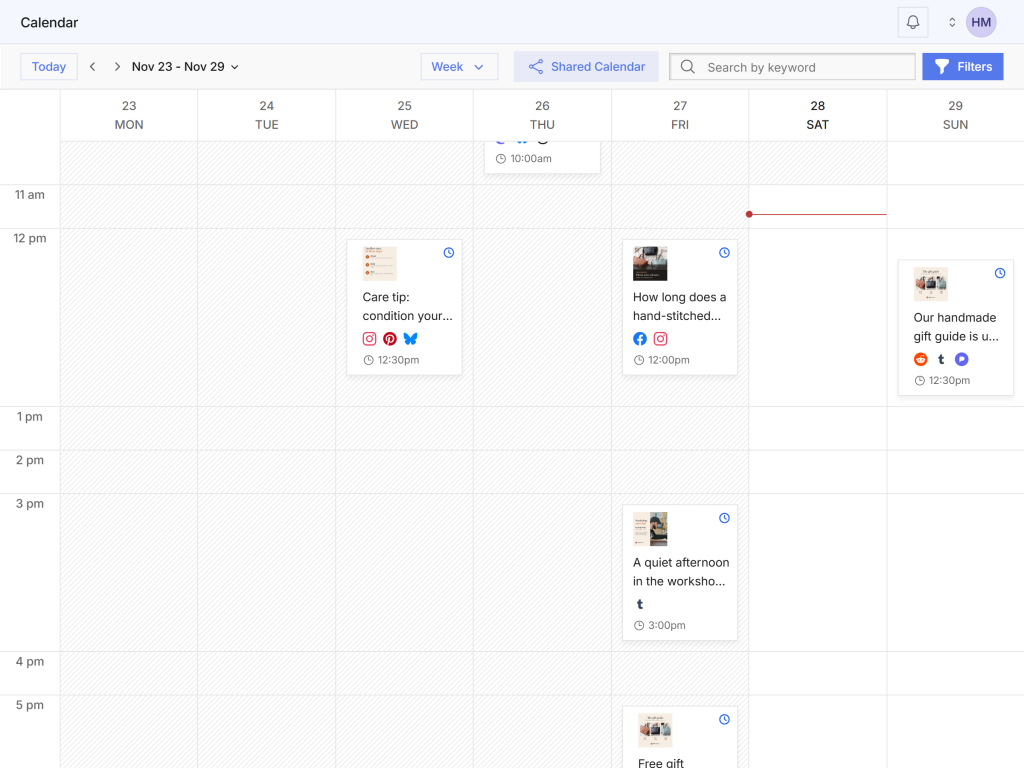
In OnlySocial you can schedule Instagram feed posts, Reels, carousels and Stories, set the Instagram options for each post, and add a first comment that goes out after the post is live.
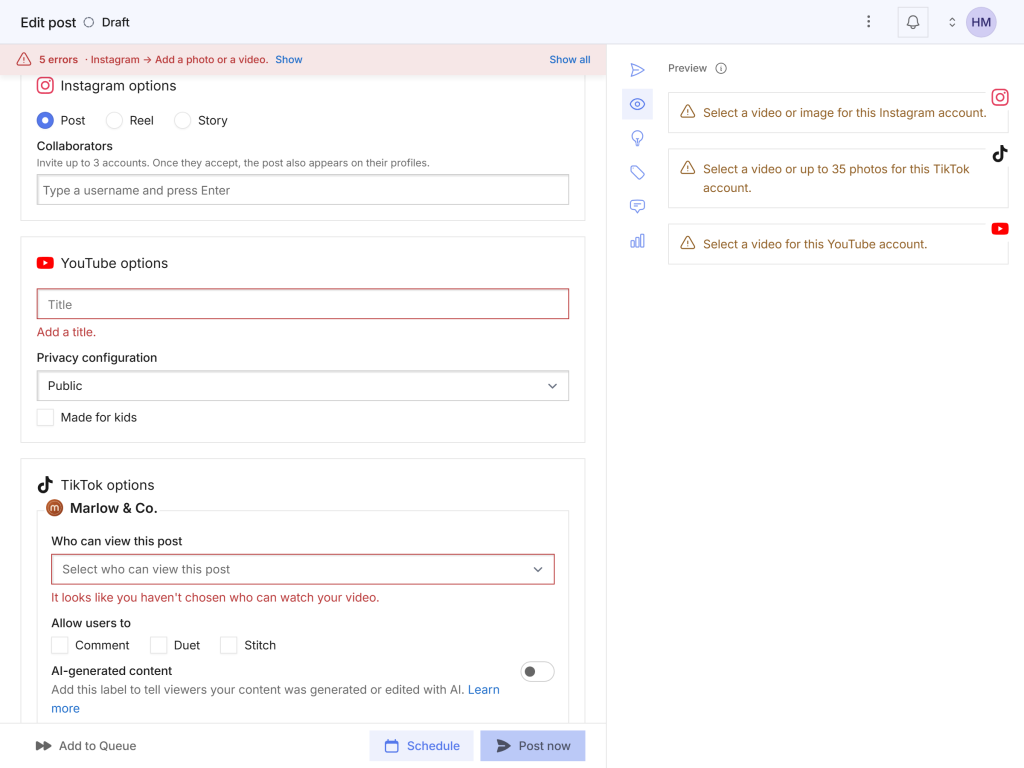
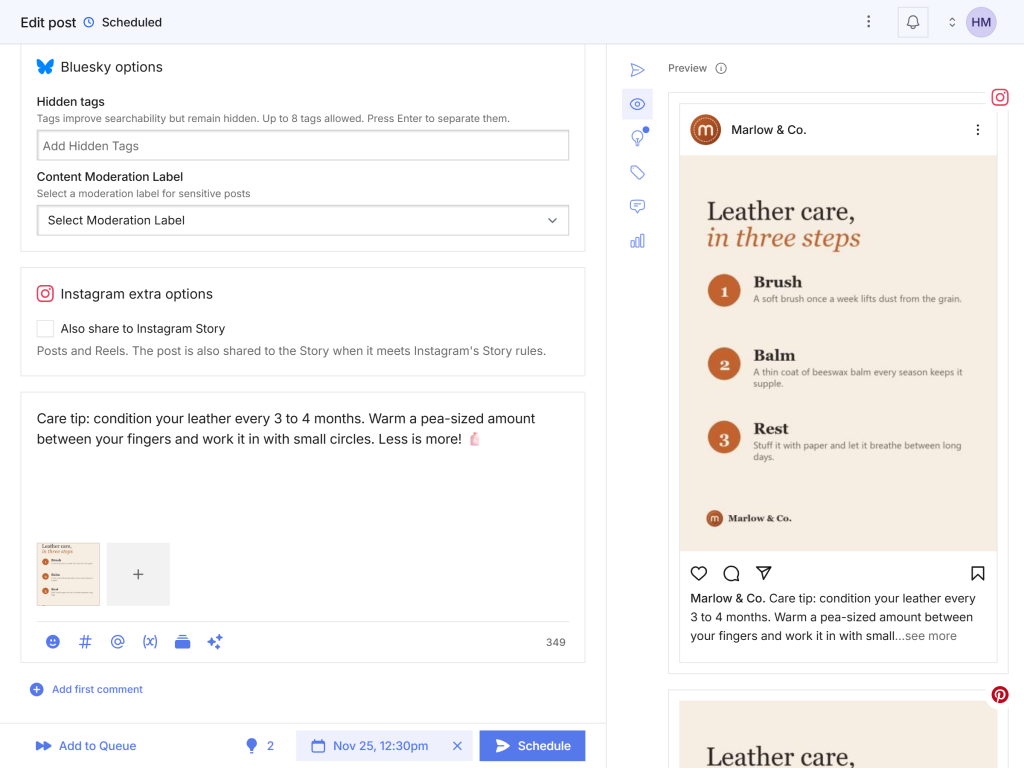
For the step-by-step, see how to plan and schedule posts on Instagram, how to create an Instagram content calendar and how to schedule a first comment on Instagram. Managing several brands? Read how to post to multiple Instagram accounts at once.
Step 6: Turn Comments and DMs Into Customers
Every comment and DM is someone raising a hand, and the businesses that answer fast win more of those people than the ones that post more.
Answer from one inbox
Replying inside the Instagram app works for one account and a few messages a day. Past that, comments, DMs, Story replies and mentions get lost between phones and team members. A unified inbox puts them in one queue with an owner and a status, so nothing waits more than a day. Read how to manage Instagram DMs and comments across accounts.
Use comment-to-DM for your best posts
Comment-to-DM is the “Comment GUIDE and I’ll send it to you” pattern. Someone comments a keyword, a tool replies publicly under the comment and sends them the link, guide or price by direct message. It works because it turns a passive viewer into a conversation, and every comment also tells Instagram the post is engaging.
Instagram sets firm rules here. A business can send one private reply per comment, within 7 days of the comment, and can only keep messaging automatically for 24 hours after the person writes back. Our Instagram comment-to-DM automation guide covers the rules, five ready-made plays and the full setup.
OnlySocial’s Salesbot includes comment-to-DM templates, AI replies that answer from your own product information, tags to sort leads, and a hand-over to your team when a person is needed. See the comment-to-DM feature page.
Set up the DM basics
- Ice breakers: up to four suggested questions people can tap when they open a chat with you (shown in the Instagram mobile app).
- Saved replies: answers to the ten questions you get every week.
- Response time: aim for the same business day. Automation handles the first reply; people handle the rest.
Step 7: Measure What Matters
Followers are a lagging number; the metrics that tell you what to post next are reach, watch time, saves, sends, profile visits and link taps.
| Metric | What it tells you | Act on it |
|---|---|---|
| Reach (followers vs non-followers) | Whether a post travelled beyond your audience | Repeat the formats and hooks that reach non-followers |
| Average watch time | Whether a Reel held attention | Cut slow openings; test shorter edits |
| Saves | Whether a post was useful enough to keep | Turn high-save topics into a carousel series |
| Sends (shares) | Whether people recommended it | Make more of what people send; it drives discovery |
| Profile visits and link taps | Whether interest turned into action | Fix the bio and link if visits are high but taps low |
| Engagement rate | Interactions relative to reach or followers | Compare posts against your own average, not other brands |
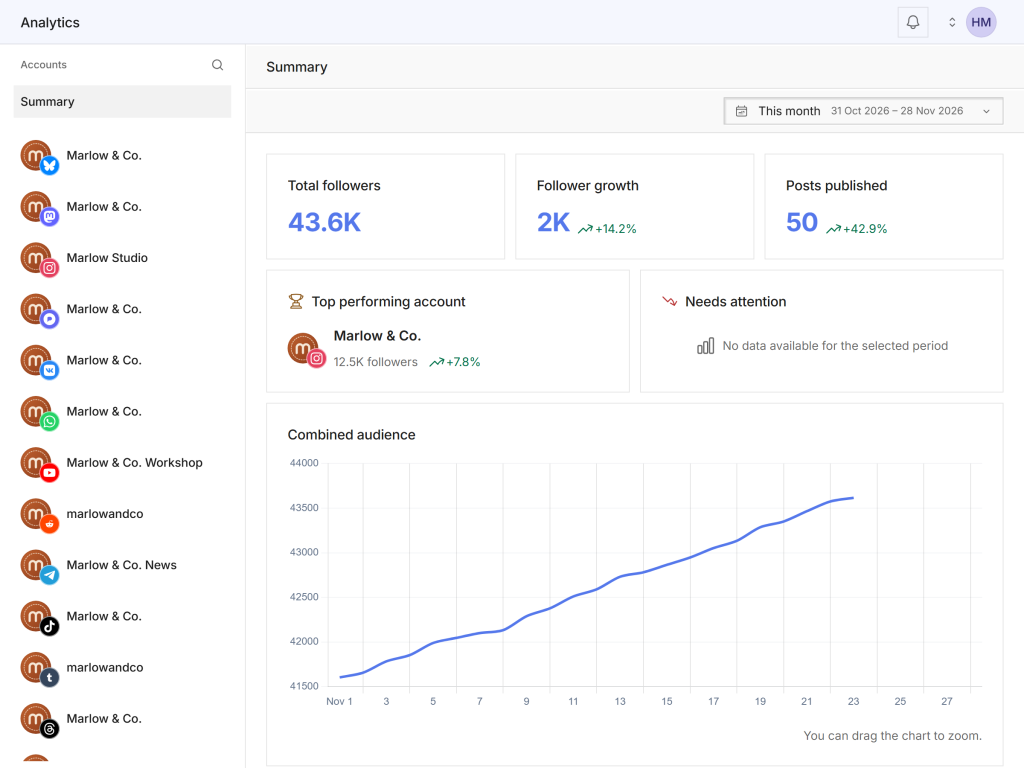
Look monthly, not daily. Compare formats against each other, keep the top 20 percent of topics and drop the bottom. Our guide to calculating your Instagram engagement rate shows the formulas, and how to use Instagram analytics to improve scheduled content shows how to feed results back into your plan.
Step 8: Grow Beyond Your Followers
Growth comes from being shown to new people, and on Instagram that mostly means Reels, collaborations, search and, when it pays, ads.
- Reels made to be sent. The single biggest lever for reaching non-followers. See how to get 10k followers on Instagram for free.
- The Explore page. Explore favours posts that hold attention and get sent. Read how to get on the Instagram Explore page.
- Collabs and creators. A collab post with a partner or local creator puts you in front of their audience with their endorsement.
- Search. Clear keywords in captions and the name field bring a steady trickle of people who were already looking for you.
- Shopping and ads. If you sell products, tag them in posts so viewers can tap through. Boost the organic posts that already performed, rather than creating ads from scratch. See how to use Instagram Shopping.
A 30-Day Starter Plan
If you are starting from scratch, or restarting an account that went quiet, this plan gets you to a month of real data without burning out.
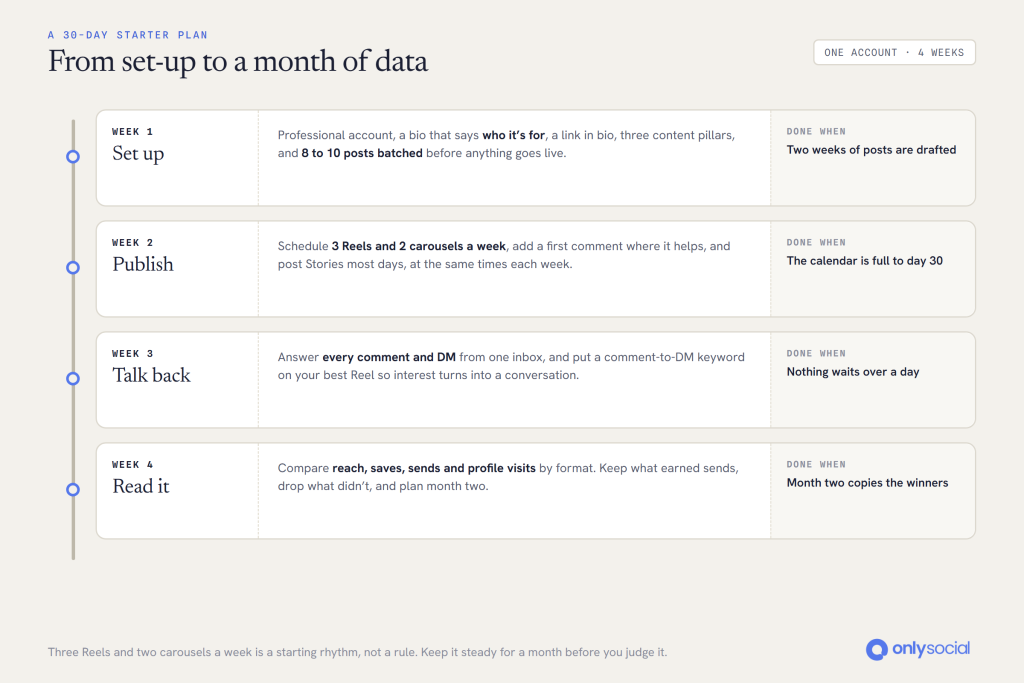
- Week 1, set up. Switch to a professional account, rewrite the bio for a stranger, add a link in bio, pick three content pillars and batch 8 to 10 posts before anything goes live.
- Week 2, publish. Schedule three Reels and two carousels a week, add a first comment where it helps, and post Stories most days at the same times.
- Week 3, talk back. Answer every comment and DM within a day from one inbox, and put a comment-to-DM keyword on your best-performing Reel.
- Week 4, read it. Compare reach, saves, sends and profile visits by format. Keep what earned sends, drop what did not, and plan month two around the winners.
Common Mistakes
- Posting without a job in mind. A Reel that teaches nothing and shows nothing has no reason to be sent.
- Chasing hashtags. Five is now the cap. Spend the effort on the caption’s first line instead.
- Reposting other people’s content as your own. Originality rules push those posts out of recommendations.
- Going quiet for weeks. Scheduling exists so a busy month does not erase your rhythm.
- Ignoring DMs. The sale often happens in the inbox, not in the feed.
- Judging on followers alone. Watch reach, sends and link taps; followers follow.
- Connecting a tool to a personal account. Scheduling and messaging tools need a professional account. If posts will not schedule, see why you can’t schedule posts on Instagram.
OnlySocial schedules Reels, carousels, Stories and first comments, answers comments and DMs from one inbox, runs comment-to-DM automation and shows analytics for every account, alongside 15 other networks. Plans start at $29 a month for 15 profiles.
Frequently Asked Questions
What is Instagram marketing?
Instagram marketing is using an Instagram account to reach potential customers, build trust with content and turn interest into visits, bookings or sales. It covers your profile, the posts, Reels and Stories you publish, how you answer comments and DMs, and how you measure results.
Is Instagram marketing still worth it for small businesses in 2026?
Yes, for most consumer businesses and many B2B ones. Instagram says it has more than 3 billion monthly users, organic posting is free, and Reels can reach people who have never heard of you. The cost is time, which planning, scheduling and automation reduce.
How often should a business post on Instagram?
Start with what you can sustain. Three Reels and two carousels a week plus Stories most days is a solid rhythm for a small business; three posts a week is fine for a very small team. Consistency matters more than volume.
How many hashtags should I use on Instagram?
Up to five. Instagram capped posts and Reels at five hashtags in December 2025, and says a few specific tags work better than many generic ones.
What is a good Instagram marketing strategy for a small business?
Pick three or four content pillars, use Reels to reach new people and carousels for saves, post on a schedule you can keep, answer every comment and DM within a day, and review reach, sends and link taps once a month. The 30-day plan in this guide is a ready-made starting point.
What does the Instagram algorithm look for?
Instagram says the three most important ranking signals are watch time, likes and sends. Likes weigh slightly more for followers and sends slightly more for non-followers. Original content is favoured over reposts.
What is the best format for growth on Instagram?
Reels, because they are shown most often to people who do not follow you. Use carousels for depth and saves, and Stories to keep existing followers engaged.
Can I schedule Instagram Reels and Stories?
Yes. With a professional account connected to a scheduler such as OnlySocial you can schedule feed posts, carousels, Reels and Stories, and add a first comment to posts and Reels.
What is comment-to-DM on Instagram?
It is an automation where someone comments a keyword on your post and automatically receives a direct message with a link or offer. Instagram allows one private reply per comment, sent within 7 days of the comment.
The Short Version
Treat Instagram as a system, not a feed. Set up a professional profile that says who you help, use Reels to be found, carousels to be saved and Stories to stay close, post on a schedule you can keep, answer every comment and DM, and let a monthly look at reach, sends and link taps decide what you make next.