On this page
- What Comment-to-DM Automation Is
- Why It Works
- Instagram’s Rules: What You Can and Cannot Send
- Five Comment-to-DM Plays
- How to Set It Up, Step by Step
- Writing the Post That Triggers It
- What Happens After the First DM
- Measuring Results
- Troubleshooting
- Mistakes to Avoid
- Frequently Asked Questions
- What is Instagram comment-to-DM automation?
- Is comment-to-DM allowed by Instagram?
- How many DMs can I send per comment?
- Can I auto DM everyone who comments on my Instagram post?
- How long do I have to reply to a comment with a DM?
- Is there a limit on automated Instagram DMs per hour?
- Do I need a business account for comment-to-DM?
- Can comment-to-DM work on Instagram ads and Live?
- Can I use comment-to-DM on Facebook or TikTok too?
- The Short Version
You have seen the posts: “Comment RECIPE and I’ll DM you the full method.” A few hundred people comment, and every one of them gets a message within seconds. Nobody is sitting at a phone typing. That is comment-to-DM automation, and it has become one of the most reliable ways for businesses and creators to turn attention on Instagram into leads, bookings and sales.
Done well, Instagram comment to DM automation feels like great customer service. It is also easy to get wrong. Instagram limits what a business can send after a comment, and a badly built flow either goes silent, sends the wrong thing or annoys the people it was meant to help. This guide covers both the opportunity and the rules.
Instagram comment-to-DM works like this: someone comments a keyword on your post or Reel, a tool replies publicly under the comment and sends them a private reply with the link or offer. Instagram allows one private reply per comment, sent within 7 days. If the person writes back, you have 24 hours to keep the conversation going automatically. You need a professional account with Allow access to messages switched on, and a tool connected through Instagram’s messaging API, such as OnlySocial’s Salesbot.
What Comment-to-DM Automation Is
Comment to DM automation watches the comments on your Instagram posts and sends a direct message to the people who comment the word you chose. It usually does three things at once:
- Spots the keyword. A comment containing GUIDE, LINK or PRICE starts the automation; other comments are left alone.
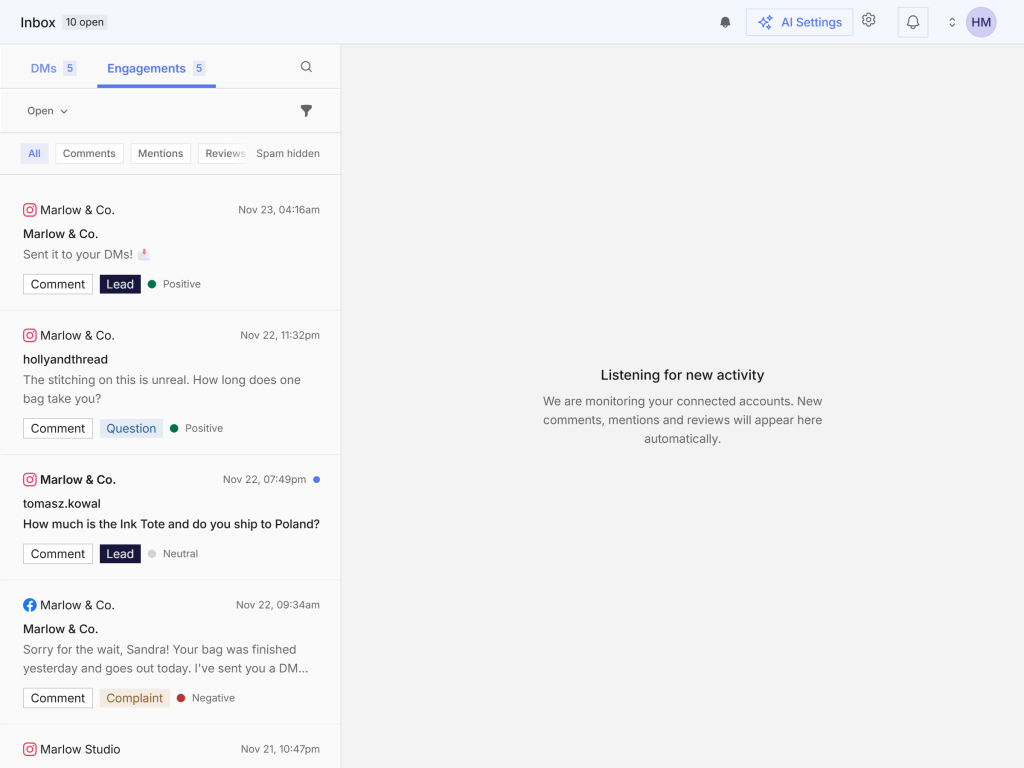
- Replies in public. A short reply under the comment, such as “Sent it to your DMs!”, shows everyone else that commenting works.
- Sends the DM. A private message lands in the commenter’s inbox with the link, file, code or answer they asked for.
On Instagram’s side, that private message is called a private reply. It is a message sent to someone in response to their comment, before they have ever messaged you. Instagram treats it differently from a normal DM, which is why the rules below matter.
Why It Works
Comment-to-DM removes the two biggest drop-off points on Instagram: the link people cannot click in a caption, and the reply nobody had time to send.
- No more “link in bio” hunt. Captions do not carry clickable links. A DM does, so the person goes straight from interest to the page.
- Instant answers. A reply in seconds, at 2am or on a Sunday, beats a reply tomorrow.
- Engagement the post can use. Every comment is a public signal that people are interested, and public replies under each comment make the thread busier still.
- A conversation, not a click. The DM opens a thread you can continue when the person writes back: answer questions, recommend a product or book a call.
- Leads you keep. A good tool saves each commenter as a contact with tags, so you can follow up properly later instead of losing them in the comments.
Instagram’s Rules: What You Can and Cannot Send
Instagram, through Meta’s messaging platform, sets hard limits on what a business can send after a comment, and every comment-to-DM tool has to work inside them.
One private reply, within 7 days
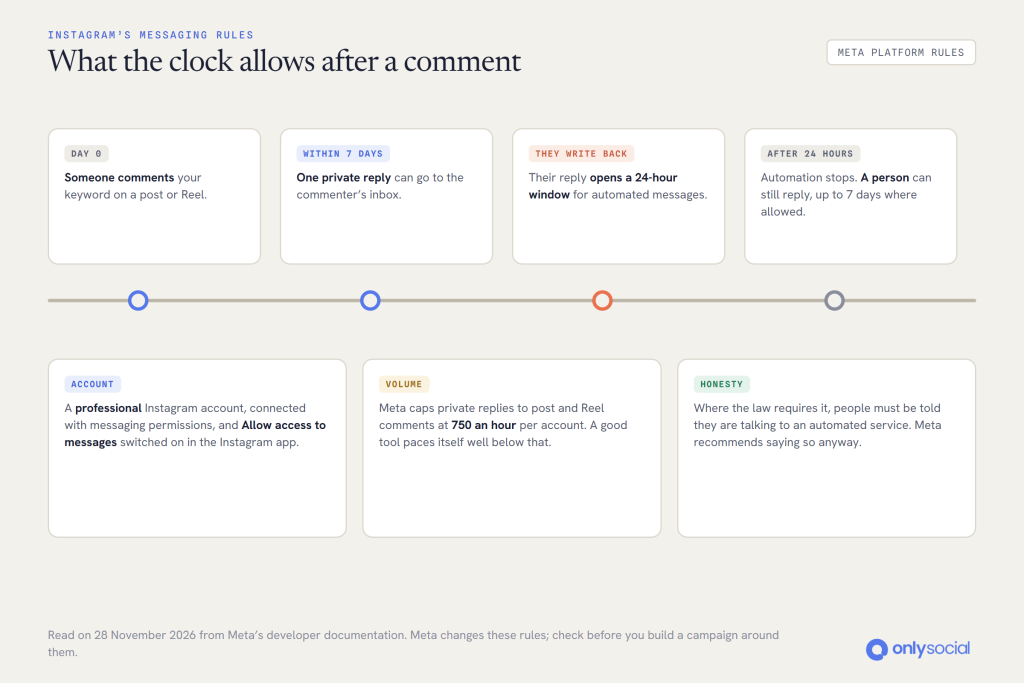
Meta’s documentation says only one message can be sent to the commenter, and it must be sent within 7 days of the comment. For Instagram Live, the private reply can only be sent while the broadcast is live. In practice that means:
- The first DM has to carry the thing you promised. You cannot send “Here’s your guide” and then a second message with the link. Put the link or button in that one message.
- You cannot chase. If they never open it or reply, that is the end of the automated conversation.
- Old comments expire. Turning on an automation today will not reach people who commented two weeks ago.
The 24-hour window opens when they reply
If the person responds to your private reply, a standard messaging window opens. For 24 hours after their latest message you can send them messages, automated or not. Each new message from them restarts the 24 hours. Once the window closes, automated messages stop. Where Meta has approved it, a person on your team can still reply by hand for up to 7 days after their last message.
Account and permissions
- A professional account. Business or creator. Personal accounts cannot use the messaging API.
- Connected with messaging permissions. When you connect Instagram to a tool, accept every permission requested; publishing and messaging use different permissions.
- Allow access to messages. In the Instagram app, open Settings, Messages and story replies, Message controls, Connected tools, and switch on Allow access to messages. Without it, comments may arrive but DMs will not.
Volume limits
Meta’s rate limit for private replies to post and Reel comments is 750 calls per hour per Instagram professional account. You will see a lower figure, often 200 DMs an hour, quoted on vendor blogs; that is a pacing choice some tools make, not a number in Meta’s documentation. Either way, a post that goes viral can produce more comments than any account can answer in an hour, so a good tool queues and paces the replies rather than dropping them.
Be honest that it is automated
Meta’s policy says that where the law requires it, people must be told they are interacting with an automated service, and it recommends disclosure anyway. A line such as “Automated reply, a real person reads every message” costs nothing and builds trust.
Five Comment-to-DM Plays
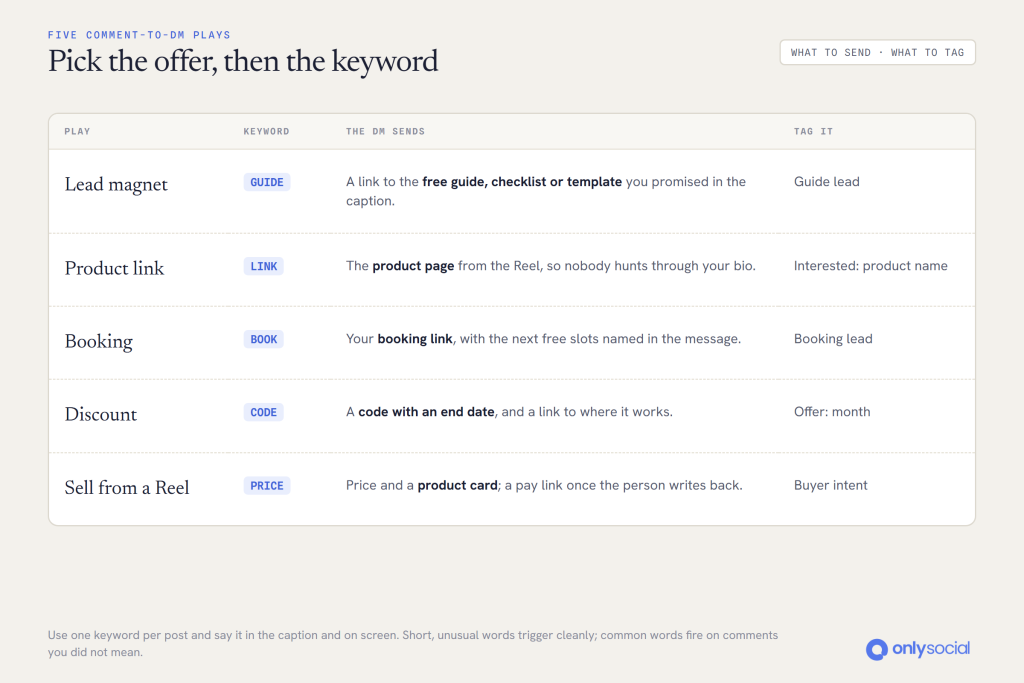
The keyword is the easy part; what matters is the offer behind it, and five offers cover most businesses.
1. Lead magnet
The classic. “Comment GUIDE for my free checklist.” The DM sends a link to the guide, template or checklist, and the contact gets tagged so you can send related content later. Works for coaches, agencies, B2B services, educators and any creator with expertise.
2. Product link
A Reel shows a product in use; “Comment LINK and I’ll send it.” The DM sends the exact product page, which is far better than asking people to find it through your bio.
3. Booking
Salons, clinics, studios, trainers and consultants: “Comment BOOK for my next free slots.” The DM sends your booking link. Tag the person as a booking lead so the team can check who booked and who did not.
4. Discount code
“Comment CODE for 15 percent off this week.” The DM sends the code with a clear end date and a link to where it works. Codes in DMs feel personal and keep the offer out of public view.
5. Sell from a Reel
“Comment PRICE.” The DM sends the price and a product card. If the person writes back with a question, the 24-hour window opens and you can answer, recommend a size and, where a payment gateway is connected, send a payment link. Keep the pay link for after they reply: it belongs in the conversation, not in a cold first message.
How to Set It Up, Step by Step
Here is the full build in OnlySocial, from connecting the account to switching the flow on; other tools follow a similar shape.
Step 1: Connect Instagram with messaging
Open Accounts, click Add account and choose Instagram. OnlySocial can connect through the Facebook Page the Instagram account is linked to, or with Instagram’s own login where that option is offered. Allow every permission requested. Then check Allow access to messages is on in the Instagram app, and send the account a test DM from another account to confirm it reaches your inbox.
Step 2: Start from a template
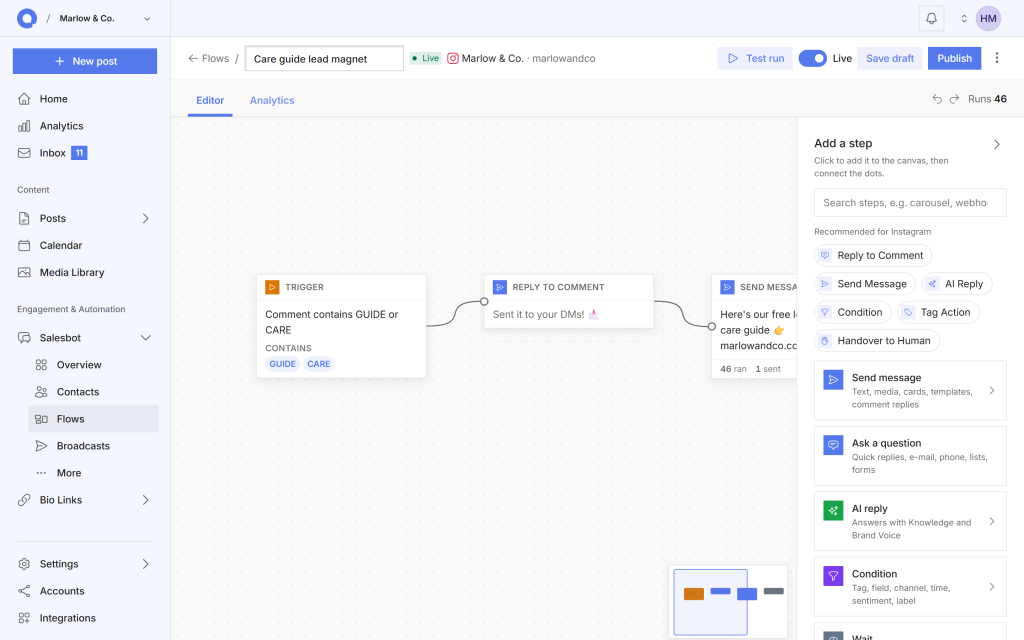
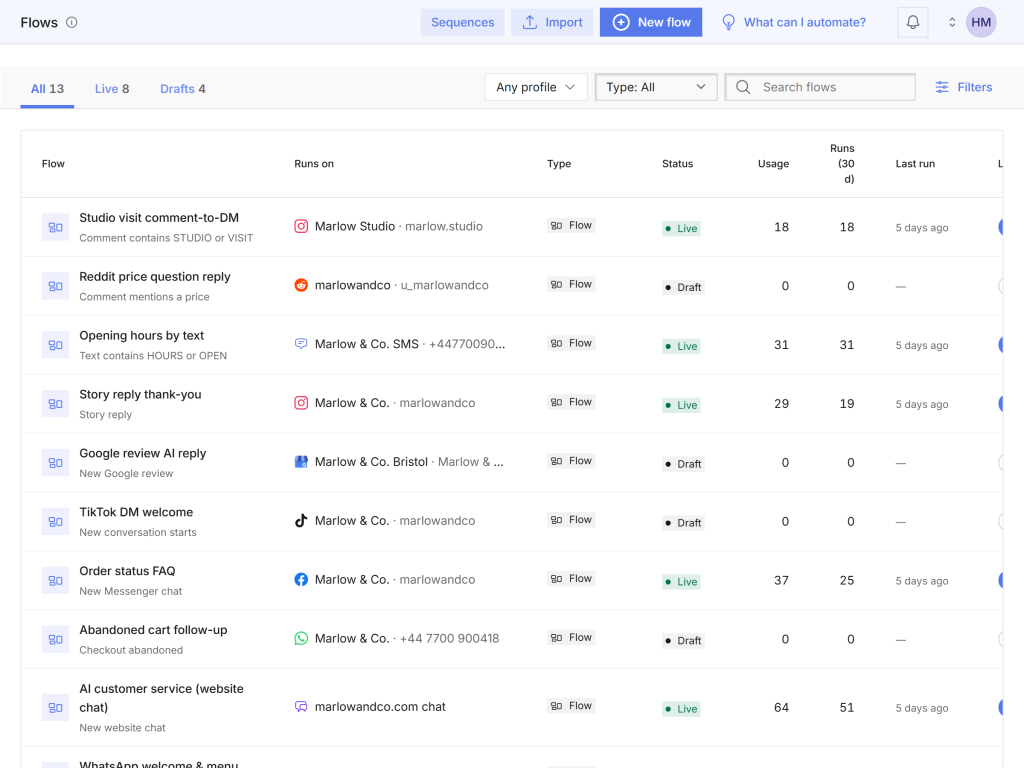
Go to Salesbot, then Flows, then New flow, pick your Instagram account and choose a template. The comment templates include Comment-to-DM flow, Comment-to-DM Lead Magnet, Follower-Gated Lead Magnet, Drive traffic from comments and Sell from Reel comments. Starting from one saves you wiring the steps yourself.
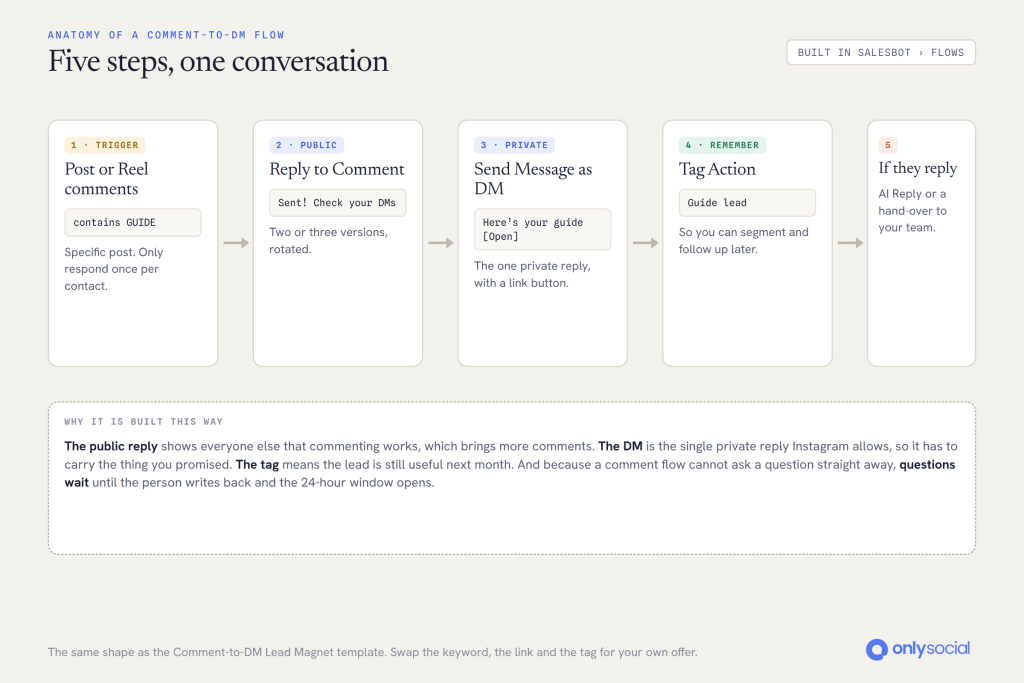
Step 3: Set the trigger
- Trigger: Post or Reel comments. Instagram also offers Live comments, Story reply and Story mentions triggers for other plays.
- Which posts? Choose Specific and tick the post or Reel, or All posts to include future posts. Comments on your ads are included in All posts, and you can target one ad by its post ID.
- Trigger type: Message contains a keyword and add your word, for example GUIDE. You can also match exactly, match the start of the comment, or use Only questions.
- Only respond once per contact: switch it on, so someone who comments three times gets one reply.
Step 4: Add the public reply
Add Reply to Comment and write the reply, for example “Sent! Check your DMs”. Click Add another version two or three times with different wording; versions are rotated so the thread does not look like a copy-paste wall. You can use variables such as the person’s first name.
Step 5: Add the private reply
Add Send Message and set Send as to Direct message. Write the message and add a button that opens your link. Remember this is the one private reply Instagram allows, so the link must be in this message.
Step 6: Tag the contact
Add a Tag Action such as “Guide lead”. Tags let you segment people later, for a broadcast, a follow-up or a report on which posts brought which leads.
Step 7: Plan the follow-up
If the person writes back, the reply starts a normal message conversation. An AI Reply step can answer questions from your own product or service information in your brand voice, or a Handover to Human step can pass the chat to your team. One limit to know: a flow started by a comment cannot ask a question with a User Input step straight away, because the answer could only come back as a DM. Send the DM first, and keep questions for after they reply.
Step 8: Test, publish and switch it on
Use Test run, then Publish and switch the flow to Live. Comment the keyword from a second account to check the public reply and the DM both arrive.
Writing the Post That Triggers It
The automation only answers comments; the post has to make people want to comment in the first place.
- Lead with the value. Show what they get: the first page of the guide, the result of the recipe, the product in use.
- Say the keyword three times. On screen in the video, in the first line of the caption, and as a pinned comment.
- Pick an unusual word. GUIDE, CARE or BOOK work. Common words such as YES or LOVE fire on comments you did not mean, and a generic word like INFO is easy to miss.
- One keyword per post. Two offers on one post confuse people and split the trigger.
- Deliver what you promised. If the caption says “free checklist”, the DM sends the checklist, not a sales page. Broken promises get reported.
- Give the post value on its own. People who never comment should still get something from it. A post that exists only to collect comments wears thin with your audience fast.
Comment-to-DM pairs well with Reels, which reach people who do not follow you yet. See our Instagram Reels ideas for formats, and the complete Instagram marketing guide for how it fits into the rest of your plan.
What Happens After the First DM
The DM is the start of a conversation, and what you do in the next 24 hours decides whether a commenter becomes a customer.
- Answer questions fast. An AI reply trained on your product information can handle sizes, prices, delivery and opening hours inside the 24-hour window.
- Hand over the warm ones. Route anyone who asks for a person, or shows buying intent, to your team in the inbox.
- Take the next step in the chat. A booking link, a product card or, with a payment gateway connected, a payment link sent once they have written back.
- Follow up within the rules. Outside the 24-hour window, automated messages stop. Use tags to include interested people in future posts, Stories and offers instead of messaging them cold.
All of this lands in one inbox in OnlySocial: comments in the Engagements tab, DMs in the DMs tab, with the option to send a reply privately as a DM where Instagram allows it. Read how to manage Instagram DMs and comments for the day-to-day side.
Measuring Results
Judge comment-to-DM on what happened after the DM, not on how many comments the post collected.
| Measure | Where to see it | What good looks like |
|---|---|---|
| Runs | The flow’s run count | Close to the number of keyword comments; a big gap means the trigger is missing some |
| DMs sent | The Send Message step’s count | Close to runs; a gap points to permissions, the 7-day limit or comments already answered |
| Replies | The inbox and follow-up steps | People writing back means the offer was wanted |
| Clicks or bookings | Your link tracking or booking tool | The real outcome; tag each post’s leads to compare offers |
| Tagged contacts | Contacts filtered by tag | A growing list you can segment and reach again |
In OnlySocial each flow has an Analytics tab next to the editor, and each step shows how many times it ran. Compare posts by the tags their leads received to see which offers pull their weight.
Troubleshooting
| Problem | Likely cause | Fix |
|---|---|---|
| No reply on some comments | Keyword not matched, wrong post selected, or “only respond once” already used | Check the trigger’s keywords and Which posts?; another live flow on the same trigger may be answering instead |
| Public reply but no DM | Instagram allows one private reply per comment; the comment is over 7 days old; or messaging permissions are missing | Reconnect the account with all permissions and check Allow access to messages |
| Comments arrive, DMs never do | Publishing and messaging use different permissions | Reconnect and accept the messaging permissions |
| Replies stop on a busy day | A daily reply limit or the platform’s rate limit was reached | Raise the limit in the AI step if you set one; otherwise wait and let the queue catch up |
| Flow fires on unrelated comments | The keyword is a common word | Switch to an unusual word or an exact match |
| Can’t ask a question in the flow | A comment-started flow cannot ask for input straight away | Send the DM first; ask questions after they reply |
Mistakes to Avoid
- Splitting the promise across two messages. Only one private reply is allowed; the link goes in the first.
- Gating everything. Use comment-to-DM for real extras, not for information that belongs in the caption.
- Sending a hard sell first. The first message should deliver; selling comes after they reply.
- Forgetting old posts. Comments over 7 days old cannot get a private reply, so switch automations on when the post goes live.
- No human in the loop. Real questions deserve real answers. Hand over when the AI is unsure or the person asks.
- Not tagging. Without tags, a viral post’s leads are a one-off spike instead of a list you can grow.
OnlySocial’s Salesbot answers Instagram comments with a public reply and a DM, follows up with AI in your brand voice, tags every lead and hands warm chats to your team, alongside scheduling and analytics for 16 networks.
Frequently Asked Questions
What is Instagram comment-to-DM automation?
It is an automation that sends a direct message to anyone who comments a chosen keyword on your Instagram post or Reel, usually with a public reply under the comment as well. It is used to deliver links, guides, codes and booking links.
Is comment-to-DM allowed by Instagram?
Yes, when it runs through Instagram’s official messaging API. Instagram lets a business send one private reply per comment within 7 days, and keep messaging for 24 hours after the person replies. Tools that scrape or log in as you are a different matter and put the account at risk.
How many DMs can I send per comment?
One. Meta’s documentation allows a single private reply to a commenter. More messages are only possible if the person writes back, which opens a 24-hour window.
Can I auto DM everyone who comments on my Instagram post?
Yes, with an Instagram auto DM tool connected through the official API. Set the trigger to any comment instead of a keyword, and every commenter gets one private reply. Keyword triggers usually work better, because they only message people who asked.
How long do I have to reply to a comment with a DM?
Seven days from the comment. For Instagram Live comments, the private reply must be sent while the broadcast is live.
Is there a limit on automated Instagram DMs per hour?
Meta’s documented rate limit for private replies to post and Reel comments is 750 calls per hour per account. Some tools pace themselves lower; figures such as 200 an hour come from tools, not Meta’s documentation.
Do I need a business account for comment-to-DM?
You need a professional account, either business or creator, connected to the tool with messaging permissions and with Allow access to messages switched on in the Instagram app.
Can comment-to-DM work on Instagram ads and Live?
Yes. In OnlySocial, ad comments are included when the trigger watches all posts, and you can target one ad by its post ID. Live comments have their own trigger, with replies sent during the broadcast.
Can I use comment-to-DM on Facebook or TikTok too?
Facebook comments support the same pattern with a private reply. OnlySocial also has comment triggers for TikTok, Threads, YouTube, LinkedIn, Reddit, Mastodon, Bluesky and Google reviews; some of those networks only allow public replies, not DMs.
The Short Version
Comment-to-DM turns “comment GUIDE” into a delivered link, a tagged lead and a conversation, as long as you respect Instagram’s rules. Use a professional account with messages allowed, one unusual keyword per post, a public reply plus one private reply that carries the promise, tags on every lead, and a fast follow-up once people write back.