OnlySocial vs Loomly: The Best White-Label Platform for Growing Your Client Base
If you’re running an agency, you’ve probably heard of Loomly. It’s a dependable social media tool and a popular choice for content teams. But when agencies start thinking about white-label platforms – software they can present as their own – Loomly and OnlySocial tend to come up for very different reasons.
On the surface, both tools offer custom branding and advanced scheduling. But when your goal is to grow your client base, not just manage posts, the details start to matter.
How much control do you really have over branding? How easy is it to scale without rising costs? And does the platform support agency workflows beyond publishing?
In this guide, we take a closer look at OnlySocial and Loomly from an agency perspective, breaking down how their white-label features compare and which one better supports long-term growth.
Table of Contents
- 1 What White-Label Really Means for Agencies Today
- 2 Loomly’s White-Label Offering: What Agencies Actually Get
- 3 OnlySocial’s White-Label Platform
- 3.1 True Platform Ownership, Not Just Custom Branding
- 3.2 Workspace-Based Client Management
- 3.3 Unlimited Scheduling and Bulk Automation
- 3.4 Unified Inbox for Engagement and Messaging
- 3.5 AI Tools That Speed Up Agency Work
- 3.6 Collaboration, Approvals, and Client Support
- 3.7 Built-In Billing and Subscription Management
- 3.8 Pricing That Encourages Growth
- 4 OnlySocial vs Loomly: Head-to-Head Comparison
- 5 Which Platform Is Better for Growing Your Client Base?
- 6 Final Note
- 7 FAQs
What White-Label Really Means for Agencies Today
White-label used to mean one simple thing: hiding another company’s logo. That’s no longer enough.
Today, agencies are expected to deliver a full experience, not just results. Clients want a place they can log into. They want to see content calendars, approvals, reports, and conversations in one dashboard – all branded as yours.
When that experience feels disjointed or obviously powered by someone else, it quietly chips away at trust.
For agencies, white-label software has also become an operational tool, not just a branding layer. It’s how you standardize processes, reduce manual work, and take on more clients without constantly adding staff.
The right platform should make it easier to onboard new clients, collaborate with teams, and manage approvals without endless emails or shared documents.
This is where the definition of white-label starts to split.
Some platforms offer surface-level branding. You get a logo swap, maybe a branded URL, and custom exports. It looks professional, but the platform still behaves like a tool built for internal teams.
Others are built as agency-first social media white-label platforms. These are designed around client workspaces, predictable pricing, automation, and even billing – so agencies can operate more like a product business than a service business.
Understanding which category a tool falls into is critical. And when you compare Loomly and OnlySocial, that difference becomes very clear very quickly.
Loomly’s White-Label Offering: What Agencies Actually Get
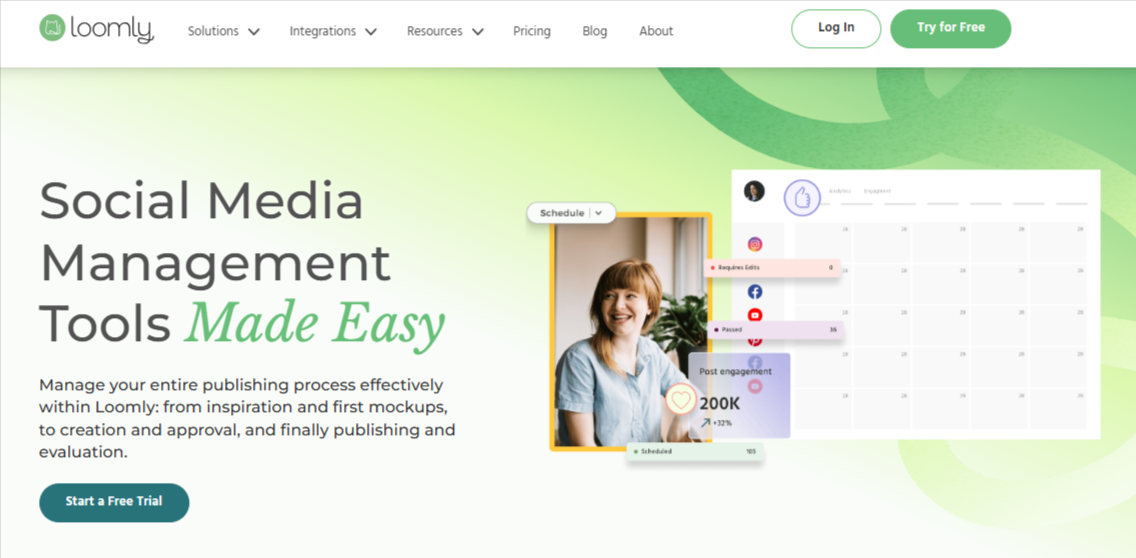
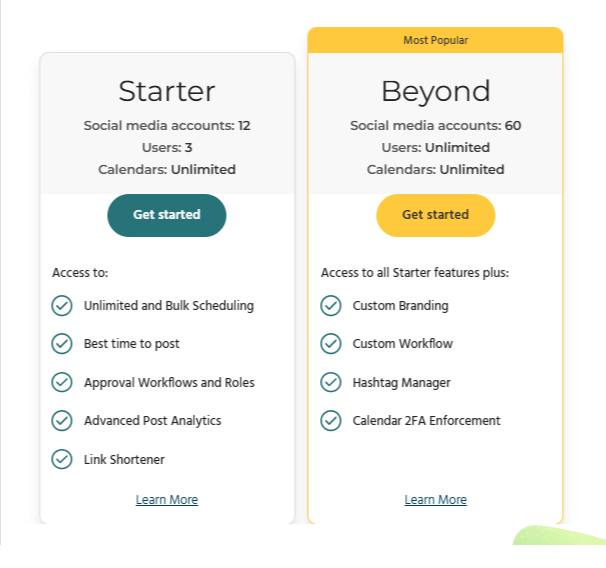
Loomly introduced its white-label feature under the name Custom Branding, and it’s available exclusively on the Beyond plan, which costs $332 per month. This immediately tells you who the feature is designed for: established teams that want a polished content workflow, not necessarily agencies trying to resell software at scale.
Here’s how Loomly approaches white-labeling.
Custom Branding Inside the Loomly Platform
With Loomly’s Custom Branding, agencies can replace Loomly’s logo with their own across the application. Your logo appears on all pages, as well as on exported content like PDF reports. You can also set a custom favicon, which helps reinforce your brand when collaborators have the platform open in their browser.
Loomly also allows access through a branded subdomain, such as yourbrand.myloomly.com. This adds a layer of professionalism, but it’s still clearly a Loomly-hosted environment rather than a fully agency-owned platform.
Branding Scope: Clean, But Surface-Level
While the branding options are well executed, they’re limited in scope. Loomly’s white-labeling focuses on visual identity – logos, URLs, and exports – rather than full platform ownership.
Client emails, workflows, and the overall structure still operate within Loomly’s ecosystem. For agencies that simply want their logo on the tool, this is enough. For agencies aiming to present the platform as their own product, it may feel restrictive.
Scheduling and Content Planning Strength
This is where Loomly shines. Agencies get unlimited scheduling, bulk scheduling, and a visual content calendar that makes planning straightforward. The “best time to post” feature helps teams optimize publishing without relying on guesswork.
For agencies managing consistent content output across multiple clients, Loomly’s planning tools are reliable and easy to use.
Approval Workflows and Team Roles
Loomly includes solid approval workflows and role management. Team members can draft content, reviewers can approve it, and clients can be looped in where needed.
These workflows are well suited for agencies that prioritize structured content review and internal accountability.
Analytics and Reporting
Loomly offers advanced post analytics and performance insights. Reports can be exported and branded, which helps agencies share results professionally with clients.
However, reporting is primarily designed for campaign tracking and content performance, not for managing multiple client accounts at scale inside a single branded dashboard.
OnlySocial’s White-Label Platform
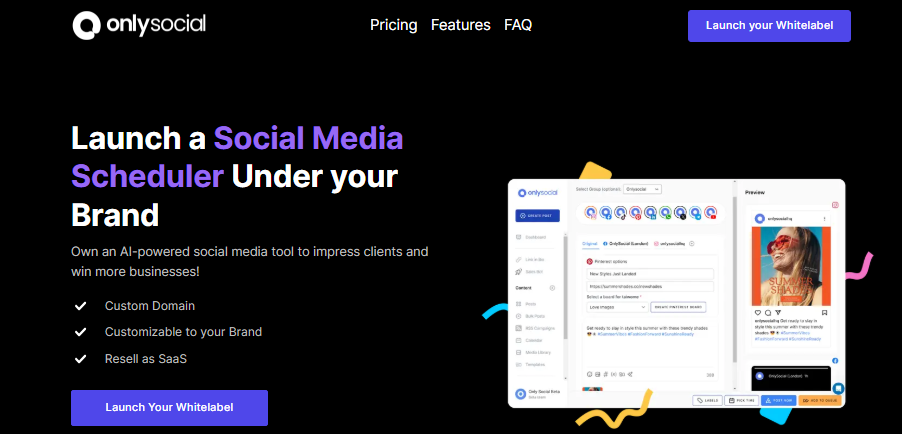
While Loomly approaches white-labeling as a branding layer on top of a content tool, OnlySocial is built from the ground up for agencies that want to run social media as a fully branded service – and scale it without friction.
The difference shows up quickly once you look beyond scheduling. let’s see what OnySocial does differently that makes it a complete white label social media platform.
True Platform Ownership, Not Just Custom Branding
OnlySocial gives agencies full control over the entire platform experience. This goes beyond logo swaps or branded exports. You can use your own domain, apply your brand identity across dashboards, emails, notifications, reports, and client workspaces, and present the software as something your agency owns.
Clients never see OnlySocial’s name. From login to reporting, everything feels native to your brand, which makes a big difference when you’re positioning your services as premium or long-term.
Workspace-Based Client Management
Instead of charging per user or per social profile, OnlySocial uses a workspace model. Each client gets their own workspace, which can contain multiple social accounts, team members, calendars, and approval flows.
For agencies, this makes onboarding simpler and costs easier to predict. You don’t need to worry about adding a few extra profiles suddenly increasing your monthly bill. As your client list grows, the structure stays clean and manageable.
Unlimited Scheduling and Bulk Automation
OnlySocial supports unlimited post scheduling across all supported platforms. Agencies can schedule posts manually, in bulk, or via CSV uploads, including large batches of content planned weeks or months ahead.
RSS automation is also included, allowing agencies to auto-publish curated or blog content without manual effort. These automations are designed to reduce repetitive work, especially for agencies managing many clients at once.
Unified Inbox for Engagement and Messaging
Managing comments and messages across platforms can quickly become chaotic. OnlySocial solves this with a unified inbox that brings all engagement into one place.
Teams can respond to comments, mentions, and DMs without switching between tools. This helps agencies stay organized and deliver faster responses, which clients notice.
AI Tools That Speed Up Agency Work
OnlySocial includes built-in AI features designed to save time, not replace creativity. Agencies can generate captions, get hashtag suggestions, and create quick visuals using the AI image generator – all inside the platform.
For teams juggling multiple clients and content calendars, these tools help remove creative bottlenecks and speed up production.
Collaboration, Approvals, and Client Support
OnlySocial is designed for teams. Role-based access and approval workflows help keep content moving smoothly from draft to publish.
One standout feature is user impersonation. Agencies can securely step into a client’s workspace to troubleshoot or manage issues without requesting passwords or scheduling calls. This makes support faster and more professional.
Built-In Billing and Subscription Management
Unlike Loomly, OnlySocial includes payment management. Agencies can integrate Stripe, Paddle, or Paystack and sell subscriptions directly through their branded platform.
This allows agencies to move beyond manual invoicing and run their services like a SaaS business – with recurring revenue baked in.
Pricing That Encourages Growth
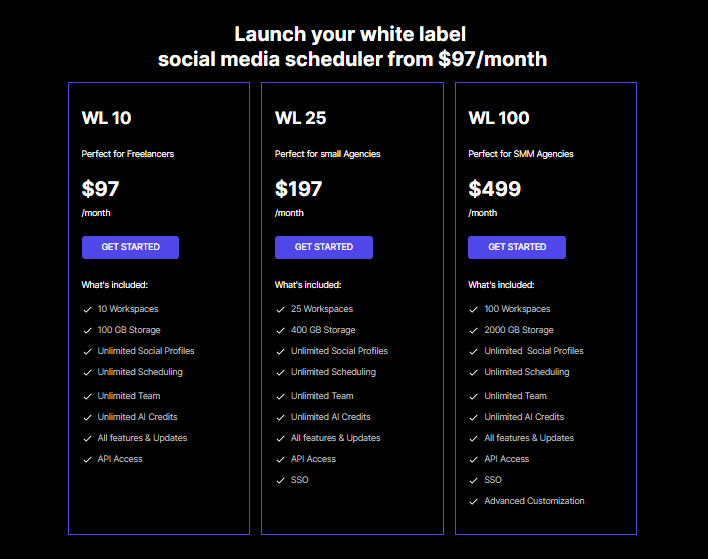
OnlySocial’s pricing is simple and transparent:
- $97/month for 10 workspaces
- $197/month for 25 workspaces
- $499/month for 100 workspaces
There are no extra charges for users or social profiles. As agencies grow, the cost per client decreases, making it far easier to scale profitably.
OnlySocial vs Loomly: Head-to-Head Comparison
On paper, OnlySocial and Loomly share a few similarities. Both support scheduling, approvals, analytics, and some level of branding. But once you start using them as an agency, with real clients, real deadlines, and real growth targets, the differences become obvious.
White-Label Depth and Brand Ownership
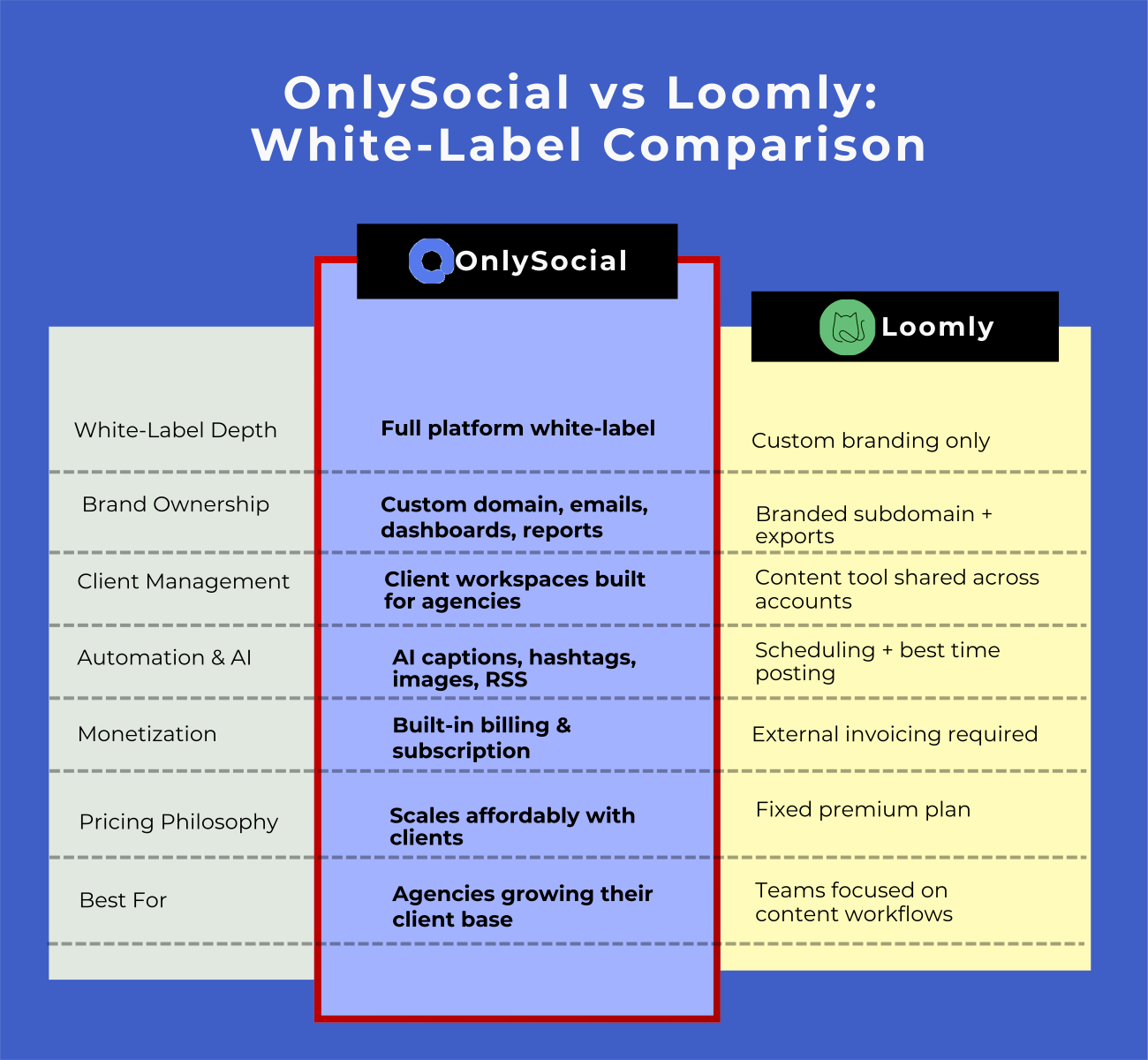
Loomly’s white-label option is best described as custom branding within Loomly. You can replace logos, add a favicon, export branded PDFs, and access the tool via a branded subdomain. It looks professional, but it still feels like a tool you’re borrowing rather than a platform you own.
OnlySocial takes a much deeper approach. The entire platform is white-labeled – domain, dashboards, emails, notifications, reports, and client workspaces. Clients never encounter OnlySocial’s branding at any point. This makes a big difference for agencies positioning themselves as long-term partners or product-driven service providers.
Pricing Structure and Growth Impact
Loomly’s white-label feature is locked behind the Beyond plan at $332 per month. While that price includes strong content tools, it’s a flat cost regardless of how many clients you manage – which sounds fine until you realize Loomly isn’t designed to help you resell the platform or run subscriptions at scale.
OnlySocial’s pricing is intentionally built around agency growth. Instead of charging per feature or per profile, pricing is based on client workspaces, making costs predictable as you scale. As your client base grows, the cost per client drops, which protects margins over time.
Client Management and Scalability
Loomly works well for agencies managing a smaller, fixed set of clients. Its structure is closer to a content planning tool shared across teams, rather than a client-by-client operating system.
OnlySocial is built around client separation. Each client gets their own workspace with its own calendars, approvals, analytics, and access levels. This makes onboarding smoother, keeps data clean, and prevents client work from bleeding into each other, especially important as your agency grows past a handful of accounts.
Automation and Workflow Efficiency
Both platforms support unlimited scheduling and bulk posting, which is essential for agencies. Loomly also offers “best time to post” suggestions and a clean calendar experience that teams appreciate.
OnlySocial goes further by layering automation on top of scheduling. CSV uploads, RSS posting, AI-assisted captions, hashtag suggestions, and image generation are all designed to reduce manual work. This matters when your team is managing dozens of content calendars at once.
Collaboration, Approvals, and Client Interaction
Loomly’s approval workflows are solid and structured. Teams can collaborate internally, assign roles, and manage approvals without confusion.
OnlySocial offers similar collaboration tools but adds flexibility. Clients can approve content directly in their workspace, teams can manage roles easily, and agencies can impersonate client accounts to troubleshoot issues quickly. This reduces support friction and cuts down on back-and-forth communication.
Analytics and Reporting Experience
Loomly provides advanced post analytics and branded report exports. It’s useful for tracking content performance and sharing campaign results with clients.
OnlySocial focuses on clarity and accessibility. Analytics live inside the platform, are fully white-labeled, and are easier for non-technical clients to understand. Instead of exporting reports constantly, agencies can point clients to a dashboard that updates in real time.
Revenue Opportunities Beyond Content Management
This is where the gap widens.
Loomly does not include billing or subscription management. Agencies still need external tools to invoice clients, manage payments, and handle renewals.
OnlySocial includes built-in billing integrations with Stripe, Paddle, and Paystack. Agencies can sell subscriptions directly through their branded platform, opening the door to recurring revenue and SaaS-style service models.
Which Platform Is Better for Growing Your Client Base?
Growing your client base isn’t just about getting more leads. It’s about being able to say yes to new clients without overloading your team, increasing your costs unpredictably, or breaking your workflow.
This is where the difference between Loomly and OnlySocial becomes most obvious.
Loomly: Better for Stable, Content-Focused Agencies
Loomly works well for agencies that manage a small to medium number of clients and focus heavily on content planning and approvals. Its clean interface, structured workflows, and strong scheduling tools make day-to-day content management reliable and predictable.
However, Loomly isn’t built around client growth. Its white-label features improve branding, but they don’t fundamentally change how agencies onboard, manage, or scale clients. There’s no built-in billing, no client-by-client workspace separation designed for growth, and no clear path to turning the platform into a resalable service.
For agencies that plan to stay at a steady size and don’t intend to productize their services, Loomly can be a comfortable choice.
OnlySocial: Built for Agencies That Want to Scale
OnlySocial is designed with growth as a core goal. Every part of the platform – from workspace-based client management to automation, AI tools, and billing – supports adding more clients without adding friction.
New clients can be onboarded quickly into their own workspace. Costs stay predictable as your client base grows. Teams don’t need to learn new tools or manage complex configurations. And because the platform is fully white-labeled, your agency looks more established as it scales.
The built-in billing system also changes the growth equation. Agencies can move from manual invoicing to recurring subscriptions, which makes revenue more stable and growth easier to manage.
Final Note
Loomly is a solid platform. It’s reliable, polished, and does a great job when it comes to content planning, scheduling, and approvals. For agencies that mainly need a well-organized content workflow with some branding on top, it gets the job done.
But growing an agency today takes more than good scheduling.
OnlySocial is built for agencies that want to scale their client base without piling on complexity or unpredictable costs. Full platform white-labeling, workspace-based pricing, and its host of amazing features all work together to support growth, not just daily posting.
If your goal is to manage a handful of clients comfortably, Loomly can work. If your goal is to grow, productize your services, and run social media under your own brand at scale, OnlySocial gives agencies a clearer long-term advantage.
FAQs
Is Loomly fully white-label?
Loomly offers Custom Branding on one of its plans, which includes logo replacement, branded PDFs, a custom favicon, and a branded subdomain. However, it’s still a Loomly-hosted platform, not a fully agency-owned white-label solution.
Can agencies resell Loomly as their own platform?
Not really. Loomly’s branding features improve presentation, but it isn’t designed for agencies to resell the platform as a SaaS product or manage subscriptions under their own brand.
Does OnlySocial offer deeper white-label control than Loomly?
Yes. OnlySocial provides full platform white-labeling, including custom domains, branded dashboards, emails, notifications, reports, and client workspaces. Clients never see OnlySocial’s branding.
Which platform is more affordable as client numbers grow?
OnlySocial is generally more cost-effective for growing agencies. Its workspace-based pricing keeps costs predictable, while Loomly’s flat pricing doesn’t support reselling or scalable client management.
Can clients approve content on both platforms?
Yes. Both Loomly and OnlySocial support content approvals. OnlySocial adds more flexibility with client-specific workspaces and smoother collaboration for larger teams.
Which tool is better for agencies focused on growth?
OnlySocial. It’s designed specifically to help agencies onboard more clients, automate workflows, protect margins, and offer a fully branded platform that feels like proprietary software.