10 Ways to Use AI in Social Media Beyond Just Content Creation
Social media teams have a complicated relationship with AI. Some see it as a productivity superpower. Others worry it will water down creativity or replace the human touch that makes brands feel real.
Both views are understandable.
But one thing is no longer up for debate: AI is already part of modern social media workflows. With around 80% of social marketers using AI in some form, the bigger risk today isn’t adopting AI – it’s ignoring it.
The good news is that AI doesn’t have to turn your social strategy into a content factory. When used properly, it does the opposite. It clears away busywork, speeds up decision-making, and gives marketers more space to focus on strategy, storytelling, and audience connection.
In this guide, we’ll explore 10 practical ways to use AI in social media beyond content creation. It will show you how it can support smarter planning, better engagement, and stronger results, without replacing the human creativity your brand depends on.
Table of Contents
- 1 Smarter (and Less Obvious) Ways to Use AI in Social Media
- 1.1 1. Turn overwhelming social data into clear, usable insights
- 1.2 2. Spot industry trends and strategic gaps before competitors do
- 1.3 3. Unlock hyper-personalization in social ads
- 1.4 4. Repurpose long-form content into weeks of social posts
- 1.5 5. Build content strategies around real audience segments
- 1.6 6. Brainstorm smarter with AI idea generation
- 1.7 7. Optimize posting times and formats using predictive insights
- 1.8 8. Generate alt text automatically
- 1.9 9. Draft briefs, outlines, and proofs of concept before production
- 1.10 10. Design and iterate custom visuals faster
- 2 Safely Using AI for Social Media: Practical Tips That Actually Help
- 3 Final Thoughts: AI Works Best When Humans Stay in Control
Smarter (and Less Obvious) Ways to Use AI in Social Media
When people talk about AI in social media, the conversation almost always stops at content generation.
Captions. Posts. Maybe a few images.
But that’s just scratching the surface. The real power of AI shows up when you use it to think better, not just create faster.
Below are ten high-impact ways AI can quietly upgrade your social media strategy behind the scenes, without turning your brand into a robot.
Social media generates more data than any human team could realistically process. Engagement metrics, audience behavior, post performance, sentiment shifts – it adds up fast.
This is where AI models shine. Instead of staring at dashboards full of numbers, AI tools can analyze massive datasets and translate them into clear summaries, patterns, and predictions you can actually act on.
Used well, AI helps you understand what topics consistently perform, which formats drive meaningful engagement, and when your audience is most likely to respond.
It can also summarize internal data like campaign reports, meeting notes, or customer feedback, giving you a single source of truth. The result isn’t just faster reporting, but smarter planning based on real signals, not guesswork.
2. Spot industry trends and strategic gaps before competitors do
Competitive and industry analysis is another area where AI delivers outsized value. Brian Gorman, SEO director at Sixth City Marketing, once said, “When a new client signs on, I do industry and audience research using Perplexity Deep Research.”
“Then, before I advise on strategy, I analyze the last 6-12 months of social media posts from the client using ChatGPT. This is a great thing to do for competitor analysis as well.”
Reviewing months of your own posts – or your competitors’ – would normally take days.
With AI, it takes minutes.
Tools can scan historical content, engagement trends, and audience reactions to surface patterns you might otherwise miss.
This kind of analysis helps you see what’s overdone in your niche, what topics are gaining momentum, and where there’s a noticeable content gap.
AI-powered social listening and sentiment analysis can even flag emerging conversations before they peak. These insights don’t just improve social posts, they can influence messaging, positioning, product development, and even customer support strategies.

Personalization used to mean swapping a name in a headline. AI has completely changed that. Today, social ad platforms can adjust creative, messaging, and format in real time, based on how each individual user behaves.
Instead of launching a handful of ad variations, marketers are now deploying hundreds of micro-versions that adapt automatically. The SaaS team at Strategic Pete, for example, used AI-driven ad tools inside Meta’s ecosystem to react to user behavior on the fly.
Peter Lewis, chief marketing officer at the company, said, “Instead of releasing five ad versions, we released hundreds, each of which changed based on the user’s history of interactions.”
Someone who watched most of a video but didn’t click was shown a follow-up carousel with customer proof. Someone who bounced quickly saw a shorter product demo with a clearer CTA.
This approach turns ads into conversations, not broadcasts. And adoption is accelerating fast, with millions of advertisers already using AI-powered ad tools, because relevance now beats reach every single time.
Posting consistently across platforms can feel impossible when you’re staring at a blank content calendar. The good news? You probably already have more content than you think. You just haven’t unlocked it yet.
AI excels at breaking long-form assets into social-sized pieces.
A single whitepaper, webinar, podcast episode, or internal presentation can be transformed into dozens of captions, short videos, quote graphics, and carousels.
Instead of reinventing the wheel 50 times a week, AI helps you extract value from what already exists.
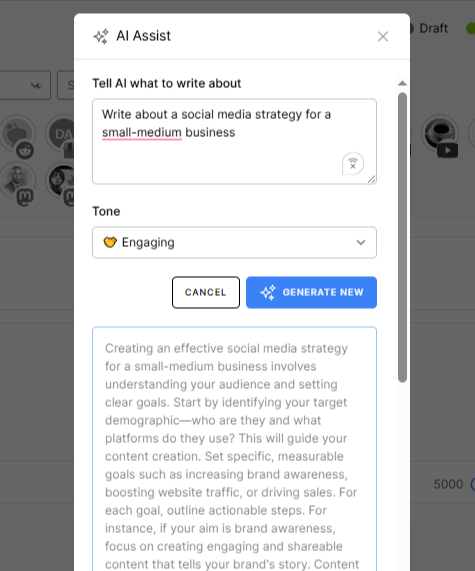
Modern AI tools, like the one on OnlySocial, can analyze tone, structure, and intent, then rewrite content so it fits each platform naturally. It can also recommend hashtags based on the text and visuals you’re using, increasing discoverability without guesswork.
That way, you can achieve more output, less burnout, and content that still sounds like you.
5. Build content strategies around real audience segments
AI is exceptionally good at finding nuance in audience behavior. Instead of relying on broad demographics, it can identify smaller, more meaningful segments based on interests, intent, and engagement patterns.
But the real value comes from how you use those insights.
Once AI highlights distinct audience groups, the human work begins. You can take over with deciding how to speak to each group in a way that feels relevant and authentic.
AI is so helpful here because it can take audience segmentation to a far deeper level than tools that don’t incorporate machine learning, providing real insights that help you create content that speaks directly to the needs of potential customers.
6. Brainstorm smarter with AI idea generation
Not every post should be about your product, and that’s where many brands get stuck.
If 80% of your content should educate, entertain, or inform, coming up with fresh ideas week after week can drain even the most creative teams.
AI makes brainstorming collaborative instead of exhausting.
By feeding it industry keywords, audience pain points, or trending topics, you can generate content ideas tailored to what people are already engaging with.
Think blog angles, carousel concepts, short-form video hooks, and conversation starters – not generic filler.
This is especially useful for newer brands or teams without a deep content archive. AI doesn’t replace strategy, but it gives you a constant stream of starting points so your creativity goes into refining ideas, not fighting blank-page syndrome.
7. Optimize posting times and formats using predictive insights
Timing still matters, but guessing is no longer necessary.
AI can analyze historical performance, audience behavior, and platform trends to predict when your content is most likely to land well. Yes, it gives you the best time to post.
Instead of relying on generic “best time to post” charts, AI looks at your audience. It learns when they scroll, pause, click, and engage – then uses that data to recommend optimal posting windows and formats.
Over time, these predictions get sharper, helping your content earn more visibility without increasing effort.
This kind of optimization is subtle but powerful. You’re not posting more; you’re posting smarter. And when combined with strong creative and relevant messaging, AI-guided timing can quietly lift engagement across every channel.
8. Generate alt text automatically
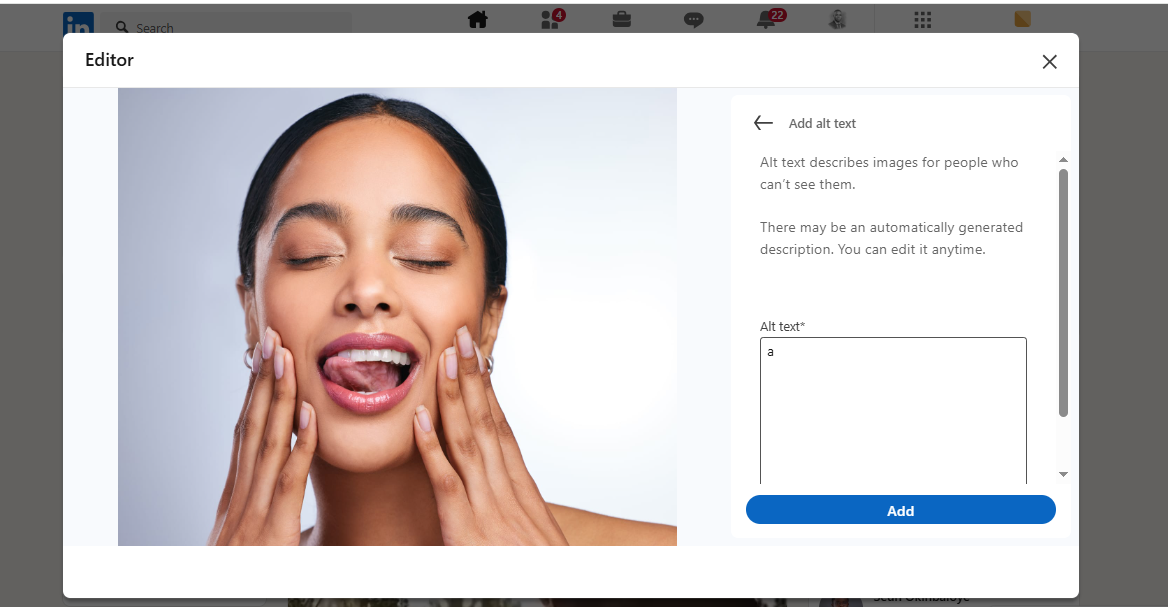
Alt text might not be the most exciting part of social media, but it’s one of the most important. It improves accessibility for screen readers and quietly boosts your social SEO.
Yet it’s often skipped because it feels tedious.
This is where AI shines as a low-risk, high-impact helper. AI tools can quickly analyze images and generate clear, descriptive alt text that explains what’s actually happening in the visual.
As Hanna Gbordzoe, VP of Social Media at Development Counsellors International, points out, even marketers who are cautious about AI often feel comfortable using it here first.
You still review and tweak the output, but AI removes the friction. That helps you get more inclusive content, better discoverability, and one less task slipping through the cracks.
9. Draft briefs, outlines, and proofs of concept before production
A lot of the work in social media happens before a single post is written. Campaign briefs, content outlines, pitch decks, and early concepts all take time – and they’re often created under pressure.
You can use AI tools to draft campaign briefs, sketch out content themes, or create rough copy and visual concepts to bring an idea to life early.
These drafts aren’t meant to be final; they’re conversation starters.
This approach lets teams gather feedback faster, spot weak ideas sooner, and refine direction before designers, writers, or videographers invest hours into execution.
Think of AI as your planning assistant, helping you pressure-test ideas cheaply before committing real resources.
10. Design and iterate custom visuals faster
Visual creation is one of the biggest bottlenecks in social media workflows. Every platform needs a slightly different size, layout, or variation – and keeping everything on-brand can slow teams down.
AI-powered design tools make this process far more efficient. Tools like Midjourney, DALL·E, DreamStudio, and Canva can generate custom visuals, mockups, or style-consistent variations in minutes instead of days. They’re especially useful for early drafts, experiments, or extending an existing campaign visually.
At OnlySocial, a hybrid workflow works best: humans define the creative direction, AI generates mockups and variations, designers polish the final assets, and AI helps scale visuals in the same style. The result is faster production without sacrificing quality or brand integrity.
Safely Using AI for Social Media: Practical Tips That Actually Help
AI is already being used heavily in industries where mistakes are not an option. Think of industries like finance, healthcare, government, and enterprise tech.
The reason is that these organizations are used to operating with guardrails. They don’t treat AI as a shortcut; they treat it like any other powerful tool that needs structure, oversight, and accountability.
If you want to use AI confidently (and responsibly) in social media, these tips will help you reduce risk without killing creativity.
1. Know where your AI gets its knowledge
AI is only as reliable as the data it’s trained on. Before relying on any tool, understand what it learns from and how it sources information. This helps you assess risks like misinformation, outdated facts, or accidental plagiarism.
A well-known example: Google had to revise a Super Bowl ad for Gemini AI after it overstated global Gouda cheese consumption. The issue wasn’t imagination. It was bad source data scraped from the web.
Incorrect inputs lead to confident but wrong outputs.
Best practice? Feed AI your own trusted materials. Style guides, blog posts, approved landing pages, and brand visuals give AI context it can rely on, while reducing guesswork and inaccuracies.
In Google’s Wisconsin local Super Bowl ad, an AI hallucination is shown on screen:
It says *Gouda* accounts for “50 to 60 percent of the world’s cheese consumption.”
Gemini provides no source, but that is just unequivocally false
Cheddar & mozzarella would like a word… pic.twitter.com/UwIBHAO4x6
— Nate Hake (@natejhake) January 31, 2025
2. Treat prompt-writing as a real skill
AI doesn’t “understand” what you want. It follows instructions. The quality of your results depends directly on how well you explain the task.
Strong prompts include context (audience, platform, tone), clear requirements (length, format, number of variations), and examples of what “good” looks like.
Don’t expect perfection on the first try. Iteration is part of the process.
Think of prompting as briefing a new team member. The clearer the brief, the better the outcome.
3. Always keep humans in the approval loop
AI is fast, but it’s not emotionally aware, culturally sensitive, or brand-conscious by default. Human review is non-negotiable, especially for public-facing content.
Ashwin Thapliyal from Exemplifi shared that early tests of fully AI-generated captions for a financial services client resulted in a 12% engagement drop.
The issue wasn’t accuracy. It was tone. The content felt robotic.
The sweet spot is to use AI for drafts, structure, and speed. Let humans handle intricacy, empathy, and final polish.
4. Set clear data privacy and usage rules
Before rolling out AI tools, update your social media policy. Define what AI can be used for, and what it can’t.
Make sure your team understands how data is handled, stored, or retained by the tools you use.
Ideally, choose AI tools that don’t train on your private data or store user conversations. If you operate in a regulated industry, loop in legal or compliance teams early to avoid issues later.
AI should support your workflow, not introduce new security risks.
5. Follow platform rules and be transparent
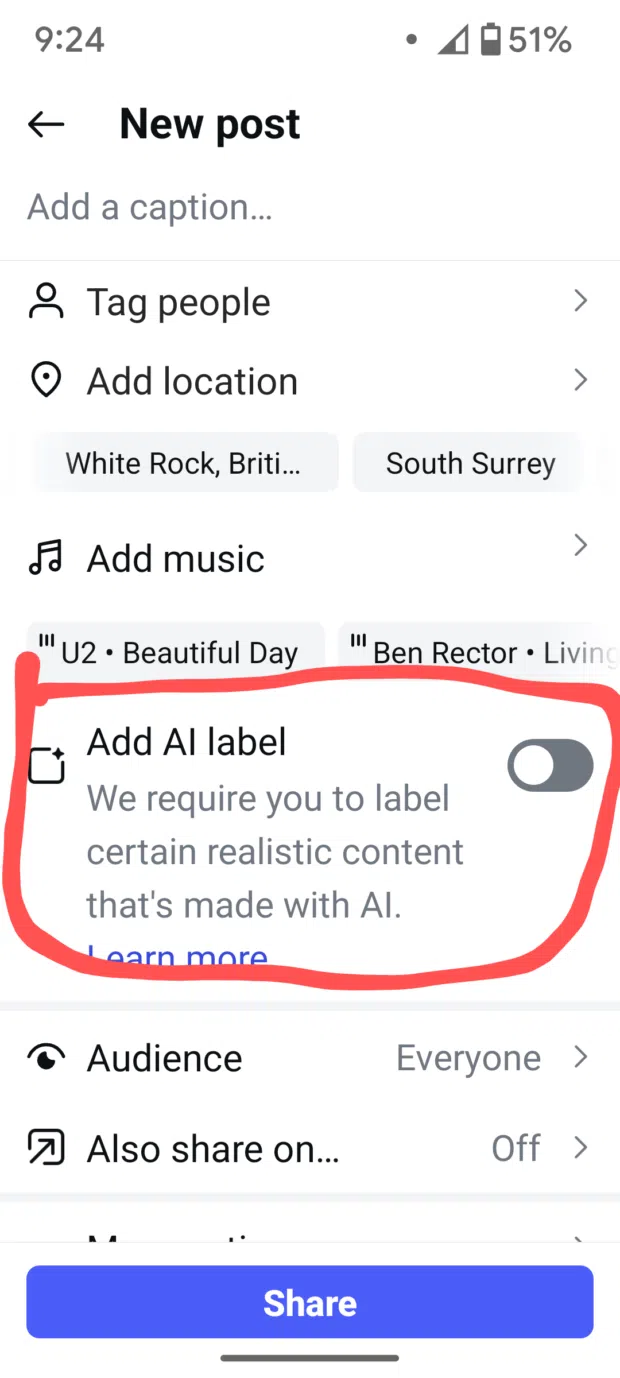
Social networks are getting stricter about AI-generated content. Some platforms already require disclosure, while others strongly encourage it.
Even when disclosure isn’t mandatory, transparency builds trust.
Clearly label AI-generated visuals or content when appropriate, and use platform tools or hashtags like #AIgenerated or #drawnbyAI, to stay compliant.
Honesty about AI use doesn’t weaken your brand. It shows responsibility and respect for your audience.
Final Thoughts: AI Works Best When Humans Stay in Control
AI isn’t here to replace social media managers, creatives, or strategists. It’s here to remove friction.
When used well, it takes care of the heavy lifting, speeds up decision-making, and frees teams to focus on what actually moves the needle: strategy, storytelling, and connection.
The brands seeing the biggest gains aren’t handing everything over to AI; they’re using it as a smart assistant that supports human judgment.