10 Powerful Social Media Automation Tools to Consider in 2026

If you’ve ever felt like social media is slowly eating your day, you’re not alone. Most brands and social media managers spend more time hopping between apps than actually creating the ideas that move their business forward. That’s why everyone needs to pay more attention to automation.
Over the past year, we’ve tested a wide range of social media automation tools – the good ones, the confusing ones, and the ones that genuinely make you wonder how you ever managed without them.
These tools don’t replace your creativity. They simply clear the noise so you can focus on the work that matters, which is building your brand, nurturing your audience, and staying consistent without burning out.
In this guide, we’ll walk you through ten powerful automation tools worth considering in 2026. Each one has a different strength, but they all share one thing in common: they cut down the repetitive tasks that drain your energy.
If you’re looking to save hours every week and give your social media strategy a real upgrade, these tools are genuinely worth your attention.
Table of Contents
- 1 How We Came Up with the Social Media Tools On This List
- 2 10 Social Media Automation Tools Worth Considering in 2026
- 3 1. OnlySocial – $29/Month
- 3.1 Key Features of OnlySocial
- 3.1.1 Advanced Scheduling & Targeting
- 3.1.2 Multi-Format Post Scheduling
- 3.1.3 AI-Powered Content Generation
- 3.1.4 First Comment Scheduling
- 3.1.5 Automatic RSS Scheduling
- 3.1.6 Content Library Storage
- 3.1.7 Team Collaboration Tools
- 3.1.8 Client Approvals & Workflows
- 3.1.9 Unified Social Inbox
- 3.1.10 Solid Analytics & Reporting
- 3.1.11 White Label for Agencies
- 3.1.12 Pros
- 3.1.13 Cons
- 3.2 What Stood Out for Us
- 3.3 Pricing
- 3.4 Overall Verdict
- 3.1 Key Features of OnlySocial
- 4 2. Hootsuite – $99/Month
- 5 3. Sprout Social – $199/Month
- 6 4. Post Planner – $11/Month
- 7 5. Buffer – $6/Month
- 8 6. ContentStudio – $19/Month
- 9 7. Sendible – $29/Month
- 10 8. Loomly – $32/Month
- 11 10. Zoho Social – $15/Month
- 12 Key Features to Look for in a Social Media Automation Tool
- 13 Final Note
- 14 FAQs
How We Came Up with the Social Media Tools On This List
Before putting this list together, we rolled up our sleeves and actually spent time inside each tool. Not just reading reviews or skimming feature pages. We did real testing. We looked at how smoothly each platform handles everyday tasks like scheduling, reporting, team collaboration, automation rules, and content creation.
We paid attention to things that matter in real life: how fast the dashboard loads, how clean the workflow feels, and how much time it genuinely saves. We also compared pricing, scalability, and user feedback to see which tools offer real value instead of shiny promises.
The goal here isn’t to overwhelm you with features but to highlight tools that can help you grow, stay consistent, and make social media feel less like a chore. These are the ones that stood out for 2026.
10 Social Media Automation Tools Worth Considering in 2026
1. OnlySocial – $29/Month
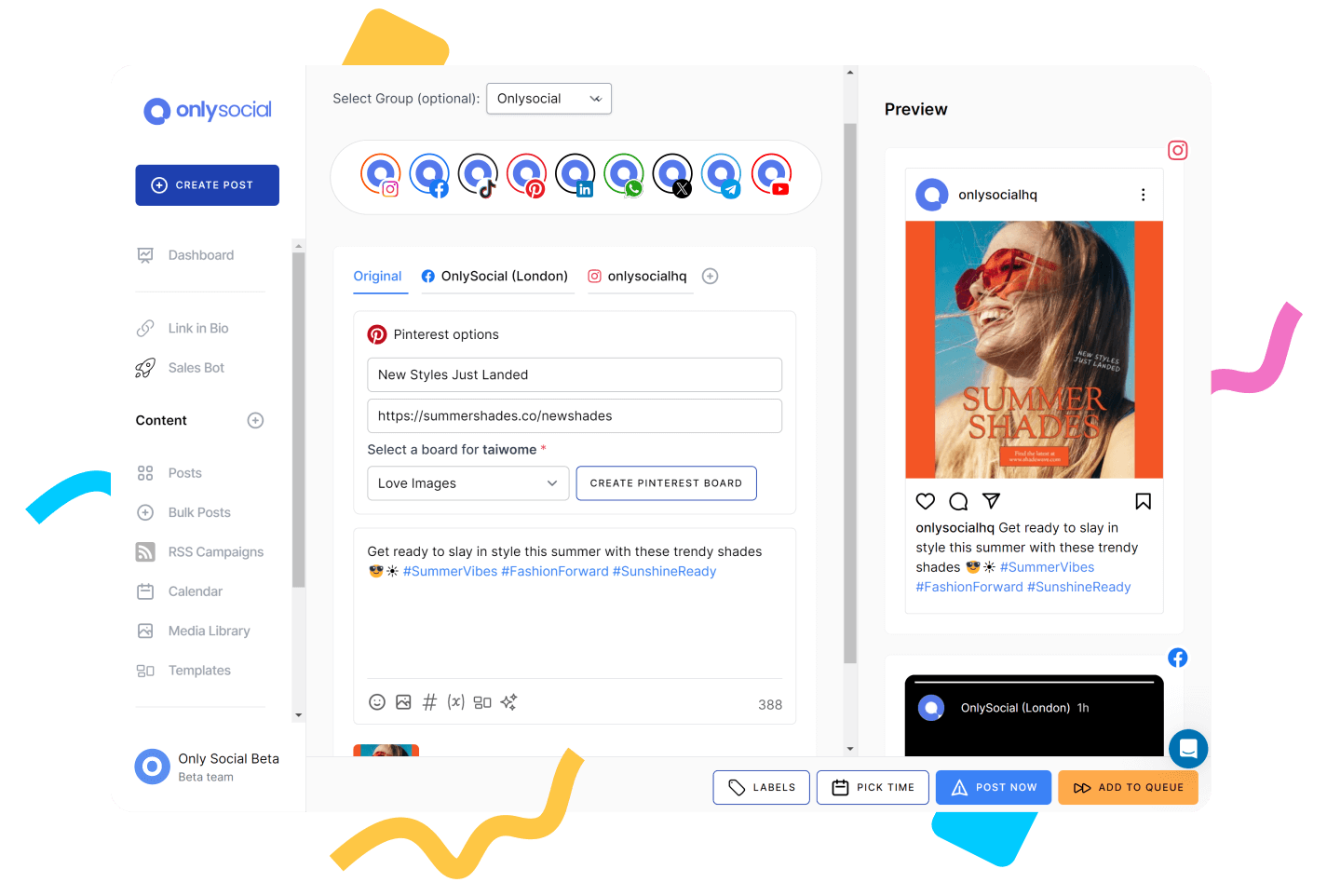
OnlySocial feels like one of those platforms you instantly “get” the moment you log in. When we tested it across multiple client accounts, the first thing that stood out was how organized everything felt.
No jumping between tabs, no awkward workflows. Just a smooth dashboard that lets you build, schedule, and manage content without friction.
It’s built for everyone, whether it’s freelancers, growing businesses, or agencies managing dozens of clients at once. With scheduling, analytics, AI features, collaboration, and a unified inbox packed under one roof, it genuinely solves the everyday headaches social media teams deal with.
Key Features of OnlySocial
Advanced Scheduling & Targeting
Posting is simple, but the real magic is in the smart scheduling. You can create weekly posting slots for each account, meaning your content lands when your audience is most active. During testing, we found this feature incredibly time-saving because it removed the constant guesswork around “when to post.”
Multi-Format Post Scheduling
Photos, videos, carousels, Reels, Shorts – OnlySocial handles them without any fuss. You can tailor captions and formats for each platform in one go, which is great when you’re posting the same message across different channels.
AI-Powered Content Generation
The built-in AI is one of the strongest we’ve seen in a scheduling tool. It can create captions, rewrite your draft in a different tone, generate hashtags, and even create visuals. When we were stuck on ideas, this feature genuinely cut our prep time in half.
First Comment Scheduling
Perfect for Instagram, Facebook, Bluesky, and TikTok. You can automatically add hashtags or CTA messages in the first comment, keeping captions clean but still optimized.
Automatic RSS Scheduling
If you run blogs or news-style content, OnlySocial can automatically pull posts from your RSS feed and schedule them for you.
Content Library Storage
Great for teams with lots of assets. Everything stays organized in folders so you can reuse videos, images, and templates without digging through drives.
Team Collaboration Tools
Assign roles, send posts for approval, and keep everyone in sync. No messy chats. No spreadsheets. It worked beautifully for our internal workflow tests.
Client Approvals & Workflows
If you work in an agency setup, this part is gold. Clients can approve posts quickly, which removes the typical back-and-forth that slows campaigns down.
Unified Social Inbox
One of our favorite upgrades. You can manage DMs, comments, mentions, and replies from Instagram, Facebook, LinkedIn, Google Business Profile, WhatsApp Business, and others – all in one place.
Solid Analytics & Reporting
You get clear insights into what’s working, who you’re reaching, and when engagement peaks. Reports can be customized, scheduled, and delivered automatically.
White Label for Agencies
Agencies can fully brand the platform with their colors, logo, and domain. It makes the tool look like your own social media software.
Pros
- Clean, intuitive interface that takes little time to learn
- Fast and helpful customer support
- Pricing is affordable and straight to the point
- Excellent for organizing multiple pages and clients
- Easy setup process – connecting accounts only takes a minute
Cons
- Social accounts sometimes need re-authentication
- No forever free plan
What Stood Out for Us
A Smarter Scheduling Experience
One of the first things we noticed when testing OnlySocial was how smooth the scheduling process felt. Uploading content, adjusting captions for different platforms, and selecting time slots all happen in one clean flow.
Dynamic Content Calendar
The drag-and-drop content calendar was another highlight. Everything sits in one place – drafts, scheduled posts, platform-specific assets – and you can filter what you see by team member, platform, or status.
Moving posts around is as easy as dragging them to a new date. During busy weeks where plans shifted constantly, this feature helped us make quick adjustments without redoing everything from scratch. Agencies and teams working on multi-platform campaigns will appreciate how visual and flexible it is.
Bulk Scheduling That Works Exactly How You Want It To
Not many tools get bulk scheduling right, but OnlySocial genuinely does. We tried uploading hundreds of posts using the CSV importer, and the platform didn’t glitch once. The posts slotted neatly into the calendar, complete with captions, media, and platform tags.
If you manage high-volume social accounts or build campaigns months in advance, this is a massive time saver. We found it especially helpful for brands with seasonal content or weekly recurring posts.
Easy Approvals and Team Collaboration
Most platforms offer team features, but it often feels clunky. With OnlySocial, it felt surprisingly smooth. We could assign roles, set approval flows, and keep everything organized without unnecessary steps.
Clients get a clean approval interface that doesn’t overwhelm them with settings they don’t understand. This alone shaved hours off our normal back-and-forth messaging. It’s clear the feature was built with real agency workflows in mind.
AI Content Creation
AI tools can be hit or miss, but the one inside OnlySocial is genuinely helpful. We used it to brainstorm ideas, rewrite captions in different tones, generate hashtags, and even produce images for posts.
It doesn’t replace the human touch, but it removes the “blank page problem” and speeds up the content prep stage dramatically. If you often create content in batches, this feature quickly becomes a lifesaver.
Unified Inbox with True Multi-Platform Coverage
Most scheduling tools don’t offer a unified inbox at all, or if they do, it’s usually limited. OnlySocial supports Instagram, Facebook, LinkedIn, Google Business Profile, and WhatsApp Business.
Being able to handle DMs, comments, mentions, and replies in one place made community management feel much more controlled. No switching between apps, no missed messages, no disconnected threads. For brands that care about engagement speed, this is a major plus.
Pricing
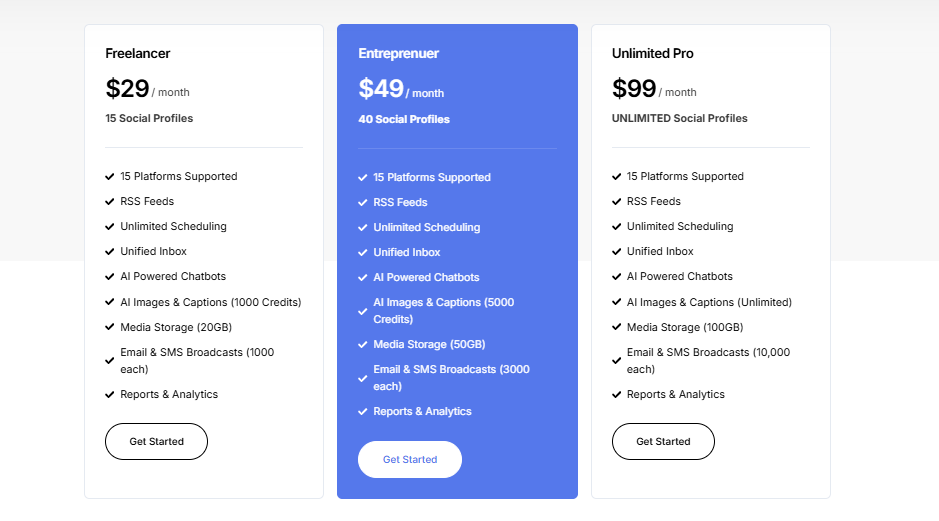
OnlySocial keeps things affordable using three plans:
- Freelancer – $29/month (15 social accounts)
- Entrepreneur – $49/month (45 accounts + 3 users)
- Professional – $99/month (unlimited accounts + 10 users)
All plans include AI tools, bulk scheduling, collaboration features, analytics, and the unified inbox.
Overall Verdict
OnlySocial is one of the strongest automation tools we’ve used, especially for freelancers, SMBs, and agencies. It handles scheduling, content production, performance tracking, client approvals, and engagement without feeling overwhelming. The dashboard is clean, the learning curve is gentle, and the pricing makes it easy to scale as your needs grow.
If you want a social media tool that cuts out the repetitive work and keeps your workflow organized, OnlySocial is easily one of the best options heading into 2026.
2. Hootsuite – $99/Month
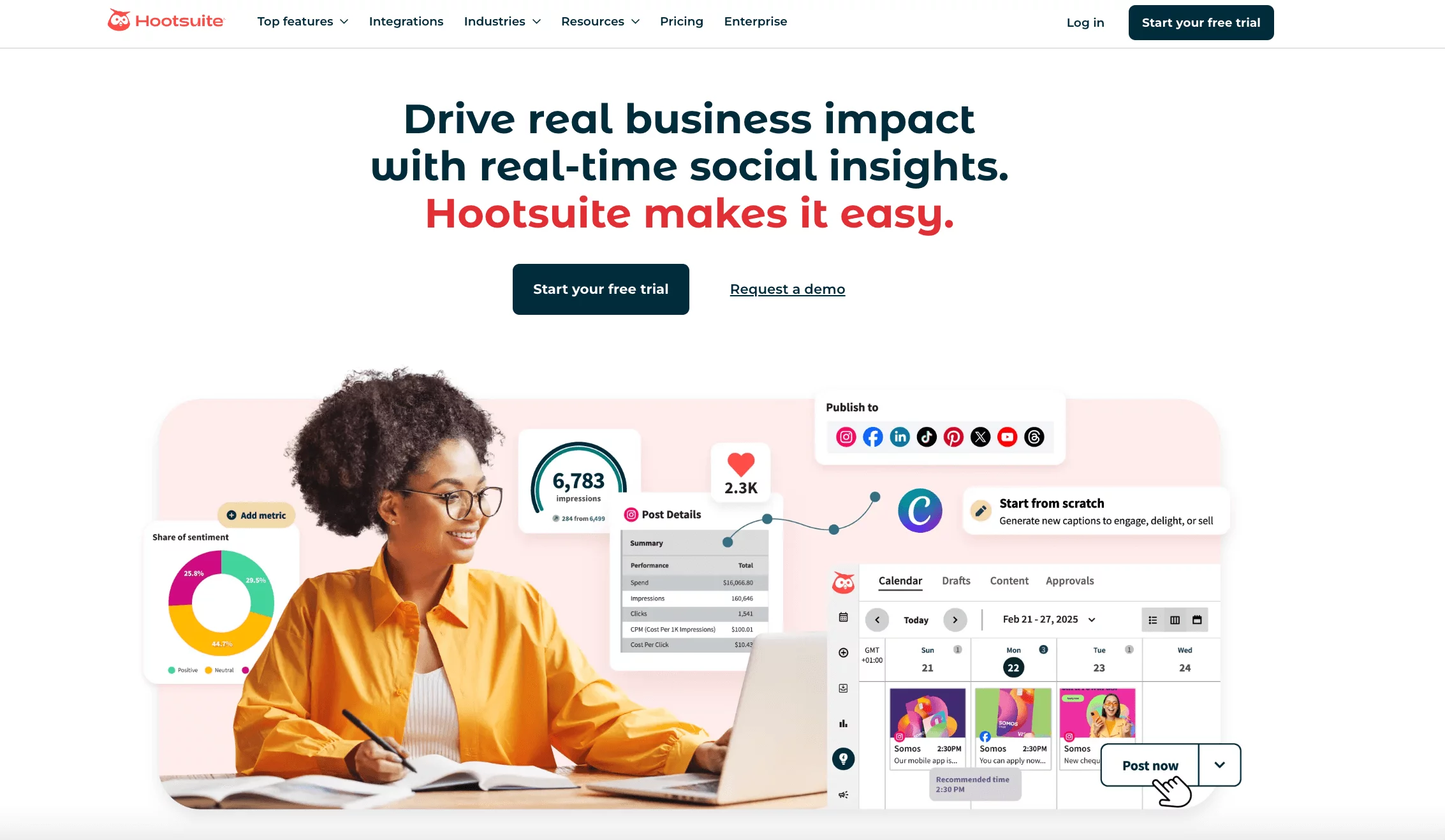
Hootsuite has been around long enough to feel like an industry classic, and after spending time with it again this year, it’s easy to see why so many brands still trust it.
Everything lives inside one big dashboard – publishing, engagement, analytics, ads, and listening – so you’re not bouncing between tools to get basic tasks done.
It’s built with larger businesses in mind. The platform has a lot of depth, especially around analytics, listening, and team collaboration. But with that depth comes a learning curve, so it’s one of those tools you grow into rather than instantly master.
Key Features of Hootsuite
Bulk Scheduling & Auto-Scheduling: You can plan content in batches or let the algorithm choose the best times to publish. Great for teams that want consistency without overthinking timing.
Monitoring Streams: We found the customizable streams extremely helpful. You can follow hashtags, competitor posts, keywords, or mentions – all in real time.
Automated Reporting: Hootsuite sends structured reports straight to your inbox or your client’s inbox. The automated delivery is especially useful for busy teams.
Social Ad Management: You can manage paid campaigns from the dashboard and boost posts directly. It’s built more for mid-size and enterprise teams, but works well once set up.
Social Listening & Insights: The listening module tracks brand mentions and sentiment. It’s powerful, but some parts sit behind higher-tier plans.
Performance Analysis: You get strong analytics on posts, campaigns, and audience behavior. The detail helps teams refine what’s working and what isn’t.
Pros
- Solid content discovery streams plus Canva integration
- Deep analytics with competitive benchmarking
- Unified inbox with saved replies and agent collision alerts
Cons
- On the pricier side, especially for small teams
- Sentiment analysis and advanced listening are paid add-ons
- Some features feel overwhelming without training
What Stood Out for Us
A Publishing System That Gives You Full Control
The visual content calendar is one of Hootsuite’s strong points. During testing, we could easily drag posts around, build weekly queues, and follow the platform’s recommended posting times. OwlyWriter AI also helps generate captions, hashtags, and ideas directly inside the dashboard, which speeds up the workflow for teams handling large accounts.
Advanced Analytics
If you’re serious about metrics, Hootsuite delivers. The default insights already cover most needs, but the advanced analytics (available as an add-on) go deeper with custom tracking, performance comparisons, and benchmarking. We found this especially helpful when working with clients who wanted reports tailored to specific KPIs.
Listening Tools That Help You Stay Ahead of Trends
The listening module is built for teams that want real-time visibility. We used it to monitor brand mentions, keep an eye on industry discussions, and catch sentiment shifts early. Real-time alerts were particularly useful for potential PR issues or sudden changes in audience mood.
Smoother Engagement and Ad Management
The unified inbox brings messages from all your channels into one view, making replies much easier to manage. Saved replies came in handy, especially for common customer questions. For teams running paid campaigns, the ad management tools help you boost top-performing posts directly, though the best automation features sit behind higher-tier plans.
Pricing
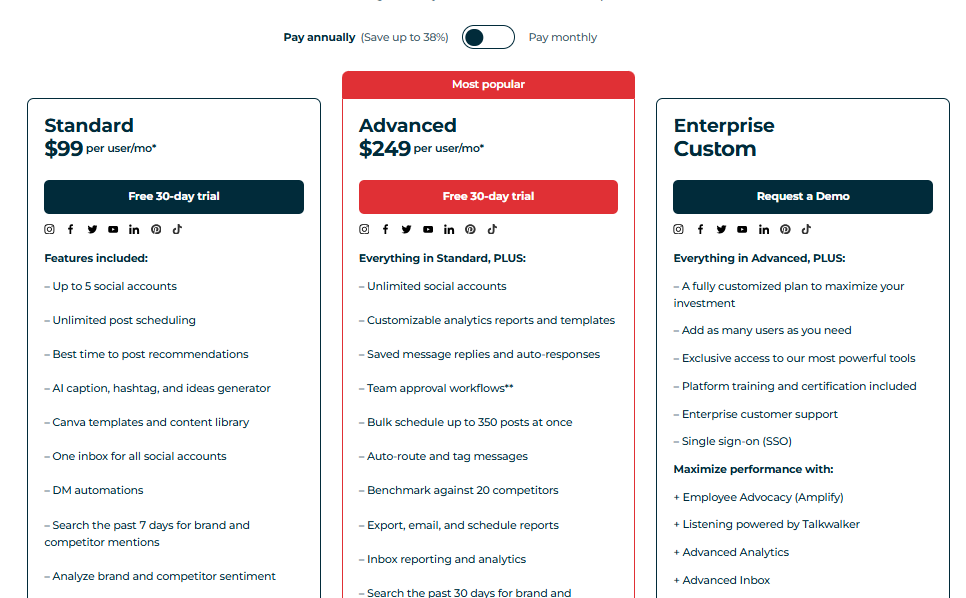
After a 30-day free trial, Hootsuite pricing starts at $99/month, with the next tier set at $249/month. The tier you choose depends on how many social accounts and team members you need to support.
Overall Verdict
Hootsuite is a serious powerhouse, especially for brands that want an all-in-one social automation suite with strong analytics and listening. It reduces a lot of manual work, handles high-volume accounts well, and integrates with more tools than most competitors.
The only downside is the cost – many of its best features sit behind premium plans. For smaller businesses, there are more budget-friendly alternatives, but for growing teams and enterprise users, Hootsuite remains a reliable option heading into 2026.
3. Sprout Social – $199/Month
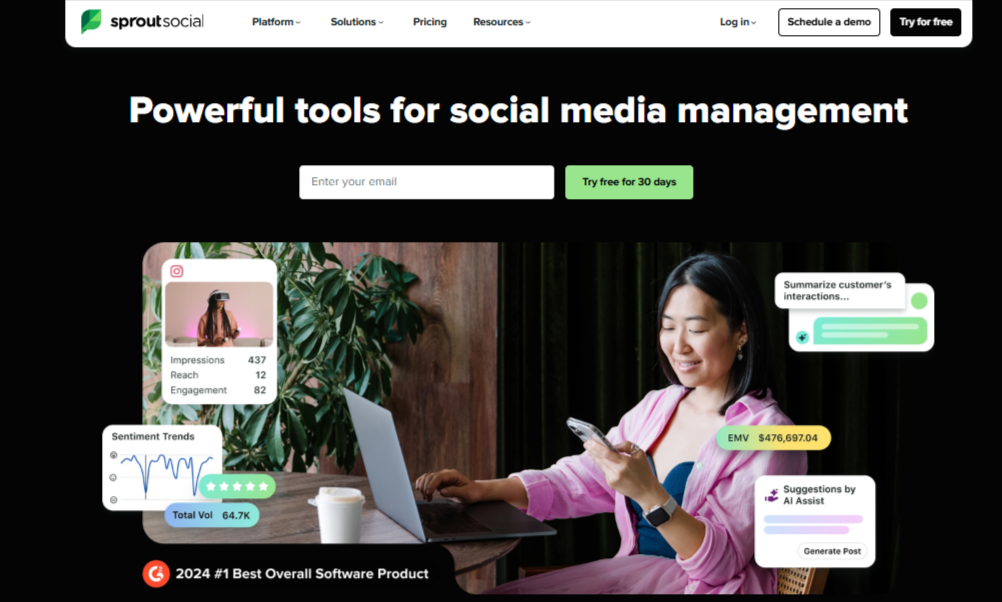
Sprout Social is one of those tools you turn to when you want something powerful, polished, and built for bigger teams. Sprout isn’t just about scheduling posts. It’s built to automate a huge portion of your daily workflow.
From smart inbox automation to post timing suggestions and chatbot-style responses, it aims to reduce the manual work behind social media management. It’s also known for its depth. Everything feels well designed, and the platform tries to give teams better control over conversations, reporting, and campaign insights.
That said, with all the advanced capabilities, Sprout is one of the more “enterprise-heavy” tools in this space.
Key Features of Sprout Social
Review Management: You can track, respond to, and manage reviews across supported platforms. This is especially useful for brands with multiple locations.
Paid Performance Reporting: Sprout lets you combine paid and organic results in one dashboard, so you can see the full picture of your campaigns.
Automated Message Responses: You can set up smart, chatbot-style replies inside the inbox – helpful for handling common questions quickly.
SproutLink (Link in Bio Tool): A customizable landing page that helps turn social traffic into website visits and conversions.
AI-Driven Message Prioritization: This helps surface the most critical messages first, based on urgency and sentiment.
Interactive Analytics: Sprout’s reporting visuals are clean and intuitive, making it easy to spot trends.
Campaign Management: You can track campaigns across platforms, including mentions, messages, and community activity.
Pros
- Versatile automation tools supported by solid AI features
- Strong monitoring tools for tracking mentions and campaign activity
Cons
- The mobile app has stability issues (slow loading, crashes, sync problems)
- Many of the standout features are locked behind higher-priced plans
What Stood Out for Us
A Streamlined and Intelligent Engagement Suite
Sprout’s engagement tools genuinely impressed us. The AI-powered prioritization inside the inbox does a great job of pulling important messages to the top. During testing, we noticed it flagged urgent messages and identified sentiment in real time, making it easier to spot potential customer issues early.
All messages – comments, reviews, DMs – sit in one clean view, which helps social teams respond faster without losing track. If customer engagement is your priority, Sprout makes that workflow feel more organized.
Clear and Actionable Performance Insights
Sprout’s analytics feel professional and polished. Interactive charts help you break down performance across platforms, and the reporting separates paid vs. organic results clearly. When we tested the Premium Analytics add-on, the custom filtering and tailored metrics were very helpful, especially for teams that report to stakeholders.
But it’s also worth noting that these premium features may feel excessive (and costly) for smaller teams that don’t need high-level reporting.
Serious Listening Power with Added Advocacy Tools
Sprout’s listening tools stand out. They track sentiment shifts, monitor brand mentions, and surface trends you might miss scrolling manually. We liked how easy it was to build detailed listening queries, although you do need time to process the data if you’re tracking large volumes.
Another pleasant surprise is the employee advocacy feature, which lets teams share curated content to expand reach. It’s great for companies with active internal teams.
Pricing
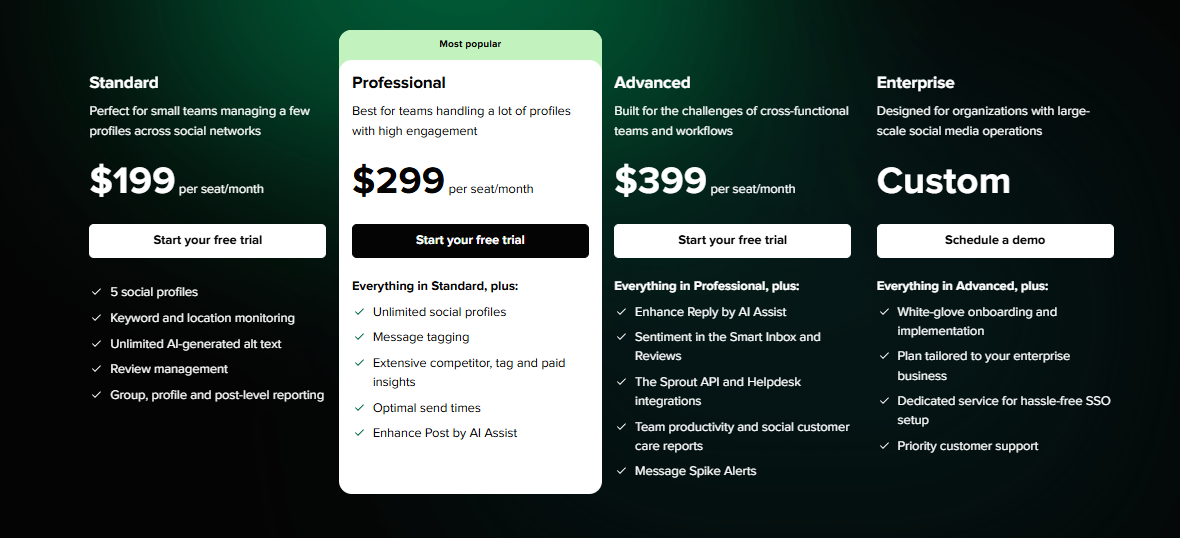
Sprout Social offers three paid plans:
- Standard – $199 per user/month (manages 5 social accounts)
- Professional – $299 per user/month
- Advanced – $399 per user/month
Pricing is high because Sprout charges per user, not per brand or per workspace.
Overall Verdict
Sprout Social is a powerful automation platform built for teams that want depth, strong analytics, and enterprise-ready engagement tools. Its social listening and reporting capabilities are among the best in the industry, and the AI-powered inbox features make customer service smoother.
But the high price and learning curve may be challenging for smaller businesses. If you’re a larger team with a strong focus on analytics and customer engagement, Sprout Social is a top-tier pick for 2026.
4. Post Planner – $11/Month
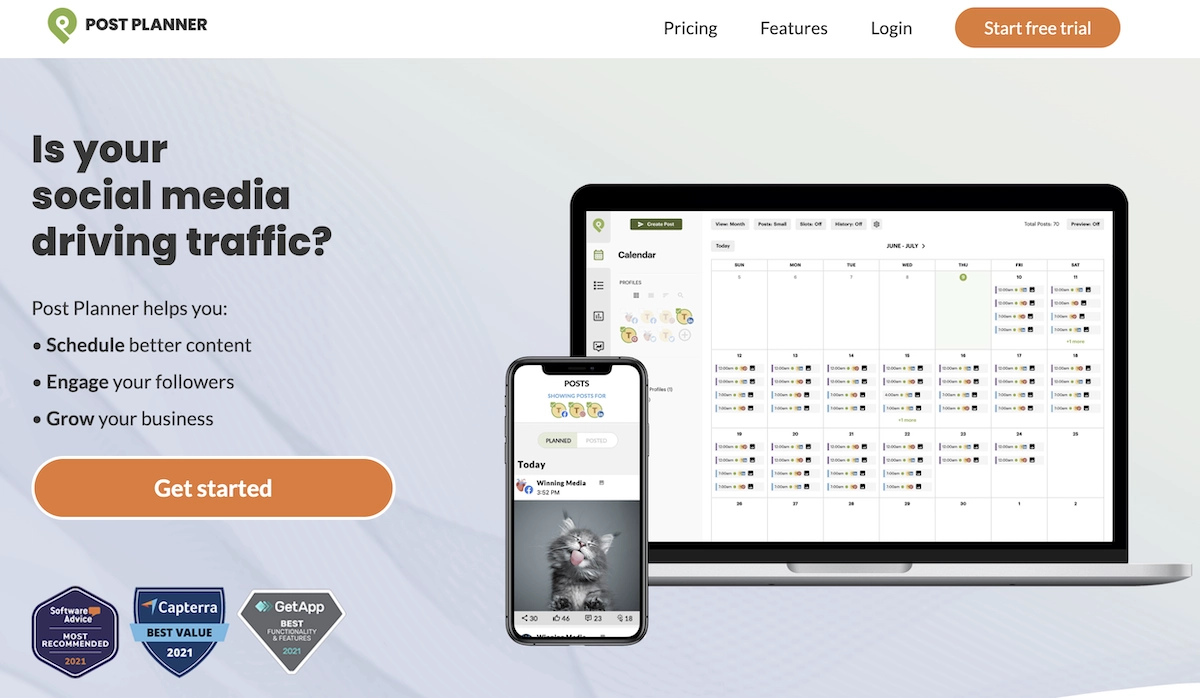
Post Planner is built for people who want simple automation for posting across all major social platforms, without getting lost in complicated dashboards. When we tested it, the tool felt very focused on helping you find good content fast, create posts quickly, and keep your publishing consistent.
It’s not the most advanced tool in this list, but it’s surprisingly handy if your main goal is to schedule posts and fill your calendar with quality content.
It comes with basic analytics, smart content queues, and an easy way to mix curated and original content, great for creators and small businesses that want to stay active without overthinking strategy.
Key Features of Post Planner
AI-Powered Content Creation: Helpful for speeding up caption writing and generating quick ideas.
Trending Content Search: This helps you discover content that’s currently performing well across the web.
Built-In Design Tools & Stock Library: You get simple editing tools plus access to stock images, which is nice for quick posts.
Streamlined Content Organization: Posts can be grouped into buckets to keep ideas and themes organized.
Reusable Custom Queues: You can build posting queues that recycle your best content.
Performance Analytics: Basic engagement insights to help you understand what’s landing with your audience.
Pros
- Easy to use and simple to integrate into existing workflows
- Helpful and responsive customer support
- Handles both curated and original content smoothly
Cons
- Calendar interface feels crowded and lacks drag-and-drop rescheduling
- Missing advanced features like team collaboration, downloadable reports, and an inbox
What Stood Out for Us
A Solid Content Curation Engine
If you’re often running out of ideas, Post Planner shines in this area. The content library pulls viral images, niche articles, videos, and trending posts from across the internet. During our tests, it surfaced plenty of content gems we hadn’t seen elsewhere.
The built-in editor is basic but useful. You can crop for each platform, tweak the resolution, add text or filters, and drop in logos. The interface does feel a bit outdated, but once you get the hang of it, it works well for day-to-day content creation.
Helpful Content Bucketing for Long-Term Planning
The content buckets are genuinely useful for organizing post ideas based on topics or themes. Setting them up takes some time, but once you’re done, it becomes a big time-saver.
You can create automated queues that recycle or shuffle posts, which helps keep your profiles active with little manual effort. We liked how the post composer allows you to reuse saved hashtags and CTAs – it’s a small detail, but in daily workflows, it saves more time than you’d expect.
Straightforward Analytics with a Handy Re-Queue Feature
Post Planner’s analytics are not deep, but they’re practical. You can filter posts by engagement and quickly spot what performed best. The standout feature for us was the ability to re-queue top-performing content with one click.
Sometimes a great post doesn’t get enough early reach; this feature helps you squeeze more value out of it. For users who want simple performance insights without diving into advanced metrics, this dashboard feels more than enough.
Pricing
Post Planner has three paid plans:
- Starter – $11/month
- Growth – higher tier
- Business – up to $69/month
There’s also a free plan, but it’s extremely limited and doesn’t include the features professionals actually need.
Overall Verdict
Post Planner is a solid option for creators and small brands looking for easy scheduling, simple analytics, and strong content curation. It shines when it comes to finding trending posts and keeping your queue full.
However, if your team needs deeper analytics, collaboration features, or a social inbox, Post Planner may feel limited. It’s a great starter tool, but scaling businesses may eventually need something more advanced.
5. Buffer – $6/Month
Buffer has always been described as one of the “friendlier” social media tools, and that reputation still holds up. The platform felt calm, clean, and easy to use – something you appreciate when juggling multiple accounts.
It’s built for teams of all sizes, but small and medium businesses will get the most value from it because of the simple layout and fast learning curve.
It doesn’t try to overwhelm you with unnecessary features. Instead, Buffer focuses on helping you plan content, publish consistently, and track performance without the usual clutter that comes with larger enterprise tools.
Key Features of Buffer
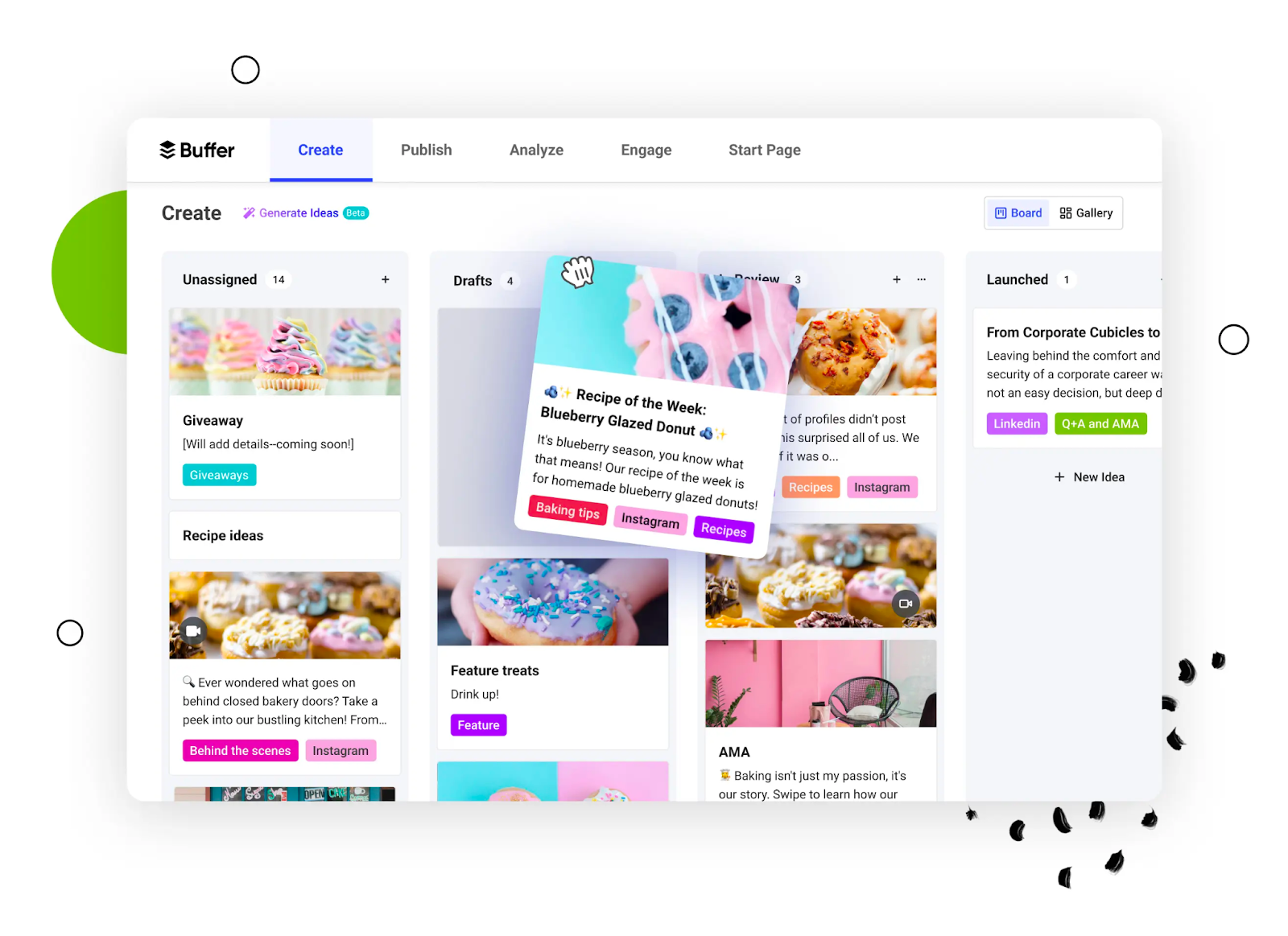
Categorized Content Boards: Great for organizing ideas, campaigns, or themes. It keeps your content planning tidy.
Visual Content Integrations: You can pull creative assets straight from connected design tools, making content creation smoother.
Buffer AI Assistant: Helpful for generating captions, rewriting drafts, and brainstorming content ideas.
Start Page Creator: A simple landing page builder for linking your top content, offers, or resources.
Best-Performing Content Tracking: Shows which posts are gaining traction so you can double down on what’s working.
White Label Reports: Useful for freelancers and agencies that want clean reports for clients.
Smart Conversation Prioritization: This helps you spot important comments or messages faster inside the unified inbox.
Pros
- Advanced scheduling makes planning content ahead much easier
- Clean, intuitive interface that most teams can understand instantly
Cons
- Limited in-app editing means images often need to be edited elsewhere before uploading
What Stood Out for Us
A Versatile Creation and Publishing Workflow
Buffer shines when it comes to creating and publishing content without friction. You can work across different formats, pull visuals directly from connected design tools, and schedule posts through a smooth calendar view. When we tested it during a content-heavy week, the publishing workflow felt simple and steady.
The AI writing assistant was also surprisingly helpful. It offered caption templates, trending topics, industry-related prompts, and seasonal ideas that made brainstorming less painful. Even though the new UI looks busy at first, it quickly becomes easy to navigate.
Analytics That Are Simple but Insightful
Buffer’s analytics aren’t as deep as what you get from enterprise tools, but they’re more than enough for small and mid-sized teams. We liked how clear the charts were and how easy it was to identify your top-performing content types.
The reports help you understand what’s working and which areas need improvement without drowning you in data. It’s not built for teams that need advanced reporting, but it gets the basics right.
An Improved Engagement Suite + Handy Landing Pages
Buffer’s engagement tools help you stay active in your comment sections and DMs without switching apps. The unified inbox keeps everything in one place and prioritizes important conversations so nothing slips through the cracks.
The Start Page feature is also a nice addition – essentially a customizable landing page where you can showcase links, products, or key content. It does take a little time to set up, but once it’s live, it gives your audience a simple, centralized place to find what matters most.
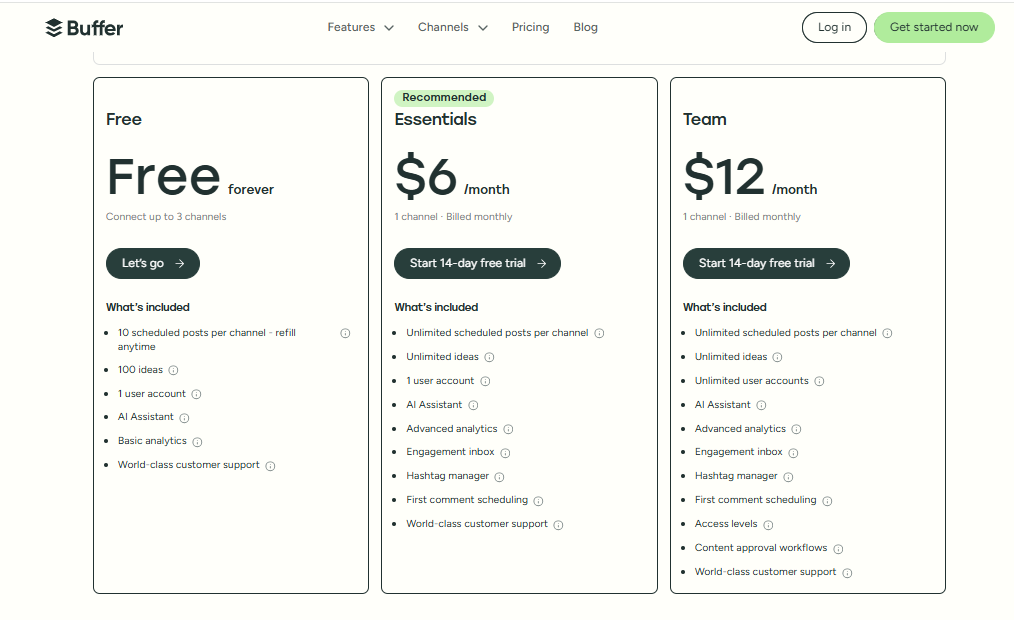
Pricing
Buffer offers four pricing tiers plus a 14-day free trial. There’s also a free plan for beginners. Paid plans range from $6/month for one account up to $120/month for 10 accounts.
Overall Verdict
Buffer is a dependable choice for small to mid-sized businesses that want a clean, easy-to-learn automation tool. It balances useful features with affordable pricing, making it ideal for solo creators, freelancers, and small marketing teams.
While it may lack the advanced depth that larger brands need, it delivers a smooth and efficient experience for everyday social media management. If you’re looking for a simple and effective way to streamline your content workflow, Buffer is definitely worth considering.
6. ContentStudio – $19/Month
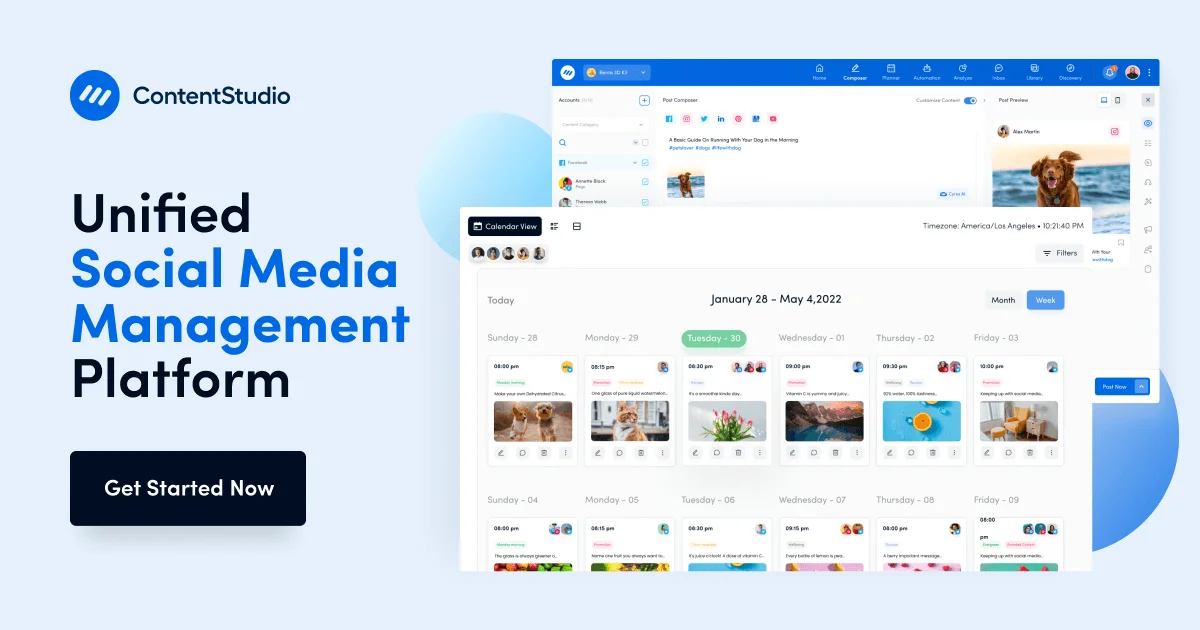
ContentStudio is one of those tools that tries to give you a bit of everything – content creation, scheduling, analytics, discovery, and automation – without feeling too overwhelming. The platform is surprisingly flexible.
Whether you’re running multiple brand pages or just trying to stay consistent with your own content, it gives you enough power to handle day-to-day posting across several channels.
Its automation features are a big highlight: evergreen recycling, AI-generated captions, content discovery, and bulk publishing. For creators and teams who want to fill their queues faster without starting from scratch every time, ContentStudio definitely helps lighten the load.
Key Features of ContentStudio
AI Caption & Image Generation: Useful for creating quick captions or visual ideas when you’re running low on inspiration.
Content Discovery Engine: Helps you find trending articles, videos, and posts across the web based on keywords or categories.
Bulk Auto-Publishing: Allows you to upload and schedule hundreds of posts at once – great for long-term planning.
Drag-and-Drop Calendar: Rescheduling is simple, letting you move posts around without rebuilding them.
Automated Report Scheduling: Reports can be set to send automatically to clients or team members.
Pros
- Offers multiple viewing formats (list view and calendar), depending on what you’re comfortable with
- Strong filtering options let you customize posts for different platforms easily
- Content curation automatically fills queues without constant manual work
Cons
- No social inbox available for iOS
- Lacks social listening tools, which may be limiting for brands tracking their online reputation
What Stood Out for Us
Effective Content Discovery
ContentStudio’s discovery feature is one of its biggest strengths. It scans the web, YouTube, and Twitter (X) for keyword-specific content, and the pre-curated categories make it easy to find posts you can share immediately. We also liked the RSS feed automation, perfect for people who want fresh content pulled straight from their favorite blogs.
Strong Scheduling Calendar
Scheduling posts across multiple platforms was straightforward, and the bulk scheduler worked smoothly even with large batches of posts. The calendar gives a clean overview of your content plan, and the “best time to post” suggestions felt accurate enough to trust.
Analytics That Cover the Essentials
ContentStudio doesn’t just offer basic KPIs. You can break results down by channel, adjust date ranges, and build grouped reports that combine multiple accounts. One thing we found really helpful was the competitor analytics – a great way to benchmark your strategy against similar brands. You can see what they’re doing well and where you might need to adjust your approach.
Surprisingly Strong Engagement Management
Even though social listening is missing, the engagement side is still solid. The unified inbox lets you manage conversations across channels in one place, complete with saved replies, conversation notes, user details, and assignments.
Collision detection ensures two team members don’t accidentally respond to the same message. The mobile app notifications were reliable too, making it easier to stay responsive throughout the day.
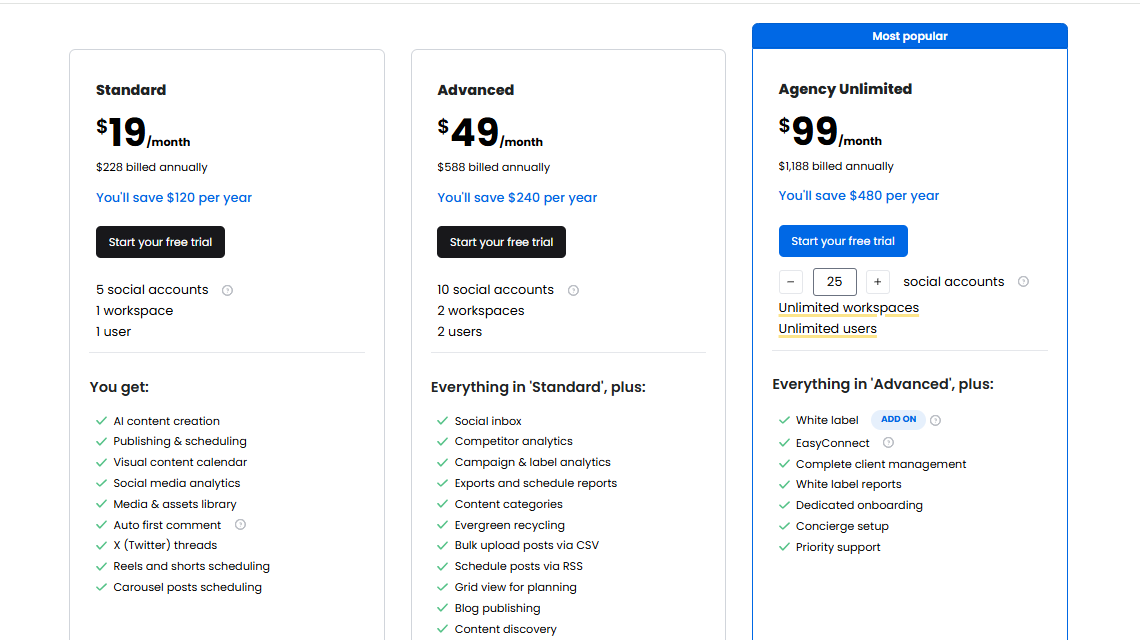
Pricing
ContentStudio offers flexible pricing, including a starter plan that goes for $19/month and a pro plan for $49/month. There is also an agency plan that goes up to $300/month, depending on the number of accounts.
Overall Verdict
ContentStudio is a strong automation tool for creators, small businesses, and agencies looking for easier content planning and smarter discovery features. Its scheduling tools, AI captioning, and analytics are impressive, and the content discovery engine saves a ton of time.
7. Sendible – $29/Month

Sendible is built for teams that want a simple, central place to plan, create, and automate content across all their social channels. When we tested it, the tool felt very team-focused. You can schedule posts one by one, build campaigns, approve content, and control how everything goes out – all from a clean dashboard that’s easy to adapt to.
The layout is intuitive, and most actions only take a few clicks, which makes it especially helpful for busy social media managers or agencies handling multiple clients. Sendible’s strength is in its workflow features and collaboration tools, which help teams stay organized without constantly hopping across different apps.
Key Features of Sendible
Collaborative Team Tools: Assign tasks, manage approvals, and keep multiple team members aligned during content creation.
Custom Report Generator: Build branded reports and tailor them to specific client needs.
Bulk CSV Upload: Upload large batches of posts at once and schedule campaigns ahead.
Scheduling Calendar: A visual planner that helps map out content over weeks or months.
White Label Options: Agencies can rebrand the dashboard, reports, and URLs with their own identity.
AI-Powered Captions: Generate or rewrite captions quickly inside the editor.
Streamlined Approval Process: Helps control content flow when multiple people or clients are involved.
Pros
- Extremely easy to navigate, even for new team members
- Excellent collaboration features that help teams work smoothly
Cons
- White label plans are expensive for smaller companies
- Handling all analytics data can feel overwhelming
- The interface sometimes feels clunky, and posts may occasionally fail to publish
What Stood Out for Us
Reliable Scheduling with Plenty of Flexibility
Sendible’s scheduling tools are simple but effective. You can customize posts with mentions, hashtags, emojis, and visuals, and the platform even suggests the best times to publish based on engagement history.
We found the bulk import feature particularly helpful when planning month-long campaigns. Smart Queues also stood out – they automatically recycle top-performing posts to keep your content active without extra work.
Better Content Management with AI Assistant
The content library makes it easy to keep all your assets organized. When we tested the AI Assist feature, it generated headlines, caption ideas, and content suggestions that felt on-brand more often than not.
It also helped pinpoint trends and recommended optimal posting times. For teams that create a large volume of posts, this makes the workflow noticeably smoother.
A Solid Collaboration System for Teams and Agencies
Sendible’s collaboration features are made for teams that need control and clarity. You can assign tasks, build approval workflows, give different permissions to team members, and manage shared content libraries.
Setting everything up takes a bit of time initially, but once the structure is in place, it creates a clear and efficient workflow.
Centralized Customer Engagement with Priority Inbox
The Priority Inbox is a huge help if you get a lot of comments or messages. It brings everything from different channels together in one feed. We liked that you can assign conversations to different team members, which helps avoid missed replies. Organization is key here, but once you settle into a system, it keeps engagement manageable.
Detailed Reporting with Custom Dashboards
Sendible’s reports are customizable enough to meet the needs of most agencies. Automated reporting saves time, and the custom content tags give you more precise tracking for campaigns.
The white-label reports look clean and professional, which clients always appreciate. The downside is that handling large media files sometimes caused glitches, so a bit more refinement would help here.
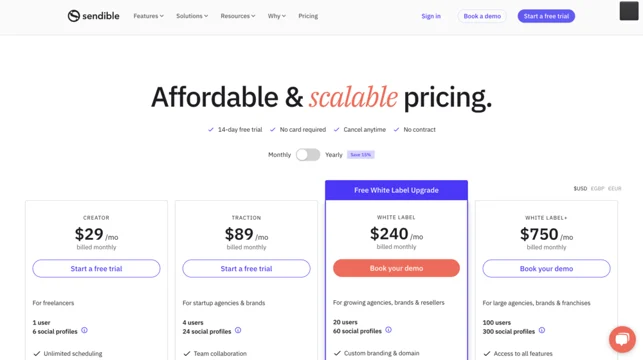
Pricing
Sendible offers four paid plans with a 14-day free trial:
- Creator – $29/month
- Traction – $89/month
- White Label – $240/month
- White Label+ – $750/month
Overall Verdict
Sendible is a strong automation tool for mid-sized businesses and agencies that need smooth collaboration, flexible scheduling, and client-ready reporting. It’s user-friendly and packed with helpful workflow tools, though the higher-tier white-label options can get expensive.
If you’re running multiple client accounts or managing a busy team, Sendible can significantly streamline your social media operations. If not, there are other alternatives worth exploring for a lighter and more affordable setup.
8. Loomly – $32/Month

Loomly is built for teams that want a clean, structured way to plan content and keep their social media workflow organized. The platform feels very straightforward – everything revolves around the content calendar, which acts like the command center for planning, drafting, approving, and publishing posts across multiple platforms.
It’s especially helpful for teams that deal with a lot of coordination. Loomly’s strength lies in its simplicity: it keeps your process tidy, helps you stay consistent, and gives your team one shared space to work from.
Key Features of Loomly
Unified Content Calendar: A central calendar where you can visualize and manage upcoming posts across all connected accounts.
Collaborative Workflow: Assign tasks, track progress, and approve content inside the platform.
Multi-Platform Scheduling: Plan posts for multiple platforms and customize each one easily.
Post Ideas Generator: Offers suggestions, trending topics, and ideas to help spark fresh content.
Analytics Dashboard: Shows performance metrics to guide your strategy decisions.
Approval Workflows: Perfect for teams that need structured review and sign-off.
Customizable Branding: Useful for agencies needing branded dashboards and reports.
Pros
- Clean, intuitive interface that simplifies multi-platform content planning
- Strong task assignment and approval workflows for team productivity
- Provides helpful performance metrics for data-driven decisions
Cons
- Analytics may feel limited for advanced users who want deeper insights
- The learning curve is noticeable with some of the more advanced features
- No free plan available
What Stood Out for Us
A Unified Calendar That Keeps Everything on Track
The content calendar is where Loomly shines. It gives a clean, full-picture view of all scheduled posts, drafts, deadlines, and ideas across every platform. During our testing, it became clear how much easier it is to keep campaigns consistent when everything sits in one structured place. It reduced the back-and-forth and made planning feel less scattered.
Streamlined Collaboration
Loomly is built with teamwork in mind. Multiple users can work together in real time, which made content creation far more efficient for us. Assigning tasks, adding deadlines, tracking progress, and approving content all happen inside the platform, meaning you don’t need separate project management tools for your social workflow.
Multi-Platform Scheduling
Customizing posts for different platforms is simple in Loomly, and that matters when you’re trying to improve engagement. We liked how easy it was to tailor captions and visuals without rebuilding everything from scratch.
Loomly handles the automation side while you focus on the content quality, and the tool manages the posting.
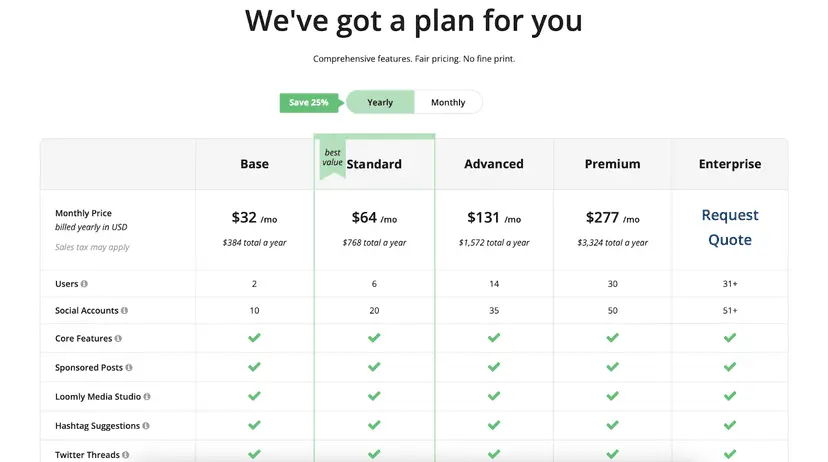
Pricing
Loomly offers several pricing tiers, starting at $32/month up to $332/month for plans that include custom branding. Each tier includes different features and user limits.
Overall Verdict
Loomly is a strong choice for businesses and teams that want a clean, organized way to plan, create, and automate their social media content. The collaborative features and intuitive calendar make it easy to stay consistent across platforms.
While it may not satisfy users who need advanced analytics or deeper platform integrations, Loomly delivers exactly what many teams need: structure, clarity, and a smoother workflow.
It is a solid pick for businesses looking to strengthen their social media presence through organized automation.
9. CoSchedule – $29/Month
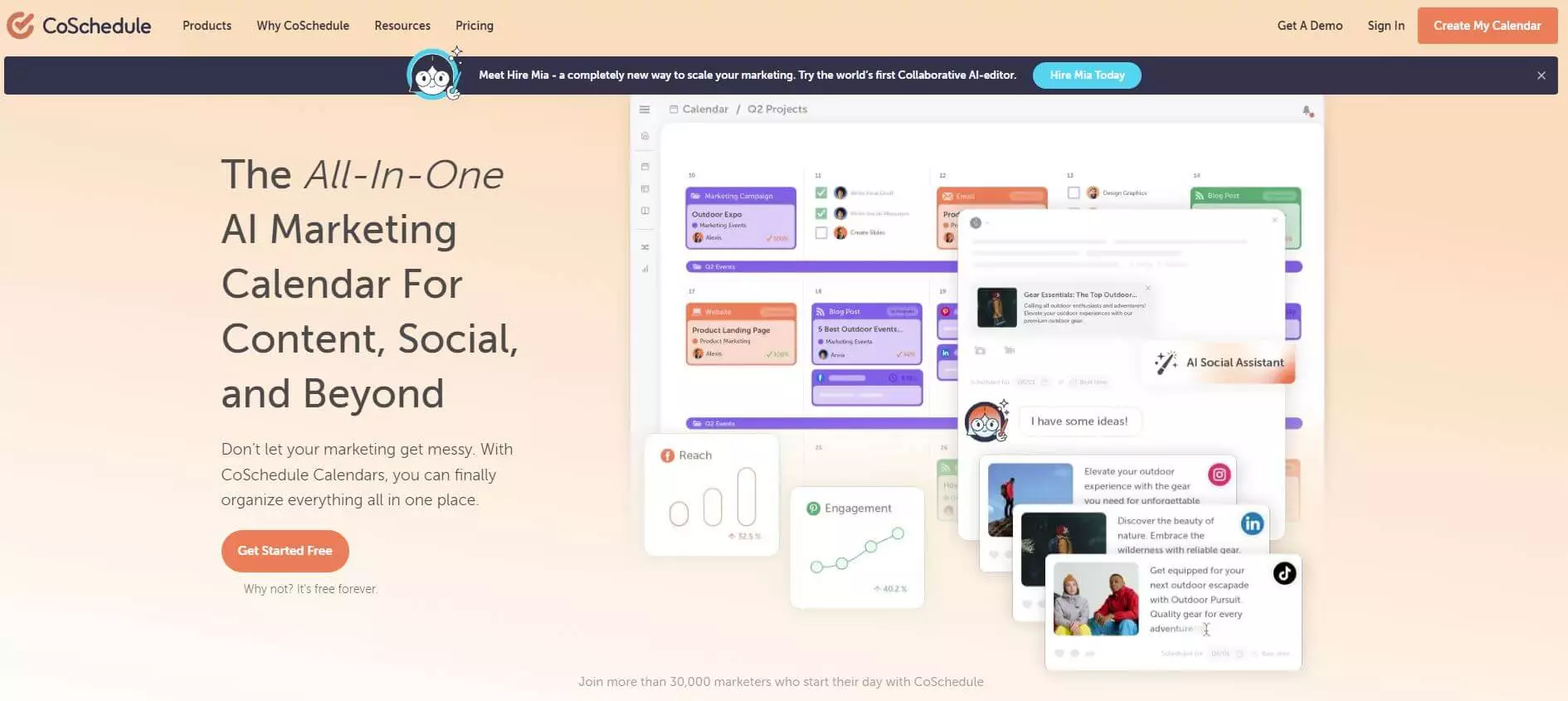
CoSchedule is built for marketers and solopreneurs who want a single place to manage all their content — blog posts, campaigns, social media, and everything in between. When we tested it, the tool felt like a full marketing calendar rather than a typical social scheduler.
Its WordPress integration is a huge bonus for anyone publishing blog content and then pushing it out to social channels.
The goal with CoSchedule is efficiency. It gives you one calendar to control your projects, tasks, and social posts, helping teams keep everything aligned and reducing the usual last-minute chaos.
Key Features of CoSchedule
Drag-and-Drop Rescheduling: Adjusting timelines and posts is quick and intuitive – just move items around the calendar.
AI-Powered Social Assistant: Generates post ideas, improves captions, and helps optimize publishing times.
Detailed Analytics & Performance Reports: Shows what content performs best across platforms and campaigns.
Requeue Feature: Automatically recycles evergreen content to keep your accounts active.
User-Friendly Content Calendar: Gives a clear bird’s-eye view of everything planned for the week or month.
Pros
- Clear calendar view that helps teams visualize all upcoming content
- Flexible calendar settings that can be customized easily
- Built-in approval procedures to streamline team workflows
Cons
- Can become sluggish when managing a lot of data
- Regular publishing errors reported by users
What Stood Out for Us
A Strong Calendar System for Complex Workflows
CoSchedule’s calendar feels like the backbone of the entire platform – and for good reason. It allows you to organize social posts, tasks, campaigns, and larger projects in one visual space.
We liked how the drag-and-drop interface made rescheduling effortless, especially during busy periods when plans kept shifting. Once everything is mapped out, the workflow feels much more predictable.
Team Collaboration
One of CoSchedule’s biggest strengths is how it enhances collaboration. Assigning tasks, adding deadlines, tracking progress, and using the Kanban board for visual clarity make team coordination much smoother.
During our testing, it was easy to see how cross-department visibility could help larger marketing teams avoid duplicate work and stay aligned on goals.
AI Assistance for Content Planning
The AI Assistant is helpful for quick caption ideas, social prompts, and timing suggestions. While the ideas aren’t always industry-specific, they help reduce brainstorming time and keep the publishing queue active.
For teams handling multiple brands or accounts, this feature can save a noticeable amount of time each week.
Pricing
CoSchedule offers a mix of free and paid plans:
- Free Social Media Plan
- Marketing Calendar – $29/month (connect up to 10 social profiles)
- Content Calendar & Marketing Suite – pricing available through customer support
Overall Verdict
CoSchedule is perfect for marketing teams that want a structured, all-in-one workflow for content planning, scheduling, and project management. It’s especially strong for teams juggling blog content and social media together.
While it can feel overwhelming at first and occasionally sluggish with large workloads, the organizational benefits are hard to ignore. For teams focused on improving productivity and staying aligned across projects, CoSchedule is a valuable addition.
10. Zoho Social – $15/Month
Zoho Social is built for fast-growing businesses that need a reliable way to manage social media, track conversations, and work closely as a team. The platform is well-structured, efficient, and tightly integrated with the wider Zoho ecosystem, especially if you’re already using Zoho CRM.
It’s designed to help you monitor brand mentions, schedule content, collaborate with your team, and stay on top of real-time engagement.
The tool packs a lot of automation features, from AI-assisted content creation to smart scheduling, making it a good fit for teams that want to streamline their posting and engagement workflows.
Key Features of Zoho Social
AI-Driven Content Creation: Write and refine captions with Zia AI, which suggests ideas and optimizes phrasing.
Streamlined Collaboration: Team roles, discussions, approval workflows, and custom access permissions keep everyone aligned.
Social Messaging Inbox: Centralizes conversations from multiple platforms.
Customizable Listening Dashboard: Track keywords, mentions, and conversations in real time.
Bulk Scheduling: Upload and schedule large batches of posts for long-term planning.
RSS Feed Integration: Automatically push blog or news content to your publishing queue.
SmartQ Posting: Recommends the best time slots to maximize engagement.
User-Friendly Calendar: A clean visual layout for planning and organizing content.
Pros
- SmartQ offers accurate posting-time suggestions for better engagement
- CRM integration allows you to turn social interactions into potential leads
- Automated reporting with client messaging makes sharing updates easy
Cons
- Analytics and reporting lack the depth needed for advanced insights
- Pricing can be restrictive for smaller businesses or teams needing multiple members
What Stood Out for Us
A Solid Publishing System with Helpful Creative Tools
Zoho Social’s publishing workflow is straightforward. Roles keep the process organized, and Canva integration makes designing posts much easier. While the publishing dashboard can feel busy at times, once you understand the layout, it becomes a powerful tool for moving content from idea to published post.
SmartQ posting helped us choose time slots that consistently improved engagement during testing.
Reliable Monitoring Tools and a Centralized Inbox
Zoho Social’s monitoring dashboard keeps you updated with real-time alerts across platforms. This made it easier for us to reply quickly and engage while conversations were still active.
The unified inbox does a great job pulling everything – comments, messages, mentions – into one place. Notifications can pile up quickly, but with a bit of organization, it becomes a solid tool for tracking discussions and managing community interactions.
Strong Collaboration for Growing Teams
Zoho Social’s collaboration system stood out. You can create discussion threads, assign roles, customize permission levels, and plan campaigns in one space.
The social inbox also makes collaboration easier – team members can assign conversations to each other, leave notes, and track progress. For teams that need structured workflows and transparency, Zoho Social does a good job keeping everyone connected.
Pricing
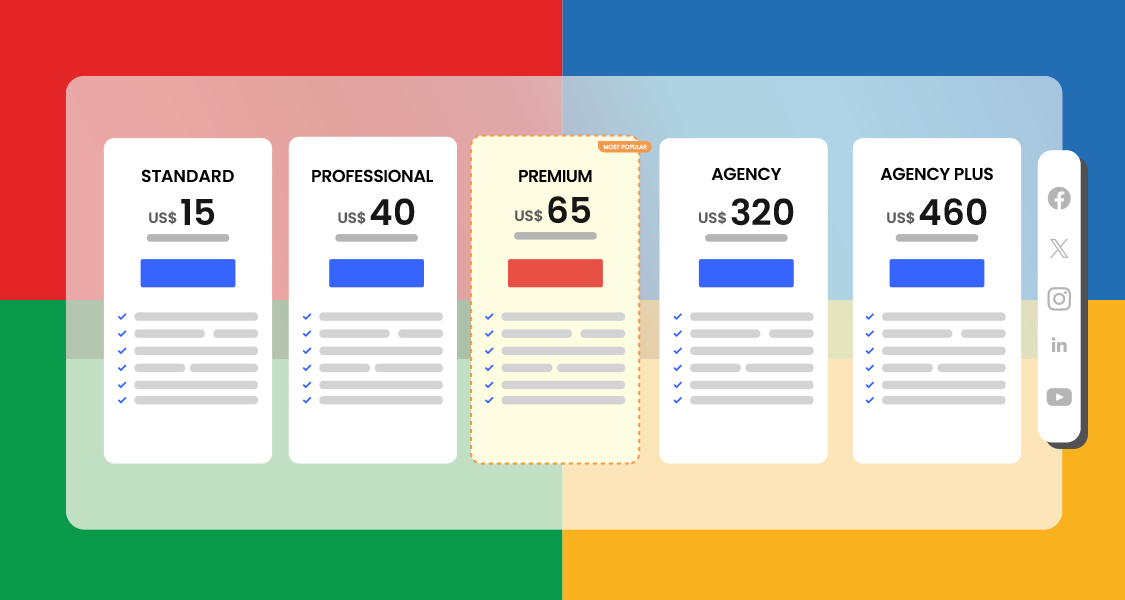
Zoho Social splits its pricing into:
- Business Plans – starting at $15/month
- Agency Plans – going up to $460/month
Pricing varies depending on users, accounts, and features.
Overall Verdict
Zoho Social is a well-rounded automation platform with strong team collaboration, real-time monitoring, and helpful posting tools. Its CRM integration makes it particularly appealing for businesses focused on lead generation.
Although the analytics could be deeper and the pricing structure may not suit smaller teams, Zoho Social remains a solid option for businesses that want an organized, data-supported approach to managing their social presence.
Key Features to Look for in a Social Media Automation Tool
Choosing the right automation tool goes beyond flashy dashboards and big promises. The best platforms are the ones that genuinely make your workflow easier, help you stay consistent, and save hours every week. After testing so many tools, we found that a few key features make the biggest difference in day-to-day use.
Strong Scheduling Options
A good tool should let you plan posts across multiple platforms, customize each version, and reschedule with ease. Features like time-slot scheduling, queues, and bulk uploads are incredibly useful when you’re dealing with lots of content.
Automation and AI-Powered Content Assistance
You’ll also want automation and AI features that actually help you move faster. This includes caption generation, post ideas, image suggestions, RSS automation, evergreen recycling, or anything that cuts down on repetitive work. Tools with built-in AI can trim your content prep time in half.
Clean Content Calendar
You should be able to see your entire posting plan at a glance – drafts, scheduled posts, upcoming campaigns – and drag things around without starting from scratch. A cluttered calendar will slow you down instead of helping.
Team Collaboration Features
If you work in a team, collaboration features matter a lot. Approval workflows, role assignments, shared content libraries, and notes help everyone stay aligned. Without them, your social process will always feel scattered.
Analytics and Reporting
Even basic insights should help you understand what’s working, when engagement peaks, and which content formats your audience responds to. If you manage clients, look for tools that allow custom or white-label reports.
Engagement Tools
A unified inbox for comments, messages, and mentions makes it easier to stay responsive without hopping between apps all day. Some tools even offer prioritization and sentiment detection, which gives you a head start when managing busy communities.
If a tool ticks most of these boxes, you’re already on the right track – the rest comes down to budget, team size, and workflow preferences.
Final Note
Social media automation has come a long way, and the tools available today can genuinely transform how you plan, create, and manage your content.
After testing each platform first-hand, one thing became clear: the right tool doesn’t just save time; it gives you the space to focus on strategy, creativity, and real engagement.
Each option on this list has its own strength, whether you’re a solo creator, a growing business, or an agency juggling multiple clients.
As long as you choose a tool that fits your workflow, budget, and long-term goals, you’ll find it much easier to stay consistent, build your presence, and get more done with less stress as you head into 2026.
FAQs
What is social media automation?
Social media automation is the process of using tools to handle repetitive tasks like scheduling posts, responding to messages, tracking performance, and finding content ideas.
Instead of manually posting every day or switching between apps all the time, automation tools help streamline your workflow so you can stay consistent and focus more on strategy and creativity.
Can I post on all social media at the same time?
Yes, you can, as long as you’re using a tool that supports multi-platform publishing. Tools like OnlySocial make this incredibly easy. You can create one post, tweak it for each platform, and publish everything at once or schedule it for later.
It’s one of the simplest ways to stay active across Instagram, Facebook, LinkedIn, TikTok, Pinterest, YouTube, X, and more without juggling apps.
What is the best social media automation tool?
The “best” tool depends on what you need. For example, OnlySocial is great if you want powerful scheduling, AI tools, and a unified inbox. Sprout Social is strong for enterprise analytics and listening. Buffer and ContentStudio are good for creators and smaller teams.
The right choice comes down to your budget, team size, and how much automation you want. But from our hands-on testing, OnlySocial offers one of the strongest all-round feature sets for 2026.
Is using social media automation tools a good idea?
Yes, as long as you use them wisely. Automation helps you stay consistent, save hours each week, and keep your content plan organized. It also reduces burnout, especially when managing multiple accounts.
The key is to automate the repetitive parts (posting, scheduling, tracking), while still showing up personally to engage with your audience when it matters.