OnlySocial vs CoSchedule: Which White-Label Tool Is Best for Agencies?
If you run a social media agency, you’ve probably heard the names OnlySocial and CoSchedule more than once. Both tools promise to make managing clients easier, streamline your content workflow, and help you deliver professional reports that make your agency look sharp.
But here’s the catch. While they sound similar on paper, they’re built for very different purposes.
CoSchedule is a brilliant tool for marketers who love structure. It keeps your calendar neat, helps you collaborate smoothly, and even lets you send branded reports to clients.
But its white-label capabilities stop there.
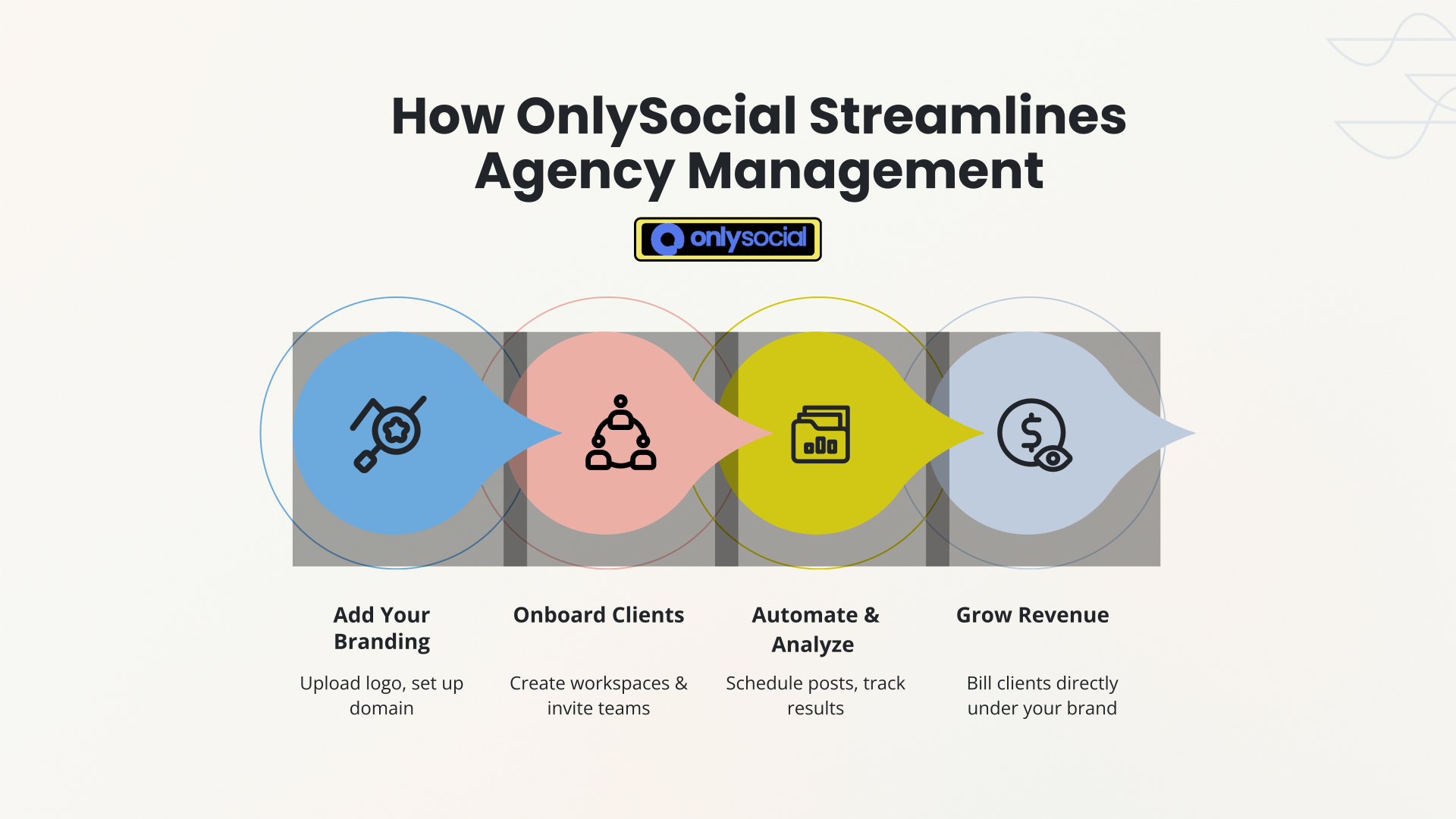
OnlySocial, on the other hand, gives agencies the keys to their own social media management software. You can brand the entire platform, automate posting, analyze results, and even bill clients – all under your name.
So if you’re torn between the two, you’re in the right place.
This guide will break down OnlySocial vs. CoSchedule, comparing how each performs in terms of features, pricing, and scalability, and help you determine which one truly fits your agency’s growth plans for 2025 and beyond.
Table of Contents
- 1 Why Agencies Are Leaning Toward White-Label Tools
- 2 CoSchedule: What It Offers Agencies
- 3 OnlySocial: The Complete White-Label Platform
- 3.1 Full Branding Control
- 3.2 Unlimited Scheduling and Bulk Posting
- 3.3 AI-Powered Content Tools
- 3.4 Advanced Analytics and Reporting
- 3.5 Unified Inbox for All Clients
- 3.6 Team Collaboration and Approval Workflows
- 3.7 Built-In Billing and Client Management
- 3.8 Impersonation for Quick Support
- 3.9 Reliable Technical Support
- 3.10 Pricing Made for Growth
- 4 Feature Comparison: OnlySocial vs. CoSchedule
- 5 Which Is Better for Your Agency?
- 6 FAQs
Why Agencies Are Leaning Toward White-Label Tools
For years, agencies relied on social media management tools to plan, post, and report on social media activity. Most of them worked fine until client demands grew more complex, margins got thinner, and every other agency started using the exact same tools.
Now, clients expect more than just content delivery. They want custom dashboards, detailed performance reports, and a seamless experience that feels like your agency’s own platform, not a third-party app.
That’s where white-label tools stepped in and completely changed the game.
A good white-label platform doesn’t just help you manage social media; it helps you scale. You can bring all your clients under one system, give them their own branded portals, automate the busywork, and even charge for access.
Instead of relying on someone else’s software, you’re effectively offering your own.
This shift explains why more agencies are moving to solutions like OnlySocial, which transform how agencies operate. It’s no longer about keeping up with clients but about building a scalable, branded system that keeps them coming back.
CoSchedule: What It Offers Agencies
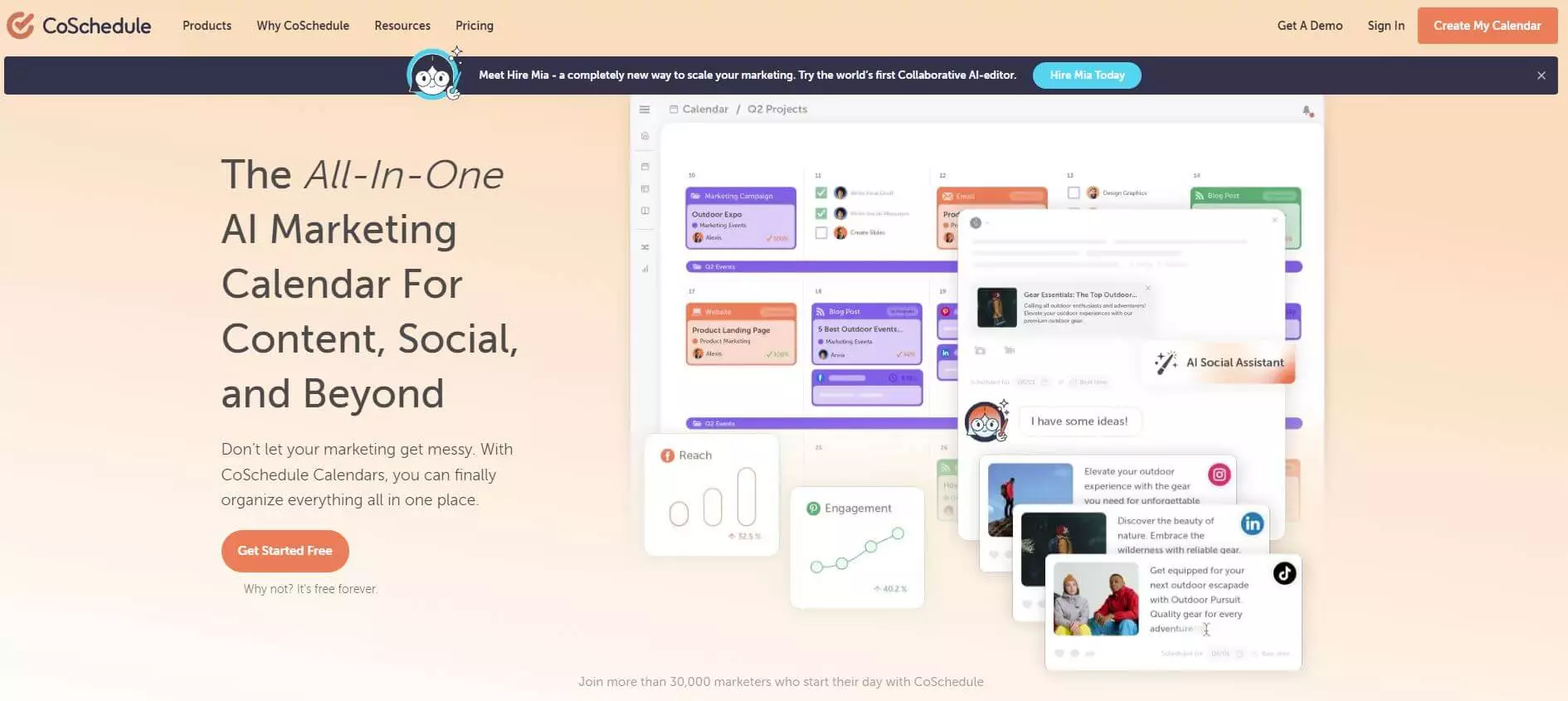
CoSchedule has earned a solid reputation among marketers who crave structure and visibility. It’s built around one primary promise – to help you plan, publish, and organize everything from one clean, color-coded calendar.
For agencies juggling campaigns across multiple clients, that structure can be a breath of fresh air.
Smart Scheduling and Social Calendar
CoSchedule’s calendar view is its biggest draw. You can drag and drop posts, schedule campaigns, and manage multiple profiles in one visual layout. For agencies that love order, it keeps everything easy to see and even easier to explain to clients.
White-Label Reporting (But Limited)
Here’s where the white-label feature comes in – but with boundaries. CoSchedule lets you customize reports with your client’s logo or your own, depending on who you’re sending them to. You can create three types of reports:
- Social Engagement Report – Highlights top-performing posts and overall engagement trends.
- Social Campaign Report – Focuses on campaign-specific results and outcomes.
- Social Profile Report – Breaks down performance by individual profile, showing best times to post and content type success.
You can export these as PDFs or CSVs – clean and professional, perfect for client meetings. But that’s where it ends. There’s no branded dashboard, no client logins, and no domain customization.
Social Inbox and Approvals
The social inbox feature gives teams a single place to manage messages and comments across connected networks, while approval workflows make client sign-offs smoother. It’s handy, especially for agencies managing collaborative campaigns.
Read-Only Client Calendars
CoSchedule lets agencies share a read-only calendar with clients so they can see what’s planned without changing anything. It’s good for transparency, but not a true white-label client experience.
Pricing for Agencies
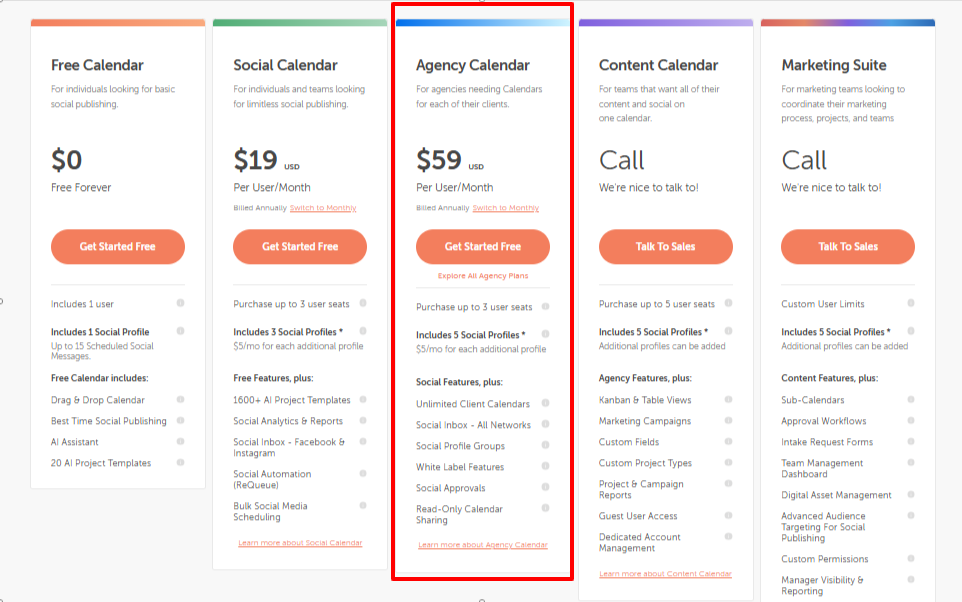
The Agency plan starts at $59 per month and includes five social profiles, with additional profiles costing $5 each. It’s a fair price for smaller agencies or freelancers, but it can get expensive quickly as your client list grows.
Bringing it together, CoSchedule is tidy, dependable, and great for marketing coordination, but when it comes to building your own branded system, its white-label capabilities stop at surface-level customization.
OnlySocial: The Complete White-Label Platform
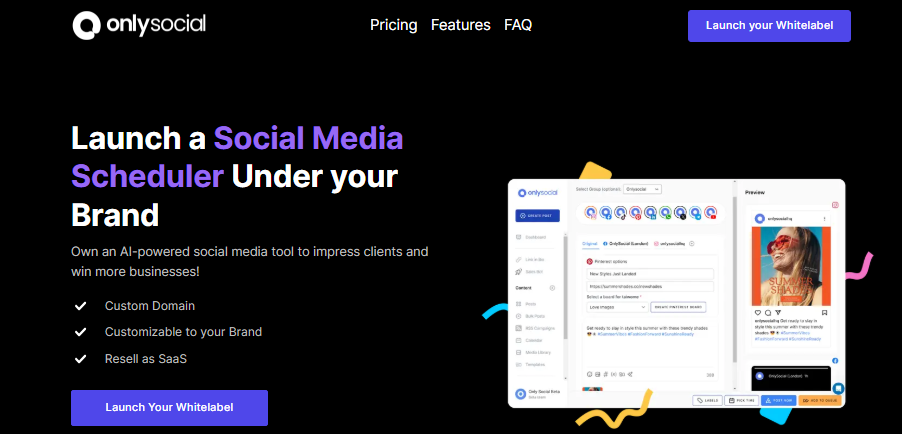
Where CoSchedule focuses on helping teams organize content, OnlySocial is designed for something much bigger, giving agencies the power to run their own social media management software, fully branded, fully automated, and ready to scale.
Full Branding Control
OnlySocial is a complete white label social media platform. With it, you’re not just slapping your logo on reports; you’re creating a complete client experience that looks and feels like your own software.
You can customize everything: your domain, dashboard, emails, and client portal. When your clients log in, they’re greeted by your brand, not someone else’s.
Unlimited Scheduling and Bulk Posting
No caps, no extra fees, no per-profile limits. OnlySocial lets you schedule as many posts as you want, across multiple platforms. You can even bulk upload up to 500 posts at once with a CSV file or automate sharing via RSS feeds. It’s perfect for agencies managing dozens of clients or running large content calendars.
AI-Powered Content Tools
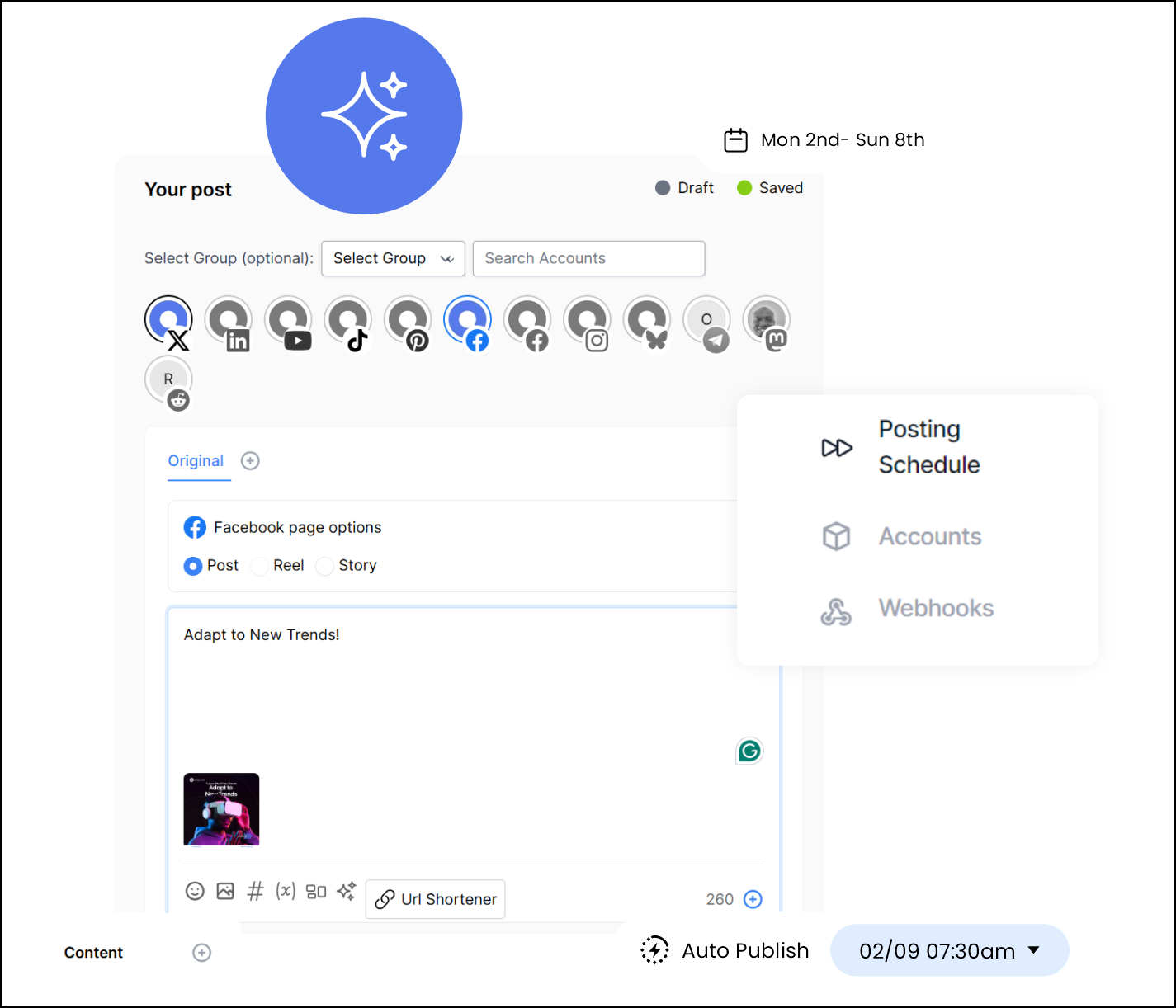
OnlySocial’s AI assistant helps speed up the creative process. It can generate captions, hashtags, and even create visuals with its built-in image generator. For busy agency teams, that means fewer late nights writing posts from scratch.
Advanced Analytics and Reporting
Agencies need data that speaks clearly, and OnlySocial delivers it. Get detailed insights on engagement, reach, impressions, and audience growth across all connected platforms. You can customize and brand these reports before sending them to clients, making your agency look polished and data-driven.
Unified Inbox for All Clients
Managing comments and messages from multiple clients can easily turn into chaos. OnlySocial brings them all together in one unified inbox, saving hours of tab-switching and letting your team reply faster and smarter.

Team Collaboration and Approval Workflows
If your agency has multiple team members, OnlySocial keeps everyone organized. Assign roles, set up content approval flows, and collaborate with clients directly inside the platform. No more scattered emails or lost feedback threads.
Built-In Billing and Client Management
This is where OnlySocial truly stands out. You can integrate Stripe, Paddle, or Paystack to manage billing directly through your branded dashboard. That means you can sell subscriptions, accept payments, and manage renewals – all inside your own platform.
Impersonation for Quick Support
Need to help a client who’s struggling with their setup? OnlySocial’s impersonate feature lets you securely access their account without endless logins or screen shares. It’s fast, professional, and client-friendly.
Reliable Technical Support
OnlySocial’s team is built around agency success. From setup to scaling, you get responsive technical support that understands how agencies operate – not just basic customer service.
Pricing Made for Growth
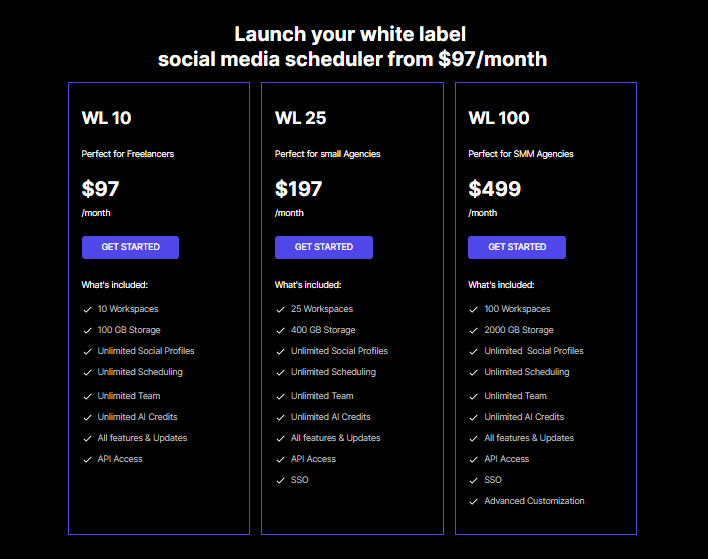
Starting at $97/month for 10 workspaces, OnlySocial scales with your agency instead of punishing you for growth. Larger plans – $197/month for 25 workspaces and $499/month for 100 – make it easy to handle more clients without blowing your budget.
Feature Comparison: OnlySocial vs. CoSchedule
Both OnlySocial and CoSchedule help agencies stay organized, schedule content, and deliver results. But when you look at the details, especially around branding, scalability, and automation, the difference becomes obvious.
1. White-Label Capability
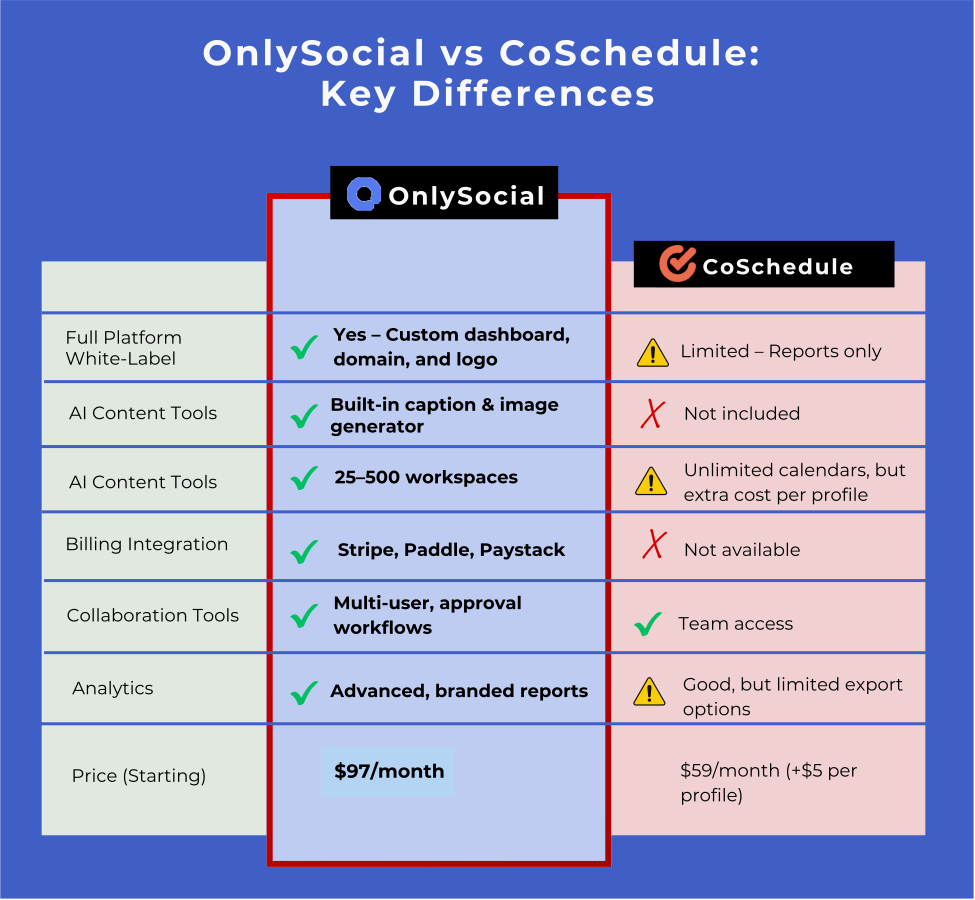
CoSchedule’s white-label features are limited to reports. You can add logos and export branded PDFs, but the platform itself still carries CoSchedule’s identity. Clients can’t log in through your domain, and you don’t get a fully private dashboard.
OnlySocial, on the other hand, goes all in. From your custom domain and logo to branded dashboards and client logins, everything reflects your agency. You essentially get your own version of a social media management platform, ready to showcase your brand’s credibility and scale your client base.
2. Scheduling and Automation
CoSchedule’s scheduling tools are smart and user-friendly, but they’re built around campaign management rather than volume. The limit on social profiles can make it challenging for agencies managing multiple clients.
OnlySocial provides unlimited scheduling, bulk posting via CSV, RSS automation, and supports 15 social platforms – all without extra costs per profile. If your agency manages dozens of brands, the difference is night and day.
3. Collaboration and Workflow
Both platforms support team collaboration, but OnlySocial goes further. With role-based permissions, content approvals, and client collaboration workflows, you can streamline feedback and reduce miscommunication.
CoSchedule offers read-only calendars and social approvals – good for visibility, but not as flexible for multi-client management.
4. AI and Creative Support
CoSchedule doesn’t include AI-powered writing or image generation. You’ll need to create everything manually or use external tools.
OnlySocial includes an AI assistant that generates captions, hashtags, and visuals. For agencies managing multiple brands, this feature can save hours of creative work every week.
5. Analytics and Reporting
Both tools provide analytics, but with different depth. CoSchedule focuses on campaign and engagement-level insights. You can track post performance and export clean reports.
OnlySocial offers advanced analytics with cross-platform tracking, audience insights, and customizable branded reports. Plus, agencies can impersonate clients to troubleshoot performance directly.
6. Pricing and Value
CoSchedule’s agency plan starts at $59/month for 5 profiles, with $5 for each additional one. That’s affordable for freelancers, but it quickly adds up as you grow.
OnlySocial’s white-label plan starts at $97/month for 10 workspaces, or less than $10 per workspace. Larger plans give far better scalability and cost efficiency, especially if you’re managing dozens of clients.
7. Client Management and Billing
OnlySocial wins big here. It includes integrated payment options, allowing you to sell subscriptions and manage recurring payments directly inside your platform. CoSchedule doesn’t offer this – you’d have to handle billing separately.
Which Is Better for Your Agency?
If your agency is small, handles a few clients, and mainly needs a scheduling calendar with decent reports, CoSchedule can absolutely do the job.
It’s tidy, organized, and easy to use. You’ll get clean campaign overviews, simple client PDFs, and an inbox for managing messages.
But if you’re looking to build your own branded platform – something your clients can log into, where your logo shines and your agency looks like a tech powerhouse – CoSchedule stops short. Its “white-label” feature really only touches reports, not the actual client experience.
But OnlySocial completely changes the game here.
It’s not just a tool; it’s an engine for agencies that want to scale smartly. With full white-label branding and many more amazing features, you can manage every client under one roof, fully branded as your own.
Imagine this:
- Clients logging into your dashboard under your
- Automated analytics and branded reports sent from your
- Your team collaborating, creating, approving, and scheduling across multiple brands – all from one central hub.
That’s not a future plan. That’s what OnlySocial delivers right now.
So, if you’re ready to move beyond simple scheduling and actually run your agency like a SaaS business, OnlySocial is the better choice hands down.
FAQs
Is CoSchedule fully white-label?
Not quite. CoSchedule’s white-label feature only applies to reports and read-only calendars. You can add your logo to exported PDFs, but you can’t brand the entire platform or use your own domain.
What makes OnlySocial’s white-label solution different?
OnlySocial lets you fully rebrand the entire software – from the login page and dashboard to emails and analytics. Your clients see your name and logo everywhere. It’s a complete white-label platform, not just reporting.
Can agencies manage multiple clients on both platforms?
Yes, but scalability differs. CoSchedule charges per social profile, which can get expensive as your client list grows. OnlySocial includes 25-500 workspaces depending on plan, making it far easier and more affordable for large-scale client management.
Which platform offers more automation features?
OnlySocial is built with automation in mind. It includes bulk scheduling (via CSV or RSS), AI caption writing, hashtag generation, and smart analytics updates. CoSchedule offers strong scheduling tools but lacks deeper AI and multi-client automation.
Which platform provides better support for agency teams?
Both offer support, but OnlySocial is built around agencies specifically. You get onboarding help, responsive technical support, and workflow tools like client impersonation and role-based permissions – things CoSchedule doesn’t provide.
Is OnlySocial more expensive than CoSchedule?
Actually, it’s the opposite in the long run. CoSchedule starts cheaper ($59/month) but adds $5 per extra profile. For agencies managing many clients, costs rise fast.
OnlySocial’s $197/month plan covers 25 workspaces – less than $10 per workspace – and scales affordably as you grow.