Google Reviews Management for Multiple Location Businesses
If your business has more than one location, you already know the headache that comes with managing Google Reviews.
One customer leaves glowing feedback in London, another posts a complaint in Manchester. And before you know it, you’re scrambling to log into multiple Google Business Profiles just to keep up. It’s messy, time-consuming, and far too easy for something important to slip through the cracks.
The truth is, Google Reviews are the currency of your brand. They build trust, influence buying decisions, and play a huge role in where your locations rank on search results. A single unanswered review, or worse, a negative one left hanging, can quietly hurt your reputation and your visibility.
That’s why having a proper review management system isn’t something to joke with. In this guide, you’ll learn how to track, reply to, and manage Google Reviews efficiently across all your locations.
Table of Contents
- 1 How to Manage Google Reviews in Google Business Profile (GBP)
- 2 The Challenges of Managing Google Reviews Across Multiple Locations
- 3 How OnlySocial Simplifies Managing Google Reviews for Multiple Locations
- 4 Best Practices for Managing Multi-Location Google Reviews
- 4.0.1 #1: Reply fast with a simple triage system
- 4.0.2 #2: Sound human, stay on brand, and localize
- 4.0.3 #3: Give each location clear owners and an escalation path
- 4.0.4 #4: Ask for more reviews the right way (and make it easy)
- 4.0.5 #5: Turn reviews into improvement loops, not just replies
- 4.0.6 #6: Measure what matters and tie it to local SEO
- 5 Why Centralized Review Management Matters for Local SEO
- 6 Final Thoughts
How to Manage Google Reviews in Google Business Profile (GBP)
Managing reviews inside Google Business Profile is straightforward once you know where to click. Here’s the quick path:
Reply to reviews
- Sign in to the Google account that manages your Business Profile.
- Open your Business Profile (search your exact business name on Google, then click View profile if needed).
- Click Read reviews.
- Find the review you want to address and click Reply.
- Write your response and hit Reply to publish.
- Made a typo? You can edit or delete your reply at any time.
Report inappropriate reviews
If a review breaks Google’s policies (spam, hate speech, etc.):
- Click the flag icon next to the review.
- Choose the violation type and submit.
- Keep a short internal note (date, link, why you flagged it) so your team has context.
Turn on email alerts for new reviews
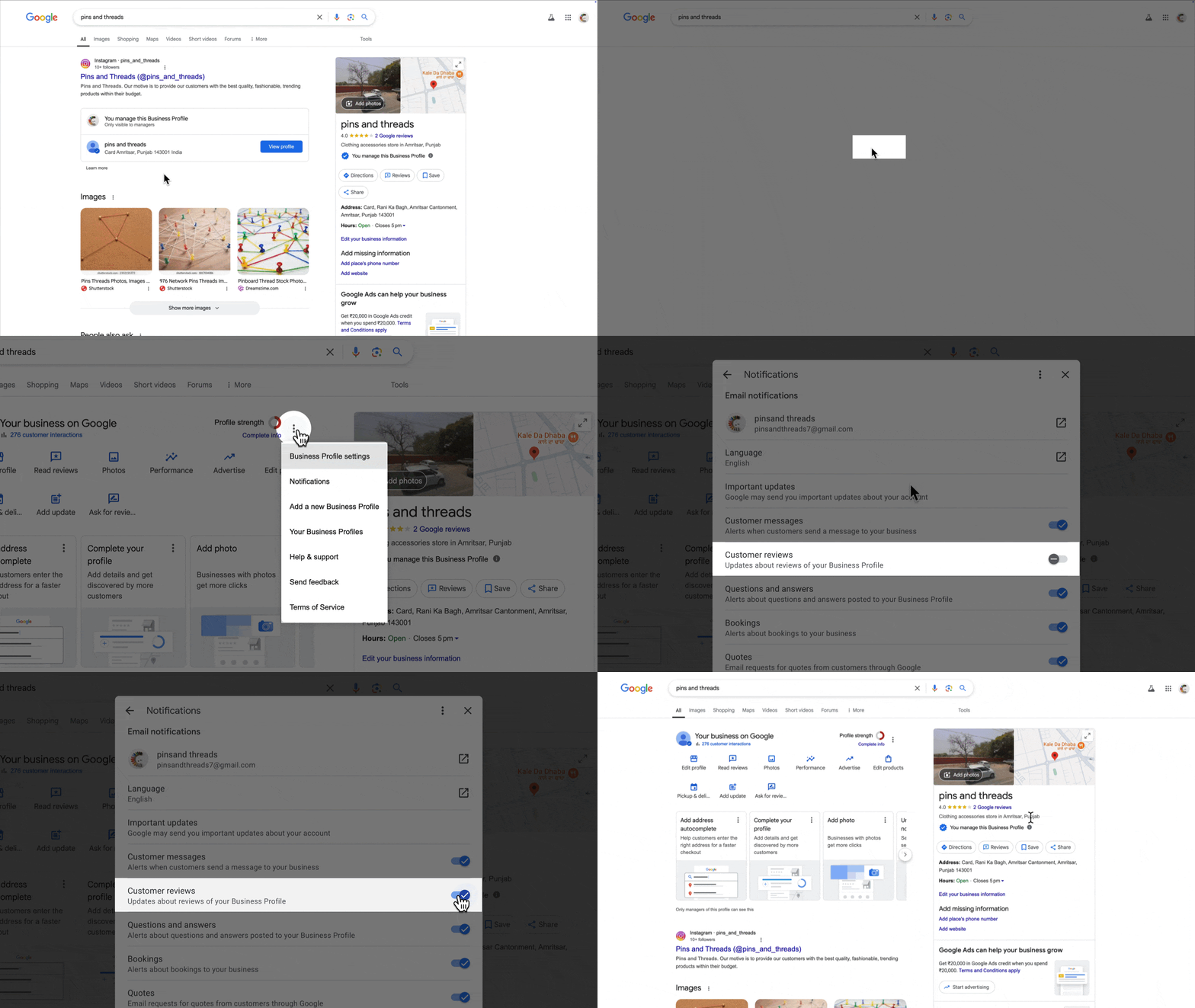
Stay in the loop without refreshing your profile all day:
- Sign in to the Google account tied to your Business Profile.
- Search your business name and open View profile.
- Click the More (three dots) menu → Notifications.
- Find Customer reviews and toggle it on to receive email alerts.
Pro tip: Create a simple reply framework for your team (thank → address point → next step). It keeps responses consistent across locations and speeds things up when volume is high.
The Challenges of Managing Google Reviews Across Multiple Locations
If your business operates in more than one city, or even across different regions, managing Google Reviews can quickly become overwhelming.
While Google Business Profile makes it easy for single-location owners to reply and monitor reviews, it’s far less forgiving when you’re handling dozens.
Here are some of the biggest challenges multi-location businesses face:
1. Endless Account Switching
Each business location has its own Google Business Profile. That means separate dashboards, separate logins, and a lot of clicking around.
If you’re managing ten or more profiles, switching between them just to reply to reviews can eat up hours every week, and it’s easy to lose track of which ones you’ve already handled.
2. Inconsistent Response Quality
When multiple team members reply from different accounts, tone and professionalism often vary. One location might sound friendly and polished, while another comes off rushed or defensive. Without a unified system or templates, consistency becomes nearly impossible, and customers notice.
3. Missed or Delayed Replies
With reviews coming in at different times and from multiple profiles, it’s far too easy for a few to slip through the cracks.
A delayed response can make customers feel ignored and discourage others from leaving feedback. Even worse, a negative review left unaddressed can quietly harm your reputation across search results.
4. Limited Oversight and Accountability
When every location manages its own reviews, there’s often no clear visibility for brand managers or head office teams. You can’t easily see who replied, how fast they responded, or whether the tone matched your brand guidelines. This lack of oversight can lead to uneven customer experiences across locations.
5. No Central Reporting or Insights
Google’s native dashboard doesn’t provide an easy way to view performance across all your locations. You can’t see which branches are getting the most reviews, which have unresolved complaints, or how sentiment differs across regions.
That means you’re missing valuable insights that could help improve customer experience and local SEO.
6. Manual Monitoring and Fragmented Notifications
Even with email alerts turned on, you’ll receive notifications for each location separately, cluttering your inbox and making it difficult to track what’s new.
Without a central place to view all incoming reviews, your team is left manually checking each page just to stay updated.
What all these mean is that; the more locations you have, the harder it becomes to manage reviews manually. What starts as a simple process for one store can quickly turn into chaos when scaled.
And that’s exactly where you need smart tools to make things easier and more effective. So, let’s talk about OnlySocial.
How OnlySocial Simplifies Managing Google Reviews for Multiple Locations
OnlySocial is a social media management tool designed to make managing your presence on line more seamless. For businesses that operate in multiple locations and want to handle all their customer reviews in one organized space, OnlySocial have them covered.
Here’s how it makes managing Google Reviews easier and far smarter.
Manage All Reviews from a Unified Inbox
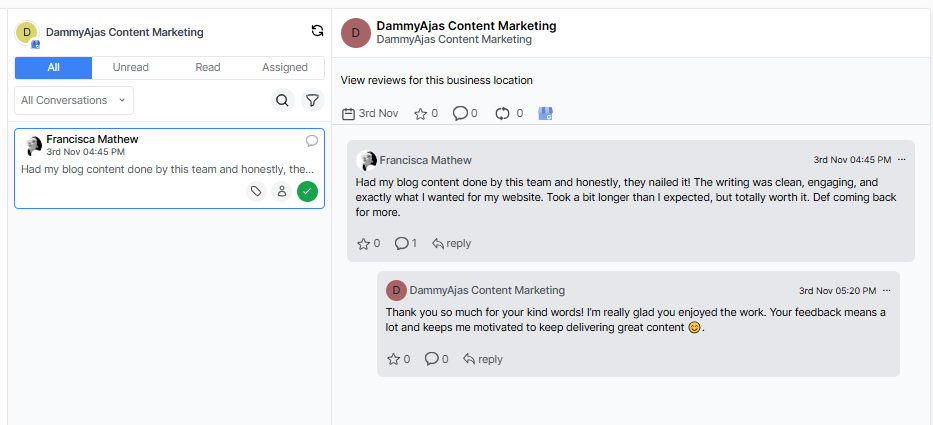
Instead of logging into every Google Business Profile separately, OnlySocial brings all your reviews together under one roof. Every new comment, rating, or piece of feedback from every location appears in a single Unified Inbox – clear, searchable, and easy to navigate.
From there, you can reply directly to each review without switching tabs or accounts. If you’re managing a national chain, that means you can respond to a customer in Glasgow and another in Bristol within seconds – all from one dashboard.
The unified setup also helps you avoid missed or duplicate responses. You can filter reviews by location, sentiment, or urgency, ensuring your team stays organized and responsive at scale.
Assign and Collaborate with Teams Across Locations
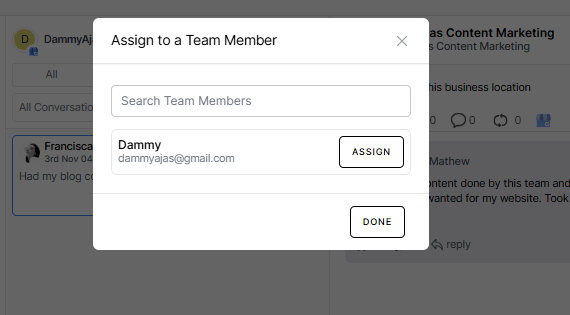
When you’re managing multiple branches, teamwork can make or break your review strategy. OnlySocial makes collaboration seamless by allowing you to assign reviews to specific team members or local managers.
For example, a head office representative can tag a negative review for follow-up by the local branch manager, while positive reviews can be routed to the marketing team for social sharing.
Internal notes can also be added to each review, giving teammates the context they need before responding.
This ensures every message gets the right attention, and that no one’s stepping on anyone else’s toes. It also brings accountability into the process, helping you track who’s handling what and how quickly they’re responding.
Automate Review Replies with AI Assistance
When you’re managing hundreds of reviews across multiple locations, writing each response manually can drain time and energy fast. OnlySocial’s AI-powered reply assistant changes that.
It helps you craft natural, on-brand responses to reviews in seconds – whether you’re thanking a happy customer or addressing a complaint.
The AI suggests responses based on the sentiment and tone of each review, which means your replies sound personal, not robotic. You can edit and customize them before posting, ensuring they still reflect your brand’s voice. This balance between automation and control allows you to maintain authenticity while cutting reply time dramatically.
It’s particularly powerful for businesses with high review volumes, where speed and tone consistency matter most. Instead of rushing or overlooking reviews, your team can focus on the ones that need more thoughtful attention, while AI handles the routine replies perfectly.
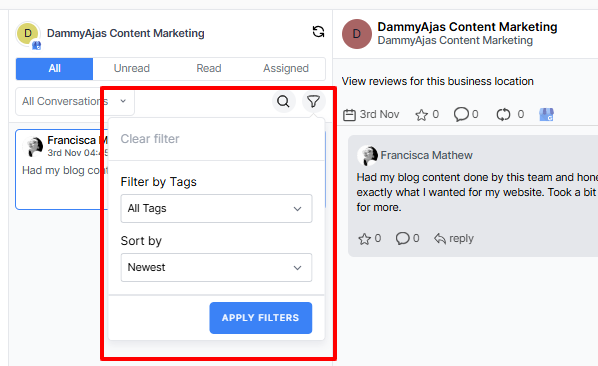
Tag, Filter, and Prioritize Reviews Efficiently
When you have multiple branches, knowing which reviews to handle first is crucial. OnlySocial’s tagging and filtering tools make this simple.
You can categorize reviews by sentiment – positive, neutral, or negative – or tag them by topic, such as service, product quality, or delivery issue.
Filters also let you view reviews by location, so you can quickly see which branches are performing well and which ones might need more attention. For example, you can pull up only one-star reviews from specific cities to spot recurring problems faster.
This structured approach prevents information overload and keeps your workflow clear. Instead of sifting through hundreds of reviews manually, your team can focus on what matters most, which is improving customer experience and maintaining a strong reputation across every location.
Monitor Performance Across All Locations
One of the biggest challenges for multi-location brands is visibility — knowing how each branch is performing in terms of customer satisfaction. OnlySocial’s built-in analytics gives you a clear overview of review trends across all your locations.
You can track response times, average star ratings, and sentiment patterns to identify which branches are thriving and which ones need extra support.
For instance, if your London store consistently earns 5-star reviews for service while your Birmingham branch sees recurring complaints about waiting times, you’ll spot it instantly.
This data-driven approach helps you make informed decisions that ensures your brand experience remains consistent everywhere. With this tool, you don’t just manage reviews; you learn from them, location by location.
Maintain Brand Consistency Across Every Response
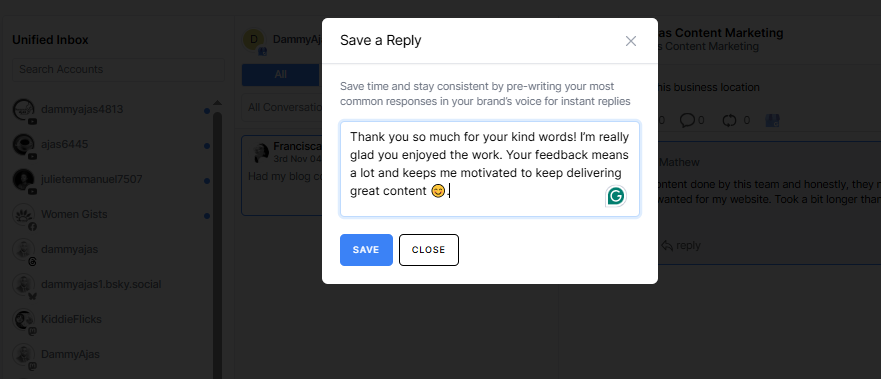
When different people reply to reviews across multiple locations, maintaining a consistent brand voice can be tricky. Some responses may sound warm and professional, while others might feel rushed or impersonal. OnlySocial helps you avoid that by giving your team access to saved replies and smart templates.
You can create approved response templates for common scenarios – like thanking customers, addressing complaints, or responding to feedback – and share them across your entire team.
These can be personalized before sending, ensuring every reply feels genuine while staying aligned with your brand tone.
This keeps your messaging polished and consistent, no matter who’s typing the reply or which location it’s coming from. It’s the easiest way to ensure your customers get the same high-quality experience – from your first location to your fiftieth.
Best Practices for Managing Multi-Location Google Reviews
#1: Reply fast with a simple triage system
Speed matters. Aim to respond to every review within 24-48 hours, even if it’s just an acknowledgment while you investigate.
Set up a triage system so nothing slips: new → assigned → in progress → resolved.
Prioritize 1-2-star reviews, then time-sensitive issues (refunds, safety, accessibility), then general praise.
Create a handful of pre-approved reply starters to save time, but personalize the middle of the message with the customer’s details and location specifics.
If you’re using OnlySocial, route reviews by location and urgency, then track response times. Fast, structured replies show care and keep small problems from growing.
#2: Sound human, stay on brand, and localize
Write like a person, not a policy. Thank the reviewer by name, reference the exact visit (“your Tuesday lunch at our Bristol store”), and keep sentences short.
Avoid defensive language. If you need to push back, do it kindly and move to a private channel for sensitive info.
Share a one-page tone guide with examples: warm greeting, empathy line, action taken, invite back. Give locations a few “local flavor” lines (seasonal menu, parking tips), but keep the brand voice consistent.
#3: Give each location clear owners and an escalation path
Confusion kills consistency. Assign a primary and backup owner for every location’s reviews. Define who handles what: on-site fixes go to the store manager; policy questions to HQ; legal or safety issues escalate immediately.
Use internal notes so the next teammate sees context: what happened, who you spoke with, and what’s pending.
In OnlySocial, you can assign reviews, @mention teammates, and keep a clean audit trail. This clarity prevents duplicate replies, speeds resolution, and helps new staff get up to speed without digging through emails or chat threads.
#4: Ask for more reviews the right way (and make it easy)
Happy customers will vouch for you if you ask at the right moment. Train frontline staff to invite feedback after a smooth checkout or successful service call. Add a short link or QR code to receipts, email footers, and follow-up texts.
Keep the ask simple: “How did we do today? Your feedback helps this location improve.”
Avoid incentives that violate Google’s policies. Rotate the request so you don’t over-message.
You can also share a tiny “how to leave a review” graphic for less tech-savvy customers. Remember that a steady stream of fresh, genuine reviews can lift rankings and balance the occasional bad day.
#5: Turn reviews into improvement loops, not just replies
Replies are step one. Step two is learning from them.
Tag reviews by theme – staff, wait time, cleanliness, product quality, price – and track patterns by location. If three stores mention slow checkout this month, that’s a process issue, not a one-off.
Close the loop: fix the thing, then update your reply template for similar cases (“we’ve added an extra till during peak hours”).
Share monthly “wins and fixes” with all locations so improvements spread quickly. With OnlySocial’s tagging and filtering, pulling a theme report takes minutes and turns feedback into action.
#6: Measure what matters and tie it to local SEO
For each location, watch four signals: volume of new reviews, average rating, response rate, and response time.
Add sentiment trends for extra insight. Set simple goals (e.g., “>30 new reviews/quarter, responses under 24 hours”).
Track before/after when you run campaigns or staff training.
Pair these metrics with Google Maps visibility checks to see how consistency affects local ranking. Build a one-page monthly dashboard so managers see exactly where they stand and what to fix next.
Why Centralized Review Management Matters for Local SEO

Google reviews aren’t just about reputation; they’re one of the strongest signals for local SEO. The more active, consistent, and well-managed your reviews are, the better your chances of ranking higher in local search results.
But when your business operates across multiple locations, scattered review management can quietly hurt visibility.
Here’s why centralization makes a real difference:
Consistent Responses Improve Search Signals
Google’s algorithm favors businesses that actively engage with their customers. When you consistently reply to reviews – positive or negative – it signals credibility and reliability.
A centralized system like OnlySocial ensures every location stays responsive without missing reviews, hence, boosts your brand’s trust score in Google’s eyes.
Faster Response Times Lead to Higher Engagement
The sooner you respond to a review, the more likely a customer is to re-engage or even update their feedback. Centralized review management cuts delays by letting you see and reply to all reviews from one dashboard, instead of logging into multiple profiles. This efficiency improves both customer satisfaction and your online reputation.
Unified Insights Help You Strengthen Local Rankings
Each location’s performance affects your brand’s overall visibility. By monitoring reviews collectively, you can identify trends, like which branches earn the most positive feedback or which areas struggle with customer service, and use that data to optimize your local SEO strategy.
Better Review Volume and Quality Across Locations
When you manage everything in one place, you can run coordinated campaigns encouraging customers to leave reviews for specific branches.
This will result in a balanced review profile where every location contributes to your overall SEO growth, rather than a few stores carrying the weight.
Stronger Brand Consistency Means Better Click-Through Rates
When potential customers see consistent review replies across different branches – all with the same friendly tone and professional handling – it builds confidence.
That consistency not only improves brand perception but also leads to higher click-through rates from local search results.
so, centralized review management doesn’t just save time; it actively boosts visibility, trust, and conversions.
With a platform like OnlySocial, every location strengthens your local SEO performance instead of competing for attention individually.
Final Thoughts
Managing Google Reviews for a business with multiple locations might seem like an uphill climb, but with the right system, it becomes a streamlined part of your daily workflow.
Reviews aren’t just feedback; they’re public proof of how your brand treats its customers, and every response shapes how potential buyers see you.
A scattered approach across different dashboards and teams often leads to missed reviews, inconsistent messaging, and lost trust. But when everything lives in one place – like it is with OnlySocial, managing, replying, and learning from your reviews becomes simple.
You can spot patterns, assign tasks, automate routine replies, and ensure every location stays responsive and on-brand.
FAQs
Can I manage all my Google reviews from one place?
Yes. Tools like OnlySocial let you connect all your Google Business Profiles into one dashboard. From there, you can view, reply to, and filter reviews from every location in a single, organized inbox. No more switching between accounts or tabs.
How can I ensure consistent review responses across multiple locations?
Create a shared tone guide and use saved reply templates. OnlySocial allows you to build custom responses for common situations like thanking positive reviewers or addressing complaints, while allowing teams to personalize messages for their specific location. This keeps your voice consistent but still human.
Does responding to Google reviews really affect my rankings?
Yes. Google considers engagement, including how frequently and quickly you respond to reviews, as a ranking factor for local SEO. Consistent, timely replies show that your business is active and customer-focused, improving both visibility and trust.
Can I automate replies to Google reviews without sounding robotic?
Absolutely. OnlySocial’s AI-powered assistant helps generate natural, on-brand responses based on each review’s tone and sentiment. You can tweak or personalize before posting, ensuring automation saves time without sacrificing authenticity.
How can large teams collaborate on review management?
Assign reviews to specific team members or local managers within OnlySocial. You can leave internal notes for context, track who’s replying, and ensure every review gets handled by the right person.
Can OnlySocial help me monitor performance by location?
Yes. OnlySocial provides analytics and sentiment tracking across all your locations. You can see which branches are getting the most reviews, which need improvement, and how response times and tone impact overall customer satisfaction and local search visibility.
What’s the best way to handle negative reviews?
Always respond – and respond quickly. Acknowledge the issue, apologize if appropriate, and move the conversation to a private channel if needed.
Never delete or ignore negative feedback; how you handle it shows others that your business values honesty and improvement.