8 Top Nuelink Alternatives for Better Social Media Growth [First-Hand Review]
Nuelink has made a name for itself as one of the smarter social media automation tools on the market. It helps you automatically share content, repurpose posts, and keep your social media calendar running smoothly without much effort.
But here’s the thing – while Nuelink does a great job at simplifying automation, it’s not perfect for everyone.
Some users find its analytics a bit limited, others want deeper collaboration tools, and many are looking for more flexible pricing or broader integrations.
If you’ve reached that point where you’re wondering, “Is there something better for my workflow?”, you’re in the right place.
We’ve tested and compared some of the best Nuelink alternatives out there – tools that offer better automation, smoother scheduling, richer analytics, and smarter ways to grow your social presence.
Here are eight platforms that stand toe-to-toe with Nuelink in 2025 – and in some cases, go even further.
Table of Contents
- 1 Why Consider Nuelink Alternatives?
- 2 Top Nuelink Alternatives to Consider for Better Social Media Growth
- 3 1. OnlySocial – $29/Month
- 4 2. Planable – $39/Month
- 5 3. Zoho Social – $15/Month
- 6 4. Buffer – $6/Month
- 7 5. ContentStudio – $29/Month
- 8 6. Agorapulse – $99/Month
- 9 7. Statusbrew – $89/Month
- 10 8. Publer – $20/Month
- 11 Choosing the Right Nuelink Alternative for You
- 12 Final Note
- 13 FAQs
Why Consider Nuelink Alternatives?
Without a doubt, Nuelink is a clever tool. It takes care of automation like a pro, pulling fresh content from your blog, store, or podcast and pushing it across multiple platforms without you lifting a finger. For creators and small teams, that’s a dream.
But after spending time with Nuelink, a few limitations stood out, especially for users managing larger brands or clients who need more than just automation. Here’s what make most people to start looking for alternatives.
Automation That’s a Bit Too Linear
Nuelink’s automation works great once you set it up, but it’s mostly one-way. You can auto-post, yes, but you can’t always customize what goes out per platform.
Many marketers today want tools that allow deeper control, like tweaking captions, tagging, or scheduling platform-specific variations within the same flow.
Limited Collaboration Features on Lower Plans
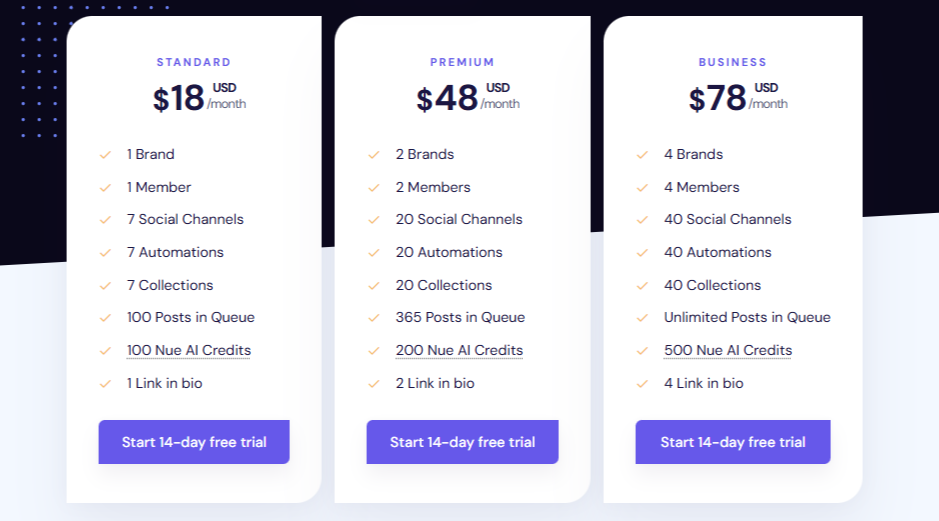
If you work with a team, you’ll need to jump to Nuelink’s Business plan ($78/month) to get proper team access and approval workflows. That might feel steep if you’re a small agency or freelancer trying to collaborate efficiently.
Some alternatives offer multi-user setups and content approvals at more flexible price points, making teamwork smoother and less costly.
Analytics Could Go Further
While Nuelink provides decent built-in analytics, it doesn’t yet include competitor tracking or audience segmentation. You can download reports, but insights feel surface-level compared to tools that dig deeper into engagement patterns, top-performing times, and follower growth trends.
If you’re a data lover, you might find yourself wanting more.
Pricing Jumps Quickly
Nuelink’s entry price of $18/month seems fair, but the jump to $78 for full functionality can feel sharp, especially when you compare it to platforms offering unlimited posting or more team slots for less.
For some, this pricing structure makes sense; for others, it feels like you’re paying a premium just to unlock features competitors already include.
No Dedicated Social Inbox
Perhaps the biggest gap we found is the lack of a true unified social inbox. In 2025, managing comments, DMs, and reviews in one place isn’t a “nice to have” anymore – it’s a must. Most modern tools have already caught up, but Nuelink still leans heavily toward scheduling and automation rather than engagement.
Top Nuelink Alternatives to Consider for Better Social Media Growth
1. OnlySocial – $29/Month
After testing dozens of social media tools over the years, OnlySocial is one that genuinely feels built for modern creators and teams who want clarity, control, and speed – without all the clutter.
Unlike Nuelink, which focuses heavily on automation, OnlySocial strikes a balance between automation and active engagement. It’s the kind of tool that helps you plan, post, and actually talk to your audience – all from one dashboard.
Key Features
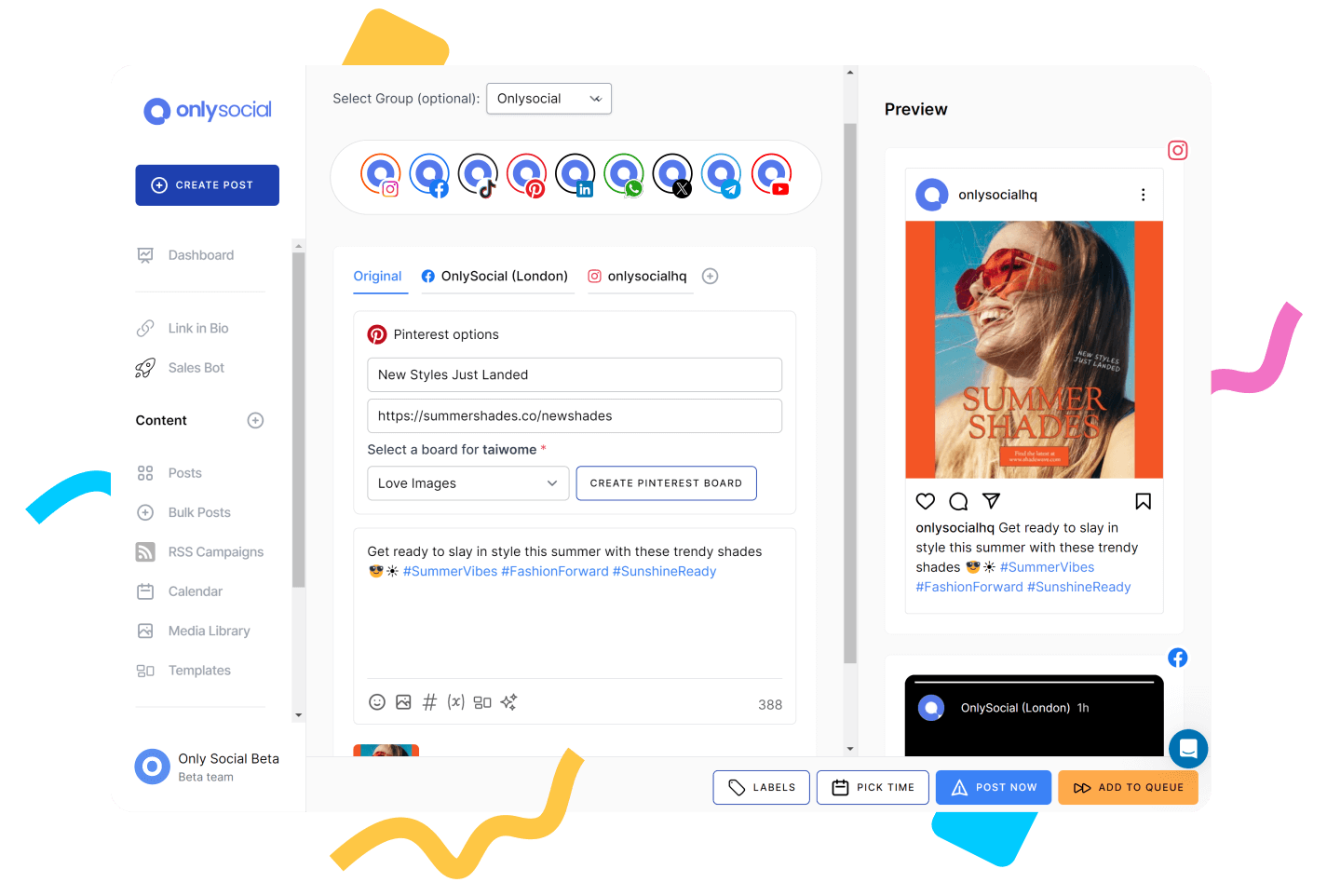
Cross-Platform Scheduling for 15+ Networks
We were impressed by how many platforms OnlySocial supports out of the box. From Instagram, TikTok, and LinkedIn to Pinterest, YouTube, Threads, Bluesky, and even Google Business, it covers practically every major network you can think of.
And what’s nice is that you don’t need workarounds or Zapier hacks – each integration works natively. That makes posting seamless, even across less mainstream platforms like Mastodon or Bluesky.
Visual Calendar with Bulk Upload
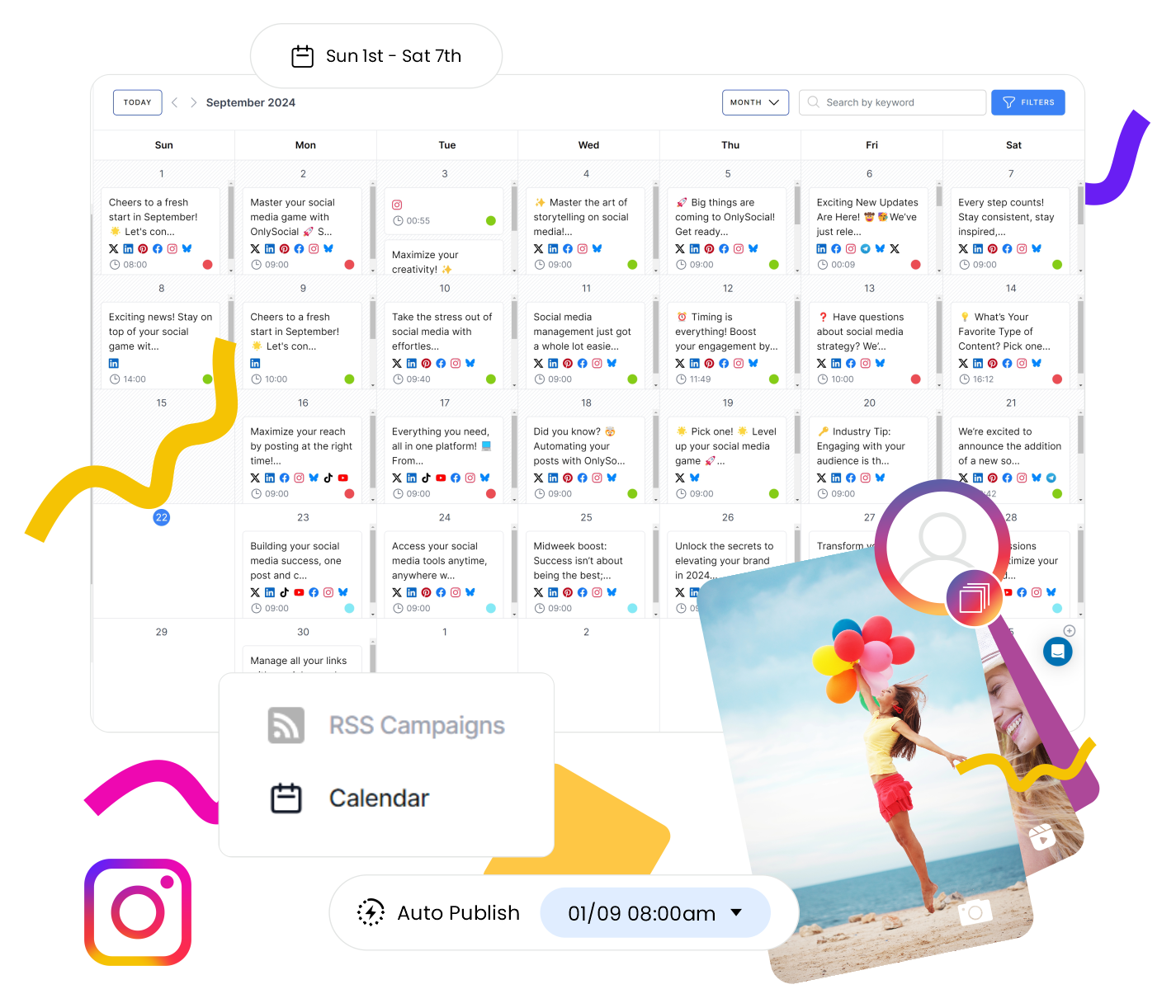
The drag-and-drop calendar is easily one of the cleanest we’ve used. You can see all your scheduled content by week or month, rearrange posts instantly, and use color-coded labels for quick navigation.
We also tested the bulk upload, and it saved hours. You can upload dozens of posts at once via CSV – a huge win for teams managing multiple brands or seasonal campaigns.
AI Content Assistant
Creating content here feels fluid. The built-in AI doesn’t just suggest generic captions; it learns your tone. For instance, after a few posts, it started mirroring our brand voice – casual but professional – while generating hashtags and visual suggestions that actually fit.
Compared to Nuelink’s NueAI, OnlySocial’s suggestions felt more natural and context-aware.
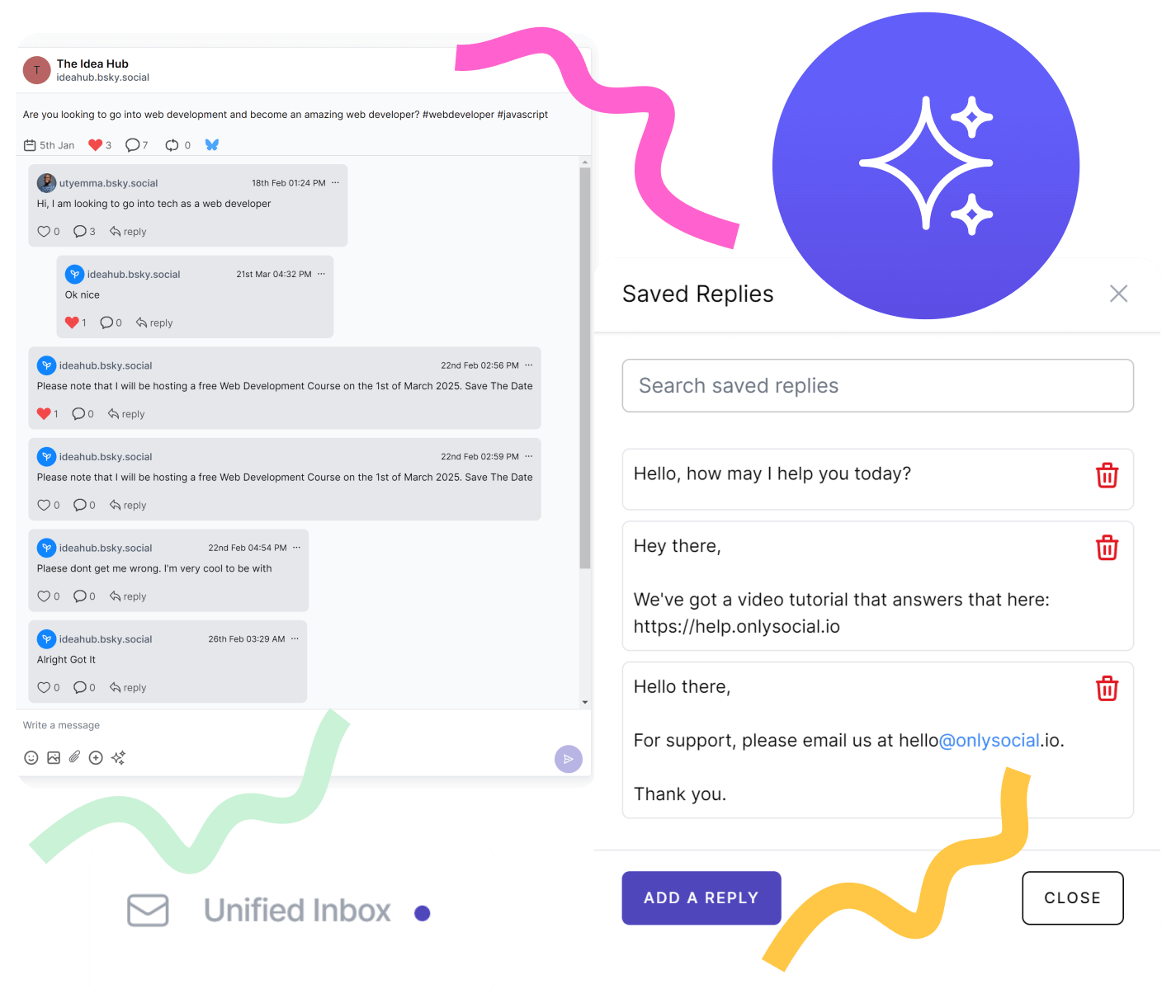
Unified Social Inbox
This is where OnlySocial clearly outshines Nuelink. All your DMs, comments, and reviews – from Facebook, Instagram, LinkedIn, and even Google Business – flow into one central inbox.
We didn’t have to jump between tabs or risk missing a message. You can reply directly, assign messages to teammates, or mark them as resolved. It’s a lifesaver for community managers.
Team Collaboration Made Simple
Roles, permissions, and internal notes – everything you need for teamwork is baked in. We particularly liked that you can leave private comments on posts (like “Needs new image” or “Approved by client”) without spamming the public thread.
Analytics That Make Sense
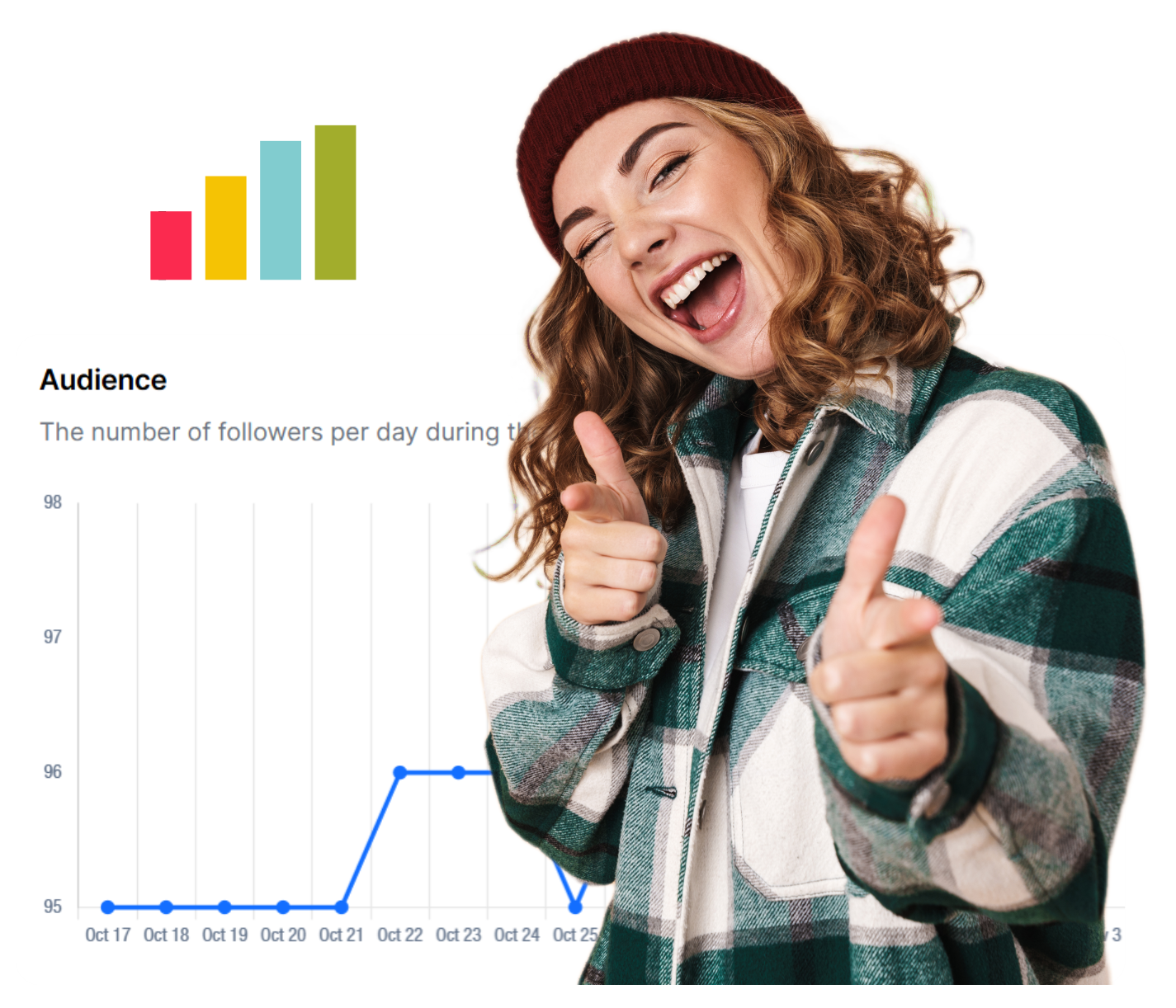
The analytics dashboard feels clean, visual, and fast. It’s not just vanity metrics either – you can track engagement trends, post reach, and audience behavior across multiple platforms, with exportable reports that clients actually understand.
Pros & Cons (After Real Use)
Pros:
- Smooth onboarding: You can set up and connect all profiles in minutes. No technical mess.
- Balanced automation: Lets you automate smartly without losing the personal touch.
- Reliable publishing: During our tests, not a single scheduled post failed – a rare thing in this space.
- Real customer support: Their chat support is quick and friendly; we got replies within minutes, not hours.
Cons:
- Lacks competitor analysis tools
- No forever free plan
Pricing & Value
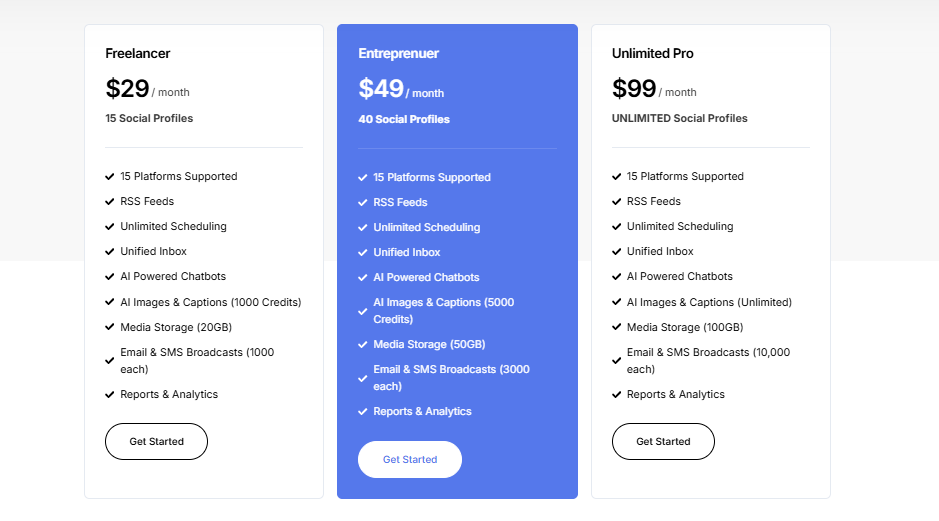
OnlySocial keeps things refreshingly simple and transparent:
- Freelancer: $29/month for up to 15 profiles
- Entrepreneur: $49/month for 45 profiles and 3 users
- Professional: $99/month for unlimited social accounts and 10 users
Unlike Nuelink, there are no limits on queues or sneaky “add-on” costs for features like approvals or inbox access. For us, this made it one of the most cost-efficient options for serious social media managers.
When you factor in the number of supported platforms and features like AI replies, unified inbox, and visual analytics – it easily justifies the price.
Final Verdict
If Nuelink is the automation powerhouse, OnlySocial is the all-rounder with a sharper edge.
It gives you automation when you need it, but also the flexibility to engage, collaborate, and grow intentionally. The interface feels built for humans, not spreadsheets – and the learning curve is practically non-existent.
For teams managing multiple brands or anyone tired of juggling between scheduling tools and engagement, OnlySocial is hands-down one of the best Nuelink alternatives worth trying in 2025.
2. Planable – $39/Month
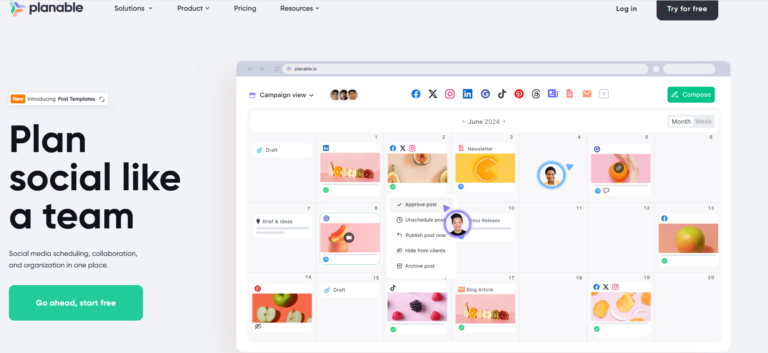
If your social media workflow relies heavily on teamwork, Planable will probably feel like home. It’s built with collaboration in mind – the kind of tool where you can see, comment on, and approve everything before it goes live.
When we tested it, what stood out most was how visual and intuitive it is. You don’t just schedule posts; you see how they’ll look across platforms before they’re published.
Key Features (What We Liked)
- Visual post previews: You can scroll through posts exactly as they’ll appear on Instagram, Facebook, or LinkedIn feeds – pixel-perfect.
- Real-time collaboration: Multiple teammates can edit and comment on posts at once, like a Google Doc for social media.
- Approval workflows: Built-in multi-step approvals make it easy for teams and clients to stay aligned.
- Content calendar views: Weekly, monthly, and feed-style views that make content planning simple and visual.
- Version history: Revert to earlier drafts anytime if someone makes an unwanted change.
Pros & Cons (From Our Testing)
Pros:
- One of the best interfaces for agencies handling client approvals.
- Makes feedback loops faster – no more endless email threads.
- Clients don’t need full training to use it. It’s that intuitive.
Cons:
- Lacks deeper automation tools (you’ll still schedule manually).
- The $39/month starting price might feel steep for smaller teams.
- Analytics are basic compared to Nuelink or OnlySocial.
Pricing & Value
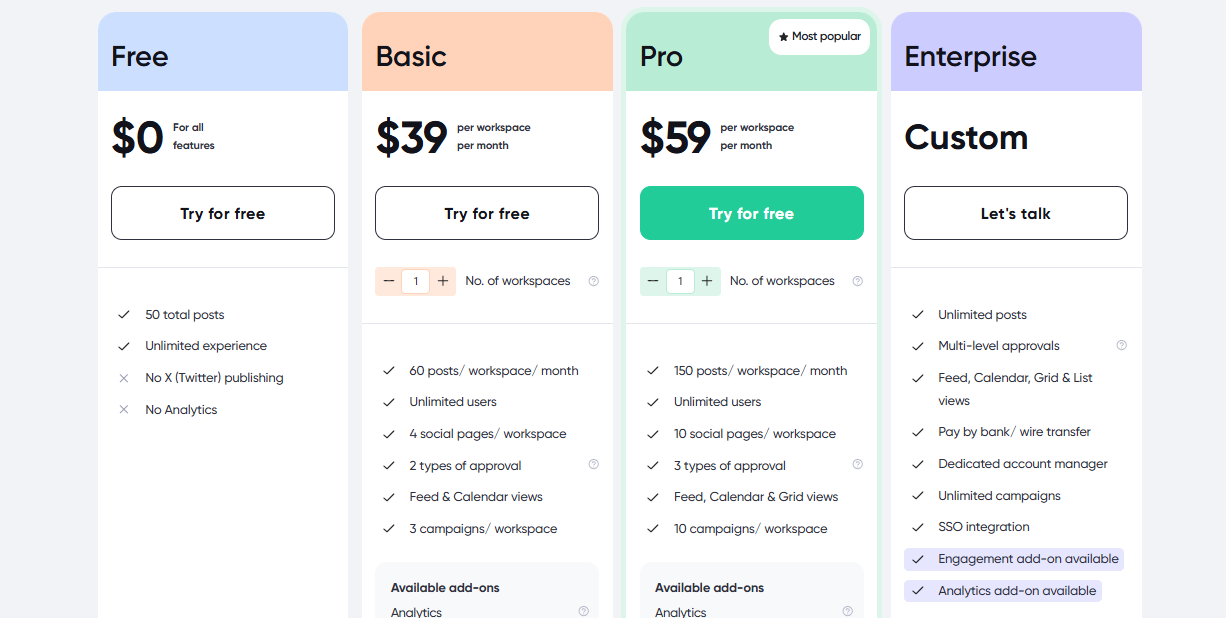
Plans start at $39/month, with unlimited users but limited posts on lower tiers. It’s not the cheapest option, but if collaboration is your biggest pain point, the clarity and speed Planable offers easily justify the cost.
Final Verdict
Planable shines for teams that live and breathe content planning. It’s not built for automation or AI-heavy workflows – it’s built for teamwork.
If you run an agency, manage clients, or simply want your approval process to stop feeling like a never-ending email thread, Planable is one of the smoothest Nuelink alternatives out there.
3. Zoho Social – $15/Month
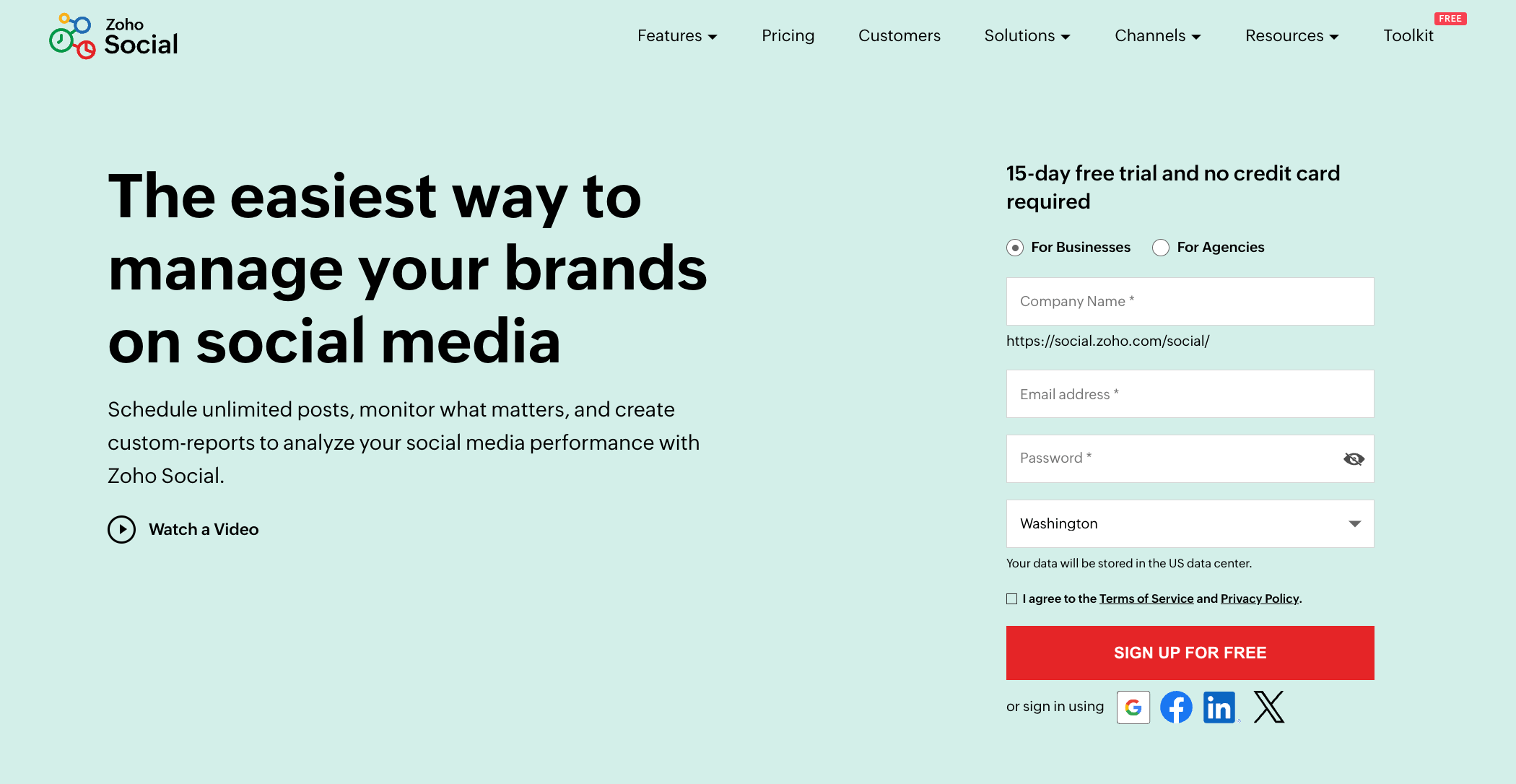
Zoho Social is more like the dependable all-rounder, especially if your business already uses Zoho products like CRM, Campaigns, or Desk.
During our test, it became clear that Zoho Social’s biggest strength is how effortlessly it ties social media activity to customer relationships and business outcomes.
It’s less “flashy” than some tools, but extremely practical for brands that want control, analytics, and structure.
Key Features (What We Liked)
- Multi-Platform Publishing: Schedule and publish posts across Facebook, Instagram, LinkedIn, X, Google My Business, and YouTube from one place.
- CRM Integration: Directly connects with Zoho CRM – great for tracking leads or social mentions that can turn into real business.
- SmartQ Scheduling: Suggests the best posting times based on engagement data.
- Live Stream Monitoring: Track hashtags, mentions, and messages in real time across platforms.
- Detailed Reports: Customizable analytics dashboards for tracking engagement and growth.
Pros & Cons (From Our Testing)
Pros:
- Ideal for businesses already in the Zoho ecosystem – the integration is seamless.
- SmartQ recommendations genuinely improved engagement timing.
- Strong analytics – more depth than you’ll get with Nuelink’s default reports.
Cons:
- The interface isn’t as sleek or modern as newer tools.
- Steeper learning curve if you’re new to Zoho products.
- Automation options are somewhat limited — you’ll still handle some tasks manually.
Pricing & Value
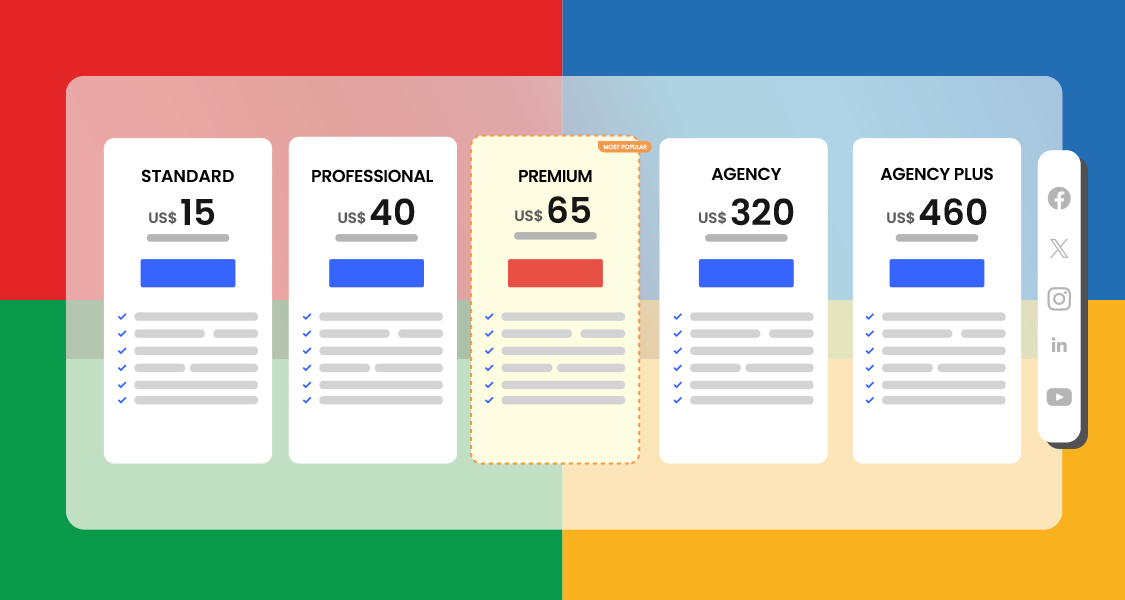
Zoho Social starts at $15/month (Standard plan) and scales up based on users and brands. It’s one of the more affordable options for teams that value structure and data over flashy AI extras.
Final Verdict
If you’re part of a marketing or sales-driven business that loves analytics and integration, Zoho Social is a strong alternative to Nuelink. It’s not the most visually appealing tool, but it’s reliable, data-focused, and built to help you connect social engagement to real business results.
4. Buffer – $6/Month
Buffer has been around for years, and there’s a reason it’s still one of the most trusted names in social media scheduling. When we revisited it recently, we were reminded just how refreshing its simplicity feels – no clutter, no steep learning curve, just straightforward posting and tracking that works.
If Nuelink sometimes feels too automation-heavy, Buffer offers a calmer, more intuitive experience.
Key Features (What We Liked)
- Clean and Minimal Dashboard: Everything is easy to find, making it a great option for users who don’t want to feel overwhelmed.
- Multi-Platform Scheduling: Supports all major platforms (Facebook, Instagram, LinkedIn, X, Pinterest, TikTok).
- Queue-Based Scheduling: Set up time slots and let Buffer automatically fill them.
- Built-in Link-in-Bio Tool: Create custom “Start Pages” to direct Instagram traffic to multiple links.
- Post Analytics: Clear performance metrics like reach, clicks, and engagement trends.
Pros & Cons (From Our Testing)
Pros:
- Exceptionally easy to use – perfect for freelancers, creators, and small businesses.
- Link-in-bio tool is well-designed and free, unlike most competitors.
- The browser extension makes scheduling on the go surprisingly quick.
Cons:
- Doesn’t include deep automation or RSS posting like Nuelink.
- Limited collaboration tools – not ideal for large teams.
Pricing & Value
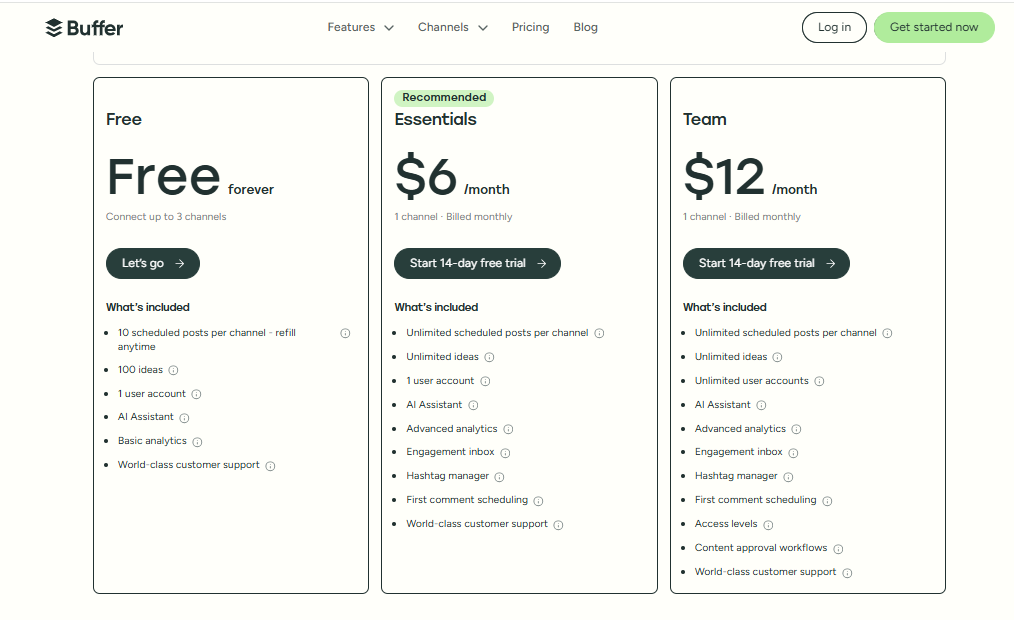
Buffer starts at $6/month per channel, with a free plan for up to three channels (and limited posting). It’s one of the most budget-friendly options for solo creators or smaller teams.
Final Verdict
Buffer is the kind of tool that proves simple can still be powerful. It doesn’t try to do everything – and that’s exactly why so many people love it.
If you’re after a lightweight, stress-free scheduler that keeps you consistent without overwhelming you, Buffer is an excellent Nuelink alternative to consider.
5. ContentStudio – $29/Month
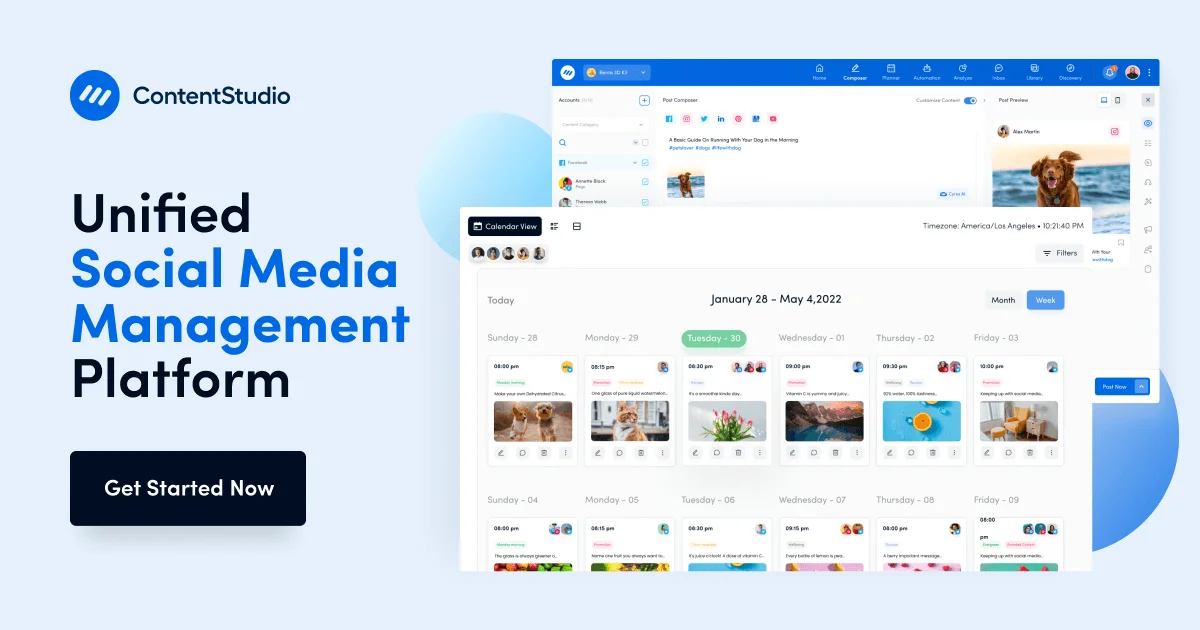
ContentStudio is one of those tools that makes you feel like you have a whole content team behind you – even if you don’t. When we tested it, it quickly stood out as one of the most feature-packed alternatives to Nuelink, blending automation, AI, and content discovery in one clean workspace.
If Nuelink’s automation helps you share content, ContentStudio goes a step further, helping you find what to share.
Key Features (What We Liked)
- AI-Powered Content Creation: Write or rewrite captions, generate ideas, and even repurpose long-form content automatically.
- Content Discovery Engine: Pulls trending articles, videos, and topics from your niche so you never run out of post ideas.
- Multi-Platform Scheduling: Supports everything from Facebook and TikTok to YouTube Shorts and LinkedIn.
- Automation Workflows: Set up recurring posts, evergreen content loops, or RSS-to-social automation with zero coding.
- Social Inbox: Manage all comments, mentions, and messages across platforms in one place.
Pros & Cons (From Our Testing)
Pros:
- The discovery tool is a huge time-saver, especially for agencies and content creators.
- Feels like a true “all-in-one” system. It plans, writes, publishes, and tracks in one dashboard.
- Analytics are more visual and detailed than what Nuelink currently offers.
Cons:
- There’s a small learning curve – there’s a lot inside this tool.
- Pricier entry point for solo creators compared to simpler tools like Buffer.
Pricing & Value
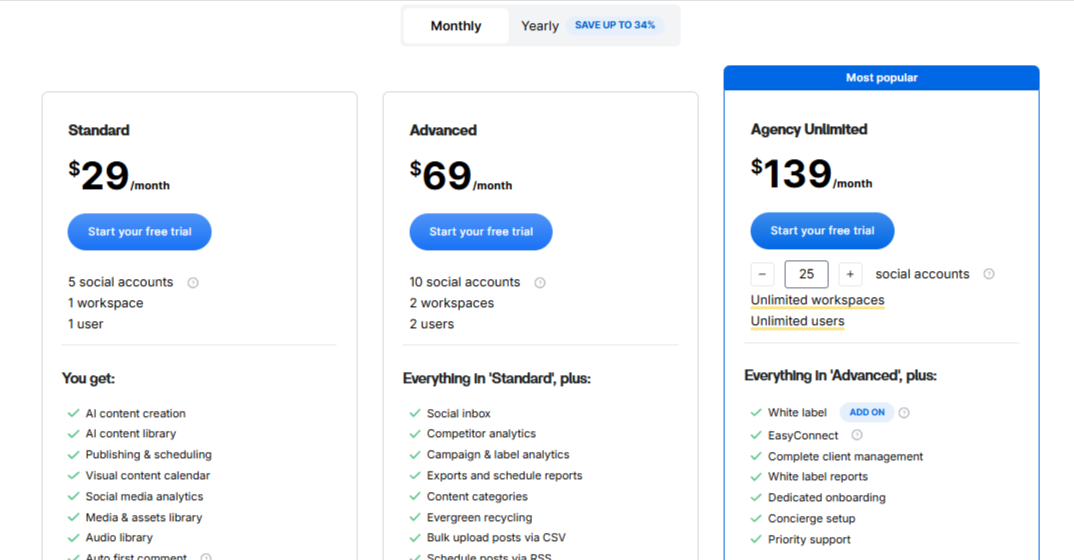
ContentStudio starts at $29/month for 5 social profiles, which might sound steep at first, but considering the amazing features it packs, it’s fair value for teams or agencies managing multiple brands.
Final Verdict
If your content strategy goes beyond “just posting” and you want help with discovery, automation, and analysis all in one platform, ContentStudio is a powerhouse.
It’s best for agencies and serious marketers who want more than scheduling – they want insights, inspiration, and smart automation that actually saves time.
6. Agorapulse – $99/Month
Agorapulse is one of those tools that feels like it was built for social media professionals who need structure. During our test, it stood out for its depth – not just posting or scheduling, but managing entire brand conversations and performance insights from one place.
Key Features (What We Liked)
- Unified Social Inbox: Every comment, message, and mention from all your platforms in one place.
- Publishing Calendar: Plan, schedule, and collaborate visually with approval workflows.
- Listening Tools: Track keywords, hashtags, and brand mentions in real time.
- Advanced Analytics: Generate in-depth performance reports with one click – ideal for agencies and clients.
- CRM Features: Tag users, track interactions, and understand your most engaged followers.
Pros & Cons (From Our Testing)
Pros:
- The inbox is one of the best we’ve used – clean, responsive, and intuitive.
- Agency-friendly reporting – you can brand and export reports easily.
- CRM-style tracking adds an extra layer of relationship management missing in Nuelink.
Cons:
- On the expensive side, especially for small businesses.
- Can feel heavy if you only need simple scheduling and posting.
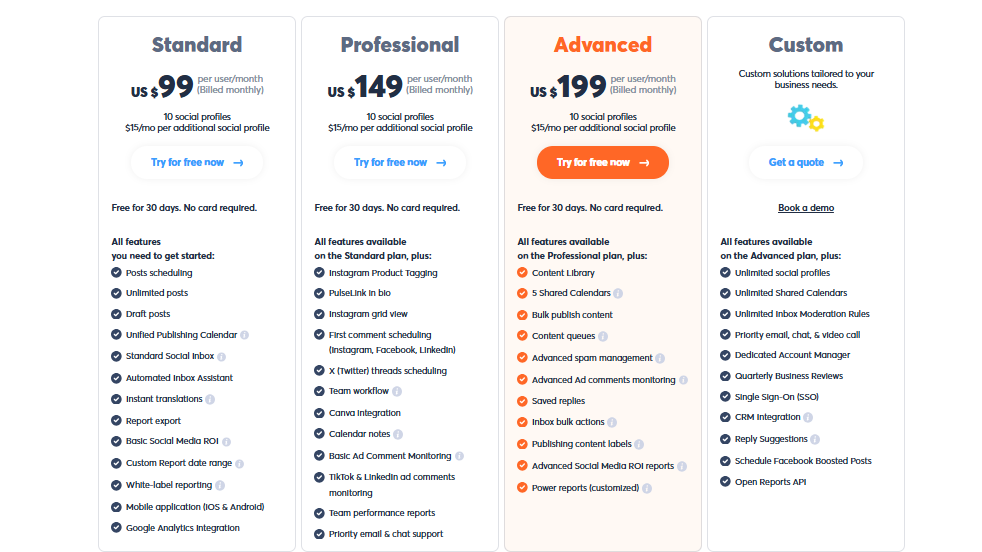
Pricing & Value
Agorapulse starts around $99/month for smaller teams, but the real power kicks in with the higher plans that include reports and collaboration tools. It’s not cheap, but if analytics and engagement tracking are your top priorities, it’s worth it.
Final Verdict
Agorapulse is a data-driven powerhouse that’s perfect for agencies, larger teams, or brands that treat social media like a serious business function – not just a posting platform.
It’s overkill for casual users, but if you want deep insights, strong collaboration, and a genuinely useful social inbox, Agorapulse is a top-tier Nuelink alternative.
7. Statusbrew – $89/Month
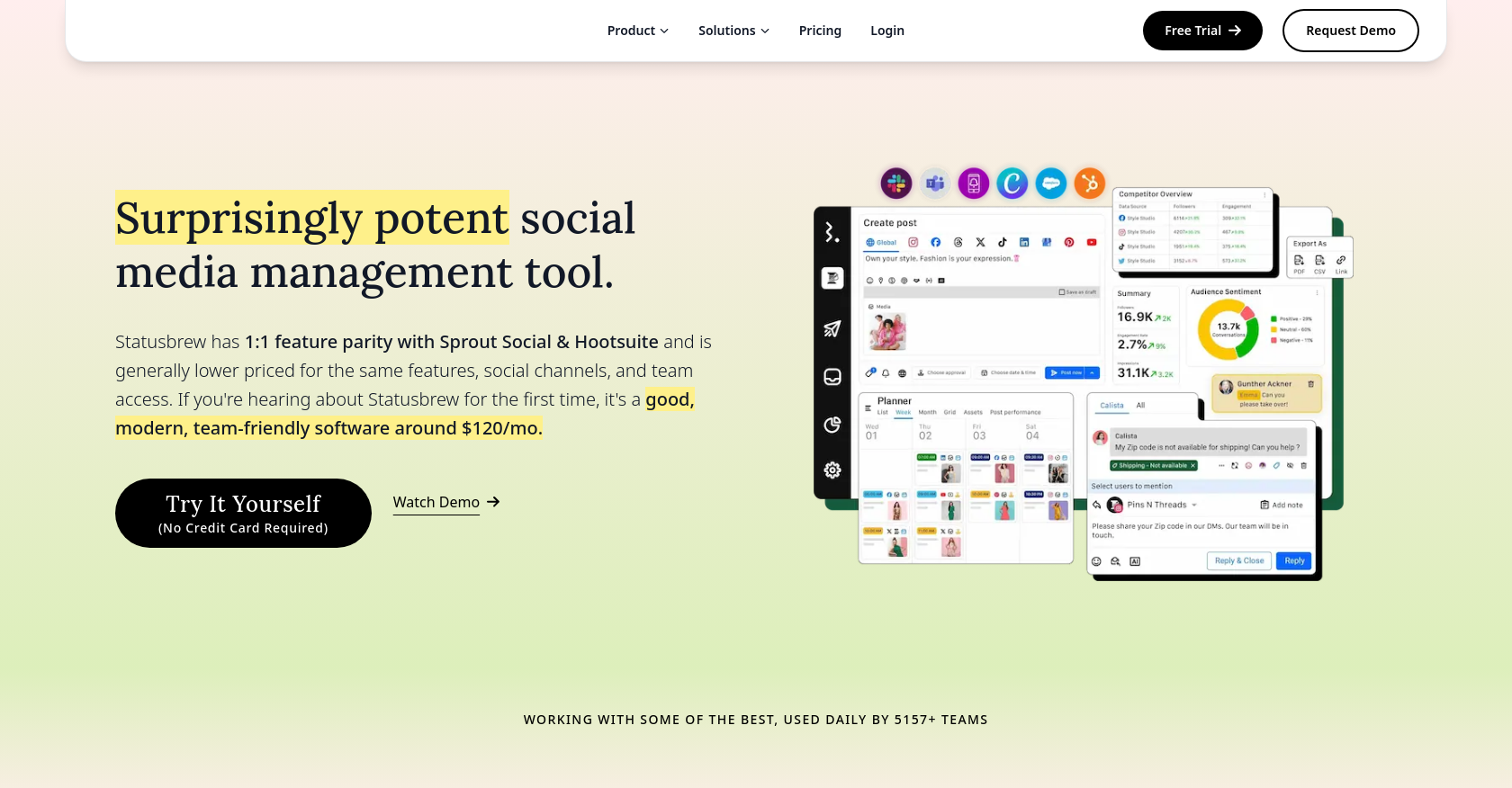
If you’re managing social media at scale – think multiple brands, clients, or regional teams – Statusbrew is one of those tools that keeps everything from spiraling out of control.
When we tested it, we could testify to how enterprise-ready it feels. Everything is built for efficiency, from its moderation tools to its role-based access controls.
While it’s not the most beginner-friendly platform, once you get the hang of it, Statusbrew becomes a command center for serious social operations.
Key Features (What We Liked)
- Unified Engagement Inbox: Manage all your social messages, mentions, and comments in one place.
- Rule-Based Automation: Auto-hide spam comments or route messages to the right team automatically.
- Collaboration Tools: Create workflows, assign approvals, and manage teams by department or brand.
- Advanced Analytics: Custom dashboards with engagement, sentiment, and campaign tracking.
- Ad Comment Management: Monitor and moderate comments on paid campaigns, which many tools overlook.
Pros & Cons (From Our Testing)
Pros:
- Excellent moderation tools, perfect for brands with large or busy communities.
- Strong reporting options that can rival higher-end tools like Sprout Social.
- Built to scale – easily handles multi-location or multi-client setups.
Cons:
- Steep learning curve for new users.
- Mobile app feels clunky compared to desktop.
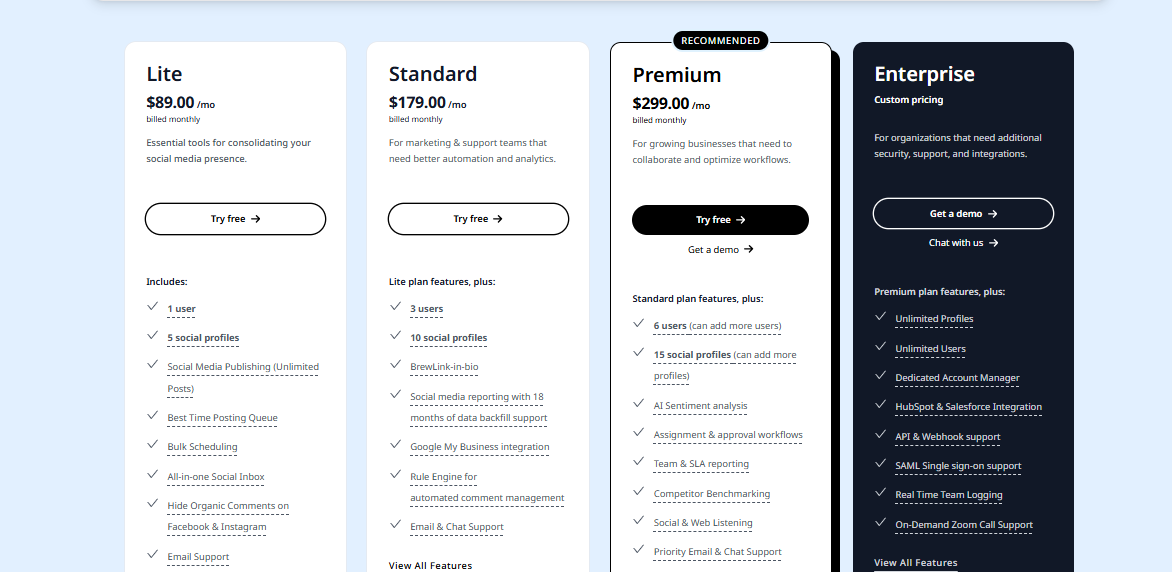
- The entry price point ($89/month for 1 user, 5 profiles) is high for small businesses.
Pricing & Value
Statusbrew starts at $89/month and quickly scales up depending on team size and number of profiles. It’s clearly aimed at mid-size to large teams rather than freelancers or solo creators.
8. Publer – $20/Month
Publer is one of those tools that quietly does a lot of things right. It’s fast, easy to navigate, and incredibly versatile for creators, marketers, and small businesses that want automation without complexity.
When we tested it, Publer felt like a “lighter” version of Nuelink, but with a few tricks that make it just as powerful in day-to-day use.
Key Features (What We Liked)
- Multi-Platform Publishing: Works across Facebook, Instagram, LinkedIn, TikTok, Pinterest, YouTube, and even Google Business.
- Auto-Recycling: Repurpose your evergreen content automatically at set intervals.
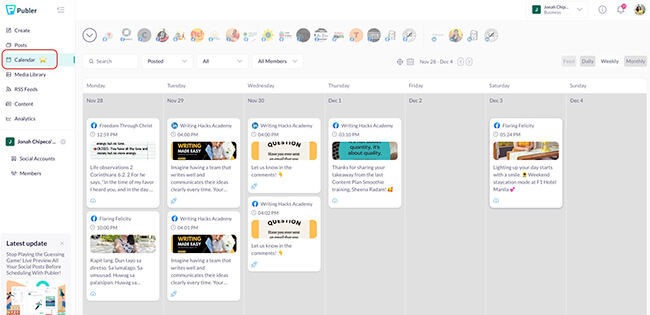
- Visual Planner: Drag-and-drop calendar with live previews before posting.
- Link-in-Bio & Link Shortener: Built right in – no third-party tools required.
- Bulk Scheduling: Upload and schedule multiple posts at once via CSV.
Pros & Cons (From Our Testing)
Pros:
- Feels light and responsive – everything loads quickly.
- Great balance between simplicity and advanced scheduling options.
- Link-in-bio and shortener tools are surprisingly well-built for the price.
Cons:
- No unified inbox, so engagement tracking isn’t possible.
- Collaboration tools are limited compared to platforms like OnlySocial or Planable.
- Analytics are solid but not deep enough for bigger brands.
Pricing & Value
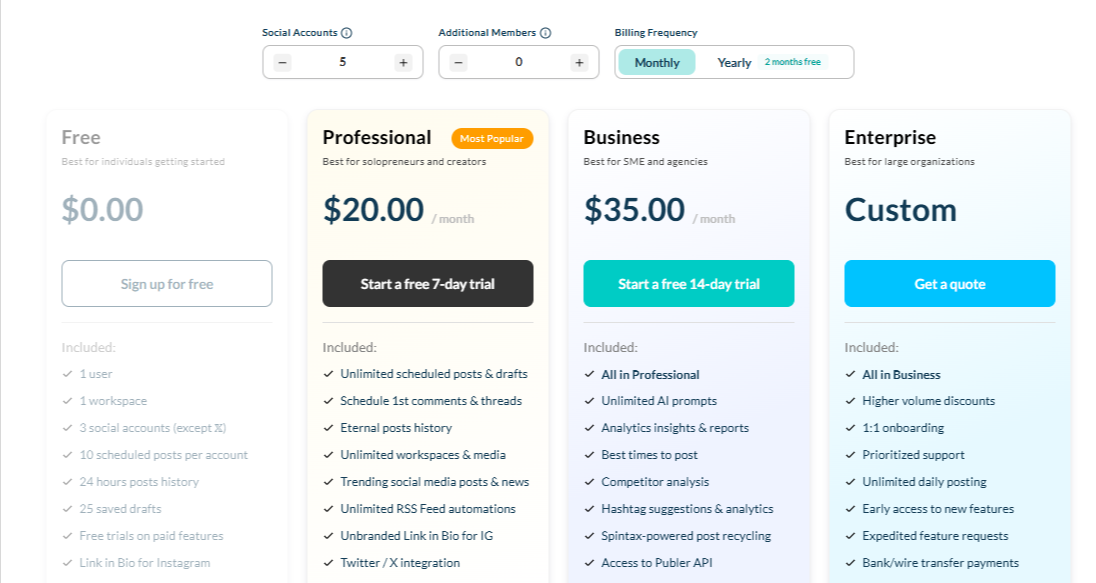
Publer starts around $20/month for 5 social profiles, with a generous free plan that includes basic scheduling and analytics. It’s one of the most budget-friendly options on this list, especially for solo creators or startups who just need reliable posting.
Final Verdict
Publer is an easy recommendation for small teams, solopreneurs, and creators who want something clean, fast, and affordable.
It’s not as advanced as Nuelink or OnlySocial, but for everyday scheduling and content recycling, Publer holds its ground as one of the best-value tools in 2025.
Choosing the Right Nuelink Alternative for You
With so many capable tools out there, choosing the right Nuelink alternative really depends on what matters most to you – what you really want from such tools. Each platform we tested has its strengths, but the “best” one for you comes down to a few key factors.
Here’s what to look for before committing to any tool:
Go for one that fits your workflow
Do you need something simple for scheduling posts, or a full command center for analytics, engagement, and automation?
- If you prefer simplicity, tools like Buffer or Publer are easier to learn and quick to set up.
- If you manage clients or teams, OnlySocial and Planable offer structured calendars and approval workflows.
- For analytics-driven strategies, Agorapulse or Statusbrew provide more advanced data dashboards.
The best tool should fit your daily rhythm, not slow it down.
Automation & AI Capabilities
Automation is where most social tools differ. Nuelink’s automation is great, but it’s mostly one-way – push content out.
If you want smarter, two-way automation (like AI captioning, sentiment-based replies, or evergreen loops), OnlySocial and ContentStudio are worth serious consideration. They use AI to make posting, replying, and planning feel effortless.
Collaboration & Team Management
If your workflow involves multiple teammates or clients, prioritize tools with flexible collaboration.
- Look for role-based access, post approvals, and internal commenting
- Planable and OnlySocial excel here – both make teamwork simple and clear without endless email threads.
- For large enterprises, Statusbrew is one of the best options for scaling across multiple brands.
Analytics & Reporting Depth
Numbers tell the real story. If insights drive your content decisions, make sure your chosen platform offers more than just “likes and reach.”
- Agorapulse and Zoho Social lead in deep, customizable analytics.
- OnlySocial delivers clean visual reports that make trends easy to understand at a glance.
Choose a platform that helps you see what’s working – not just track what’s posted.
Pricing & Long-Term Value
Finally, think long-term. A tool that starts cheap but charges for every new user or feature can cost more in the end.
- Publer and Buffer are great for small budgets.
- OnlySocial offers transparent pricing that scales well with growing teams.
- If you need enterprise-level functions, Statusbrew or Agorapulse justify their price through sheer depth.
Don’t just compare prices – compare what you’re getting for each dollar.
Final Note
The truth is, social media management has come a long way. Tools like Nuelink made automation easier, but the landscape in 2025 demands more – faster responses, better collaboration, smarter AI, and real engagement.
After testing all these platforms, one thing became clear: no single tool fits everyone. Some shine in automation, others in analytics, and a few, like OnlySocial, manage to balance both beautifully.
If you’re after something that saves time and keeps your content personal, OnlySocial is hard to beat. It gives you everything you need – scheduling, analytics, AI content tools, and even a unified inbox – all without the usual clutter or steep learning curve.
Whichever you choose from this list, the right Nuelink alternative will help you simplify your workflow, stay consistent, and grow your social presence with confidence.
FAQs
Is Nuelink still worth using in 2025?
Yes, Nuelink remains a strong option, especially for automation-heavy workflows. It’s great if you mainly want to auto-share blog posts, eCommerce updates, or podcasts.
However, if you’re looking for deeper analytics, smarter AI, or built-in engagement tools, some of the alternatives listed here may serve you better.
What’s the best Nuelink alternative for small teams?
For small teams or startups, OnlySocial and Planable are great picks. OnlySocial gives you automation, AI captioning, and a unified inbox at a reasonable price, while Planable keeps teamwork and approvals effortless. Both are intuitive enough that your team can get started with minimal setup.
Which tool offers the best automation features?
If automation is your main goal, Nuelink, OnlySocial, and ContentStudio are all excellent. Nuelink focuses on pulling content automatically from your sources, while OnlySocial adds AI-driven scheduling and post optimization.
ContentStudio goes a step further with RSS feeds, evergreen loops, and content discovery automation.
Are there free alternatives to Nuelink?
Yes. Buffer and Publer both offer free plans with limited scheduling and posting features. They’re ideal if you’re managing just a few accounts or testing the waters before investing in a paid tool. Keep in mind, though, that advanced features like analytics and team access usually require an upgrade.