Mastering Google Business Review Replies in 2025: Tips & Tools
People trust people – that’s one fact every business owner must know.
Studies show that 98% of consumers read online reviews before making a purchase decision. That means almost every potential customer checking out your business on Google is quietly asking, “Can I trust them?”
And while getting good reviews is great, how you reply to those reviews matters even more.
A thoughtful response shows you care, it builds confidence, and often turns casual browsers into paying customers. When you ignore them – or sound robotic – you’re literally shooting yourself in the leg.
However, it’s not always easy to respond to every review promptly, politely, and consistently, especially if you manage multiple locations or have a busy schedule. That’s where smart tools and strategies step in.
In this guide, we’ll walk through how to master your Google Business review replies and also show you great tools that can help you stay on top of every customer conversation.
Table of Contents
- 1 Why Google Reviews Are Your Secret Weapon
- 2 Understanding the Different Types of Reviews
- 3 What Makes a Great Google Review Reply in 2025
- 4 Leveraging Tools to Manage Google Review Replies
- 5 How OnlySocial Makes Google Review Replies Easier
- 6 Common Google Review Response Mistakes Businesses Still Make
- 7 3 More Tools That Help with Google Business Reviews
- 8 Handling the Dark Side: Fake Reviews and Google Policy
- 9 Common Questions About Google Business Reviews Answered!
- 9.0.1 How do ratings and reviews impact Google search results?
- 9.0.2 How are Google Star Ratings calculated?
- 9.0.3 How can I use “Near Me” keywords to boost local SEO?
- 9.0.4 How many Google reviews do businesses need?
- 9.0.5 How should I respond to reviews without comments?
- 9.0.6 What’s the best way to collect more 5-star Google reviews?
- 10 Conclusion: Turning Reviews into Relationships
Why Google Reviews Are Your Secret Weapon
When it comes to winning customers online, Google reviews are leading the way. They’re a powerful signal that affects everything, including how much people trust you, how easily they find you on Google, and even how much money your business makes.
Let’s break it down.
The Trust Factor
Trust is the real currency of the internet, and Google reviews are where that trust begins.
- 6% of consumers say they specifically read Google reviews to decide if a business is credible.
- Businesses with 4+ star ratings get almost three times more clicks than those with lower scores.
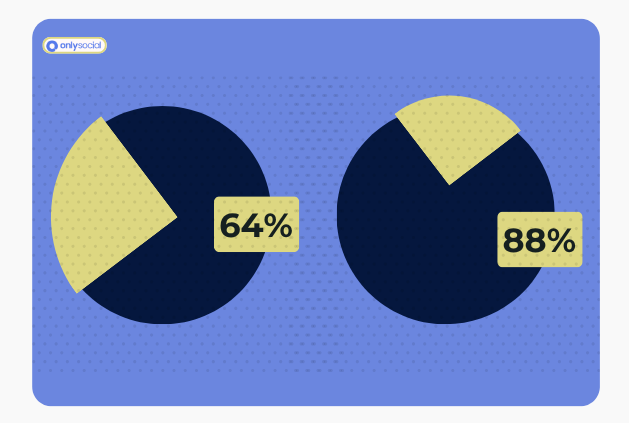
- And here’s a big one – 88% of customers trust a business more when it responds to all reviews, compared to just 47% when it doesn’t reply at all.
Every review is like a public conversation. The more genuine, timely, and consistent your replies are, the more potential customers see you as professional and trustworthy – even when the reviews aren’t glowing.
Great for SEO
Google loves activity. And every time a customer leaves a review, it’s like they’re giving your business a tiny SEO boost. Here’s why:
- Fresh Content: Every new review adds relevant, keyword-rich text to your business profile.
- Engagement Signals: Replying shows Google that your business is active and engaged with customers.
- Local Authority: The more quality reviews you earn, the more Google’s algorithm sees you as a popular and reliable choice in your area.
Real example: A small plumbing company boosted its review count from just 12 to over 150 in six months. Their Google ranking jumped from page 3 to position #2 – and their monthly revenue grew by roughly $40,000.
That’s not luck. That’s the power of visibility and credibility working together.
Revenue Booster
Great reviews don’t just look good – they pay off.
- Businesses with 50+ reviews earn around 35% more revenue than those with fewer.
- Just one extra star in your average rating can raise your income by 5-15%.
- And even negative reviews can become opportunities – responding professionally can win back up to 25% of lost customers.
At the end of the day, your Google reviews are always working – around the clock, even when you’re not active. The real question is: are they working for you or against you?
Understanding the Different Types of Reviews
Not all reviews are created equal. Some make your day, others sting a little – and a few might leave you scratching your head. But each one deserves a thoughtful reply. How you respond can either strengthen or weaken your relationship with potential customers.
Here are the three main types of reviews you’ll come across, and how to handle each like a pro.
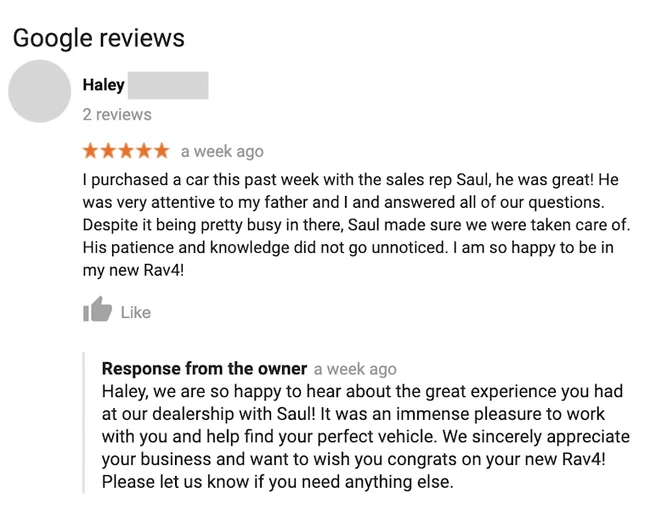
1. The Positive Review
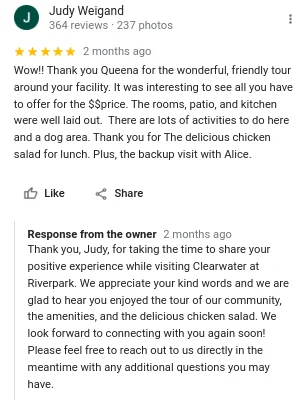
These are the easy wins – a happy customer who took time out of their day to share a great experience. Don’t just drop a quick “Thank you!” and move on. A well-crafted response can turn that good moment into long-term loyalty.
How to reply:
- Start by thanking them personally.
- Mention something specific from their review.
- Reinforce the positive part of their experience (“We’re thrilled you loved our service!”).
- End with an invitation to return.
Example:
“Thanks so much, Sarah! We’re glad you loved your new garden setup – our team had a blast designing it. Hope to see you again soon for your spring planting project!”
Small touches like using their name or referring to what they bought show authenticity and appreciation.
See how this business used this below:
2. The Neutral Review
Neutral reviews usually come from customers who weren’t disappointed, but also weren’t impressed. This is your chance to win them over.
How to reply:
- Thank them for their feedback.
- Acknowledge the parts they mentioned positively.
- Address any mild concerns politely.
- Offer to improve their next experience.
Example:
“Hi Tom, thank you for your honest feedback! We’re happy you liked our staff’s service, and we’ll definitely look into making our booking process smoother. We hope to make your next visit a five-star one!”
These replies show you care about improvement, and they might even prompt the customer to update their rating later.
3. The Negative Review
No one likes getting them, but negative reviews can be surprisingly valuable if handled the right way. A calm, empathetic response can turn a critic into a supporter – and show future customers that you care enough to make things right.
How to reply:
- Stay calm and professional (never argue).
- Thank them for bringing the issue to your attention.
- Acknowledge their frustration – empathy goes a long way.
- Offer to resolve the issue privately (email, phone, etc.).
Example:
“Hi James, we’re sorry to hear your order didn’t arrive on time. That’s not the experience we aim to provide. Please reach out to us at [email protected] so we can fix this for you right away.”
Once you have made this response, then:
- Call the customer personally
- Listen completely before responding
- Offer specific solution + something extra
- Follow up to ensure satisfaction
After resolving the issue, don’t forget to follow up publicly to let others know how it went down. You can post a review update after one week, once you have resolved the concern:
“Hi James, we hope the solution we provided has resolved your concerns completely. If you feel we’ve made things right, would you consider updating your Google review to reflect your final experience with us?”
This is a smart way to turn what could have been a public problem into a display of professionalism.
What Makes a Great Google Review Reply in 2025
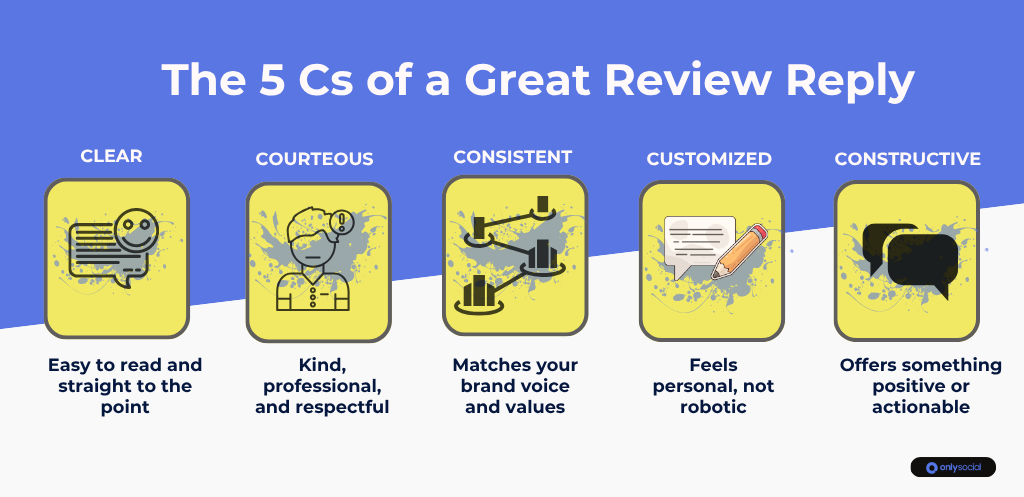
Replying to reviews isn’t just about saying “thanks.” It’s about communicating your brand’s personality, professionalism, and care – all in a few short sentences.
In 2025, with customers expecting instant and authentic engagement, the way you respond can make or break a potential sale.
Now, let’s see some features that separate a great Google review reply from an average one.
Be Timely
The faster you respond, the better. A reply within 24 to 48 hours shows customers that you’re paying attention and genuinely care about their feedback. Quick responses also send strong engagement signals to Google, helping your business stay active and relevant in local search.
Keep the Tone Warm and Professional
Avoid generic copy-paste responses. Your tone should feel human – warm, polite, and confident. Think of it like chatting with a customer face-to-face: friendly but respectful.
Example:
“Thanks so much for your kind words, Emma! We’re so glad you enjoyed your visit. We’ll be sure to pass your feedback to our team – they’ll be thrilled to hear it!”
Personalize Every Response
Mentioning details from the review (like their name, product, or experience) shows effort and sincerity. It makes your reply feel genuine – not automated.
Even if you’re using a template or AI suggestion (like with OnlySocial’s AI reply assistant), a small personal touch makes a big difference.
Stay Calm Under Pressure
Negative reviews can sting, especially if they feel unfair. But how you respond publicly is what other potential customers will remember. Keep it professional, acknowledge the issue, and offer to resolve it offline.
Example:
“We’re really sorry to hear about your experience, Jack. That’s not the level of service we aim for. Please email us at [email protected] – we’d love to make things right.”
End with a Next Step or Thank You
Finish your replies with a positive note or clear next step. It shows that the conversation doesn’t end there.
Leveraging Tools to Manage Google Review Replies
If you’ve ever tried keeping up with Google reviews manually, you know how quickly it becomes overwhelming, especially when you’re managing multiple locations or busy social media accounts. Missing just a few replies can make your business look unresponsive, even when you’re simply stretched thin.
That’s where technology comes in. Smart tools can help you manage, organize, and reply to reviews without losing that personal touch.
Social Media & Review Management Platforms
There are some social media management platforms that bring your reviews and messages together in one place. Instead of jumping between Google, Facebook, and Instagram tabs, you can manage everything from a single dashboard.
This centralized view helps you stay consistent and ensures no review slips through the cracks, even during your busiest days.
Google Business Profile Dashboard
For small business owners who prefer to keep things simple, Google’s own Business Profile dashboard is a good starting point. You can read and reply to reviews directly from your Google account, manage basic info, and even see how people find your business online.
The only downside? It can get time-consuming once you start receiving a high volume of reviews, especially across multiple branches or brands.
Centralized Analytics and Alerts
Good review management isn’t just about replying but about learning from feedback.
The best tools help you track sentiment, identify common issues, and alert you when a new review needs attention. Over time, these insights can guide improvements in customer experience and operations.
How OnlySocial Makes Google Review Replies Easier
Managing Google reviews can quickly go from “manageable” to “mayhem”, especially when your business has multiple locations or a high volume of customer feedback. Luckily, you have OnlySocial to help.
It’s not just another social media scheduling tool. It’s a full engagement management platform that lets you handle Google Business reviews (alongside your social channels) faster, smarter, and more consistently – all from one place.
Here’s how OnlySocial makes the process seamless.
Collect and Centralize All Reviews in One Inbox

Switching between multiple Google Business accounts to reply to reviews is a nightmare. OnlySocial fixes that with a unified inbox that brings every review from all your business locations into one dashboard.
You can read, reply, and manage conversations without constantly logging in and out of different accounts. It’s like having your entire review system under one roof.
Beyond convenience, this also means:
- You can reply faster and never miss a single review.
- Your tone stays consistent across all branches.
- You save hours of repetitive work each week.
For busy managers juggling multiple Google profiles, this single feature alone is a game-changer.
AI-Guided Replies That Sound Human
We all know how stressful it can be trying to respond to dozens of reviews, especially when the messages start to sound repetitive. OnlySocial’s AI-powered reply assistant analyzes each review’s tone and intent, then suggests a personalized response that sounds natural, not robotic.
Whether it’s a happy customer raving about your service or someone leaving tough feedback, OnlySocial helps you strike the right tone instantly.
You can:
- Approve, edit, or send AI-suggested replies in one click.
- Stay professional and warm across every response.
- Keep engagement going even when you’re not online.
It’s like having a 24/7 digital assistant that handles the small stuff while you focus on bigger priorities.
Assign Reviews to the Right Team Members
If your business operates in multiple locations or has different departments, replying to every review yourself can quickly become impossible.
With OnlySocial, you can assign reviews to specific team members directly from your inbox. That means:
- Your customer support team can handle product or service issues.
- Your marketing lead can respond to collaboration or PR opportunities.
- Your branch managers can handle location-specific feedback.
Everyone knows exactly what they’re responsible for, keeping your workflow organized and your customers heard, without confusion or overlap.
Leave Internal Notes for Context
Some reviews need extra context before a reply goes out – maybe it’s a returning customer, or the same issue was reported elsewhere.
OnlySocial lets you add internal notes on any review so your team stays on the same page. Think of it like sticky notes behind the scenes:
“This was already resolved by phone.”
“Send this feedback to the operations team.”
“Follow up next week after their appointment.”
It’s private, quick, and ensures that every response your team sends is informed and coordinated.
Use Smart Filters to Prioritize Reviews
Even with everything in one inbox, hundreds of reviews can pile up fast. OnlySocial makes it easy to stay on top of things with multiple filtering options.
You can sort reviews by:
- Location or business profile.
- Star rating (to prioritize negative reviews first).
- Date or keyword.
- Sentiment (positive, neutral, negative).
This way, you can quickly handle the most urgent reviews first – like unhappy customers – and circle back to others later. It’s efficient, and it keeps your response times sharp.
Add Labels or Tags for Quick Sorting
Not all reviews are created equal – some are compliments, some are complaints, and some might be business leads in disguise.
OnlySocial lets you tag reviews with labels like “Positive Feedback,” “Customer Issue,” “Urgent,” or “Marketing Opportunity.”
These tags make it easy to:
- Prioritize which reviews to reply to first.
- Delegate specific categories to the right team members.
- Spot trends over time – like what customers love most or what issues pop up often.
Turn Great Reviews into Marketing Assets
Don’t let glowing reviews fade into the background. With OnlySocial, you can share positive reviews directly to your social media accounts.
It’s a simple way to turn real customer experiences into authentic marketing content. You can design a post highlighting the review, schedule it across multiple platforms (Facebook, Instagram, LinkedIn, and more), and keep your feeds full of genuine praise.
This not only celebrates happy customers but also builds social proof that attracts new ones.
Common Google Review Response Mistakes Businesses Still Make
Many things can sometimes cause even the most well-meaning business owners to slip up when replying to reviews. It could be because of time pressure; other times it’s simply not knowing what customers expect.
Since these mistakes are easy to fix, let’s show you some of these mistakes and how to avoid them
Mistake #1: Copy-and-Paste Replies
We’ve all seen them – the same “Thank you for your feedback!” response repeated under ten different reviews. While it’s quick, it also feels lazy and robotic.
Customers can spot a generic response instantly. It sends the message that you’re ticking boxes, not genuinely engaging.
Better approach:
Take a few seconds to personalize each reply. Mention the customer’s name, refer to what they said, or highlight something specific about their experience. It doesn’t have to be long – just human.
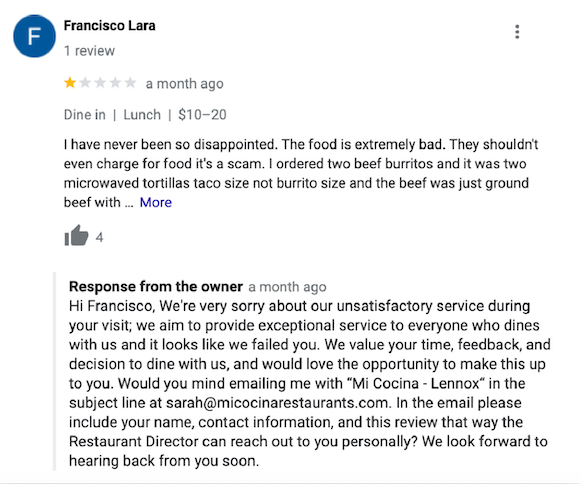
Mistake #2: Ignoring Negative Reviews
It’s tempting to skip bad reviews altogether, but silence can speak louder than words. Ignoring them tells potential customers you don’t care about fixing problems – or worse, that you’re avoiding accountability.
Better approach:
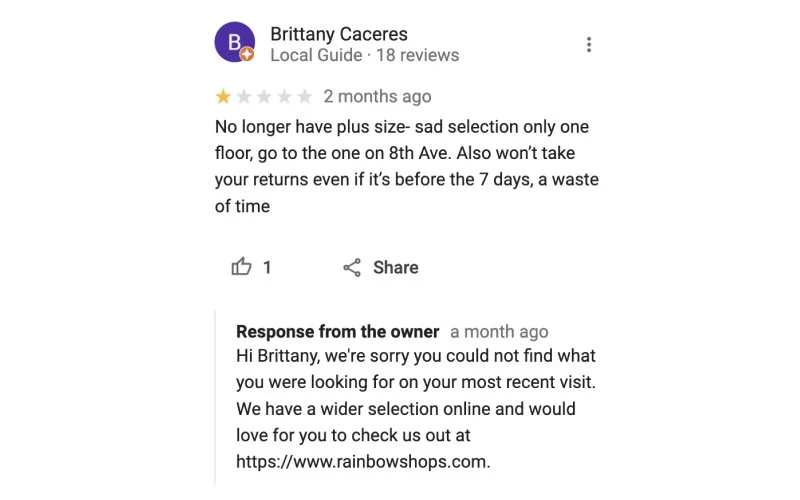
Acknowledge the feedback, apologize if needed, and show you’re taking action. A polite, solution-focused response can often win back trust and even encourage an updated rating.
Below is a good example:
Mistake #3: Getting Defensive or Arguing Back
When you feel wrongly criticized, it’s easy to get defensive, but public arguments never look good. Remember, you’re not replying to the reviewer alone; you’re replying for everyone who will read that reply later.
Better approach:
Stay calm, be factual, and express willingness to resolve the issue privately. That balance shows maturity and professionalism.
Example:
“We understand your frustration, Paul. Our goal is always to provide prompt service, and we’d like to learn more about what went wrong. Please contact us at [email protected] so we can make things right.”
Mistake #4: Forgetting to Thank Happy Customers
It sounds obvious, but many businesses reply only to negative reviews and ignore the positive ones. That’s a missed opportunity. Positive reviews are golden moments to reinforce your brand personality and build long-term loyalty.
Better approach:
Always thank happy customers, even if their review is short. It shows gratitude and keeps the tone positive across your entire Google profile.
Mistake #5: Taking Too Long to Reply
Speed matters. Waiting weeks to respond makes customers feel forgotten and signals inactivity to Google. In contrast, prompt replies boost trust and show you care about engagement.
Better approach:
Set a goal to reply to every review within 24-48 hours. If that feels tough, tools like OnlySocial can help by sending notifications, scheduling replies, or even suggesting AI-powered drafts for faster responses.
3 More Tools That Help with Google Business Reviews
While OnlySocial is a standout for managing Google reviews alongside all your social channels, it’s not the only tool worth mentioning. Depending on your goals, there are a few other platforms that can help you stay organized, reply faster, and make the most of your customer feedback.
Here are three more tools worth knowing:
1. WiserReviews
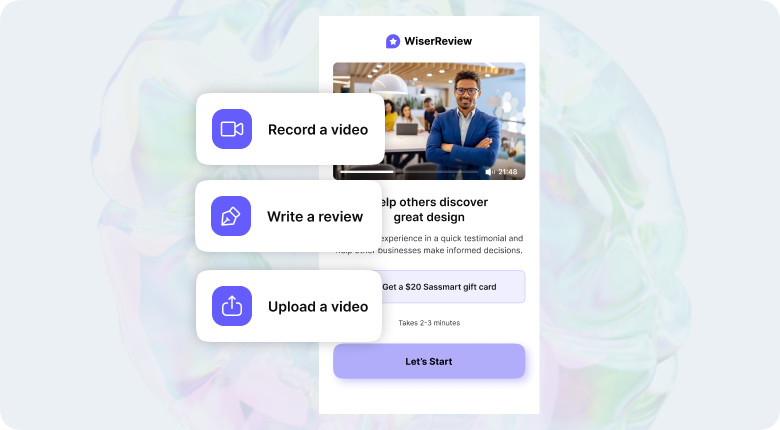
If you’re looking for a tool that helps you collect and display Google reviews as well as manage them, WiserReviews is a solid pick.
It automates the process of gathering both text and video testimonials through email or SMS campaigns, helping you increase review volume with minimal effort. Once reviews start rolling in, you can tag them by topic (like “support,” “pricing,” or “delivery”) and decide which ones to feature on your website.
You can even display reviews beautifully using ready-made widgets – from sliders to pop-ups – that build trust right on your homepage or product pages.
The platform is also adding smart AI tools like auto-tagging, sentiment detection, and AI-assisted sharing, so you can highlight your best feedback automatically on social media.
In short: WiserReviews doesn’t just help you reply – it turns your happiest customers into your best marketing assets.
2. SocialPilot
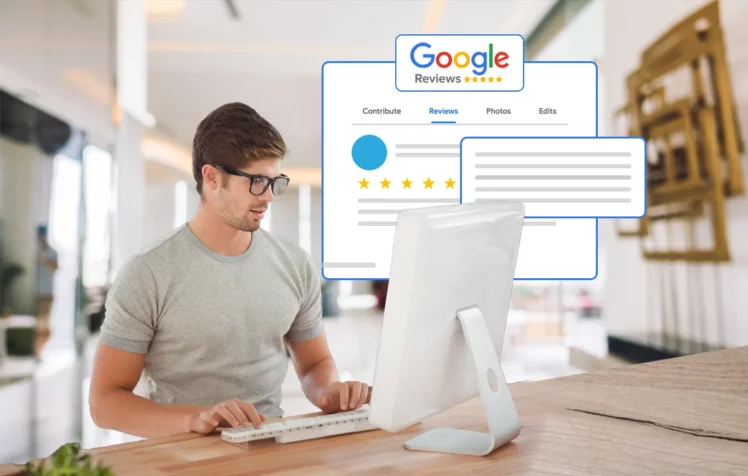
For teams that already use SocialPilot for social media scheduling, the SocialPilot Reviews feature is a natural extension.
It gives you a centralized review dashboard, where you can track and respond to Google reviews without switching between multiple profiles or tabs. If you manage several storefronts or client accounts, SocialPilot makes it easy to assign team members to specific brands or locations using role-based permissions, ensuring everyone stays accountable and on-brand.
Its built-in AI response assistant helps you write quick, personalized replies for both positive and negative reviews, saving tons of time while maintaining a human touch.
If you’re managing multiple clients or local franchises, SocialPilot helps you stay on top of feedback while keeping your workflow neat and efficient.
3. MARA
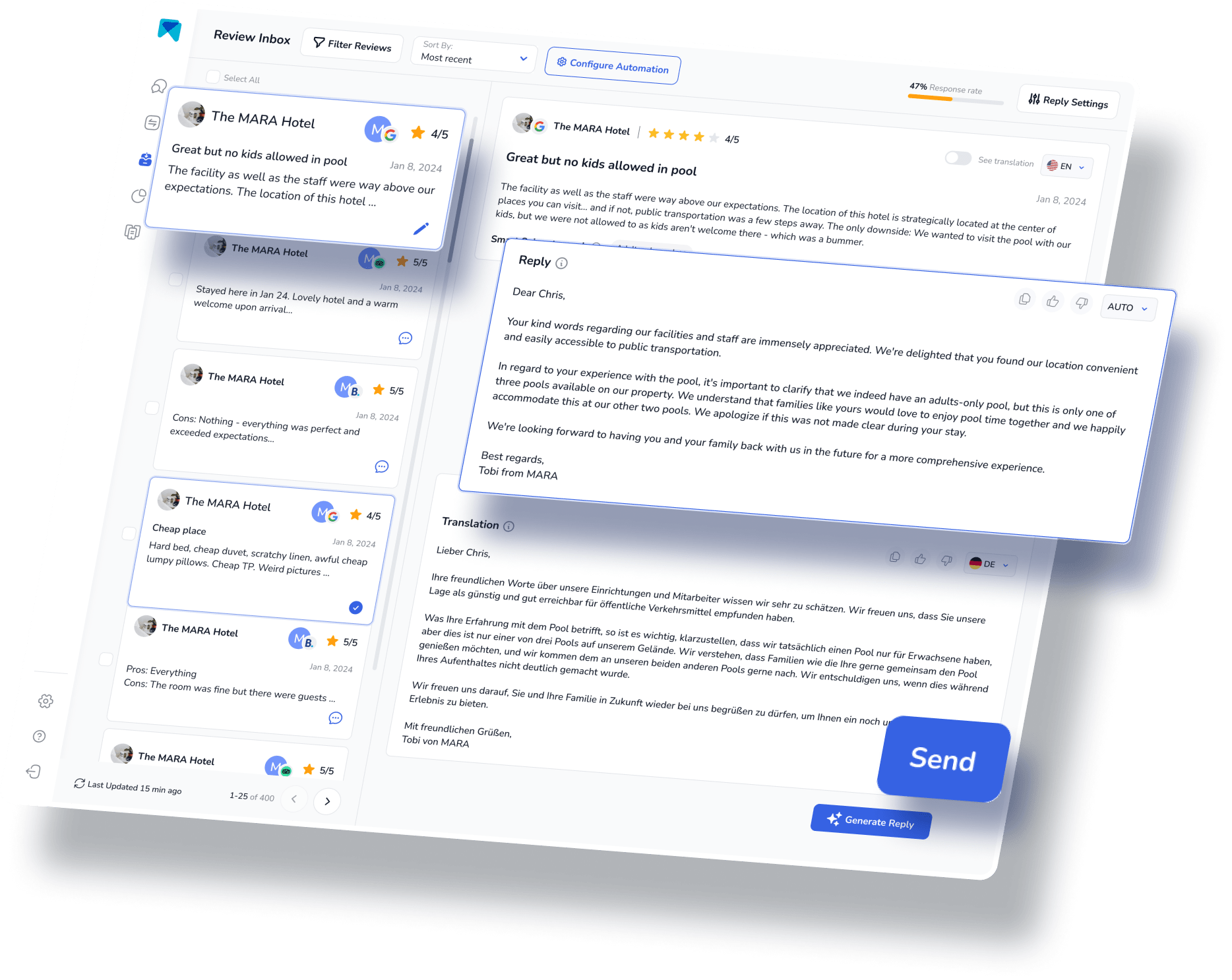
If you’ve ever wished an AI could write Google review replies that actually sound like you, MARA is the tool for that.
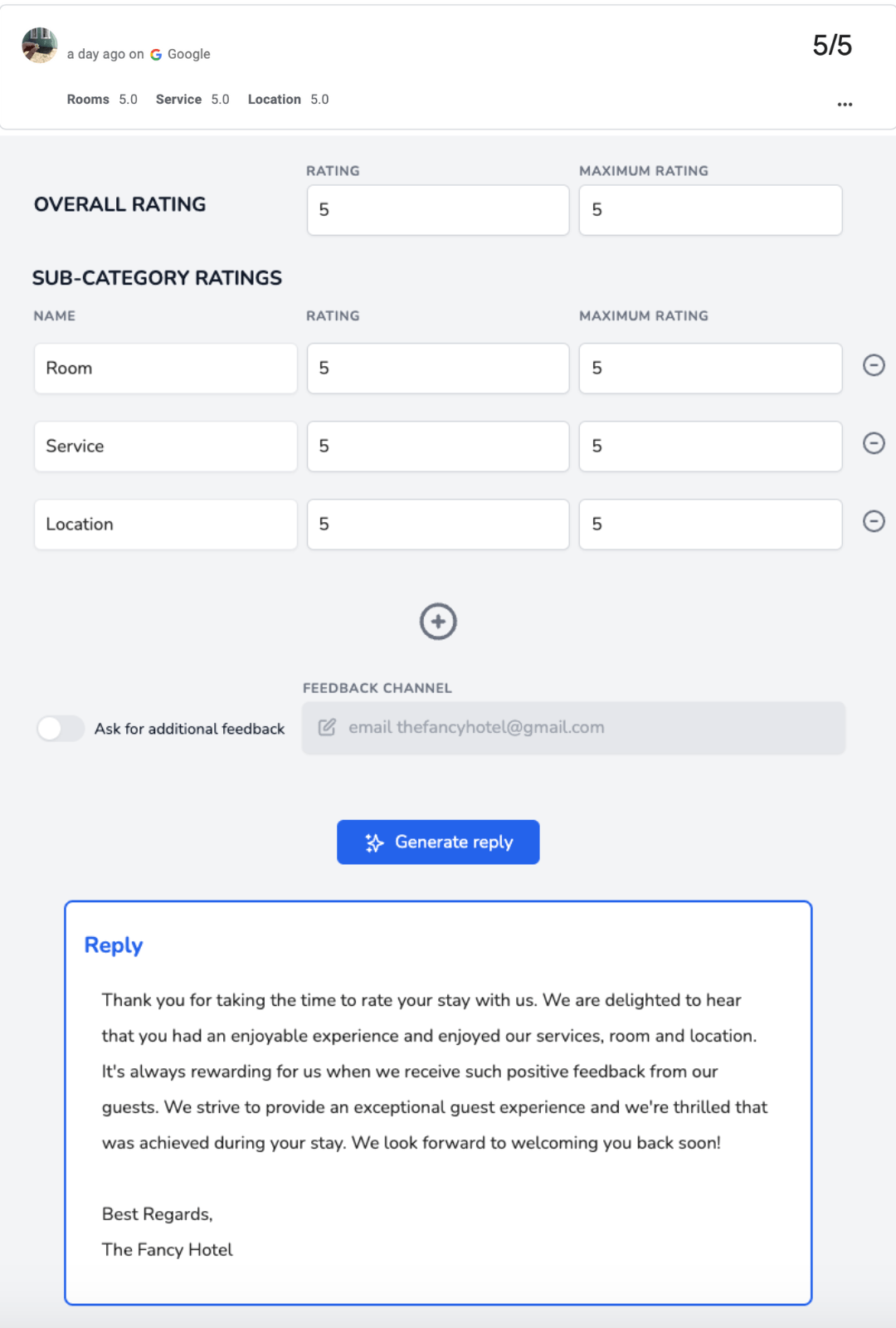
MARA’s AI-powered Review Inbox gathers reviews from Google, Booking.com, Tripadvisor, and more, all in one place. You can hit “Generate reply,” tweak it if needed, and send it instantly – or even automate responses to simple reviews (like 5-star ratings with no text).
Its Review Analytics feature summarizes customer feedback into clear insights, helping you spot recurring issues or praises without reading every single comment.
And thanks to its Brand Voice feature, MARA learns your tone and writing style over time, so replies always feel personal and on-brand.
It’s especially popular in hospitality and service industries where tone, empathy, and speed matter most.
Each of these tools approaches review management differently – WiserReviews helps you showcase great feedback, SocialPilot simplifies team-based replies, and MARA personalizes responses through smart AI.
But if you want one platform that does it all – review management, AI replies, social scheduling, and team collaboration – OnlySocial remains the all-in-one solution that ties everything together.
Handling the Dark Side: Fake Reviews and Google Policy
For every genuine review that makes your day, there’s always the risk of a fake one lurking in the mix. Whether it’s a random troll, a competitor trying to drag your rating down, or a bot-generated review, fake reviews can sting – and they can hurt your reputation if left unchecked.
Thankfully, you can spot and deal with them before they do real damage.
Spotting Fake Reviews Before They Spread
Not all fake reviews are obvious at first glance. Some sound polite and vague, while others are oddly specific about things your business doesn’t even offer. Here are a few red flags to watch for:
- Generic language: “Great service!” or “Highly recommended!” – with zero detail.
- Anonymous accounts: No profile photo, no history, no context.
- Duplicate patterns: Multiple reviews posted around the same time, or from users reviewing several businesses in unrelated industries.
- Irrelevant details: Mentions of services, staff names, or locations you don’t recognize.
If you’re tracking IPs or analytics, you might even spot clusters of reviews coming from the same source – another strong indicator something’s off.
What to Do When You Find a Fake Review
The worst thing you can do is ignore it. Google has a process for reporting fake reviews – it just requires a bit of patience and persistence.
Here’s how to handle it:
- Flag the review directly in your Google Business Profile.
- Report it through Google’s support channels for formal review.
- Document everything. Take screenshots, note the date, and keep any supporting evidence.
- Follow up regularly. Google doesn’t always act right away. Sometimes, their first reply is “no,” but consistent follow-up often gets results.
Staying on the Right Side of Google’s Review Policy
While removing fake reviews is important, it’s equally critical to make sure your review practices are fully compliant with Google’s rules. Google’s review system is built on authenticity, so breaking their policy can lead to penalties – or worse, account suspensions.
Here’s a quick breakdown of what’s allowed and what’s not:
What Google Prohibits:
- Paying customers (or offering discounts) in exchange for reviews.
- Writing fake or self-promotional reviews.
- Asking friends or family to post reviews.
- Posting reviews from your own business computers or network.
What Google Allows:
- Asking happy customers for honest feedback.
- Providing a direct link to your Google review page.
- Sending polite review reminders via email or text.
- Offering general promotions or discounts unrelated to reviews.
Best practice: focus on earning reviews, not chasing them. Genuine feedback from real customers is worth more – both to Google and to potential buyers – than a hundred fake five-star ratings.
Common Questions About Google Business Reviews Answered!
Let’s wrap up some of the most common questions business owners ask when it comes to Google reviews. If you’ve ever wondered how reviews affect rankings, how star ratings work, or how many reviews you really need, this section’s for you.
How do ratings and reviews impact Google search results?
Google reviews do more than just influence how customers feel about your business; they also shape how Google itself ranks you.
Positive ratings send strong signals to Google’s algorithm that your business is credible, relevant, and worth showing higher in search results. A single one-star boost can increase revenue by 5-9%, and businesses with 4+ stars get far more clicks than those with lower averages.
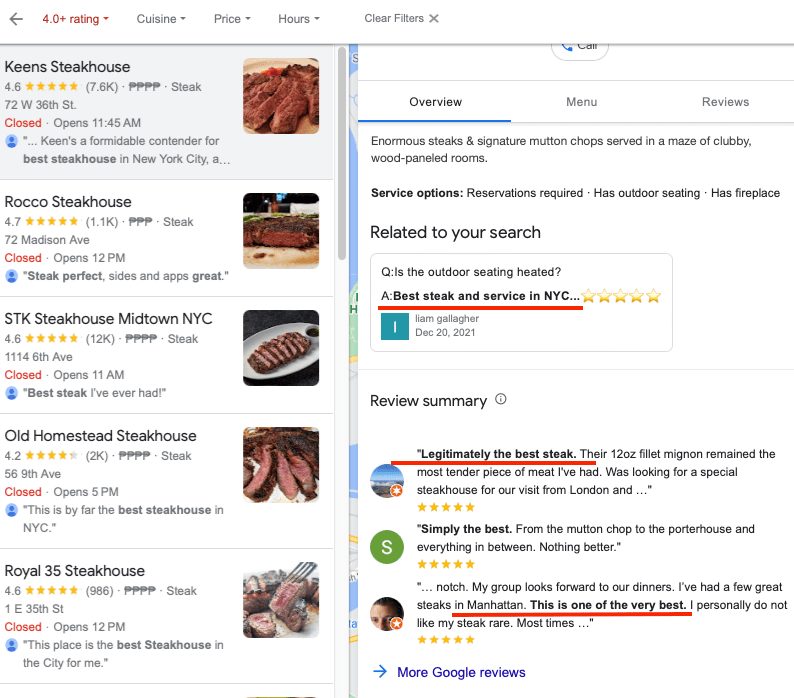
Reviews also play a big role in both unbranded (like “best coffee near me”) and branded searches. The more positive and keyword-rich your reviews are, the more likely you’ll appear in local map packs and search results.
In short, every review – and every reply – strengthens your local SEO.
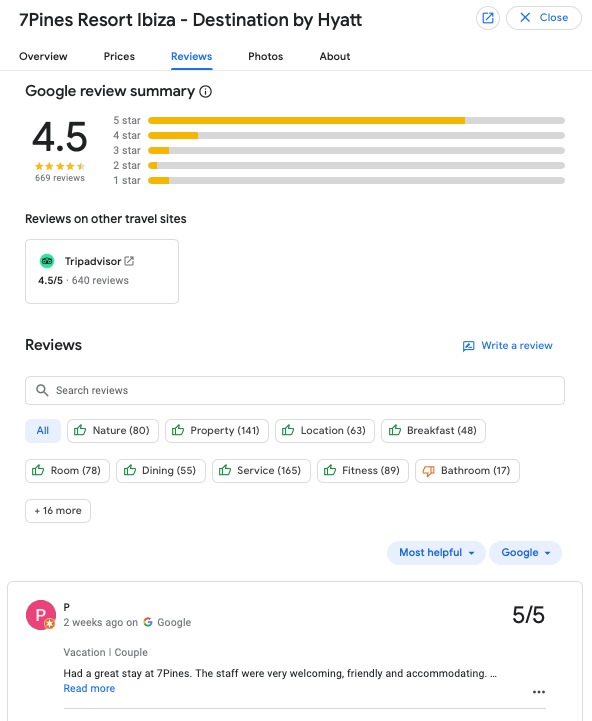
How are Google Star Ratings calculated?
Google calculates your star rating by averaging all individual star reviews left by customers on your Google Business Profile.
Here’s how it works:
Total of all star ratings ÷ Number of reviews = Your overall star rating
Each review has equal weight, meaning one recent 5-star review counts the same as an older one. However, consistent activity (like frequent reviews) can boost your search visibility.
Google’s system also automatically filters suspicious or fake reviews, so your score reflects legitimate customer feedback. Updates to your average rating may take up to two weeks to appear across Google Search and Maps.
How can I use “Near Me” keywords to boost local SEO?
The “Near Me” search trend is massive, and mastering it can dramatically increase local visibility.
Start by optimizing your Google Business Profile:
- Use consistent business information (Name, Address, Phone).
- Include location-based keywords naturally in your description and posts.
- Encourage reviewers to mention your location or area in their feedback (e.g., “best dentist in Liverpool”).
- Build local backlinks and citations to strengthen credibility.
- Ensure your website and GMB profile are mobile-friendly since most “near me” searches happen on phones.
How many Google reviews do businesses need?
There’s no magic number – it depends on your industry and competition.
For example:
- Restaurants or hotels might need hundreds of reviews to stay competitive.
- Professional services (like real estate or dental practices) might do well with dozens of strong, detailed reviews.
As a general rule, aim for 10-15 new reviews per month for steady growth. In competitive industries, 20-30 per month keeps you visible.
And remember, it takes around 30-40 new 5-star reviews to raise your average rating by one full star.
Consistency is key – the more recent, positive, and relevant your reviews are, the better your overall reputation will look.
How should I respond to reviews without comments?
Even if a customer just leaves a star rating without any text, you should still reply.
Why? Because responses improve engagement and can even help your SEO. Use these opportunities to reinforce keywords naturally and show gratitude.
Example:
“Thanks for the 5-star rating, Sarah! We’re glad you enjoyed your visit to our Liverpool clinic.”
It’s short, personal, and still contributes to your local ranking strength.
For low-star, no-text reviews, stay polite and curious:
“We noticed your 2-star rating and would love to hear how we can do better. Please reach out at [email protected].”
What’s the best way to collect more 5-star Google reviews?
Waiting for reviews isn’t enough anymore. The best-performing businesses ask consistently and strategically.
Here’s a simple 3-touch review request system that works:
- Touch 1 – Immediate (Point of Sale):
Ask while the experience is fresh.
“If you’re happy with your visit today, would you mind leaving us a quick Google review? Here’s the link: [short URL].”
- Touch 2 – 24-48 Hours Later (Email):
Send a friendly follow-up with your review link. - Touch 3 – One Week Later (SMS):
“Hi Sarah, hope you’re enjoying your new coffee maker! We’d love a quick Google review if you have 30 seconds: [link].”
Pro tip: only send review requests to satisfied customers. A simple two-step feedback form (“How was your experience?”) can help filter responses before sending the Google link.
And if you’re juggling multiple locations or don’t have time to send requests manually, tools like OnlySocial can automate this process – from reminders to AI-powered follow-ups – helping you maintain a steady flow of genuine, positive feedback.
Conclusion: Turning Reviews into Relationships
At the end of the day, Google reviews aren’t just a numbers game; they’re about connection. Each review is a small conversation between your business and your customers, and how you respond can make all the difference.
In 2025, the businesses that stand out aren’t just the ones with the most reviews, they’re the ones that reply thoughtfully, handle criticism gracefully, and use tools that help them stay consistent and professional.
OnlySocial takes the chaos out of managing Google Business reviews by putting everything — from replies and AI-assisted responses to team collaboration and analytics – in one simple, powerful dashboard. Whether you’re running one business or fifty, it helps you respond faster, sound more human, and protect your reputation effortlessly.
Because at its core, mastering Google review replies isn’t about chasing stars – it’s about building trust, showing care, and turning happy customers into loyal advocates. And with OnlySocial, you can do exactly that – smarter, faster, and with confidence.