9 RecurPost Alternatives for All Business Types

If you’ve been using RecurPost for a while, you already know its strengths. It’s affordable, simple, and brilliant for recycling evergreen content.
But let’s be honest – there comes a point where those strengths might not be enough.
Maybe the dashboard feels a bit outdated, you’re craving deeper analytics, or need smoother Instagram posting.
Or maybe you’re just starting your social media management journey and wondering if RecurPost is really the best fit for your goals.
Whatever brought you here, you’re not alone. As your business grows, or your content calendar gets more demanding, it’s only natural to want something more modern, flexible, or just easier to use.
That’s why we’ve rounded up these 9 powerful RecurPost alternatives that work for all kinds of businesses. Just keep reading to find one that best meets your business needs.
Table of Contents
- 1 Why Consider a RecurPost Alternative?
- 2 9 Powerful RecurPost Alternatives to Consider for Your Business
- 3 1. OnlySocial
- 4 2. Sprout Social
- 5 3. Buffer
- 6 4. Loomly
- 7 5. Later
- 8 6. Agorapulse
- 9 7. Sendible
- 10 8. SocialBee
- 11 9. Hootsuite
- 12 How to Choose the Best RecurPost Alternative for Your Business
- 13 Final Note
- 14 FAQs
- 14.0.1 Is RecurPost the cheapest option out there?
- 14.0.2 Which RecurPost alternative is best for small businesses?
- 14.0.3 What’s the best alternative for agencies?
- 14.0.4 Which tool offers the most advanced features?
- 14.0.5 Does OnlySocial offer more than RecurPost?
- 14.0.6 How do I know which RecurPost alternative is right for me?
Why Consider a RecurPost Alternative?
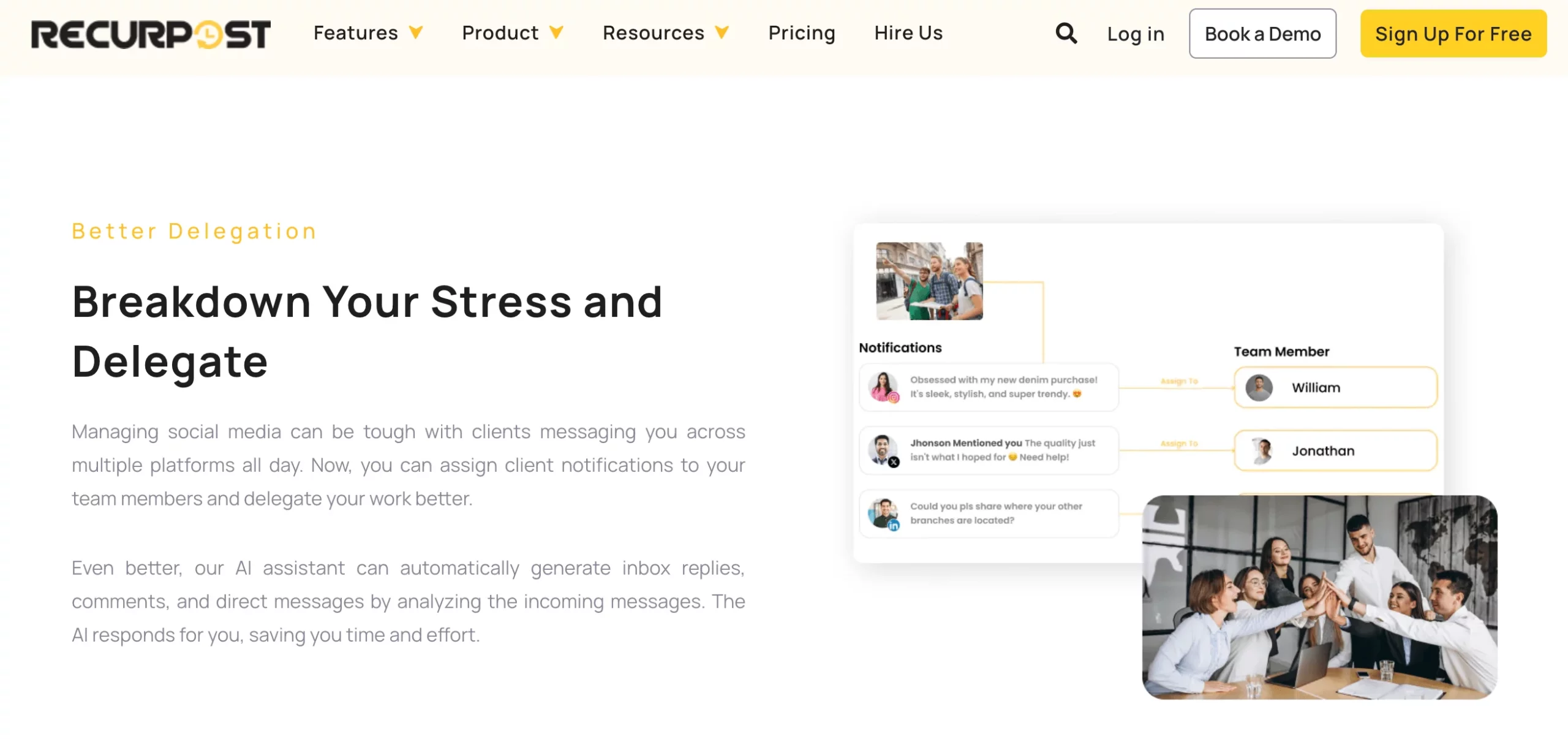
RecurPost is a solid choice, no doubt about it, especially if you’re just starting out or working with a tight budget. Its content recycling feature is a time-saver, the AI tools help speed things up, and the pricing is refreshingly low compared to some big-name platforms.
But as your content demands grow, so do your expectations.
Many users eventually run into a few roadblocks: a dashboard that feels stuck in the past, limited flexibility in analytics, no direct Instagram publishing, and a mobile app that doesn’t quite keep up.
For agencies and teams, collaboration can feel a bit restricted, and the customization options, especially when it comes to reporting, don’t go far enough.
If you’re finding yourself needing more automation, better insights, or a smoother user experience, it might be time to explore other options.
The good news is that there are plenty of RecurPost alternatives out there that are just as affordable, and in some cases, way more powerful.
9 Powerful RecurPost Alternatives to Consider for Your Business
1. OnlySocial
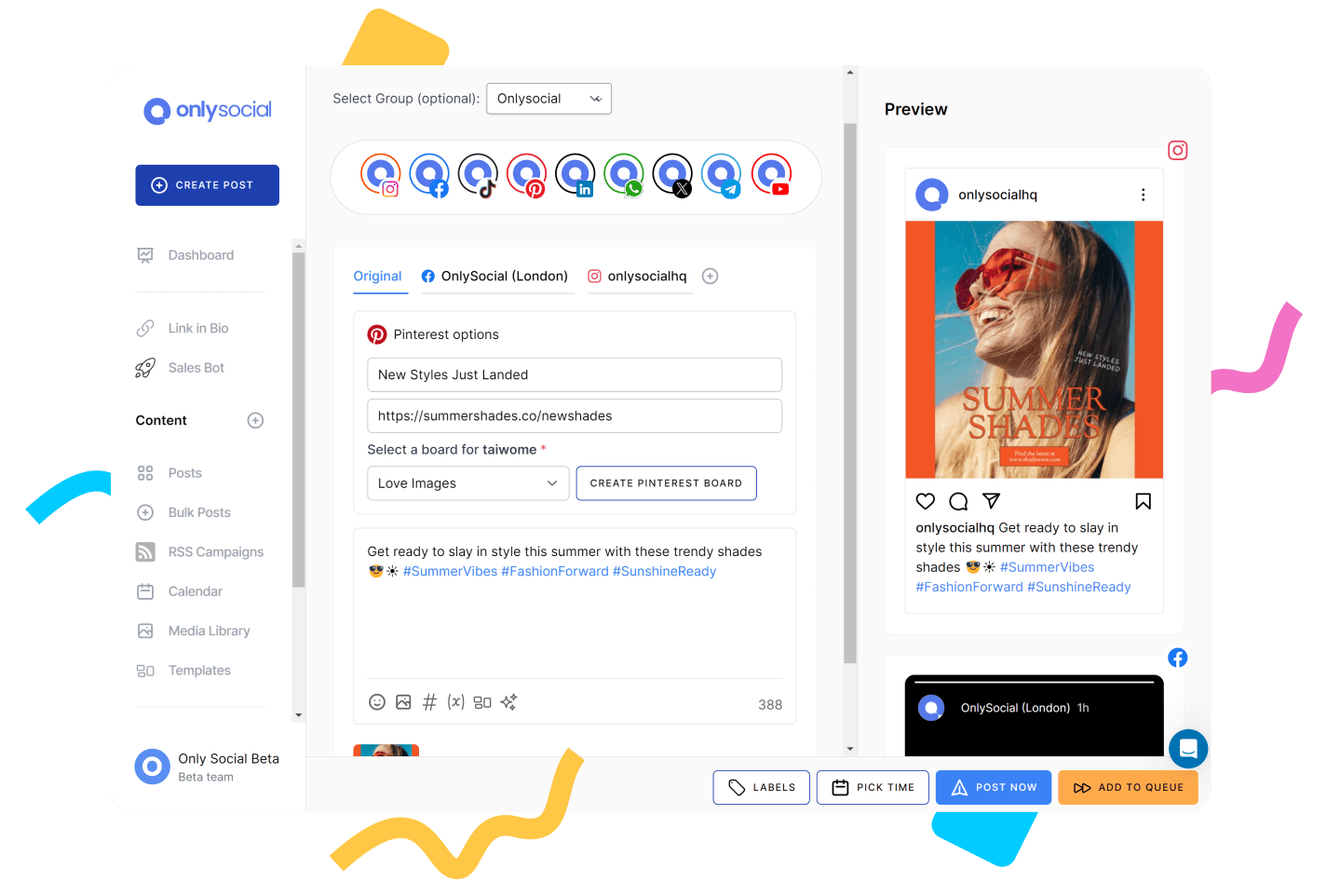
If RecurPost has started to feel like a basic tool in a growing world, OnlySocial could be your next big upgrade. It’s clean, fast, and built to handle everything from simple post scheduling to full-on social media campaigns – across multiple platforms.
Whether you’re managing a couple of profiles or running the show for clients, OnlySocial gives you more control with less hassle.
Key Features of OnlySocial
Bulk Scheduling
With OnlySocial, you can schedule up to 500 posts in one go. Just upload your content in bulk – no need to queue things up one by one. For teams who plan ahead or repurpose content across platforms, this feature alone can save hours each week.
Cross-Platform Publishing (15+ Networks)
Unlike RecurPost, which focuses on a smaller set of platforms, OnlySocial lets you manage content across 15+ channels, including Facebook, Instagram, LinkedIn, X (Twitter), TikTok, Pinterest, Google Business Profile, and more. You can plan once and publish everywhere.

AI-Powered Content Creation
Stuck on what to write? OnlySocial’s built-in AI assistant can help you craft captions, tweak your tone, and even generate hashtag ideas. It’s like having a content writer on standby, ready to help you post faster (and smarter).
Drag-and-Drop Content Calendar
The visual content calendar is intuitive and flexible. You can view your posts by day, platform, or team member, and drag content around to reschedule with ease. It’s a simple but powerful way to stay on top of what’s going out – and when.

In-Depth Analytics
OnlySocial gives you performance data that’s easy to understand and act on. You’ll see what’s working (and what’s not), with metrics like reach, clicks, engagement, and follower growth across all platforms, without needing a data science degree.
Smart Inbox for Engagement
Instead of juggling multiple apps, OnlySocial brings all your social messages, comments, and mentions into one central inbox. This makes it easier to respond quickly and maintain brand consistency.

Group Management Made Easy
Do you have multiple clients or manage different locations? You can group pages by project, client, or location, making your workspace tidy and efficient. It’s ideal for agencies or brands with more than one audience to keep track of.
Fast, Friendly Support
No long wait times or robotic replies here. If you run into an issue, OnlySocial’s support team is quick to respond and genuinely helpful. Whether it’s setup questions or feature walkthroughs, they’ve got your back.
Pros:
- The dashboard is clean, fast, and doesn’t overwhelm you with too many tabs or confusing layouts.
- Built for scale: It doesn’t slow down or get clunky as you grow.
- Unified inbox for managing all messages in one place
- Clear, actionable analytics
- Offers affordable plans with powerful, all-in-one features
- Consistent platform updates. Features are regularly refined based on user feedback, which is something you don’t always see with smaller tools.
Cons:
- No free plan: For users coming from RecurPost’s free trial or very low-cost starter plan, this might feel like a small barrier at first.
- Some platforms may require you to reconnect your social profiles now and then, especially after login sessions expire.
- Pretty new in the market
Pricing and Value
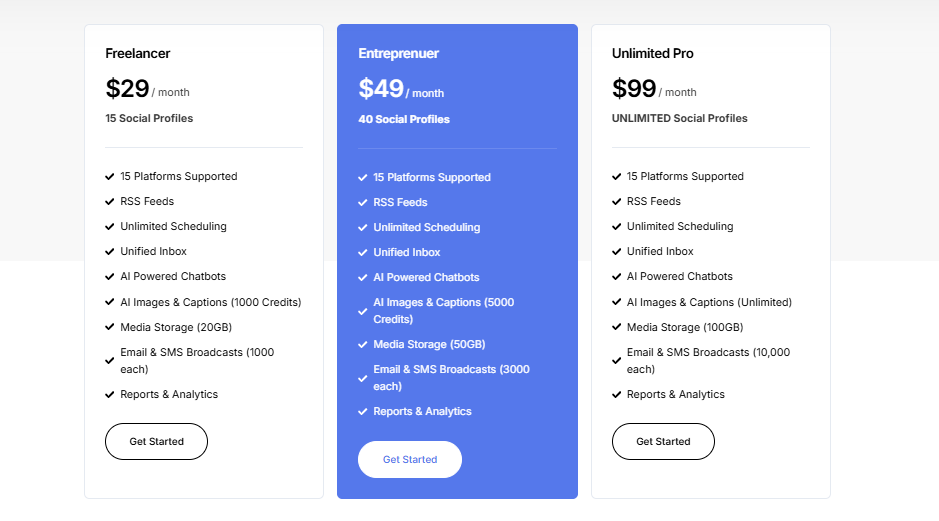
OnlySocial keeps things refreshingly straightforward. You’re not paying per user or getting hit with extra charges just to unlock basic features. Plans start at $29/month, and you get access to:
- Full access to AI tools
- Bulk scheduling
- Advanced analytics
- Support for 15+ platforms
- Multi-account management
- Clean UI with no learning curve
- Fast, helpful support team
The pricing scales fairly, too – whether you’re managing 15 accounts or 150. Compared to tools like Sprout Social or even upgraded RecurPost plans, the value per feature is hard to beat.
Overall Verdict
If RecurPost feels like it’s holding you back, or you’ve outgrown its limited visuals and platform support, OnlySocial is a fantastic next step.
It’s modern, fast, and powerful without being overly complicated. Plus, the team behind it actually listens to users and evolves the product with real-world needs in mind.
From smart automation to organized planning and team-friendly features, OnlySocial makes social media management less stressful and more effective, regardless of your business type or size.
2. Sprout Social

Sprout Social is one of the most established names in social media management. It’s built for larger businesses and agencies that need robust scheduling, advanced analytics, and seamless team collaboration.
However, while it’s packed with features, the steep pricing makes it better suited for companies that can justify the investment.
Key Features:
Advanced Scheduling with Smart Suggestions
Plan content across multiple platforms with precision. Sprout’s AI suggests the best posting times based on when your audience is most active, ensuring higher engagement without guesswork.
AI-Powered Writing Assistant
Struggling to draft captions? Sprout’s AI assistant helps create or refine content, generate hashtags, and keep your tone consistent across campaigns, saving teams hours of brainstorming.
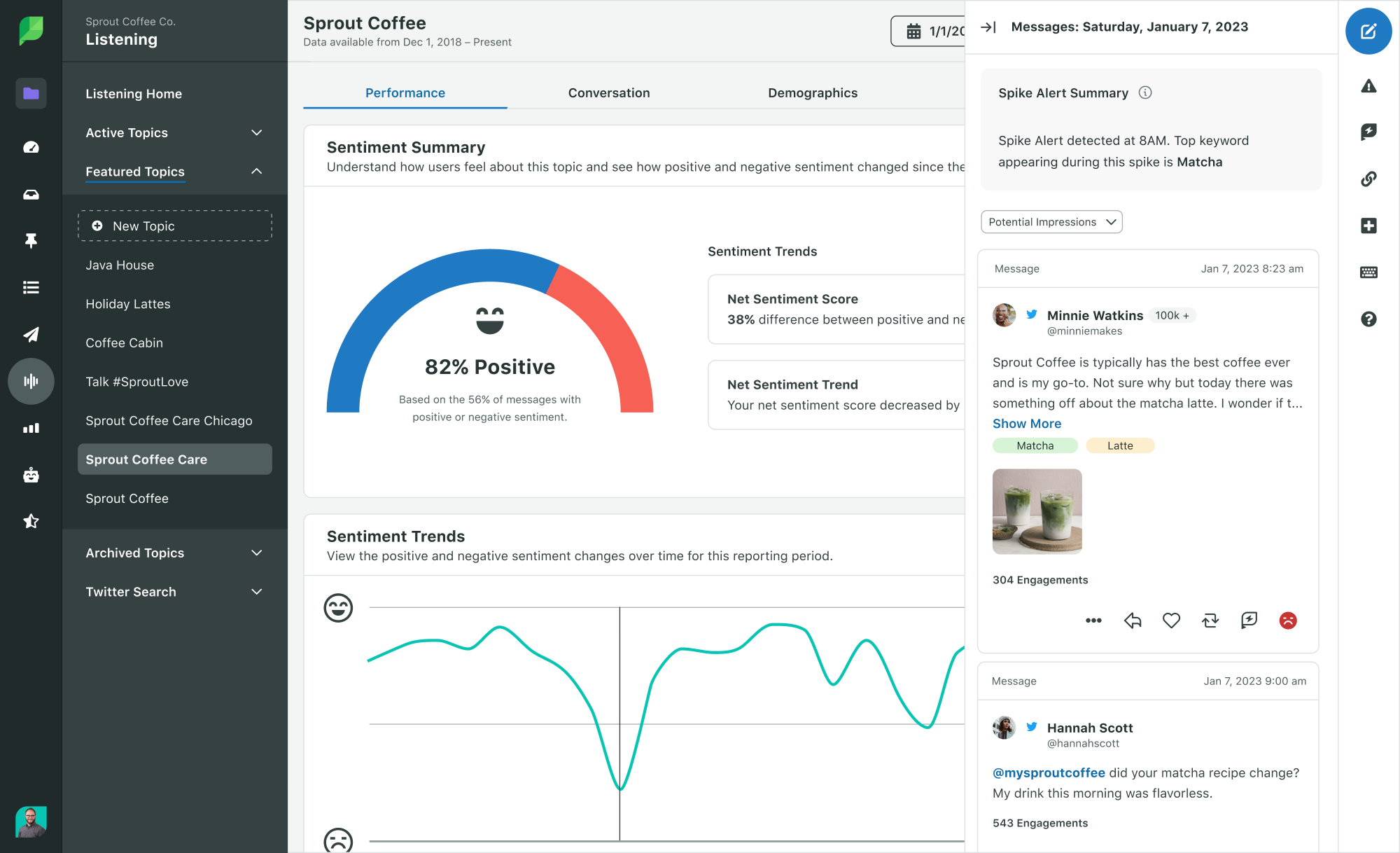
In-Depth Analytics & Custom Reporting
Sprout delivers powerful analytics that go beyond surface-level metrics. You can build customized reports, track campaign performance, and even compare results against competitors.
Approval Workflows for Teams and Clients
Agencies and larger teams will appreciate the built-in content approval flows. Posts can be reviewed internally or by clients before publishing, reducing errors and improving accountability.
CRM Integrations
Sprout connects with customer relationship management tools, helping businesses link social conversations to broader customer data. This is especially valuable for sales and support teams.
Pros:
- Excellent collaboration tools with approval systems built for agencies.
- Customizable and advanced analytics that scale with complex needs.
- Influencer discovery tools baked right into the platform.
- Known for stability and trusted by enterprise-level companies.
Cons:
- Premium price point makes it inaccessible for freelancers or small businesses.
- No native YouTube publishing, which limits reach.
- Smart inbox isn’t fully unified across all platforms.
- Add-ons for listening and reporting drive costs even higher.
Pricing and Value
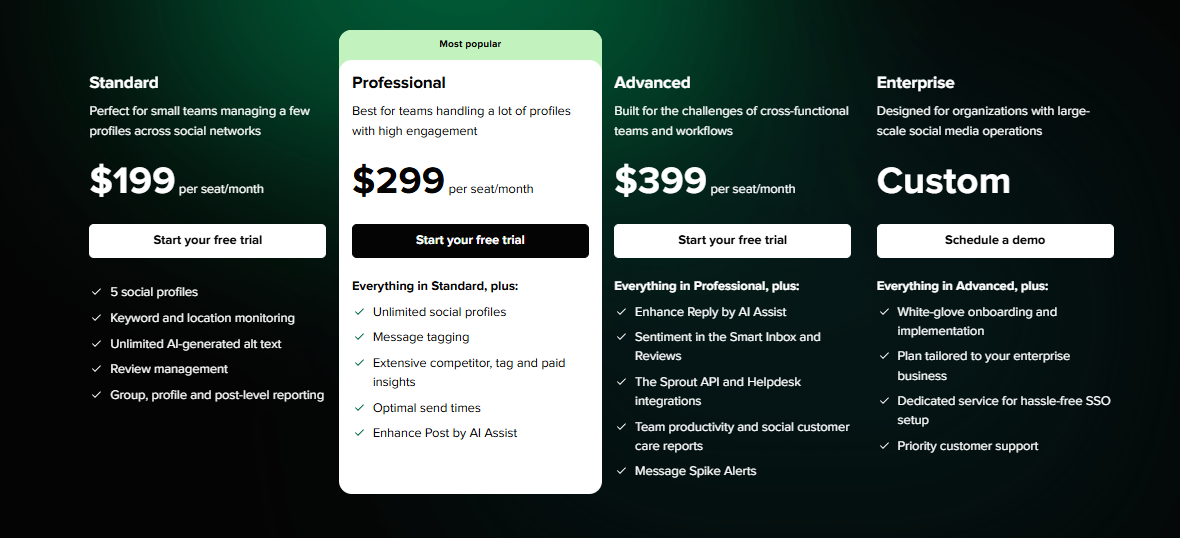
Sprout Social starts with professional plans but quickly climbs into enterprise-level pricing. The agency plan costs around $399/month, which includes advanced analytics, influencer marketing tools, and collaboration features.
While the platform delivers high-quality functionality, the pricing often makes it a better fit for larger organizations and agencies rather than smaller teams.
Overall Verdict
Sprout Social is a powerhouse, no doubt about it. Its advanced analytics, influencer tools, and seamless collaboration workflows make it perfect for big teams running complex campaigns.
But the high cost and occasional platform gaps make it impractical for small businesses. If budget isn’t an issue and you need a tool that scales effortlessly with your team, Sprout Social is a top-tier choice.
3. Buffer

Buffer has been around for years, and it’s still a favorite for small businesses, freelancers, and creators who want something straightforward.
It’s clean, affordable, and gets the job done without the learning curve of more complex platforms. Though it may not have the bells and whistles of enterprise tools, it’s perfect for those who just need smart scheduling and reliable analytics at a fair price.
Key Features:
Post Scheduling Across Platforms
Buffer makes it easy to schedule posts ahead of time for all your social media accounts. You can queue up content days, weeks, or even months in advance, keeping your feeds active even when you’re not online.
Visual Content Calendar
The calendar view helps you see what’s coming up at a glance. You can drag posts around, fill content gaps, and keep campaigns neatly organized without needing spreadsheets.
AI Writing Assistant
Recently added AI tools suggest captions, help tweak messaging, and provide fresh ideas for posts. This feature is especially helpful when you’re short on inspiration or need to adjust tone quickly.
Engagement Tools
With Buffer’s engagement dashboard, you can reply to comments and messages from multiple platforms in one place. While not as advanced as some competitors, it’s enough to help you stay on top of conversations.
Analytics and Insights
Buffer provides easy-to-understand analytics that show how your content is performing. You can track clicks, reach, engagement, and identify your best-performing posts – perfect for small teams who want clarity without complexity.
Pros:
- Super simple interface, great for beginners.
- Affordable pricing makes it accessible to freelancers and small businesses.
- AI assistant adds a creative edge without needing extra tools.
- Clean analytics that are easy to understand.
Cons:
- Limited editing options – content usually needs to be pre-edited before uploading.
- More advanced analytics locked behind higher plans.
- Doesn’t support every social platform.
- May feel too “basic” for larger teams or agencies.
Pricing and Value
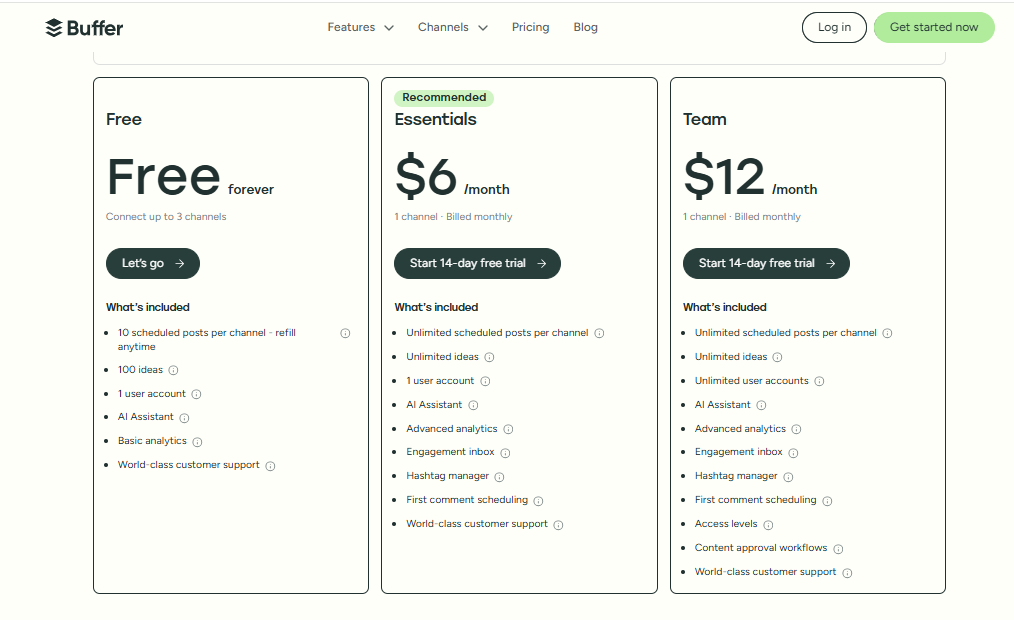
Buffer offers a free plan for individuals with limited needs, which is great for testing the platform. Paid plans start at $6/month per channel, making it one of the most affordable options on the market.
Even at the higher tiers (around $120/month for 10 channels), it’s still budget-friendly compared to premium tools. The trade-off is fewer advanced features, but for smaller teams, the value is excellent.
Overall Verdict
Buffer is best for users who want simplicity and affordability over complexity. It’s a reliable tool that covers the essentials – scheduling, basic analytics, and light collaboration – without overwhelming you.
If you’re running a small business or freelancing and just want a tool that “works,” Buffer is a strong alternative to RecurPost. Larger teams may find it limiting, but for straightforward scheduling, it’s hard to beat at this price point.
4. Loomly

Loomly is designed for businesses and teams that like structure and clear workflows. It’s particularly useful for brands that want to target audiences more strategically and keep everyone aligned on what’s going out and when.
Yes, it comes at a higher price than some competitors. But its organized approach and targeting tools make it a favorite among marketing teams managing multiple campaigns.
Key Features:
Content Previews
Loomly lets you see exactly how posts will look on each platform before they’re published. This reduces miscommunication across teams and helps avoid nasty surprises once posts go live.
Audience Targeting
A standout feature is its built-in audience targeting for Facebook and LinkedIn. Multi-location businesses or brands looking to grow strategically can fine-tune who sees their content.
Visual Content Calendar
With Loomly’s calendar, teams can easily plan, view, and adjust upcoming posts. It’s collaborative, well-organized, and keeps everyone on the same page – whether you’re in-house or agency-based.

Collaboration and Approval Flows
Team members can draft, review, and approve posts within the platform. This structured workflow ensures content is polished and consistent, making it ideal for groups managing multiple clients.
Analytics Dashboard
While not the most advanced in the market, Loomly’s analytics give teams a clear view of performance, engagement, and growth metrics to refine their strategy.
Pros:
- Clear and organized workflows keep teams aligned.
- Audience targeting helps reach the right people, not just more people.
- Previews reduce errors and keep content consistent.
- Great for multi-location or agency-based teams.
Cons:
- No direct Instagram publishing, which is a dealbreaker for some.
- Pricing can feel high for freelancers or small businesses.
- Analytics are decent but lack the depth of premium competitors.
Pricing and Value
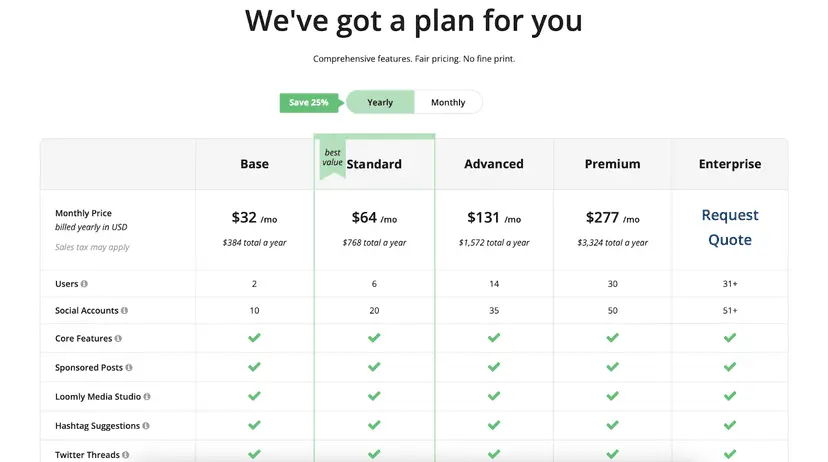
Loomly doesn’t offer a free plan, and pricing starts at $32/month (includes 2 users and 10 social accounts). The cost rises as you scale, which makes it less budget-friendly for individuals or very small businesses.
That said, the value comes from its team-friendly structure and targeting features, which are especially useful for agencies or growing companies.
Overall Verdict
Loomly is a great RecurPost alternative if your priority is organization, strategy, and teamwork. It won’t be the cheapest option, and Instagram publishing limits are frustrating, but for teams that want smoother workflows and better audience targeting, Loomly makes social media management far less chaotic.
5. Later

Later has long been the go-to tool for Instagram-first scheduling, and it’s still a strong option if your brand leans heavily on visual content.
Its visual calendar and drag-and-drop planning make it a favorite for creators and businesses that want their feeds to look polished.
Key Features:
Visual Content Calendar
Later’s calendar is one of its strongest features. You can drag and drop posts into your feed, making it easy to plan out a consistent visual style for Instagram.
Instagram Story Scheduling
Not all tools handle story planning well, but Later lets you schedule stories in advance. This is a big win for brands that want to stay consistent without being glued to their phones.
Best Time to Post
Later suggests the optimal times to post for Instagram based on audience activity. While it’s limited to Instagram only, it’s still a handy way to boost engagement.
Multi-Platform Publishing (Basic)
While Instagram is its strength, Later also supports scheduling for Facebook, TikTok, Pinterest, and LinkedIn. However, the features outside Instagram are more limited compared to alternatives like OnlySocial or Sprout Social.
Pros:
- One of the best tools for Instagram scheduling and visuals.
- Drag-and-drop calendar makes planning feeds simple.
- Strong story scheduling and media management features.
- Easy for beginners to pick up and use.
Cons:
- Very Instagram-focused – other platforms feel like an afterthought.
- Advanced analytics are limited compared to competitors.
- Pricing can add up quickly for teams.
- Fewer integrations than tools like Sprout Social.
Pricing and Value
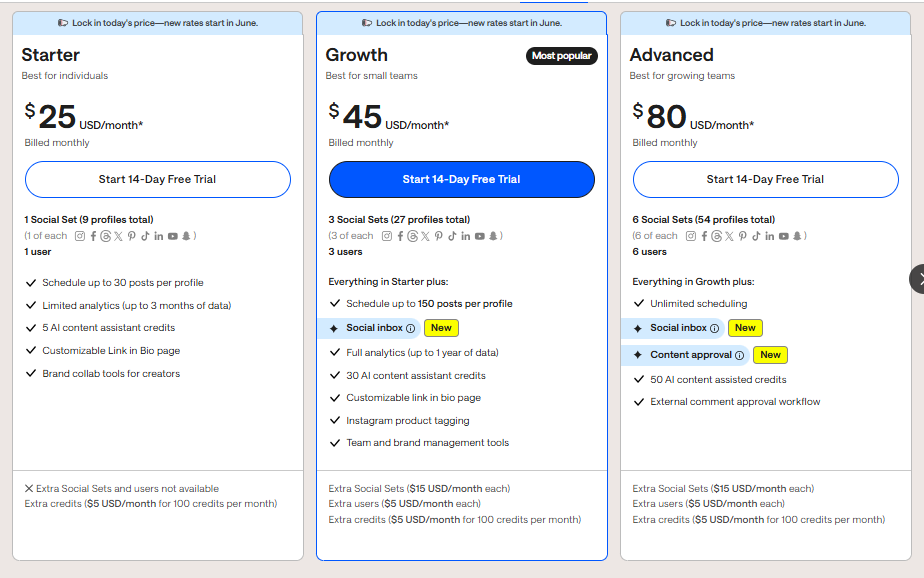
Later starts at $25/month, making it fairly affordable for individuals or small businesses. However, costs can climb quickly as you add users or need more advanced features.
For teams managing multiple clients or platforms, you may find more value in alternatives that offer broader functionality at similar or slightly higher price points.
Overall Verdict
Later is an excellent RecurPost alternative if your focus is Instagram content planning. Its visual-first approach is unmatched for feed design, story scheduling, and creative asset management.
But if you need advanced analytics, broad integrations, or stronger multi-platform support, you’ll probably outgrow Later fairly quickly.
6. Agorapulse

Agorapulse is a robust social media management platform that’s often considered a step up from entry-level tools like RecurPost or Later.
It’s designed with agencies and larger teams in mind, offering a clean interface, strong analytics, and powerful collaboration features. While it delivers a lot of value, its pricing and learning curve can be hurdles for smaller businesses.
Key Features:
Unified Social Inbox
Agorapulse brings all your comments, mentions, reviews, and even ad messages into one central inbox. This makes it far easier to stay on top of conversations and customer engagement.
Advanced Scheduling & Publishing
With a visual calendar, bulk scheduling, and multi-platform support, Agorapulse makes managing content across channels smooth and efficient.
Analytics & ROI Tracking
The platform provides detailed analytics that connect to Google Analytics, letting you measure not just engagement but also conversions and traffic from social.
Collaboration Tools
Built for teams, Agorapulse includes approval workflows, role-based permissions, and shared calendars, keeping everyone aligned and accountable.
Social Listening
One of its standout features is advanced listening. You can monitor keywords, hashtags, and brand mentions across platforms to track trends and manage reputation.
Pros:
- Unified inbox makes engagement management far less stressful.
- Robust analytics and ROI tracking help prove the value of social campaigns.
- Social listening tools give you insights beyond just your own posts.
- Clean interface that’s easier to navigate than many enterprise-level tools.
Cons:
- Pricing is higher compared to simpler alternatives.
- Doesn’t support every platform (e.g., no Pinterest).
- Learning curve can be steeper for new users.
Pricing and Value
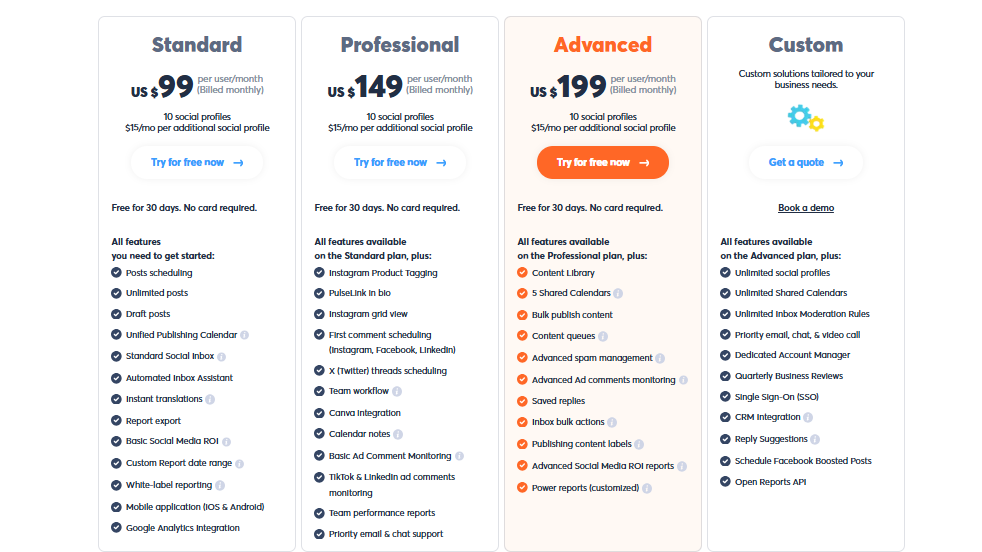
Agorapulse starts at $99/month, putting it in the premium category. For that price, you get a well-rounded suite of features including strong analytics, engagement tools, and collaboration workflows.
While it’s excellent value for agencies and bigger teams, it may feel like overkill for smaller businesses who don’t need advanced reporting or listening features.
Overall Verdict
Agorapulse is a smart RecurPost alternative if you’re managing a team or agency and need powerful engagement, analytics, and collaboration features in one platform.
It’s not the cheapest option, and beginners may find it a little heavy at first, but for those who want depth and professionalism, it’s one of the best all-in-one tools available.
7. Sendible

Sendible is a social media management tool built with agencies in mind. It offers powerful scheduling, collaboration, and reporting features, all wrapped in a clean, professional interface.
Its flexibility and integrations make it especially appealing for marketers who work with multiple clients, though the price point can be a stretch for smaller teams.
Key Features:
Smart Scheduling
With bulk scheduling, queues, and its “smart compose” box that suggests improvements in real time, Sendible makes managing high volumes of content less stressful.
Collaboration & Approval Workflows
Sendible supports team approval processes, ensuring posts are reviewed before going live. For agencies, this keeps both team members and clients aligned.
White-Label Options
Agencies can customize dashboards and reports with their own branding. This adds a professional touch when presenting results to clients.
Deep Analytics
Sendible provides detailed analytics, including campaign performance and ad insights on higher plans. Reports are customizable and can be shared easily.
Priority Inbox
Similar to OnlySocial, Sendible has a centralized inbox to manage comments, mentions, and messages across platforms, helping teams stay responsive.

Pros:
- Excellent for agencies managing multiple clients.
- Shareable calendars make collaboration and planning easy.
- White-label dashboards and reports elevate client presentations.
- Wide range of integrations with third-party tools.
Cons:
- Pricing is higher compared to simpler tools.
- Takes time to learn all the features. It’s not instantly beginner-friendly.
- Some advanced features only come with the more expensive plans.
Pricing and Value
Sendible starts at $29/month for solo users and scales up to around $240/month for agency-level plans (with white-label options).
While it’s not the cheapest, the value lies in its agency-focused features – approval workflows, branded reporting, and broad integrations. For freelancers or very small businesses, though, the cost might outweigh the benefits.
Overall Verdict
Sendible is a strong RecurPost alternative if you’re running a marketing agency or working with multiple clients. It’s more complex and costly than lighter tools, but for teams needing scalability and client-ready features, Sendible is well worth considering.
8. SocialBee

SocialBee is a newer but fast-growing social media management tool that’s become popular with freelancers, creators, and small teams.
What sets it apart is its clever category-based scheduling system, which helps keep content balanced and organized. While it has a bit of a learning curve, once you get used to it, SocialBee can be a real time-saver for managing multiple campaigns.
Key Features:
Category-Based Scheduling
Instead of dumping everything into one queue, you can assign posts to categories like promos, blogs, or quotes. This ensures variety and keeps your content calendar fresh.
Content Recycling
Evergreen content never goes to waste – SocialBee automatically recycles posts, so your queue is never empty and your best content continues to get visibility.
AI-Powered Assistant
SocialBee includes an AI “copilot” to help brainstorm ideas, write captions, and generate hashtags. Perfect for when creativity runs dry.
Collaboration Tools
Teams can share calendars, assign roles, and manage approval workflows, keeping everyone aligned and reducing back-and-forth.
Analytics & Growth Tracking
Provides insights into follower growth, engagement, and performance so you can tweak strategies. Reports aren’t as advanced as enterprise tools, but good enough for small businesses.

Pros:
- Unique category-based scheduling keeps content organized and varied.
- Content recycling ensures your feed never goes quiet.
- AI assistant helps speed up content creation.
- Collaboration features make it useful for small marketing teams.
Cons:
- Steeper learning curve than simpler tools like Buffer.
- Dashboard can feel clunky for first-time users.
- No mobile app, which limits on-the-go management.
- Analytics can sometimes be inconsistent across platforms.
Pricing and Value
SocialBee starts at $24/month for 5 profiles, with plans going up to $82/month for 25 profiles. For the amount of structure and flexibility it provides, it offers solid value, especially for users who want more control over their posting strategy without breaking the bank.
Overall Verdict
SocialBee is a great RecurPost alternative for those who like structure and balance in their content strategy. The category-based system and content recycling make it easy to stay consistent, while its AI assistant and collaboration tools give it an edge for teams.
It’s not the most beginner-friendly tool, but once mastered, it’s one of the smarter scheduling solutions on the market.
9. Hootsuite

Hootsuite is no doubt, the veteran of social media management. The tool has been around longer than most tools on this list, and it remains one of the most feature-rich platforms available.
It’s trusted by global companies and marketing agencies for its powerful scheduling, detailed analytics, and strong collaboration tools.
However, it comes with a high price tag and a steeper learning curve, making it more suitable for bigger businesses than solo marketers.
Key Features:
Advanced Publishing Tools
Hootsuite’s visual content calendar makes it easy to plan and adjust campaigns. You can also create custom publishing queues and get AI-powered posting time suggestions for maximum engagement.
OwlyWriter AI
Built-in AI helps generate captions, hashtags, and content ideas on the fly, streamlining the creation process for busy teams.
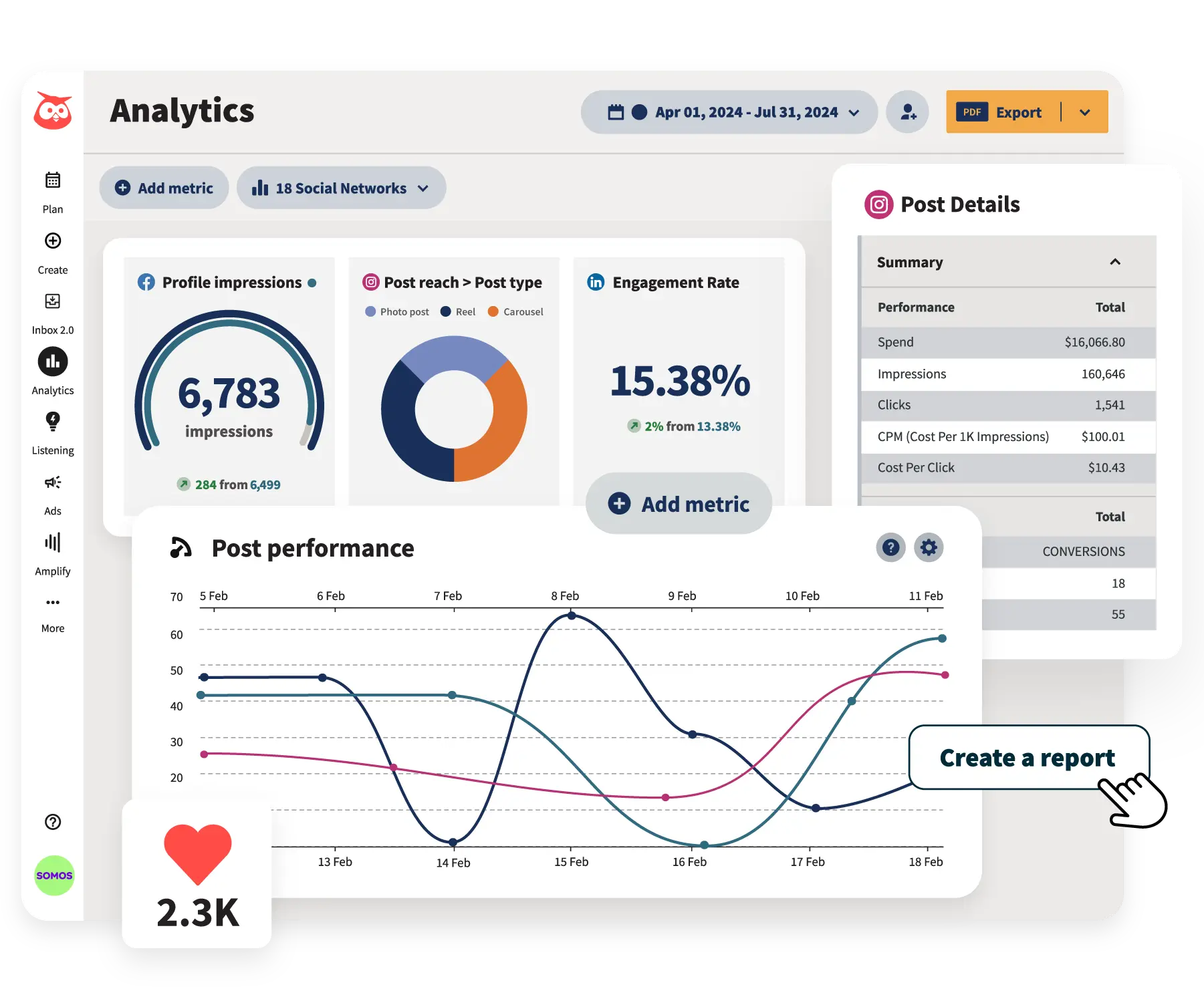
Comprehensive Analytics
Hootsuite provides advanced analytics and reporting, with options to customize and benchmark against industry standards. Great for teams that need to track KPIs and justify ROI.
Social Listening
Premium listening tools track brand mentions, keywords, and sentiment across platforms in real time. This helps businesses manage their reputation and respond quickly to trends.
Team Collaboration & Engagement
Features like role-based access, saved replies, and a unified inbox make teamwork efficient. The platform also supports ad management, letting you boost top-performing posts automatically.
Pros:
- Trusted by enterprises and agencies worldwide.
- Extremely feature-rich, covering everything from publishing to ads.
- Powerful analytics and social listening for data-driven teams.
- Strong collaboration features with approval workflows.
Cons:
- Expensive compared to most alternatives.
- Key features like listening and advanced reporting often require costly add-ons.
- Can feel overwhelming for beginners due to the complex dashboard.
Pricing and Value
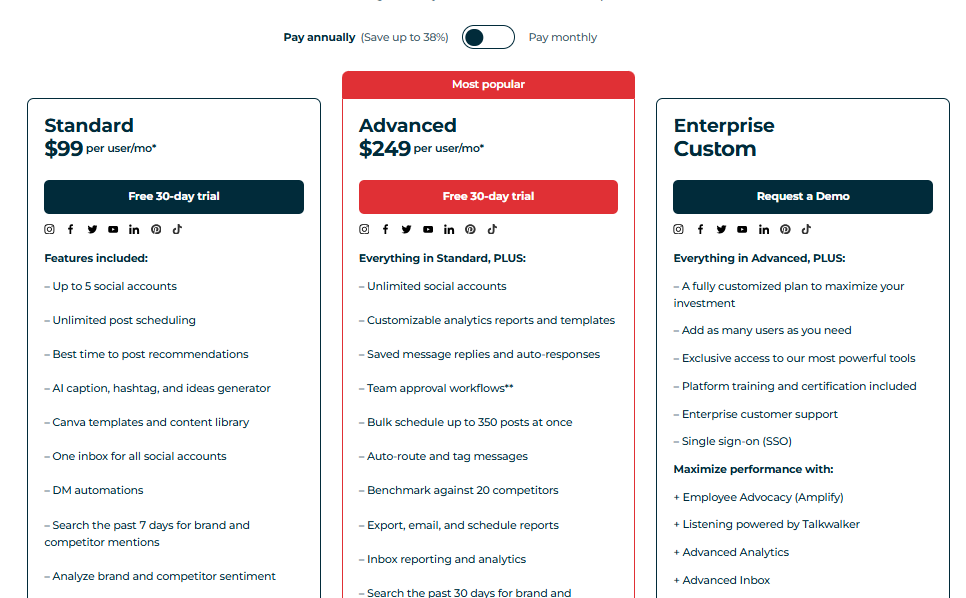
Hootsuite offers a 30-day free trial, with plans starting at $99/month and going up to $249/month depending on the number of users and social accounts. It’s priced firmly in the premium range, making it better suited to enterprises and established agencies rather than freelancers or small businesses.
Overall Verdict
Hootsuite is the go-to RecurPost alternative if you need enterprise-level power, advanced reporting, and robust team collaboration tools. But for small businesses or budget-conscious users, it’s probably overkill.
If you’ve got the budget and want a tool that can do it all, Hootsuite still holds its place as one of the most complete platforms on the market.
How to Choose the Best RecurPost Alternative for Your Business
With so many options out there, picking the right tool can feel a bit overwhelming.
The truth is, there’s no one-size-fits-all. The best alternative for your business depends on your goals, budget, and the way you like to work.
Here are a few things to think about before making your choice:
Define Your Goals
Are you looking to save time with automation, grow faster with better analytics, or improve team collaboration? Being clear on your main objectives helps you rule out tools that look shiny but don’t actually solve your problems.
Check Platform Support
Some tools, like Later, shine for Instagram, while others, like OnlySocial or Agorapulse, spread their strengths across multiple platforms. Make sure the tool you choose supports the networks where your audience spends time.

Consider Ease of Use
A tool that’s too complicated will slow you down. Platforms like Buffer are beginner-friendly, while Hootsuite and Sprout Social can feel overwhelming at first. Test the interface and see what feels natural for you and your team.
Look at Collaboration Needs
If you’re a freelancer, solo-friendly tools might be enough. But if you’re running a team or agency, you’ll want features like approval workflows, shared calendars, and client-ready reports.
Evaluate Analytics and Reporting
Do you just need simple engagement numbers, or do you want in-depth ROI tracking and competitor benchmarks? Tools like Sprout Social and Hootsuite deliver advanced analytics, while Buffer keeps things light and simple.
Balance Features Against Budget
Price is always part of the decision. RecurPost is cheap for a reason – it does less. Higher-priced tools bring more features, but you don’t want to pay for things you’ll never use. Start small if you can, and scale up as your needs grow.
At the end of the day, the best RecurPost alternative is the one that fits your workflow, supports your platforms, and gives you the right balance between features, simplicity, and cost.
Final Note
RecurPost has carved out a niche as a budget-friendly tool, but it’s not the only option – and for many businesses, it’s not the best option.
As your social media needs evolve, you’ll want a platform that grows with you, whether that’s through deeper analytics, better collaboration, or stronger support for multiple platforms.
However, the good news is that from beginner-friendly tools like Buffer to powerhouse platforms like Sprout Social and Hootsuite, there’s a RecurPost alternative for every business type.
The key is knowing what matters most to you: affordability, ease of use, or advanced features. Once you’ve figured that out, the right choice becomes much clearer.
FAQs
Is RecurPost the cheapest option out there?
RecurPost is one of the most affordable tools, starting at just $9/month. But depending on your needs, other tools like Buffer or SocialBee offer competitive pricing with extra features that might deliver better long-term value.
Which RecurPost alternative is best for small businesses?
For small businesses or freelancers, Buffer or OnlySocial are great picks. They’re affordable, simple to use, and give you enough features to stay consistent without overwhelming you.
What’s the best alternative for agencies?
If you’re running an agency, Sendible and Agorapulse are strong choices. Both offer collaboration workflows, client approvals, and white-label reporting – features built specifically for managing multiple clients.
Which tool offers the most advanced features?
Sprout Social and Hootsuite are the heavyweights here. They come with detailed analytics, social listening, ad management, and collaboration tools. But they’re also priced for larger teams and enterprises.
Does OnlySocial offer more than RecurPost?
Yes. While RecurPost is excellent for content recycling, OnlySocial goes further with AI-powered scheduling, bulk posting, deeper analytics, and support for 15+ platforms – all in a clean, user-friendly interface.
How do I know which RecurPost alternative is right for me?
Start by looking at your priorities: if cost is the main factor, stick with affordable tools like Buffer or SocialBee.
If you need advanced reporting or large-team collaboration, look at Sendible, Agorapulse, or Sprout Social. And if you want a balanced, all-in-one solution at fair pricing, OnlySocial is a great choice.