Top 10 Planable Alternatives for All Business Types [2025 Review]

If you’ve been using Planable to plan and manage your social media content, you’ve probably heard the news – Planable was recently acquired by SE Ranking in August 2025.
And while that might sound exciting, acquisitions often bring changes.
Sometimes it’s new features, other times it’s pricing updates, platform shifts, or changes in focus that don’t quite fit what you need.
If you’re starting to wonder if Planable will still be the right fit for your business moving forward, you’re not alone. Many marketers and business owners are already exploring fresh options.
They are considering tools that still offer the same smooth content planning experience but with extra features, better pricing, or a more stable long-term roadmap.
In this guide, we’ve handpicked 10 of the best Planable alternatives for 2025. No matter your business type or size, you’ll find options here that make scheduling, collaboration, and reporting feel effortless.
And yes – OnlySocial is high on that list, because it’s one of the most complete and budget-friendly tools you can switch to right now. You can check it out right away!
Table of Contents
- 1 Why Consider a Planable Alternative?
- 2 Top Planable Alternatives to Consider for Your Business in 2025
- 3 1. OnlySocial ($29/Month)
- 4 2. Buffer ($6/Month)
- 5 3. Metricool ($18/Month)
- 6 4. SocialPilot ($30/Month)
- 7 5. ContentStudio ($19/Month)
- 8 6. Hootsuite ($99/Month)
- 9 7. Loomly ($32/Month)
- 10 8. SocialBee ($29/Month)
- 11 9. Social Champ ($25/Month)
- 12 10. Sendible ($29/Month)
- 13 Features to Look for in Planable Alternatives
- 14 Final Note
- 15 FAQs
Why Consider a Planable Alternative?
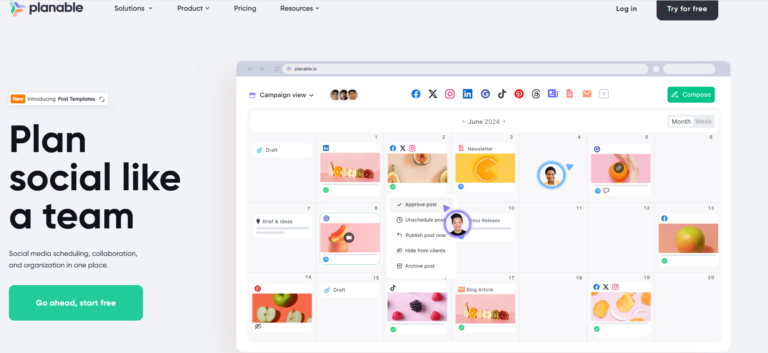
Planable has built a solid reputation as a go-to tool for social media content planning and team collaboration.
Its clean interface, visual post previews, and simple approval workflows have made it a favorite for agencies, brands, and marketing teams.
But with its recent acquisition by SE Ranking, some long-time users are feeling uncertain. Acquisitions often mean changes – sometimes for the better, but sometimes in ways that don’t suit every customer.
Pricing structures can shift, features may get altered or removed, and the platform’s priorities can change to align with the new owner’s vision.
Beyond the acquisition, there are other reasons businesses might explore a Planable alternative:
- Broader feature set – Some teams need more than just planning and approvals. They want advanced analytics, AI-powered content creation, or deeper integration with other marketing tools.
- Better pricing – Planable’s pricing is fair for many, but it’s not always the most cost-effective choice, especially for small businesses or large agencies managing dozens of accounts.
- All-in-one solutions – Instead of using multiple tools for planning, publishing, and analytics, some brands prefer a single platform that does it all from one dashboard.
- More flexible collaboration – While Planable handles approvals well, some competitors offer more detailed feedback tools, task management features, and real-time editing.
- Better customer support – Good customer support is essential. Many Planable users have complained about having less-than-ideal experiences with Planable’s support team.
If any of these points sound familiar, or if you simply want to future-proof your social media workflow, now is a good time to explore other options.
And the good news is that there are several tools out there that tick all the right boxes while offering even more room to grow. Let’s check out the best of them.
Top Planable Alternatives to Consider for Your Business in 2025
1. OnlySocial ($29/Month)
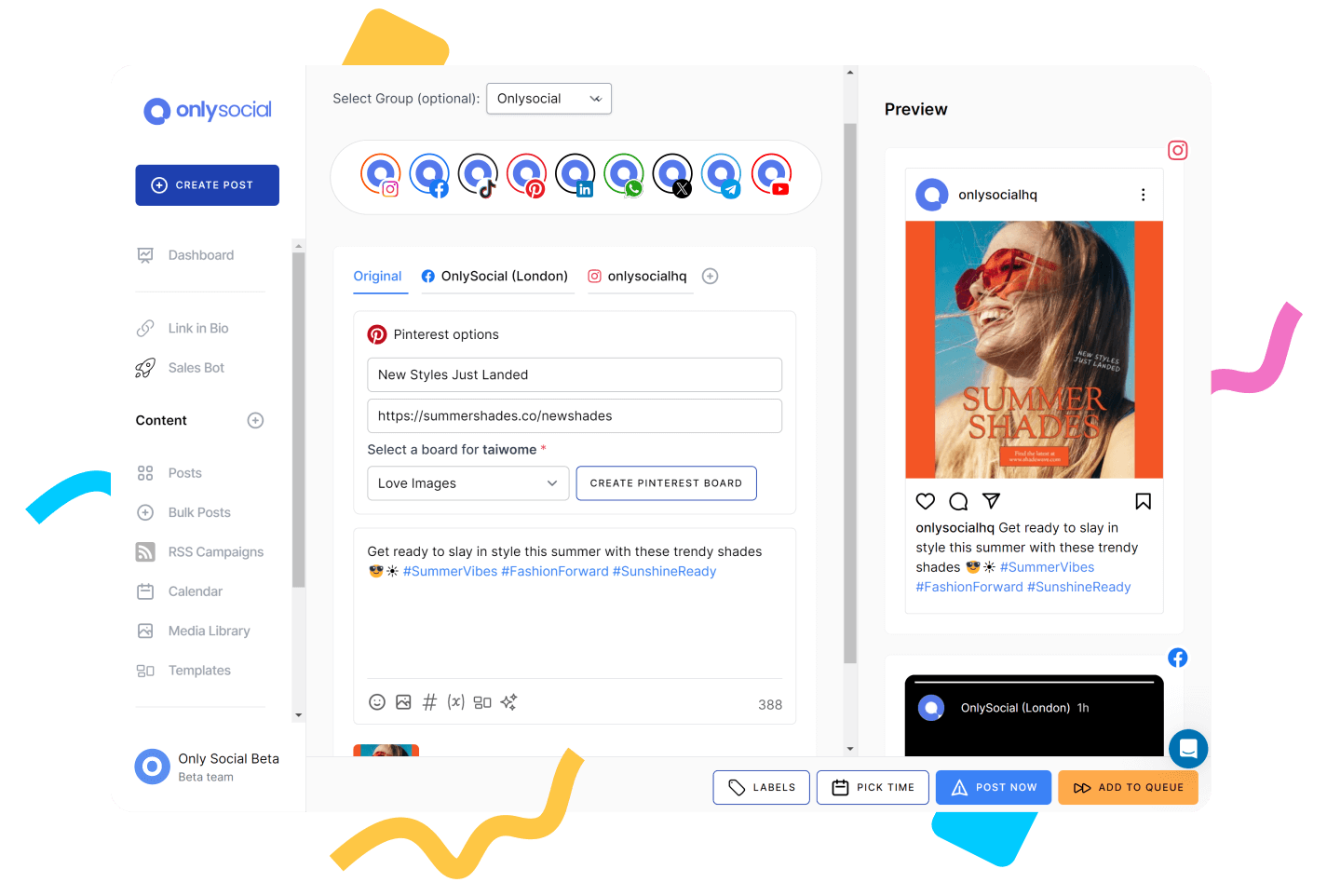
If you’re looking for a Planable alternative that doesn’t just handle collaboration but also gives you powerful publishing, analytics, and AI features in one place, OnlySocial should be high on your list.
The tool is designed for businesses of all sizes – from solo creators to big agencies – and it keeps everything simple with a clean, user-friendly dashboard.
One thing that makes OnlySocial stand out compared to Planable is that it’s not just about planning posts. You can create, schedule, collaborate, monitor, and measure results without leaving the platform. That means fewer logins, fewer integrations, and far less time lost jumping between tools.
Key Features of OnlySocial
Cross-Platform Scheduling for 15+ Networks
OnlySocial lets you schedule content to more than 15 social platforms, including Instagram, TikTok, Facebook, LinkedIn, YouTube, Pinterest, Threads, and Bluesky.
Unlike Planable, which focuses on visual planning for the main networks, OnlySocial gives you full, native posting capabilities for each channel, all from one unified calendar.
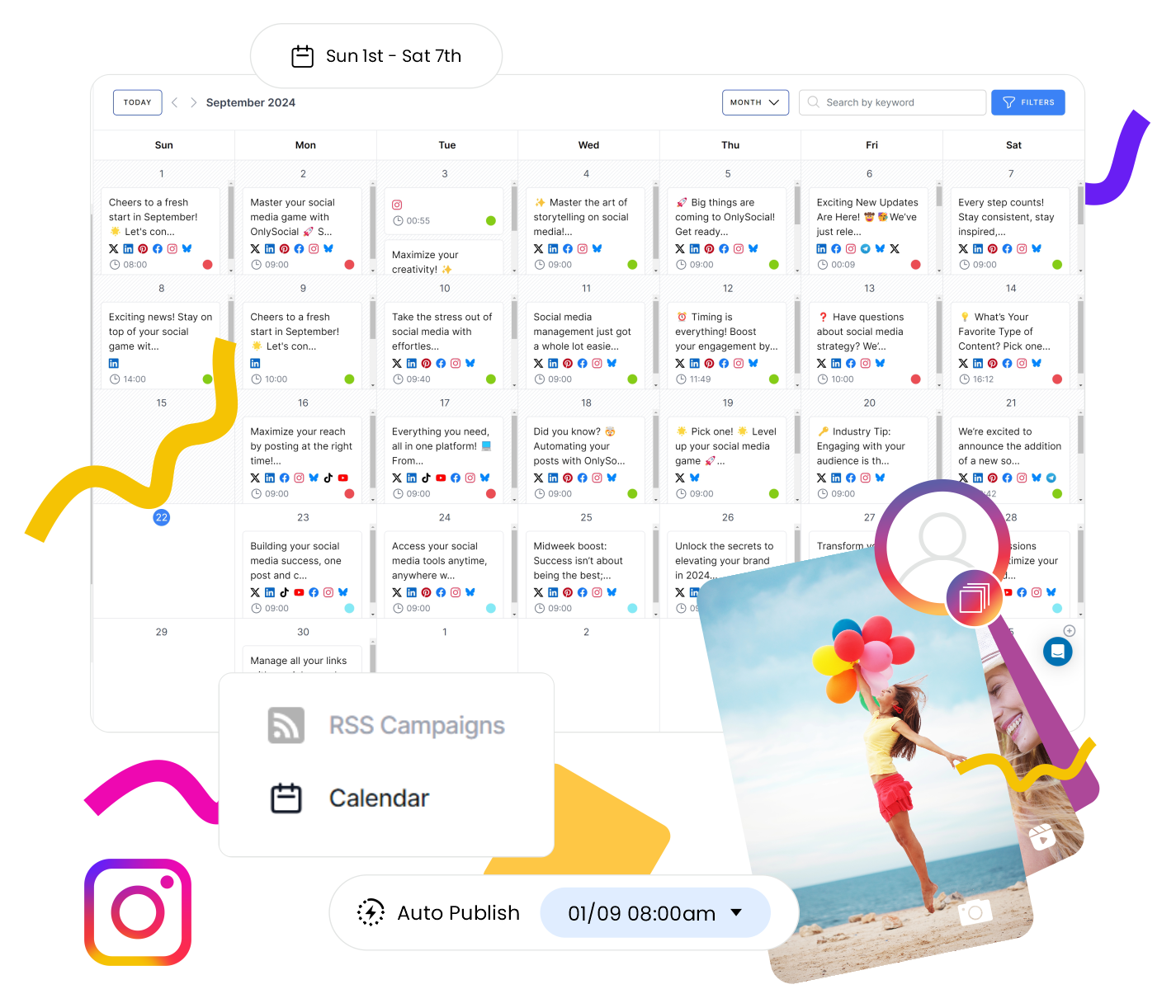
Visual Calendar with Bulk Upload
You can drag, drop, and rearrange posts easily with the unified visual calendar. But what really sets it apart is the bulk upload feature. This allows you to upload up to 500 posts at once using a CSV file.
Planable is great for visual previews, but OnlySocial adds high-volume scheduling power that’s a game-changer for agencies and busy marketing teams.
AI-Powered Content Creation
The built-in AI Assistant is like having a copywriter and strategist in your pocket. It can generate captions, suggest hashtags, create post ideas, and even source visuals to match your brand’s style.
Planable doesn’t offer an integrated AI tool, so this is a big upgrade if you want faster content creation without sacrificing quality.
Smart Analytics and Reports
Get clear insights into how your posts perform – from engagement rates to best posting times – and export professional reports for clients or internal reviews. Planable sure doesn’t provide this level of detailed analytics.
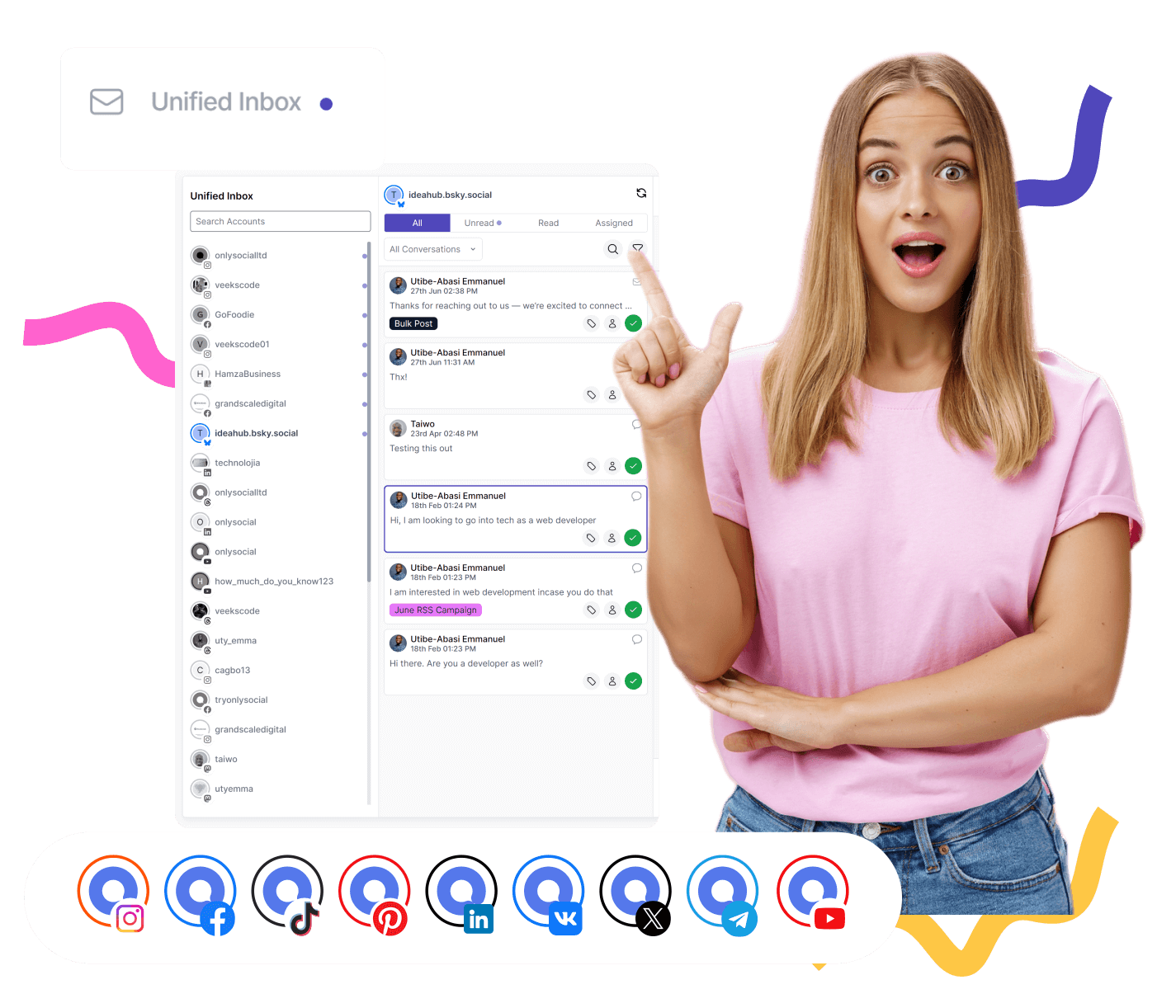
Unified Social Inbox
Managing DMs, comments, and mentions across platforms can be a headache. OnlySocial’s Unified Social Inbox puts all your interactions in one place, so you can reply faster and never miss an engagement opportunity.
Seamless Integrations
OnlySocial integrates directly with tools like Adobe Express, Bit.ly, and OpenAI, making it easy to complete important content creation tasks without leaving your dashboard.
Team Collaboration Tools
Assign roles, leave internal comments, and create approval workflows tailored to your team. Plus, you can store brand assets in a shared library so everyone is working with the same resources.
Pros
- Offers affordable plans with powerful, all-in-one features
- The tool supports 15+ social platforms
- AI-assisted content creation and hashtag suggestions
- Bulk upload up to 500 posts
- Unified inbox for managing all messages in one place
- Clear, actionable analytics
Cons
- OnlySocial doesn’t offer a free plan
- No built-in competitor analytics
Pricing & Value
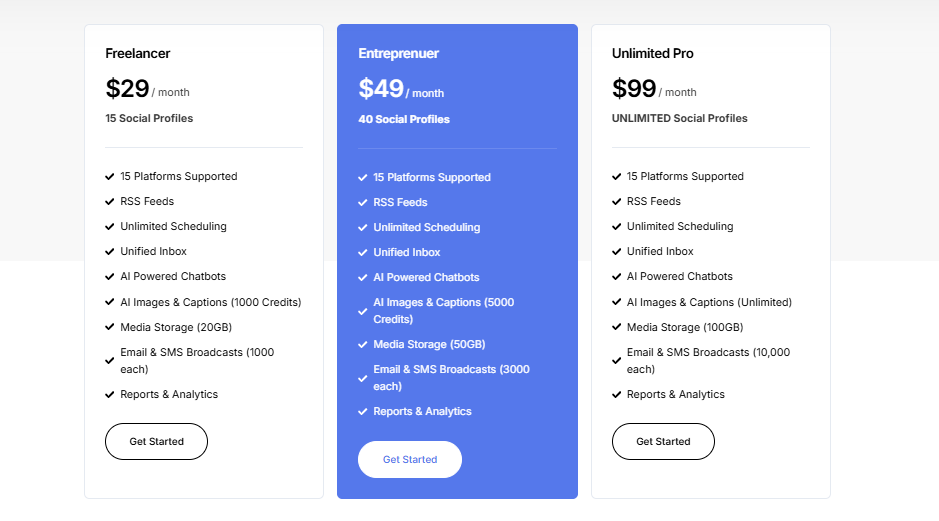
OnlySocial offers excellent value for the features you get. Its basic plan starts from $29/month for up to 15 social accounts. It comes with all the advanced features, including bulk scheduling, AI assistance, analytics, and collaboration tools.
Compared to Planable, which starts from $33/month for only 4 social accounts and limited features, OnlySocial is significantly more budget-friendly, especially for teams managing multiple accounts.
Final Verdict
If Planable’s acquisition has you considering a switch, OnlySocial is an upgrade worth making.
It keeps the strong collaboration focus but adds the advanced scheduling, analytics, AI, and engagement features you’d otherwise need multiple tools for. It’s one of the most well-rounded and cost-effective Planable alternatives in 2025.
2. Buffer ($6/Month)
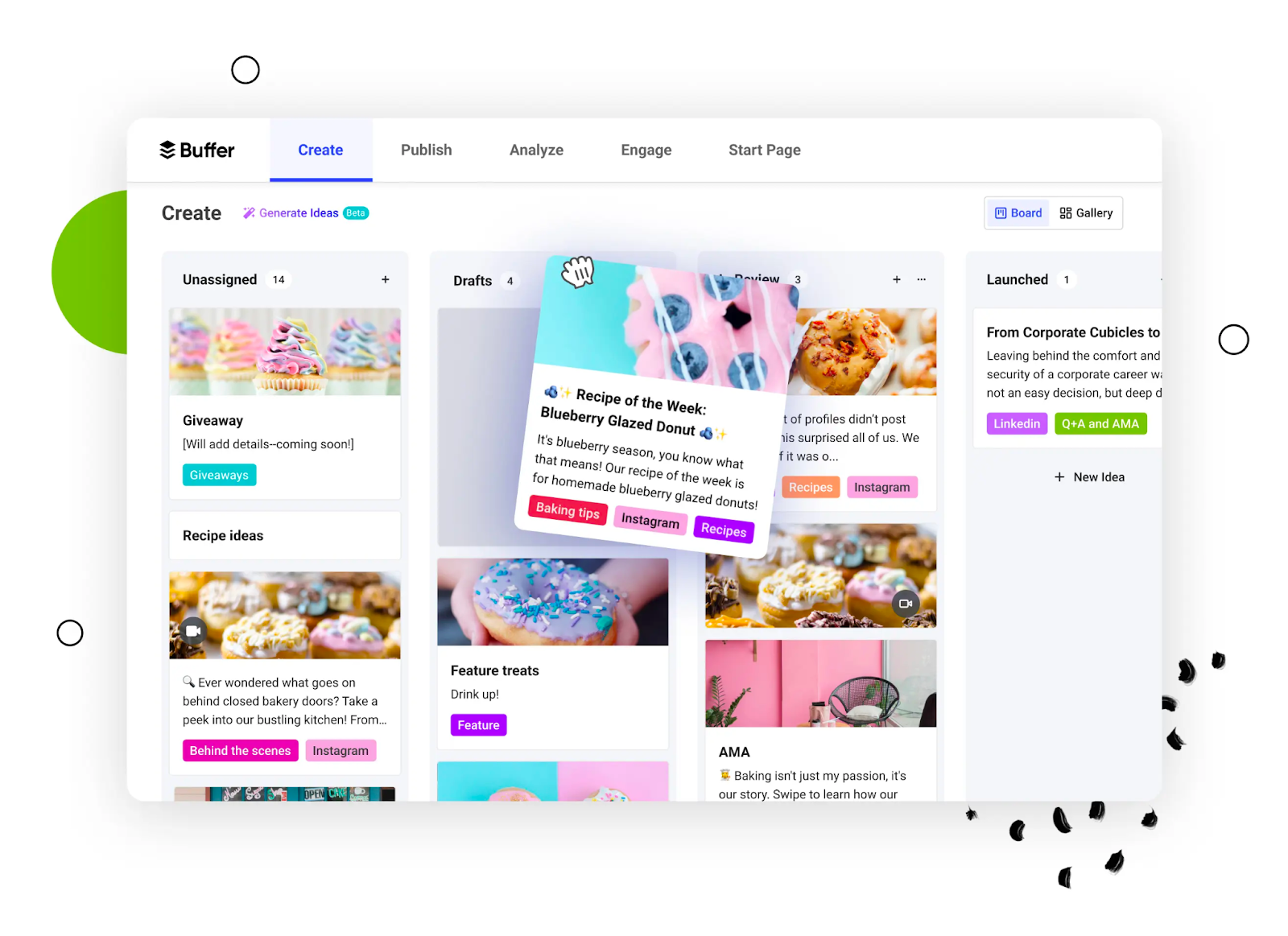
Buffer is one of the most popular names in social media management – and for good reason. It’s clean, easy to use, and perfect for marketers who want a straightforward way to plan and publish content.
While Planable shines in collaborative post approvals, Buffer is better if you want a balance between scheduling, publishing, and performance tracking without a steep learning curve.
Key Features
Multi-Platform Scheduling
Buffer supports popular platforms like Instagram, Facebook, TikTok, Twitter/X, LinkedIn, Pinterest, YouTube, and Mastodon.
Its publishing workflow is smooth, with the ability to queue posts, set custom publishing times, and quickly shuffle content around the calendar.
Visual Planning Tools
Like Planable, Buffer offers a drag-and-drop calendar, but it’s more functional than purely visual. You can filter by platform, campaign, or status, making it easier to organize content for different audiences.
AI Content Assistant
Buffer has recently integrated an AI Assistant to help with captions, ideas, and content repurposing. While not as feature-rich as OnlySocial’s AI tools, it’s still a big help for those who want to speed up copywriting.
Analytics & Reporting
Buffer offers built-in analytics to track post reach, engagement, clicks, and audience growth. It’s not as advanced as some dedicated analytics tools, but it’s perfect for quick performance snapshots.
Engagement Dashboard
Reply to comments and messages on Instagram, Facebook, and LinkedIn from one place. This isn’t as wide-reaching as OnlySocial’s unified inbox, but it’s still useful for maintaining community engagement without hopping between apps.
Team Collaboration
Invite team members, assign roles, and review content before publishing. While Buffer’s collaboration is simpler than Planable’s highly visual approval process, it works well for small teams that don’t need overly complex workflows.
Pros
- Extremely user-friendly with a clean interface
- Covers all major social media platforms
- AI Assistant for quicker content creation
- Affordable entry-level pricing
- Decent engagement tools for main platforms
Cons
- Analytics could be more detailed
- Limited collaboration features compared to Planable
- Engagement inbox doesn’t cover all networks
Pricing & Value
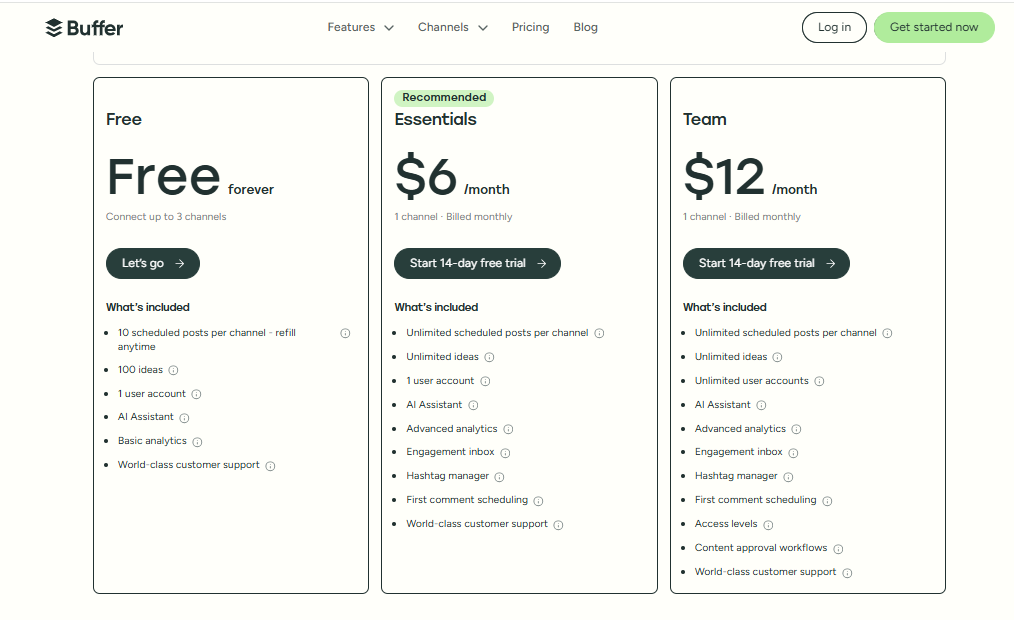
Buffer’s pricing is transparent and scales with your needs. The Essentials plan starts at $6/month per channel, Team plan at $12/month per channel, and the Agency plan at $120/month for 10 channels (additional channels cost extra).
There’s also a free plan with up to 3 channels and 10 scheduled posts per channel.
For solo marketers or small businesses, Buffer can be more budget-friendly than Planable. However, for larger teams, the per-channel pricing can quickly add up.
Overall Verdict
If you want a lightweight, easy-to-learn alternative to Planable that still covers scheduling, analytics, and basic engagement, Buffer is a solid choice.
It’s best suited for small businesses, creators, and marketers who prioritize simplicity over advanced workflow customization.
3. Metricool ($18/Month)
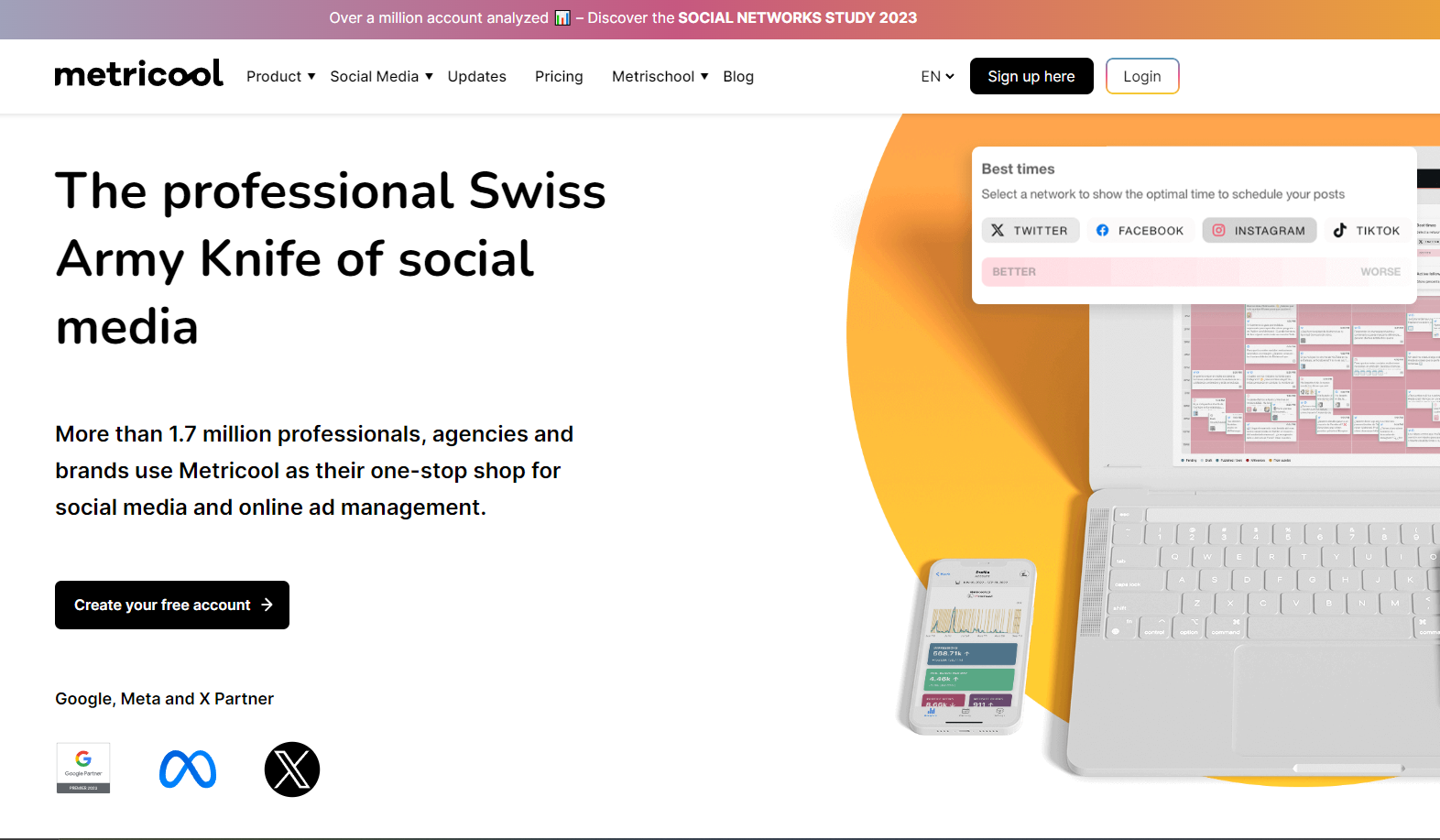
Metricool is a powerful all-in-one social media management and analytics tool that has quickly become a favorite among marketers who love data.
While Planable focuses heavily on collaboration and approvals, Metricool shines in giving you a complete view of your performance across social media, blogs, and even paid campaigns – all in one dashboard.
Key Features
Unified Social Media Scheduling
Metricool supports platforms like Instagram, Facebook, Twitter/X, LinkedIn, TikTok, Pinterest, YouTube, and Google Business Profile.
You can plan and post content directly from the visual drag-and-drop calendar, with the added bonus of seeing the “best time to post” suggestions based on your audience’s behavior.
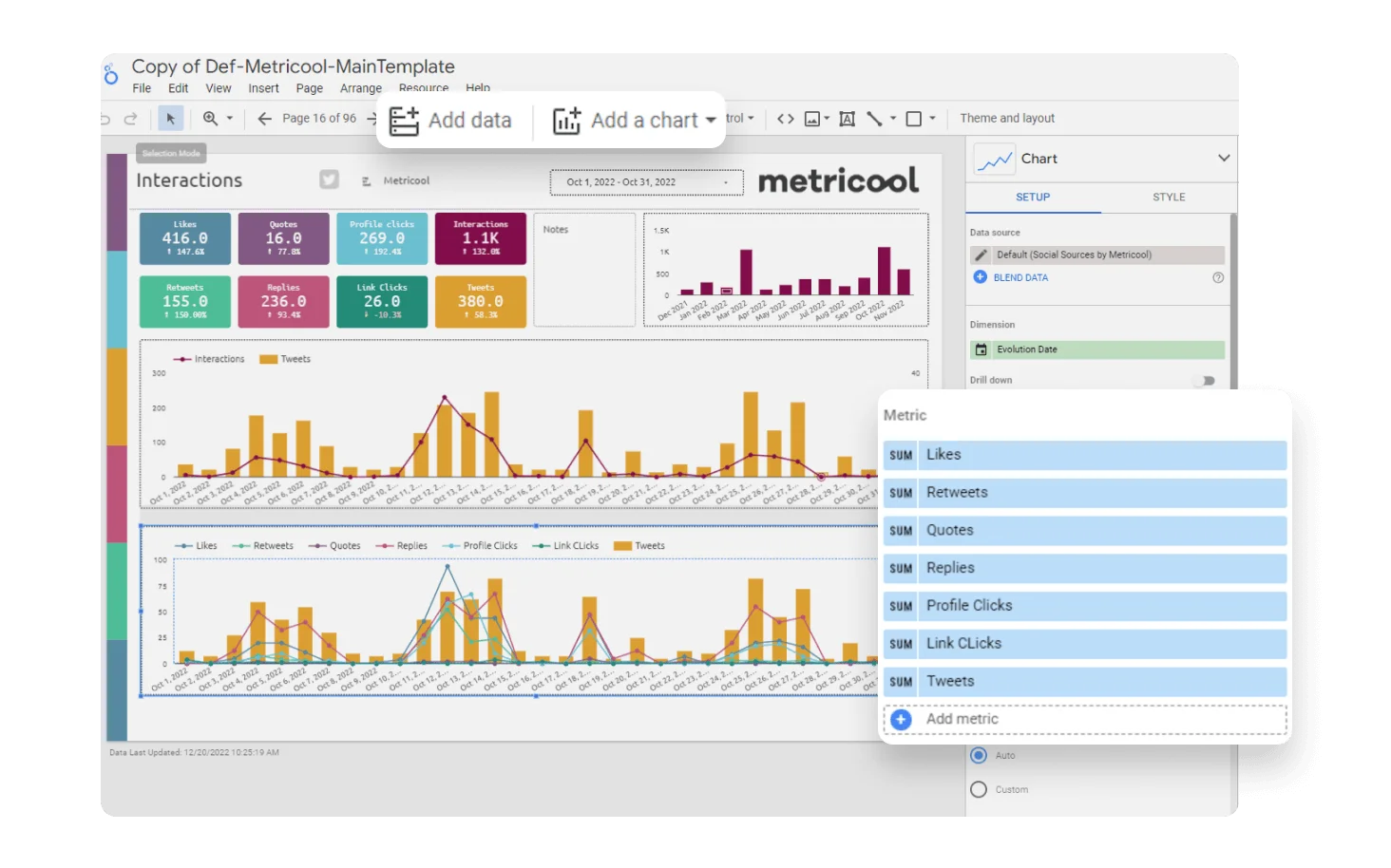
Deep Analytics
This is where Metricool really outshines Planable. You get detailed metrics for each social post, along with performance tracking for your website, Google Ads, Facebook Ads, and more.
The ability to monitor organic and paid results in one place makes it ideal for businesses that want to connect the dots between social and other marketing channels.
Competitor Analysis
While Planable doesn’t offer competitor insights, Metricool lets you track competitors’ social profiles to compare performance and spot trends. This can be a game-changer for staying ahead in your niche.
Hashtag Tracking
If you run hashtag campaigns on Instagram or Twitter/X, Metricool can track hashtag performance over time, helping you identify which ones are boosting visibility.
Reporting
Generate custom reports for clients or internal teams with a few clicks. Reports are visually appealing and fully white-labelled on higher plans, which is great for agencies.
Ad Campaign Integration
Planable doesn’t touch ads, but Metricool connects directly with your ad accounts so you can manage and measure campaigns alongside organic content.
Pros of Metricool
- Excellent analytics that go beyond social media
- “Best time to post” feature improves engagement
- Competitor tracking and hashtag analytics
- Supports both organic and paid campaign tracking
- Strong reporting tools for agencies
Cons
- Interface can feel overwhelming for beginners
- Collaboration features aren’t as strong as Planable’s
- Limited AI content tools compared to platforms like OnlySocial
Pricing & Value
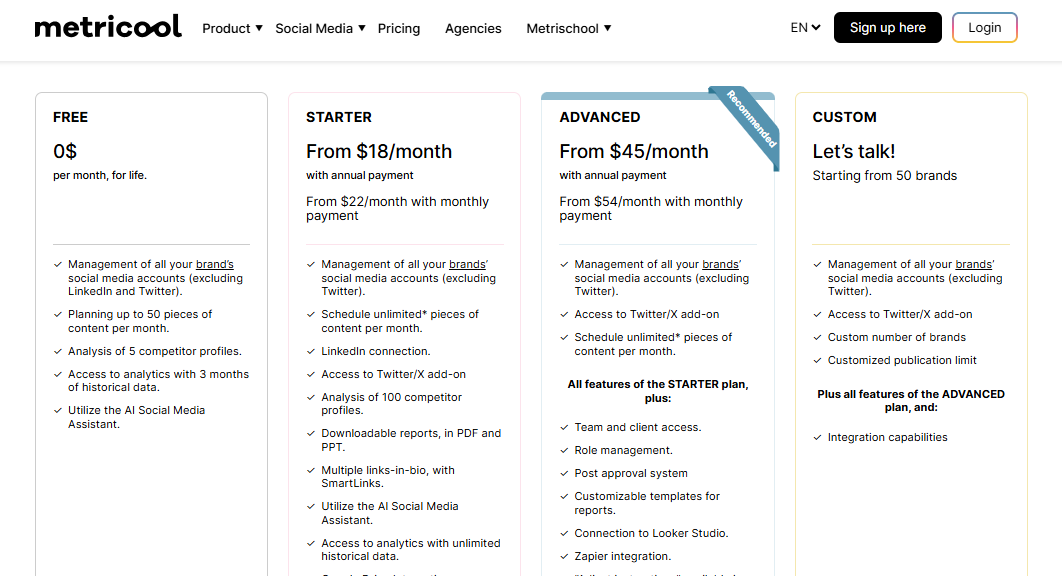
Metricool offers a free plan with basic features, making it an easy option for beginners.
Paid plans start at $18/month for the Starter plan, $45/month for the Advanced plan, and $119/month for the Enterprise plan (billed annually).
Considering it combines scheduling, analytics, competitor tracking, and ad integration, it offers excellent value, especially for data-driven marketers and agencies.
Final Verdict
If you love digging into numbers and want a tool that combines social posting with detailed analytics, Metricool is a top contender.
It’s especially strong for brands and agencies running both organic and paid campaigns, though those who prioritize visual collaboration, like in Planable, may find it less engaging for content approvals.
4. SocialPilot ($30/Month)
SocialPilot is another impressive tool to consider when looking for an alternative to Planable. It is a well-rounded social media management tool built for businesses, agencies, and marketing teams.
While Planable focuses heavily on visual approvals and content reviews, SocialPilot expands into multi-platform posting, robust analytics, and even client management features. This makes it a strong choice for teams handling high volumes of content.
Key Features
Multi-Platform Scheduling
SocialPilot supports over 10 platforms, including Facebook, Instagram, LinkedIn, Twitter/X, TikTok, Pinterest, YouTube, and Google Business Profile.
You can schedule in bulk, queue posts, or reschedule evergreen content. Unlike Planable, it offers RSS feed automation for content curation.
Analytics & Reporting
Planable’s analytics are limited compared to SocialPilot. Here, you get in-depth engagement metrics, audience growth tracking, and post-performance breakdowns. Reports are exportable and can be white-labelled for agencies.
Client Management
For agencies, SocialPilot’s client management is a big win. You can create dedicated client dashboards, manage accounts without needing client passwords, and set permissions for collaboration.
Collaboration Tools
While Planable’s collaboration shines in the content approval process, SocialPilot takes a more operational approach – assigning roles, tracking activity, and allowing managers to approve or reject posts. However, it doesn’t match Planable’s visual post feed experience.
Social Inbox
Like Planable, SocialPilot offers a unified inbox for comments, messages, and mentions, letting you respond quickly to audience engagement without switching platforms.
Pros
- SocialPilot supports bulk scheduling and RSS feed automation
- Expect strong analytics and white-labelled reports for agencies
- Built-in client management tools
- Unified inbox for managing comments and DMs
- More budget-friendly than some enterprise tools
Cons
Collaboration is functional but less visual compared to Planable
Interface feels more “utility” than creative-friendly
Limited creative asset storage compared to some rivals
Pricing & Value
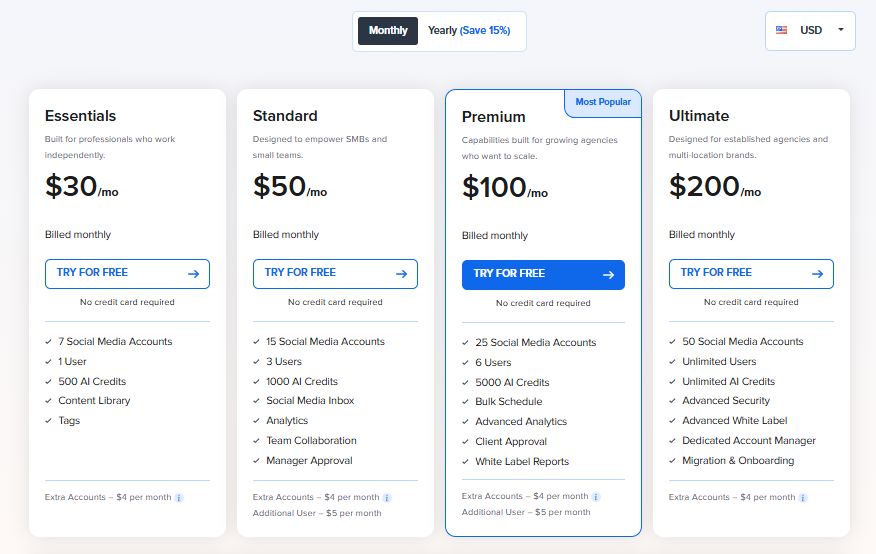
SocialPilot’s pricing starts at $30/month for the Professional plan, scaling to $100/month for the Agency+ plan when billed annually.
All plans include analytics, bulk scheduling, and social inbox access, making it great value for high-volume posting teams. Compared to Planable, you get more publishing and reporting power, but less emphasis on creative approvals.
Final Verdict
If you’re running multiple accounts, need advanced analytics, and want client-ready reports, SocialPilot is an excellent alternative to Planable.
You’ll trade some of the creative collaboration experience for stronger operational tools and wider platform coverage. That’s a worthwhile swap for many agencies and growing businesses.
5. ContentStudio ($19/Month)
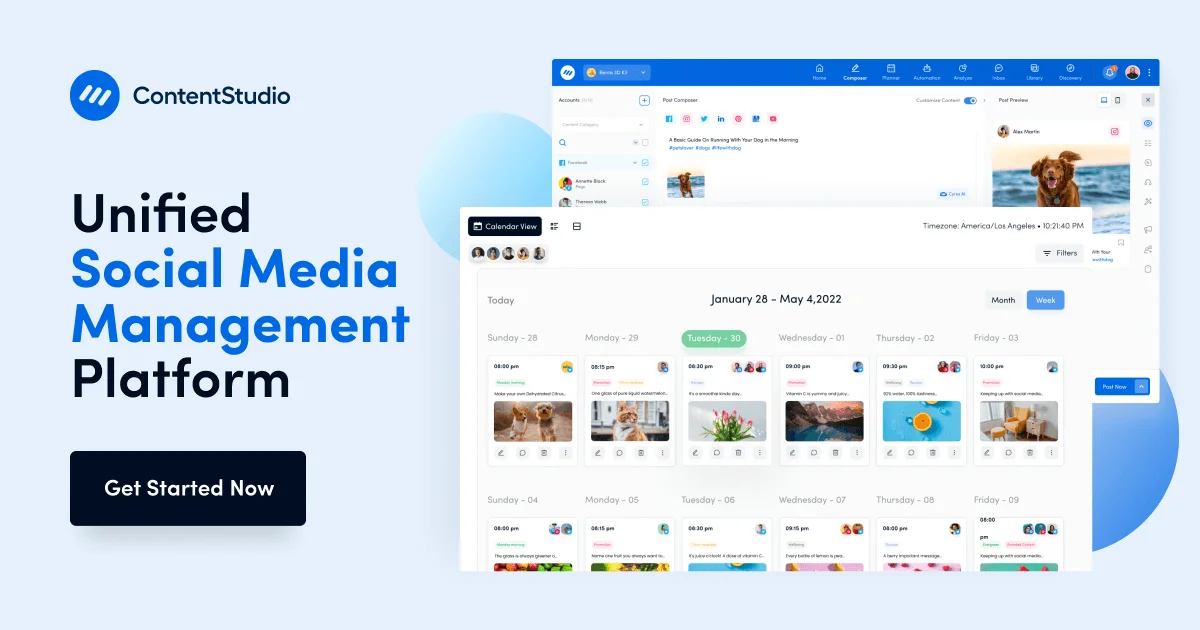
ContentStudio is an all-in-one social media management and content marketing platform built for marketers who need more than just scheduling and approvals.
In addition to content collaboration and post approvals, ContentStudio adds advanced features like AI-assisted content creation, content discovery, and social listening.
This makes it an attractive option for brands that want to manage publishing and find fresh ideas in one place.
Key Features
Multi-Channel Publishing
With ContentStudio, you can post to a wide range of social platforms, including popular ones like Facebook, Instagram, LinkedIn, Twitter/X, Pinterest, YouTube, TikTok, and Google Business Profile.
It also integrates with blogging platforms like WordPress and Medium – something Planable doesn’t offer natively.
AI-Powered Content Creation
Its AI assistant helps generate captions, blog outlines, and even entire social posts. While Planable also supports content creation inside its editor, ContentStudio’s AI tools feel more geared towards ideation and speed, helping you fill gaps in your content calendar quickly.
Content Discovery & Social Listening
One standout feature Planable doesn’t have is ContentStudio’s content discovery engine. You can search trending topics, monitor keywords, and curate articles to share. This is a big plus for brands looking to keep their feeds fresh with relevant content.
Visual Calendar & Bulk Scheduling
Much like Planable, ContentStudio offers a clean, drag-and-drop calendar for easy scheduling. You can also bulk upload posts, queue evergreen content, and preview how your posts will look on different platforms.
Unified Social Inbox
Similar to Planable, ContentStudio has a unified inbox for managing comments, mentions, and DMs across platforms, so you can engage without leaving the dashboard.
Advanced Analytics & Reporting
ContentStudio offers detailed analytics on reach, engagement, top-performing posts, and audience demographics. Reports can be automated and white-labelled, making it a good fit for agencies that need client-ready insights.
Pros
- Offers AI tools for faster content creation and ideation
- Comes with content discovery and social listening features
- Unified inbox for engagement
- Supports blogging platforms in addition to social media
- Strong analytics and white-labelled reports
Cons
- Can feel feature-heavy for small teams that only need approvals and scheduling
- Pricing is higher than some simpler alternatives
- Learning curve for first-time users
Pricing & Value
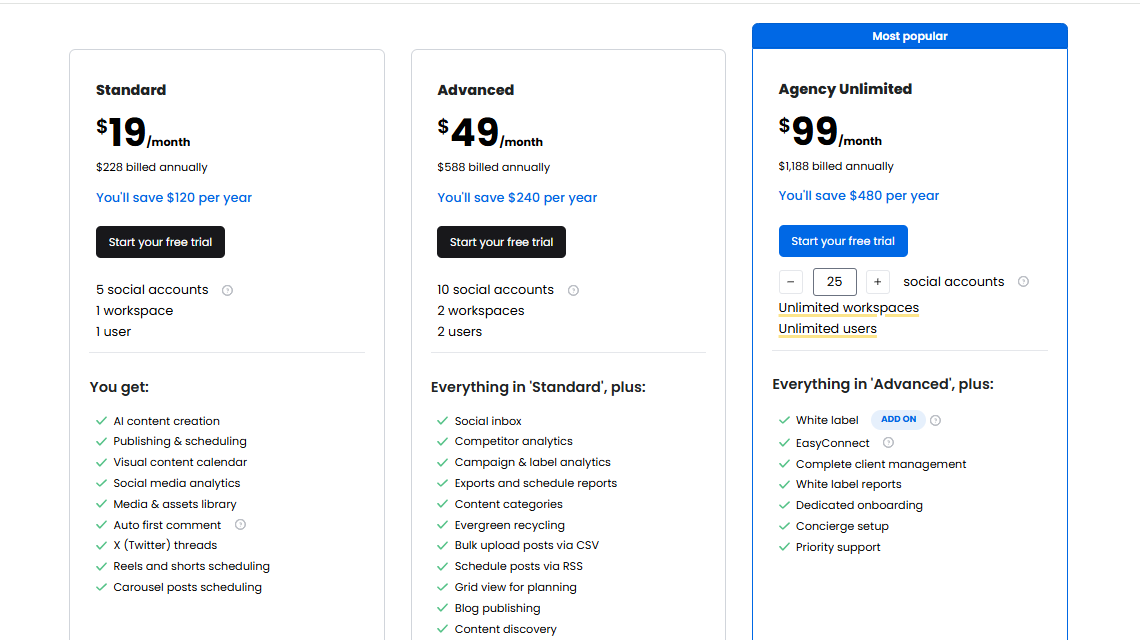
ContentStudio’s plans start at $19/month for the Starter plan (1 user, 5 social accounts) and go up to $99/month for the Agency plan with more accounts, users, and advanced features. ConentStudio is indeed a more affordable and better option, especially for teams managing both strategy and publishing in one place.
Overall Verdict
If you want a tool that combines Planable’s scheduling and collaboration strengths with extra capabilities, ContentStudio is a strong contender.
It’s especially good for agencies and content-heavy brands that need both creativity and data-driven insights under one roof.
6. Hootsuite ($99/Month)
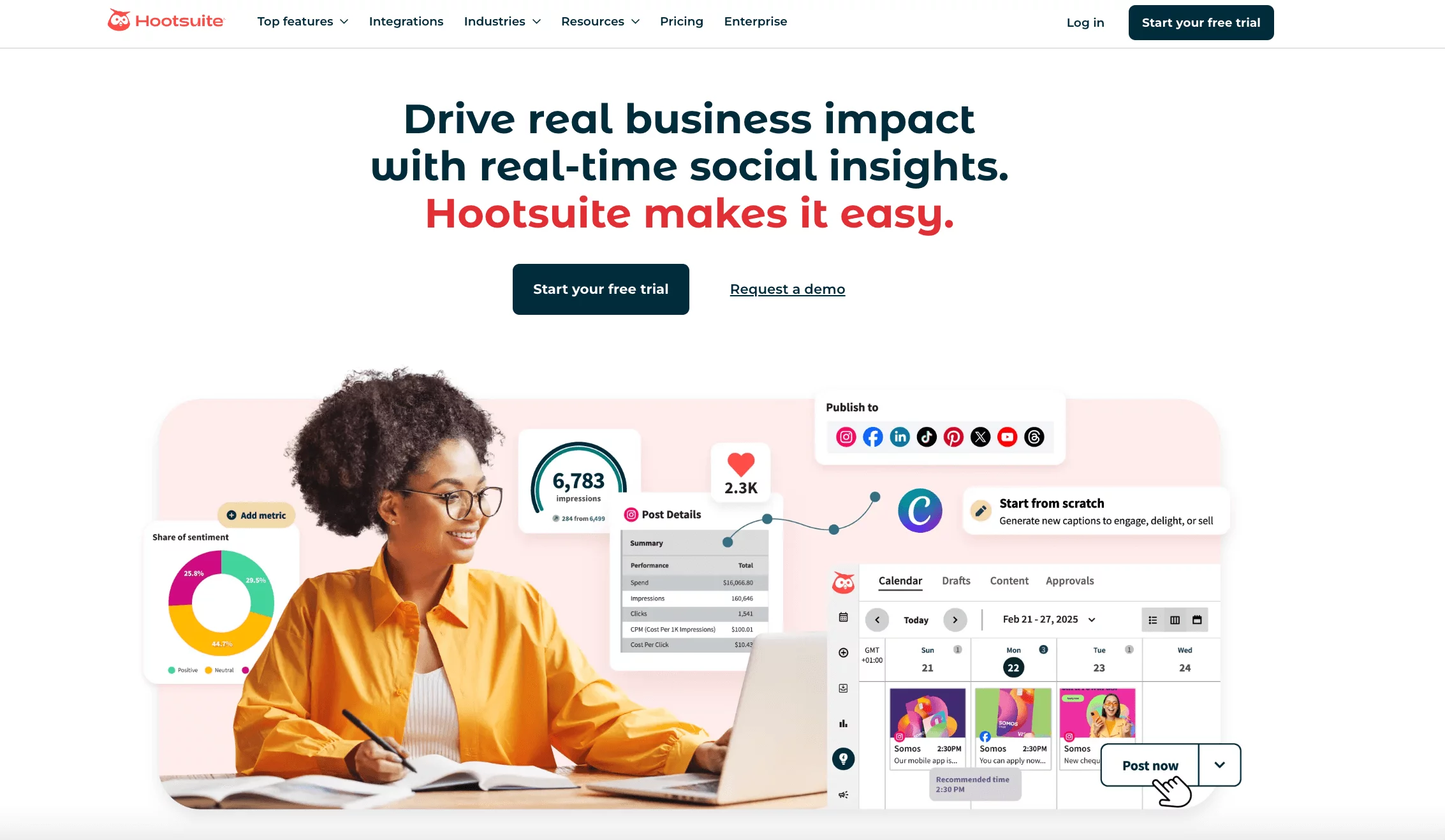
Hootsuite has been around for years and is still one of the most recognizable names in social media management.
Yes, Planable wins points for its sleek collaboration and approval process but Hootsuite is more of an all-in-one powerhouse. It goes beyond content approvals to give you publishing, engagement, analytics, social listening, and even ad management – all from one dashboard.
Key Features of Hootsuite
Wide Platform Support
Hootsuite connects with over 20 social networks, including Facebook, Instagram, LinkedIn, TikTok, YouTube, Twitter/X, Pinterest, and more.
It also supports integrations with tools like Canva, Dropbox, and Google Drive, making it easy to pull in creative assets.
Scheduling & Calendar
You get a visual planner similar to Planable, but with more automation features like bulk scheduling, best-time-to-post recommendations, and auto-scheduling.
Unified Social Inbox
Like Planable, Hootsuite lets you view and reply to comments and DMs across multiple platforms in one place. The difference? Hootsuite also integrates social listening streams, so you can track brand mentions and keywords even if they don’t tag you directly.
Analytics & Reporting
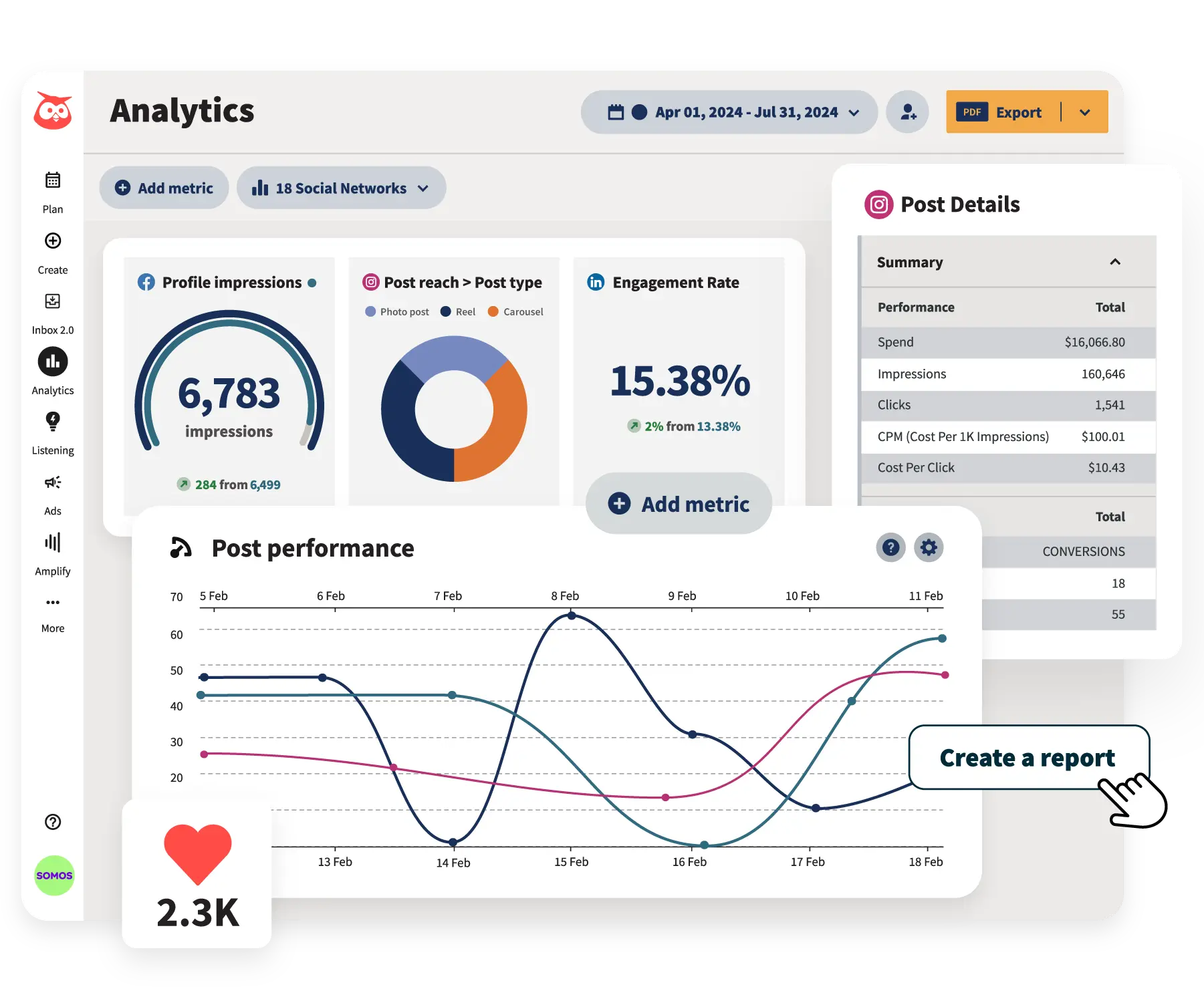
Hootsuite offers detailed analytics that track engagement, audience growth, and ROI. You can create custom reports, export data, and even compare performance across campaigns – something Planable’s analytics can’t match at the same depth.
Ad Campaign Management
One of Hootsuite’s unique features is the ability to create, manage, and analyze paid social campaigns directly from the dashboard. Planable focuses purely on organic content, so this is a big plus for brands running both paid and organic strategies.
Team Collaboration
While Planable’s post-by-post feedback and approval process is very streamlined, Hootsuite offers role-based permissions, task assignments, and workflow tools that are designed for larger, more complex teams.
Pros
- Supports the most platforms out of the tools on this list
- Built-in social listening and brand monitoring
- Ad campaign management alongside organic posting
- Strong analytics and reporting tools
- Unified inbox with advanced engagement filters
Cons
- Higher pricing than many alternatives
- Can feel overwhelming for small teams with simple needs
- Interface is less modern compared to Planable’s clean design
Pricing & Value
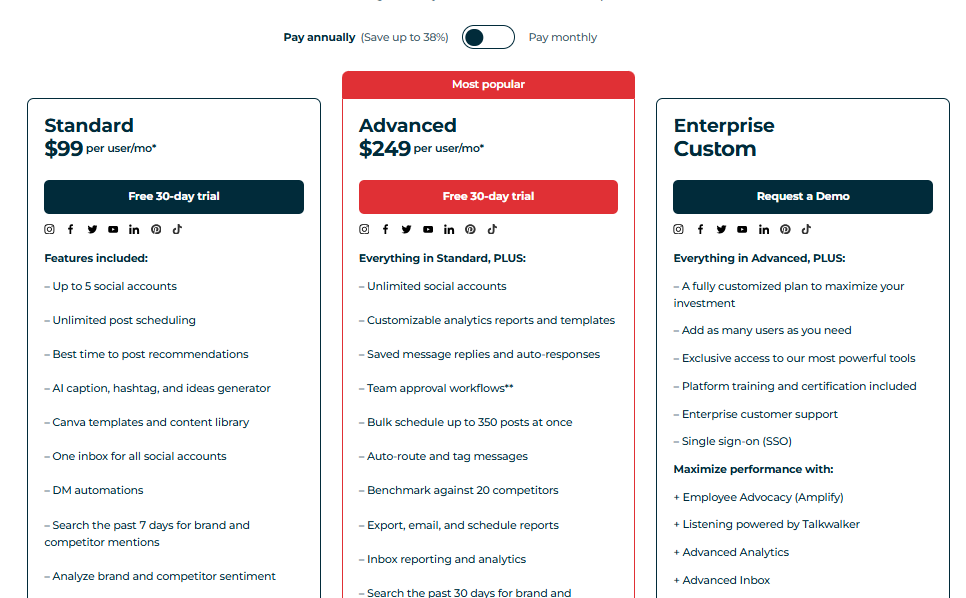
Hootsuite’s plans start at $99/month for 1 user and 10 social accounts. The Team plan jumps to $249/month for 3 users and 20 accounts, while larger businesses can opt for the Business or Enterprise tiers with more custom features.
It’s significantly pricier than Planable, but the extra cost is justified if you need ad management, social listening, and deep analytics all in one place.
Overall Verdict
If you want more than just post approvals and scheduling, Hootsuite is one of the most comprehensive Planable alternatives out there. It’s especially well-suited for brands that want to manage paid ads, track mentions, and get enterprise-level analytics without juggling multiple tools.
7. Loomly ($32/Month)

Loomly is a content planning and scheduling platform that focuses on helping teams create, approve, and publish content in an organized way.
If you love Planable’s collaborative features but want a tool with more built-in content inspiration and workflow automation, Loomly could be a perfect fit.
It’s designed for both small businesses and large teams, with a clean interface that makes planning social posts feel effortless.
Key Features
Multi-Platform Publishing
Loomly supports major social platforms like Facebook, Instagram, Twitter/X, LinkedIn, TikTok, Pinterest, and YouTube. You can also post to Google Business Profiles and run ads through Facebook Ads integration, giving you a bit more variety than Planable.
Post Inspiration & Guidance
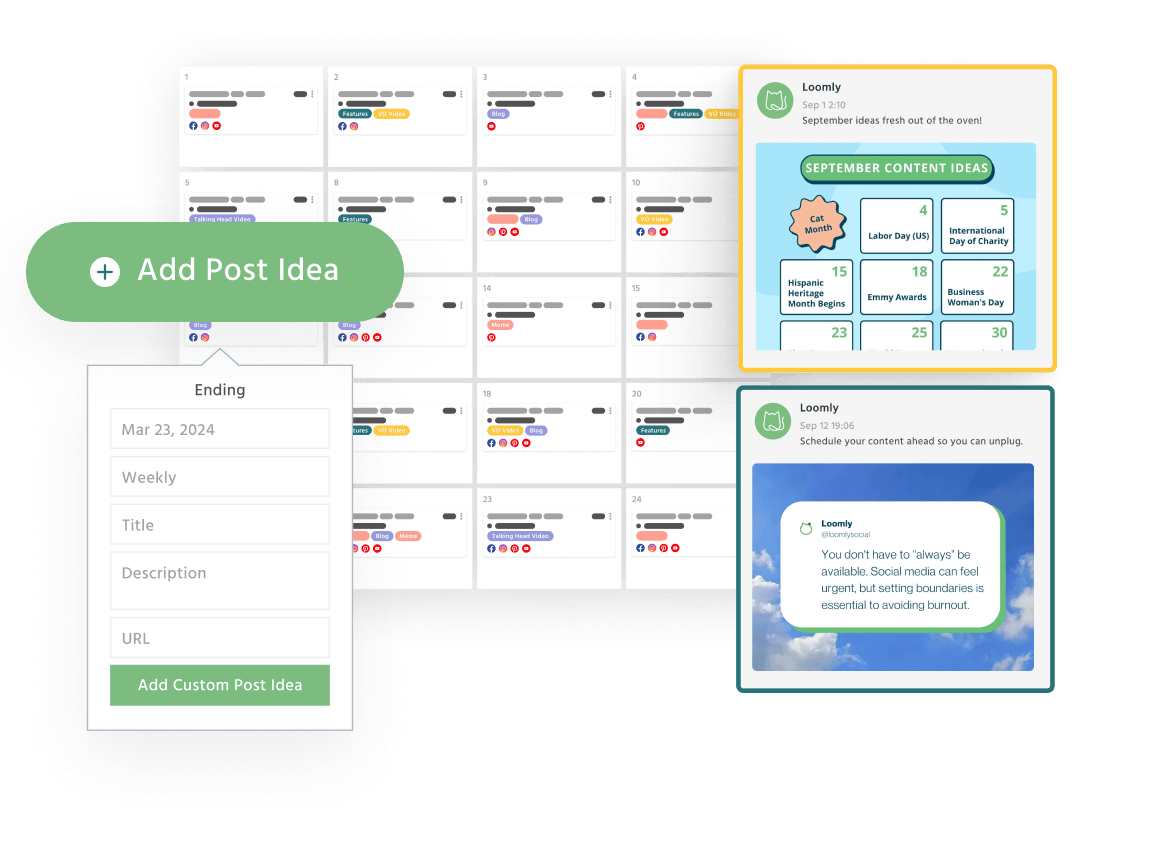
One of Loomly’s standout features is its “Post Ideas” feed. It suggests content topics, trends, and events to inspire your posts, which is something Planable doesn’t offer natively. You also get optimization tips for each post before publishing.
Visual Calendar & Workflow
The drag-and-drop content calendar is intuitive and color-coded, much like Planable’s. You can manage approval workflows, set custom statuses (Draft, Pending Approval, Approved, etc.), and ensure your team knows exactly where each post stands.
Collaboration Tools
Loomly matches Planable in giving teams a clear feedback and approval system. Multiple team members can comment directly on drafts, and you can keep all communication in one place to avoid long email threads.
Advanced Scheduling & Automation
From bulk uploads to automated publishing, Loomly ensures your content goes out exactly when it should. You can even automate post promotion using its ad integration tools.
Analytics & Reporting
While not as deep as Hootsuite’s, Loomly’s analytics give you a clear view of post performance, engagement, and audience trends. Reports can be customized and exported for clients or internal use.
Pros
- Easy-to-use interface with a gentle learning curve
- Built-in post inspiration and optimization tips
- Strong collaboration and approval workflows
- Ad management integration for Facebook campaigns
- Supports both organic and paid posting
Cons
- Analytics are not as advanced as some competitors
- No social listening or competitor tracking
- Fewer third-party integrations compared to larger platforms
Pricing & Value
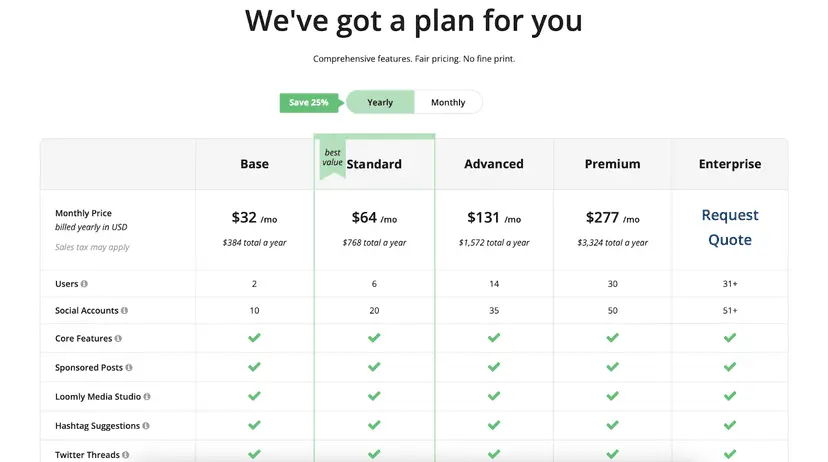
Loomly starts at $32/month (billed annually) for 2 users and 10 social accounts. The Standard plan is $64/month for 6 users and 20 accounts, with larger plans scaling up for bigger teams.
While it’s not the cheapest option, the mix of collaboration and automation makes it a solid investment for brands wanting more than just scheduling.
Final Verdict
Loomly is a great Planable alternative if you want a platform that blends structure with creativity. Its content inspiration features and smooth approval process make it ideal for teams that value both efficiency and fresh ideas.
8. SocialBee ($29/Month)
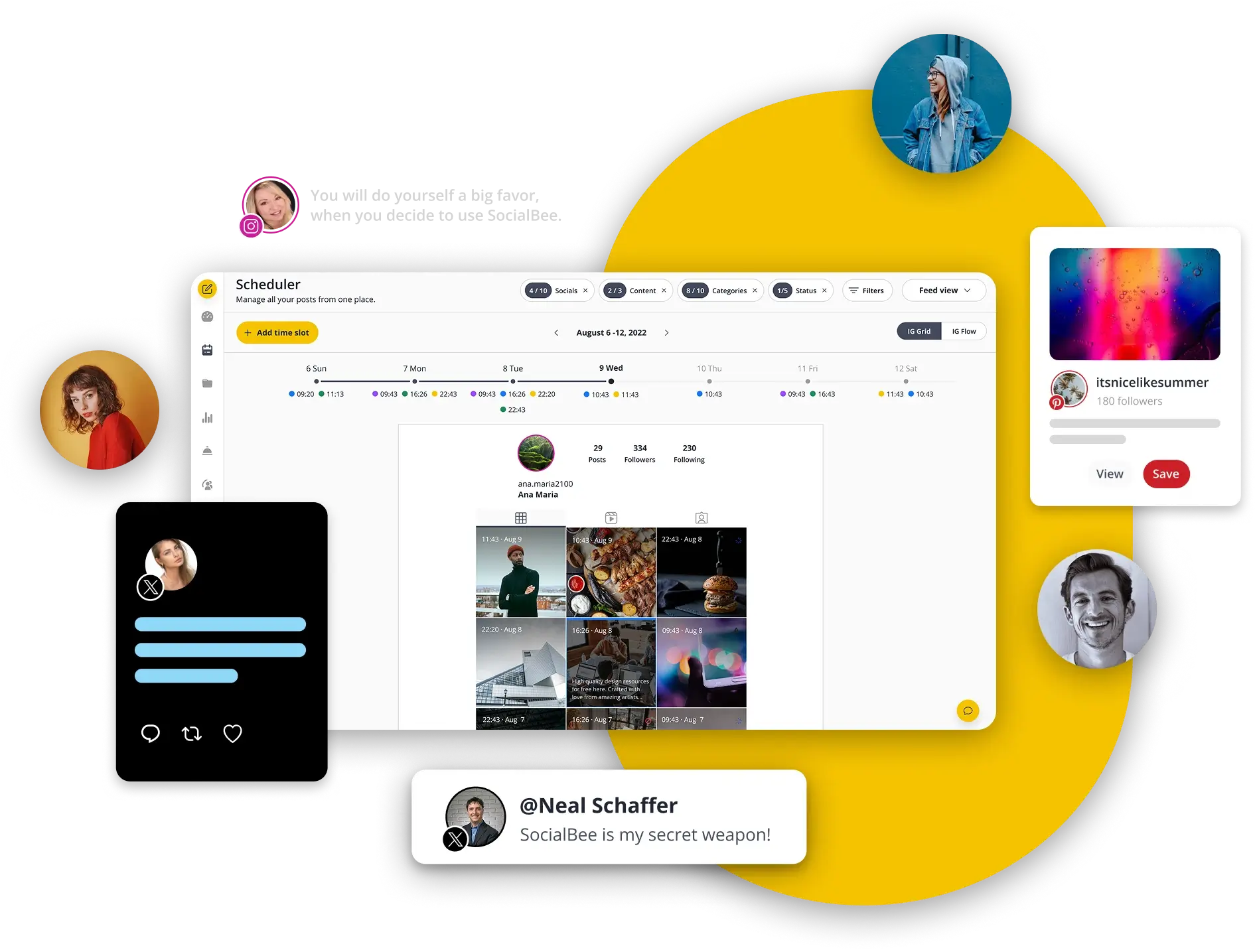
SocialBee is a social media management platform known for its strong content categorization and evergreen posting features.
If you like Planable’s organized approach but want more control over how and when content gets recycled, SocialBee could be the upgrade you’re looking for.
It’s built for efficiency, making it easier to keep your social feeds active without constantly starting from scratch.
Key Features of SocialBee
Content Categories
SocialBee lets you organize your posts into categories like “Blog Posts,” “Promotions,” or “Engagement Questions.” This makes scheduling more strategic and helps you balance different types of content. This is one feature Planable doesn’t offer in the same structured way.
Evergreen Posting
With SocialBee, your best content never has to fade away. You can set posts to recycle automatically, ensuring a consistent flow of content even when you’re busy. Planable is great for planning fresh content, but SocialBee excels at keeping older content in circulation.
Multi-Platform Support
It supports Facebook, Instagram, Twitter/X, LinkedIn, Pinterest, TikTok, Google Business Profile, and more. You can manage them all from one dashboard without hopping between tabs.
Post Variations
You can create multiple variations of the same post to keep your content fresh and avoid repetition fatigue, especially useful for evergreen campaigns.
Collaboration & Approval
While SocialBee’s collaboration tools are not quite as visually immersive as Planable’s, it still allows team members to review, edit, and approve posts before publishing.
Analytics & Performance Tracking
Get detailed engagement and reach reports, broken down by platform and post type, to help you refine your strategy.
Pros
- Strong content recycling and category system
- Supports post variations for evergreen campaigns
- Integrates with Canva and other creation tools
- Affordable plans compared to some competitors
Cons
- Collaboration interface is less visual than Planable’s
- No built-in social inbox for messages and comments
Pricing & Value
SocialBee’s plans start at $29/month for 5 social accounts and 1 user, making it one of the more budget-friendly options in this list.
The Accelerate plan at $49/month increases the number of accounts and features, while larger business plans add more users and integrations. For small teams or solo managers looking for powerful scheduling and recycling tools, it’s a great value.
Overall Verdict
SocialBee is an excellent Planable alternative if you want to automate and streamline content posting while keeping things well-organized. It’s perfect for marketers who want their content strategy to run on autopilot without sacrificing variety.
9. Social Champ ($25/Month)
Social Champ is a budget-friendly yet surprisingly capable social media management platform. It offers many of the features you’d expect from bigger tools, such as scheduling, analytics, content recycling, and team collaboration, but at a fraction of the cost.
If Planable’s recent changes or pricing have you rethinking your options, Social Champ could be a strong contender, especially for small businesses and growing agencies.
Key Features
Multi-Platform Scheduling
Social Champ supports all major platforms including Facebook, Instagram, LinkedIn, Twitter/X, Pinterest, Google Business Profile, TikTok, and YouTube. Like Planable, you can create, edit, and schedule posts from one place, but Social Champ keeps the interface clean and straightforward.
Bulk Upload & Automation
You can bulk upload up to 200 posts at a time via CSV, a big time-saver for campaigns. It also offers automated posting from RSS feeds — handy if you want your blog or news site content to go live instantly without manual scheduling.
Content Recycling
Similar to SocialBee, Social Champ lets you set evergreen posts to recycle automatically. Planable focuses more on fresh campaign planning, whereas Social Champ balances both new and recurring content.
Collaboration Tools
Invite team members, assign roles, and review posts before they go live. Planable’s visual collaboration is more advanced, but Social Champ still makes teamwork manageable without overcomplicating things.
Engagement & Monitoring
While it doesn’t have a full social inbox like Planable’s for handling DMs and comments in one place, you can still track engagement metrics and performance from the dashboard.
Pros
- Very affordable and user-friendly
- Bulk upload and RSS automation save hours of work
- Supports a wide range of platforms
Cons
- No full-featured social inbox for comments and messages
- Collaboration features are basic compared to Planable
Pricing & Value
Social Champ starts at $25/month for 5 social accounts, which already makes it a better value than many tools in the same category. Higher-tier plans add more accounts, users, and advanced features, but even at the top plan, it stays budget-friendly.
Final Verdict
Social Champ is ideal if you want a cost-effective Planable alternative without sacrificing key features like bulk scheduling, automation, and multi-platform posting. It may not have Planable’s sleek collaboration visuals, but it delivers where it matters for efficiency and affordability.
10. Sendible ($29/Month)

We wouldn’t round up this list of the best Planable alternatives out there without mentioning Sendible. It is a well-established social media management platform, widely used by agencies, brands, and freelancers.
If you have been rethinking your commitment to Planable, Sendible is worth a close look, especially if you need strong client management and reporting tools alongside scheduling and collaboration.
Key Features
Comprehensive Scheduling
Plan, create, and schedule content for multiple platforms, including Facebook, Instagram, LinkedIn, Twitter/X, YouTube, and Google Business Profile. Like Planable, you get a visual calendar to see your content plan at a glance.
Social Inbox for Comments & Messages
Similar to Planable’s one inbox, Sendible lets you manage comments, messages, and mentions from multiple channels in a single feed. This makes it easier to keep engagement centralized.

Advanced Collaboration
Sendible supports assigning tasks, setting permissions, and managing multiple clients without overlap. Agencies can use custom workflows to ensure each post goes through the right review process before publishing.
Content Suggestions & Canva Integration
You can esily generate fresh ideas using Sendible’s content suggestions tool, then design posts directly via the Canva integration. This is a time-saver for teams without dedicated designers.
Analytics & Reporting
Get detailed insights into engagement, audience growth, and post performance. You can also create white-label reports for clients, something Planable’s agency users may find appealing.
Pros
- Powerful client and multi-brand management tools
- Centralized social inbox for all messages and comments
- Detailed white-label reporting for agencies
- Content suggestions tool for quick ideas
Cons
- Slightly steeper learning curve compared to Planable
- Pricing can add up for larger teams
Pricing & Value
Sendible’s Creator plan starts at $29/month for 1 user and 6 social profiles, which is great for freelancers. The Traction plan at $89/month adds more profiles, advanced reporting, and unlimited scheduling, making it a solid choice for small agencies.
While it’s pricier than some options, the depth of features can justify the investment.
Overall Verdict
Sendible is a feature-rich Planable alternative, especially for agencies that need client-friendly tools, robust reporting, and a unified inbox.
If your priority is managing multiple brands efficiently and keeping all communications in one place, Sendible is hard to beat.
Features to Look for in Planable Alternatives
If you’re moving away from Planable, you’ll want a replacement that not only matches what you’re used to but also brings something extra to the table.
Here are some features to prioritize:
User-Friendly Interface
Switching tools is enough of a headache; you don’t need a steep learning curve on top.
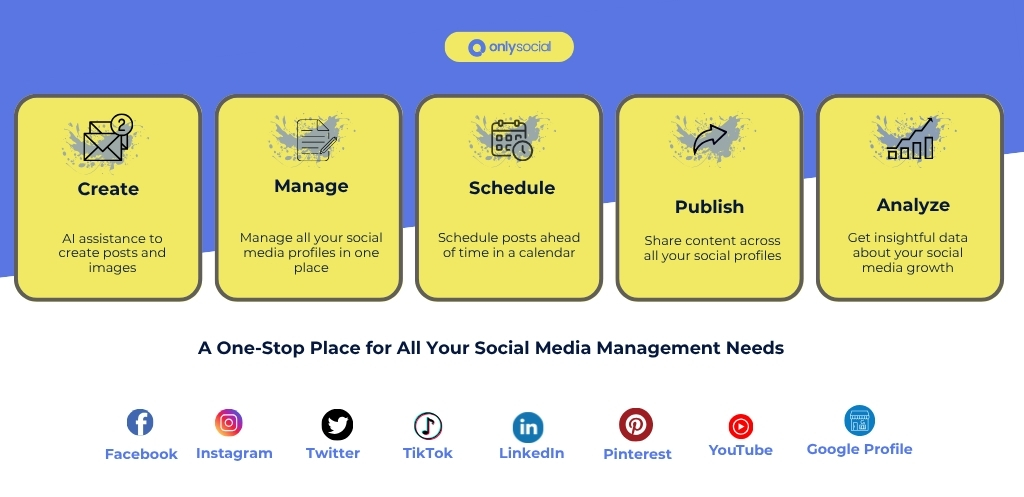
A clean, intuitive interface helps you and your team work faster without the frustration of figuring out where everything lives. OnlySocial makes this easy with a simple dashboard that lets you create, schedule, and manage posts without wasting time on clunky menus.
Advanced Scheduling Options
Consistency is key on social media, and that means scheduling ahead. The right alternative should give you flexible scheduling tools that let you plan content weeks, or even months, in advance. OnlySocial’s bulk scheduling feature does exactly that, helping you queue up a steady stream of posts without the last-minute scramble.
Multi-Platform Support
Your audience isn’t just in one place, so your tool shouldn’t be either. Look for a platform that supports multiple social channels, ideally more than what Planable offers.
OnlySocial delivers here, letting you manage a wide range of platforms so your branding and messaging stay consistent everywhere.
Content Calendar
A visual content calendar is non-negotiable if you want to stay organized. It lets you see what’s going out and when, making it easy to spot gaps or overlaps in your strategy.
Analytics and Reporting
You can’t improve what you don’t measure. A solid alternative should give you detailed analytics to understand what’s working – and what’s not.
Team Collaboration Tools
If you work with a team, collaboration tools like multi-user access, role-based permissions, and built-in approval workflows are essential. OnlySocial nails this too, making it easy to control who can do what, share feedback, and keep the workflow smooth.
Final Note
Planable has been a go-to for many teams, but with its recent acquisition by SE Ranking, some users may be exploring other options.
The good news? There’s no shortage of capable, feature-rich alternatives that can step in – and even offer more flexibility, better pricing, or extra functionality.
We have given you our top picks already, with each option bringing its own strengths to the table. The key is to pick one that aligns with your workflow, budget, and long-term goals.
If you’re after a platform that’s affordable, easy to use, and packed with powerful features, OnlySocial is hard to beat. It’s built to make managing your social media smooth, efficient, and results-driven – no matter your business size.
FAQs
Is Planable shutting down?
No, Planable is not shutting down. However, it was recently acquired by SE Ranking. And while the platform is still running, changes in direction, pricing, or features in the future might prompt some users to look for alternatives.
Why are people considering Planable alternatives?
Some teams are exploring other tools because they want features or pricing that better fit their needs. While Planable offers strong scheduling and collaboration features, other platforms may provide broader platform support, advanced analytics, AI content creation, or more affordable plans.
How do I choose the right alternative for my team?
Start by listing your must-have features, such as bulk scheduling, multi-platform support, analytics, or team collaboration tools. Then, compare pricing, ease of use, and integration capabilities. It’s also wise to test the tool with a free trial before committing to ensure it fits your workflow.
Are there alternatives offering AI content creation?
Yes. Several Planable alternatives, including OnlySocial, ContentStudio, and SocialBee, now offer AI-powered tools to help generate captions, suggest hashtags, and even create visuals. This can save time and keep your content fresh and engaging.