10 Best SocialPilot Alternatives for All Your Business Needs [First-Hand Review]

If you’ve been managing social media for a while, chances are you’ve heard of SocialPilot. It’s a solid tool with a loyal following.
But let’s be honest, it’s not for everyone.
Maybe you’re after better analytics, smoother team collaboration, or just a more affordable plan that doesn’t cut corners.
The good news is, there are plenty of options you can explore.
In 2025, there are plenty of SocialPilot alternatives that do more, cost less, or just feel easier to use. Whether you’re a solo creator, a small business owner, or part of a growing agency, there’s a tool out there that fits just right.
In this guide, we’ll walk you through 10 of the best alternatives to SocialPilot. We will cover what each of them offers, how they compare, and why they might be the upgrade you’re looking for.
Table of Contents
- 1 Why Consider SocialPilot Alternatives?
- 2 10 Best Socialpilot Alternatives for All Your Business Needs
- 3 2. Hootsuite
- 4 Key Features
- 5 3. Buffer
- 6 4. Loomly
- 7 5. Sprout Social
- 8 6. SocialBee
- 9 7. Agorapulse
- 10 8. SocialBu
- 11 9. ContentStudio
- 12 10. Social Champ
- 13 Features to Look for in a SocialPilot Alternative
- 14 Final Note
- 15 FAQs
- 15.0.1 Do I really need an alternative to SocialPilot?
- 15.0.2 What are some top SocialPilot alternatives to give a shot in 2025?
- 15.0.3 What makes OnlySocial a strong SocialPilot alternative?
- 15.0.4 Is there a free alternative to SocialPilot?
- 15.0.5 Is Hootsuite better than SocialPilot?
- 15.0.6 Is SocialPilot a good social media management tool?
Why Consider SocialPilot Alternatives?

SocialPilot is a well-known social media management tool built to help businesses, agencies, and solo users stay organized online.
It lets you schedule posts, manage multiple social accounts in one place, view analytics, and even work with your team – all from a single dashboard. It supports major platforms like Facebook, Instagram, Twitter (X), LinkedIn, Pinterest, and more, so it covers a lot of ground for content planning and publishing.
But while SocialPilot does many things right, it’s not perfect – and that’s why many users are starting to look elsewhere.
One big reason is cost. Even the entry-level plan isn’t exactly cheap, especially when you factor in the extra charges for adding team members. If you’re a freelancer or a growing business with a limited budget, those costs can add up fast.
Then there’s the issue of team collaboration. SocialPilot does offer an approvals feature, but it’s only available on the higher-tier Agency plans – and not during the free trial. Even then, it’s mainly designed for client approval after the content is done, not for helping your team brainstorm or co-create drafts together.
Worse still, if you’re hoping for a smooth feedback loop, you might be disappointed. The platform doesn’t let team members comment on specific parts of a draft or collaborate directly during the creation process.
It forces you to move a post into the publishing queue before a manager can even review it, which slows everything down and makes real-time collaboration tricky.
If you are facing any of these challenges, then it’s time you find the best SocialPilot alternatives. And in this guide, we’ve got you covered. Just read on.
10 Best Socialpilot Alternatives for All Your Business Needs
1. OnlySocial
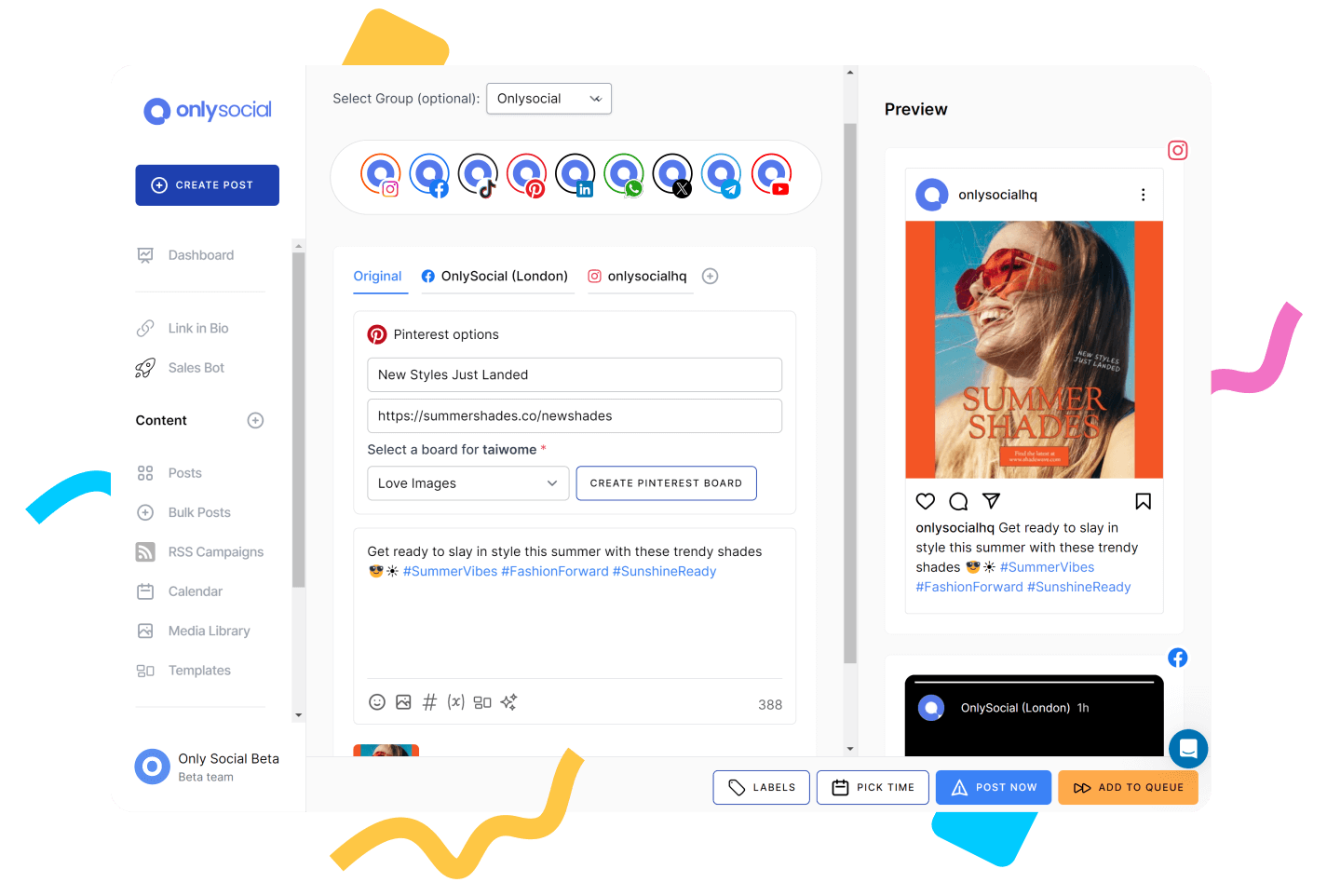
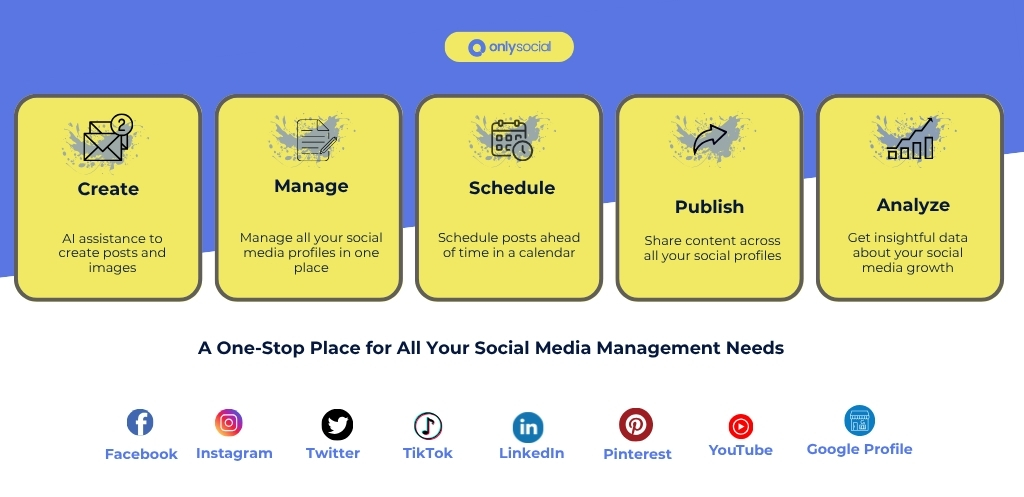
OnlySocial is an all-in-one social media management tool designed for businesses, creators, and agencies who want a simpler, smarter way to schedule and manage their social content.
From its clean dashboard to its powerful automation tools, OnlySocial makes the entire process feel less like a chore and more like a breeze.
What makes it a strong SocialPilot alternative? It delivers most of the same features, including scheduling, collaboration, analytics, and cross-platform publishing, but with a more modern interface, more flexible pricing, and smarter AI integrations that actually feel useful.
Key Features
Multi-Platform Scheduling
OnlySocial supports up to 15 different social platforms, including Instagram, TikTok, Facebook, LinkedIn, YouTube, Pinterest, Threads, and Bluesky. You can plan and publish your posts from one central dashboard without hopping across tabs.
Compared to SocialPilot, which supports fewer emerging platforms, OnlySocial gives you wider social coverage right out of the gate.

Smart AI-Powered Post Creation
With a built-in AI assistant, OnlySocial helps you brainstorm captions, find relevant hashtags, and even generate visuals using AI. It does all without needing a third-party tool.
It’s like having a mini content assistant inside your scheduler. While SocialPilot supports basic content planning, it doesn’t have this level of smart assistance built into the platform.
Unified Visual Calendar with Bulk Upload
The drag-and-drop calendar makes planning content intuitive. You can bulk upload up to 500 posts via CSV, color-code campaigns, and visually map out your posting schedule across all platforms. For teams that need fast, friction-free workflows, this calendar layout is a huge time-saver.
Unified Social Inbox
No more jumping between apps to reply to messages or comments. OnlySocial’s unified inbox brings all your DMs, comments, and mentions from Instagram, Facebook, and other platforms into one place – something that SocialPilot lacks entirely.
This alone is a major upgrade for community managers or anyone who handles real-time engagement.

Advanced Team Collaboration
You can assign roles, manage user permissions, leave internal notes, and set up post approval workflows. There’s also a shared content library to keep branding consistent.
SocialPilot does have team collaboration, but most of the useful features are locked behind higher-tier agency plans. OnlySocial gives you these at more affordable tiers.
Visual and Actionable Analytics
OnlySocial breaks down performance by platform, post type, and time slot. Reports are easy to understand and export, and the analytics are designed to be useful – not just pretty.
Whether you’re tracking engagement trends or refining your posting times, you’ll get insights that actually help shape your strategy.
Seamless Integrations
OnlySocial integrates smoothly with Google Drive, OneDrive, Bit.ly, Adobe Express, and OpenAI, so you can use your preferred tools without switching tabs. This makes your entire workflow smoother and more consolidated.

Pros of OnlySocial
- Simple and clean interface
- Cross-platform scheduling (15+ networks)
- AI assistant for content and hashtags
- Powerful bulk scheduling
- Unified inbox for messages and mentions
- Responsive customer support
- No hidden pricing tiers – affordable and scalable
Cons
- No competitor analytics
- No forever-free plan (though you can test it out affordably)
Pricing & Value
OnlySocial is built to be cost-effective without cutting corners. Here’s how the plans stack up:
- Freelancer Plan – $29/month for up to 15 social accounts
- Entrepreneur Plan – $49/month for 45 accounts and 3 users
- Professional Plan – $99/month for unlimited accounts and 10 users
Each plan comes with core features like bulk scheduling, analytics, AI tools, and team collaboration. SocialPilot starts at $30/month for 1 user and limits collaboration unless you upgrade, so OnlySocial offers much better value if you manage multiple clients or work as a team.
Overall Verdict
If you’re searching for a SocialPilot alternative that does more without draining your budget, OnlySocial is an excellent pick. It combines ease of use, powerful features, and advanced integrations – all in a platform that feels modern and actually fun to use.
2. Hootsuite

Hootsuite is one of the oldest names in social media management – and for good reason. It’s been around since 2008, and many businesses still rely on it for scheduling posts, tracking performance, and engaging with audiences across major platforms.
Despite its age, Hootsuite still offers a robust feature set that’s comparable to SocialPilot’s, especially for larger teams. While it’s not the cheapest option on the market, it’s packed with enterprise-level tools that cater to serious social media efforts.
Key Features
Wide Platform Support
Hootsuite supports all major social networks like Facebook, Instagram, LinkedIn, X (Twitter), Pinterest, TikTok, and YouTube. You can manage multiple accounts from a single dashboard, similar to SocialPilot, but with more refined tools for platform-specific actions, such as Instagram Story scheduling and YouTube publishing.
Drag-and-Drop Content Calendar
The visual calendar makes it easy to plan, move, and reschedule posts across channels. It offers a straightforward view of what’s coming up, and allows team members to collaborate directly within the planner. This is a feature SocialPilot restricts unless you’re on higher plans.
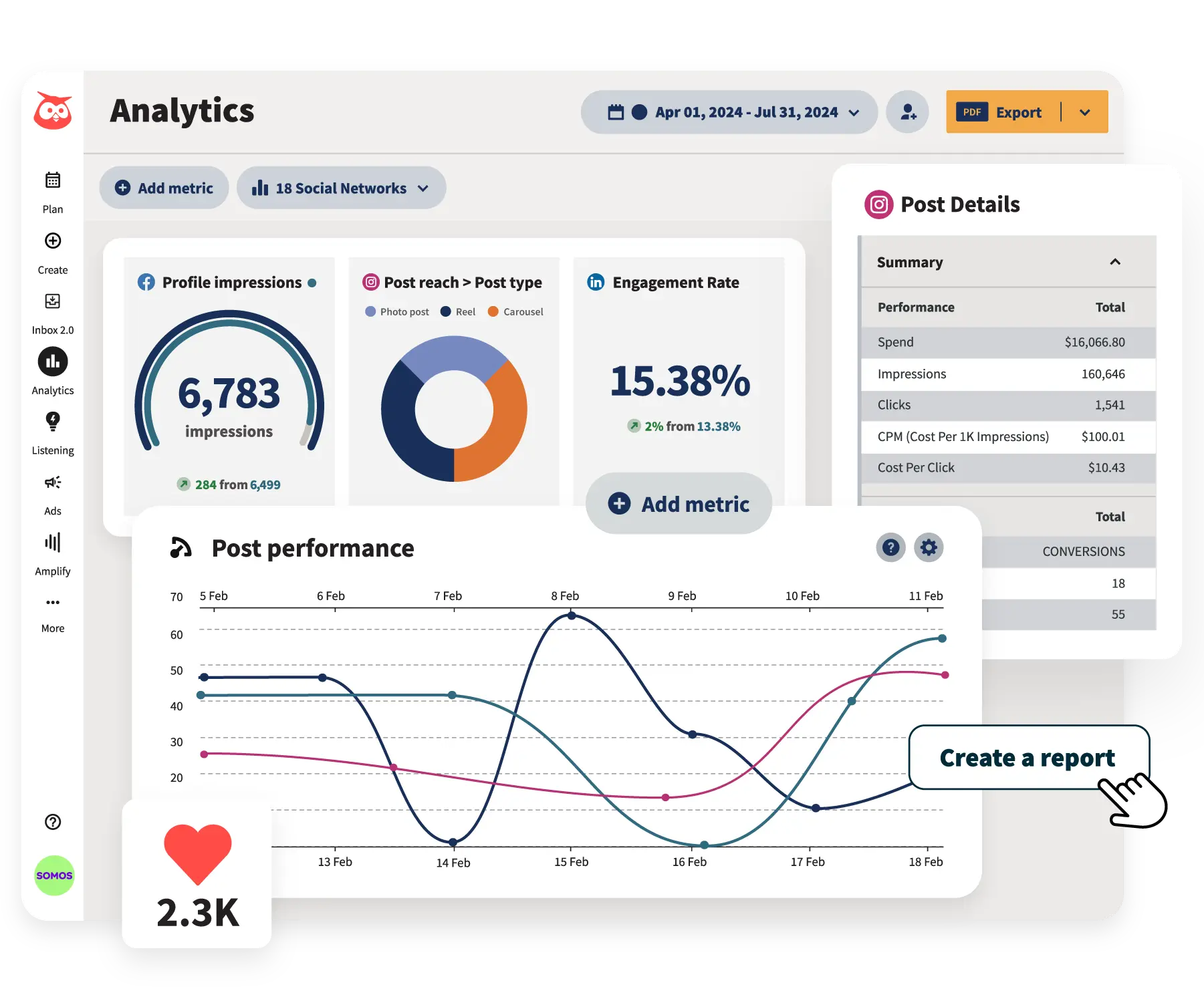
Advanced Analytics & Reporting
Hootsuite’s reporting dashboard is a step above what SocialPilot offers. You get in-depth data on engagement, clicks, conversions, reach, and ROI tracking. Plus, reports are fully customizable, which is great for agencies or businesses that need tailored presentations for clients or stakeholders.
Inbox for Engagement
Like OnlySocial, Hootsuite has a unified social inbox that lets you respond to DMs, comments, and mentions across platforms in real time. This central hub helps you keep customer communication in one place, which is something SocialPilot doesn’t currently offer.
Content Curation Tools
Hootsuite offers an RSS feed integration and a content discovery feature that suggests relevant articles and trends. This can help fill content gaps – especially handy for social managers looking to stay consistent without reinventing the wheel daily.
App Directory and Integrations
With over 150+ integrations available through its app directory (including Canva, Google Drive, HubSpot, Zendesk, and Trello), Hootsuite plays well with your existing tools, giving it a flexibility edge over SocialPilot.
Pros
- Strong multi-channel support
- Built-in social inbox for engagement
- Excellent analytics and custom reporting
- Huge list of integrations via the app directory
- Good reputation and long track record in the industry
Cons
- Expensive for small teams or freelancers
- Steeper learning curve than tools like OnlySocial or Buffer
- Collaboration features cost extra
- Limits on analytics/reporting in lower-tier plans
Pricing & Value
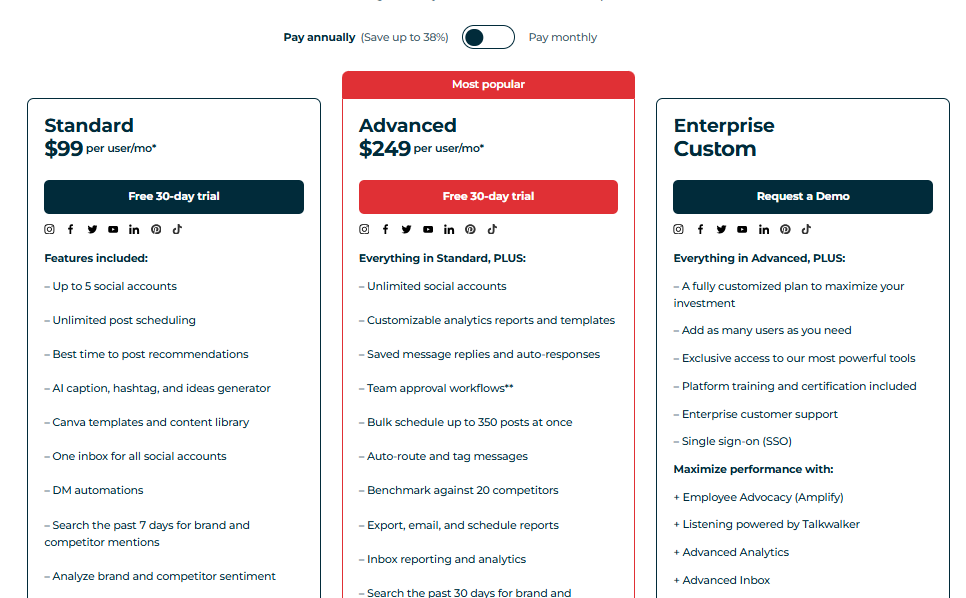
Hootsuite’s pricing starts at £99/month for a single user and 10 social accounts. The next tier jumps to £249/month for 3 users and 20 accounts. Enterprise pricing is custom.
While this is significantly more expensive than SocialPilot (starting at $30/month), you’re paying for the name, scale, and integrations. But for freelancers, solopreneurs, or small teams on a budget, Hootsuite might feel like overkill.
Overall Verdict
Hootsuite is a heavyweight in the social media management space. If you run a larger team or need deep analytics, expansive integrations, and dependable performance, it’s still a solid alternative to SocialPilot.
However, it comes at a premium. If you’re looking for a streamlined, affordable solution with similar features, tools like OnlySocial or Buffer might offer better value. That said, for those with bigger budgets and the need for enterprise-level control, Hootsuite is a reliable choice.
3. Buffer
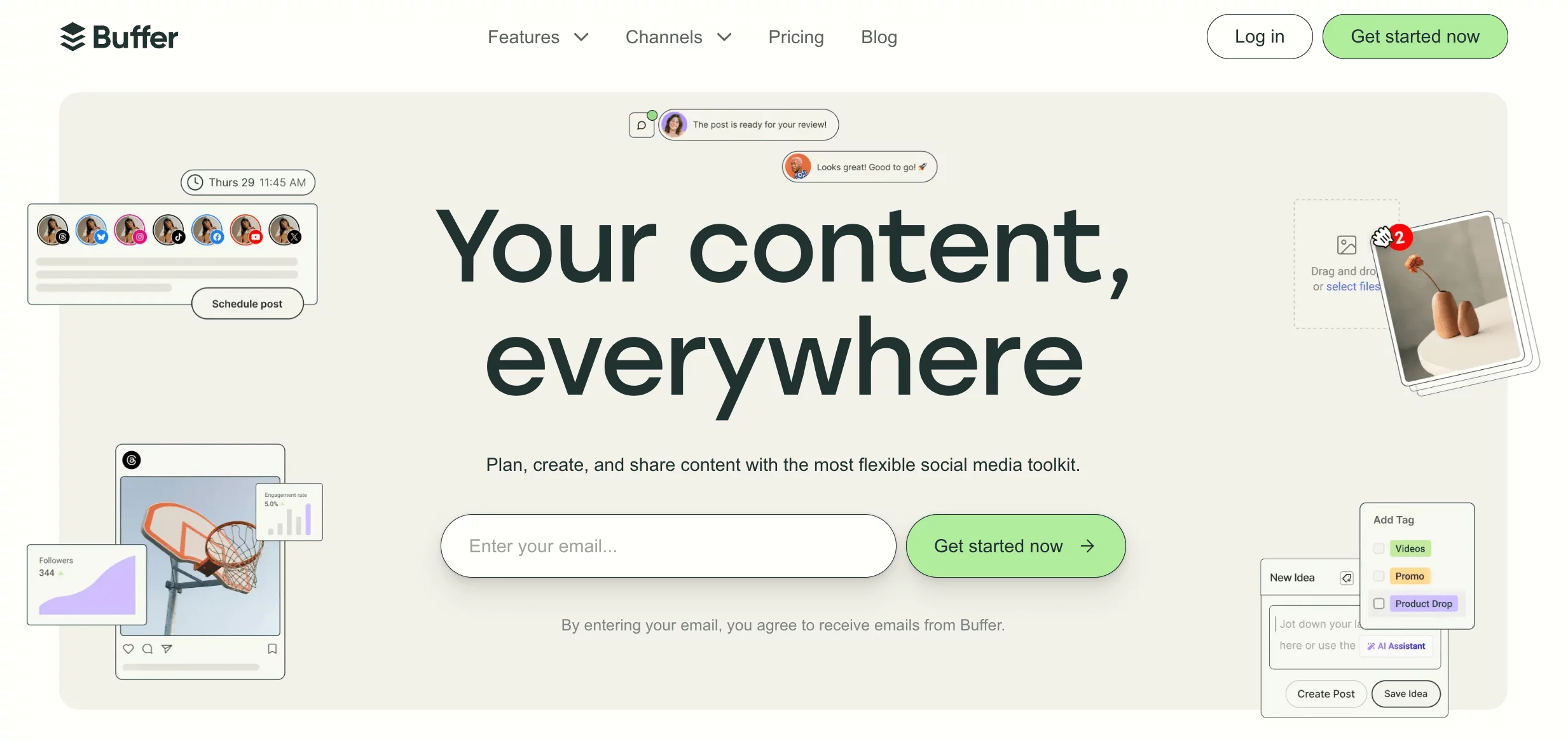
Buffer has built a reputation over the years as a clean, simple, and reliable social media scheduling tool, especially for solo users, freelancers, and small teams.
If SocialPilot feels bloated, expensive, or slightly rigid, Buffer might be exactly the breath of fresh air you need.
It focuses on the essentials: scheduling, analytics, and engagement – all packed into an intuitive interface. And while it doesn’t try to be everything at once, what Buffer does offer, it does extremely well.
Key Features
Simple Scheduling and Publishing
Buffer is known for its straightforward approach to scheduling. You can queue posts across multiple platforms, customize content for each channel, and set consistent posting times.
While SocialPilot also handles scheduling well, Buffer’s post-queue system is arguably easier to navigate, especially for beginners.
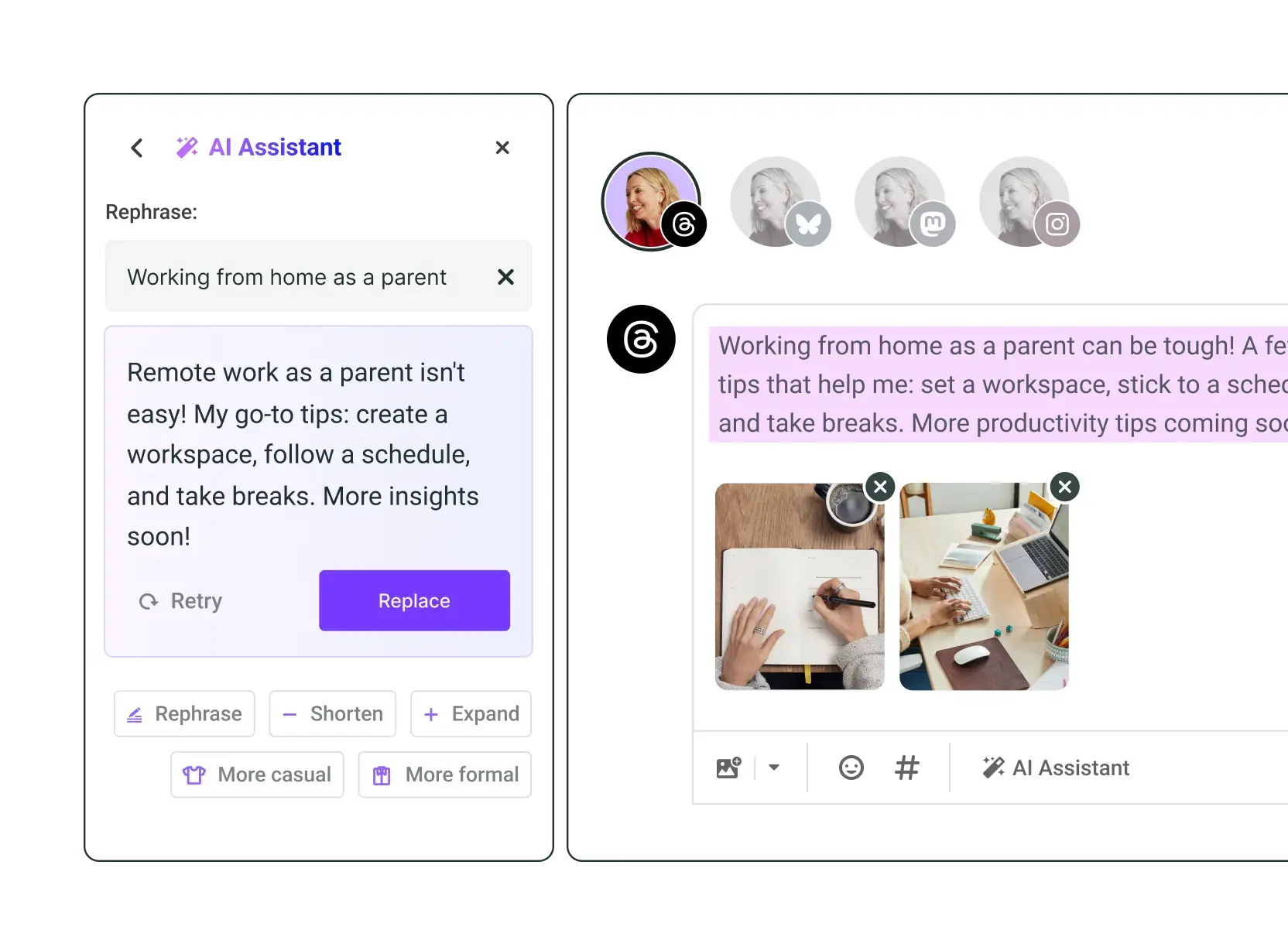
AI Assistant for Post Creation
Buffer now comes with an AI assistant that helps generate captions and repurpose content. This is a recent addition and makes it easier to create variations of the same post or come up with fresh content ideas – something not as polished in SocialPilot unless you’re using third-party tools.
Unified Engagement Tool
Buffer’s Engage tool brings all your Instagram and Facebook comments into one inbox. It helps you stay on top of community interactions.
Analytics and Reporting
Buffer offers engagement tracking, reach data, and content performance analytics. It’s not as deep as Hootsuite, but it’s more than enough for most small businesses. Compared to SocialPilot, Buffer’s analytics feel more user-friendly but slightly less comprehensive in terms of custom reports.
Landing Page Builder
A unique feature that Buffer includes is a customizable landing page template – great for linking out from your Instagram bio or any social platform. SocialPilot doesn’t offer this at all, so this is a win for creators and brands wanting to centralize their links.
Pros of Buffer
- Incredibly easy to use with a clean interface
- AI assistant makes content creation faster
- Unified inbox for Instagram and Facebook engagement
- Free plan available
- Built-in landing page builder
- Smooth scheduling and publishing experience
Cons
- Lacks deep competitor analytics
- Team features are limited to higher-tier plans
- Best time to post feature not always accurate
- Limited integration options compared to SocialPilot
Pricing & Value
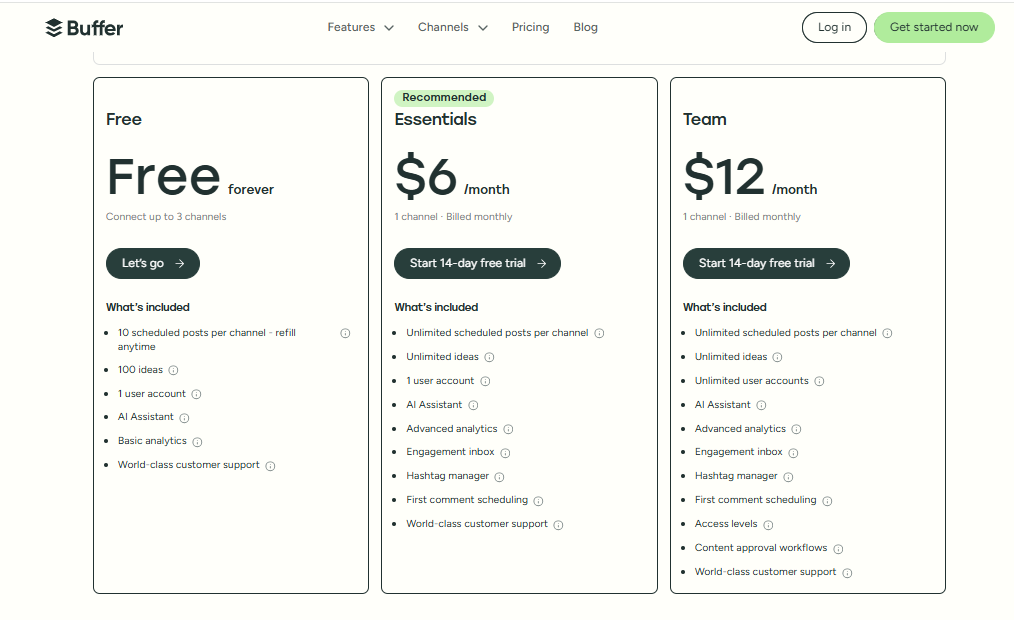
Buffer offers a free plan for up to 3 channels, which is great for new users.
Paid plans start at just $6/month per social channel (Essentials), with the Team plan costing $12/month per channel. That means if you’re managing 5 channels, you’ll pay $30–$60/month depending on your needs. It’s modular, so you only pay for what you use.
This makes Buffer a cheaper and more flexible option than SocialPilot, especially for individuals or businesses that don’t want to commit to high monthly costs upfront.
Overall Verdict
If you’re after a lean, clean, and affordable social media tool, Buffer is one of the best SocialPilot alternatives out there. It strips away unnecessary extras and gives you exactly what you need: scheduling, analytics, and engagement – all without the clutter.
Buffer may not have the same agency-friendly depth as SocialPilot, but it’s perfect for solo marketers, creators, and small businesses who value ease of use, flexibility, and a clutter-free experience.
4. Loomly

Loomly is a powerful and structured social media management tool that’s ideal for marketing teams, content creators, and agencies.
While SocialPilot is great for handling multiple accounts, Loomly shines in planning and collaboration, especially if your workflow involves content calendars, approval processes, and tight team coordination.
If SocialPilot feels too limited in terms of collaboration or client feedback tools, Loomly offers a clean, visual alternative that’s both smart and scalable.
Key Features
Visual Content Calendar
Loomly’s calendar isn’t just for looks; it’s a fully interactive workspace. You can plan your posts, schedule them visually, and make real-time adjustments.
It’s a great fit for brands that need to map out campaigns in advance and see the big picture at a glance. SocialPilot has scheduling, yes – but Loomly’s visual layout is more intuitive and planning-friendly.

Collaboration and Approval Workflows
One of Loomly’s standout features is its collaboration flow. Multiple team members can comment, suggest edits, and approve content before it goes live.
Unlike SocialPilot, where collaboration is gated behind higher plans and not very fluid, Loomly offers a seamless system where teams and even clients can leave feedback on specific drafts.
Post Ideas & Optimization Tips
Running low on content ideas? Loomly provides built-in post inspiration based on trends, holidays, and even your posting history. It also offers optimization tips as you draft, helping you improve engagement.
Basic Analytics
You get access to performance data like engagement, reach, and clicks across your posts and channels. While it’s not as deep as tools like Hootsuite, it’s more than enough for small to mid-size teams.
SocialPilot does have more granular reporting in some tiers, but Loomly’s interface makes it easier to digest for non-technical users.
Pros of Loomly
- Excellent collaboration tools for teams and clients
- Clean, intuitive visual calendar
- Helpful post suggestions and optimization tips
- Easy approval workflows
- Works well for structured marketing teams
Cons
- Limited analytics depth on lower-tier plans
- No unified inbox for engagement
- Post previews are basic compared to some competitors
- Can be pricey as team size grows
Pricing & Value
Loomly’s pricing starts at $42/month (Base plan) for 2 users and 10 social accounts.
Here’s a general breakdown:
- Base – $42/month (2 users, 10 accounts)
- Standard – $80/month (6 users, 20 accounts)
- Advanced – $175/month (16 users, 35 accounts)
- Premium – $369/month (26 users, 50 accounts)
Each plan includes access to core features like scheduling, collaboration, post ideas, and analytics. While Loomly is more expensive than SocialPilot’s entry-level plan, it justifies the cost with smoother workflows and better planning tools.
Overall Verdict
Loomly is an excellent SocialPilot alternative for content teams that want structure, creativity, and collaborative power in one platform.
Its visual planning tools and approval workflows make it ideal for agencies or brands that manage high-volume, multi-channel content.
If SocialPilot feels too restrictive or manual when it comes to teamwork, Loomly is worth every penny for a more refined, collaborative content process.
5. Sprout Social

If you’re looking for a more advanced, enterprise-ready platform that goes far beyond basic scheduling, Sprout Social is one of the most powerful SocialPilot alternatives available.
It’s designed for brands and agencies that need deep analytics, CRM features, and robust team collaboration tools.
While SocialPilot is well-suited for budget-conscious teams, Sprout Social delivers premium features that justify its higher price tag, especially if you’re managing complex campaigns or large teams.
Key Features
Smart Scheduling & Publishing
Sprout Social’s scheduling system is incredibly flexible. You can queue posts, schedule them manually, or use Optimal Send Times powered by analytics.
Compared to SocialPilot, it feels more automated and strategic, with AI-driven recommendations helping you post when your audience is most active.
Unified Smart Inbox
Unlike SocialPilot, where engagement tools are somewhat limited, Sprout’s Smart Inbox combines all your messages, comments, mentions, and replies across platforms into one place.
It’s a lifesaver for brands juggling multiple social networks and needing to keep up with real-time customer interactions.
Advanced Analytics & Custom Reports
Sprout Social shines with its analytics. You get granular insights into performance, audience demographics, team productivity, campaign impact, and even competitor benchmarking.
These reports are visually clean and fully customizable – something SocialPilot’s reporting lacks on most plans.
CRM-Like Features
You can tag conversations, add contact details, and track the history of user interactions, turning Sprout into a lightweight CRM. If you’re in customer service or want to build deeper relationships through social, this is a game-changer.
Team Collaboration & Approval Workflows
Sprout is built for teamwork. Assign tasks, leave internal comments, and manage approval workflows easily. SocialPilot offers basic team roles, but Sprout takes collaboration to the next level with audit trails, task assignments, and message tagging.
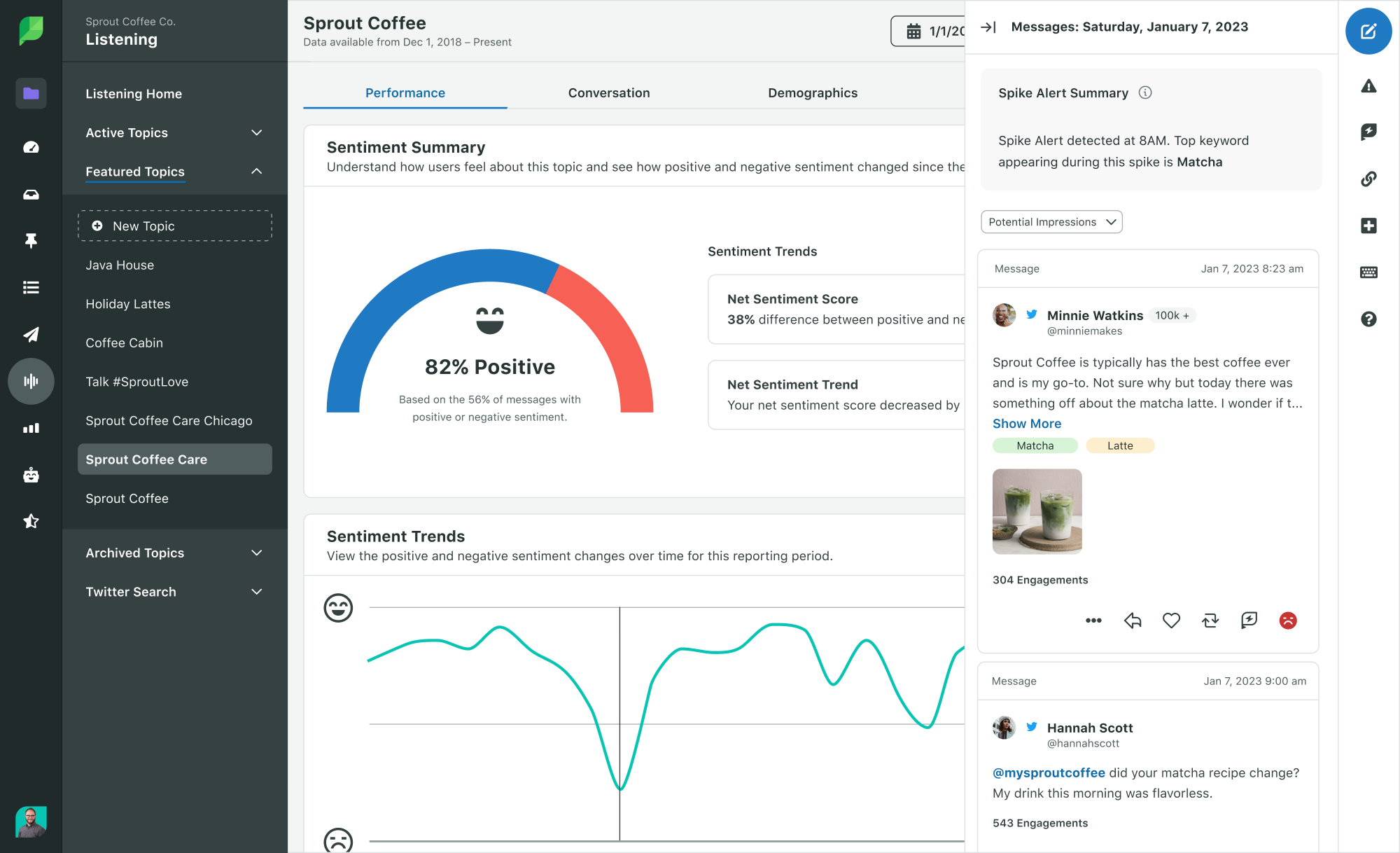
Social Listening
Want to know what people are saying about your brand or your niche? Sprout’s Listening Tool lets you track keywords, hashtags, sentiment, and competitors – great for market research and trend spotting.
Pros
- Unified Smart Inbox for cross-platform engagement
- Deep, customizable analytics and reporting
- Built-in CRM and social listening tools
- Powerful team collaboration workflows
- Slick, professional UI that scales well with team size
Cons
- One of the most expensive tools on the market
- Overkill for freelancers or small teams
- No free plan
- Slight learning curve due to its depth
Pricing & Value
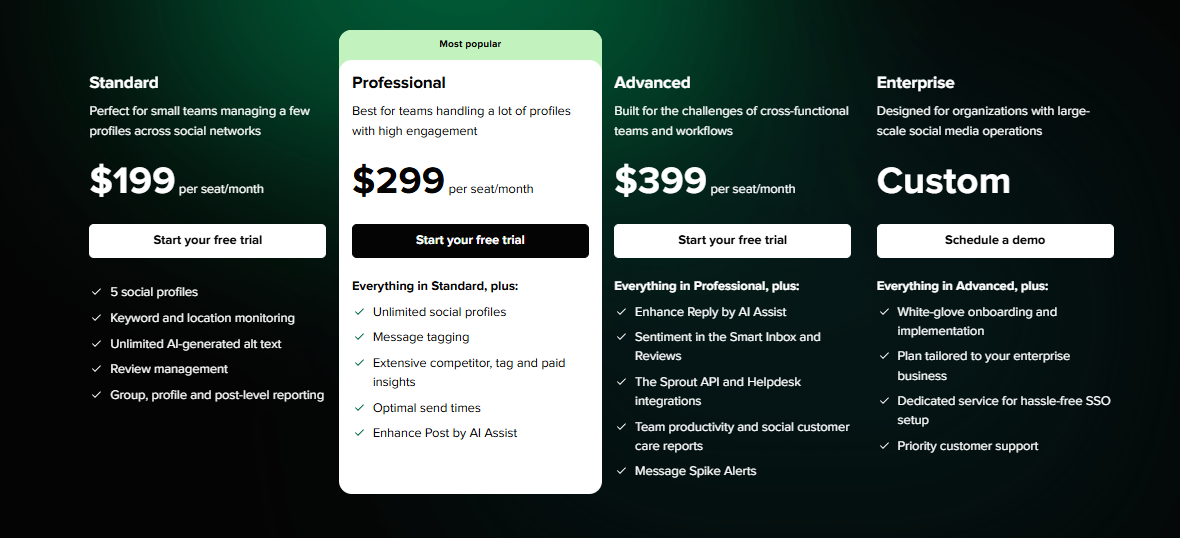
Sprout Social’s pricing reflects its premium positioning. The basic plan starts at $199/month for just 5 social profiles. Even though there is a free 30-day trial, no free forever plan like SocialPilot.
However, if you need the level of detail and control Sprout provides, it’s worth the investment.
Overall Verdict
Sprout Social is a top-shelf SocialPilot alternative for teams that need powerful reporting, unified messaging, and deep collaboration tools.
It’s not cheap, but for medium to large businesses or agencies managing multiple brands and campaigns, it can become an essential part of your digital marketing stack.
6. SocialBee
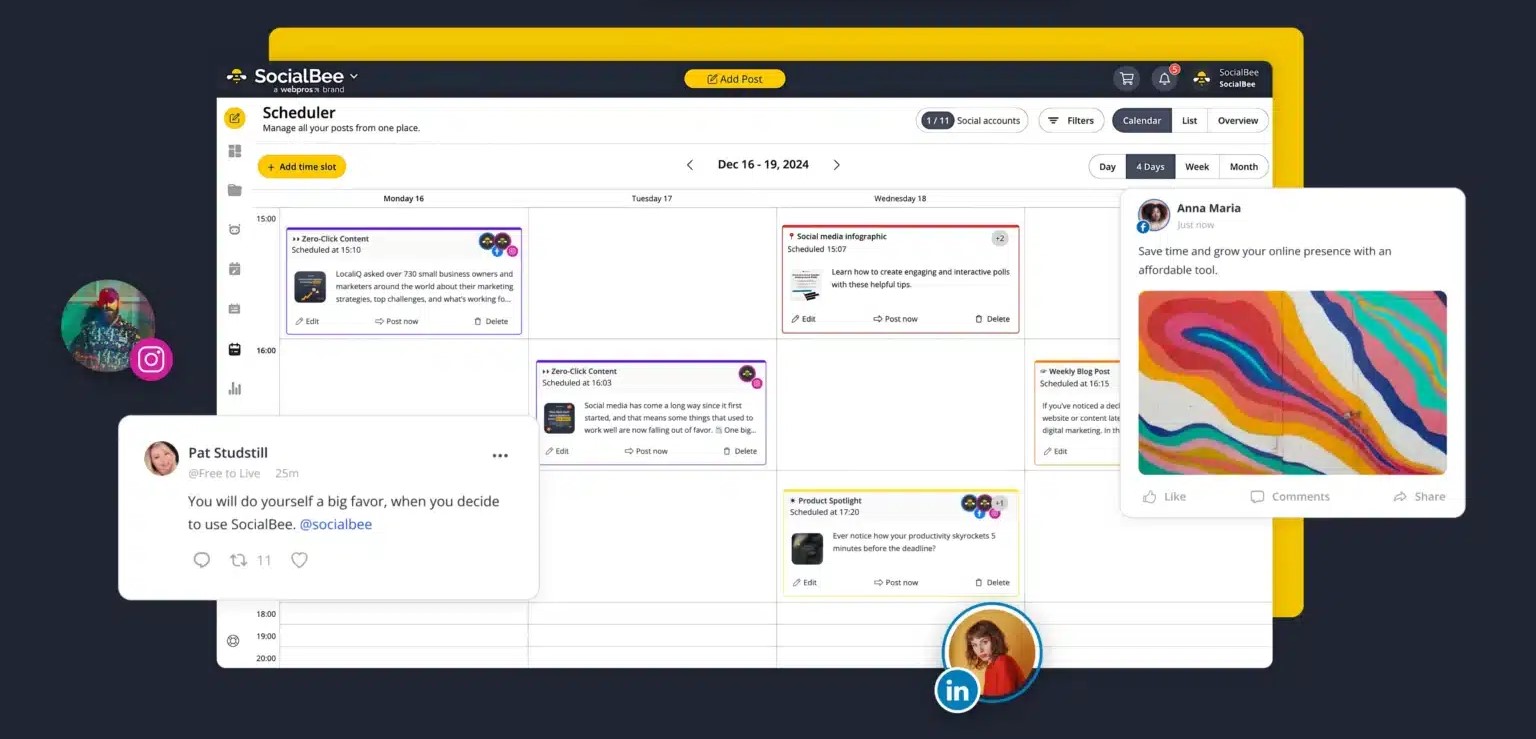
If you’re after a tool that gives you structured, category-based scheduling with a strong focus on evergreen content, SocialBee is a great option to consider.
It’s built for small businesses, entrepreneurs, and agencies looking for more control over their content buckets and posting routines.
SocialBee stands out with its content categorization, automation, and intuitive setup. Let’s see why it’s a good SocialPilot alternative.
Key Features
Category-Based Scheduling
SocialBee lets you organize your posts into categories – like Promotions, Blog Posts, Tips, or Curated Content – and set a different schedule for each.
This gives you full control over the mix of content your audience sees. Compared to SocialPilot’s simpler queue-based system, this is a major plus if you want structure and variety in your calendar.
Evergreen Recycling
One of SocialBee’s best features is evergreen post recycling. You can automatically re-use your top-performing content without copying and pasting. This beats SocialPilot’s limited re-sharing option and helps you maximize the value of every post.
Workspaces and Role-Based Access
You can manage multiple brands or clients under separate workspaces with different user permissions – ideal for agencies. While SocialPilot offers team collaboration, SocialBee gives more flexibility at lower-tier plans.
Custom URL Shorteners & UTM Tracking
For data-driven users, SocialBee integrates with URL shorteners like Bitly and Rebrandly, and it lets you add UTM parameters for precise tracking. This kind of feature is especially handy for marketing teams who want to monitor campaign performance in detail.
Post Variations
Want to share the same blog post in different ways across a week? SocialBee lets you create multiple text/image variations of a single post to keep things fresh. It’s a small but impactful feature SocialPilot doesn’t match natively.
AI Content Assistant (New)
SocialBee now includes AI tools to help generate captions, repurpose content, and create social posts from scratch. While not as robust as OnlySocial’s AI, it’s still a solid addition that outperforms SocialPilot’s lack of integrated AI.
Pros of SocialBee
- Category-based scheduling for better content mix
- Excellent evergreen post recycling
- Supports post variations and bulk import
- Great for freelancers and agencies with workspaces
- Solid integrations (Zapier, Canva, Bitly, Rebrandly, AI tools)
Cons
- UI feels a bit outdated compared to other tools
- Analytics are basic unless you connect third-party apps
- Slight learning curve with category setup for beginners
Pricing & Value
SocialBee is priced competitively, with plans that suit different levels of users:
- Bootstrap Plan – $29/month (1 workspace, 5 social profiles)
- Accelerate Plan – $49/month (1 workspace, 10 profiles, more features)
- Pro Plan – $99/month (5 workspaces, 25 profiles, priority support)
All plans come with content categorization, evergreen posting, and workspace support. Compared to SocialPilot, SocialBee offers more value for solo users and small teams, especially in terms of automation and evergreen content features.
Overall Verdict
If you’re looking for a structured, flexible, and efficient way to manage your content without spending hours every week, SocialBee is a tool you should check out. It’s a smart pick for those who love to plan, categorize, and recycle content for long-term results.
7. Agorapulse

Agorapulse is an ideal SocialPilot alternative if you’re managing a busy social media team or multiple client accounts and need advanced workflows, powerful reporting, and inbox management all in one place. While SocialPilot focuses more on affordability and basic features, Agorapulse delivers a premium experience with tools built specifically for agencies and large businesses.
Key Features
Unified Social Inbox
Agorapulse offers one of the cleanest and most powerful social inboxes in the game. All your comments, mentions, messages, and reviews from multiple platforms flow into a single stream.
You can label, assign, respond, and track – all without switching tabs. SocialPilot has a basic inbox, but it doesn’t come close to the filtering and workflow Agorapulse provides.
Advanced Publishing & Scheduling Tools
You get full control over how and when your posts go live, including the ability to assign posts to teammates, create approval workflows, and view everything in a shared calendar. This is better better-suited tool for teams that need collaboration features at every step – not just after content is scheduled.
Social Listening
Monitor brand mentions, keywords, and hashtags across platforms – something SocialPilot currently lacks. This gives you valuable insight into what people are saying about your brand or your client’s, so you can join conversations or mitigate issues early.
In-Depth Analytics & Reporting
Agorapulse doesn’t just show you likes and shares. It offers detailed, exportable reports, including team performance metrics, audience insights, content engagement, and more. SocialPilot does provide analytics, but Agorapulse adds deeper insights and customizable reports that are especially valuable for client reporting.
Team Collaboration & Workflow
You can assign content, add internal notes, set review permissions, and monitor team productivity. It’s a tool that was clearly designed with real collaboration in mind.
Pros of Agorapulse
- Top-tier team collaboration and approval workflows
- Robust analytics and custom client reporting
- Unified inbox with message labelling and assignment
- Built-in social listening
- Excellent customer support and onboarding
Cons
- Premium price point – more suited for medium to large teams
- Might be too feature-heavy for solo users or basic scheduling needs
- Limited integrations with design or AI tools compared to other competitors
Pricing & Value
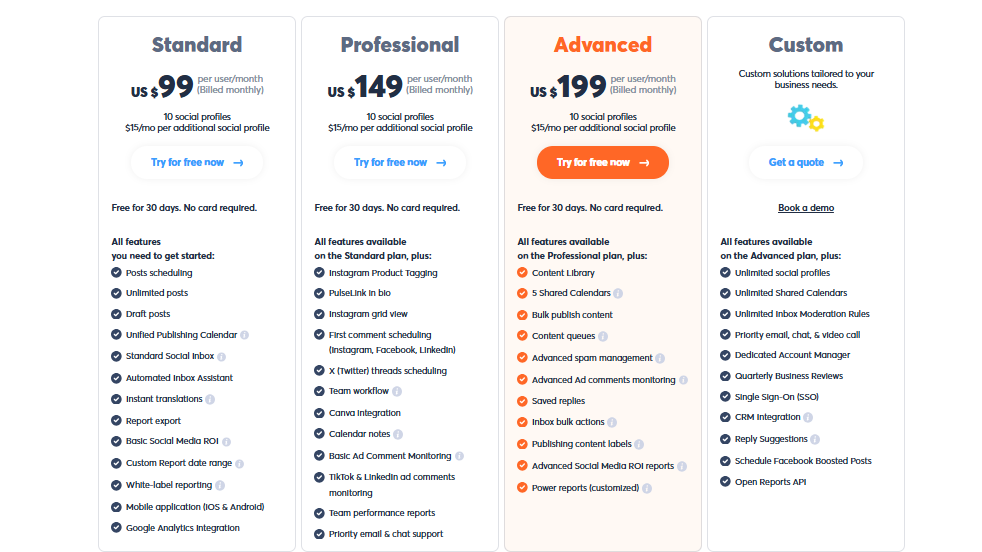
Agorapulse is positioned as a high-end platform, and its pricing reflects that. Plans start at $99/month per user, which includes scheduling, inbox, reporting, and basic collaboration features. Higher-tier plans unlock advanced reporting, listening, and more users.
If you’re a freelancer or a small business owner with simple needs, this might feel expensive. But for agencies and teams managing multiple brands, the robust features and time-saving workflows could easily justify the cost.
Overall Verdict
Agorapulse is an enterprise-grade alternative to SocialPilot. It’s perfect for teams who need to collaborate, manage engagement efficiently, and report results in detail. If SocialPilot’s approval workflows or inbox capabilities feel limited, Agorapulse will feel like a serious upgrade.
8. SocialBu

When you’re looking for a no-fuss, automation-first social media tool, SocialBu is a brilliant SocialPilot alternative. Designed for creators, startups, and small teams, it takes scheduling and engagement automation to a next level while keeping the interface approachable and the pricing super-competitive.
Unlike SocialPilot, which leans more into content curation and campaign planning, SocialBu focuses on streamlined automation, engagement workflows, and flexible scheduling – all while still offering solid analytics and team tools.
Key Features
Unified Inbox & Smart Engagement
SocialBu aggregates messages, comments, and mentions across platforms into one inbox. It goes further with automation – auto-replies, auto-likes, and auto-posting based on triggers, which SocialPilot does not support natively.
Visual Scheduler with Bulk Upload
You can plan your content on a drag-and-drop content calendar and upload hundreds of posts via CSV – ideal for marketers who like to queue up a month of posting in one sitting.
SocialBu also lets you schedule Instagram Stories, carousels, and first comments directly. These are features missing or limited in SocialPilot.
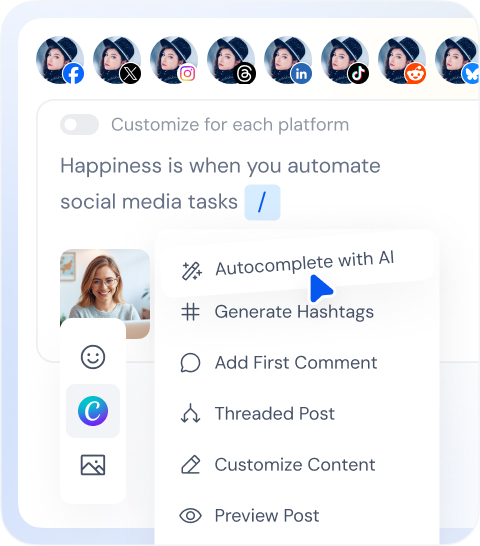
AI Content Generator
Generate captions, hashtags, and post ideas using built-in AI tools. SocialBu also ties into Canva for in-platform visual creation. SocialPilot doesn’t offer built-in AI tools or an integrated visual editor like this.
Custom Post Variations
Write a core message once, and tailor variations for Instagram, Facebook, LinkedIn, and others – all within one workflow. Very handy if you want to present each platform optimally without fiddling separately on each.
Media Library & Design Access
Store images, videos, and brand assets in a central media library. Plus, you can design visuals right inside the tool with Canva integration, keeping you in workflow and avoiding app switching.
RSS Feed Automation
Automatically share new blog posts or news updates via RSS feeds, keeping your content fresh without manual work. SocialPilot lacks this level of automation out of the box.
Pros
- Very affordable with flexible automation features
- All-in-one inbox with auto-engage and rule-based workflows
- Supports scheduling of Instagram Stories, carousels, and first comment
- AI-powered content generation with Canva design tools
- Offers bulk scheduling and a visual calendar for fast planning
Cons
- Analytics are present, but not as robust as SocialPilot’s higher plans
- Not ideal for large multi-client agencies
Pricing & Value
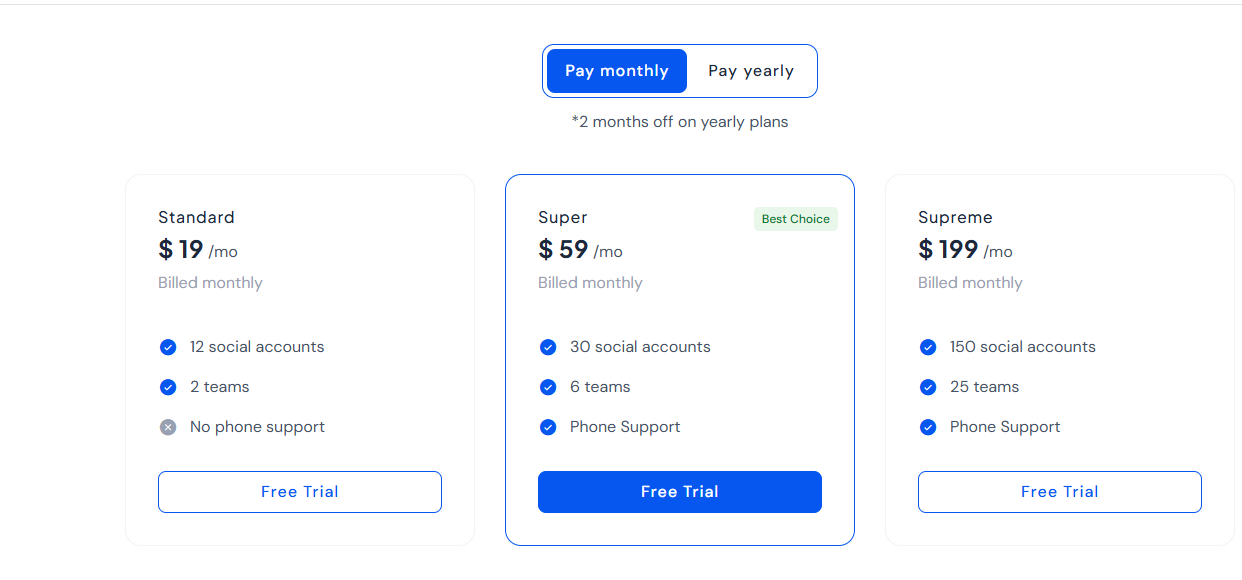
SocialBu offers a free trial, then its Premium plan starts at just $19/month for unlimited social profiles and basic automation features.
Additional users and social account sets are available at additional cost – still far more affordable than most tools on this list.
Compared to SocialPilot’s base plan, SocialBu offers more features and automation for less, especially appealing if you’re focused on scheduling volume or engagement workflows.
Overall Verdict
SocialBu is a smart, lightweight alternative to SocialPilot, especially if you want more automation and flexibility without the hefty price tag.
It’s ideal for individual creators, solopreneurs, or small marketing teams who want to schedule smarter, automate engagement, and create content with minimal friction.
While it may lack some of the deeper analytics big brands need, for anyone focused on simple efficiency, SocialBu delivers.
9. ContentStudio
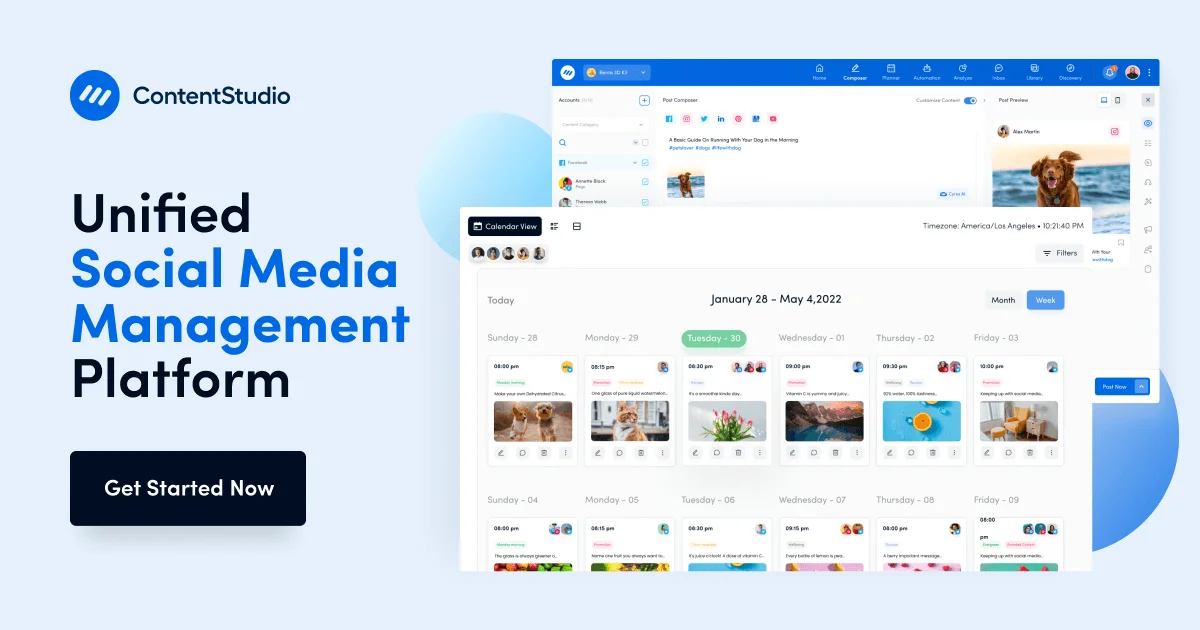
If you’re seeking a feature-rich content creation and planning tool, ContentStudio is a strong contender – and a standout SocialPilot alternative. This tool is especially known for its solid scheduling and moderation features. It goes deeper with content discovery, influencer search, and AI-powered strategy features.
ContentStudio is a perfect match or marketers, content teams, and agencies who want more automation, insight, and flexibility in their social media workflows.
Key Features
Smart Content Discovery & Influencer Search
ContentStudio includes a robust feed that surfaces trending articles in your niche, so you can easily curate quality content. It also features influencer discovery tools for Instagram and Twitter – helpful for brands planning partnerships or collaborations.
AI-Driven Post Creation & Planning
With AI assistance built right into the composer, you can generate captions, rewrite posts, and shape content strategies on the fly. You can combine this with Bulk Post Creator and smart scheduling tools for powerful workflow automation – an edge over SocialPilot’s more manual content creation process.
Visual Multi-View Content Calendar
Plan content in calendar mode, list view, or Instagram grid view – all within the same interface. This visual flexibility is ideal for teams that value streamlined content planning across platforms.
Unified Inbox with Collaboration Tools
Like many tools on this list, ContentStudio also keeps comments, mentions, and messages from multiple channels in one central inbox. You can assign tasks, leave internal notes, and use approval workflows to manage posts before publishing – something SocialPilot restricts unless you’re on higher-tier plans.
Advanced Analytics & White-Label Reports
Track engagement, clicks, audience growth, and content performance by platform. You can also export branded, white-label reports, making it easier to demo results to clients or stakeholders.
Integrated Influencer & Content Tools
You can search for influencers based on niche, geographic location, and follower size – or use curated templates to discover shareable content quickly. It’s a combination rarely found in tools at this price point.
Pros
- Excellent content curation and discovery tools
- AI assistance for caption writing and idea generation
- Strong influencer discovery functionality
- Flexible content calendar and bulk scheduling
- Unified inbox with team workflows and approvals
- Customizable white-label reporting
Cons
- Interface can feel dense for solo users or beginners
- Pricier than some simpler scheduling tools
- Influencer and listening features are reserved for higher-tier plans
Pricing & Value
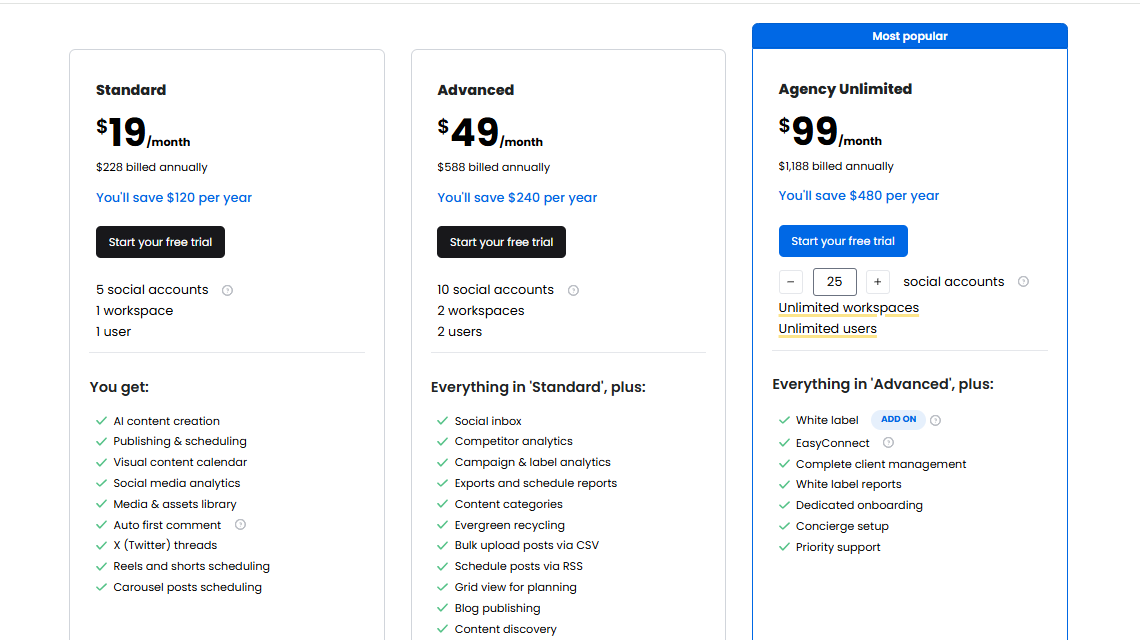
ContentStudio offers tiered plans starting around $19/month, including scheduling, content discovery, and basic analytics. Its Pro and Enterprise plans (at $49-$99/month) unlock features like influencer search, multiple workspaces, and dedicated reporting tools.
Compared to SocialPilot’s base pricing of $30/month for limited accounts, ContentStudio offers long-term value for teams focusing on content strategy and automation. One catch: the more advanced features require a higher-tier plan.
Overall Verdict
If you’re ready to go beyond basic scheduling and bring content strategy into your social workflow, ContentStudio is one of the best SocialPilot alternatives on the market.
It combines automation, discovery, and collaboration into one platform, making it great for marketers and content-heavy professions looking to scale efficiently.
10. Social Champ
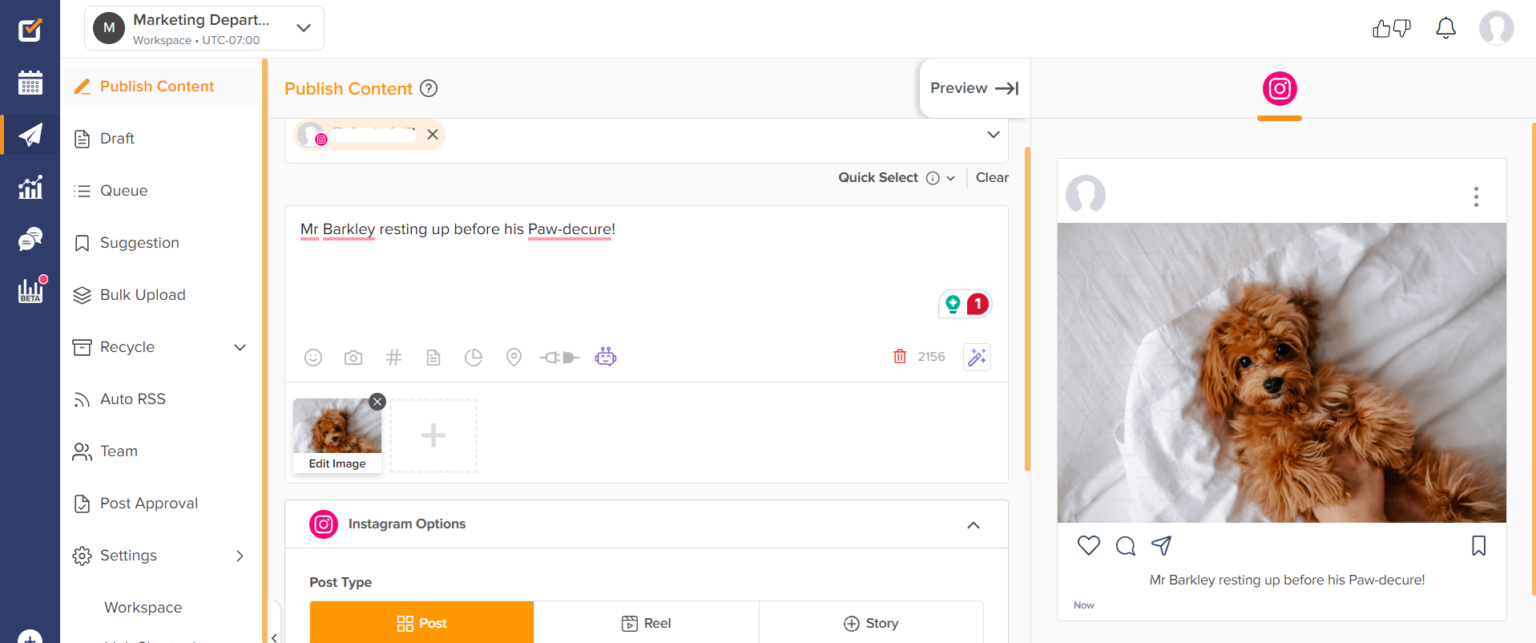
Social Champ is a streamlined, cost-effective alternative to SocialPilot, built for teams and businesses that want a flexible, powerful platform without corporate-level pricing.
It offers a refreshing balance between automation, analytics, and collaboration, especially if you’re ready to move beyond SocialPilot’s limitations in workflow and flexibility.
Key Features
Multi-Platform Publishing for 10+ Networks
Social Champ supports publishing to major platforms including Facebook, Instagram, Twitter (X), LinkedIn, Pinterest, TikTok, Google Business Profile, Threads, Bluesky, and Mastodon – all from one clean dashboard.
SocialPilot also supports multiple networks, but Social Champ offers broader coverage at lower price tiers.
Suite of AI Tools (Champ AI)
The Champ AI Suite helps you generate captions, suggest visuals, and propose content ideas in a snap. While SocialPilot focuses more on scheduling, Social Champ helps remove the blank screen hesitation with smart AI assistance built-in.
Bulk Scheduling, Content Recycling, Smart Calendar
Bulk upload posts via CSV, set up evergreen content recycling, and manage a drag‑and‑drop content calendar. This speeds up posting and makes planning more visual and cohesive compared to SocialPilot’s queue system.
Unified Social Inbox
All comments, messages, and mentions from any platform are consolidated into a single inbox. Spotted a feature missing on SocialPilot? Social Champ adds team collision prevention to ensure two people never reply to the same message.
Agency-Level Team Workflows
Manage multiple clients or brands, assign roles, approve content before publishing, and leave internal notes – all in one workspace. SocialPilot offers some collaboration tools, but Social Champ delivers them at a more intuitive and affordable level.
Trend Tracking & Competitor Monitoring
See what your competitors are posting and catch-on-to-the-waves before they ride out. This envy-of-the-agency-level monitoring helps you stay relevant even without expensive subscription models.
Pros
- Very affordable, starting as low as $4/month
- Clean, easy-to-use interface
- Built-in AI tools for content generation
- Supports over 10 social platforms
- Collaborative features are great for small teams and agencies
Cons
- Some advanced analytics are restricted to higher-tier plans
- Limited integrations with third-party tools beyond essentials
- Trend and competitor tracking not as in-depth as in premium platforms
Pricing & Value
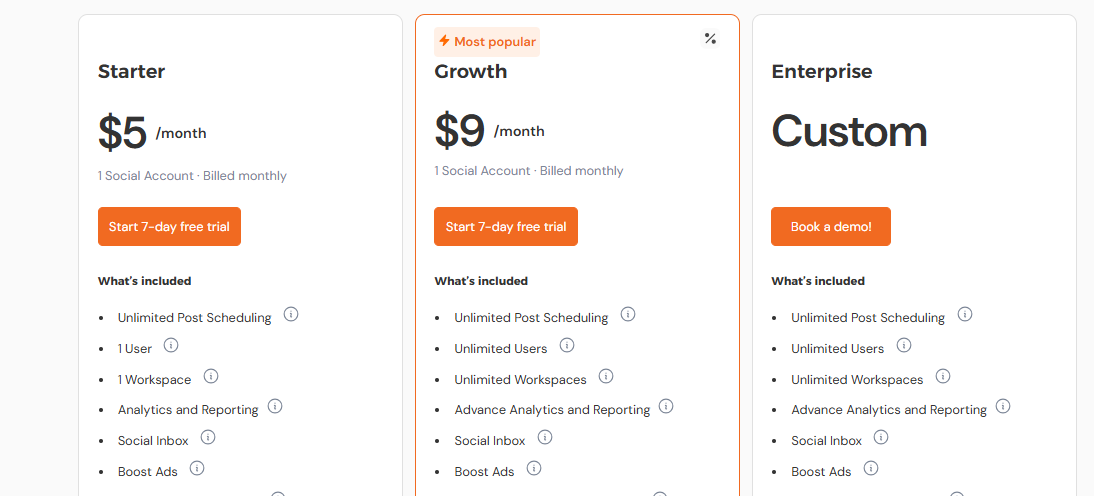
You can start with Social Champ at just $5/month, making it one of the most affordable tools available – even cheaper than SocialPilot.
Growth and Business plans offer more user seats, advanced calendars, collaboration options, and analytics. For businesses and agencies that want AI tools, team collaboration, content automation, and competitor tracking without overspending, Social Champ provides huge value relative to SocialPilot.
Overall Verdict
If you’re tired of SocialPilot’s rigid workflow and lack of flexibility, particularly around content automation, team collaboration, or AI content assistance, Social Champ is a standout alternative.
It gives you more for less and offers seriously useful features even at entry-level pricing.
Whether you’re working solo or building a small team, it’s one of the most efficient and affordable SocialPilot upgrades you can make.
Features to Look for in a SocialPilot Alternative
Switching from SocialPilot? Then make it count. You’ll want to choose a tool that doesn’t just match what SocialPilot offers, but actually makes your day-to-day smoother.
Here are the key features to keep in mind:
Content Scheduling That Works for You
Look for a tool that gives you freedom and flexibility with how and when you schedule posts. A visual calendar, drag-and-drop planning, and post recycling options can save loads of time. It should feel natural, not like you’re wrestling with a spreadsheet.
Better Analytics and Reporting
Your strategy’s only as strong as your data. A solid SocialPilot alternative should offer clear insights into what’s working, and what’s not. Look out for engagement metrics, reach breakdowns, audience growth trends, and performance by platform. Bonus points if it lets you export slick reports for clients or your boss.
Client and Account Management
If you’re handling multiple brands or running an agency, client management features are a must. Think white-label reporting, separate workspaces, and role-based access. It’ll help you stay organized and make you look even more professional.
Seamless Integrations
Your social media tool shouldn’t live in a silo. Find one that connects easily with your other tools – like Canva, Bit.ly, Google Drive, Mailchimp, or CRMs. That way, you can build and manage content without constantly jumping between platforms.
Collaboration Made Simple
Whether you’re a duo or a team of ten, smooth collaboration matters. The right platform should let you assign tasks, get approvals, leave notes, and avoid the dreaded “who posted this?” moment. Social media’s a team sport – your tool should support that.
Final Note
Finding the right social media management tool can make a huge difference in how you work, and the results you get.
While SocialPilot is a solid platform, exploring other options in 2025 could help you unlock more advanced features, smoother collaboration, or even better value for your budget.
From tools like OnlySocial and Buffer to SocialBee and ContentStudio, each of the alternatives we’ve covered brings something unique to the table.
And if you’re looking for a strong all-rounder, OnlySocial is definitely worth a look. It offers helpful extras that makes it a smart SocialPilot alternative for growing teams and busy marketers alike.
So take your time, test a few out, and choose the one that truly supports your goals. Your next favorite tool might be just a click away.
FAQs
Do I really need an alternative to SocialPilot?
Not necessarily, but it depends on your needs. If SocialPilot is limiting your workflow, getting too expensive, or lacking features like strong collaboration tools or deeper analytics, then yes, it’s worth exploring other options. There are plenty of tools out there that offer better value, more flexibility, or a smoother experience.
What are some top SocialPilot alternatives to give a shot in 2025?
Some standout options in 2025 include OnlySocial, Buffer, SocialBee, ContentStudio, Loomly, Agorapulse, Hootsuite, and Social Champ. Each offers its own strengths – whether it’s budget-friendly plans, more integrations, stronger team collaboration, or smarter scheduling features.
What makes OnlySocial a strong SocialPilot alternative?
OnlySocial offers a clean, intuitive interface, robust analytics, powerful AI tools, and support for 15+ social platforms – all at a more affordable rate.
It also shines when it comes to team collaboration and bulk scheduling, which makes it a smart upgrade if you’ve outgrown SocialPilot.
Is there a free alternative to SocialPilot?
Yes. Tools like Buffer offer free plans with limited features – great if you’re just starting out or managing a few accounts. But for more advanced features, you’ll want to consider affordable paid plans like those from OnlySocial or Social Champ.
Is Hootsuite better than SocialPilot?
It depends on what you’re looking for. Hootsuite has broader features and supports larger teams, but it’s also more expensive. SocialPilot offers good value for solo users and small teams, but lacks some collaboration and analytics power. If budget is tight, there might be even better alternatives than both.
Yes, SocialPilot is a reliable tool for scheduling, analytics, and client management. But it’s not perfect. Some users find its pricing, collaboration features, or analytics limiting. If those are your concerns, then checking out other platforms may give you more for your money.