On this page
- What TikTok Comment-to-Message Is
- How It Works in OnlySocial
- Who Can Use It
- How to Switch It On
- What to Write in the DM
- How It Compares With Instagram Comment-to-DM
- If It Does Not Start
- Getting More Out of It
- Frequently Asked Questions
- What is TikTok Comment-to-Message?
- Is TikTok comment to message the same as a TikTok auto DM tool?
- Can I DM everyone who comments on my TikTok?
- How long do I have to send the DM?
- Which countries is TikTok Comment-to-Message available in?
- Do I need a Verified Business Account?
- Can the DM include images or buttons?
- What happens if the person replies?
- Do I need to switch anything on in OnlySocial?
- The Short Version
“How much?” “Link?” “Do you ship to Texas?” On TikTok, the people most ready to buy often say so in the comments, and then scroll away before anyone answers. Until now there was no TikTok comment to DM option: no way for a business to message them directly from a comment through TikTok’s official tools.
That has changed. TikTok has added Comment-to-Message to its Business Messaging API, and starting today OnlySocial supports it. Comments that TikTok judges to be high intent can start a flow in OnlySocial’s Salesbot, which sends the commenter a DM, so a buying question in the comments becomes a private conversation in your inbox.
What it is: a new High-intent comments trigger in OnlySocial flows. How it works: TikTok marks some comments on your videos as high intent; your flow sends each of those commenters one text DM within 48 hours. Who can use it: TikTok business accounts registered in the US, Vietnam, Indonesia and Thailand that are a Verified Business Account (or have Advanced Access), with message requests allowed. How to start: Salesbot, Flows, New flow, pick your TikTok account and choose the Comment-to-DM flow template.
What TikTok Comment-to-Message Is
Comment-to-Message lets a TikTok business account send a direct message in reply to a comment on its video, but only for comments TikTok marks as high intent.
TikTok describes a high-intent comment as one that shows a strong intention to purchase or to seek more information. Think “price?”, “where can I buy this?”, “is it available in blue?” or “how do I book?”. TikTok decides which comments qualify; neither you nor any tool can choose them. When it flags one, it notifies the connected tool, and the business may send that commenter a single message.
That is a real difference from Instagram, where a business can pick any comment by keyword. On TikTok the platform does the filtering. The upside is that the people you reach have already signalled they want something; the trade-off is that you cannot message everyone who comments.
How It Works in OnlySocial
A high-intent comment starts a flow, the flow sends one text DM, and if the person writes back the conversation carries on in your inbox like any other TikTok chat.
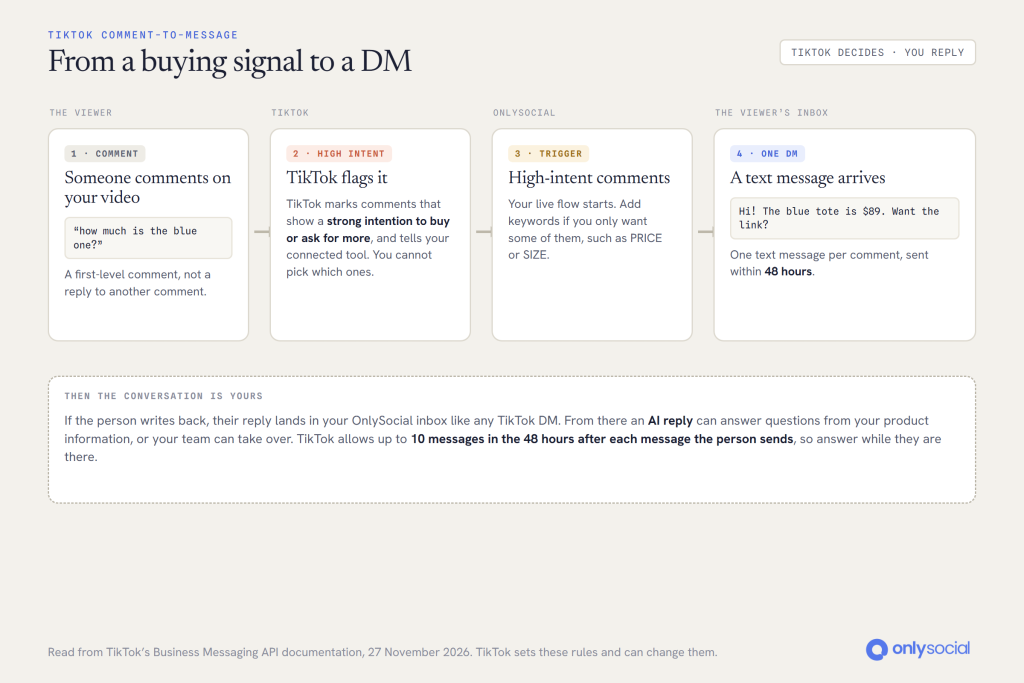
- Someone comments on your video. It has to be a comment on the video itself, not a reply under another comment.
- TikTok flags it as high intent and tells OnlySocial.
- Your flow starts. The new trigger is called High-intent comments (“TikTok marks a comment on your video as high intent”). You can add keywords if you only want some of those comments, for example ones that mention PRICE or SIZE.
- One DM goes out. The flow’s first message step sends the commenter a text message, within 48 hours of the comment.
- The conversation continues if they reply. Their answer lands in the OnlySocial inbox. An AI reply can answer from your product information, or someone on your team can take over.
In the inbox, high-intent TikTok comments carry a High intent badge in the thread header, and the Send as DM button works for a comment that can still receive one. So even without a flow, your team can answer a buying question privately by hand.
OnlySocial asks TikTok to switch Comment-to-Message on for an account as soon as a live flow on the High-intent comments trigger covers it. If TikTok says no, the account’s card on the Accounts page shows TikTok’s reason.
Who Can Use It
Two sets of conditions apply: one for your account, which you check once, and one for every comment, which TikTok checks each time.
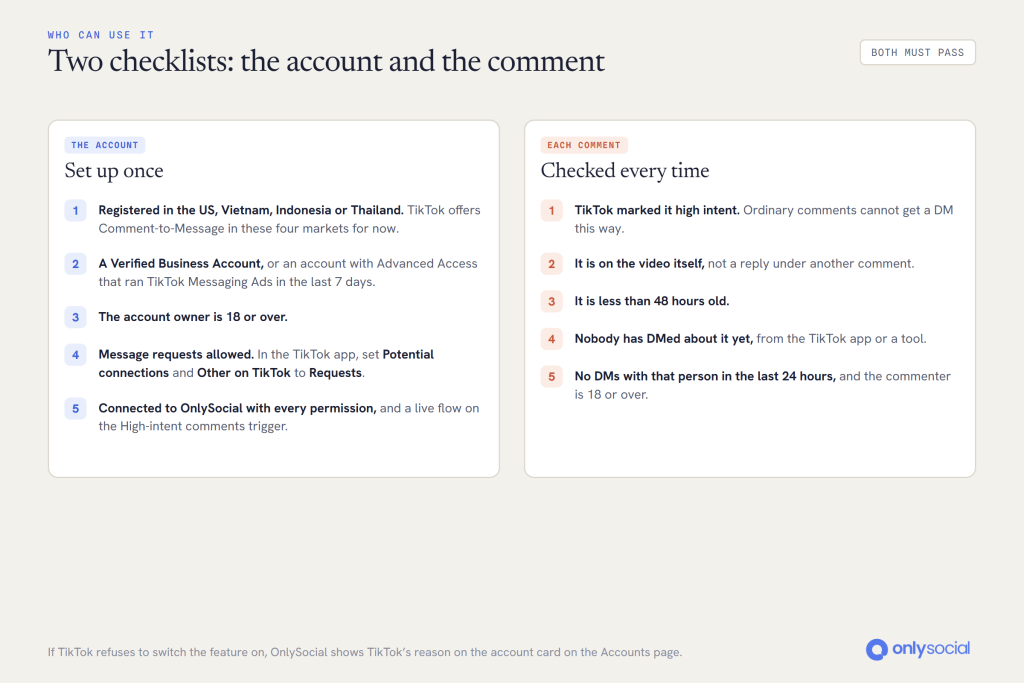
Your account
- Registered in the US, Vietnam, Indonesia or Thailand. TikTok offers Comment-to-Message in these four markets for now.
- A Verified Business Account, or a TikTok account with Advanced Access that has run TikTok Messaging Ads in the last 7 days.
- The account owner is 18 or over.
- Message requests allowed. In the TikTok app’s messaging settings, set Potential connections and Other on TikTok to Requests.
Each comment
- TikTok has marked it as high intent.
- It is a first-level comment on one of your videos.
- It is less than 48 hours old.
- Nobody has replied to it by DM yet, from the TikTok app or a tool.
- You have not exchanged DMs with that person in the last 24 hours.
- The commenter is 18 or over.
How to Switch It On
It takes about five minutes if your TikTok account is already connected.
1. Check the TikTok app settings
Make sure the account is a business account in one of the four markets, and that message requests from Potential connections and Other on TikTok are set to Requests.
2. Connect, or reconnect, TikTok in OnlySocial
Open Accounts. If your TikTok account is already there, reconnect it and allow every permission TikTok asks for; messaging needs permissions that publishing does not. If it is not connected yet, click Add account and choose TikTok.
3. Create the flow from the template
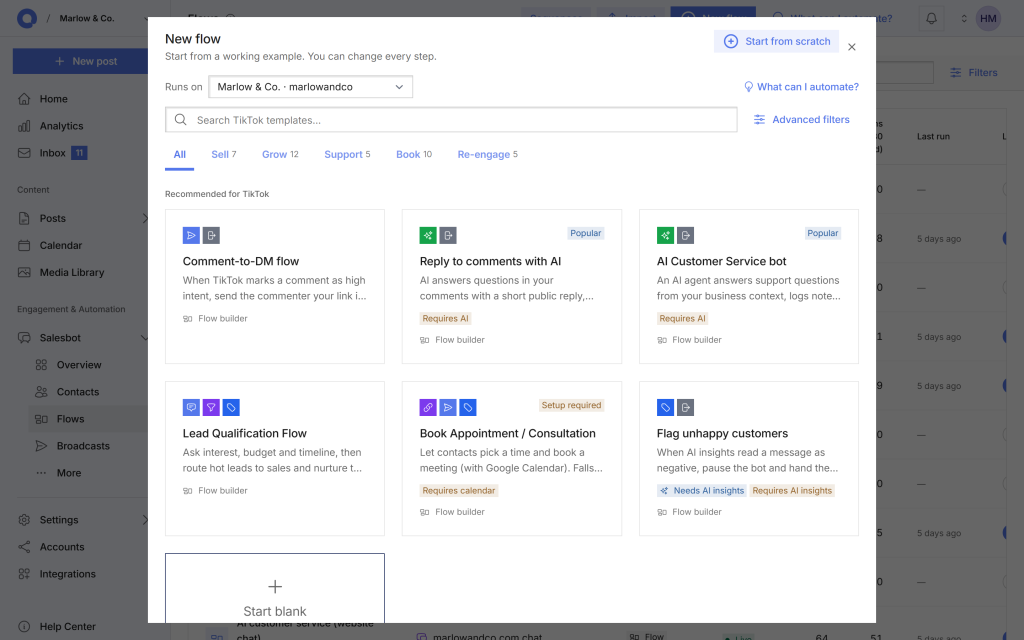
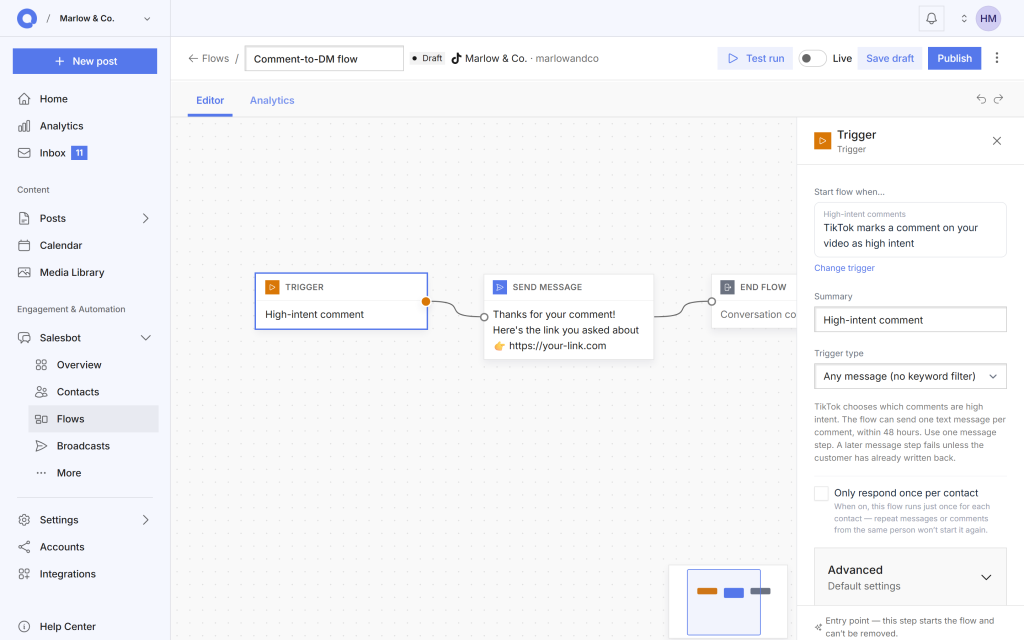
Go to Salesbot, then Flows, then New flow, and pick your TikTok account. In the template gallery, Comment-to-DM flow is the first template in TikTok’s Recommended row. It comes ready-made with the High-intent comments trigger, one text message and an end step. Prefer to start from scratch? Pick the High-intent comments trigger yourself; it is available in the flow builder.
4. Narrow it down (optional)
Leave the trigger open to answer every high-intent comment, or add keywords so the flow only runs when a comment mentions, say, PRICE, SIZE or BOOK. You can build several flows with different keywords and messages.
5. Write the message
Write the DM in the message step (tips below). It is a text message, so keep it short and useful. Keep to one message step: as the trigger panel says, a second message step fails unless the customer has already written back.
6. Publish and go live
Publish the flow and switch it to Live. OnlySocial then asks TikTok to turn on Comment-to-Message for that account. Check the account’s card on the Accounts page a little later: if TikTok refused, the reason is shown there; if a reconnect is needed, it says so.
What to Write in the DM
You get one message, so it has to answer the question and give the next step in a few lines.
- Answer first. If the likely question is price, put the price in the first line. If it is availability, say what is in stock.
- Give one next step. The product page, the booking page or “reply SIZE and we’ll help you pick”. Text only, so write the page address in full.
- Invite a reply. A question at the end (“Which colour are you after?”) gets people writing back, and once they do, the conversation can continue with an AI reply or your team.
- Sound like a person, and be honest. Short, friendly, no wall of hashtags or emojis. If the message is automated, it is good practice to say so.
- Keep it under a few lines. TikTok allows up to 6,000 characters, but nobody reads that on a phone.
Some examples:
| Business | Message |
|---|---|
| Fashion shop | “Hi! The blue tote from today’s video is $89 and in stock. Shop it at marlowandco.com/blue-tote. Want help with sizing? Just reply here.” |
| Salon | “Thanks for asking! Balayage starts at $140. Book a slot at our site, or reply with a day that suits you and we’ll check.” |
| Coach or course | “Here’s the free workbook from the video: example.com/workbook. Reply START if you want the 5-day plan too.” |
| Restaurant | “Yes, we take bookings for groups of up to 12. Reply with your date and party size and we’ll get back to you today.” |
Keep prices and claims in the message up to date: an automated message keeps saying whatever you wrote until you change it.
How It Compares With Instagram Comment-to-DM
The idea is the same, but TikTok’s version is narrower: TikTok chooses the comments, the window is shorter and the message is text only.
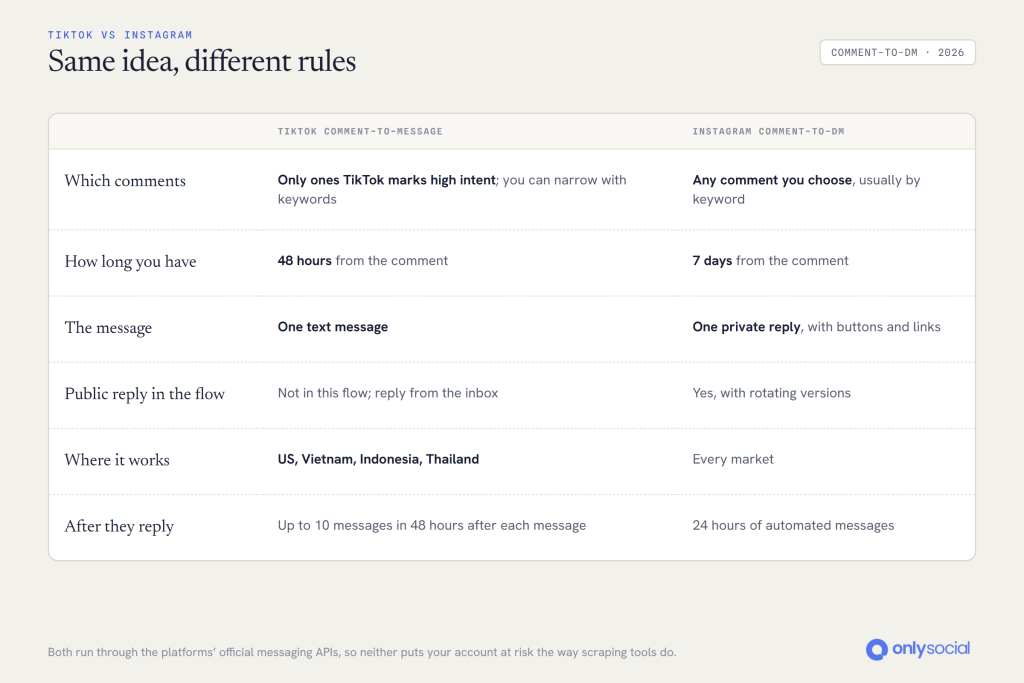
Two practical consequences:
- No “Comment GUIDE” posts on TikTok. On Instagram you can ask people to comment a keyword and promise everyone a DM. On TikTok only the comments TikTok flags get one, so do not promise a DM to every commenter. Let the feature catch the buying questions you already get.
- Public replies stay manual. The TikTok flow does not post a public reply under the comment. If you want to answer in public too, do it from the Engagements tab of the inbox.
If you also sell on Instagram, our Instagram comment-to-DM automation guide covers that side, including keyword lead magnets.
If It Does Not Start
| What you see | Why | What to do |
|---|---|---|
| The account card says TikTok did not turn on Comment-to-Message | The account is outside the four markets, is not a Verified Business Account (or lacks Advanced Access), or message requests are not allowed | Fix the setting TikTok names; OnlySocial asks TikTok again on its next check |
| The account card asks you to reconnect | The connection is missing a messaging permission | Reconnect the TikTok account on Accounts and allow every permission |
| Comments arrive but the flow never runs | TikTok has not flagged any of them as high intent, or your keywords filter them out | Remove keywords to test; remember TikTok decides which comments count |
| The flow ran but the DM failed | The comment was a reply, older than 48 hours, already answered by DM, or you messaged that person in the last 24 hours | Nothing to fix; TikTok’s reason is stored on the failed message |
| Send as DM is greyed out in the inbox | The comment is not high intent or no longer qualifies | Reply publicly instead, or wait for the person to message you |
Getting More Out of It
Comment-to-Message only works on comments you already get, so the best way to use it is to make videos that invite buying questions.
- Show the product clearly and say what it is, so viewers know what to ask about.
- Post consistently. Schedule your TikToks so new videos keep bringing new comments; see how to schedule TikTok posts.
- Understand reach. More views mean more comments. Our guides to the TikTok algorithm and promoting a product on TikTok help here.
- Automate the rest. Pair it with a welcome flow for people who DM you first. See our TikTok automation guide.
OnlySocial schedules your TikToks, puts comments and DMs from every network in one inbox, and now replies to high-intent TikTok comments with a DM automatically. Plans start at $29 a month for 15 profiles.
Frequently Asked Questions
What is TikTok Comment-to-Message?
It is a TikTok Business Messaging feature that lets a business account send one direct message in reply to a comment on its video, when TikTok marks that comment as high intent.
Is TikTok comment to message the same as a TikTok auto DM tool?
It is the official version of one. Third-party TikTok auto DM tools that log in as you or scrape comments put the account at risk; Comment-to-Message runs through TikTok’s own Business Messaging API, within TikTok’s rules.
Can I DM everyone who comments on my TikTok?
No. Only comments TikTok flags as high intent can receive a DM this way, and TikTok decides which those are. Other comments can get a public reply.
How long do I have to send the DM?
48 hours from the comment. OnlySocial sends it as soon as the flow runs, usually within moments of TikTok flagging the comment.
Which countries is TikTok Comment-to-Message available in?
For TikTok accounts registered in the United States, Vietnam, Indonesia and Thailand.
Do I need a Verified Business Account?
TikTok requires a Verified Business Account, or an account with Advanced Access that has run TikTok Messaging Ads in the last 7 days. The account owner must be 18 or over.
Can the DM include images or buttons?
No. TikTok’s comment reply is a text message. Write any link out in full in the text.
What happens if the person replies?
Their message lands in your OnlySocial inbox and the chat continues normally. TikTok allows up to 10 messages in the 48 hours after each message the person sends, so an AI reply or your team can keep helping them.
Do I need to switch anything on in OnlySocial?
No separate switch. Create a live flow on the High-intent comments trigger, for example from the Comment-to-DM flow template, and OnlySocial asks TikTok to enable Comment-to-Message for that account.
The Short Version
TikTok now lets businesses DM the people who ask buying questions in the comments, and OnlySocial supports it from today. If your account qualifies, create a flow from the Comment-to-DM flow template, write one short, helpful message, go live, and let the buying questions on your videos turn into conversations in your inbox.